If you want a compact desktop that stays silent while driving two monitors, a fanless mini PC with dual display support is one of the smartest upgrades you can make. It saves space, cuts noise, and can handle everyday productivity, streaming, and light business workloads with ease.
Below, we’ve grouped 10 strong options based on display support, performance, connectivity, storage, and value so you can quickly find the right fit for your setup.
Best 10 Fanless Mini PC with Dual Display Picks for 2026
Best For Quiet Workspaces
MeLE Quieter 4C N150 Fanless Mini PC

- Silent 0dB fanless operation
- Dual HDMI + USB-C triple display support
- 16GB RAM with 512GB SSD included
Best For: Quiet office, kiosk, and home users who want a compact multi-display PC.
Best for Dual-Network Routing
MeLE QuieterDL N100 Fanless Mini PC

- Dual 2.5GbE ports for routing and network isolation
- Fanless N100 platform runs silently with low power use
- Triple-display 4K output with HDMI, USB-C, and DP
Best For: Silent home labs, soft routers, and compact dual-monitor setups.
Best Dual-Display Value

- Ryzen 5 5625U for reliable everyday performance
- HDMI + DP output for dual 4K@60Hz monitors
- 16GB RAM and 480GB NVMe SSD included
Best For: People who want a budget-friendly dual-monitor mini PC for office work and streaming.
Best for Silent 4K Multitasking
MeLE Quieter 4C Fanless Mini PC

- Silent fanless cooling for always-on use
- Dual/triple 4K display support via HDMI and USB-C
- 16GB RAM plus 512GB SSD included
Best For: Quiet office, signage, and home setups that need dual-display flexibility.
Best for Industrial I/O
Fanless AMD A4 Dual-Display Mini PC

- Silent fanless operation for 24/7 use
- HD + VGA outputs for dual monitors
- Good port selection for office or kiosk setups
Best For: Small business and industrial buyers who need a quiet dual-monitor mini PC with broad connectivity.
Best for Dual 4K Signage
MeLE PCG02 Pro N100 Mini PC Stick

- Dual HDMI 2.0 for two 4K/60Hz displays
- Fanless 0dB design for silent 24/7 use
- Ultra-compact stick form hides behind monitors
Best For: Digital signage, kiosks, and quiet dual-display setups.
Best Silent Office Pick
MINIX NEO Z300 Fanless 16GB/512GB

- Completely fanless for silent operation
- Supports dual 4K displays for productivity
- Includes 16GB RAM, 512GB SSD, and 2.5G LAN
Best For: Quiet office users who want a compact dual-display PC with passive cooling.
Best for Industrial Ports

- Fanless metal build for quiet, dust-resistant operation
- HDMI + VGA dual display support
- Dual LAN and RS232 ports for industrial gear
Best For: Industrial setups, kiosks, and control stations that need legacy ports and dual displays.
Best for Silent Dual-Display Workstations
MeLE Cyber X1 N150 Fanless Mini PC
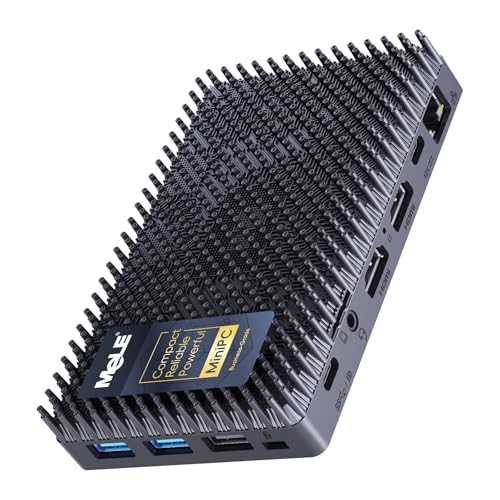
- Silent 0dB fanless operation
- Dual HDMI plus USB-C display output
- Compact VESA-mountable design
Best For: Quiet office and digital signage users who need stable dual-display output in a tiny desktop.
Best For Quiet Workspaces – MeLE Quieter 4C N150 Fanless Mini PC
If you want a fanless mini pc with dual display support for an office desk, kiosk, or home setup, the MeLE Quieter 4C is built for quiet, always-on use. The N150 chip, 16GB RAM, and 512GB SSD are enough for everyday productivity, while dual HDMI plus USB-C display output make it easy to run multiple screens.
Best For: Quiet business and home users who need a compact, low-power PC for browsing, office apps, digital signage, and light multitasking.
Pros:
- 0dB fanless design keeps operation silent for offices and shared spaces
- Dual HDMI and USB-C support triple-display setups for better multitasking
- 16GB RAM and 512GB SSD provide a solid everyday performance base
- Ultra-compact size with VESA mounting helps save desk space
Cons:
- Not intended for heavy creative work or gaming
- Storage expansion requires compatible SSDs and does not support 2.5-inch HDDs
- Wi-Fi 5 is fine for basics but not as fast as newer Wi-Fi 6/6E systems
For buyers who prioritize silence, small size, and dependable multi-monitor output, this fanless mini pc with dual display support hits a practical sweet spot. It is especially appealing if you want an unobtrusive system that can stay on all day without adding noise or clutter.
Best for Network Security – GEEKOM iX12 Fanless Mini PC
If you need a fanless mini pc with dual display capability for always-on networking tasks, the GEEKOM iX12 is built around quiet reliability rather than general-purpose speed. Its fanless metal chassis, Intel N95 with AES-NI, four 2.5G ports, and Windows 11 Pro make it a practical choice for VPN, firewall, edge, and virtualization setups where uptime matters more than raw graphics performance.
Best For: Home labs, branch offices, and edge deployments that need silent 24/7 operation, secure traffic handling, and flexible multi-network connectivity.
Pros:
- Fanless metal design runs silently and resists dust buildup for 24/7 use.
- Intel N95 with AES-NI and TPM 2.0 is well suited to VPN and firewall workloads.
- Four 2.5G ports plus 5G failover support make it strong for network isolation and redundancy.
- DDR5 memory, NVMe storage support, and virtualization features add useful headroom.
Cons:
- Not the best fit if you want a compact PC primarily for demanding creative or gaming work.
- Base 8GB/256GB configuration may feel limited for heavier multitasking.
- Dual-display support is useful for dashboards and admin work, but this is not a graphics-focused machine.
This is a smart pick if your priority is a fanless mini pc with dual display support that stays quiet, secure, and dependable around the clock. It’s especially compelling for buyers who value networking features and failover options over entertainment performance.
Best for Dual-Network Routing – MeLE QuieterDL N100 Fanless Mini PC
If you need a fanless mini pc with dual display for office work, home lab duties, or light digital signage, the MeLE QuieterDL is built around practical connectivity first. Its twin 2.5GbE ports, 4K triple-display support, and quiet N100 platform make it a strong fit when you want a small system that can run all day without adding noise.
Best For: Users who want a silent, compact mini PC for routing, dual-monitor productivity, and always-on home server or NAS tasks.
Pros:
- Dual 2.5GbE ports are ideal for soft router and network-isolation setups
- Fanless N100 design stays silent, dust-free, and low power
- Supports up to triple 4K displays via HDMI, USB-C, and DP
- VESA mount and tiny footprint make it easy to hide behind a monitor
Cons:
- 4GB RAM and 128GB eMMC are modest for heavier Windows workloads
- Best results may require adding an NVMe SSD for extra storage
- More specialized than a general-purpose desktop for gaming or editing
Overall, this is a smart pick if your priority is quiet networking, compact size, and flexible display output. As a fanless mini pc with dual display support, it stands out more for always-on utility than raw performance.
Best Dual-Display Value – Beelink SER5 Ryzen 5 Mini PC
If you want a practical fanless mini pc with dual display support for everyday work and media, the Beelink SER5 is a strong value pick. Its Ryzen 5 5625U chip, 16GB RAM, and NVMe SSD give it enough speed for office multitasking, streaming, and light creative tasks, while HDMI plus DisplayPort make running two monitors simple.
Best For: Users who want an affordable dual-monitor mini PC for productivity, home office use, and light entertainment.
Pros:
- Ryzen 5 5625U delivers solid 6-core, 12-thread performance for daily multitasking
- HDMI and DP outputs support dual 4K@60Hz displays
- 16GB DDR4 RAM and 480GB NVMe SSD provide a usable out-of-box setup
- Compact design with WiFi 6, Bluetooth 5.2, and 2.5G Ethernet
Cons:
- Not ideal for heavy gaming or demanding workstation workloads
- Storage and RAM are upgradeable, but not as spacious as larger desktops at purchase
Overall, the SER5 fits well if you need a fanless mini pc with dual display support that keeps costs sensible while still offering the ports, speed, and 4K output you’d expect for a compact desk setup.
Best for Silent 4K Multitasking – MeLE Quieter 4C Fanless Mini PC
If you want a fanless mini pc with dual display support that stays silent on a desk or behind a monitor, the MeLE Quieter 4C is built for light productivity, digital signage, classrooms, and 24/7 use. Its N150 chip, 16GB RAM, and 512GB SSD give it enough headroom for everyday work, while the triple-display output makes it especially handy for multi-screen setups.
Best For: Users who need a quiet, low-power mini PC for office work, home labs, signage, or multi-monitor setups.
Pros:
- Fanless design for silent operation and dust-resistant reliability
- Supports dual or triple 4K displays through HDMI and USB-C
- 16GB RAM and 512GB SSD come ready for everyday use
- Wi‑Fi 5, Bluetooth 5.1, and full-function USB-C add flexibility
Cons:
- N150 is efficient, but not meant for heavy content creation or gaming
- Fanless chassis can run warm under sustained load
For buyers comparing a fanless mini pc with dual display support, this MeLE model stands out for its quiet operation, compact footprint, and practical port selection. It is a strong fit if you value stability and low noise more than raw performance.
Best for Industrial I/O – Fanless AMD A4 Dual-Display Mini PC
If you need a fanless mini pc with dual display for a light-duty office, kiosk, or industrial setup, this model focuses on practical connectivity over raw speed. The AMD A4 6400T chip, silent cooling-free design, and wide port selection make it a straightforward choice for 24/7 use where reliability and monitor support matter more than gaming performance.
Best For: Small business, lab, kiosk, and industrial users who want a quiet dual-monitor mini PC with plenty of ports.
Pros:
- Fanless design supports silent, low-maintenance operation
- HD and VGA outputs enable dual-display setups
- Rich I/O includes USB 3.0, Gigabit LAN, Type-C, and audio ports
- Supports Windows, Ubuntu, auto power-on, PXE boot, and Wake on LAN
Cons:
- 4GB RAM and 64GB SSD are modest for heavier multitasking
- Pre-installed OS is unactivated and does not include a license
- AMD A4 hardware is better for basic tasks than demanding workloads
Overall, this fanless mini pc with dual display is a solid fit if your priority is dependable connectivity, silent operation, and simple dual-monitor support rather than top-tier performance. It makes the most sense in controlled work environments where compact size and I/O flexibility are the main buying factors.
Best for Dual 4K Signage – MeLE PCG02 Pro N100 Mini PC Stick
If you want a fanless mini pc with dual display support for kiosks, dashboards, or a quiet office setup, the MeLE PCG02 Pro is built around that exact job. Its N100 chip, dual HDMI 2.0 outputs, and 24/7-friendly fanless design make it a practical fit where small size and low noise matter more than raw desktop power.
Best For: Digital signage, lightweight multi-screen workstations, MES/WMS terminals, and other always-on setups that need a compact dual-display PC.
Pros:
- Dual HDMI 2.0 outputs support two 4K displays at 60Hz.
- Fanless 0dB design is ideal for silent, always-on environments.
- Compact stick form factor hides neatly behind monitors and TVs.
- WiFi 5, Bluetooth 5.1, and Gigabit Ethernet cover wired or wireless use.
Cons:
- 128GB eMMC storage is convenient but slower and smaller than an SSD.
- Not meant for demanding gaming or heavy creative workloads.
- Limited expandability compared with larger mini PCs.
For buyers prioritizing a fanless mini pc with dual display output in a tiny, easy-to-hide package, this MeLE stick makes sense. It is especially appealing for signage, control panels, and productivity screens where quiet operation and simple mounting are the main goals.
Best Silent Office Pick – MINIX NEO Z300 Fanless 16GB/512GB
If you want a fanless mini pc with dual display support for a quiet desk setup, the MINIX NEO Z300-0dB is built for everyday office work, browsing, and light multitasking. Its Intel N300 chip, Windows 11 Pro, and 2.5G LAN make it a practical micro desktop for home offices and shared workspaces.
Best For: Quiet work environments, small offices, and users who want a compact PC with passive cooling and dual 4K display support.
Pros:
- Fanless design keeps operation completely silent for noise-sensitive spaces
- Dual 4K display support helps with productivity and multitasking
- 16GB RAM and 512GB SSD give it solid everyday performance out of the box
- 2.5G LAN adds fast wired networking for office and home use
Cons:
- Not intended for gaming or demanding creative workloads
- Top cover can get warm during extended use
Overall, this is a strong choice if you need a fanless mini pc with dual display output and prefer a dependable, low-noise machine over raw performance. It is especially appealing for users who value silent operation, simple multitasking, and a tidy desktop footprint.
Best for Industrial Ports – msecore Fanless Industrial PC
If you need a fanless mini pc with dual display for factory, kiosk, or office control tasks, this msecore unit stands out for its Core i7-5500U, serial ports, and dual LAN. It is built more like an industrial controller than a consumer desktop, so the focus is on always-on reliability, low noise, and legacy device compatibility.
Best For: Industrial users who need a quiet, dual-display mini PC with COM ports, wired networking, and stable 24/7 operation.
Pros:
- Fanless metal chassis helps keep noise down and improves dust resistance.
- Dual display support via HDMI and VGA for control panels or extended desktops.
- Dual LAN plus RS232 COM ports make it a strong fit for industrial equipment.
- 16GB RAM and 512GB SSD come ready for heavier multitasking out of the box.
Cons:
- Older 5th-gen Core i7 performance is fine for business use, but not modern heavy workloads.
- Only one HDMI and one VGA output, so display flexibility is limited.
- Expansion is geared more toward industrial needs than general consumer upgrades.
For buyers prioritizing ports, uptime, and silent operation, this fanless mini pc with dual display is a practical pick. It is less about raw speed and more about dependable connectivity in spaces where a small, rugged system makes the most sense.
Best for Silent Dual-Display Workstations – MeLE Cyber X1 N150 Fanless Mini PC
If you want a fanless mini pc with dual display support that stays quiet on a desk or behind a monitor, the MeLE Cyber X1 is built for exactly that kind of light-business and home-office use. Its N150 chip, dual HDMI outputs, and USB-C video support make it a practical fit for browsing, conferencing, digital signage, and other everyday multitasking.
Best For: Quiet office setups, compact workstations, and users who need stable dual- or triple-display output without fan noise.
Pros:
- 0dB fanless design keeps operation silent and low-maintenance
- Dual HDMI plus USB-C enables up to triple-display setups
- N150 processor is efficient for office work, web apps, and media playback
- Small VESA-mountable chassis saves space on desks or behind monitors
Cons:
- 8GB RAM is fixed single-channel, which limits heavier multitasking
- Storage is usable, but serious expanders may still want a larger SSD
- Not a fit for demanding creative workloads or gaming
This is a strong pick if your priority is a fanless mini pc with dual display support that emphasizes silence, compactness, and dependable everyday performance. It gives you enough connectivity for a clean multi-monitor setup without adding the noise or bulk of a traditional desktop.
How We Picked These Fanless Mini PC with Dual Display Options
We focused on systems that clearly support two screens through HDMI, USB-C, DisplayPort, or similar video outputs, since that is the core requirement for a dual-monitor desktop. We also weighed fanless design, processor class, memory, storage, wireless and wired connectivity, and whether the system looks suited for office work, signage, edge tasks, or heavier multitasking.
Because these compact systems vary a lot in purpose, we favored models that offer a practical balance of silence, reliability, and display flexibility rather than chasing raw benchmark performance alone.
Quick Comparison: What Stands Out at a Glance
Some picks lean toward value and basic productivity, such as N100- and N150-based models with enough headroom for web work, documents, and media. Others are better suited to network-heavy or industrial setups, especially units with dual LAN, 2.5G networking, or serial ports. A few choices prioritize broader output options for multi-monitor use, while higher-power AMD or older Core i7 systems may make sense when you need more multitasking muscle.
Key Buying Factors for a Fanless Mini PC with Dual Display
Video Outputs and Monitor Support
Check how the mini PC handles two displays: dual HDMI is simplest, while USB-C DisplayPort Alt Mode or full-size DisplayPort can add flexibility. Also confirm the maximum supported resolution and refresh rate if you plan to use 4K monitors.
Processor and Real-World Performance
For basic office work, media playback, and light browsing, Intel N100, N150, or N300 chips are usually enough. If you plan to run more tabs, virtual machines, or heavier multitasking, a higher-performance chip such as an AMD Ryzen option or a stronger Core series model may be better.
Memory, Storage, and Expansion
8GB RAM is workable for light use, but 16GB is the safer choice for smoother day-to-day performance. A fast NVMe SSD improves responsiveness, and extra storage or upgrade access can extend the life of the machine.
Connectivity and Deployment
Think about Ethernet speed, Wi-Fi quality, and special ports. Dual LAN or 2.5G LAN matters for networking roles, while COM ports can be important in industrial environments. If this is for a clean desk setup, also consider VESA mounting and power efficiency.
Who Should Buy Which Fanless Mini PC with Dual Display?
Choose a quieter, entry-level Fanless Mini PC with Dual Display if you mainly want a silent home office, media station, or lightweight productivity box. Pick a more connected model if your work depends on VPNs, firewall duties, NAS-like networking, or edge computing. Go with a higher-memory, faster-storage option if you want the most headroom for multitasking, and consider industrial-oriented hardware only if your workflow needs legacy ports, always-on operation, or specialized deployment features.
In short, the best choice depends less on size alone and more on how many screens you need, how demanding your tasks are, and whether connectivity or silence matters more in your daily setup.