Fanless mini PCs are a smart fit for kiosk displays because they stay quiet, run cooler, and avoid dust-prone moving parts. That makes them a practical choice for retail screens, self-service terminals, digital signage, and interactive wayfinding.
Below, we focus on the features that matter most for dependable deployment: display outputs, industrial ports, storage, network options, and long-term stability.
Best 10 Fanless Mini PCs for Kiosk Displays Picks for 2026
Best for 24/7 Kiosks

- Silent fanless operation for continuous use
- Easy to hide behind kiosk or signage displays
- Gigabit Ethernet and auto power-on features
Best For: Retail kiosks, digital signage, and always-on display setups.
Best for Serial Devices
Qotom Fanless Mini PC Q31031P i3-10110U

- 4 RS-232 COM ports for scanners, controllers, and legacy gear
- Dual HD + DP output for kiosk or dual-display setups
- Fanless 24/7 aluminum chassis with dual 2.5GbE LAN
Best For: Kiosks and industrial displays that need multiple serial connections and quiet, always-on reliability.
Best for Quiet 24/7 Kiosks
MeLE Fanless Mini PC N100 16GB/512GB

- Silent fanless cooling for public-facing spaces
- Triple 4K display support with USB-C and HDMI
- Low-power N100 chip with 16GB RAM and 512GB storage
Best For: Retail, lobby, and office kiosks that need silent operation and dependable always-on use.
Best for Built-In Touch Kiosks
15.6" Fanless Industrial Panel PC

- 15.6" 1080p IPS touchscreen in an all-in-one format
- Fanless sealed build suits dusty, public-facing installs
- Windows 11 Pro with USB 3.0, HDMI, LAN, Wi‑Fi 5, and BT 5.0
Best For: Retail kiosks and self-service stations that need a rugged touch display with the PC built in.
Best Fanless for Triple Displays
- Silent fanless operation for public-facing kiosks
- Triple 4K display support with USB-C plus dual HDMI
- Efficient N100 chip suits signage and light workloads
Best For: Retail kiosks, digital signage, and quiet always-on display setups.
Best for Serial & Dual-Display Kiosks
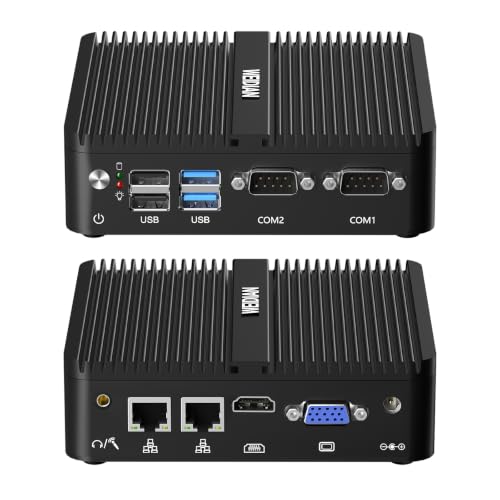
- Fanless design for quiet 24/7 kiosk use
- Dual-display output with HDMI and VGA
- 2x RS232 and 2x Gigabit Ethernet for peripherals
Best For: Kiosks, signage, and compact terminals that need serial devices and dual screens.
Best Fanless Commercial Stick
- Silent fanless design for enclosed kiosks and signage
- Windows 11 Pro with N100, 8GB RAM, and 256GB storage
- Gigabit Ethernet plus Wake on LAN/PXE for remote control
Best For: Digital signage and kiosk deployments that need a tiny, always-on Windows mini PC.
Best for Built-In Touchscreen
Mini PC N5100 Touchscreen Windows 11 Pro

- Integrated 5.5-inch touchscreen for kiosk-style use
- Fanless operation helps keep deployments quiet and cleaner
- Windows 11 Pro with Wi‑Fi, Bluetooth, and Gigabit Ethernet
Best For: Interactive kiosks, digital signage, and compact business terminals.
Best for Kiosk Signage
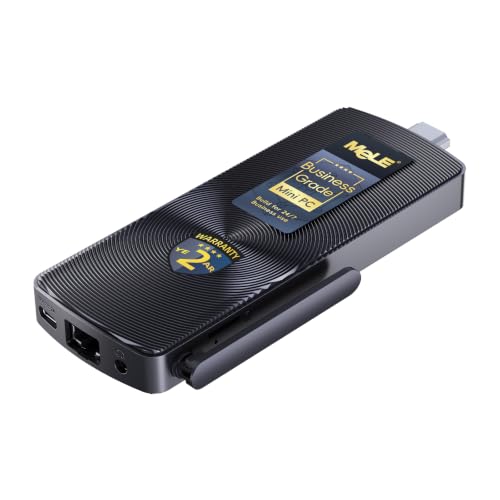
- Dual 4K outputs for signage and kiosk layouts
- Fanless 24/7 operation with silent cooling
- PXE boot, WoL, and auto power-on for managed installs
Best For: Digital signage and kiosk deployments that need a tiny, quiet, easy-to-manage PC.
Best for Kiosk Connectivity

- Fanless metal chassis for quiet, dust-resistant operation
- Dual LAN and dual RS232 COM for kiosk/POS hardware
- Triple-display support for signage and multi-screen setups
Best For: Kiosks, POS counters, and signage installs that need strong port variety in a compact fanless PC.
Best for 24/7 Kiosks – MeLE Fanless N100 PC Stick
If you need one of the more practical fanless mini pcs for kiosk displays, this MeLE PC stick is built around a quiet N100 processor, Windows 11 Pro, and always-on features like auto power on and Wake on LAN. Its compact stick form makes it easy to hide behind a screen, while Gigabit Ethernet and dual-band Wi‑Fi help keep signage or kiosk content connected reliably.
Best For: Retail kiosks, digital signage, and other space-limited displays that need silent 24/7 operation.
Pros:
- Fanless design supports quiet, dust-resistant 24/7 use
- Windows 11 Pro plus Linux/Ubuntu support for flexible deployments
- Gigabit Ethernet, dual-band Wi‑Fi, and Wake on LAN / auto power on
- Compact stick format is easy to mount behind a display
Cons:
- 8GB/128GB storage is modest for heavier local workloads
- Surface temperatures can run warmer than fan-cooled mini PCs
- Bluetooth 4.2 is older than current-generation versions
For buyers comparing fanless mini pcs for kiosk displays, this model stands out more for reliability and deployment-friendly features than raw performance. It’s a strong fit when you want a quiet, hidden, always-on PC for signage, check-in screens, or simple interactive terminals.
Best for Serial Devices – Qotom Fanless Mini PC Q31031P i3-10110U
If you need one of the more capable fanless mini pcs for kiosk displays that also has serious I/O flexibility, the Qotom Q31031P stands out. Its fanless aluminum design, dual 2.5GbE LAN, and four RS-232 serial ports make it a strong fit for kiosks that must talk to scanners, controllers, or legacy peripherals while staying quiet and reliable.
Best For: Kiosks and industrial display setups that need multiple serial connections, dual-screen output, and always-on, low-noise operation.
Pros:
- Four RS-232 COM ports are ideal for kiosk peripherals and industrial devices.
- Dual HD + DP outputs support two-screen monitoring or display layouts.
- Fanless aluminum chassis is silent, dust-resistant, and built for 24/7 use.
- Dual Intel i226-V 2.5GbE ports add fast, stable wired networking.
Cons:
- Barebone system requires separate RAM and NVMe SSD purchases.
- Core i3-10110U is efficient, but not meant for heavy workstation workloads.
- More specialized than a simple plug-and-play kiosk PC.
For fanless mini pcs for kiosk displays, this Qotom is especially compelling when your setup depends on serial hardware and reliable wired networking. It is less about general-purpose value and more about giving unattended displays the ports and stability they often need.
Best for Quiet 24/7 Kiosks – MeLE Fanless Mini PC N100 16GB/512GB
If you need one of the more practical fanless mini pcs for kiosk displays, the MeLE Quieter 4C is built around low-power, always-on use with enough speed for digital signage, check-in stations, and other lightweight business tasks. Its fanless design keeps noise out of customer-facing spaces, while triple 4K display support gives you room for multi-screen layouts.
Best For: Retail, lobby, and office kiosks that need silent operation, dependable 24/7 uptime, and flexible display output without taking up much space.
Pros:
- Fanless cooling for silent operation and less dust buildup
- Triple 4K output via two HDMI ports plus full-function USB-C
- 16GB LPDDR5 RAM and 512GB storage for smooth everyday kiosk workloads
- Compact N100 platform with low 8W power use
Cons:
- Fanless cases can run warmer than fan-cooled mini PCs
- Wi-Fi 5 is fine for most uses, but not the newest wireless standard
- Not ideal for heavy content creation or demanding software
For buyers comparing fanless mini pcs for kiosk displays, this MeLE model stands out for quiet reliability, flexible mounting-friendly hardware, and enough display support to handle modern signage or menu-board setups without extra clutter.
Best for Built-In Touch Kiosks – 15.6" Fanless Industrial Panel PC
If you need fanless mini pcs for kiosk displays that can run continuously and fit into a clean all-in-one setup, this 15.6-inch industrial panel PC is a practical choice. It combines Windows 11 Pro, a Full HD touchscreen, and a sealed fanless design for quiet operation in public-facing or semi-rugged environments.
Best For: Retail kiosks, self-service terminals, signage stations, and other touch-first installs that need an integrated display and PC in one unit.
Pros:
- All-in-one 15.6″ 1080p IPS touchscreen simplifies kiosk deployment
- Fanless, sealed design is better suited to dust-prone or high-traffic areas
- Windows 11 Pro with N5095, 8GB RAM, and 128GB storage covers light to moderate workloads
- Useful I/O including USB 3.0, HDMI, LAN, Wi‑Fi 5, and Bluetooth 5.0
Cons:
- Not as compact as a bare mini PC, since the display is built in
- N5095 hardware is fine for basic kiosk tasks, but not heavy multitasking
- Industrial styling may be more utilitarian than consumer kiosk hardware
This is a smart pick if you want fanless mini pcs for kiosk displays but prefer an integrated touch panel instead of pairing a separate monitor and computer. It’s especially compelling when uptime, simple mounting, and reduced cable clutter matter more than raw performance.
Best Fanless for Triple Displays – MeLE Mini PC Quieter 4C N100
If you need fanless mini pcs for kiosk displays, the MeLE Mini PC Quieter 4C is a strong fit thanks to its silent 8W N100 processor, triple 4K display support, and compact fanless design. It’s built for always-on signage, counters, education stations, and other spaces where low noise and simple cable management matter more than raw desktop power.
Best For: Retail kiosks, digital signage, and other always-on display setups that need quiet operation and three-screen output.
Pros:
- Fanless cooling keeps operation silent for customer-facing spaces
- Triple 4K display support via two HDMI ports and full-function USB-C
- Low-power N100 chip is efficient for signage, dashboards, and light productivity
- Expandable storage options help for local content and media playback
Cons:
- Not ideal for demanding creative work or heavy multitasking
- Fanless design can run warm under sustained load
- Wi-Fi 5 is fine for most kiosks, but not the newest wireless standard
This model stands out among fanless mini pcs for kiosk displays because it combines quiet 24/7 operation with flexible triple-monitor output and a practical low-power footprint. If your priority is reliable signage hardware over performance headroom, it’s an easy one to shortlist.
Best for Serial & Dual-Display Kiosks – WEIDIAN J5005 Fanless Mini PC
If you need fanless mini pcs for kiosk displays that can handle signage, checkout screens, or simple interactive terminals, this WEIDIAN mini PC is a practical industrial pick. Its fanless design, dual display outputs, and built-in serial and Ethernet ports make it well suited for always-on commercial setups where reliability matters more than raw speed.
Best For: Kiosks, digital signage players, and compact business terminals that need multiple wired connections and quiet 24/7 operation.
Pros:
- Fanless chassis is ideal for quiet, low-maintenance kiosk deployments
- 2RS232 COM ports plus 2 Gigabit Ethernet ports support industrial and retail peripherals
- 4K HDMI and VGA dual display output help with flexible screen setups
- Compact J5005 platform is sufficient for signage and front-desk tasks
Cons:
- J5005 performance is modest for heavier multitasking or demanding apps
- Not the best choice if you only need a simple single-port media player
- More specialized than a general-purpose office mini PC
For buyers comparing fanless mini pcs for kiosk displays, this model stands out for its wired connectivity and dual-display support rather than headline performance. It’s a good fit when you need a dependable, clutter-free machine for commercial screens and peripherals.
Best Fanless Commercial Stick – MeLE PCG02 N100 Mini PC Stick
If you need one of the more flexible fanless mini pcs for kiosk displays, the MeLE PCG02 stands out for its Windows 11 Pro support, compact stick design, and built-in commercial features like Auto Power On and Wake on LAN. It is a strong fit for signage setups where space is tight, noise must be eliminated, and 24/7 operation matters.
Best For: Digital signage, kiosk displays, and other always-on commercial installs that need a tiny, quiet PC with reliable wired networking and remote wake options.
Pros:
- Fanless design keeps operation silent and reduces dust buildup in enclosed spaces
- Celeron N100, 8GB RAM, and 256GB storage are enough for light kiosk and signage workloads
- Gigabit Ethernet, dual-band Wi-Fi, and Wake on LAN/PXE support help with remote management
- Full-function USB-C plus multiple USB ports make peripheral hookup easier
Cons:
- Surface temperatures can run warm because it uses passive cooling
- Limited horsepower for demanding multitasking or heavy media editing
- Stick form factor may be less convenient than a traditional mini PC for some installs
For compact signage, the MeLE PCG02 is a practical pick among fanless mini pcs for kiosk displays because it balances silent operation, remote wake features, and enough everyday performance for single-purpose deployments.
Best for Built-In Touchscreen – Mini PC N5100 Touchscreen Windows 11 Pro
If you need fanless mini pcs for kiosk displays that can also double as a compact control terminal, this N5100 model is worth a look. It combines an integrated 5.5-inch touchscreen, Windows 11 Pro, and fanless operation in a small footprint that suits signage, POS counters, and light office use.
Best For: Interactive kiosks, digital signage, and small business setups that benefit from an all-in-one touch display plus flexible connectivity.
Pros:
- Built-in 5.5-inch IPS touchscreen makes it easier to use for kiosk-style workflows
- Fanless design helps reduce dust buildup and noise in public-facing installations
- Windows 11 Pro, Wi-Fi, Bluetooth, Ethernet, and USB ports cover most basic deployment needs
- Compact size and battery option add flexibility for portable or space-limited setups
Cons:
- N5100 and 8GB RAM are fine for signage and admin tasks, but not heavy multitasking
- The built-in display is small, so many kiosk installs will still rely on an external monitor
- Battery and touchscreen features add versatility, but also make it less of a traditional mini PC
This is a practical choice if your fanless mini pcs for kiosk displays shortlist includes devices with integrated controls and easy day-to-day setup. It leans more toward interactive front-end use than raw performance, which is exactly what many kiosk and signage deployments need.
Best for Kiosk Signage – MeLE PCG02 N100 Fanless Stick
If you need a compact, silent option for fanless mini pcs for kiosk displays, the MeLE PCG02 N100 is built around the right mix of display support, remote-management features, and always-on reliability. Its fanless design, dual 4K output, and unlocked BIOS make it a practical fit for signage, lobby kiosks, and thin-client deployments.
Best For: Digital signage, kiosk terminals, and other space-limited installs that need quiet 24/7 operation with easy mounting.
Pros:
- Dual 4K display support over HDMI and USB-C is ideal for signage and kiosk layouts.
- Fanless, low-power design helps it run silently in 24/7 environments.
- Unlocked BIOS with PXE boot, WoL, and auto power-on suits managed deployments.
- Very small stick form factor makes hidden mounting behind a display simple.
Cons:
- eMMC storage is less flexible than a full SSD-based mini PC.
- Best for light kiosk and signage workloads, not heavy multitasking or media editing.
Overall, this is a strong pick for buyers prioritizing discreet installation and remote administration in fanless mini pcs for kiosk displays. It is especially appealing when you want dependable 4K output without fan noise or extra bulk.
Best for Kiosk Connectivity – VENOEN Fanless Mini PC J6412
For buyers comparing fanless mini pcs for kiosk displays, this VENOEN model stands out for its practical I/O mix, quiet fanless cooling, and support for multiple displays. The Celeron J6412 platform is modest, but it covers signage, checkout, and other always-on business tasks well when reliability and connection options matter more than raw speed.
Best For: Kiosks, POS stations, and digital signage setups that need dual LAN, serial ports, and triple-display support in a compact, silent chassis.
Pros:
- Fanless all-metal design helps keep noise down and improves dust resistance.
- 2x RS232 COM and 2x RJ45 LAN make it a strong fit for kiosk and POS peripherals.
- Triple-display output supports up to three independent monitors for signage or multitasking.
- Compact VESA-mountable body is easy to hide behind a monitor or install in tight spaces.
Cons:
- Celeron J6412 is fine for light business workloads, but not heavy multitasking.
- Storage expansion is flexible, but the base configuration may feel limited for larger apps or media files.
- Wi‑Fi and Bluetooth are included, but wired deployment will still be the most dependable option for kiosks.
This is a smart pick if you want fanless mini pcs for kiosk displays with the right ports first and foremost. It favors dependable connectivity, quiet operation, and compact mounting over performance extras, which is exactly what many retail and information kiosks need.
How We Picked These Fanless Mini PCs for Kiosk Displays
We prioritized models that match real kiosk needs: stable 24/7 operation, compact footprints, fanless cooling, and the right mix of video outputs and I/O. For Fanless Mini PCs for Kiosk Displays, that usually means paying close attention to serial ports, dual or triple display support, wired networking, and Windows compatibility.
We also favored options with practical memory and storage configurations, because kiosks benefit more from reliability and fast boot times than from raw desktop-class power.
Quick Comparison: What Matters Most
Use the comparison below as a shortcut: stick-style units are best for ultra-compact signage, while box-style mini PCs usually offer better expansion and more ports. Panel PCs make sense when the display and computer need to be integrated into one enclosure.
- Stick PCs: Best for simple signage and tight mounting spaces.
- Mini PCs with COM/LAN expansion: Best for industrial kiosks and payment or control systems.
- All-in-one panel PCs: Best when you want a built-in touchscreen solution.
Key Buying Factors for Fanless Mini PCs for Kiosk Displays
Display output: Confirm HDMI, DisplayPort, USB-C, or dual/triple-display support based on how many screens the kiosk will drive.
Ports and peripherals: Serial COM ports, USB connectivity, and multiple Ethernet ports are important for scanners, printers, card readers, and industrial controllers.
Performance: Entry-level Intel N-series chips are usually enough for signage, menus, and web-based kiosks. Heavier apps, multitasking, or touchscreen workflows may benefit from Core i3-class hardware.
Networking: Choose wired Ethernet for mission-critical deployments. Dual LAN can be useful for segmentation or backup connections.
Storage and memory: More RAM and SSD capacity help with smoother booting, local caching, and software updates.
Mounting and enclosure: Check VESA support, chassis size, and cable routing so the system fits cleanly behind the display.
Who Should Buy Which Fanless Mini PCs for Kiosk Displays?
If you need a basic signage player, a compact stick-style model is often enough. If your setup requires scanners, receipt printers, or PLC integration, choose an industrial mini PC with COM ports and dual LAN. If you want a touch-first setup with the display built in, a panel PC is the most streamlined option.
For most buyers, the best choice among Fanless Mini PCs for Kiosk Displays is the one that matches your software demands first, then your port requirements, and finally your physical mounting constraints.