Building a Proxmox cluster doesn’t require standard NUCs. The best NUC alternative mini PCs for Proxmox clusters can offer more Ethernet, better expandability, and stronger value for homelab or edge-server use.
In this roundup, we focus on compact systems that make sense for virtualization first: reliable networking, enough memory headroom, efficient processors, and practical storage options.
Best 10 Nuc Alternative Mini PCs for Proxmox Clusters Picks for 2026
Best Value for 2.5GbE Proxmox
GMKtec Nucbox G10 Ryzen 5 3500U

- 2.5GbE LAN suits Proxmox clustering and fast network storage
- Dual M.2 slots and up to 64GB RAM support expansion
- Includes 16GB RAM and 1TB SSD for immediate use
Best For: Homelab users wanting an affordable Proxmox node with solid networking and expansion.
Best for Proxmox and Home Assistant

- Proxmox VE and Home Assistant come preinstalled
- Ryzen R2514 offers efficient 4C/8T performance
- Upgradeable dual SO-DIMM and dual NVMe design
Best For: Buyers who want a plug-and-play Proxmox mini PC for home automation and small cluster nodes.
Best Dual-LAN Option
Beelink EQi12 Dual LAN Mini PC

- Dual 1GbE ports suit Proxmox and homelab networking.
- 24GB LPDDR5 RAM and 500GB PCIe 4.0 SSD included.
- Built-in 85W PSU keeps cabling simple in tight setups.
Best For: Home lab users who want a compact Proxmox node with dual networking and simple setup.
Best for PCIe 5.0 Expansion
MINISFORUM BD775i SE Mini ITX Board

- Ryzen 7 7745HX for strong virtualization performance
- Dual PCIe 4.0 M.2 and DDR5-5200 support
- PCIe 5.0 x16 slot for NICs, GPUs, or add-in cards
Best For: Proxmox builders who want a compact Mini-ITX base with serious expansion potential.
Best Budget Proxmox Starter

- Low-cost entry for Proxmox lab builds
- Low-power N95 chip suits always-on use
- Dual Ethernet and dual 4K support
Best For: Beginners building a compact, budget-friendly Proxmox node for light virtualization and home lab use.
Best Dual-LAN Entry

- Dual 1GbE LAN suits Proxmox networking and cluster setups.
- Ryzen 5300U offers solid 4-core/8-thread entry-level virtualization performance.
- Dual M.2 slots give you room to expand storage for lab workloads.
Best For: Home lab users who want an affordable dual-LAN mini PC for a starter Proxmox cluster.
Best Simple Pick
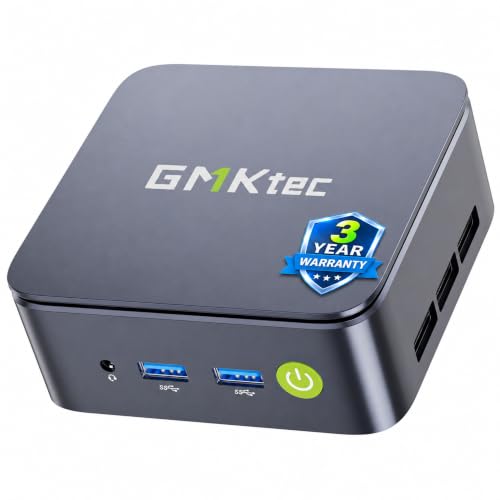
- Ryzen 5 3500U is a step up from N100/N97-class chips
- 2.5GbE LAN helps with Proxmox cluster networking
- Dual M.2 slots and 16GB RAM support easy expansion
Best For: Budget homelab users building a compact Proxmox node with faster wired networking.
Best for Proxmox Expansion – MINISFORUM MS-02 Ultra Workstation Mini PC
If you want one of the most capable nuc alternative mini pcs for proxmox clusters, the MINISFORUM MS-02 Ultra stands out for its mix of PCIe 5.0 expansion, 4-slot DDR5 memory support, and dual high-speed Ethernet. It is a strong fit when your lab needs more than a basic CPU box and you want room for networking, storage, or even GPU-backed workloads.
Best For: Proxmox users building dense VM hosts, small lab clusters, or an expansion-friendly node with serious networking and memory headroom.
Pros:
- PCIe 5.0 x16 slot adds unusual upgrade flexibility for a mini PC
- 4x DDR5 SODIMM slots support up to 256GB for VM-heavy setups
- 10GbE plus 2.5GbE is ideal for fast storage and cluster traffic
- Dual USB4 v2 ports make it easy to attach fast peripherals and docks
Cons:
- Barebone configuration means you must supply RAM, SSD, and OS
- More workstation-oriented than a simple low-power home lab node
- Likely overkill if you only need a basic Proxmox host
For buyers comparing nuc alternative mini pcs for proxmox clusters, this model is less about minimum cost and more about building a compact node that can scale with your lab. If expandability and high-end I/O matter, it is one of the most flexible options in this category.
Best Value for 2.5GbE Proxmox – GMKtec Nucbox G10 Ryzen 5 3500U
If you want nuc alternative mini pcs for proxmox clusters without paying for newer-core premium, the GMKtec Nucbox G10 is a practical midrange option. Its Ryzen 5 3500U, 16GB dual-channel RAM, 1TB NVMe SSD, and 2.5GbE port make it a capable small node for lab virtualization, light homelab services, and mixed office duties.
Best For: Homelab builders who want an affordable Proxmox node with fast wired networking, decent x86 performance, and easy storage expansion.
Pros:
- 2.5GbE LAN is ideal for Proxmox clusters, storage traffic, and fast intra-node networking
- Dual M.2 2280 slots and support for up to 64GB RAM give it strong expandability
- Triple-display outputs and Vega 8 graphics add flexibility for desk use or HTPC tasks
- Included 1TB SSD and 16GB RAM make it usable out of the box
Cons:
- Ryzen 5 3500U is older silicon, so it is less efficient than newer mini PC platforms
- Wi‑Fi 5 is fine for basics, but not as modern as Wi‑Fi 6/6E options
- Not the best choice if you need maximum VM density or heavy container workloads
This is a sensible pick among nuc alternative mini pcs for proxmox clusters if your priority is a balanced mix of price, 2.5GbE networking, and upgrade room rather than cutting-edge CPU efficiency.
Best for Proxmox Storage Nodes – AOOSTAR MACO 6850H Mini PC
If you want one of the more expandable nuc alternative mini pcs for proxmox clusters, the AOOSTAR MACO stands out with dual 2.5GbE, three M.2 PCIe 4.0 slots, and an Oculink port for future expansion. It’s a strong fit for lab builds, edge virtualization, and small homelab nodes that need fast networking and flexible storage without jumping to a full server.
Best For: Homelab users building a compact Proxmox node with lots of NVMe capacity, dual 2.5GbE networking, and room to grow.
Pros:
- Three M.2 2280 PCIe 4.0 x4 slots support dense NVMe storage and RAID setups.
- Dual 2.5GbE LAN is a strong match for Proxmox clusters and fast east-west traffic.
- Dual USB4 and Oculink add serious expansion flexibility for a compact system.
- 6850H-class performance gives plenty of headroom for VMs and containers.
Cons:
- Barebone configuration requires you to add your own SSD and install an OS.
- 24GB LPDDR5 is soldered, so RAM upgrades are not straightforward.
- Its feature set is great, but it may be more than casual users need.
For buyers comparing nuc alternative mini pcs for proxmox clusters, this one is compelling because it prioritizes storage density and networking over simple plug-and-play minimalism. If your cluster plan includes multiple NVMe drives, high-speed networking, and expansion options, the MACO is a very capable foundation.
Best for Proxmox and Home Assistant – TK Node Mini PC with Proxmox
If you want one of the more turnkey nuc alternative mini pcs for proxmox clusters, this TK Node system stands out because it ships with Proxmox VE and a ready-to-run Home Assistant VM already in place. The Ryzen R2514, 16GB of RAM, and 512GB SSD make it a practical starting point for lab virtualization, automation, and always-on self-hosted services without a lot of setup work.
Best For: Buyers who want a plug-and-play Proxmox mini PC for home automation, homelab containers, and small cluster nodes.
Pros:
- Proxmox VE and Home Assistant are preinstalled, which cuts initial setup time.
- Ryzen R2514 with 4 cores and 8 threads is well-suited to lightweight virtualization and 24/7 workloads.
- Dual SO-DIMM and dual NVMe support give you room to scale RAM and storage later.
- Texas assembly plus a 2-year US-based limited warranty adds peace of mind.
Cons:
- 16GB RAM is fine for starters, but cluster users may want to upgrade quickly.
- Built-in storage is modest if you plan to run several VMs or large containers.
- The Ryzen R2514 is efficient, not a high-performance workstation chip.
For buyers comparing nuc alternative mini pcs for proxmox clusters, this model is compelling if you value convenience over raw horsepower. It is especially attractive when you want a compact node that is already tuned for virtualization and home automation.
Best Dual-LAN Option – Beelink EQi12 Dual LAN Mini PC
If you want one of the more practical nuc alternative mini pcs for proxmox clusters, the Beelink EQi12 stands out for its dual 1GbE ports, modern 12th-gen Intel CPU, and included 24GB RAM/500GB SSD. It’s a sensible choice for a small virtualization node where networking, low power use, and compact size matter more than raw workstation muscle.
Best For: Home lab users building a compact Proxmox node or small cluster with dependable wired networking and easy expansion.
Pros:
- Dual LAN makes it a strong fit for Proxmox, routing, or clustered networking setups.
- 24GB LPDDR5 memory and 500GB PCIe 4.0 SSD provide a solid out-of-box baseline.
- Compact chassis, built-in 85W PSU, and Wake-on-LAN/Auto Power On help simplify deployment.
- 12th-gen Intel i3-1220P offers enough headroom for light-to-moderate virtualization tasks.
Cons:
- Only dual 1GbE, so it lacks the faster 2.5GbE ports many homelab buyers prefer.
- LPDDR5 memory is not user-upgradable like standard SO-DIMM designs.
- Not ideal if you need heavy VM density or demanding storage/network throughput.
Overall, the EQi12 is a well-rounded pick for nuc alternative mini pcs for proxmox clusters when you want an inexpensive, compact node with good everyday responsiveness and dual-network flexibility.
Best for Proxmox Networking – GMKtec G11 Ryzen Embedded Mini PC
If you’re comparing nuc alternative mini pcs for proxmox clusters, the GMKtec G11 stands out because it pairs a low-power AMD Ryzen Embedded chip with dual 2.5GbE ports and 16GB of dual-channel RAM. That makes it a practical fit for small virtualization nodes, firewall appliances, and homelab builds where networking matters as much as CPU performance.
Best For: Home-lab users and small teams building Proxmox nodes, NAS boxes, or router/firewall systems that need dual 2.5GbE in a compact footprint.
Pros:
- Dual 2.5GbE LAN is ideal for Proxmox, pfSense/OPNsense, and NAS roles.
- Ryzen Embedded R2514 is built for efficient 24/7 operation.
- Dual-channel 16GB RAM helps with smoother multitasking and light virtualization.
- Triple-display support adds flexibility for admin consoles and office use.
Cons:
- 16GB RAM and 256GB SSD may feel tight for larger cluster workloads.
- Not the best choice if you want easy internal expansion for drives or memory.
Overall, the G11 is a strong niche pick among nuc alternative mini pcs for proxmox clusters when your priority is networking density, efficient uptime, and a compact node that can also double as a firewall or lab server.
Best for PCIe 5.0 Expansion – MINISFORUM BD775i SE Mini ITX Board
If you want a more expandable platform than a typical compact box, this MINISFORUM board is a strong fit for nuc alternative mini pcs for proxmox clusters. The Ryzen 7 7745HX brings 8 cores and 16 threads, while dual PCIe 4.0 M.2 slots, DDR5 support, and a PCIe 5.0 x16 slot give you room for storage, networking, or even a large add-in card.
Best For: Proxmox builders who want a compact Mini-ITX base with desktop-class expansion, fast SSDs, and room for future upgrades.
Pros:
- Ryzen 7 7745HX delivers strong multicore performance for virtualization and containers
- Dual PCIe 4.0 M.2 slots and DDR5-5200 support suit dense cluster storage
- PCIe 5.0 x16 slot is ideal for high-end NICs, GPUs, or other expansion cards
- Triple display outputs and 2.5GbE add flexibility for lab or homelab use
Cons:
- Not a turnkey mini PC; you still need to source a case, RAM, storage, and cooling fan
- No built-in Wi-Fi card included
- More board-focused than plug-and-play, so it suits builders over casual buyers
This is a compelling pick for nuc alternative mini pcs for proxmox clusters if you value upgrade headroom over simplicity. It makes the most sense when you want a small Proxmox node that can grow with faster storage, better networking, or add-in hardware later.
Best Budget Proxmox Starter – Mini PC N95 8GB/256GB G3S
If you want a low-cost entry point into nuc alternative mini pcs for proxmox clusters, this Mini PC N95 G3S is a straightforward pick for light virtualization, lab testing, and compact office workloads. The N95 chip, 8GB of RAM, and 256GB M.2 SSD make it practical for a small Proxmox node, especially if you are building out a home cluster on a tight budget.
Best For: Beginners and budget-focused buyers who need a compact Proxmox node for basic lab use, lightweight VMs, and simple cluster setups.
Pros:
- Affordable way to start a Proxmox cluster without buying a full-size desktop
- Low-power N95 platform is a good fit for always-on home lab use
- Dual 4K display support and dual Gigabit Ethernet add useful flexibility
- VESA mount helps keep the setup clean and space-saving
Cons:
- 8GB RAM may feel limiting for heavier virtualization workloads
- Not ideal if you plan to run multiple demanding VMs or containers
- Storage capacity is modest unless you upgrade or add external options
This model makes the most sense when you need one of the simplest nuc alternative mini pcs for proxmox clusters and care more about price and efficiency than raw performance. It is a sensible starter node, but power users will likely want more memory and CPU headroom.
Best Dual-LAN Entry – BOSGAME E5 11 Pro Ryzen 5300U
If you want nuc alternative mini pcs for proxmox clusters without jumping to a high-end price tier, the BOSGAME E5 11 Pro is a practical 5300U option with dual LAN, triple-display output, and enough expansion to get started with a small virtualization lab.
Best For: Home lab builders who want an affordable dual-LAN mini PC for Proxmox nodes, light VMs, and basic container hosting.
Pros:
- Dual 1GbE LAN is useful for Proxmox clustering, segmentation, or separate management and VM networks.
- Ryzen 5300U 4-core/8-thread performance is a solid step up from ultra-budget N-series mini PCs.
- Dual M.2 2280 SSD slots make storage expansion easier for lab use.
- Triple 4K display support adds flexibility if you also use it as a desktop.
Cons:
- 8GB RAM is light for virtualization, so most buyers will want an upgrade.
- Wi-Fi 5 is fine for basics, but wired networking is the better choice for clusters.
- It is more entry-level than faster 6-core or 8-core alternatives.
This is a sensible pick if you are comparing nuc alternative mini pcs for proxmox clusters and care more about dual NICs and expandability than top-tier CPU throughput. With the right RAM and SSD upgrades, it can serve as a capable starter node for a small lab.
Best Simple Pick – GMKtec G10 Ryzen 5 Mini PC
If you’re comparing nuc alternative mini pcs for proxmox clusters, the GMKtec G10 stands out for its 2.5GbE port, upgrade-friendly storage, and Ryzen 5 3500U CPU. It’s not a high-end server box, but it offers a solid mix of light virtualization capability, compact size, and practical I/O for homelab or office use.
Best For: Budget-minded homelab builders who want a compact Proxmox node with faster wired networking and enough CPU headroom for light workloads.
Pros:
- Ryzen 5 3500U offers stronger multitasking than N100/N97-class mini PCs
- 2.5GbE LAN is a major plus for Proxmox clusters and network-heavy tasks
- Dual M.2 slots and 16GB RAM make it flexible for upgrades
- Triple-display output adds versatility for desktop or lab use
Cons:
- Older 4-core CPU is fine for light virtualization, not heavy VM density
- WiFi 5 is less modern than newer WiFi 6/6E systems
- Single 2.5GbE port limits advanced networking setups without adapters
For nuc alternative mini pcs for proxmox clusters, this G10 is a sensible value pick if you care more about wired speed and expandability than cutting-edge CPU performance. It’s a good fit for small clusters, home labs, and low-power services that need dependable basics.
How We Picked the Best Nuc Alternative Mini PCs for Proxmox Clusters
For Proxmox, the most useful mini PCs are not always the fastest on paper. We prioritized systems with the networking and platform features that matter most for clustered virtualization: dual LAN or better, NVMe storage, upgrade-friendly memory where available, and CPUs that can handle multiple lightweight VMs or containers without running hot.
We also considered whether each model fits a cluster role. Some are better as general-purpose nodes, while others are better for denser workloads, home automation, or storage-adjacent tasks.
Quick Comparison for Proxmox Clusters
If you want the shortest path to the right choice, match the hardware to the job. High-end options with PCIe 5.0, multiple Ethernet ports, and DDR5 are ideal for serious cluster nodes. Midrange Ryzen and Intel systems with dual 2.5GbE are a sweet spot for balanced homelabs. Lower-power N95 or older Ryzen 3000-series systems can still work well for light containers, management nodes, or test clusters.
Key Buying Factors for Nuc Alternative Mini PCs for Proxmox Clusters
Networking Matters Most
For cluster traffic, live migration, backups, and storage access, onboard networking is critical. Look for at least dual 2.5GbE if possible. A single NIC may work for a basic node, but it limits flexibility and can complicate cluster design.
Memory Headroom and Upgrade Path
Proxmox benefits from extra RAM more than many buyers expect. If the system uses user-upgradeable DDR4 or DDR5, that is a major advantage. Soldered LPDDR5 can still be fine, but only if the capacity is sufficient from the start.
Storage and Expansion
NVMe SSD support is essential for VM responsiveness. If you plan to run more than a few workloads, choose a model with a second M.2 slot, room for larger SSDs, or additional PCIe expansion. This is where some Nuc Alternative Mini PCs for Proxmox Clusters stand out from standard mini PCs.
CPU Efficiency Versus Raw Power
Heavier CPUs help with dense virtualization, but efficient chips are often a better fit for always-on clusters. Balance core count, thermals, and power draw based on whether the node will run 24/7 or serve as a burst-capable compute host.
Who Should Buy Which Nuc Alternative Mini PCs for Proxmox Clusters?
Choose a high-end workstation-style mini PC if you want a primary Proxmox node with serious networking and expansion. Pick a dual-LAN midrange system if you want the best value for a small homelab cluster. Go with lower-power budget models if you are building lab nodes, learning Proxmox, running Home Assistant, or hosting light services where efficiency matters more than raw performance.
If you are shopping for Nuc Alternative Mini PCs for Proxmox Clusters, the best choice is the one that matches your storage, networking, and uptime goals—not just the newest CPU badge.