If you’re looking to enhance your workspace, choosing the right monitor arm for your ultrawide PC monitor is essential. With so many options available, it can be tough to decide which one suits your needs best. From heavy-duty models to sleek, adjustable designs, each offers unique benefits that can transform your setup. Let’s explore some of the top picks that can elevate your ergonomic experience and optimize your productivity.
Heavy Duty Monitor Arm for Ultrawide Monitors

If you’re looking for a monitor arm that can handle the heft of ultrawide monitors, the Heavy Duty Monitor Arm is an excellent choice for you. It supports screens up to 57 inches and 44 lbs, ensuring stability for your setup. With pneumatic height adjustment and a modular design, it offers flexibility for various desk layouts. You can tilt, swivel, and rotate your monitor easily, thanks to its gas spring lift. Plus, the quick-release VESA bracket accommodates both 75x75mm and 100x100mm mounts. Whether you prefer a c-clamp or grommet mount, this arm adapts to your needs effortlessly.
Best For: Professionals and gamers seeking a sturdy monitor arm that accommodates large ultrawide monitors while providing adjustable ergonomics.
Pros:
- Supports large ultrawide monitors up to 57 inches and 44 lbs, ensuring stability for heavier setups.
- Versatile adjustability with +25 to -25 degrees tilt, 180 degrees swivel, and 13 inches of height adjustment for optimal viewing angles.
- Modular design allows for future upgrades to dual or triple monitor setups, enhancing productivity and workspace efficiency.
Cons:
- Requires compatible VESA mounts (75x75mm or 100x100mm), which may necessitate an adapter for some monitor models like the Samsung G9.
- Desk thickness limitations for mounting, which might exclude some desks that do not meet the required specifications.
- Potential complexity in installation due to its modular nature and various mounting options, possibly requiring extra time or tools.
MOUNTUP Ultrawide Monitor Arm for 22-43 inch Curved Screen
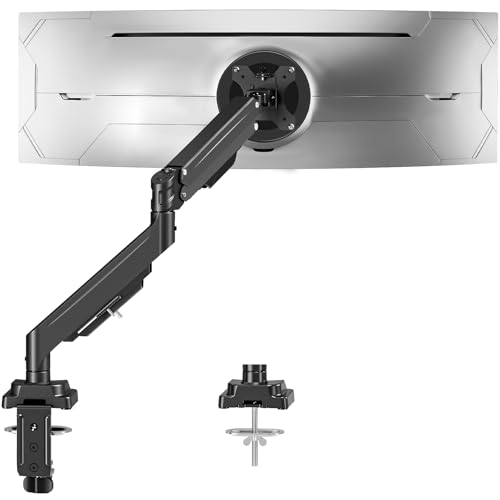
The MOUNTUP Ultrawide Monitor Arm is an excellent choice for gamers and professionals alike, offering impressive adjustability that enhances your workspace. It supports 22-43 inch monitors weighing up to 33 lbs, ensuring compatibility with popular brands like Samsung and Dell. With 360° rotation, ±90° tilt, and a reach of 23.6 inches, you can customize your viewing angle effortlessly. The heavy-duty construction provides stability, while the cable management keeps your desk organized. Installation is easy with both C-clamp and grommet options. Rated 4.5 stars, users praise its sturdy design and flexibility, making it perfect for extended work or gaming sessions.
Best For: The MOUNTUP Ultrawide Monitor Arm is best for gamers, professionals, and creators looking to enhance their workspace ergonomics and organization.
Pros:
- Heavy-duty construction ensures stability for monitors weighing up to 33 lbs.
- Offers impressive adjustability with 360° rotation, ±90° tilt, and a reach of 23.6 inches for optimal viewing angles.
- Easy installation with both C-clamp and grommet mount options, complemented by effective cable management.
Cons:
- Some users have reported concerns regarding bracket stability during adjustments.
- A few reviews mention issues with adjustment precision.
- Compatibility limitations with certain non-VESA compliant monitors.
WALI Ultrawide Monitor Arm for 13 to 49 Inch Screens (GSM001XL)

For users seeking a reliable solution to support their ultrawide monitors, the WALI Ultrawide Monitor Arm (GSM001XL) stands out with its impressive weight capacity of up to 33 lbs. Designed for screens ranging from 13 to 49 inches, it offers +45°/-45° tilt, +90°/-90° swivel, and 180° rotation for flexible viewing. Its ergonomic build reduces neck strain and eye fatigue, perfect for long hours. Installation’s a breeze with included mounts and straightforward instructions. Plus, built-in cable management keeps your setup tidy. With a solid 4.4-star rating, it’s a fantastic choice for anyone looking to enhance their workspace.
Best For: Users looking for a durable and ergonomic monitor arm that supports ultrawide screens and enhances workspace organization.
Pros:
- Robust build quality with a weight capacity of 33 lbs, suitable for larger monitors.
- Flexible viewing options with tilt, swivel, and rotation features to reduce neck strain.
- Easy installation process with included mounts and effective cable management.
Cons:
- Some users reported minor challenges during installation with specific parts.
- May not be suitable for desks thicker than 1.77 inches without additional modifications.
- Limited adjustment range for very heavy or oversized monitors beyond the specified weight capacity.
HUANUO TitanLift Heavy Duty Monitor Arm for Ultrawide Screens

Designed specifically for ultrawide screens up to 49 inches, the HUANUO TitanLift Heavy Duty Monitor Arm is an excellent choice for gamers and professionals alike who demand durability and flexibility. It supports weights from 6.6 to 40 lbs and features a robust aluminum construction for long-lasting performance. With a full range of motion, you can tilt, swivel, and rotate your monitor effortlessly. Installation is a breeze with its quick setup and cable management system, keeping your workspace tidy. Customers rave about its sturdy build and smooth adjustments, making it a top pick in the monitor arm category.
Best For: Gamers and professionals who need a durable and flexible monitor arm for ultrawide screens up to 49 inches.
Pros:
- Sturdy construction made from high-strength aluminum alloy ensures long-lasting performance.
- Full range of motion allows for easy adjustments with tilt, swivel, and rotation features.
- Quick installation process with built-in cable management for a tidy workspace.
Cons:
- Some users may find the arm too long for smaller desk setups, leading to potential returns.
- Limited compatibility with screens outside the specified weight and size range.
- A few customers reported difficulty in fine-tuning the tension adjustment.
VIVO Ultrawide Monitor Arm Desk Mount (STAND-V001)

Looking for a sturdy and adjustable monitor mount? The VIVO Ultrawide Monitor Arm Desk Mount (STAND-V001) is perfect for you. It supports screens from 13” to 38” and holds up to 22 lbs with VESA compatibility. With a height adjustment of up to 16 inches, you can easily switch between portrait and landscape orientations. Installation is a breeze thanks to the heavy-duty desk clamp and tool-free assembly. Plus, integrated cable management keeps your setup tidy. Users love its stability and design, making it a great choice for those needing a reliable, space-saving solution for their ultrawide monitors.
Best For: Those seeking a reliable and adjustable monitor mount for ultrawide screens that maximizes desk space.
Pros:
- Sturdy design with a weight capacity of 22 lbs, accommodating screens from 13” to 38”.
- Toolless installation with a heavy-duty desk clamp for easy setup and integrated cable management.
- Great adjustability with height adjustments and orientation options, enhancing ergonomic comfort.
Cons:
- Some users find height adjustments require tools, which can be inconvenient.
- A few reviews suggest it might be slightly overpriced for certain features.
- Limited to a maximum desk thickness of 3.25 inches, which may not suit all desk setups.
monTEK Heavy-Duty Monitor Arm for Ultrawide Curved Screen

The monTEK Heavy-Duty Monitor Arm stands out as an ideal choice for those who use ultrawide curved screens, accommodating monitors ranging from 17 to 57 inches and weighing up to 59.4 pounds. Its full motion capabilities allow for a tilt of +75° to -75°, 180° swivel, and ±90° rotation, ensuring you find the perfect viewing angle. With a height range of 11.3 to 22 inches, your comfort is prioritized. Built from high-quality steel and aluminum, it promises durability. Plus, its integrated cable management keeps your workspace neat, making it suitable for any studio, office, or gaming setup.
Best For: The monTEK Heavy-Duty Monitor Arm is best for professionals and gamers looking for an ergonomic and adjustable solution for their ultrawide curved monitors.
Pros:
- Full motion capabilities allow for versatile positioning with tilt, swivel, and rotation adjustments.
- High-quality construction from steel and aluminum ensures durability and stability.
- Integrated cable management helps maintain a clean and organized workspace.
Cons:
- Installation may require additional tools if not using C-clamp or grommet methods.
- Limited compatibility with monitors outside the specified size and weight range.
- Some users may find the initial setup time-consuming despite the quick-release VESA plate.
HUANUO Heavy Duty Monitor Arm for Ultrawide Screens

For those seeking robust support for their ultrawide monitors, the HUANUO Heavy Duty Monitor Arm stands out as an exceptional choice. Designed for screens ranging from 17 to 49 inches, it accommodates both flat and curved models, supporting up to 40 lbs. The heavy-duty C-clamps or grommet mounting provide a secure fit on desks up to 3.5 inches thick. With an impressive height range of 29.1 inches and flexible adjustments, you can easily tilt, swivel, and rotate your monitor for best viewing. Constructed from durable aluminum alloy, this arm promises long-lasting reliability, making it a fantastic addition to your workspace.
Best For: Professionals and gamers who need a sturdy and adjustable monitor arm for ultrawide screens ranging from 17 to 49 inches.
Pros:
- Supports both flat and curved monitors with a weight capacity of up to 40 lbs.
- Offers extensive height adjustments and flexibility with tilt, swivel, and rotation features.
- Constructed from high-strength aluminum alloy, ensuring durability and long-lasting reliability.
Cons:
- Installation may require additional tools or assistance for optimal setup.
- The arm’s size and weight might not be suitable for smaller desks or limited workspace.
- Higher price point compared to standard monitor stands.
HUANUO Single Monitor Arm for 40 Inch Screens
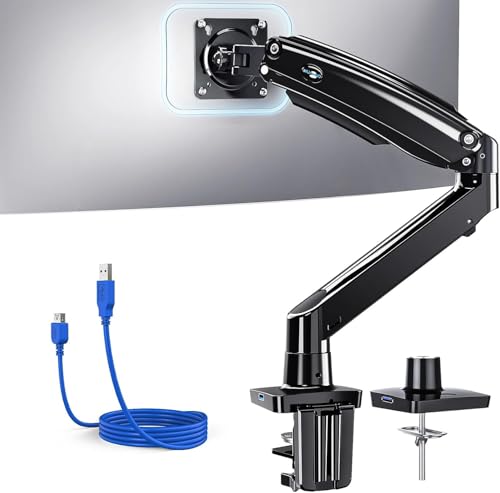
Designed specifically for ultrawide monitors up to 40 inches, the HUANUO Single Monitor Arm excels in versatility and ergonomic support. It accommodates screens weighing between 4.4 to 26.4 pounds, featuring a robust design that guarantees stability during intense use. With a generous height adjustment of 21.1 inches and a 25.6-inch extension range, you can easily customize your setup. It also includes a USB 3.0 port for quick data transfers. Installation is a breeze, thanks to included tools and mounts. Overall, this monitor arm enhances your workspace, reduces neck strain, and keeps your desk organized.
Best For: Users seeking an ergonomic and adjustable solution for ultrawide monitors up to 40 inches that enhances workspace organization and comfort.
Pros:
- Versatile Compatibility: Supports a wide range of monitor sizes (13 to 40 inches) and weights (4.4 to 26.4 lbs), accommodating various setups.
- Ergonomic Adjustability: Offers extensive tilt, swivel, and height adjustments to reduce neck strain and improve viewing comfort.
- Integrated USB Port: Features a USB 3.0 port for fast data transfers and charging, adding convenience to your workspace.
Cons:
- Cable Management Issues: Some users report minor design flaws regarding the effectiveness of the cable management components.
- Weight Limitations: The maximum weight capacity might not support heavier ultrawide monitors beyond 26.4 lbs.
- Installation Complexity: While generally user-friendly, beginners may still find the initial setup slightly challenging without prior experience.
VIVO Heavy Duty Aluminum Ultrawide Monitor Tension Arm (STAND-V101V)
If you’re in the market for a robust and flexible solution to elevate your ultrawide monitor, the VIVO Heavy Duty Aluminum Ultrawide Monitor Tension Arm (STAND-V101V) stands out. It supports screens up to 49 inches and 44 lbs, making it perfect for models like the Samsung Odyssey G9. With multiple mounting options, you can secure it to desks up to 3.2 inches thick using a heavy-duty C-clamp. The premium spring-assist arm allows for easy height adjustments, while the 180° swivel and 360° rotation enhance your viewing experience. Plus, integrated cable management keeps your setup tidy.
Best For: Gamers and professionals seeking an ergonomic and adjustable mounting solution for large ultrawide monitors.
Pros:
- Supports large monitors up to 49 inches and 44 lbs, accommodating popular models like the Samsung Odyssey G9.
- Versatile mounting options with heavy-duty C-clamp or grommet mount for various desk thicknesses.
- Enhanced adjustability with tilt, swivel, and height adjustment features for optimal viewing angles.
Cons:
- Installation may be complex for some users due to multiple mounting options and included hardware.
- Limited to specific VESA patterns (75x75mm or 100x100mm), restricting compatibility with some monitors.
- Desk thickness limitations for grommet mounting may not suit all setups, as it only accommodates desks up to 1.4 inches thick.
ARES WING Ultrawide Monitor Arm for 13-49 Curved Screens
The ARES WING Ultrawide Monitor Arm stands out for its impressive support of screens ranging from 13 to 49 inches, making it an excellent choice for gamers and professionals who need to optimize their workspace. It accommodates up to 40 lbs for flat monitors and 31 lbs for curved displays, including compatibility with the Samsung G9 Monitor. Installation is a breeze with clamp-on or grommet options, fitting desks 10mm to 45mm thick. Enjoy ergonomic benefits with tilt, swivel, and rotation adjustments that enhance comfort while keeping your workspace tidy and organized. Plus, its gas spring system guarantees smooth, stable adjustments for every setup.
Best For: Gamers and professionals seeking an ergonomic and space-saving solution for large monitors between 13 to 49 inches.
Pros:
- Supports a wide range of monitor sizes and weights, accommodating both flat and curved displays.
- Easy installation with clamp-on or grommet options, suitable for various desk thicknesses.
- Adjustable ergonomic features for optimal viewing angles, reducing neck and shoulder strain.
Cons:
- Limited to specific monitor weight limits, which may not accommodate heavier models.
- Requires desk thickness within a specific range, potentially limiting compatibility with certain desks.
- Initial setup may require some adjustments to achieve the desired tension and stability.
Factors to Consider When Choosing Monitor Arms for Ultrawide PC Monitors
When choosing monitor arms for your ultrawide PC monitor, consider several key factors to guarantee peak performance. You’ll want to pay attention to weight capacity, VESA compatibility, and adjustability features. Additionally, think about the available mounting options and the overall material and build quality of the arm.
Weight Capacity Considerations
Choosing the right monitor arm for your ultrawide PC monitor hinges greatly on weight capacity. Verify that the arm can support more weight than your monitor; many models handle between 33 lbs and 59.4 lbs. Always check the manufacturer’s specifications for weight limits, as exceeding them can compromise stability and safety. For heavier ultrawide monitors, look for arms designed to support 44 lbs or more, ideal for high-end models. Assess the arm’s materials and construction—high-strength aluminum or reinforced components are preferable for durability. Additionally, consider your monitor’s weight distribution; arms with adjustable tension mechanisms help accommodate varying weights, providing better support for larger screens. Prioritize these factors to enhance your setup’s stability and performance.
VESA Compatibility Requirements
Understanding VESA compatibility is key to ensuring a secure attachment between your ultrawide monitor and its arm. Most ultrawide monitors use standardized mounting holes, typically 75x75mm or 100x100mm. Before buying, check your monitor’s specifications to see if it requires a VESA adapter, as some models may not come with built-in mounting holes. Additionally, confirm that the monitor arm’s weight capacity meets or exceeds your monitor’s weight, which usually ranges from 33 lbs to 44 lbs for ultrawide displays. Opting for monitor arms with adjustable VESA mounts can provide flexibility, allowing for future upgrades or changes in your setup. Proper VESA compatibility minimizes the risk of accidents or damage, ensuring peace of mind in your workspace.
Adjustability Features Importance
Adjustability features are vital for maximizing the ergonomic benefits of your ultrawide monitor setup. With options like tilt, swivel, and rotation, you can position your monitor at ideal angles, greatly reducing neck and eye strain. A height adjustment range of at least 11 to 29.1 inches accommodates various user preferences, promoting better posture. Additionally, monitor arms that extend up to 24.8 inches offer flexibility in screen placement, important for large ultrawide displays. Quick tension adjustments allow you to easily fine-tune the monitor’s position while ensuring stability. Finally, integrated cable management keeps your workspace clutter-free, enhancing both aesthetics and functionality. Prioritizing these adjustability features will lead to a more comfortable and efficient working environment.
Mounting Options Available
When considering monitor arms for your ultrawide PC monitors, it’s essential to evaluate the available mounting options, as they can considerably impact your setup’s stability and functionality. You typically have C-clamp and grommet mounts. C-clamp mounts attach easily to the desk’s edge without drilling, making them ideal for quick installation. On the other hand, grommet mounts require a pre-drilled hole, offering a cleaner look and a secure fit. Verify compatibility with your monitor by checking for VESA mounting patterns, commonly 75x75mm or 100x100mm. Some arms feature quick-release VESA plates for easier adjustments. Your choice of mounting option can also affect stability, especially with heavier monitors, so consider designs that allow for height adjustments to optimize your setup.
Material and Build Quality
The material and build quality of monitor arms play a crucial role in ensuring your ultrawide PC monitor remains stable and secure. High-strength aluminum alloy or steel greatly enhances durability, with some models enduring over 20,000 fatigue tests. If you’re using a heavier ultrawide monitor, look for arms with a thicker design and wider base, as certain models can support weights up to 59.4 lbs. Reliable build quality prevents wobbling, ensuring a smooth experience during use. Arms that have passed rigorous testing, such as 50,000 cycle motion tests, offer enhanced reliability for daily adjustments. Additionally, features like reinforced VESA heads add sturdiness, keeping your monitor securely in place without the risk of detachment or failure.