If you’re a programmer looking to boost your comfort and efficiency, a split keyboard might be just what you need. These keyboards are designed to promote a more natural wrist position, reducing strain during long coding sessions. With a variety of options available, from customizable features to ergonomic designs, you’ll find the perfect fit for your needs. Curious about which models stand out and why they could transform your typing experience?
Arteck Ergonomic USB Wired Keyboard with Backlit Colors

If you’re a programmer looking for comfort during long coding sessions, the Arteck Ergonomic USB Wired Keyboard with Backlit Colors is an excellent choice. Its split ergonomic design naturally positions your wrists and forearms, reducing strain. The soft cushioned wrist rest adds to your comfort, while the adjustable backlighting with seven colors lets you customize your workspace. You’ll appreciate the tactile keys, designed for fast and accurate typing, especially in shared spaces. With a reliable USB connection, robust build quality, and a 24-month warranty, this keyboard is perfect for enhancing your coding efficiency and overall typing experience.
Best For: Programmers and writers seeking a comfortable and ergonomic typing experience during long sessions.
Pros:
- Ergonomic design promotes natural wrist positioning, reducing strain and discomfort.
- Customizable backlighting with seven colors enhances visibility and workspace aesthetics.
- Quiet, tactile keys provide a satisfying typing experience, ideal for shared environments.
Cons:
- Some users may find key sizes and placements slightly unconventional.
- Backlight cannot be turned off independently without shutting down the computer.
- Compact design may require layout adjustments for optimal use, especially for those accustomed to traditional keyboards.
Logitech ERGO K860 Wireless Ergonomic Keyboard

The Logitech ERGO K860 Wireless Ergonomic Keyboard is an ideal choice for programmers who spend long hours typing, as its curved, split design promotes a natural typing posture that greatly reduces muscle strain on your wrists and forearms. With a curved wrist rest featuring memory foam, you get 54% more support and 25% less wrist bending. The Perfect Stroke keys enhance your typing confidence, while quiet operation guarantees a distraction-free environment. You can connect via USB or Bluetooth for seamless compatibility. Plus, it’s environmentally friendly, made with 71% certified post-consumer recycled plastic. Elevate your coding comfort and efficiency with this keyboard!
Best For: Programmers and individuals who spend long hours typing and seek a comfortable, ergonomic solution to reduce muscle strain.
Pros:
- Ergonomic design promotes natural typing posture, reducing wrist and forearm strain.
- Curved wrist rest with memory foam provides superior support and comfort.
- Versatile connectivity options via USB or Bluetooth for easy compatibility with different systems.
Cons:
- Learning curve for those accustomed to traditional keyboard layouts.
- Higher price point compared to standard keyboards may be a consideration for budget-conscious users.
- Bulkier design may not be ideal for users with limited desk space.
Perixx Periboard-612B Wireless Ergonomic Split Keyboard

Designed with programmers in mind, the Perixx Periboard-612B Wireless Ergonomic Split Keyboard offers dual mode connectivity through both 2.4 GHz and Bluetooth, making it a versatile choice for those who work across multiple devices. Its ergonomic split design and integrated palm rest support your wrists, reducing median nerve pressure and minimizing the risk of RSI and carpal tunnel syndrome. Weighing just 2.2 pounds, it’s portable and compatible with Windows 10 and Mac OS X. While some users mention a learning curve due to unique key placement, many appreciate the comfortable typing experience and responsive keys for extended coding sessions.
Best For: Programmers and users seeking an ergonomic keyboard that supports extended typing sessions across multiple devices.
Pros:
- Comfortable typing experience with responsive keys and long travel distance.
- Ergonomic split design with integrated palm rest reduces wrist strain and minimizes RSI risk.
- Dual mode connectivity (2.4 GHz and Bluetooth) allows compatibility with both Windows 10 and Mac OS X.
Cons:
- Users may experience a learning curve due to unique key placement, especially for arrow and function keys.
- Some initial issues with the space bar sticking have been reported.
- Mixed reviews on customer service effectiveness regarding warranty claims and replacements.
ProtoArc EK01 Plus Backlit Bluetooth Ergonomic Keyboard

For programmers seeking comfort during long coding sessions, the ProtoArc EK01 Plus Backlit Bluetooth Ergonomic Keyboard stands out with its innovative split-keyframe design. Its full-size layout and scooped keys minimize muscle strain, while the cushioned wrist rest offers 54% more support to reduce fatigue. You can adjust the tilt for ideal wrist relaxation, ensuring a natural typing experience. The soft white LED backlighting features three brightness levels and smart inactivity adjustments. Plus, with Bluetooth and 2.4G USB connectivity, you can easily switch between devices. Enjoy extended use with a 2000mAh rechargeable battery, making it a perfect choice for your coding needs.
Best For: Programmers and individuals who spend long hours typing, seeking comfort and ergonomic support during their work.
Pros:
- Ergonomic design with a split-keyframe and cushioned wrist rest reduces muscle strain and fatigue.
- Adjustable backlighting with three brightness levels and smart inactivity features enhance usability in various lighting conditions.
- Multi-device connectivity via Bluetooth and 2.4G USB allows easy switching between devices for versatile use.
Cons:
- Cannot be connected via wire, limiting flexibility for users who prefer wired connections.
- Buttons do not support programming, which may disappoint users looking for customizable features.
- Requires careful charging with a specific DC 5V 1A charger, avoiding fast chargers for optimal performance.
RK ROYAL KLUDGE RKS70 Ergonomic Split Wireless Gaming Keyboard
Offering a perfect blend of comfort and functionality, the RK ROYAL KLUDGE RKS70 Ergonomic Split Wireless Gaming Keyboard is an ideal choice for programmers seeking to enhance their typing experience. With a split design and adjustable typing angle, it promotes a comfortable posture during long coding sessions. The thick wrist rest provides additional support, while the compact 75% layout allows for versatility. You’ll appreciate the hot-swappable switches, enabling easy customization to suit your preferences. Plus, with impressive battery life and multiple connection modes, this keyboard guarantees reliable performance, making your programming tasks smoother and more enjoyable.
Best For: Programmers and gamers seeking an ergonomic and customizable typing experience.
Pros:
- Solid build quality and responsive key travel enhance typing comfort.
- Excellent battery life with multiple connection modes ensures reliable performance.
- Hot-swappable switches allow for easy customization to fit personal preferences.
Cons:
- Limited backlight options may not appeal to all users.
- There may be a learning curve associated with programming the macro keys.
- Some users have reported experiencing missed key presses during use.
ProtoArc Bluetooth Ergonomic Keyboard (EK04)
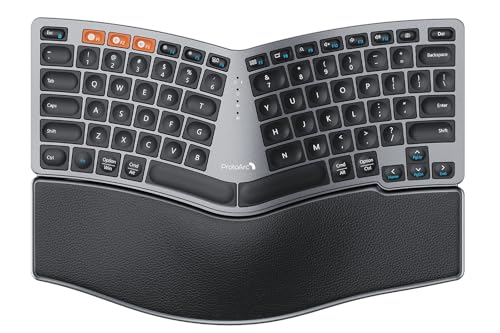
The ProtoArc Bluetooth Ergonomic Keyboard (EK04) stands out as an excellent choice for programmers seeking enhanced comfort during long coding sessions. Its compact, split design features 80 keys and a hard palm rest for wrist support. This space-saving layout promotes natural shoulder alignment by positioning your mouse closer. You can easily switch between up to three devices with its wireless connectivity options via Bluetooth or a 2.4G USB receiver. Though adapting to the split layout may take time, the benefits of improved ergonomics make it worthwhile for your coding efficiency and comfort. Plus, the built-in rechargeable battery guarantees long-lasting use.
Best For: Programmers and individuals who spend long hours typing and require ergonomic support for comfort and efficiency.
Pros:
- Compact ergonomic design promotes natural shoulder alignment and reduces wrist strain.
- Wireless connectivity allows seamless switching between up to three devices for versatility.
- Long-lasting rechargeable battery provides 250 hours of standby time after a quick charge.
Cons:
- Transitioning to the split layout may require an adjustment period for some users.
- The hard palm rest is non-removable and not cushioned, which may not suit everyone’s preference.
- Lacks a dedicated number pad, which might be inconvenient for users who frequently use numeric inputs.
Nulea Wireless Ergonomic Keyboard with Wrist Rest

Engineered with programmers in mind, the Nulea Wireless Ergonomic Keyboard features a split design that promotes natural wrist positioning, reducing strain during long coding sessions. Its comfortable wrist rest and adjustable tilt legs enhance your typing experience, preventing fatigue. With low-profile keys, you’ll enjoy quiet operation and minimal travel. The keyboard connects easily to up to three devices via Bluetooth or USB, making multitasking seamless. Plus, the adjustable 7-color backlight adds a personal touch while maintaining visibility. Weighing just 3.48 pounds, it’s portable and convenient. With a solid customer rating, it’s a smart investment for any coder.
Best For: Those seeking a comfortable and versatile keyboard solution for extended typing sessions, particularly programmers and remote workers.
Pros:
- Ergonomic split design that promotes natural wrist positioning and reduces strain.
- Multi-device connectivity allows seamless switching between up to three devices.
- Adjustable backlight with multiple color options enhances visibility and personal preference.
Cons:
- Some users reported initial Bluetooth connectivity issues that may require troubleshooting.
- A few customers mentioned concerns about key placement and plastic odor.
- Occasional Bluetooth sync problems were noted by some users.
KINESIS Advantage360 Professional Split Ergonomic Keyboard

For programmers who prioritize comfort and efficiency, the KINESIS Advantage360 Professional Split Ergonomic Keyboard stands out with its contoured shape and adjustable tenting features. This keyboard offers quiet Kailh Box Pink switches, ensuring a smooth typing experience. You can customize it fully with open-source software, though it may require some tech-savvy. With wireless Bluetooth connectivity and integrated palm supports, it accommodates various body types while reducing wrist strain. Although some users report Bluetooth issues, the ergonomic benefits make it a worthwhile investment for frequent typists. Plus, it comes with a three-year warranty and U.S. tech support for peace of mind.
Best For: Programmers and frequent typists seeking an ergonomic keyboard that reduces wrist strain and offers customizable features.
Pros:
- Fully programmable with open-source capabilities for personalized setup.
- Contoured shape and adjustable tenting provide significant comfort and support.
- Quiet mechanical switches enhance the typing experience without disturbing others.
Cons:
- Some users report issues with Bluetooth connectivity and double key-pressing.
- Learning curve associated with adapting to the unique layout and programming features.
- Higher price point may deter budget-conscious buyers.
KINESIS Freestyle2 USB-A Ergonomic Keyboard with VIP3 Lifters

Designed with programmers in mind, the KINESIS Freestyle2 USB-A Ergonomic Keyboard with VIP3 Lifters enhances comfort through its split design, allowing you to position the key modules up to 9 inches apart. This innovative keyboard features adjustable tenting with cushioned palm supports, promoting a natural wrist position. With low-force key switches, you’ll experience less finger fatigue during long coding sessions. The plug-and-play functionality means you can start typing right away without installing additional software. Users rave about improved posture and reduced discomfort, making it a great choice for anyone looking to enhance their coding comfort and efficiency.
Best For: Individuals seeking an ergonomic typing solution to enhance comfort and reduce strain during extended coding or computer use.
Pros:
- Split design allows for customizable positioning of key modules, promoting natural wrist alignment.
- Adjustable tenting with cushioned palm supports enhances comfort and reduces forearm strain.
- Low-force key switches minimize finger fatigue, making it ideal for long typing sessions.
Cons:
- Some users may experience an adaptation period to the unique key layout.
- The placement of specific keys may not meet everyone’s preferences, leading to dissatisfaction.
- Limited options for remapping keys to suit individual typing habits or preferences.
EPOMAKER Split65 Wireless Mechanical Keyboard

If you’re looking for a keyboard that enhances your comfort while coding, the EPOMAKER Split65 Wireless Mechanical Keyboard stands out with its ergonomic design. Its split 65% layout lets you customize the angle and distance of the halves, reducing wrist strain. With durable PBT gradient keycaps, you’ll enjoy a satisfying typing experience. The top-mounted structure includes sound dampening layers, minimizing harsh noise for a pleasant “thocky” sound. Plus, its tri-mode connectivity allows seamless shifts between devices, while customizable RGB backlighting adds flair. With QMK/VIA support, you can personalize key mappings, making it perfect for productivity and gaming.
Best For: Those seeking an ergonomic and customizable keyboard for comfortable coding, gaming, and productivity.
Pros:
- Ergonomic split design reduces wrist strain and promotes natural typing posture.
- Tri-mode connectivity allows easy switching between multiple devices.
- Customizable RGB backlighting and key mapping enhance user experience.
Cons:
- Split design may take time to adjust for users accustomed to traditional layouts.
- Limited to a 65% layout, which may not suit everyone’s preference for key availability.
- Potential compatibility issues with some mechanical switches due to hot-swappable PCB.
Factors to Consider When Choosing Split Keyboards for Programmers
When choosing a split keyboard, you’ll want to take into account several factors that can impact your programming experience. Think about ergonomic design features that promote comfort, as well as connectivity options that suit your setup. Don’t forget to evaluate key feel and travel, customization capabilities, and the size and layout that best fit your workspace.
Ergonomic Design Features
Choosing the right split keyboard is essential for programmers, as ergonomic design features can greatly impact your comfort and productivity. Look for keyboards that reduce muscle strain by promoting natural wrist and forearm positioning, which helps lower the risk of repetitive strain injuries and carpal tunnel syndrome. Adjustable tenting angles accommodate different body types, enhancing wrist alignment. Integrated palm rests provide extra support, reducing wrist fatigue during long coding sessions. Curved and scooped key designs fit your fingertips better, leading to a more comfortable typing experience. Finally, consider models with adjustable tilt legs and customizable key layouts to suit your personal preferences, ensuring that your keyboard is tailored to enhance your coding journey.
Connectivity Options Available
While considering a split keyboard, you’ll want to pay close attention to the connectivity options available, as they can greatly affect your workflow. Most split keyboards offer wired USB connections, guaranteeing reliable performance and low latency during your programming sessions. If you prefer a cleaner setup, many modern options feature wireless connectivity via Bluetooth or 2.4GHz radio frequency, giving you more freedom of movement. Some models even support dual connectivity modes, allowing you to switch between wired and wireless as needed. Additionally, look for keyboards that enable multiple device connectivity, so you can easily switch between devices for increased productivity. Finally, verify compatibility with various operating systems to avoid any hassles while coding.
Key Feel and Travel
Key feel and travel are essential factors that can greatly impact your programming experience. The tactile feedback from keyboard switches varies, ranging from soft and quiet to tactile and clicky, influencing your typing speed and comfort. You’ll find that key travel distance, typically between 1.5mm to 4mm, affects how quickly and accurately you can type. Shorter travel distances may boost your typing speed, while longer ones offer more satisfying feedback, especially for touch typists. Additionally, key resistance, measured in grams, dictates how much effort is needed to press them; lighter switches (around 45g) allow quicker actuation compared to heavier ones (up to 70g). Consider your preferences for low-profile keys versus mechanical switches to enhance your coding sessions.
Customization and Programmability
After considering key feel and travel, the next step in selecting a split keyboard for programming is understanding customization and programmability. Look for keyboards with hot-swappable switches, allowing you to easily change key switches based on your typing preferences. This enhances comfort during long coding sessions. Many models support key remapping and macro programming, helping you create shortcuts for frequently used commands, boosting your efficiency.
Advanced software compatibility, like QMK or VIA, gives you the power to customize layouts and lighting settings in real-time. If you work across multiple devices, prioritizing keyboards that seamlessly connect to various systems is essential. Finally, ergonomic features, such as adjustable tilt and wrist rests, should be tailored to your needs for a more comfortable typing experience.
Size and Layout Considerations
When choosing a split keyboard for programming, the size and layout can greatly impact your comfort and efficiency. Split keyboards come in various sizes, from full-sized models with number pads to compact 65% layouts, which can save desk space and bring your mouse closer. Ergonomic designs often allow for customizable separation between key modules, helping you find the perfect typing posture. Keep in mind that key placements can differ considerably, so be ready for an adjustment period if you’re switching from a traditional keyboard. Many models feature adjustable tilt legs for added comfort, letting you set the angle to reduce wrist strain. The shape and contour of the keyframe also help promote natural wrist positioning, enhancing your overall typing experience.