If you’re looking to enhance your typing experience, you’ve come to the right place. The right wireless mechanical keyboard can make a significant difference in your productivity and comfort. From sleek designs to customizable features, these keyboards offer something for everyone. As you explore the top options available, you’ll find unique functionalities that could transform how you work, play, or simply type. Ready to discover which keyboards stand out?
RK ROYAL KLUDGE S98 Mechanical Keyboard

If you’re a gamer or a creative professional looking for a wireless mechanical keyboard that combines functionality and style, the RK Royal Kludge S98 is your go-to choice. Its smart display showcases custom GIFs, date, connection mode, and battery status, while the intuitive knob lets you adjust volume, connection modes, and RGB settings with ease. You’ll appreciate its robust build, featuring double-shot PBT keycaps that resist wear and tear. Plus, with sound dampening technology, you’ll enjoy a satisfying typing experience without excessive noise. The hot-swappable PCB lets you customize switches hassle-free, making it perfect for your unique preferences.
Best For: Gamers and creative professionals seeking a stylish and functional wireless mechanical keyboard.
Pros:
- Smart display with customizable GIFs and essential status indicators enhances user experience.
- Superior build quality with durable double-shot PBT keycaps ensures longevity and resistance to wear.
- Sound dampening technology significantly reduces noise, providing a pleasant typing experience.
Cons:
- The wireless connection may experience occasional latency during high-intensity gaming sessions.
- Customization options may require additional purchases of switches and keycaps for full personalization.
- The compact design may take some time to get used to for users accustomed to full-sized keyboards.
Logitech MX Mechanical Wireless Illuminated Performance Keyboard

The Logitech MX Mechanical Wireless Illuminated Performance Keyboard stands out for its Tactile Quiet switches, making it perfect for professionals and gamers who crave a satisfying typing experience without the disruptive noise. The low-profile keys enhance comfort, while smart illumination activates as your hands approach. You can connect up to three devices via Bluetooth or Logi Bolt, and the USB-C quick charging guarantees minimal downtime. Weighing 29.2 oz, it’s sturdy yet portable. With a battery life of up to 15 days, you’ll stay productive longer. Enjoy a premium feel with customizable options, all wrapped in an eco-friendly design.
Best For: Professionals and gamers seeking a high-quality, quiet typing experience with the convenience of wireless connectivity.
Pros:
- Excellent switch responsiveness for a satisfying typing experience.
- Compact layout with adjustable backlighting for enhanced visibility.
- Seamless multi-device pairing allows easy switching between devices.
Cons:
- Limited key customization options may not meet advanced user needs.
- Some users find the keyboard louder than expected for a “quiet” model.
- The weight may be less portable for users looking for ultra-light options.
AULA F75 Pro Wireless Mechanical Keyboard

Designed for gamers and professionals alike, the AULA F75 Pro Wireless Mechanical Keyboard stands out with its tri-mode connectivity, allowing seamless shifts between Bluetooth, 2.4GHz, and USB-C connections. Its hot-swappable design enables easy customization of switches, while the pre-lubed Reaper switches provide smooth typing experiences. The durable side-printed PBT keycaps add to its stylish gradient black look. With 16.8 million RGB colors and multiple lighting effects, you can personalize your setup effortlessly. Plus, a long-lasting 4000mAh battery guarantees you stay powered through intense sessions. Rated 4.7 stars, it’s clearly a top choice for performance and value.
Best For: Gamers and professionals seeking a customizable, high-performance mechanical keyboard with versatile connectivity options.
Pros:
- Hot-swappable design allows for easy switch customization to suit personal preferences.
- Long-lasting 4000mAh battery ensures extended usage without frequent recharging.
- Vibrant RGB lighting with 16.8 million colors and multiple effects enhances the aesthetics of any setup.
Cons:
- Some users reported issues with the RGB app usability, which may affect lighting customization.
- Key markings may be difficult to see in certain lighting conditions, impacting visibility.
- Weight and dimensions may not be ideal for users looking for a more compact or lightweight keyboard option.
AULA F99 Wireless Mechanical Keyboard

Looking for a versatile keyboard that seamlessly connects to multiple devices? The AULA F99 Wireless Mechanical Keyboard has you covered with tri-mode connectivity—Bluetooth 5.0, 2.4GHz, and USB-C. You can connect up to five devices and switch easily using FN key combinations. Its hot-swappable design lets you customize switches and keycaps without any hassle. Enjoy a smooth typing experience with pre-lubed linear switches and vibrant RGB backlighting. Weighing 3.31 pounds, it feels sturdy, while the 8000mAh battery offers up to four weeks of use. With a 4.6-star rating, it’s perfect for both gaming and office work.
Best For: The AULA F99 Wireless Mechanical Keyboard is best for gamers and professionals seeking a customizable and versatile keyboard that connects seamlessly to multiple devices.
Pros:
- Affordable price at $99 for a feature-rich mechanical keyboard.
- Excellent sound and feel with pre-lubed linear switches and N-key rollover.
- Multiple connectivity options and customizable RGB lighting enhance user experience.
Cons:
- Some users report concerns about keycap installation flexibility.
- Software installation is required via Google Drive, which may be inconvenient.
- Battery indicator issues have been noted by some customers.
Redragon K580 PRO Wireless RGB Gaming Keyboard

For gamers seeking a reliable and customizable keyboard, the Redragon K580 PRO Wireless RGB Gaming Keyboard stands out with its impressive 3-mode connectivity options, including Bluetooth and 2.4GHz wireless. Weighing 3.3 pounds, it features linear red switches for quick response and minimal key wiggle. You’ll love the customizable per-key RGB lighting and five programmable macro keys, allowing you to optimize your gaming setup without extra software. The robust build guarantees stability during intense gaming sessions, while the dedicated multimedia controls enhance usability. Although battery life could be improved, its overall performance makes it a top contender for any gaming enthusiast.
Best For: Gamers and professionals seeking a customizable and reliable keyboard for both gaming and productivity.
Pros:
- Excellent build quality and design.
- Customizable RGB lighting without the need for additional software.
- Convenient volume wheel with tactile feedback.
Cons:
- Attached cord; no USB pass-through option.
- Some users report a metallic sound when bottoming out keys.
- Battery life could be better; drains quickly if not turned off.
Redragon K556 PRO Upgraded Wireless RGB Gaming Keyboard

The Redragon K556 PRO Upgraded Wireless RGB Gaming Keyboard stands out as an excellent choice for gamers and professionals alike, thanks to its versatile 3-mode connection that includes USB-C wired, Bluetooth 3.0/5.0, and 2.4GHz wireless options. You’ll enjoy a no-lag experience across all fields, enhancing your productivity. With its true hot-swap capability, you can easily customize switches without worrying about compatibility issues. The solid aluminum build not only adds stability but also provides a premium look. Plus, the vibrant RGB lighting and customizable software let you create your unique setup, making every session enjoyable and efficient.
Best For: Gamers and professionals seeking a versatile and customizable keyboard for both work and play.
Pros:
- 3-mode connection provides flexibility with USB-C wired, Bluetooth, and 2.4GHz wireless options.
- True hot-swap capability allows easy switch customization without compatibility concerns.
- Vibrant RGB lighting and customizable software enhance the aesthetics and functionality of your setup.
Cons:
- The keyboard may be heavier due to its solid aluminum construction, which could affect portability.
- Some users may find the soft key travel of the Quiet+ Red switches less satisfying for tactile feedback.
- The initial setup for customization might require time and effort to fully utilize the software features.
Logitech G413 SE Full-Size Mechanical Gaming Keyboard

Gamers who prioritize performance and durability will find the Logitech G413 SE Full-Size Mechanical Gaming Keyboard to be an excellent choice. With tactile mechanical switches, it delivers uncompromising gaming performance. The PBT keycaps are heat- and wear-resistant, ensuring longevity, while the brushed aluminum-magnesium alloy top case provides minimal flex for added durability. The sleek black finish and white LED lighting enhance your gaming setup’s aesthetics. Plus, 6-key rollover anti-ghosting technology guarantees reliable key input during intense gameplay. You can also control volume and playback easily with the FN key media controls. If you prefer a compact design, the tenkeyless version is available.
Best For: Gamers who prioritize performance, durability, and a visually appealing setup will find the Logitech G413 SE Full-Size Mechanical Gaming Keyboard to be an excellent choice.
Pros:
- Durable PBT keycaps that are heat- and wear-resistant for long-lasting use.
- Sleek black-brushed aluminum finish with white LED lighting enhances aesthetic appeal.
- 6-key rollover anti-ghosting technology ensures reliable key input during intense gameplay.
Cons:
- The full-size layout may be less ideal for users seeking a compact keyboard option.
- Lacks customizable RGB lighting, limiting personalization options.
- FN key media controls may require users to adjust to a different function key layout.
Wireless Mechanical Keyboard with RGB Backlit and Number Pad
Seeking a versatile keyboard that merges functionality with style? The Wireless Mechanical Keyboard with RGB Backlit and Number Pad might be just what you need. Featuring hot-swappable custom keycaps and Kailh LuLu switches, it offers a comfortable typing experience. With tri-mode connectivity, you can effortlessly switch between devices. The stunning Cosmic Violet design, coupled with customizable RGB lighting, lets you express your personality. While its 4600mAh battery guarantees long-lasting use, the transparent keycaps provide tactile feedback. Although it lacks advanced macro options, this keyboard is perfect for both gaming and typing, making it a worthy investment for any PC enthusiast.
Best For: PC enthusiasts and gamers looking for a stylish, high-performance keyboard that offers customizable features and comfortable typing.
Pros:
- Versatile tri-mode connectivity allows pairing with up to 5 devices simultaneously.
- Stunning Cosmic Violet design with customizable RGB lighting enhances aesthetic appeal.
- Hot-swappable keycaps and Kailh LuLu switches provide a comfortable and tactile typing experience.
Cons:
- Limited advanced features like macros and key reprogramming for the price point.
- Heavier construction may reduce portability and ease of use on the go.
- Transparent keycaps can obscure keycap printing, making it challenging for non-touch typists.
Redragon K742 Wireless Mechanical Gaming Keyboard
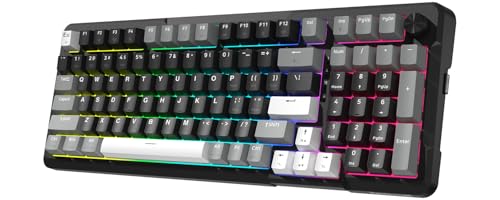
For those who crave a seamless typing experience without the distraction of noise, the Redragon K742 Wireless Mechanical Gaming Keyboard stands out with its innovative gasket structure and sound-absorbing paddings. Its pre-lubed RPC Linear Switch guarantees creamy keystrokes, perfect for long sessions. With tri-mode connectivity, you can easily switch between devices, while the compact layout saves desk space without losing functionality. Plus, the customizable keys through QMK/VIA enhance your productivity. A robust 4,000mAh battery ensures hours of use, and 24/7 customer support guarantees you’re never left in the lurch. Enjoy reliable performance with every keystroke!
Best For: Users seeking a silent and customizable typing experience that enhances productivity for both office work and gaming.
Pros:
- Quiet typing experience: The gasket structure and sound-absorbing paddings minimize noise, making it suitable for quiet environments.
- Versatile connectivity options: Tri-mode connectivity (Bluetooth, 2.4GHz, USB-C) allows easy switching between multiple devices.
- Customizable features: Supports QMK/VIA for extensive key remapping and macro automation, catering to diverse user needs.
Cons:
- Battery life limitations: While it offers up to 53 hours of use without backlighting, backlit use significantly reduces battery life to just 16 hours.
- Compact layout may not suit everyone: The 98% compact design might feel cramped for users accustomed to full-sized keyboards.
- Limited stock switches: The inclusion of only Redragon’s RPC Linear Switch may not appeal to users who prefer different switch types.
ASUS ROG Strix Scope II 96 Wireless Mechanical Gaming Keyboard

The ASUS ROG Strix Scope II 96 Wireless Mechanical Gaming Keyboard stands out with its compact 96% layout, making it ideal for those who want to maximize their desk space without sacrificing essential keys. You’ll appreciate the enhanced typing experience thanks to pre-lubed stabilizers that provide smoother keystrokes. Choose between hot-swappable ROG NX Snow linear switches or ROG NX Storm clicky switches for a personalized feel. With tri-mode connectivity options, switching between devices is seamless. Plus, integrated sound-dampening foam reduces noise, while durable keycaps guarantee a premium touch. This keyboard truly elevates your gaming and typing experience.
Best For: Gamers and typists who seek a compact keyboard without sacrificing functionality or quality.
Pros:
- Compact 96% layout frees up desk space while retaining essential keys.
- Hot-swappable switches allow for easy customization of typing feel and sound preference.
- Integrated sound dampening technology reduces noise for a quieter typing experience.
Cons:
- Limited to a specific layout which may not appeal to users preferring full-sized keyboards.
- Wireless performance could be affected by interference in crowded environments.
- Keycap material choices may not satisfy all users, especially those who prefer specific textures or finishes.
Factors to Consider When Choosing Wireless Mechanical Keyboards for PC
When choosing a wireless mechanical keyboard for your PC, you’ll want to take into account various factors that impact your experience. From connectivity options and switch types to build quality and customization features, each element plays an essential role. Don’t forget to factor in ergonomics for comfort during long sessions.
Connectivity Options Available
Choosing the right connectivity options can greatly enhance your experience with wireless mechanical keyboards for your PC. Most models offer a variety of connections, including Bluetooth, 2.4GHz wireless via a dongle, and USB-C wired. Bluetooth lets you connect multiple devices simultaneously, with some keyboards supporting up to five for effortless switching. If you’re into gaming or high-performance tasks, the 2.4GHz connection typically delivers faster response times and greater stability. Meanwhile, USB-C wired connections allow you to charge while using the keyboard, ensuring a lag-free experience for those who prefer a wired setup. Look for keyboards that offer easy mode switching with dedicated buttons or shortcuts for added convenience and flexibility.
Switch Type Selection
How do you determine which switch type is right for your wireless mechanical keyboard? First, consider your typing style and preferences. Tactile switches give you a noticeable bump for feedback, making them perfect for typing. If you’re a gamer, you might prefer linear switches, which offer a smooth keystroke without that bump. Clicky switches, on the other hand, give you satisfying auditory feedback with each press, but they can be noisy in quiet settings.
Next, think about the actuation force. Switches typically range from 35g to 70g; selecting the right force can enhance comfort during long typing sessions. Finally, check if the keyboard is hot-swappable, allowing you to customize your experience easily.
Build Quality Assurance
After settling on the right switch type for your wireless mechanical keyboard, the next step is ensuring it’s built to last. Look for materials like aluminum or durable PBT keycaps, as they resist wear and enhance longevity. A solid construction, such as a metal top plate or top-mount design, minimizes flex and provides stability, resulting in a more satisfying typing experience. Consider keyboards with sound dampening technology; these features reduce noise and improve acoustic feedback for a pleasant use. Hot-swappable designs let you easily replace switches, promoting customization and preserving the keyboard’s integrity. Finally, opt for double-shot or side-printed PBT keycaps, which maintain their appearance and functionality longer than cheaper options, ensuring a consistent typing experience.
Customization Features Offered
What customization features can elevate your typing experience with a wireless mechanical keyboard? Many keyboards now offer hot-swappable PCBs, so you can easily change switches without soldering, tailoring your setup to your preferences. You’ll also find programmable macros that let you record and assign complex key sequences, boosting your efficiency for tasks or gaming. RGB lighting with millions of color options and effects adds a personal touch to your aesthetic. Key remapping capabilities via dedicated software enhance usability, allowing control over function keys and backlighting settings. Some models even include customizable smart displays or volume control knobs, offering additional versatility. These features guarantee your keyboard not only looks unique but also works exactly how you want it to.
Ergonomic Design Considerations
When personalizing your typing setup, don’t overlook the importance of ergonomic design in wireless mechanical keyboards. Look for low-profile keys that promote comfort and precision, reducing strain during long typing sessions. Keyboards with adjustable feet let you customize the angle, ensuring a more comfortable wrist position. Opt for high-quality materials, like PBT keycaps, to enhance durability and stability, minimizing key wobble. Sound dampening technology, such as integrated foam and silicone pads, creates a pleasant acoustic environment, especially useful in shared spaces. Finally, consider compact layouts like 75% or 96% that save desk space while keeping essential keys accessible, promoting a tidy workspace and encouraging better posture. Your typing experience will greatly improve with these ergonomic features.
Battery Life Expectation
Battery life is an essential factor to take into account as you choose a wireless mechanical keyboard for your PC, especially if you’re looking for a device that can keep up with your typing habits. Some models can last up to 15 days on a full charge with backlighting, while others may go weeks without it. If you opt for a keyboard with a larger battery, like 8000mAh, you could enjoy over four weeks of usage, depending on how you use it. Keep in mind that Bluetooth connections generally offer better battery life than 2.4GHz or wired options. Also, consider your backlighting preferences, as RGB features can drain the battery faster, though adjustable brightness settings can help extend usage.
Keycap Material Durability
Keycap material plays an essential role in the durability of your wireless mechanical keyboard, influencing how well it withstands the rigors of daily use. PBT keycaps are your best bet for resilience, as they resist wear and fading far better than ABS options. Consider double-shot keycap construction, which prevents legends from wearing off, ensuring visibility over time. Thicker keycaps also offer better resistance to impacts and scratches, enhancing overall longevity. UV-coated keycaps may provide some protection against shine, but they don’t match PBT’s durability. Finally, choose keycaps with textured surfaces; they resist fingerprints and smudges better than smooth ones, keeping your keyboard looking clean and new for longer.
Sound Dampening Technology
While you might love the tactile feedback of a mechanical keyboard, the noise it produces can be a distraction, especially in shared spaces. That’s where sound dampening technology comes into play. Keyboards featuring this tech often include layers of sound-absorbing materials, like foams and silicone pads, reducing key noise by up to 40%. IXPE switch dampeners and thicker foams minimize impact noise when keys bottom out, creating a quieter environment. Some designs even absorb vibrations and echoes, enhancing your typing experience without sacrificing tactile feedback. Effective sound dampening not only improves acoustic quality but also boosts the durability and consistency of key presses, reducing wear and tear over time. Consider these features for a more enjoyable typing experience.