When it comes to PC flight simulations, choosing the right HOTAS flight stick can greatly enhance your experience. With various options available, from budget-friendly models to high-end controllers, you’ll want to evaluate what fits your needs best. Each stick offers unique features that can improve your control and immersion. Let’s explore the top 10 HOTAS flight sticks that could transform your gaming sessions into something extraordinary.
Thrustmaster T-Flight Hotas X (Compatible with PC)

If you’re diving into the world of PC flight simulations and want a reliable, budget-friendly option, the Thrustmaster T-Flight Hotas X is an excellent choice. This joystick offers 12 programmable buttons and 5 axes, ensuring you have complete control. Its dual-system aerodynamic control lets you choose between a rotating handle or a tilting lever. You’ll appreciate the detachable throttle, designed for comfort and precision. With positive user feedback highlighting its responsiveness, this stick is perfect for beginners. Just remember to calibrate it correctly for seamless gameplay. Overall, it’s a fantastic value for anyone serious about flight simulation.
Best For: Those new to flight simulation who seek a reliable and cost-effective joystick without sacrificing quality.
Pros:
- Fully programmable with 12 buttons and 5 axes for customizable control.
- Detachable throttle designed for comfort and high precision.
- Positive user feedback on comfort, responsiveness, and setup flexibility.
Cons:
- Some users report a “sticky” middle point on the throttle, which may require break-in time.
- Calibration is essential to avoid functionality issues, especially when switching between PC and PS3.
- Might not meet the advanced needs of experienced flight simulation enthusiasts compared to higher-end models.
Thrustmaster T-Flight Hotas One Flight Simulator Controller

The Thrustmaster T-Flight Hotas One Flight Simulator Controller is an ideal choice for both casual gamers and serious flight simulation enthusiasts looking for an authentic flying experience. Compatible with Xbox Series X|S and PC, it boasts a 10-bit precision system with 5 axes, ensuring smooth and accurate control. With 14 buttons, a rapid trigger, and an ergonomic design, you can easily adapt to various flight styles. The detachable throttle adds versatility, whether you’re flying on your lap or desk. Plus, its dual rudder system enhances lateral maneuvering, making it perfect for all types of aircraft in Microsoft Flight Simulator 2024.
Best For: Casual gamers and serious flight simulation enthusiasts seeking an authentic flying experience.
Pros:
- Ergonomic design with adjustable joystick resistance enhances comfort during long flights.
- Detachable throttle allows for versatile use on both lap and desk.
- Compatible with multiple platforms (Xbox Series X|S and PC) and adaptable for various aircraft types.
Cons:
- Additional accessories, such as the Thrustmaster TFRP rudder pedals, are sold separately.
- The learning curve may be steep for complete beginners to flight simulation.
- Limited customization options compared to higher-end flight controllers.
Thrustmaster T16000M FCS HOTAS (Compatible with PC)

For gamers who crave precision in their flight simulations, the Thrustmaster T16000M FCS HOTAS is an excellent choice. This system connects to your PC via USB, ensuring compatibility with both 32-bit and 64-bit Windows systems. With 16 action buttons, including braille-style identification, you’ll enjoy intuitive controls. The exclusive Hall effect technology delivers unmatched accuracy, while the 4 independent axes and twist rudder enhance maneuverability. The 8-way POV hat and two 4-way switches provide further customization for your flying experience. If you’re serious about flight sims, this HOTAS setup will elevate your gameplay to new heights.
Best For: Flight simulation enthusiasts seeking precision control and customization in their gaming experience.
Pros:
- High precision with Hall effect technology ensuring accurate movements.
- User-friendly design featuring braille-style identification for easy button navigation.
- Versatile control options with 16 action buttons, 4 independent axes, and customizable switches.
Cons:
- Limited compatibility as it only works with PC systems.
- No wireless option, requiring a USB connection for use.
- May have a learning curve for users unfamiliar with HOTAS setups.
Thrustmaster T16000M FCS HOTAS – Compatible with PC
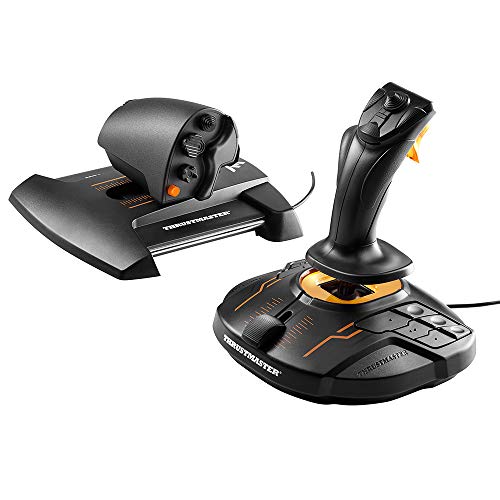
Designed with precision and versatility in mind, the Thrustmaster T16000M FCS HOTAS is an excellent choice for PC flight sim enthusiasts seeking an entry-level solution. Compatible with various Windows systems, it boasts 16 action buttons, an 8-way POV hat, and four independent axes, including a twist rudder. You’ll appreciate the Hall Effect and H.e.A.R.T magnetic precision technologies that enhance your control. With an ergonomic design and solid build quality, it’s comfortable for extended use. Just keep in mind that you’ll need some space for setup and may want to adjust the throttle for ideal performance.
Best For: Casual flight simulation enthusiasts looking for a reliable and affordable entry-level joystick setup for PC.
Pros:
- Excellent precision and build quality for the price.
- Ergonomic design allows for comfortable extended use.
- Versatile configurations for key mapping and controls.
Cons:
- Some components may feel less durable due to plastic construction.
- Throttle movement might require adjustments for optimal precision.
- Setup requires space, and cables can become unorganized.
Thrustmaster T-Flight Hotas X – Compatible with PS3/PC

Looking for an affordable yet reliable flight stick? The Thrustmaster T-Flight Hotas X is a fantastic choice for both PS3 and PC gamers. Weighing just 4.4 pounds, it features a comfortable wide hand-rest and a detachable throttle control for ergonomic use. With 12 programmable buttons and 5 axles, you can easily customize your settings. Its plug-and-play setup means you’ll be flying in no time, and the adjustable resistance joystick offers high precision. While it’s budget-friendly, some users report concerns about durability, but overall, it provides a significant upgrade over standard controllers for flight simulations.
Best For: Budget-conscious flight simulation enthusiasts looking for a reliable and comfortable joystick for PS3 and PC.
Pros:
- Comfortable design with a wide hand-rest and detachable throttle control for ergonomic use.
- Customizable settings with 12 programmable buttons and 5 axles, allowing for personalized control.
- Plug-and-play setup makes it easy to start flying right away without complicated installations.
Cons:
- Some users report durability concerns, indicating it may not withstand heavy use.
- The connection between the joystick and throttle can be too close for some users, although they can be separated.
- There have been instances of quality control issues, with some items appearing used or lacking documentation.
Thrustmaster Sol-R2 HOSAS for Space Flight Simulation

The Thrustmaster Sol-R2 HOSAS stands out as an exceptional choice for dedicated space flight simulation enthusiasts. With Hall Effect Technology, it guarantees ultra-precise gaming on your PC. You’ll appreciate the two detachable ambidextrous grips, complete with interchangeable wrist and thumb rests for ultimate comfort and stability. The system boasts a total of 88 action buttons, including 21 on each flightstick, offering a rich array of controls. Featuring H.E.A.R.T. technology for 16-bit accuracy, it elevates your gameplay precision. Plus, the backlit joysticks, inspired by iconic sci-fi designs, enhance the immersive experience while seamlessly integrating with other Thrustmaster products.
Best For: The Thrustmaster Sol-R2 HOSAS is best for serious space flight simulation enthusiasts looking for precision and comfort in their gaming experience.
Pros:
- Exceptional precision with H.E.A.R.T. technology providing 16-bit accuracy.
- Customizable comfort with detachable ambidextrous grips and interchangeable wrist and thumb rests.
- Extensive control options with a total of 88 action buttons available.
Cons:
- Primarily designed for PC, limiting compatibility with other gaming platforms.
- May require a larger gaming setup due to the dual flightstick design.
- Higher price point compared to standard flight sticks, which may not appeal to casual gamers.
Turtle Beach VelocityOne Flightdeck HOTAS Simulation System Joystick & Throttle
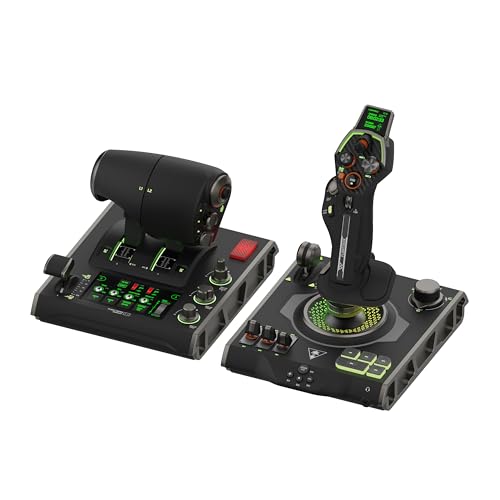
For those seeking an immersive experience in air and space combat simulations, the Turtle Beach VelocityOne Flightdeck HOTAS Simulation System stands out with its innovative Flight Touch Display. This universal HOTAS system is compatible with Windows 10 and 11 PCs, ensuring a seamless setup. You’ll appreciate the contactless Hall-Effect controls, providing precision and durability. With 139 programmable buttons and an adjustable haptic throttle detent response, customization is at your fingertips. The ergonomic design allows you to adjust the stick height, accommodating all hand sizes for comfort during long gaming sessions. Elevate your flight simulation experience with this top-tier control system.
Best For: Flight simulation enthusiasts and gamers looking for a high-quality, customizable control system for air and space combat experiences.
Pros:
- Innovative Flight Touch Display enhances user interaction and immersion.
- 139 programmable buttons allow for extensive customization to suit individual preferences.
- Ergonomic design with adjustable stick height ensures comfort for users of all hand sizes.
Cons:
- May have a steeper learning curve for beginners unfamiliar with HOTAS setups.
- Compatibility limited to Windows 10 & 11 PCs, excluding other operating systems.
- Price point might be higher than entry-level flight simulation controllers, making it less accessible for casual users.
Thrustmaster HOTAS Warthog Flight Stick and Throttle for Flight Simulation

Experience the thrill of realistic flight simulation with the Thrustmaster HOTAS Warthog Flight Stick and Throttle, a perfect choice for serious aviation enthusiasts. This official replica of the U.S. Air Force A-10C offers unmatched precision with its H.E.A.R.T Hall Effect technology. You’ll appreciate the detachable metal joystick handle, 19 action buttons, and 16-bit accuracy for an authentic flying experience. The dual throttle system allows independent engine control, featuring 17 buttons and magnetic sensors. Customize your setup using T.A.R.G.E.T software, ensuring compatibility with popular games. With its robust build and extensive controls, the Warthog truly elevates your flight simulation experience.
Best For: Serious aviation enthusiasts and flight simulation gamers seeking an authentic and high-quality experience.
Pros:
- High precision with H.E.A.R.T Hall Effect technology, providing 16-bit accuracy.
- Realistic controls with a detachable metal joystick handle and numerous action buttons.
- Extensive customization options through T.A.R.G.E.T software for enhanced compatibility and configuration.
Cons:
- Hefty weight of 14 lbs may require substantial desk space and stability.
- The price point may be higher than entry-level flight sticks, limiting accessibility for casual users.
- Complex programming features might be overwhelming for beginners.
WINWING Orion2 HOTAS MAX Flight Controller
Releasing the potential for advanced simulation, the WINWING Orion2 HOTAS MAX Flight Controller is perfect for serious flight sim enthusiasts and gamers alike. With its precision alloy molding and 16-bit sensor, you’ll experience unmatched control. The StrikeAce E Throttle Grip boasts 38 switches and a dual dynamic motor for realism. You can customize your setup with various joystick and throttle options. Though assembly requires some effort, many find the build quality solid and a significant upgrade from entry-level options. Just be aware of potential customer service issues and consider checking video guides for installation tips. Enjoy your soaring adventures!
Best For: Serious flight sim enthusiasts and gamers looking for advanced control and customization in their setups.
Pros:
- High-quality metal construction and solid build provide durability and a premium feel.
- Extensive customization options with different joystick and throttle configurations.
- Realistic control experience with features like the dual dynamic motor and adjustable hand rest.
Cons:
- Assembly can be challenging, and no printed instructions are included, requiring reliance on online video guides.
- Some users have reported issues with customer service and slow refund processes.
- Preset keybindings for popular games may require adjustments, leading to potential frustration during setup.
THRUSTMASTER Play,Plug T.Flight Hotas 4 (PS4/PC),4160664, Playstation 4

The THRUSTMASTER Play, Plug T.Flight Hotas 4 is an exceptional choice for gamers seeking a versatile and affordable joystick tailored for both PlayStation 4 and PC flight simulations. With its detachable throttle and adjustable joystick resistance, you’ll experience immersive gameplay across various flight types. Weighing just 4.45 pounds and featuring a stable base, it guarantees a solid performance. You can easily map controls to suit your preferences, thanks to its programmable settings. While it has a few minor drawbacks, like a short connection cord, its 4.3-star rating speaks volumes about its quality and value for flight enthusiasts.
Best For: Flight simulation enthusiasts looking for an affordable and versatile joystick for both PS4 and PC gaming.
Pros:
- Adaptable design for various flight types, enhancing immersive gameplay.
- Programmable controls allow for customization and easy mapping of settings.
- Stable base and adjustable joystick resistance provide solid performance during gameplay.
Cons:
- Short connection cord may limit placement options.
- Lack of thumb button can be inconvenient for some users.
- Throttle responsiveness issues reported by a few customers.
Factors to Consider When Choosing Hotas Flight Sticks for PC Flight Sims
When you’re choosing a HOTAS flight stick for your PC flight sims, there are several key factors to take into account. Think about compatibility with your favorite games, the button layout that suits your play style, and the precision features that enhance your control. Don’t forget to evaluate ergonomics for comfort during long sessions and analyze the price to ascertain you’re getting good value.
Compatibility With Flight Sims
Choosing the right HOTAS flight stick for your PC flight sims involves several key compatibility factors that can greatly impact your gaming experience. First, ascertain the flight stick is compatible with the specific simulation software you plan to use, as some models are tailored for certain games. Also, check whether it supports both PC and console systems; some sticks work exclusively with PCs, while others are versatile enough for consoles like PlayStation or Xbox. Look for features like programmable buttons and axes, which can enhance compatibility by allowing you to customize controls. Finally, verify the operating system requirements and read user reviews to assess performance with popular flight sims, confirming it meets your expectations for responsiveness and functionality.
Button Configuration and Layout
After ensuring compatibility with your favorite flight sims, the next step is to evaluate button configuration and layout. A good HOTAS flight stick, like the Thrustmaster T16000M FCS, features multiple action buttons—16, in this case—along with a POV hat for versatile control. Look for programmable buttons; the T-Flight Hotas X, for example, supports 12, allowing you to customize your setup. Prioritize ergonomics for easy access to essential controls during flight, aided by thoughtful button placements and adjustable joystick resistance. Additionally, consider systems with extra controls like sliders and dials for fine-tuned adjustments. Finally, check the number of axes; advanced models may offer up to 5 axes, enhancing navigation and maneuvering precision in your simulations.
Precision and Control Features
To achieve ideal performance in PC flight simulations, you must consider precision and control features when selecting a HOTAS flight stick. Look for models that incorporate Hall Effect technology, as this enhances accuracy and eliminates drift through magnetic sensors. A flight stick with multiple axes—ideally five—allows for advanced maneuvering, making your flight experience more realistic. Adjustable joystick resistance is another essential feature; it lets you customize the control feel to match your preferences, especially during long sessions. Additionally, having 12 to 19 programmable buttons improves accessibility and efficiency, enabling you to tailor controls for specific functions. Finally, a detachable throttle control provides versatility and enhances your handling, whether you’re gaming on a desk or your lap.
Ergonomics and Comfort Design
When selecting a HOTAS flight stick, ergonomics and comfort design play an essential role in enhancing your overall gaming experience. Look for wide hand rests and adjustable joystick resistance to guarantee comfort during those long sessions. Detachable throttle controls can be a game-changer, allowing you to customize placement based on your personal preferences. High-precision joysticks with adjustable resistance contribute to a comfortable grip, helping to reduce hand fatigue as you play. It’s also important that the setup accommodates various hand sizes for a more personalized feel. Finally, pay attention to the positioning of buttons and switches; an ideal layout minimizes excessive hand movement, improving accessibility and keeping you focused on your flight simulation.
Price and Value Analysis
As you plunge into the world of HOTAS flight sticks, understanding the price and value is essential for making an informed decision. Entry-level options range from $50 to $150, perfect for beginners and casual gamers. If you’re looking for more advanced features, consider mid-range sticks priced between $150 and $300, which offer better precision and customizable buttons. For serious enthusiasts, high-end models exceeding $300 provide realistic controls and robust build quality. Don’t forget to assess the number of programmable buttons and axes, as these can enhance your gameplay versatility. Finally, check customer ratings and reviews; products with higher ratings typically indicate greater satisfaction and reliability within the flight simulation community.