As businesses evolve, edge computing PCs are becoming essential tools for enhancing performance and efficiency. In 2025, the right systems will offer unmatched multitasking capabilities and connectivity options tailored for modern enterprises. You’ll want to evaluate various models that promise to meet your business needs. Which of these cutting-edge PCs will best support your operations and future growth? Let’s explore the top contenders on the market.
MINISFORUM MS-01 Mini PC with Intel Core i9-12900H

The MINISFORUM MS-01 Mini PC with an Intel Core i9-12900H is tailor-made for businesses that demand high-performance computing in a compact form factor. With its 14 cores and 20 threads, it reaches speeds up to 5.0GHz, delivering robust processing power for gaming, video editing, and 3D rendering. You’ll appreciate the dual-channel 32GB DDR5 RAM and a 1TB SSD, expandable to 24TB, ensuring ample storage for intensive applications. Its connectivity options, including two 10Gbps Ethernet ports, guarantee lightning-fast networking. Plus, Intel vPRO technology enhances security, making it a reliable choice for enterprise-class solutions.
Best For: The MINISFORUM MS-01 Mini PC is best for businesses and professionals seeking high-performance computing solutions in a compact design.
Pros:
- Powerful Performance: Equipped with an Intel Core i9-12900H processor, delivering exceptional speed and multitasking capabilities.
- Expandable Storage: Supports up to 24TB of storage, allowing for extensive data management and storage needs.
- High-Speed Connectivity: Features multiple 10Gbps Ethernet ports for ultra-fast networking, ideal for enterprise environments.
Cons:
- Price Point: Higher performance comes at a premium cost, which may not be suitable for budget-conscious users.
- Size Limitations: Although compact, the mini PC might not accommodate larger, specialized hardware compared to traditional desktops.
- Cooling Requirements: High-performance components may generate significant heat, necessitating effective cooling solutions for sustained use.
MINISFORUM UN1250 Mini PC with Intel Core i5-1250P

For businesses seeking a powerful yet compact solution, the MINISFORUM UN1250 Mini PC with its Intel Core i5-1250P processor stands out as an ideal choice. With 12 cores and a max turbo frequency of 4.4 GHz, it guarantees high performance for multitasking. You’ll appreciate the Intel Iris Xe Graphics, supporting triple 4K displays for enhanced productivity. Equipped with 32GB DDR4 RAM and a 512GB SSD, storage is easily expandable. Connectivity options include a 2.5Gbps Ethernet port, dual-band Wi-Fi 6, and versatile USB Type-C features, making it perfect for any modern business or mobile office setup.
Best For: Businesses and professionals seeking a compact yet powerful mini PC for multitasking and multi-monitor setups.
Pros:
- High performance with Intel Core i5-1250P processor and 12 cores for efficient multitasking.
- Triple 4K display support for enhanced productivity and multitasking capabilities.
- Versatile connectivity options including 2.5Gbps Ethernet, dual-band Wi-Fi 6, and a full-featured USB Type-C port.
Cons:
- Limited pre-installed storage of 512GB may require expansion for users with large media libraries.
- Active cooling fan may introduce noise in quiet environments.
- Higher initial cost compared to basic desktop solutions.
HP ProDesk 400 G9 SFF Business Desktop Computer

Designed to meet the demands of modern businesses, the HP ProDesk 400 G9 SFF Business Desktop Computer excels in multitasking and data analysis. With an Intel Celeron G6900 processor and 32GB of expandable RAM, it guarantees smooth performance for your daily tasks. The 1TB PCIe SSD offers lightning-fast storage, enhancing your productivity with quick boot times and rapid file access. Its compact design saves space, while dual 4K display support and multiple connectivity options keep you connected. Plus, with Windows 11 Pro and enterprise-level security features, your data remains safe and secure. This desktop is a reliable choice for any business.
Best For: The HP ProDesk 400 G9 SFF Business Desktop Computer is best for small to medium-sized businesses seeking a reliable and efficient computing solution for multitasking and data analysis.
Pros:
- Fast performance with an Intel Celeron G6900 processor and 32GB of RAM, suitable for daily business tasks.
- Expandable storage and memory options allow for future upgrades to meet growing business needs.
- Comprehensive security features with Windows 11 Pro and HP Wolf Security ensure data protection.
Cons:
- Integrated graphics may not meet the needs of users requiring high-end graphics performance for design or gaming.
- Limited weight of 18 pounds may not meet preferences for ultra-light or portable systems.
- Compact design could restrict internal hardware upgrades compared to larger desktops.
HP Elite Desk SFF 600 G9 Business Desktop Computer

Offering robust performance in a compact design, the HP Elite Desk SFF 600 G9 Business Desktop Computer is perfect for professionals who need powerful computing without sacrificing valuable office space. With a 13th Gen Intel Core i7 processor and 32GB of DDR5 RAM, it effortlessly handles demanding tasks. You can expand storage up to 2TB, ensuring ultra-fast access to extensive files. Connectivity is a breeze with multiple USB ports, HDMI, and Wi-Fi capabilities. Its small form factor fits seamlessly into any workspace, while the included wired keyboard provides a reliable typing experience. Enjoy exceptional performance with outstanding customer satisfaction ratings!
Best For: Professionals seeking a powerful, space-saving desktop computer for demanding tasks and efficient productivity.
Pros:
- High-performance: Equipped with a 13th Gen Intel Core i7 processor and 32GB DDR5 RAM for seamless multitasking.
- Expandable storage: Options to upgrade to 2TB for extensive file storage and quick access.
- Compact design: Small form factor ideal for limited office spaces without compromising on power.
Cons:
- Integrated graphics: Lacks dedicated graphics for high-end gaming or graphic design tasks.
- Weight: Weighs 18 pounds, which may be heavier than other compact options.
- Wired keyboard included: Limited flexibility in terms of wireless peripherals unless purchased separately.
Lenovo ThinkCentre Tiny M70q Gen 5 Business Desktop

The Lenovo ThinkCentre Tiny M70q Gen 5 Business Desktop stands out as an exceptional choice for professionals seeking a compact yet powerful solution for their edge computing needs. With an Intel 10-Core i5 processor and 32GB of DDR5 RAM, it handles multitasking and data processing effortlessly. The 1TB NVMe storage guarantees you’ve got plenty of space for your projects. Its sleek dimensions make it easy to fit in any workspace, while WiFi 6E and Bluetooth 5.1 keep you connected. Plus, with a 4.9-star rating, users rave about its performance, compact size, and ease of setup.
Best For: Professionals and businesses seeking a compact, high-performance desktop for multitasking and efficient data processing.
Pros:
- Powerful Performance: Equipped with an Intel 10-Core i5 processor and 32GB of DDR5 RAM for seamless multitasking.
- Compact Design: Its small dimensions make it easy to fit into any workspace without sacrificing power.
- Excellent Connectivity: Features WiFi 6E and Bluetooth 5.1 for fast and reliable connections.
Cons:
- Noise Levels: Some users report that the device can be noisy during operation.
- Limited HDMI Ports: May require adapters for additional HDMI connections, limiting immediate usability for multiple displays.
- Weight: At 2.91 pounds, it may be heavier compared to other mini PCs in its class.
Dell OptiPlex 7020 Plus Business Desktop Computer
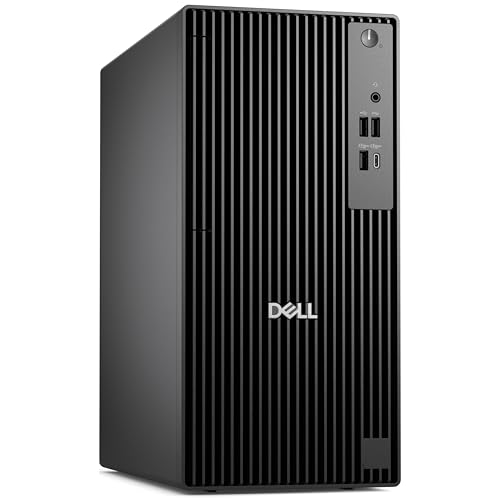
For businesses seeking a powerful yet compact solution, the Dell OptiPlex 7020 Plus Tower Desktop PC stands out with its 14th Gen Intel Core i7-14700 processor, delivering impressive performance with turbo speeds reaching up to 5.4GHz. With 32GB of DDR5 RAM and a 1TB PCIe SSD, you’ll enjoy fast data access and seamless multitasking. The integrated Intel UHD 770 graphics supports three DisplayPort outputs, making it ideal for multi-monitor setups. Though it lacks built-in Wi-Fi and Bluetooth, the included Wireless USB WiFi adapter guarantees connectivity. Overall, this desktop offers reliable performance for any business environment.
Best For: Businesses looking for a powerful and reliable desktop solution with robust performance for multitasking and multi-monitor setups.
Pros:
- High-performance processor: Equipped with a 14th Gen Intel Core i7-14700, offering turbo speeds up to 5.4GHz for demanding applications.
- Ample memory and storage: Features 32GB of DDR5 RAM and a 1TB PCIe SSD for fast data access and seamless multitasking.
- Versatile connectivity options: Includes multiple USB ports and three DisplayPort outputs for enhanced productivity with multi-monitor setups.
Cons:
- No built-in Wi-Fi or Bluetooth: Requires an external Wireless USB WiFi adapter for connectivity, which may be inconvenient for some users.
- User interface issues: Some users report difficulties with the Windows 11 interface, which may affect user experience.
- Build quality concerns: There are mentions of build quality not being as robust as older models, which may raise durability questions.
MINISFORUM N5 Pro 5-Bay Desktop AI NAS

Businesses seeking robust data management and high-performance computing will find the MINISFORUM N5 Pro 5-Bay Desktop AI NAS an exceptional choice. Powered by an AMD Ryzen AI 9 HX PRO 370 processor, this NAS boasts 12 cores and 24 threads, delivering up to 80 TOPS performance. With five SATA HDD slots supporting a staggering 144TB storage capacity, you’ll easily manage large files. Its high-speed network ports allow for swift transfers, while the modular design guarantees effortless upgrades. Plus, with multiple RAID modes and built-in data security features, your data remains safe and accessible, making it perfect for demanding business environments.
Best For: Businesses seeking robust data management and high-performance computing in demanding environments.
Pros:
- High storage capacity with five SATA HDD slots supporting up to 144TB.
- Powerful processing capabilities with an AMD Ryzen AI 9 HX PRO 370 processor, offering 12 cores and up to 80 TOPS performance.
- Flexible connectivity options including 10GbE and 5GbE network ports, as well as dual USB4 and 8K HDMI output.
Cons:
- Weighty design at 15 pounds may limit portability.
- Higher upfront cost compared to basic NAS solutions.
- Complex setup may require technical expertise for optimal configuration and RAID management.
HP Elite 805 G9 Business Desktop Computer

Designed for efficiency and power, the HP Elite 805 G9 Business Desktop Computer stands out as an excellent choice for professionals needing robust performance in edge computing environments. With its AMD Ryzen 5 8500G processor, you’ll enjoy impressive multi-core capabilities that surpass Intel’s offerings. The integrated AMD Radeon 740M graphics guarantee stunning visuals, while the 16GB DDR5 RAM—expandable up to 64GB—supports demanding tasks. Plus, with a 1TB PCIe SSD, you have ample storage that can grow to 4TB. Its sleek design and solid build make it a reliable option for daily use, complementing any workspace seamlessly.
Best For: Professionals and businesses seeking a compact desktop with powerful performance for multitasking and demanding applications.
Pros:
- High performance: Equipped with an AMD Ryzen 5 8500G processor, it excels in multi-core tasks.
- Expandable storage: Comes with a 1TB PCIe SSD, expandable up to 4TB for ample storage needs.
- Sleek design: The small form factor and premium materials make it an aesthetically pleasing addition to any workspace.
Cons:
- Limited graphics capability: Integrated graphics may not be sufficient for high-end gaming or graphic-intensive tasks.
- Weight: At 11 lbs, it may be heavier than some other compact desktops in the market.
- Price point: Higher initial cost compared to entry-level desktops may not fit all budgets.
Dell OptiPlex 7020 MFF Mini Business Desktop Computer
The Dell OptiPlex 7020 MFF Mini Business Desktop Computer stands out as an excellent choice for professionals seeking a powerful yet compact solution for edge computing in 2025. With its Intel Core i3-14100T processor and 16GB DDR5 RAM, it tackles demanding software seamlessly. The 512GB PCIe SSD boosts load times, while support for up to four 4K displays keeps your workflow efficient. It’s equipped with Wi-Fi 6E and multiple USB ports for easy connectivity. Running on Windows 11 Professional, this desktop also includes a keyboard and mouse, making it ready for your business needs right out of the box.
Best For: Professionals and businesses seeking a compact, high-performance desktop solution for multitasking and demanding applications.
Pros:
- Powerful Performance: Features a 14th Gen Intel Core i3-14100T processor and 16GB DDR5 RAM for efficient handling of management software and IT applications.
- High Connectivity: Equipped with Wi-Fi 6E, multiple USB ports, and support for up to four 4K displays, enhancing productivity and connectivity options.
- Ready to Use: Comes pre-installed with Windows 11 Professional and includes essential accessories like a keyboard and mouse.
Cons:
- Limited Upgradeability: The compact design may limit options for hardware upgrades in the future.
- Integrated Graphics: The Intel UHD Graphics 730 may not meet the needs of users requiring advanced graphics performance for gaming or design work.
- Compact Size: While portable, the small form factor may not provide sufficient cooling for prolonged high-performance tasks.
Intel NUC 12 Pro Business Mini Desktop

For professionals seeking a compact yet powerful computing solution, the Intel NUC 12 Pro Business Mini Desktop stands out with its impressive Intel Core i7-1260P processor. This mini desktop packs 12 cores and 16 threads, making it ideal for multitasking across various applications. With 32GB of RAM and a 1TB PCIe 4.0 NVMe SSD, you’ll enjoy fast storage and seamless performance. Its 8K resolution capability allows you to connect multiple displays for enhanced productivity. Plus, with WiFi 6E and a range of ports, connectivity is effortless. Enjoy three years of support and a compact design that fits any workspace.
Best For: Professionals and gamers seeking a compact, high-performance desktop solution for multitasking and extensive connectivity options.
Pros:
- High-performance processor with 12 cores and 16 threads, ideal for demanding tasks.
- Impressive connectivity options including WiFi 6E, multiple USB ports, and support for 8K displays.
- Quiet operation and compact design, making it suitable for any workspace.
Cons:
- Limited upgradability for some components due to its small form factor.
- May require additional peripherals as it does not come with a monitor or keyboard.
- Price point may be higher compared to traditional desktops with similar specifications.
Factors to Consider When Choosing Edge Computing PCs for Business
When choosing edge computing PCs for your business, you need to evaluate several key factors. Performance specifications, connectivity options, and expandable storage capabilities all play essential roles in meeting your operational needs. Don’t forget about graphics processing power and security features, as they can greatly influence your productivity and data safety.
Performance Specifications Overview
Selecting the right performance specifications for edge computing PCs is vital for optimizing business operations. Look for processors with multiple cores and threads, such as Intel’s 12th or 13th generation CPUs, to efficiently handle multitasking and high-performance applications. A minimum of 16GB RAM is recommended, with the option to expand up to 64GB or more as your workloads grow. For storage, consider PCIe NVMe SSDs, which boost data access speeds and can be configured in RAID for better performance or redundancy. Verify your device supports multiple high-resolution video outputs for enhanced productivity in data-intensive environments. Finally, high-speed networking capabilities like 10Gbps Ethernet or Wi-Fi 6 are essential for quick data transfers in edge computing scenarios.
Connectivity Options Available
Performance specifications set the stage for what edge computing PCs can do, but connectivity options play a significant role in maximizing their potential. When choosing your edge computing PC, prioritize models equipped with high-speed connectivity options like 10Gbps Ethernet ports, delivering rapid data transfer. Look for dual-band Wi-Fi 6 support for faster wireless communication and reduced latency. Multiple USB ports, especially USB Type-C with power delivery, are essential for connecting various peripherals and enabling high-speed data transfer simultaneously. Additionally, consider systems with multiple display outputs like HDMI and DisplayPort to facilitate multi-monitor setups, enhancing your productivity. Finally, advanced networking features such as link aggregation can increase throughput and redundancy, ensuring consistent performance in edge computing environments.
Expandable Storage Capabilities
Expandable storage capabilities are essential for edge computing PCs, especially if you’re handling large volumes of data. Look for models that support multiple M.2 NVMe SSDs, as they can greatly increase your total storage capacity, ensuring efficient data handling and processing. RAID configurations, like RAID0 for enhanced capacity and RAID1 for data redundancy, provide both performance and data safety. Some PCs can accommodate up to 24TB of storage, making them ideal for large-scale operations. Additionally, easily upgrading RAM and storage with dual channel configurations helps enhance the longevity and adaptability of your system. Don’t forget to check for high-speed interfaces like PCIe 4.0, which can drastically improve data transfer rates for your data-intensive tasks.
Graphics Processing Power
When handling large volumes of data at the edge, you can’t overlook the role of graphics processing power in your PC choices. It directly impacts the performance of applications that require real-time data processing, such as video analytics and machine learning. While integrated graphics solutions like Intel Iris Xe or AMD Radeon can suffice for many tasks, dedicated GPUs are vital for demanding applications like 3D rendering. Also, consider how your GPU choice affects computational speed and power consumption, which can influence overall system efficiency and costs. Look for multi-threaded performance to enhance parallel processing capabilities, essential for managing large datasets. Finally, make sure you understand the maximum supported display resolutions and outputs, especially for multi-monitor setups that enhance visualization.
Security Features Importance
As businesses increasingly rely on edge computing, prioritizing security features in your PC choices becomes essential to protect sensitive data from cyber threats. Look for hardware-level security measures like a Trusted Platform Module (TPM), which enhances protection against unauthorized access and data breaches. Implement built-in security software, such as antivirus and encryption tools, to safeguard data both at rest and in transit. Given that edge devices process data closer to the source, it’s critical to establish robust security protocols to mitigate vulnerabilities in remote environments. Don’t forget regular firmware and software updates; they’re important for patching known vulnerabilities and ensuring your system remains resilient against evolving threats. Secure your edge computing infrastructure to maintain compliance and protect your business.
Form Factor Considerations
Selecting the right form factor for your edge computing PCs can make a significant difference in deployment efficiency. Small form factors (SFF) are often the best choice for tight spaces, making installation easier in industrial and retail settings where traditional desktops won’t fit. Weighing your options is vital too; lighter devices enhance mobility, allowing for easy transport between operational areas without sacrificing performance. Confirm the form factor supports efficient cooling solutions since high-performance tasks generate heat, affecting reliability. Additionally, look for options that allow for expansion, such as extra storage or connectivity ports. This adaptability guarantees your edge computing setup can grow with your business needs, providing long-term value.
Cooling and Noise Levels
Effective cooling and manageable noise levels are essential considerations for edge computing PCs, especially in environments where performance and comfort go hand in hand. You’ll want systems with robust cooling solutions, like active fans or heat sinks, to maintain ideal temperatures and prevent thermal throttling during intense workloads. Quieter systems are perfect if sound sensitivity is a concern, ensuring workplace comfort isn’t compromised. Efficient cooling not only enhances performance but also extends hardware lifespan by reducing overheating risks. Proper airflow design is vital, so look for PCs with strategically placed components and larger fans. Regularly monitoring temperature and noise levels can help you fine-tune cooling strategies, maximizing efficiency and reliability in your edge computing setup.