If you’re an engineer on the move, having the right portable workstation laptop can make all the difference. You need a device that balances power, performance, and portability. In this guide, we’ll explore the top options available, each tailored to handle demanding applications without weighing you down. But with so many choices, how do you find the perfect fit for your specific needs? Let’s take a closer look at what’s out there.
HP ZBook Firefly 14 G11 Mobile Workstation Laptop
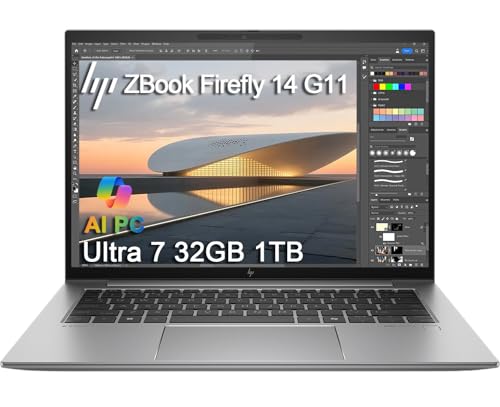
The HP ZBook Firefly 14 G11 Mobile Workstation Laptop stands out as an ideal choice for engineers who demand high performance on the go. With its 14-inch FHD+ touchscreen, stunning visuals come alive at 1920 x 1200 pixels. The AMD Ryzen 7 8840HS processor, paired with 64GB DDR5 RAM, guarantees you can tackle heavy workloads effortlessly. Weighing just 3.11 pounds, it’s highly portable. Fast-charging capabilities get you back on track quickly, while multiple ports, including Thunderbolt 4, enhance connectivity. Plus, built-in security features like the fingerprint reader give you peace of mind during your projects.
Best For: Engineers and professionals who require high performance and portability for heavy workloads and multitasking.
Pros:
- High-performance AMD Ryzen 7 processor and 64GB DDR5 RAM for seamless multitasking.
- Lightweight design at just 3.11 pounds, making it easy to carry.
- Fast-charging battery that reaches 50% in just 30 minutes for quick uptime.
Cons:
- Higher price point may not be suitable for budget-conscious users.
- Limited upgrade options due to compact design.
- Integrated graphics may not meet the needs of users requiring advanced gaming or graphics performance.
Lenovo ThinkPad P14s Mobile Workstation Laptop

Engineers and designers seeking a powerful yet portable workstation will find the Lenovo ThinkPad P14s Mobile Workstation Laptop an exceptional choice. With an AMD Ryzen 7 Pro 5850U processor and 32GB of DDR4 memory, it handles demanding tasks effortlessly. The 14-inch FHD touchscreen offers a vibrant display, while integrated AMD Radeon graphics support up to three external monitors. Connectivity options are plentiful, including USB-C and HDMI ports, ensuring you stay connected on the go. Built to last, it meets multiple MIL-SPEC standards and is ISV certified for essential software like AutoCAD and SolidWorks, making it a reliable companion for professionals.
Best For: Engineers and designers seeking a powerful, portable workstation for demanding applications.
Pros:
- Exceptional performance with AMD Ryzen 7 Pro 5850U processor and 32GB DDR4 memory.
- High-quality 14-inch FHD touchscreen display with anti-glare technology.
- Robust connectivity options, including multiple USB-C and HDMI ports, supporting up to three external monitors.
Cons:
- Limited upgradeability due to soldered components.
- Heavier compared to some other ultraportable laptops.
- May be overkill for casual users or those with less demanding software requirements.
Lenovo ThinkPad P15 Mobile Workstation

For professionals seeking a powerful mobile workstation, the Lenovo ThinkPad P15 stands out with its impressive Intel Octa-Core i7 processor and a whopping 128GB of RAM. The 15.6-inch FHD display offers anti-glare technology and 300 nits brightness, perfect for outdoor work. You’ll appreciate the NVIDIA RTX A2000 graphics for demanding applications, while the 4TB SSD guarantees lightning-fast storage. Weighing just 6.32 lbs, it’s portable enough for on-the-go tasks. With robust connectivity options, including Thunderbolt 4 and Wi-Fi 6E, you can stay connected effortlessly. Plus, its security features provide peace of mind for sensitive data management.
Best For: Professionals and creatives who require a high-performance mobile workstation for demanding applications and multitasking.
Pros:
- Exceptional performance with an Intel Octa-Core i7 processor and 128GB of RAM, making it ideal for resource-intensive tasks.
- Stunning 15.6-inch FHD display with anti-glare technology, offering excellent visibility even in bright environments.
- Extensive connectivity options, including Thunderbolt 4 and Wi-Fi 6E, ensuring fast data transfer and seamless connectivity.
Cons:
- Weighing 6.32 lbs, it may be heavier than some users prefer for frequent portability.
- The high-end specifications come at a premium price, which may not be suitable for budget-conscious buyers.
- Limited battery life during ultra-performance mode may require frequent charging during intensive tasks.
Lenovo Gen 5 ThinkPad P14s Mobile Workstation

With its powerful AMD Ryzen 7 PRO processor and 64GB of RAM, the Lenovo Gen 5 ThinkPad P14s Mobile Workstation stands out as an ideal choice for professionals tackling demanding engineering tasks. Its 14-inch 2.8K OLED display offers stunning visuals, complemented by slim bezels and TÜV Eyesafe certification to reduce eye strain. The dual-fan cooling system guarantees efficient performance, while the ISV-certified apps assure reliability for heavy workloads. You’ll appreciate the easy upgradeability with customer replaceable units. Weighing just 4.99 pounds, it’s portable enough for on-the-go productivity, making it a top contender for any engineer’s toolkit.
Best For: Professionals and engineers seeking a high-performance mobile workstation for demanding tasks and on-the-go productivity.
Pros:
- Exceptional performance with AMD Ryzen 7 PRO processor and 64GB RAM for heavy workloads.
- Stunning 14-inch 2.8K OLED display with TÜV Eyesafe certification for reduced eye strain.
- Excellent upgradeability with customer replaceable units for easy maintenance and repairs.
Cons:
- Some users have reported battery life concerns during intensive usage.
- Occasional heating issues noted under heavy workloads.
- Weighing 4.99 pounds may be heavier than other lightweight alternatives for portability.
Lenovo ThinkPad P14s Mobile Workstation

The Lenovo ThinkPad P14s Mobile Workstation stands out as a top choice for engineers who need a robust and portable solution. With its 14-inch FHD touchscreen and AMD Ryzen 7 Pro processor, you’ll experience high performance and smooth multitasking. Weighing just 3.24 pounds, it’s easy to carry, while offering up to 12.5 hours of battery life. The laptop supports multiple external displays, ensuring you can work efficiently. Certified for critical applications like AutoCAD and MATLAB, it’s built to endure demanding environments. Plus, the three-year warranty on upgrades gives you peace of mind. This workstation is truly made for engineers on the go.
Best For: Engineers and professionals who require a powerful, portable workstation for demanding applications and multitasking.
Pros:
- High-performance AMD Ryzen 7 Pro processor with integrated Radeon graphics for smooth operation.
- Lightweight design at 3.24 pounds and long battery life of up to 12.5 hours for portability.
- Certified for essential engineering software like AutoCAD, CREO, and MATLAB, ensuring reliability in critical tasks.
Cons:
- No optical drive, which may be a limitation for users needing to use physical media.
- Slightly higher price point compared to standard laptops, reflecting its professional-grade specifications.
- Limited upgrade options post-purchase as it is primarily resealed for memory/SSD upgrades.
Lenovo ThinkPad P16s Gen 3 Mobile Workstation Laptop

Engineers seeking a powerful and portable solution will find the Lenovo ThinkPad P16s Gen 3 Mobile Workstation Laptop an ideal choice, thanks to its robust Intel Core Ultra 7 processor and 64GB of DDR5 RAM. Weighing just 4.01 pounds, it’s easy to carry, while the 16-inch FHD+ display guarantees clear visuals for any project. With a 2TB SSD and NVIDIA RTX 500 graphics, multitasking and rendering are seamless. Connectivity options like Thunderbolt 4 and Wi-Fi 6E enhance productivity, and built-in security features like a fingerprint reader keep your data safe. You’ll appreciate the performance on the go!
Best For: Engineers and professionals needing a powerful, portable workstation with high performance for demanding tasks.
Pros:
- Powerful Performance: Equipped with Intel Core Ultra 7 processor and 64GB DDR5 RAM for seamless multitasking and rendering.
- High-Quality Display: 16-inch FHD+ display with anti-glare features ensures clear visuals for projects and presentations.
- Robust Connectivity: Multiple ports, including Thunderbolt 4 and Wi-Fi 6E, enhance productivity and connectivity options.
Cons:
- Weight: At 4.01 pounds, it may be heavier than some competitors in the portable workstation category.
- Price Point: High-end specifications may come with a higher price, making it less accessible for budget-conscious buyers.
- Limited Graphics Memory: The 4GB GDDR6 may not be sufficient for extremely graphics-intensive applications compared to other models with more VRAM.
Lenovo ThinkPad P16 Gen 2 Mobile Workstation
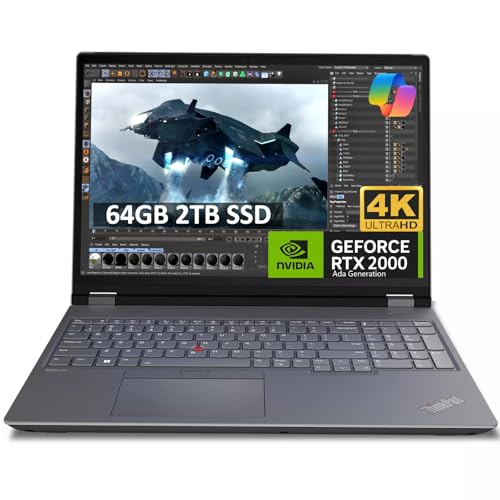
If you’re seeking a powerhouse that handles demanding tasks effortlessly, the Lenovo ThinkPad P16 Gen 2 Mobile Workstation stands out. With a stunning 16-inch 4K UHD display and an Intel 20-Core i7-14700HX processor, it delivers exceptional performance for engineers and designers. You’ll appreciate the dedicated NVIDIA RTX 2000 Ada GPU, ensuring smooth graphics and multitasking. The rich connectivity options, including Thunderbolt 4 and HDMI 2.1, allow easy peripheral connections. Plus, with a three-year warranty on upgraded components, you can work confidently. This workstation truly combines power, versatility, and usability, making it an excellent choice for your mobile workstation needs.
Best For: Professionals such as engineers, designers, and architects who require high performance and reliability in demanding tasks.
Pros:
- High-performance Intel 20-Core i7-14700HX processor and dedicated NVIDIA RTX 2000 Ada GPU for smooth multitasking.
- Stunning 16-inch 4K UHD display with HDR support and wide color gamut for impressive visuals.
- Extensive connectivity options including Thunderbolt 4 and HDMI 2.1 for easy peripheral connections.
Cons:
- Customer rating of 3.1 out of 5 stars may indicate mixed user experiences.
- Relatively heavy for a mobile workstation, potentially impacting portability.
- Higher price point may not be suitable for budget-conscious users.
Dell Precision 3490 Mobile Workstation Laptop

For professionals constantly on the move, the Dell Precision 3490 Mobile Workstation Laptop stands out as an ideal choice, combining portability with powerful performance. Weighing just 3.09 lbs, this 14-inch laptop packs a punch with its Intel Core Ultra 7 processor and 32GB DDR5 RAM, perfect for demanding tasks. The FHD anti-glare display and 1080p webcam enhance your video calls, while connectivity options like Thunderbolt 4 support up to three 4K monitors. With Intel Wi-Fi 6E and a built-in fingerprint reader, you’ll enjoy fast connections and added security. Plus, it runs on Windows 11 Pro, ensuring smooth, efficient operation.
Best For: Professionals, designers, and engineers who need a portable yet powerful workstation for demanding tasks and multitasking.
Pros:
- Compact and lightweight design (3.09 lbs) for easy portability.
- High-performance specifications with Intel Core Ultra 7 processor and 32GB DDR5 RAM for efficient multitasking.
- Multiple connectivity options, including Thunderbolt 4, supporting up to three 4K external monitors.
Cons:
- Integrated graphics may not meet the needs of high-end gaming or graphic-intensive applications.
- Limited premium features compared to flagship models like Precision 5690.
- The 14-inch display may be too small for users who prefer larger screens for extensive work.
HP ZBook Firefly 16 G11 Mobile Workstation Laptop

The HP ZBook Firefly 16 G11 Mobile Workstation Laptop stands out with its impressive processing power, featuring an Intel Core Ultra 7 155U that can reach speeds of up to 4.8 GHz. With 64GB of DDR5 RAM and a 2TB PCIe NVMe SSD, it handles demanding tasks effortlessly. The 16-inch FHD+ display guarantees vibrant visuals, while its lightweight design at 3.96 pounds makes it easy to carry. Connectivity is exceptional with multiple Thunderbolt 4 ports, and the battery charges to 50% in just 30 minutes. Plus, it’s backed by a solid warranty, giving you peace of mind on your engineering projects.
Best For: Professionals and creatives who require high performance for demanding applications while on the go.
Pros:
- Powerful Performance: Equipped with Intel Core Ultra 7 processor and 64GB DDR5 RAM for seamless multitasking.
- High-Quality Display: 16-inch FHD+ screen provides vibrant visuals and an immersive viewing experience.
- Fast Charging: Battery can reach 50% charge in just 30 minutes, enhancing productivity during travel.
Cons:
- Integrated Graphics: Lacks dedicated graphics card, which may limit performance in graphics-intensive tasks.
- Weight: At 3.96 pounds, it may be heavier than some competing ultra-portable laptops.
- Price Point: Premium specifications come with a higher price tag, which may not fit all budgets.
Lenovo ThinkPad P14s Gen 5 Mobile Workstation Laptop
Engineers seeking a powerful yet portable workstation will find the Lenovo ThinkPad P14s Gen 5 an exceptional choice. Weighing just 3.55 lbs, it sports a stunning 14.5″ 3K display, perfect for vibrant visuals. With an Intel Core Ultra 7 processor and NVIDIA RTX 500 graphics, it handles demanding applications like AutoCAD and SolidWorks with ease. The 64GB DDR5 memory and 2TB SSD guarantee you’ve got ample power and storage. Plus, features like a fingerprint reader and AI-enhanced security keep your data safe. Enjoy seamless connectivity with multiple ports, making it a versatile companion for your engineering tasks on the go.
Best For: Engineers and professionals who require a powerful, portable workstation for demanding applications and multitasking.
Pros:
- Exceptional performance with Intel Core Ultra 7 processor and NVIDIA RTX 500 graphics for handling intensive tasks.
- Stunning 14.5″ 3K display with anti-glare technology for vibrant visuals and improved usability in various lighting conditions.
- Comprehensive security features, including fingerprint reader and AI-powered threat detection, to protect sensitive data.
Cons:
- Higher price point compared to standard laptops, which may not be suitable for casual users.
- Limited upgrade options post-purchase as the laptop is resealed for memory/SSD upgrades.
- Weight of 3.55 lbs may be slightly heavier for users prioritizing ultra-lightweight devices for travel.
Factors to Consider When Choosing Portable Workstation Laptops for Engineers
When you’re choosing a portable workstation laptop as an engineer, several key factors come into play. You’ll want to contemplate performance specifications and components, display quality and size, as well as portability and weight. Additionally, think about connectivity options and the laptop’s durability to make certain it meets your professional needs.
Performance Specifications and Components
Selecting the right portable workstation laptop hinges on its performance specifications and components. Look for high-end processors like the AMD Ryzen 7 or Intel Core i7/i9 series. These chips feature multiple cores and threads, making them ideal for demanding engineering applications. You’ll want a minimum of 32GB of DDR5 RAM to guarantee smooth multitasking during complex simulations. For storage, opt for solid-state drives (SSD) with at least 1TB capacity; these provide faster data access and ample space for large project files. A dedicated graphics card, like the NVIDIA RTX or AMD Radeon, is essential for effective rendering and running CAD or 3D modeling software. These specifications will greatly enhance your productivity on the go.
Display Quality and Size
While you may prioritize performance specifications, the display quality and size of a portable workstation laptop are equally vital for engineers. Ideally, look for a screen size between 14 to 16 inches, striking a balance between usability and portability. A high resolution, such as FHD (1920 x 1080) or even 2.8K or 4K, is essential for those intricate designs and data analysis tasks. Aim for brightness levels of at least 300 nits to maintain visibility in various lighting conditions, especially outdoors. Anti-glare technology will help reduce reflections and eye strain during long hours of use. Additionally, features like touchscreens and high color accuracy (100% sRGB) can greatly enhance your productivity and ease of interaction.
Portability and Weight
Portability and weight play a significant role in the choice of a portable workstation laptop for engineers, especially since many of you frequently travel to job sites. Aim for a laptop that weighs under 4 pounds; this guarantees it’s lightweight and easy to carry. Look for dimensions around 12 to 14 inches wide and less than an inch thick, which helps it fit snugly into bags or briefcases. A slim design not only enhances portability but also reduces strain during long commutes. Additionally, consider battery life—opt for at least 8-10 hours to keep you productive without constant recharging. Finally, materials like carbon fiber or aluminum can help maintain durability while keeping the laptop lightweight, perfect for demanding environments.
Connectivity Options Available
When choosing a portable workstation laptop for engineering tasks, connectivity options are just as important as its weight and portability. Look for laptops with multiple USB ports, both USB-A and USB-C, to guarantee you can connect various peripherals and devices. Thunderbolt 4 support is essential for high-speed data transfer and connecting multiple external monitors, boosting your multitasking capabilities. Make sure the workstation includes HDMI or DisplayPort options for easy connections to external displays, projectors, or additional monitors during presentations. Additionally, opt for the latest wireless standards like Wi-Fi 6E and Bluetooth 5.3 for faster, more reliable connections. A built-in Ethernet port can also be a lifesaver in environments where wireless signals may falter.
Durability and Build Quality
As you navigate the demanding world of engineering, selecting a portable workstation laptop with exceptional durability and build quality is essential. Look for models that meet MIL-SPEC testing standards, like MIL-STD 810G, ensuring they withstand extreme conditions such as temperature changes, vibrations, and drops. Reinforced chassis and wear-resistant materials can greatly extend your device’s lifespan in tough environments. Opt for laptops with spill-resistant keyboards and rugged designs to protect against accidental liquid damage during fieldwork. Keep weight and portability in mind; lightweight models with a slim profile are easier to transport without sacrificing performance. Ultimately, prioritize long battery life and fast-charging capabilities to maintain productivity during those long hours away from power sources.
Warranty and Support Options
One key factor to evaluate in your search for a portable workstation laptop is the warranty and support options available. Consider the warranty duration for both upgraded components and the remaining parts; longer warranties can offer peace of mind against failures. Look for a return policy that allows full refunds within a specified period for damaged or defective products, ensuring protection against misrepresentation. Also, check if the warranty covers accidental damage or just manufacturer defects, as extensive coverage can save you on repairs. Assess whether the warranty is backed by the manufacturer or a third party, given that this affects service quality. Finally, investigate extended warranty options for longer-term support, safeguarding your investment in the workstation laptop.