Your iMac can play music straight out of the box, but external speakers offer more choice in sound, placement, and volume. The right pair depends on what you listen to, how much desk space you have, and how you want to connect.
These 10 options range from compact USB speakers and sound bars to powered bookshelf speakers and studio monitors, so you can find a sensible match without paying for features you will not use.
Best 10 Imac Speakers for Music Picks for 2026
Compact Hi-Res Pick

- 66W RMS stereo output
- USB-C, AUX, and Bluetooth 5.3
- Angled desktop stands included
Best For: Compact desks needing flexible wired and wireless audio
Single-Bar Space Saver

- One 16-inch sound bar
- Bluetooth 5.0 or 3.5mm AUX
- USB-powered with side knob
Best For: A simple, single-enclosure desktop setup
Multi-Input Bookshelf Pair

- 30W-per-channel stereo pair
- Bluetooth, USB, AUX, and RCA
- Front volume knob
Best For: Desktop listeners connecting multiple audio sources
Music-and-Monitor Pick

- 36W RMS stereo output
- Music, Monitor, and Custom modes
- TRS, RCA, AUX, and Bluetooth
Best For: Near-field music listening and occasional audio work
Compact Desk Pick
Creative Pebble 2.0 USB Speakers

- USB power; 3.5 mm audio
- Angled drivers and passive radiators
- Front-facing volume control
Best For: Compact personal listening setups
Flexible Listening Pick
Sanyun SW208 Bookshelf Speakers

- USB audio with 24-bit DAC
- Bluetooth 5.0 and AUX input
- Volume, bass, and treble controls
Best For: Flexible desktop music listening
Creator-Focused Pick
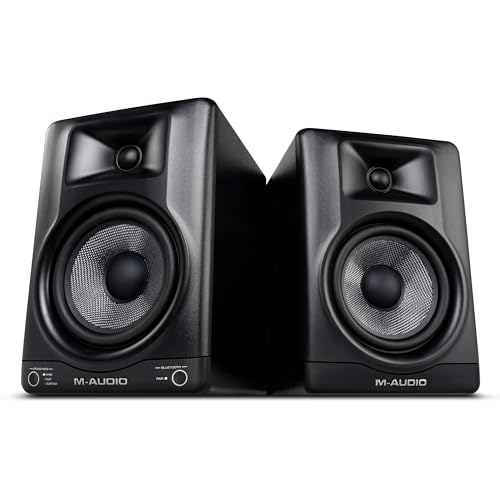
- 5-inch woofers and 1-inch tweeters
- Selectable DSP modes and app EQ
- Bluetooth 5.0 and TRS inputs
Best For: Music production and adjustable desktop listening
Best for Switching Devices
Logitech Z207 Bluetooth Speakers

- Bluetooth and 3.5mm input
- Easy-Switch between audio devices
- On-speaker headphone jack
Best For: Switching between computer and phone audio
Best for a Compact Desk
Creative Pebble V3 USB-C Speakers

- Single-cable USB-C audio and power
- Bluetooth 5.0 and AUX options
- 45° upward-angled drivers
Best For: A compact, tidy desktop setup
Best Under-Monitor Soundbar
Bluedee Bluetooth Computer Soundbar

- Slim, roughly 16.4-inch-wide design
- Bluetooth 5.0 and 3.5mm audio
- USB-powered with light strips
Best For: A single speaker beneath a monitor
Compact Hi-Res Pick – Edifier M60
If you want compact iMac speakers for music, the Edifier M60 pairs a small desktop footprint with 66W RMS stereo output. Its USB-C and AUX inputs offer wired connection options, while Bluetooth 5.3 adds wireless playback.
Best For: Small desks where wired audio, wireless streaming, and speaker positioning matter.
Pros:
- Two-way design with 3-inch mid-low drivers, 1-inch silk-dome tweeters, and DSP processing.
- USB-C, AUX, and Bluetooth 5.3 inputs provide flexible connections.
- Included 15-degree aluminum stands angle the speakers toward ear level.
Cons:
- Requires mains power rather than running from a built-in battery.
- LDAC high-resolution Bluetooth streaming is specified for compatible Android devices, so it should not be assumed for an iMac connection.
The M60 is a strong fit if you want a tidy stereo setup with a wired option for your iMac. Check your available ports before deciding between USB-C and AUX.
For iMac speakers for music that occupy one spot rather than two, the Nylavee computer sound bar is a 16-inch-wide option. It offers Bluetooth 5.0 or a 3.5mm AUX connection and draws power from a separate USB connection.
Best For: Desks where a single sound bar and simple controls are the priorities.
Pros:
- Single-bar layout avoids placing a speaker on each side of the display.
- Bluetooth and 3.5mm AUX offer wireless and wired audio options.
- Side knob handles controls; USB power can come from an available power source.
Cons:
- USB provides power, not a listed USB audio input.
- At 16 inches wide, it still needs clear horizontal desk space.
This is the straightforward choice if you prefer one enclosure and do not need the separate placement of a stereo speaker pair. Plan for both USB power and your chosen audio connection.
The OHAYO 60W pair suits shoppers comparing iMac speakers for music who also want inputs for other audio sources. These compact powered speakers list Bluetooth 5.3, USB, AUX, and RCA connections, with a front-panel volume knob for quick adjustments.
Best For: A desktop music setup that needs several connection options beyond Bluetooth.
Pros:
- 30W-per-channel claimed output from a stereo speaker pair.
- Bluetooth 5.3, USB, AUX, and RCA inputs accommodate different sources.
- MDF cabinets and a front volume knob suit everyday desktop use.
Cons:
- Two cabinets take up more placement space than a single sound bar.
- The speakers require corded power.
Choose this pair if input flexibility matters as much as the compact bookshelf format. The supplied details do not establish a particular iMac connection method, so match the input you plan to use to your setup.
If you use your iMac speakers for music listening and occasional audio work, the Edifier MR3 offers a more adjustable approach. Its 36W RMS stereo output, Music and Monitor modes, and app-based EQ let you tailor playback to the task.
Best For: Near-field listening and home-studio work that benefits from adjustable sound.
Pros:
- Music, Monitor, and Custom modes, plus EQ adjustments in the EDIFIER ConneX app.
- Balanced TRS, RCA, AUX, and Bluetooth connections support varied sources.
- Headphone output adds a convenient private-listening option.
Cons:
- No USB audio input is listed.
- A two-speaker monitor setup needs space for both cabinets.
The MR3 makes sense when you want speakers that can shift between casual listening and more deliberate monitoring. For an iMac, select a compatible audio connection from its listed inputs before buying.
Compact Desk Pick – Creative Pebble 2.0 USB Speakers
If you want compact iMac speakers for music at your desk, the Creative Pebble 2.0 offers wired stereo sound without a separate power adapter. It takes power from USB and audio through a 3.5 mm AUX connection, so check that your iMac setup has both connections available.
Best For: Personal listening at a small desk where simple controls and a compact footprint matter.
Pros:
- USB-powered; no separate power adapter needed.
- 45° elevated drivers aim sound toward the listener.
- Rear-facing passive radiators enhance bass, and the volume control is on the front.
Cons:
- Needs separate USB power and 3.5 mm audio connections.
- Its 4.4W maximum output is modest compared with the larger speakers here.
The Pebble is a practical choice for close-up listening, provided its wired connections suit your iMac.
Flexible Listening Pick – Sanyun SW208 Bookshelf Speakers
The Sanyun SW208 is a pair of small bookshelf-style iMac speakers for music if you want more ways to connect and adjust the sound. It offers USB audio through a built-in 24-bit DAC, a 3.5 mm AUX input, and Bluetooth 5.0.
Best For: Listeners who want compact stereo speakers with wired and wireless options and hands-on tone controls.
Pros:
- USB connection uses the built-in 24-bit DAC for digital audio input.
- Bluetooth 5.0 and 3.5 mm AUX provide alternative connections.
- Side-mounted volume, bass, and treble knobs let you tailor playback.
Cons:
- Requires AC power rather than drawing power from USB.
- The 7.48-inch-tall cabinets need more desk space than compact desktop speakers.
Choose the SW208 when connection flexibility and adjustable bass and treble matter more than the smallest possible footprint.
Creator-Focused Pick – M-Audio BX5BT Studio Monitors
For iMac speakers for music that can also serve a production or editing setup, the M-Audio BX5BT pair offers 5-inch woofers, 1-inch tweeters, and selectable DSP listening modes. Bluetooth 5.0 handles wireless playback, while rear TRS inputs provide a wired option; check your iMac’s output before planning a TRS connection.
Best For: Music makers and content creators who want adjustable desktop monitors for both working and listening.
Pros:
- FLAT, HYPE, and CUSTOM modes offer different playback voicings.
- The M-Audio Studio Control App provides a 5-band EQ and custom presets.
- Bluetooth 5.0 and rear TRS inputs support wireless and wired setups.
Cons:
- TRS connection may require an appropriate cable or interface for your iMac.
- The pair’s larger cabinets need more desktop room than compact speakers.
The BX5BT is the most control-oriented option here: its modes and EQ are useful if you switch between casual listening and creative work.
Best for Switching Devices – Logitech Z207 Bluetooth Speakers
If you want iMac speakers for music that can also play audio from your phone, the Logitech Z207 pairs Bluetooth with a 3.5mm input. Its two-speaker setup gives you stereo sound, while Easy-Switch lets you change sources by pausing one device and playing another.
Best For: Listeners who regularly switch between their computer and a Bluetooth device.
Pros:
- Bluetooth and 3.5mm connections accommodate different devices.
- Easy-Switch makes changing playback sources straightforward.
- On-speaker volume controls and a headphone jack are easy to reach.
Cons:
- Two separate speakers take up more desk space than a single soundbar.
- The plastic enclosures may not appeal to shoppers seeking a different finish.
Each speaker combines a powered full-range driver with a passive radiator for bass extension. Choose the Z207 primarily for its flexible connections and convenient everyday controls.
Best for a Compact Desk – Creative Pebble V3 USB-C Speakers
For iMac speakers for music on a crowded desk, the Creative Pebble V3 offers a compact stereo pair with 45° elevated drivers aimed toward your ears. A single USB-C connection handles both computer audio and power; Bluetooth 5.0 and a 3.5mm input add other ways to listen.
Best For: A tidy desktop setup that still needs flexible audio connections.
Pros:
- USB-C audio and power reduce cabling when connected to a compatible port.
- Bluetooth 5.0 and an AUX input support additional sources.
- Angled drivers direct sound toward a seated listener.
Cons:
- The amplified gain mode requires a 10W USB-C or USB-A port.
- A 3.5mm AUX cable is not included.
The Pebble V3 also includes Clear Dialog processing for spoken content and a USB-C-to-USB-A converter for older ports. Check your computer’s available connection and power output if the higher-gain mode matters to you.
Best Under-Monitor Soundbar – Bluedee Bluetooth Computer Soundbar
If you’d rather place one unit beneath your display, this Bluedee soundbar is an option for iMac speakers for music. Its roughly 16.4-inch-wide, 2.6-inch-high profile fits below many monitors, while Bluetooth 5.0 and a 3.5mm audio plug provide two playback options.
Best For: Listeners who prefer an under-monitor soundbar over separate desktop speakers.
Pros:
- Slim, single-unit design keeps the speaker in one spot.
- Bluetooth 5.0 and 3.5mm audio support wireless and wired playback.
- USB power and a braided Y-cable help simplify setup.
Cons:
- The soundbar still needs a USB power connection.
- Built-in light strips may not suit a minimalist desk.
Dual drivers and dual diaphragms provide its stereo output, and the light strips add a visible accent. Measure the space beneath your display before choosing this layout over a two-speaker set.
How We Picked These Imac Speakers for Music
We chose a mix of desktop speakers, sound bars, powered bookshelf speakers, and studio monitors to cover different budgets and desk layouts. We considered stated connection options, speaker size, power requirements, and controls, along with whether each design makes sense for everyday listening at a computer. Specifications alone cannot establish sound quality, so treat power ratings and feature lists as starting points rather than guarantees.
Quick Comparison
For the smallest footprint, consider the Creative Pebble or Pebble V3; the V3 adds USB-C and Bluetooth. The Nylavee and Bluedee sound bars keep two separate speaker cabinets off your desk. For a conventional stereo layout, compare the Logitech Z207, OHAYO 60W, Edifier M60, and Sanyun SW208. The Edifier MR3 and M-AUDIO BX5BT are monitor-style choices for listeners with more room who want to position each speaker carefully.
Key Buying Factors for Imac Speakers for Music
Connections and Power
Check the ports on your particular iMac before ordering. USB-C, USB-A, 3.5 mm AUX, and Bluetooth are not interchangeable: some speakers use USB only for power, while others can receive audio over USB. A Bluetooth speaker avoids an audio cable, but a wired connection is usually simpler if you want to avoid pairing or latency issues. Also check whether the speakers need a separate power outlet.
Placement and Stereo Sound
Two separate speakers let you place one on each side of the display, which helps create a wider stereo image for music. A single sound bar can save space but offers less flexibility in positioning. Measure the available width and depth, particularly for bookshelf speakers or 5-inch monitors, and leave room to reach volume controls and cable connections.
Listening Priorities
Compact speakers suit close-up listening and tidy desks; larger cabinets may be a better fit if you want fuller sound or listen from farther away. Do not compare wattage figures in isolation: speaker design, placement, and your preferred volume matter too. If you plan to make or mix music, look for useful wired inputs and a setup that lets you position both speakers symmetrically. If you mainly stream music, ease of use may matter more than studio-oriented features.
Who Should Buy Which Imac Speakers for Music?
Choose a Pebble model if desk space is tight; check its connection and power needs first. Pick a Nylavee or Bluedee sound bar if you prefer one unit beneath the iMac. For flexible everyday listening, start with the Logitech Z207 or one of the other stereo desktop pairs. Consider the Edifier M60 or Sanyun SW208 if you can accommodate bookshelf-style speakers. Look at the Edifier MR3 or M-AUDIO BX5BT when monitor-style placement and music-focused listening are priorities. Whichever you choose, confirm compatibility with your iMac and measure your desk before buying.