When you’re looking for the perfect wireless keyboard for your iMac, you want options that fit your unique needs. From sleek designs to ergonomic choices, the right keyboard can enhance your productivity and comfort. In this guide, you’ll find a selection of the top 10 iMac wireless keyboards that cater to various preferences and requirements. So, which one will elevate your typing experience?
Macally Compact Bluetooth Keyboard for Mac

If you’re looking for a reliable, budget-friendly keyboard that seamlessly connects to multiple devices, the Macally Compact Bluetooth Keyboard for Mac is an excellent choice. Weighing just 1.01 pounds and measuring 11.2 x 4.6 x 0.9 inches, it’s perfect for portability. You can easily switch between three Bluetooth-enabled devices, enjoying a wireless range of up to 30 feet. With an ergonomic design and 78-key layout, you’ll find typing comfortable and responsive, similar to Apple’s Magic Keyboard. Plus, the built-in rechargeable battery lasts up to two months, making it a practical option for everyday use.
Best For: Individuals seeking an affordable and versatile Bluetooth keyboard that can easily connect to multiple devices for efficient productivity.
Pros:
- Compact and portable design makes it easy to carry and use in various settings.
- Seamless device switching allows for quick transitions between up to three connected devices.
- Long battery life of up to two months on a full charge offers convenience for regular use.
Cons:
- Some users have reported occasional Bluetooth connectivity issues and challenges with device switching.
- Concerns about battery longevity and performance consistency after prolonged use.
- Limited warranty support experiences reported by some customers.
Macally Wireless Bluetooth Keyboard for Mac

The Macally Wireless Bluetooth Keyboard for Mac stands out as an ideal choice for those who crave versatility and seamless connectivity. This ultra-slim keyboard, just 15 millimeters thick, connects to up to three Bluetooth devices, boosting your productivity whether you’re working or gaming. With 110 full-sized keys, including 20 shortcuts and a numeric keypad, typing feels responsive and quiet thanks to its enhanced keys. Plus, you’ll appreciate the built-in rechargeable battery that lasts up to three months with average use. Whether you’re an Apple or Windows user, this keyboard fits seamlessly into your tech setup.
Best For: Users seeking a versatile and efficient keyboard that seamlessly connects to multiple devices for work, gaming, or creative tasks.
Pros:
- Multisync capability allows connection to up to 3 Bluetooth devices, enhancing productivity.
- Ultra-slim design at only 15 millimeters thick makes it easy to transport and fits well in any workspace.
- Long battery life with a built-in rechargeable battery that lasts up to 3 months on average use.
Cons:
- May not have programmable keys or advanced features found in higher-end models.
- Limited compatibility with some non-Bluetooth devices, restricting its use.
- The quiet typing experience may not suit users who prefer tactile feedback.
OMOTON Wired Keyboard for Mac Devices
For Mac users seeking a reliable and efficient typing experience, the OMOTON Wired Keyboard stands out with its seamless compatibility specifically designed for macOS devices (version 11.3 and up). This sleek, portable keyboard fits well with your MacBook, Mac Mini, or iMac, and its ergonomic design features an 8° lift for ideal wrist comfort. You’ll enjoy a stable connection through easy plug-and-play usage, avoiding those pesky Bluetooth issues. Plus, the scissor-foot design guarantees smooth keystrokes, while function keys provide quick access to shortcuts, greatly boosting your productivity during daily tasks. Just remember to check your device’s power for ideal functionality!
Best For: Mac users looking for a reliable and ergonomic wired keyboard that offers seamless compatibility and enhanced productivity.
Pros:
- Sleek and portable design makes it easy to use at home or on the go.
- Ergonomic 8° lift promotes a comfortable wrist angle for extended typing sessions.
- Convenient function keys provide quick access to commonly used shortcuts, boosting productivity.
Cons:
- Compatibility limited to macOS (version 11.3+), not fully functional with non-Mac devices.
- Wired connection might not suit users preferring wireless options.
- Requires sufficient device power to function properly, which could be an issue for some users.
OMOTON Bluetooth Keyboard Compatible with Mac
Looking for a reliable keyboard that seamlessly integrates with your Mac? The OMOTON Bluetooth Keyboard is a fantastic choice, compatible with Mac OS X 10.10 and above. Its solid Bluetooth connection offers a range of up to 33 feet, letting you work from a distance. The slim, ergonomic design includes scissor-switch keys that reduce fatigue while typing, making it perfect for long sessions. With 12 exclusive shortcut keys, you can streamline your tasks and boost productivity. Plus, it operates on just two AAA batteries and features an automatic sleep mode to save energy. Upgrade your typing experience with OMOTON!
Best For: Users seeking a reliable and ergonomic Bluetooth keyboard that enhances productivity on Mac devices.
Pros:
- Seamless compatibility with Mac OS X 10.10 and above, ensuring smooth integration with various Mac devices.
- Slim and lightweight design makes it portable and easy to carry, perfect for on-the-go use.
- 12 exclusive shortcut keys that streamline tasks, boosting efficiency and saving time.
Cons:
- Requires 2 AAA batteries which are not included, adding to the initial setup cost.
- Bluetooth connection range may be limited in environments with many obstacles affecting signal strength.
- No backlit keys, which may be a drawback for users who work in low-light conditions.
Macally Ultra-Slim USB Wired Computer Keyboard (Full Size, Space Gray)

If you’re searching for a reliable and stylish keyboard that seamlessly integrates with your Mac setup, the Macally Ultra-Slim USB Wired Computer Keyboard in Space Gray is an excellent choice. Its ultra-slim design enhances your workspace, while the full-size layout with a numeric keypad guarantees comfort and efficiency. At just 0.4 inches tall, it adds a sleek touch without sacrificing sturdiness. With plug-and-play functionality and compatibility with both Mac and Windows, you’ll enjoy a smooth typing experience right out of the box. Users appreciate its responsive keys and aesthetic appeal, making it a popular option for any computer setup.
Best For: Those seeking a stylish, reliable keyboard that offers seamless compatibility with both Mac and Windows systems.
Pros:
- Ultra-slim design enhances workspace aesthetics while maintaining sturdiness.
- Plug-and-play functionality ensures effortless setup without the need for drivers.
- Responsive keys provide a comfortable typing experience, appreciated by users for efficiency.
Cons:
- Some users report key sensitivity issues, affecting typing precision.
- Complaints about the placement of specific design features, such as the power button.
- A few negative experiences regarding connection reliability and key registration.
Macally Small Wired Keyboard for Mac and Windows

The Macally Small Wired Keyboard is an excellent choice for those seeking a compact and versatile typing solution for both Mac and Windows systems. With 78 scissor switch keys, it guarantees a comfortable typing experience while saving space. You’ll appreciate its plug-and-play functionality, connecting easily via a 4’7” USB cable—no installation needed. This keyboard works seamlessly with MacBook Air/Pro, iMac, and PCs, making it adaptable for any setup. Plus, its sleek aluminum design not only looks great but also includes 13 shortcut keys for Mac and multimedia hotkeys for Windows, boosting your productivity effortlessly.
Best For: Those looking for a compact and versatile keyboard that works well with both Mac and Windows systems.
Pros:
- Compact Design: Saves space and enhances portability for users with limited desk space.
- Plug and Play: Easy setup with no installation required, allowing for immediate use.
- Productivity Boost: Features 13 shortcut keys for Mac and multimedia hotkeys for Windows, improving efficiency.
Cons:
- Wired Connection: Limited mobility due to the need for a USB connection.
- No Backlit Keys: Lacks backlighting, which may be a drawback for users typing in low-light conditions.
- Limited Key Customization: Fewer customization options compared to some advanced keyboards on the market.
Macally USB Wired Keyboard and Mouse Combo for Mac and PC

Designed for both Mac and PC users, the Macally USB Wired Keyboard and Mouse Combo stands out with its compact design, making it an ideal choice for those who value space-saving solutions. The keyboard features 78 low-profile scissor-switch keys and 13 shortcut keys, enhancing your productivity. Its optical mouse, equipped with silent click technology, guarantees a quieter workspace. Users love the easy plug-and-play setup, eliminating battery hassles. Rated 4.6 out of 5 stars, this combo offers excellent tactile feedback and comfort, making it a reliable alternative to wireless options. Plus, you benefit from friendly US-based customer support for any inquiries.
Best For: Users seeking a reliable, compact keyboard and mouse combo for both Mac and PC that prioritizes space-saving design and comfort.
Pros:
- Compact design ideal for small workspaces and portable use.
- Silent mouse technology offers a quieter working environment.
- Easy plug-and-play setup with no installation required.
Cons:
- Some users may require an adapter for certain iMac models.
- Lacks a numeric pad and additional USB ports compared to larger keyboards.
- Not as customizable as some high-end wireless options.
Wireless Bluetooth Keyboard for Apple Mac OS
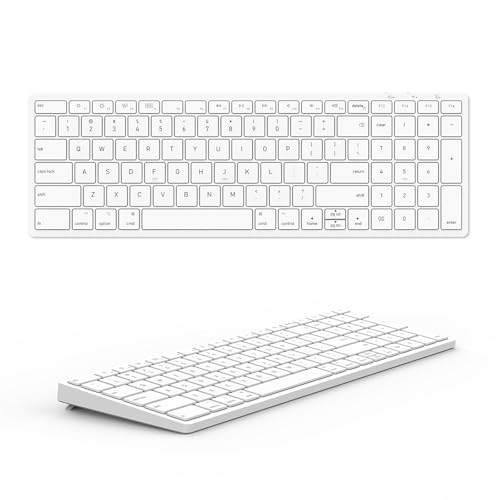
For Mac users seeking a reliable and efficient typing experience, the Wireless Bluetooth Keyboard for Apple Mac OS stands out with its seamless compatibility across various devices, including iMacs, MacBook Pros, and iPads. Utilizing Broadcom BT 3.0 technology, it guarantees stable, lag-free typing. With a US QWERTY layout, the 102 scissor keys mimic the official Apple keyboard, making your change smooth. Plus, it features 13 hotkeys specifically designed for Mac OS functionality. The built-in 180mAh Li-ion rechargeable battery lasts over 200 hours on a full charge, providing exceptional convenience for all your Apple devices.
Best For: Mac users seeking a reliable and efficient typing experience across various Apple devices.
Pros:
- Stable, lag-free typing experience with Broadcom BT 3.0 technology.
- Mimics the layout of the official Apple keyboard, facilitating a smooth transition for users.
- Long-lasting battery life of over 200 hours on a single charge.
Cons:
- Limited compatibility with non-Mac devices.
- Rechargeable battery may require occasional charging, which could be inconvenient for some users.
- Lacks some advanced features found in premium Apple keyboards.
Macally Wired Keyboard for Mac (USB C + A)

If you’re seeking a keyboard that combines visibility and functionality, the Macally Wired Keyboard for Mac (USB C + A) stands out with its oversized key print, which is four times larger than traditional keyboards. This full-size 107-key keyboard features backlit keys with three brightness levels, ensuring you can type comfortably in any lighting. Plus, its dual USB-A and USB-C connectivity guarantees compatibility with all your Mac devices. Weighing only 1.52 pounds, it’s both sturdy and portable. Users appreciate its solid construction and ease of use, though some have noted minor quality concerns. Overall, it’s a fantastic choice for any Mac user.
Best For: Those seeking a reliable, visually accessible keyboard for Mac devices, particularly users with vision issues.
Pros:
- Oversized key print enhances visibility and typing confidence.
- Backlit keys with adjustable brightness for comfortable use in various lighting conditions.
- Dual USB-A and USB-C connectivity ensures compatibility with a wide range of Mac devices.
Cons:
- Some users have reported keys becoming unresponsive after short periods of use.
- Occasional discomfort while typing due to key action or design.
- Issues with excessive light leakage around keys and concerns over plastic quality.
Wireless Keyboard and Mouse Compatible with iMac and MacBook

Looking for a wireless keyboard and mouse set that seamlessly integrates with your iMac or MacBook? This optimized duo pairs effortlessly with all Apple devices, enhancing your multi-device experience. With a sleek design that mirrors Apple’s aesthetic, it not only looks great but also performs like a high-end peripheral. Enjoy Bluetooth connectivity that allows you to switch between devices effortlessly. Whether you’re on a Mac, Windows, or Android, you’ll appreciate the responsive typing sensation and comfortable use. Elevate your workspace with a set that combines style, functionality, and the quality you expect from Apple products.
Best For: Users looking for a wireless keyboard and mouse set that complements their Apple devices while offering versatility across multiple operating systems.
Pros:
- Seamless Integration: Optimized for Mac devices, ensuring easy pairing and smooth functionality.
- Sleek Design: A stylish aesthetic that complements Apple products while appealing to a broader audience.
- Dual Connectivity: Bluetooth capability allows quick switching between devices, enhancing user flexibility.
Cons:
- Limited Customization: May lack advanced features or customization options found in some dedicated gaming or professional peripherals.
- Battery Dependency: Wireless functionality relies on battery life, which may require regular replacements or charging.
- Price Point: Higher cost compared to basic wireless keyboard and mouse sets not specifically designed for Apple devices.
Factors to Consider When Choosing an iMac Wireless Keyboard
When you’re choosing an iMac wireless keyboard, there are several key factors to keep in mind. You’ll want to take into account compatibility with your Mac devices, the layout and design of the keys, and the connectivity options available. Don’t forget to think about battery life, efficiency, and any ergonomic features that can enhance your comfort during use.
Compatibility With Mac Devices
Choosing the right iMac wireless keyboard is essential for guaranteeing compatibility with your Mac devices. First, make sure the keyboard supports your specific Mac OS version, as some only work with certain updates. Look for models that allow multi-device connectivity, so you can easily switch between your MacBook, iMac, and iPad. Check that the connection technology, like Bluetooth, is reliable and offers a range of up to 30 feet for your workspace. Additionally, consider whether the keyboard features dedicated function keys and shortcuts designed for Mac OS, enhancing your productivity. Finally, verify the keyboard’s layout aligns with macOS standards, providing a familiar typing experience for Apple users.
Key Layout and Design
An effective key layout and design can greatly impact your typing experience with an iMac wireless keyboard. Look for keyboards with the standard 78-key layout, including 13 shortcut keys specifically for macOS. Ergonomic features, like an 8° lift, can enhance your comfort during long typing sessions. If portability is essential, consider compact designs around 11.2 x 4.6 inches, which maintain key functionality without taking up much space. Additionally, multi-device connectivity lets you switch between devices effortlessly, boosting your productivity. Finally, don’t overlook aesthetics; ultra-slim profiles and materials that match your Apple products can create a visually appealing workspace. Choosing the right layout and design will guarantee a more enjoyable and efficient typing experience.
Wireless Connectivity Options
A great typing experience on your iMac wireless keyboard goes beyond just layout and design; wireless connectivity options play a vital role too. When choosing a keyboard, look for Bluetooth connectivity with a reliable range, ideally up to 30 feet, to guarantee seamless use across your workspace. Many keyboards support multi-device connectivity, allowing you to pair with up to three Bluetooth-enabled devices for easy switching. Consider models with auto OS detection features that automatically adjust compatibility for macOS, Windows, and Android systems. Finally, prioritize ergonomic designs and responsive key mechanisms to enhance typing comfort and reduce fatigue during extended use. These connectivity options will greatly improve your overall experience with your iMac.
Battery Life and Efficiency
When it comes to selecting an iMac wireless keyboard, battery life and efficiency are essential factors that can make or break your experience. Some models can last up to two months on a full charge, while others might need recharging every few weeks. Look for features like automatic sleep mode, which conserves battery during inactivity. The type of battery also matters; keyboards with built-in rechargeable batteries offer convenience, while those using disposable batteries require more maintenance. Power management features, such as an on/off switch or auto shut-off, can greatly extend battery life. Finally, check user reports on battery performance to see how well a keyboard maintains its charge over time, especially with extensive use.
Ergonomic Features and Comfort
Battery life and efficiency are just the start when you’re picking the right iMac wireless keyboard. You’ll want to take into account ergonomic features to enhance your typing experience. Look for keyboards with an 8° lift, which helps position your hands naturally, reducing wrist strain. Scissor-switch designs offer a smoother and quieter typing experience, making long sessions more comfortable. If you value portability, compact keyboards can help keep your workspace organized without sacrificing functionality. Additionally, shortcut keys tailored for macOS streamline your tasks, boosting your productivity. Finally, adjustable backlighting on keys improves visibility in various lighting conditions, reducing eye strain and helping you type accurately. Prioritizing these features guarantees comfort during extended use.
Additional Functionality and Shortcuts
Choosing the right iMac wireless keyboard goes beyond just comfort and battery life; additional functionality and shortcuts can greatly enhance your productivity. Look for keyboards that include dedicated shortcut keys tailored for macOS, making tasks like cut, copy, and paste quicker and easier. If you juggle multiple devices, consider keyboards with multi-device connectivity, allowing seamless switching between platforms. Ergonomic designs often feature specific keys that improve efficiency and reduce strain during long typing sessions. A scissor-switch design can offer a better typing experience, providing responsiveness and quieter operation. Unique features like backlit keys or oversized print can also enhance visibility, especially in low-light settings or for users with vision challenges. Choose wisely to maximize your workflow!