If you’re looking to enhance your iMac’s storage speed in 2025, you’ve got some excellent external SSD options. These drives not only improve performance but also offer durability for all your important files. With various capacities and features, choosing the right one can make a significant difference in your workflow. Discover which SSDs stand out and why they might just be the perfect fit for your needs.
SanDisk 2TB Extreme Portable SSD

If you’re looking for a reliable, high-performance external SSD for your iMac, the SanDisk 2TB Extreme Portable SSD is an excellent choice. With read speeds up to 1050MB/s and write speeds of 1000MB/s, it dramatically improves file transfer times. Its rugged design offers 3-meter drop protection and IP65-rated water and dust resistance, making it perfect for on-the-go use. Weighing just 1.76 ounces, its compact size and included carabiner loop enhance portability. Plus, with 256-bit AES encryption, your data stays secure. Users love its performance, rating it 4.6 out of 5 stars—definitely a top contender for your iMac storage needs.
Best For: Those seeking a high-performance, portable external SSD that combines rugged durability with fast data transfer speeds for both professional and personal use.
Pros:
- Exceptional read speeds of up to 1050MB/s and write speeds of 1000MB/s enhance file transfer efficiency.
- Rugged design featuring 3-meter drop protection and IP65-rated water and dust resistance ensures reliability in various environments.
- Compact and lightweight with a carabiner loop, making it easy to carry for on-the-go storage needs.
Cons:
- Lacks internal DRAM cache, which may lead to reduced write speeds when the drive is nearly full.
- Real-world performance can vary; write speeds may drop to approximately 438 MB/s when filled.
- Requires software download for compatibility with macOS for full encryption features.
SAMSUNG T7 Portable SSD 1TB External Solid State Drive

The SAMSUNG T7 Portable SSD 1TB is an outstanding choice for iMac users seeking lightning-fast data transfer speeds and robust performance. With read speeds up to 1,050 MB/s and write speeds of 1,000 MB/s, it outpaces traditional hard drives by up to 9.5 times. Its compact design (3.3 x 2.2 x 0.3 inches) and lightweight build (2.08 ounces) make it perfect for on-the-go use. Plus, the shock-resistant aluminum casing guarantees durability. Plug-and-play compatibility across various devices, coupled with Samsung’s stellar reputation, assures reliability and quality. You’ll love this SSD for large file transfers, including 4K video.
Best For: Users seeking a fast, portable, and durable external storage solution for large file transfers, including 4K video, across multiple devices.
Pros:
- High-speed performance: With read speeds up to 1,050 MB/s and write speeds of 1,000 MB/s, it significantly outperforms traditional hard drives.
- Compact and lightweight design: Its small size and light weight make it easy to carry for on-the-go use.
- Durable construction: The shock-resistant aluminum casing protects the device from impacts, ensuring reliability during transport.
Cons:
- Price: May be more expensive compared to traditional external hard drives.
- Limited to USB compatibility: Requires USB 3.2 Gen 2 or compatible ports for optimal performance.
- No built-in encryption: Lacks hardware encryption features for enhanced data security.
Crucial X9 Pro for Mac 2TB Portable SSD

For professional creators seeking a reliable and high-performance storage solution, the Essential X9 Pro for Mac 2TB Portable SSD stands out as an ideal choice. With impressive read and write speeds of up to 1050MB/s, it guarantees quick data access, leaving traditional hard drives behind. Its IP55 water and dust resistance and drop resistance up to 7.5 ft make it perfect for fieldwork. Optimized for Apple devices, it seamlessly connects to your iMac, MacBook, and more. Plus, you get three months of Mylio Photos+ and Acronis True Image to enhance your workflow. This SSD truly delivers on speed and durability.
Best For: Professional creators seeking a high-performance, reliable, and durable storage solution optimized for Apple devices.
Pros:
- High-speed performance with read and write speeds up to 1050MB/s.
- Durable design with IP55 water and dust resistance and drop resistance up to 7.5 ft.
- Includes bonus software for enhanced workflow, such as Mylio Photos+ and Acronis True Image.
Cons:
- Optimized primarily for Apple devices, which may limit some features for non-Apple users.
- Higher price point compared to traditional hard drives.
- Limited storage capacity options available, only offering 2TB.
Crucial X9 2TB Portable SSD

Looking for a reliable storage solution that can keep up with your creative workflow? The Essential X9 2TB Portable SSD is an excellent choice. With speeds up to 1050MB/s, transferring large files and editing media becomes a breeze. It’s designed for durability too, boasting IP55 water and dust resistance and a drop resistance of up to 7.5 feet. Compatibility isn’t an issue either, as it works seamlessly with a variety of devices, including Windows, Mac, and gaming consoles. Plus, you get 2TB of storage along with bonus software like Mylio Photos and Acronis True Image upon registration.
Best For: Creative professionals and gamers looking for fast, reliable, and portable storage solutions.
Pros:
- High-speed performance with transfer speeds up to 1050MB/s, ideal for large file transfers and media editing.
- Durable design featuring IP55 water and dust resistance, along with drop resistance up to 7.5 feet.
- Broad compatibility with multiple devices including Windows, Mac, iPad Pro, and gaming consoles like PS4 and PS5.
Cons:
- May be more expensive compared to traditional hard drives.
- Requires USB-C or USB-A adapters for some older devices.
- Limited bonus software access if not registered within the specified time frame.
SSK Portable SSD 1TB External Solid State Drive

With its impressive read speeds of up to 1050MB/s and a compact design, the SSK Portable SSD 1TB is perfect for anyone needing fast and reliable storage for their iMac. Weighing just 36.6g, it’s easy to carry, making it ideal for backups or quick file transfers. Plus, the USB 3.2 Gen2 interface guarantees seamless connectivity across devices. You’ll appreciate the durable aluminum alloy casing that keeps it cool and quiet during use. With 4.5 stars from over 3,300 ratings, users rave about its performance and portability. If you want efficiency without compromising quality, the SSK SSD is a solid choice.
Best For: The SSK Portable SSD 1TB is best for professionals and creatives seeking fast, reliable, and portable storage solutions for their devices.
Pros:
- Fast data transfer speeds of up to 1050MB/s enhance productivity.
- Compact and lightweight design makes it easy to carry.
- Durable aluminum alloy casing ensures longevity and efficient heat dissipation.
Cons:
- Limited to exFAT formatting, which may restrict compatibility in some cases.
- Some users note that it has a higher price point compared to similar products.
- Performance may drop for files exceeding 250GB due to caching limitations.
Crucial X10 4TB Portable SSD (CT4000X10SSD9-02)
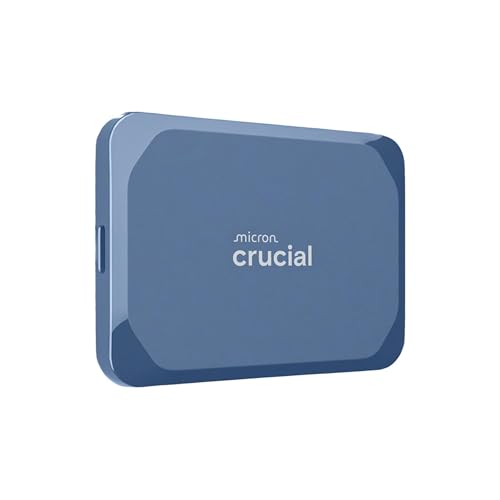
The Essential X10 4TB Portable SSD is a powerhouse in data storage, specifically designed for professionals, content creators, and gamers who need speed and reliability on the go. With read speeds reaching up to 2,100MB/s, this SSD outpaces the Significant X9, ensuring quick transfers. Its compact design (1.96 x 2.55 x 0.39 inches) and lightweight build (1.13 ounces) make it easy to carry anywhere. Plus, it’s IP65 dust and water-resistant and drop-resistant up to 9.8 ft, perfect for outdoor use. Compatible with various devices, the Significant X10 is backed by 45 years of Micron’s expertise, earning high user praise.
Best For: Professionals, content creators, and gamers seeking fast and reliable portable storage solutions.
Pros:
- Fast read speeds of up to 2,100MB/s for quick data transfers.
- Durable design with IP65 dust and water resistance, and drop-resistant up to 9.8 ft.
- Compact and lightweight for easy transport, fitting conveniently in pockets.
Cons:
- Lack of built-in encryption may be a concern for some users.
- Warranty clarity is not well defined, leading to potential confusion.
- No significant price advantage compared to similar products on the market.
Samsung T7 Shield 2TB Portable SSD

For photographers and content creators needing reliable storage, the Samsung T7 Shield 2TB Portable SSD stands out with its impressive read speeds of up to 1050MB/s and write speeds of 1000MB/s. Its compact, palm-sized design makes it easy to carry, while the IP65 rating guarantees it’s resistant to water and dust. You can drop it from heights up to 9.8 feet without worry. It’s compatible with PCs, Macs, Android devices, and gaming consoles, making it a versatile choice. Plus, Samsung Magician software offers essential management tools for peak performance and data protection.
Best For: Photographers, content creators, and gamers looking for reliable, high-speed storage that can withstand outdoor conditions.
Pros:
- Compact and portable design allows for easy transportation.
- High-speed performance with read speeds up to 1050MB/s and write speeds of 1000MB/s.
- Durable and rugged with IP65 water and dust resistance and drop resistance from heights up to 9.8 feet.
Cons:
- Price may be higher compared to traditional HDDs.
- Limited to USB 3.2 Gen 2 interface, which may not be compatible with older devices.
- Requires Samsung Magician software for optimal management and performance features.
Samsung T9 Portable SSD 4TB (MU-PG4T0B/AM)

Designed for demanding users, the Samsung T9 Portable SSD 4TB (MU-PG4T0B/AM) stands out with its impressive sequential read speeds of up to 2,000MB/s and write speeds reaching 2,300MB/s. This USB 3.2 Gen 2×2 SSD offers ample 4TB storage, making it perfect for video editing and large file transfers. Its rugged design guarantees durability while the Dynamic Thermal Guard keeps it cool during heavy use. With AES 256-bit hardware encryption, your data stays secure. Plus, its compact size and plug-and-play convenience make it an ideal choice for your iMac or other devices.
Best For: Professionals and creatives who require high-speed data transfer and substantial storage capacity for demanding tasks like video editing and large file management.
Pros:
- High performance: Offers impressive sequential read speeds up to 2,000MB/s and write speeds up to 2,300MB/s.
- Robust security: Features AES 256-bit hardware encryption for data protection.
- Portable design: Compact, lightweight, and rugged build makes it easy to carry and durable for travel.
Cons:
- Price point: Higher cost compared to traditional hard drives may not be suitable for budget-conscious users.
- Limited compatibility: Requires USB 3.2 Gen 2×2 for maximum speed, which may not be available on all devices.
- No included cables: Some users may need to purchase additional cables for optimal performance.
SanDisk 1TB Portable SSD – External Solid State Drive

SanDisk’s 1TB Portable SSD stands out with impressive read speeds of up to 800MB/s, making it a perfect choice for creatives who need quick access to their files on an iMac. Its robust design includes up to two-meter drop protection, ensuring your data stays safe during your adventures. Plus, the tough rubber hook allows for secure attachment to your belt loop or backpack, making it ideal for a mobile lifestyle. Trusted by professional photographers, this SSD is perfect for backing up content and memories without sacrificing performance. With 1TB of storage, you’ll have plenty of space for all your important files.
Best For: Creative professionals and photographers who need a reliable and fast storage solution for their files on the go.
Pros:
- Fast read speeds of up to 800MB/s for quick access to files.
- Durable design with up to two-meter drop protection for added safety.
- Portable and convenient with a tough rubber hook for easy attachment to bags or belts.
Cons:
- Performance may vary based on the host device and usage conditions.
- Limited to 1TB storage, which may not be sufficient for users with extensive data needs.
- Higher price point compared to traditional external hard drives.
Lexar 4TB Armor 700 Portable SSD

The Lexar 4TB Armor 700 Portable SSD stands out as an ideal choice for creative professionals and gamers who need fast, reliable storage. With max read/write speeds of 2000MB/s, it utilizes a USB 3.2 Gen 2×2 interface for lightning-quick transfers. Its rugged design offers IP66 water and dust resistance, plus it withstands drops from up to 3 meters. You’ll appreciate its compatibility with various devices, including PC, Mac, and gaming consoles. Enhanced security features, like 256-bit AES encryption, guarantee your data stays safe, while the included Type-C and USB-A cable makes connectivity a breeze.
Best For: Creative professionals and gamers in need of fast, durable, and secure portable storage solutions.
Pros:
- High max read/write speeds of 2000MB/s for rapid data transfer.
- Rugged design with IP66 water and dust resistance, plus drop protection up to 3 meters.
- Enhanced security features, including 256-bit AES encryption, to keep data safe.
Cons:
- Higher price point compared to standard portable SSDs.
- Bulkier design due to rugged features, which may affect portability.
- Compatibility with Apple Pro Res recording requires a separate magnetic ring.
Factors to Consider When Choosing an iMac External SSD
When choosing an external SSD for your iMac, you need to contemplate several important factors. Think about the storage capacity you require, as well as the speed and performance that will meet your needs. Additionally, pay attention to durability, compatibility with your devices, and the design for portability.
Storage Capacity Options
Choosing the right storage capacity for your iMac’s external SSD is essential for optimizing your workflow and managing your data effectively. External SSDs typically range from 250GB to 4TB, so consider your specific storage needs. A 1TB SSD is perfect for everyday use, holding about 250,000 photos or 200,000 songs. However, if you’re a professional dealing with large files like video editing, opt for a 2TB or 4TB SSD to accommodate high-resolution content and backups. Higher-capacity SSDs also provide flexibility for multitasking and storing applications, which can be vital for demanding workflows. Always select an SSD that not only meets your current needs but also anticipates future data growth to avoid the hassle of frequent upgrades.
Speed and Performance
After determining the right storage capacity, focusing on speed and performance is essential for your iMac’s external SSD. Look for SSDs with read speeds of at least 1,050MB/s and write speeds around 1,000MB/s to enhance file transfers and application loading. The interface type also matters; USB 3.2 Gen 2 can provide speeds up to 10Gbps, considerably better than older USB versions. Additionally, SSDs using PCIe NVMe technology generally outperform those with SATA connections. It’s vital to check if the SSD maintains its performance even when nearly full, as some may slow down as capacity approaches its limit. Finally, user feedback on speed consistency across various file sizes can provide valuable insights into real-world performance.
Durability and Protection
While you want your external SSD to deliver high-quality speed, durability and protection are equally important to guarantee it withstands the rigors of everyday use. Look for SSDs with IP ratings like IP65 or IP66, which indicate resistance to water and dust. This feature enhances durability in various environments. Consider drives that offer drop protection, rated for falls of at least 2 meters, ensuring functionality after accidental drops. Opt for robust build materials, such as aluminum or ruggedized designs, to provide extra protection against physical damage. Additionally, evaluate the operating temperature range; SSDs with broader ranges perform reliably in extreme conditions. Finally, assess weight and size for portability, as lighter, compact SSDs are easier to carry without compromising durability.
Compatibility With Devices
When it comes to selecting an external SSD for your iMac, compatibility with your devices plays a significant role in ensuring a seamless experience. First, make sure the SSD is optimized for macOS file systems like APFS for better performance. Look for drives with USB-C or Thunderbolt 3 interfaces, as they provide faster data transfer rates and are widely supported by modern iMacs. Verify that the SSD supports plug-and-play functionality with macOS, which minimizes any extra software installations. Additionally, check the drive’s compatibility with macOS versions, ensuring it works with at least macOS 10.9 or higher. Finally, consider the SSD’s ability to connect with other devices, allowing for versatility across various platforms like Windows, Android, and gaming consoles.
Design and Portability
Choosing the right external SSD for your iMac involves more than just speed and storage capacity; design and portability are essential factors to take into account. Consider the dimensions and weight of the SSD—aim for a compact design around 3-4 inches long and under 2 ounces for easy transport. Opt for a rugged design that can withstand drops of up to 3 meters, ensuring durability on the go. Water and dust resistance ratings, like IP65 or IP66, are vital if you plan to use your SSD outdoors. Additionally, features such as a carabiner loop or lanyard attachment can enhance portability, allowing you to secure the SSD to bags or belts without adding bulk to your setup.
Security Features Available
Portability and design are important, but securing your data is equally essential. When choosing an external SSD for your iMac, look for models that feature AES 256-bit hardware encryption. This level of encryption protects sensitive data from unauthorized access. Password protection is another vital feature, adding an extra layer of security for your files. Some SSDs also come with software for drive health monitoring and data protection, enhancing your security management. Durability ratings like IP65 or IP66 indicate water and dust resistance, safeguarding your drive from environmental hazards. Additionally, features like S.M.A.R.T. monitoring and TRIM technology help maintain performance and prolong lifespan, indirectly supporting data integrity and security. Prioritize these features to keep your data safe.
Price and Value
While evaluating external SSDs for your iMac, understanding the balance between price and value is essential. Start by examining your storage needs against your budget, as larger SSDs typically cost more per gigabyte. Don’t overlook performance specifications; higher read and write speeds can justify a higher price, especially for demanding tasks. Durability matters too; SSDs with rugged designs or water and dust resistance might carry a premium but offer better long-term value. Additional features like encryption and software support enhance functionality, providing value beyond mere storage. Finally, compare warranty and customer support options, as a longer warranty can indicate better product confidence and reassure you about your investment.