When you’re working long hours at your iMac, comfort and ergonomics become essential. An adjustable stand can help align your screen to eye level, reducing strain on your neck and back. But with so many options available, how do you choose the right one? In this guide, you’ll discover ten of the best adjustable iMac stands, each designed to enhance your workspace effectively. Let’s explore what each has to offer and what factors you should keep in mind.
BoYata Adjustable Monitor Stand for TV, PC, and Laptop
If you’re looking for an adjustable stand that enhances your workspace, the BoYata Adjustable Monitor Stand is an excellent choice for anyone using a TV, PC, laptop, or iMac. This sleek black stand measures 9.3 x 7.87 x 4.3 inches and supports up to 33.1 pounds, thanks to its sturdy metal construction. You’ll appreciate the adjustable height feature, which allows you to align your screen to eye level, reducing neck and back strain. Plus, the design provides ample storage space underneath for notebooks or keyboards, helping you keep your workspace organized while enjoying ergonomic comfort.
Best For: Individuals seeking an ergonomic and adjustable solution for elevating their monitors, TVs, or laptops to improve comfort and workspace organization.
Pros:
- Adjustable Height: Easily customize the monitor’s height to align with eye level, promoting better posture and reducing discomfort.
- Sturdy Construction: Made of durable metal with a high weight capacity of 33.1 pounds, ensuring stability for various devices.
- Space Saving Design: Features ample storage space underneath for office supplies, helping to keep your workspace tidy and organized.
Cons:
- Periodic Maintenance Required: Users may need to check and tighten screws periodically to maintain stability over time.
- Weight Limit: Some users may find the 33.1-pound weight limit restrictive for heavier monitors or setups.
- Assembly Required: Although the assembly is straightforward, some users may prefer a fully assembled product.
Twelve South HiRise Pro Adjustable Monitor Stand

For professionals and creatives seeking an ergonomic workspace, the Twelve South HiRise Pro Adjustable Monitor Stand is the ideal solution. This stylish silver stand elevates your iMac or external monitor up to 9.5 cm, reducing neck and back strain. With four adjustable height options, it guarantees the best viewing comfort tailored to you. Plus, its internal shelf offers organized storage for hard drives or personal items, keeping your desk clutter-free. Made from premium materials like padded leather and aluminum, this durable stand has earned a stellar 4.8 out of 5 stars from users, praising its build quality and ease of assembly.
Best For: Professionals and creatives looking for an ergonomic workspace solution that enhances comfort and organization.
Pros:
- Adjustable Height: Offers four height options to ensure optimal viewing comfort and reduce neck and back strain.
- Stylish Design: Features a sleek silver finish with a reversible walnut/aluminum front plate, adding a modern touch to any workspace.
- Effective Storage: Internal shelf provides organized space for hard drives, hubs, or personal items, keeping the desk clutter-free.
Cons:
- Weight: Weighs 6.3 pounds, which may be heavier than some users prefer for portability.
- Size Limitations: Compatible with displays that have a maximum base depth and width of 235 mm (9.25 inches), potentially limiting options for larger monitors.
- Price Point: May be considered expensive compared to basic monitor stands, which could deter budget-conscious buyers.
Nillkin Adjustable Height Computer Monitor Stand for Desk
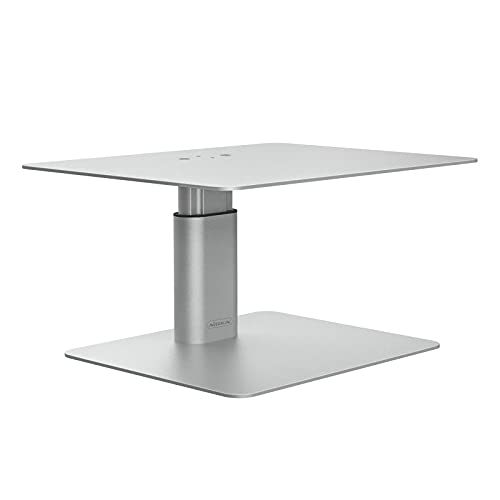
The Nillkin Adjustable Height Computer Monitor Stand is perfect for anyone seeking to enhance their workspace ergonomics. With its ergonomic aluminum design, it supports various monitors and laptops, including iMacs and Dell screens. You can easily adjust the height using the twist-knob feature, aligning your screen with eye level to reduce neck and shoulder strain. This stand can hold up to 33.07 lbs and features anti-slip rubber pads for stability. Plus, the gap between the base and top panel offers extra storage for your office supplies. Assembly is quick and straightforward, making it a hassle-free addition to your desk setup.
Best For: Those looking to improve their workspace ergonomics and reduce strain during long hours of computer use.
Pros:
- Ergonomic design helps align the screen with eye level, minimizing neck and shoulder discomfort.
- Adjustable height feature allows customization to fit individual preferences.
- Sturdy construction with anti-slip pads ensures stability and supports a variety of devices.
Cons:
- Weight limit of 33.07 lbs may not accommodate heavier monitors.
- Assembly required, which could be inconvenient for some users.
- Limited height adjustment options (only three levels) may not suit everyone’s needs.
Klearlook Foldable Height Adjustable Monitor Stand Riser

Designed with versatility in mind, the Klearlook Foldable Height Adjustable Monitor Stand Riser is perfect for anyone looking to enhance their workspace comfort. This stand raises your monitor to an ideal height, reducing back and neck strain while promoting better posture. With three adjustable widths, it easily fits various workstations. Plus, the hidden storage drawer and integrated tablet/phone holder keep your essentials organized. Weighing just 2.87 pounds yet supporting up to 55 pounds, it’s stable and compatible with different monitor sizes. Enjoy the ergonomic benefits and functionality without assembly hassles, making your workspace more efficient.
Best For: Those seeking an ergonomic and space-efficient solution to elevate their workspace, especially remote workers and home office users.
Pros:
- Ergonomic Design: Raises the monitor to an optimal height, reducing strain on the back and neck.
- Adjustable Widths: Offers three different widths to accommodate various workstations and monitor sizes.
- Built-in Storage: Features a hidden drawer and a device holder for organized workspace management.
Cons:
- Drawer Size: Some users may find the storage drawer size smaller than expected.
- Stability with Heavier Monitors: There are concerns about stability when using heavier monitors.
- Limited Color Options: Currently only available in white, which may not suit all decor styles.
Hemudu Clear Computer Monitor Stand Riser (HD01T-002)

If you’re looking to enhance your workspace ergonomically, the Hemudu Clear Computer Monitor Stand Riser (HD01T-002) is an excellent choice. This height-adjustable stand elevates your monitor or laptop, reducing neck and back strain while promoting better posture. You can customize the height from 3.4 to 4.9 inches and tilt it forward up to 15 degrees for ideal viewing comfort. Made from 1/4 inch tempered safety glass, it supports up to 88 lbs, ensuring durability and stability. Plus, you can conveniently stow your laptop underneath, saving desk space. Assembly is straightforward with stainless steel legs and screws.
Best For: Those seeking an ergonomic workspace solution to improve posture while using computers or laptops.
Pros:
- Height adjustable from 3.4 to 4.9 inches for customizable viewing comfort.
- Durable construction with 1/4 inch tempered safety glass, supporting up to 88 lbs.
- Space-saving design allows for convenient storage of laptops underneath the stand.
Cons:
- May not be suitable for very large or heavy monitors exceeding the weight limit.
- Requires assembly, which may take some time and effort.
- Limited tilt adjustment range (0-15 degrees) may not meet everyone’s viewing preferences.
Mount-It! Aluminum Monitor Stand for iMac
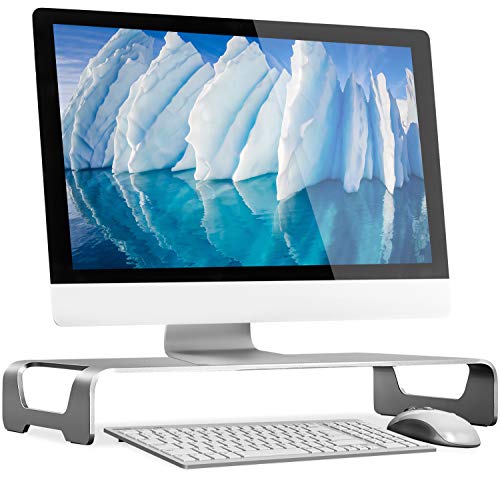
For anyone seeking an elegant solution to enhance their workspace, the Mount-It! Aluminum Monitor Stand for iMac is a fantastic choice. This wide unibody riser elevates your iMac, MacBook, or PC monitor to a comfortable height, promoting better posture. Its high-grade aluminum construction with a brushed finish not only matches your Apple products but also supports up to 44 lbs without wobble. With a space-saving design, it cleverly organizes your keyboard and mouse underneath. Plus, it requires no assembly and is easy to maintain. Users rave about its sturdiness, making it a must-have for any ergonomic setup.
Best For: Individuals looking to enhance their workspace ergonomically while maintaining a modern aesthetic with their Apple products.
Pros:
- Sturdy construction supports up to 44 lbs without wobbling, ensuring stability for various devices.
- Space-saving design allows for effective cable management and storage for keyboard and mouse underneath.
- No assembly required and easy maintenance, making setup and upkeep hassle-free.
Cons:
- Some users have noted minor issues with branding/logo placement, which may not appeal to everyone.
- A few customers wish for a longer design to accommodate full-size keyboards comfortably.
- Limited color options may not suit all personal styles or office decor preferences.
TV/Monitor Riser Desktop Stand (2 Pack)
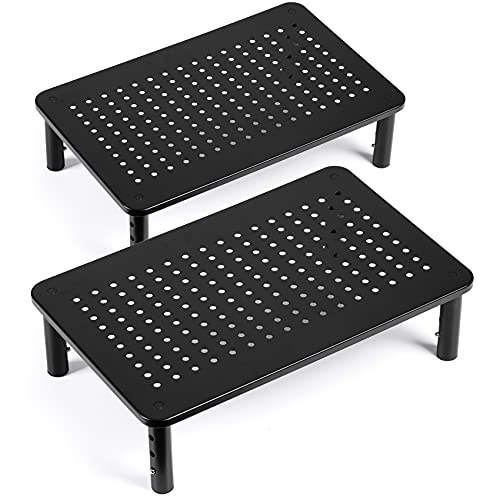
The TV/Monitor Riser Desktop Stand (2 Pack) is ideal for anyone seeking an ergonomic solution to enhance their workspace. With adjustable heights of 3.9, 4.7, and 5.5 inches, you can easily find the perfect viewing angle to reduce neck and back strain. Its sturdy metal construction supports up to 44 lbs, ensuring your devices stay secure. Plus, non-slip legs and a ventilated platform keep everything stable and cool. Assembly is quick—just screw in the legs, no tools needed! Whether you use it for monitors, laptops, or printers, this versatile stand adapts to your needs effortlessly.
Best For: Individuals seeking an ergonomic workspace solution to improve comfort and reduce strain during prolonged computer use.
Pros:
- Ergonomic design with adjustable heights promotes a customized viewing angle, reducing neck and back stress.
- Sturdy metal construction supports up to 44 lbs, ensuring stability for various devices.
- Ventilated platform enhances airflow, helping to keep devices cool and preventing overheating.
Cons:
- Only available in one color option, which may not match all decor styles.
- Height adjustments may not suit everyone’s preference, limiting customization for some users.
- The weight capacity may be insufficient for heavier monitors or equipment beyond 44 lbs.
Amazon Basics Height Adjustable Computer Monitor Riser Desk Stand

Looking for an ergonomic solution to reduce neck and eye strain while working? The Amazon Basics Height Adjustable Computer Monitor Riser Desk Stand is the answer. With adjustable heights of 2.87, 4.25, and 4.9 inches, it supports monitors, laptops, and printers up to 22 lbs. Its durable ABS plastic construction and non-skid feet guarantee stability, preventing wobbling during use. Plus, the clutter-free design features under-stand storage for added convenience. Users rave about its sturdiness and ease of assembly, earning it an impressive average rating of 4.6 stars from over 24,000 reviews. Enhance your workspace today!
Best For: Those seeking an ergonomic solution to improve workspace comfort and reduce neck and eye strain.
Pros:
- Sturdy design with a weight capacity of up to 22 lbs, ensuring stability for monitors, laptops, and printers.
- Adjustable height options (2.87, 4.25, and 4.9 inches) cater to various user preferences for optimal viewing.
- Convenient under-stand storage helps keep workspaces clutter-free and organized.
Cons:
- Assembly required for height adjustments, which may be inconvenient for some users.
- Limited weight capacity of 22 lbs may not support larger or heavier equipment.
- Return policy restrictions may apply for certain conditions, making it crucial to review before purchasing.
Foldable Height Adjustable Laptop Stand (Compatible with MacBook and Other Laptops)
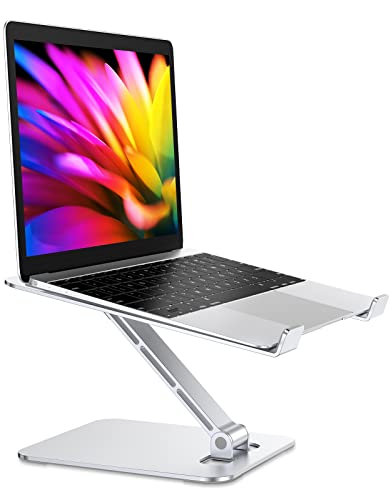
If you’re searching for a reliable solution to enhance your workspace ergonomics, the Foldable Height Adjustable Laptop Stand is an excellent choice for MacBook users and anyone with laptops ranging from 10 to 16 inches. Made from durable aluminum, it supports up to 8.8 lbs without shaking. You can easily adjust the height up to 7.48 inches, allowing for comfortable viewing angles. Its foldable design makes storage and portability a breeze, fitting snugly in your bag. Plus, the open structure promotes heat ventilation, preventing overheating. With an average rating of 4.7 stars, it’s a favorite for both practicality and style.
Best For: Individuals seeking an ergonomic solution for their laptops, particularly MacBook users and those with devices ranging from 10 to 16 inches.
Pros:
- Adjustable Height: Offers customizable viewing angles with a height adjustment of up to 7.48 inches.
- Sturdy Construction: Made from durable aluminum alloy, it supports up to 8.8 lbs without shaking.
- Portable Design: Foldable for easy storage and transport, fitting conveniently in bags.
Cons:
- Limited Weight Capacity: May not support laptops heavier than 8.8 lbs.
- Initial Setup Required: Users must adjust the height and angle manually, which may take time.
- Compatibility Constraints: Designed specifically for laptops within the 10-16 inch range, limiting use with larger devices.
HUANUO Adjustable Monitor Riser for Laptop and Desktop

For anyone seeking an ergonomic solution to enhance their workspace, the HUANUO Adjustable Monitor Riser stands out with its customizable height settings. You can easily adjust the height to 3.94”, 4.72”, or 5.51”, promoting better posture and reducing neck strain. This sturdy riser supports up to 44 lbs and features a vented platform that prevents overheating. With its anti-slip rubber pads, your devices stay secure, while the under-platform storage offers extra organization. Assembly is tool-free, making setup a breeze. Compatible with various devices, this riser is perfect for home offices, schools, or compact spaces. Enjoy improved comfort and functionality!
Best For: Those looking for an ergonomic and adjustable solution to elevate their workspace, suitable for home offices, schools, and compact living environments.
Pros:
- Ergonomic Design: Adjustable height settings promote better posture and reduce neck strain.
- Sturdy Construction: Supports up to 44 lbs, making it compatible with various devices.
- Tool-Free Assembly: Quick and easy setup without the need for tools.
Cons:
- Quality Inconsistencies: Some customers have reported variations in quality between newer models and earlier purchases.
- Limited Height Options: Height adjustments may not accommodate everyone’s preferences or needs.
- Storage Space May Be Tight: Under-platform storage could be insufficient for larger office supplies.
Factors to Consider When Choosing an Adjustable iMac Stand
When you’re selecting an adjustable iMac stand, consider several key factors to guarantee it meets your needs. You’ll want to look at the height adjustment mechanism, material durability, and ergonomic design features. Additionally, check for compatibility with your devices and available storage space to maximize functionality.
Height Adjustment Mechanism
Choosing an adjustable iMac stand involves considering various height adjustment mechanisms to guarantee ideal comfort and usability. You’ll find options like twist knobs, button presses, and screw-in legs that let you customize your monitor’s position. Look for stands with multiple height settings, usually ranging from 3 to 9.5 inches, to fit your unique desk setup and personal preference. An ergonomic design that elevates your monitor to eye level can greatly reduce neck, shoulder, and back strain during long hours of use. Additionally, make sure that the mechanism promotes stability and prevents wobbling, offering a secure setup. Finally, consider how easy it is to adjust the height, as quick modifications can enhance your overall productivity and comfort.
Material Durability and Stability
An adjustable iMac stand’s effectiveness isn’t just about height adjustment; material durability and stability play significant roles in guaranteeing a secure setup. Opt for stands made from metal or aluminum, as these materials offer superior strength compared to plastic, allowing them to support substantial weights without bending. A robust weight capacity, ideally around 33 lbs or more, guarantees your stand can handle heavy devices without wobbling. Enhance stability further with anti-slip rubber pads or skidproof designs to prevent sliding on various surfaces. High-grade materials resist scratches and wear, extending your stand’s lifespan while keeping it looking great. Regular maintenance checks, like tightening screws, are vital for preserving performance and safety over time.
Ergonomic Design Features
To enjoy a comfortable and productive workspace, it’s vital to contemplate ergonomic design features when selecting an adjustable iMac stand. Look for a stand that elevates your display to eye level—this helps reduce neck and shoulder strain while promoting better posture. Height-adjustable options let you customize your viewing angle, accommodating various preferences. Tilt adjustments can further enhance your experience by allowing you to angle the monitor for ideal visibility and decreased glare. Verify the stand has a sturdy design with a high weight capacity to maintain stability, critical for ergonomic safety. Finally, consider models with under-platform storage to keep your workspace organized, which can greatly boost your comfort and productivity.
Compatibility With Devices
When selecting an adjustable iMac stand, ensuring compatibility with your devices is crucial for a seamless setup. First, check that the stand supports your iMac and any external monitors you might use, as many stands are tailored for specific brands and sizes. Pay attention to the maximum weight capacity—some can handle up to 44 lbs, while others may only support 22 lbs. Adjustable height features are important too; they allow for various screen sizes and personal preferences, enhancing ergonomics. Also, confirm the stand accommodates the dimensions of your iMac or monitor base. Finally, consider compatibility with other devices, like laptops or printers, as versatile stands can enhance your workspace efficiency.
Storage Space Availability
Choosing an adjustable iMac stand with adequate storage space is vital for maintaining an organized workspace. Consider whether the stand offers under-stand storage for items like your keyboard, notebooks, or office supplies. Some models feature built-in solutions, such as drawers or shelves, to help minimize desk clutter and keep important items easily accessible. The stand’s dimensions are critical; make sure it has enough height and width to accommodate your iMac while allowing for storage underneath. Additionally, look for adjustable height options that maintain sufficient clearance for items placed below. Finally, evaluate the stand’s weight capacity to confirm it can safely support your iMac while providing the structural integrity needed for any additional items stored underneath.
Assembly Ease and Maintenance
Considering the assembly ease and maintenance of an adjustable iMac stand is vital for a smooth setup experience. Some models offer tool-free assembly, while others need screws and tools, which can affect how quickly you get started. Look for stands that include tools or come with clear instructions to simplify setup and maintenance. Regular checks on screw stability are essential, especially for models that support heavier weights—up to 33 pounds or more. Stands with simple designs and fewer components usually require less maintenance, making them more user-friendly. Finally, choose materials that are durable and easy to clean, as this will enhance longevity and overall ease of upkeep for your adjustable iMac stand.
Aesthetic Design Appeal
The assembly ease and maintenance of your adjustable iMac stand set the stage for what comes next: its aesthetic design appeal. You’ll want a stand that complements the sleek and modern look of your iMac, often made from materials like aluminum or premium finishes. A minimalist design not only enhances your workspace’s aesthetics but also integrates cable management features to keep clutter at bay. Opt for color options like silver or black to match your decor seamlessly. An ergonomic design elevating your screen to eye level improves your posture while creating a balanced appearance. Unique design elements, such as adjustable widths or built-in storage, can add visual interest and practicality, enhancing your overall user experience.