A dual-monitor setup can make spreadsheets, research, video calls, and everyday multitasking easier—but the right desktop depends on more than screen size. Memory, storage, included accessories, and monitor connections all affect the value of a bundle.
These eight options span compact PCs, full-size desktops, and packages with two displays. Some listings include the computer only, so check exactly what arrives before you buy.
Best 8 Dual Screen Deskpc Picks for 2026
Best for Heavy Multitasking
HP EliteDesk 800 G4 with Dual 24-Inch Monitors
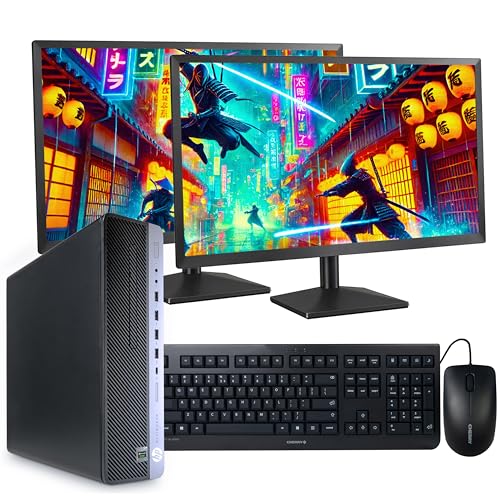
- Six-core i5-8500 and 32GB RAM
- 1TB NVMe SSD and dual 1080p displays
- Wi-Fi 6 and Windows 11 Pro
Best For: Memory-heavy office multitasking
Best Curved-Screen Bundle
Dell OptiPlex Mini with Dual 24-Inch Curved Monitors

- Two curved 24-inch 1080p displays
- 16GB RAM and 1TB SSD
- Webcam, RGB peripherals, and soundbar
Best For: Compact setup with included accessories
Best Space-Saving HP Setup
HP EliteDesk 800 G3 Mini with Dual 24-Inch Monitors

- Compact mini PC with two KOORUI displays
- 32GB RAM and new 1TB NVMe SSD
- Wi-Fi 6E and Bluetooth 5.2
Best For: Small desks needing two screens
Best Straightforward Office Bundle
Dell OptiPlex 3070 with Dual 22-Inch Monitors

- Six-core i5-9500 and 16GB RAM
- 512GB SSD and Windows 11 Pro
- Wireless keyboard and mouse included
Best For: Everyday office and school tasks
Best All-Around Office Setup
HP EliteDesk 800 G4 with Dual 24-Inch Monitors

- Six-core i5, 16GB RAM, and 1TB SSD
- Two 24-inch LCD monitors and peripherals
- Windows 11 Pro with Wi-Fi 6
Best For: Home offices needing a complete two-monitor setup
Basic Dual-Monitor Pick
HP Elite Desktop with Two 19-Inch LCDs
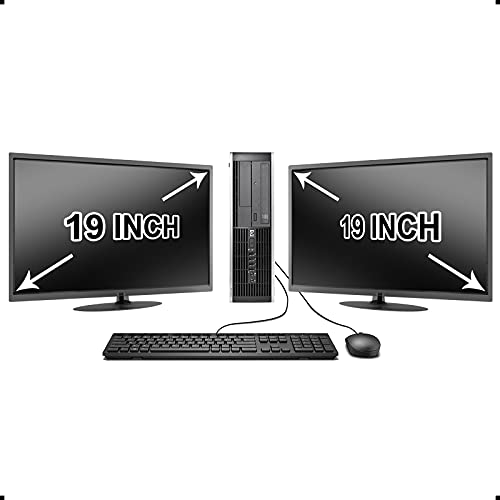
- Two 19-inch LCD monitors included
- Core i5, 8GB RAM, and 1TB HDD
- USB Wi-Fi adapter and DVD-ROM
Best For: Light office work on two smaller screens
Best for Comfort
HP EliteDesk 800 G3 with 32GB RAM

- 32GB RAM and an i7-6700
- 1TB NVMe SSD plus 2TB HDD
- Two KOORUI 24-inch monitors
Best For: Multitasking with substantial local storage
Best Large-Screen Bundle
Dell OptiPlex Mini with Dual 27-Inch Curved Monitors

- Two 27-inch curved monitors
- 32GB RAM and 1TB SSD
- Webcam and RGB peripherals included
Best For: Large dual displays in a compact setup
Best for Heavy Multitasking – HP EliteDesk 800 G4 with Dual 24-Inch Monitors
This renewed HP EliteDesk is a dual screen deskpc bundle for buyers who keep many work apps open. Its six-core i5-8500, 32GB of RAM, and 1TB NVMe SSD pair with two refurbished 24-inch 1080p monitors.
Best For: Office users who want generous memory and storage in a complete two-monitor setup.
Pros:
- 32GB of RAM supports busy multitasking.
- 1TB NVMe SSD provides ample, responsive storage.
- Includes Wi-Fi 6, Windows 11 Pro, and a wired keyboard and mouse.
Cons:
- Renewed monitors may show cosmetic wear.
- Integrated graphics are better suited to productivity than demanding graphics work.
The strongest reason to choose this bundle is its 32GB RAM and 1TB SSD combination; just account for its refurbished components and 90-day warranty.
Best Curved-Screen Bundle – Dell OptiPlex Mini with Dual 24-Inch Curved Monitors
This renewed Dell bundle takes a more accessory-focused approach to a dual screen deskpc: a compact Core i5 mini PC comes with two 24-inch curved 1080p monitors, a webcam, RGB keyboard and mouse, and an RGB soundbar.
Best For: Buyers who want a small desktop and a coordinated set of displays and accessories.
Pros:
- Mini PC takes up less desk space than a full-size tower.
- 16GB RAM and a 1TB SSD cover everyday multitasking and storage.
- Webcam, soundbar, keyboard, and mouse are included.
Cons:
- The listing does not identify the Core i5 generation.
- Integrated graphics are not a dedicated gaming GPU.
Choose this one for its curved monitors and bundled peripherals, but confirm the processor generation and operating-system edition with the seller: the supplied title says Windows 11 Pro while the details say Windows 11.
Best Space-Saving HP Setup – HP EliteDesk 800 G3 Mini with Dual 24-Inch Monitors
For a dual screen deskpc that keeps the computer itself compact, this renewed HP EliteDesk 800 G3 Mini pairs a small desktop with two approximately 24-inch KOORUI 1080p monitors. It has an i7-6700, 32GB of RAM, and a new 1TB NVMe SSD.
Best For: Buyers with limited desk space who still want two displays and 32GB of RAM.
Pros:
- Mini PC measures 6.9 by 7 by 1.3 inches.
- 32GB RAM and 1TB NVMe storage suit multitasking and file-heavy work.
- Includes Wi-Fi 6E and Bluetooth 5.2 connectivity.
Cons:
- The sixth-generation i7-6700 is an older processor.
- The supplied title says Windows 11, but the bullets and details specify Windows 10 Pro.
This is a practical way to gain screen space without a large desktop case. Verify the installed Windows version before buying, since the supplied listing information conflicts.
Best Straightforward Office Bundle – Dell OptiPlex 3070 with Dual 22-Inch Monitors
This renewed Dell OptiPlex 3070 is a dual screen deskpc option built around a six-core i5-9500, 16GB of RAM, and a 512GB SSD. The title lists two 22-inch LED monitors, plus a wireless keyboard and mouse.
Best For: Everyday office and school work where a ready-to-use two-monitor layout matters more than maximum storage.
Pros:
- Six-core ninth-generation i5 handles routine productivity tasks.
- Windows 11 Pro and wireless keyboard and mouse are included.
- Compact-form desktop offers DisplayPort, USB, and Gigabit Ethernet connections.
Cons:
- 512GB SSD is smaller than the 1TB drives in the other listed bundles.
- Monitor size conflicts: the title says dual 22-inch displays, while the details list a 24-inch screen.
Its specifications suit a conventional work setup, but verify the included monitors’ size and resolution before ordering because the supplied listing details do not agree.
Best All-Around Office Setup – HP EliteDesk 800 G4 with Dual 24-Inch Monitors
This renewed HP EliteDesk is a dual screen deskpc package for everyday office work. Its six-core i5-8500, 16GB RAM, and 1TB SSD pair with two 24-inch LCD monitors for a workspace that is ready for multitasking.
Best For: Home-office users who want two larger screens and a complete set of peripherals.
Pros:
- Includes dual 24-inch monitors, a wireless keyboard and mouse, and RGB speakers.
- 1TB SSD and 16GB RAM offer useful capacity for work files and multiple applications.
- Windows 11 Pro, Wi-Fi 6, and Bluetooth are included.
Cons:
- Renewed PC has a listed 30-day warranty.
- Integrated graphics are better suited to general computing than demanding graphics work.
Choose this package if screen size, SSD storage, and included accessories matter more than dedicated graphics. Check the renewal terms before buying.
Basic Dual-Monitor Pick – HP Elite Desktop with Two 19-Inch LCDs
This renewed HP bundle is a dual screen deskpc option for routine tasks when two displays matter more than cutting-edge components. It lists a Core i5, 8GB RAM, a 1TB SATA hard drive, and two 19-inch LCD monitors.
Best For: Basic office tasks and users who prefer a smaller two-monitor workspace.
Pros:
- Includes two 19-inch monitors, a USB keyboard and mouse, and a USB Wi-Fi adapter.
- 1TB hard drive provides space for documents and media.
- DVD-ROM is included for reading discs.
Cons:
- The listed HDD will generally feel less responsive than an SSD.
- Ships with Windows 10, and monitor brands may vary.
This is a straightforward way to get two screens in one bundle. Its older memory and hard-drive configuration make it a better fit for light workloads than speed-focused multitasking.
Best for Comfort – HP EliteDesk 800 G3 with 32GB RAM
For a dual screen deskpc with more memory and storage flexibility, this renewed EliteDesk 800 G3 combines 32GB RAM, a 1TB NVMe SSD, and a 2TB hard drive. Two KOORUI 24-inch monitors provide room to keep multiple windows visible.
Best For: Office users who run many applications and keep large local file collections.
Pros:
- 32GB RAM supports memory-heavy multitasking.
- Pairs a 1TB NVMe SSD with a 2TB HDD.
- Includes two 24-inch monitors, wireless peripherals, Wi-Fi 6, and Bluetooth 5.
Cons:
- The i7-6700 is an older processor despite the generous memory.
- The renewed computer has a listed 90-day warranty.
The SSD-and-HDD combination is the main advantage here: it separates fast everyday storage from bulk file space. Included display cables and a DP-to-HDMI adapter also help with setup.
Best Large-Screen Bundle – Dell OptiPlex Mini with Dual 27-Inch Curved Monitors
This renewed Dell OptiPlex takes the dual screen deskpc approach further with two 27-inch curved monitors and a compact mini PC. The listed 32GB RAM and 1TB SSD make it a practical option for a spacious everyday workstation.
Best For: Users who want expansive displays and a compact desktop with video-call accessories.
Pros:
- Two 27-inch curved monitors provide generous screen space.
- 32GB RAM and a 1TB SSD suit multitasking and file storage.
- Includes an RGB keyboard, mouse, soundbar, and webcam.
Cons:
- The Core i5 generation is not specified in the supplied listing.
- Listed display specifications conflict on native versus maximum resolution; confirm before purchase.
This bundle stands out for its monitor size and included accessories, not a clearly identified processor generation. Verify the exact display resolution and PC configuration if those specifications will drive your decision.
How We Picked the Best Dual Screen Deskpc
We compared the listed processor, memory, storage, monitor sizes, included accessories, and desktop form factors across all eight products. We also considered whether a listing includes two monitors or only a PC capable of supporting them. Specifications can vary by seller or configuration, so treat the product listing—not the bundle name—as the final authority on what is included.
Quick Comparison: Which Setup Fits?
For a compact workspace, the Dell Tiny bundles pair a small desktop with two curved monitors; the listed 27-inch version also has 32GB of RAM, versus 16GB on the 24-inch version. The HP 800 G3 Mini bundle offers two 24-inch monitors, 32GB of RAM, and a 1TB NVMe SSD in a small form factor.
For conventional office setups, the Dell OptiPlex 3070 bundle lists two 22-inch displays, while two HP EliteDesk bundles list dual 24-inch monitors. The older HP Elite desktop with dual 19-inch displays has 8GB of RAM and a hard drive, making its listed specifications less appealing for demanding multitasking. The HP EliteDesk 800 G4 with 32GB of RAM and a 1TB NVMe drive is a PC-only listing: budget separately for two screens.
Key Buying Factors for a Dual Screen Deskpc
Confirm the Complete Display Setup
Check that two monitors are included if you need a ready-to-use bundle. Verify each monitor’s size, resolution, stand, cables, and input types. Also confirm the desktop has two usable video outputs compatible with the displays; adapters may be necessary, and connector selection can vary.
Prioritize Memory and Storage
For email, documents, and browser tabs across two screens, 16GB of RAM is a practical starting point; 32GB provides more room for heavier multitasking. An SSD generally makes the system feel more responsive than a SATA hard drive. Compare capacities alongside drive type: a large HDD is not a substitute for an SSD as the primary system drive.
Check Age, Software, and Condition
These listings include older Intel processor generations. Before ordering, verify the exact CPU, installed operating system and its support status, warranty, return policy, and whether components or monitors are refurbished. Do not assume Windows 11 compatibility or ongoing updates solely from a listing title.
Who Should Buy Which Dual Screen Deskpc?
Choose a Dell Tiny bundle if desk space is tight and you want curved displays; pick between its 24- and 27-inch listings based on available space and your preferred screen size. Consider the HP 800 G3 Mini bundle for a small PC with the listed 32GB of RAM and dual 24-inch monitors. The OptiPlex 3070 bundle suits buyers comfortable with two 22-inch screens. An EliteDesk bundle with two 24-inch displays may fit a standard home office, while the PC-only EliteDesk 800 G4 makes sense if you already own monitors or want to choose them separately. Compare the dual-19-inch HDD bundle carefully against SSD-based options before deciding on price alone.