A touch-enabled computer can simplify everyday desktop work, but the right choice depends on where you will use it. A compact all-in-one makes sense on a desk; an industrial panel PC or large interactive display serves a different purpose.
These eight options span Windows and Android devices, small embedded screens, and room-size boards. Use the buying guide to narrow them down by operating system, screen size, hardware, and installation needs.
Best 8 Touch Screen Deskpc Picks for 2026
Best Everyday All-in-One
MSI Modern AM242TP 23.8-Inch Touch PC
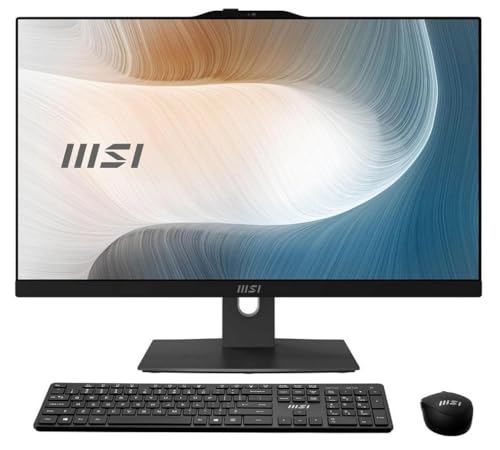
- 23.8-inch Full HD IPS touchscreen
- Intel Core 7-150U and 16GB DDR5
- 1TB SSD plus 1TB HDD
Best For: A full-size Windows touchscreen for home or office work
Best Windows Business Display
TouchWo 21.5-Inch Industrial PC

- 21.5-inch Full HD 10-point touch
- Windows 11 Pro with 8GB RAM
- VESA mount and multiple wired connections
Best For: Wall-mounted business, classroom, or point-of-sale setups
Best Compact Touch PC
HEIGAOLAPC Mini PC with 5.5-Inch Screen

- 5.5-inch built-in HD touchscreen
- 16GB RAM and Windows 11 Pro
- Dual external 4K output via HDMI and USB-C
Best For: Compact Windows setups with external monitors
Best Android Touch Display
TouchWo 21.5-Inch Android 11 PC

- 21.5-inch Full HD 10-point touch
- Android 11 with 4GB RAM and 32GB storage
- VESA mounting and TF/SD expansion
Best For: Fixed displays running compatible Android apps
Compact Industrial Pick
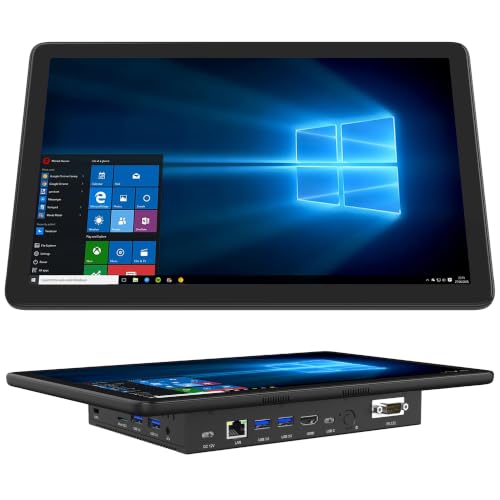
- 11.6-inch five-point touchscreen
- Windows 11 Pro with 8GB RAM
- Dual RS232 and four USB 3.0 ports
Best For: Compact industrial or office stations needing serial ports
Meeting-Room Pick
TouchWo 43-Inch Interactive Board

- 43-inch Full HD touch display
- Ten-point touch and built-in speakers
- PC specifications conflict in listing
Best For: Meeting rooms and classrooms needing a shared touch display
Home-Office Pick
ALNERUZL 22-Inch Touch All-in-One

- 22-inch Full HD touchscreen
- 16GB RAM and included peripherals
- Verify OS and SSD capacity
Best For: Everyday home-office and study desks
Large-Format Pick
TouchWo 55-Inch 4K Smart Board

- 55-inch 4K ten-point touchscreen
- Windows 11 Pro PC with 8GB RAM
- No cabled video input
Best For: Classrooms and presentation spaces needing a large interactive screen
Best Everyday All-in-One – MSI Modern AM242TP 23.8-Inch Touch PC
If you want a touch screen deskpc for everyday work without a separate tower, the MSI Modern AM242TP pairs a 23.8-inch Full HD IPS touchscreen with an Intel Core 7-150U, 16GB of DDR5 memory, and Windows 11 Home.
Best For: Home or office users who want a full-size Windows touchscreen and substantial built-in storage.
Pros:
- 23.8-inch Full HD IPS touchscreen provides a roomy workspace.
- Includes both a 1TB SSD and a 1TB HDD.
- Comes with an adjustable stand, wireless keyboard, and mouse.
Cons:
- Integrated Intel UHD graphics are not a dedicated graphics card.
- Full HD resolution may feel limited to buyers seeking a sharper display at this size.
This is the straightforward Windows all-in-one of the group: it prioritizes screen space, included peripherals, and storage over a compact footprint.
Best Windows Business Display – TouchWo 21.5-Inch Industrial PC
For a touch screen deskpc in a classroom, shop, or shared workspace, this TouchWo model combines a 21.5-inch Full HD 10-point touchscreen with the listed i7 processor, 8GB of RAM, 512GB of storage, and Windows 11 Pro.
Best For: Business installations that need a wall-mountable Windows touch PC for presentations, menus, or point-of-sale use.
Pros:
- 10-point capacitive touch supports multi-finger gestures and gloved use.
- Includes 100 x 100mm VESA mounting holes and a wall bracket.
- Offers USB, VGA, LAN, Wi-Fi, and built-in speakers.
Cons:
- 8GB of RAM leaves less multitasking headroom than the 16GB Windows models here.
- The supplied details do not identify the i7 processor generation.
Its mounting options and range of connections make it a practical fit for fixed-position use. Check your software and peripheral requirements before selecting it for a specific business system.
Best Compact Touch PC – HEIGAOLAPC Mini PC with 5.5-Inch Screen
This touch screen deskpc takes a different approach: its built-in 5.5-inch, 1280 x 720 touchscreen provides on-device control, while HDMI 2.0 and USB-C let you connect larger external displays. It runs Windows 11 Pro on an Intel Celeron N5095 with 16GB of RAM and 256GB of storage.
Best For: Buyers who want a space-saving Windows mini PC with a small built-in touch interface and external-monitor options.
Pros:
- Compact 5.51 x 3.54 x 0.79-inch body includes its own touchscreen.
- Supports two external 4K displays at 60Hz through HDMI and USB-C.
- Includes four USB 3.0 ports, Gigabit Ethernet, and an SD card reader.
Cons:
- The 5.5-inch built-in screen is too small to replace a typical desktop monitor for extended work.
- Intel Celeron N5095 is a modest processor choice for demanding workloads.
Choose this model for its small footprint and flexible display connections, not as a one-screen substitute for the larger all-in-one PCs.
Best Android Touch Display – TouchWo 21.5-Inch Android 11 PC
If your touch screen deskpc needs Android apps rather than Windows software, this TouchWo all-in-one offers a 21.5-inch Full HD 10-point touchscreen, Android 11, an RK3568 processor, 4GB of RAM, and 32GB of built-in storage.
Best For: Fixed Android-based displays for menus, presentations, media, or compatible point-of-sale apps.
Pros:
- Large 10-point touchscreen supports multi-finger input and gloved use.
- 100 x 100mm VESA mounting holes and an included wall bracket suit fixed installations.
- TF/SD expansion adds storage flexibility beyond the built-in 32GB.
Cons:
- Android 11 will not run Windows desktop applications.
- 4GB of RAM and 32GB of built-in storage are modest for heavy multitasking or large app libraries.
This is the specialist pick for Android workflows. Confirm that your required apps and POS hardware are compatible before using it in a business installation.
Compact Industrial Pick – OuuOee 11.6-Inch Panel PC
If you need a touch screen deskpc for a tight workstation or equipment setup, this 11.6-inch panel PC combines a built-in IPS display with Windows 11 Pro and serial connectivity.
Best For: Compact office stations or industrial setups that need RS232 ports.
Pros:
- 11.6-inch, 1366 × 768 IPS display with five-point touch.
- 8GB RAM, 128GB eMMC storage, and a TF slot for expansion.
- Two RS232 ports, four USB 3.0 ports, Gigabit Ethernet, HDMI, and Type-C.
Cons:
- The built-in screen is small and lower-resolution than a Full HD desktop display.
- 128GB of built-in storage may require expansion for larger file collections.
Its main advantage is specialized connectivity in a compact touch-enabled PC; choose a larger all-in-one if screen space matters more than serial ports.
Meeting-Room Pick – TouchWo 43-Inch Interactive Board
For a shared-space touch screen deskpc, this 43-inch TouchWo board offers a Full HD display, ten-point touch, and a built-in computer for presentations and classroom activities. Check the exact configuration before ordering: the title lists Windows 11, a Core i7, 8GB RAM, and 512GB storage, while the supplied bullets list Windows 10, an i5, 4GB RAM, and 128GB storage.
Best For: Teams or classrooms that want a large, interactive Windows-based display.
Pros:
- 43-inch, 1920 × 1080 screen supports ten-point touch.
- Includes built-in speakers, Wi-Fi, USB ports, and a wall-mount bracket.
- Touch controls work without a stylus, according to the supplied notes.
Cons:
- Processor, memory, storage, and Windows version conflict across the supplied listing details.
- Cabled screen input from another device is not supported; screen casting requires software.
This is a practical size for collaborative use, but confirm the shipped PC specifications and your screen-sharing workflow before buying.
Home-Office Pick – ALNERUZL 22-Inch Touch All-in-One
This 22-inch all-in-one is a more conventional touch screen deskpc for study or home-office tasks, pairing a Full HD touchscreen with 16GB RAM and an included wired keyboard and mouse.
Best For: A compact desk setup for everyday browsing, documents, and study.
Pros:
- 22-inch, 1920 × 1080 touchscreen with wide viewing angles.
- 16GB RAM and an SSD for everyday multitasking.
- Includes a wired keyboard, mouse, mouse pad, and power accessories.
Cons:
- The supplied details specify DOS, so do not assume Windows is installed.
- SSD capacity conflicts: the bullets say 256GB, while the details list 512GB.
It has the familiar size and accessories of a desk-ready all-in-one, but verify the installed operating system and storage capacity before purchase.
Large-Format Pick – TouchWo 55-Inch 4K Smart Board
If your touch screen deskpc needs to serve a room rather than one seated user, this 55-inch TouchWo smart board combines a 4K display and ten-point touch with a built-in Windows 11 Pro PC.
Best For: Classroom instruction, group presentations, and large interactive displays.
Pros:
- 55-inch, 3840 × 2160 touchscreen provides substantial space for group viewing.
- Listed with a Core i7, 8GB RAM, and a 512GB SSD.
- Built-in speakers, four USB ports, Wi-Fi, and an included wall-mount bracket.
Cons:
- At 55 inches and 30 kg, it is not suited to a typical small desk.
- It does not accept cabled video input from another device; mirroring requires screen-casting software.
Choose it when collaborative screen area and 4K clarity justify a wall-mounted setup, and plan ahead for its screen-sharing limitation.
How We Picked the Best Touch Screen Deskpc
We compared the listed specifications and intended uses of eight touch-enabled devices, rather than treating them as interchangeable desktop computers. The selection covers conventional all-in-ones, small panel PCs, an Android industrial display, a mini PC with a built-in screen, and large interactive boards. We prioritized distinctions buyers can check before ordering: operating system, screen size and resolution, stated memory and storage, and whether the device suits a desk, embedded installation, or shared room. Listings do not establish real-world speed, touch accuracy, or long-term reliability, so confirm those details with the seller when they matter.
Quick Comparison: Which Format Fits?
- Everyday desk work: The 23.8-inch MSI all-in-one has a listed Core 7-150U processor, 16 GB of RAM, and both SSD and HDD storage. The 22-inch all-in-one is another desk-size choice; compare its listed G5400 processor and 256 GB SSD against your workload.
- Windows panel installations: The 21.5-inch industrial PC lists an i7, 8 GB of RAM, and 512 GB of storage. The smaller 11.6-inch N5095 panel PC lists 8 GB of RAM and 128 GB eMMC; check mounting and port requirements for either.
- Android-based touch use: The 21.5-inch RK3568 model runs Android 11 and lists 4 GB of RAM and 32 GB of storage. It is not a substitute for Windows-only software.
- Small-footprint computing: The mini PC with a built-in screen may save display space, but verify its screen size, specifications, and connections before comparing it with a full-size desktop.
- Group collaboration: The 43-inch Full HD and 55-inch 4K interactive boards are sized for meeting or teaching spaces, not typical desks.
Key Buying Factors for a Touch Screen Desk PC
Software and Performance
Choose the operating system around the applications you actually need. Windows 11 and Android 11 serve different app ecosystems, and software compatibility should come before screen size. For multitasking, compare processor, RAM, and storage type as well as capacity: an SSD generally makes more sense for active files and applications, while eMMC-equipped models deserve closer scrutiny if you expect demanding desktop use.
Screen, Touch, and Placement
Match the display to viewing distance and task. Full HD is common among the listed smaller screens, while the 55-inch board lists 4K; resolution alone does not tell you how touch will feel. Check supported touch points, stylus compatibility, brightness, and viewing angles if those features are essential. Also verify stand or mounting hardware, power access, and available ports—especially for wall-mounted boards and embedded panel PCs.
Who Should Buy Which Touch Screen Deskpc?
For a familiar desktop setup, start with the MSI or 22-inch all-in-one. Choose a Windows industrial panel PC for a dedicated workstation or mounted interface, and consider the Android model only when your required apps run on Android. The 11.6-inch panel PC suits tighter spaces; the mini PC with a screen calls for extra specification checks. For presentations or shared annotation, compare the 43- and 55-inch boards by room size, viewing distance, resolution, and installation requirements. Before buying any Touch Screen Deskpc, verify the exact configuration and included accessories on the current listing.