A fanless mini PC can keep a desk, display, or equipment cabinet quiet without taking up much space. The trade-off is that performance, port selection, and cooling headroom vary considerably between models.
These 10 picks cover everyday desktop tasks, space-saving PC sticks, and industrial systems with connections that ordinary mini PCs often lack.
Best 10 Fanless Mini PCs Picks for 2026
Quiet Office Pick

- Intel N300 and Windows 11 Pro
- 16GB RAM; 512GB NVMe SSD
- Fanless case with expandable storage
Best For: Quiet office desks and everyday multitasking
Triple-Display Pick

- Intel N150 with 16GB RAM
- Three 4K display connections
- Expandable M.2 and microSD storage
Best For: Quiet three-screen business workstations
Legacy-Port Pick
KINGDEL NC3000 Industrial Mini PC

- Two RS232 serial ports
- HDMI and VGA dual-display support
- Core i7, 16GB RAM, 512GB NVMe SSD
Best For: Industrial equipment and legacy peripherals
Hidden Signage Pick

- Direct HDMI stick design
- 8GB memory and 128GB eMMC
- Remote-start and dual-display features
Best For: Hidden digital signage and unattended displays
Industrial Connectivity
KINGDEL Core i5 Fanless Mini PC
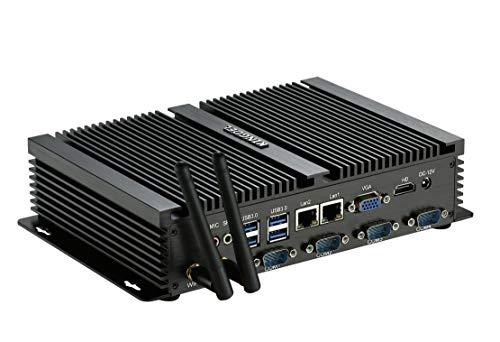
- Four RS232 ports and dual Ethernet
- Eight USB ports total
- Silent metal enclosure
Best For: Serial-connected equipment and dual-network setups
Triple-Display Workspace
- N100 with 16GB LPDDR5
- Three 4K@60Hz display outputs
- MicroSD and M.2 expansion
Best For: Quiet multi-monitor office or signage setups
Portable PC Stick

- 182g stick-style design
- Two HDMI display outputs
- MicroSD expansion; no internal SSD slot
Best For: Portable browsing, office work, and dual-display signage
Business Deployment Pick

- Triple 4K 60Hz display support
- Remote-management BIOS features
- TLC SSD rated at 256TBW or higher
Best For: Managed office, signage, and kiosk deployments
Slim Desk Pick

- 0.7-inch-thick fanless chassis
- Three independent 4K displays
- Empty M.2 NVMe slot for expansion
Best For: Quiet desks and compact multi-monitor setups
Expandable Cyber X1 Pick
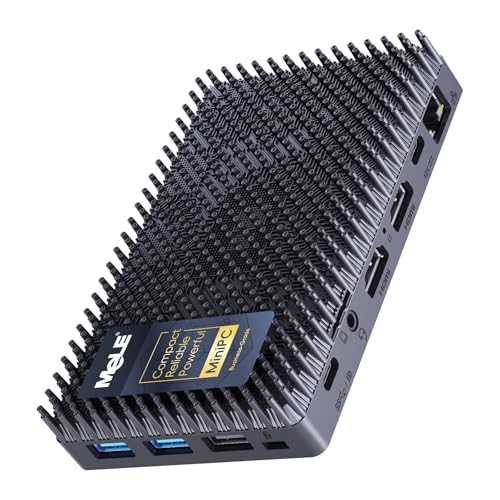
- Copper-heatsink fanless cooling
- Triple 4K display support
- Spare M.2 NVMe slot and microSD slot
Best For: Quiet workstations needing future storage expansion
Quiet Office Pick – MINIX NEO Z300-0dB
Among fanless mini pcs for a quiet desk, the MINIX NEO Z300-0dB pairs an Intel N300 eight-core processor with 16GB of RAM, a 512GB NVMe SSD, and Windows 11 Pro. It is a practical choice for office work, browsing, and media tasks without fan noise.
Best For: Quiet office setups that need a ready-to-use Windows mini PC with room to expand.
Pros:
- Passive cooling eliminates fan noise.
- 16GB RAM is upgradeable to 32GB, and the M.2 slot supports up to 4TB of storage.
- Compact 4.84 x 4.72-inch footprint; VESA mount is included.
Cons:
- The top cover can become warm and should be kept out of children’s reach.
- Integrated graphics make it a better fit for everyday tasks than graphics-heavy work.
The N300, included storage, and upgrade options make this a flexible silent desktop. Leave the case unobstructed so its passive cooling can do its job.
Triple-Display Pick – MeLE Quieter 4C N150
The MeLE Quieter 4C stands out among fanless mini pcs when you need several screens in a small workspace. Its Intel N150 processor, 16GB of RAM, and 512GB of storage suit everyday business tasks, while two HDMI ports and a full-function USB-C port support three 4K displays.
Best For: Quiet multi-monitor workstations and compact business installations.
Pros:
- Supports three 4K displays through two HDMI ports and USB-C.
- USB-C supports display, data, and PD 3.0 power input.
- Storage can be expanded with a microSD card or an internal M.2 2280 SSD.
Cons:
- Passive cooling can leave the surface at 55–70°C.
- Wi-Fi 5 is the specified wireless standard.
Choose this model if display flexibility matters more than keeping the case cool to the touch. Give it space for heat to dissipate, particularly during continuous use.
Legacy-Port Pick – KINGDEL NC3000 Industrial Mini PC
For buyers comparing fanless mini pcs for equipment connections, the KINGDEL NC3000 offers ports that many small desktops omit. Its metal case houses an eighth-generation quad-core Core i7, 16GB of DDR4 RAM, and a 512GB NVMe SSD, with two RS232 serial ports plus HDMI and VGA outputs.
Best For: Industrial or business setups that need serial connections and mixed-display support.
Pros:
- Two RS232 ports support compatible legacy equipment.
- HDMI and VGA provide dual-monitor connections.
- Includes a metal case, 16GB RAM, and a 512GB NVMe SSD.
Cons:
- At 9.2 x 5.9 x 2 inches, it takes up more space than the smallest mini PCs here.
- The eighth-generation processor is an older platform.
This is the specialist choice when its serial and VGA ports solve a real compatibility problem; for a simple desk setup, its larger enclosure may be unnecessary.
Hidden Signage Pick – MeLE PCG02 N100 Stick PC
The MeLE PCG02 takes a different approach to fanless mini pcs: its stick-shaped body plugs directly into an HDMI display and can be mounted out of sight. An Intel N100, 8GB of memory, 128GB eMMC storage, and Windows 11 Pro cover modest office, IoT, and digital-signage workloads.
Best For: Space-constrained signage, kiosks, and other unattended displays.
Pros:
- Direct HDMI connection and included VESA mounting option simplify hidden placement.
- USB-C supports a second 4K display, data transfer, and PD 3.0 power.
- Wake-on-LAN, PXE boot, RTC wake, and auto power-on support remote deployments.
Cons:
- 128GB eMMC offers less built-in storage than the 512GB models in this roundup.
- The surface may reach 55–70°C under load.
Its small footprint and unattended-operation features are the main reasons to choose it. Check that its built-in storage and available connections fit your installation before deploying it behind a display.
Industrial Connectivity – KINGDEL Core i5 Fanless Mini PC
Among fanless mini pcs, this KINGDEL model stands out for connecting industrial equipment: it pairs four RS232 serial ports with dual Ethernet ports in a silent metal case. Its Core i5-3317U, 8GB of RAM, and 256GB mSATA SSD suit everyday office tasks and dedicated control setups.
Best For: Workstations that need serial connections and two wired network ports.
Pros:
- Four RS232 ports and dual Ethernet ports support equipment-heavy setups.
- Four USB 3.0 and four USB 2.0 ports provide room for peripherals.
- Fanless metal case operates silently.
Cons:
- The Core i5-3317U and DDR3L memory are older-generation hardware.
- RAM is listed with an 8GB maximum, limiting upgrades.
Choose this for its port layout rather than cutting-edge processing power; the serial and network connections are its clearest advantage.
Triple-Display Workspace – MeLE Quieter 4C N100
The MeLE Quieter 4C is a compact choice among fanless mini pcs for office desks and digital signage. Its four-core N100, 16GB of LPDDR5 RAM, and 512GB of storage pair with two HDMI ports and a full-function USB-C port for up to three 4K displays at 60Hz.
Best For: Quiet, space-saving workstations that need multiple displays.
Pros:
- Supports three simultaneous 4K displays through HDMI and USB-C.
- MicroSD and an internal M.2 2280 slot offer storage expansion.
- USB-C supports display, data, and PD power input.
Cons:
- The fanless enclosure can reach a reported surface temperature of 55°C to 70°C.
- PD power requires a compatible 12V–20V source rated at least 36W.
It offers more display and storage flexibility than a basic mini PC, but plan for its warm-running enclosure and power requirements.
Portable PC Stick – MeLE PCG02 Pro N5100
For shoppers comparing fanless mini pcs by portability, the MeLE PCG02 Pro puts a quad-core N5100, 8GB of DDR4 RAM, and 256GB of eMMC storage into a 5.7-inch-long stick. Two HDMI 2.0 ports let it run separate or duplicated displays without a desktop-sized box.
Best For: Portable dual-display setups for browsing, office tasks, or digital signage.
Pros:
- Small, 182g stick format is easy to move between setups.
- Dual HDMI ports support two displays.
- USB PD3.0 accepts compatible power banks and other suitable sources.
Cons:
- This N5100 model does not support internal SSD expansion; storage expansion relies on microSD.
- Its fanless surface can reach a reported 55°C to 70°C.
Pick it when a lightweight, silent PC matters more than internal storage flexibility. For USB PD power, check that your source supplies more than 12V and 24W.
Business Deployment Pick – MeLE Cyber X1 N150
Among fanless mini pcs for managed workplaces, this Cyber X1 stands out for its remote-management BIOS features and business-oriented storage. Its N150 processor, 16GB of memory, and 512GB SSD suit everyday office tasks, signage, and kiosk use without fan noise.
Best For: Businesses deploying quiet PCs for office terminals, digital signage, or retail kiosks.
Pros:
- Supports three 4K 60Hz displays through two HDMI ports and USB-C.
- Unlocked BIOS includes auto power-on, RTC wake, Wake-on-LAN, and PXE boot.
- Includes a VESA mount and a high-endurance TLC SSD rated at 256TBW or higher.
Cons:
- Wi-Fi 5 and Gigabit Ethernet may be limiting if you need newer networking standards.
- The N150 is better suited to everyday and dedicated-purpose workloads than demanding compute tasks.
The strongest reason to choose this version is its combination of deployment controls, triple-display support, and specified SSD endurance. Check that its ports and networking match your installation before buying.
For shoppers comparing fanless mini pcs for a quiet desk, the Quieter4C pairs an N150 processor with 16GB of DDR4 memory and a 512GB SSD. Its thin chassis and included VESA mount make it easy to tuck behind a monitor.
Best For: Quiet home offices, study spaces, and compact multi-monitor workstations.
Pros:
- Fanless design runs without fan noise and measures just 0.7 inches thick.
- Drives three independent 4K displays using two HDMI ports and USB-C.
- An empty M.2 2280 NVMe slot and microSD slot offer storage expansion.
Cons:
- Wi-Fi 5 and Gigabit Ethernet are not the latest networking options.
- The N150 is aimed at everyday productivity rather than intensive computing.
Choose the Quieter4C if a slim, silent setup and room for another NVMe drive matter most. It also ships with Windows 11 Pro and lists Linux compatibility for flexible setups.
This Cyber X1 is one of the fanless mini pcs to consider if you want silent operation and a spare NVMe slot. It combines an N150 processor, 16GB of upgradeable DDR4 memory, and a 512GB SSD with support for three 4K displays.
Best For: Quiet office or control-room setups that may need more storage later.
Pros:
- Fanless cooling uses a copper heatsink and patterned housing for passive heat dissipation.
- Two HDMI ports and USB-C support three independent 4K displays.
- Includes an empty M.2 2280 NVMe slot, microSD slot, and unlocked BIOS with auto power-on.
Cons:
- Wi-Fi 5 and Gigabit Ethernet may not suit buyers seeking newer networking standards.
- The N150 is not intended for demanding compute-heavy work.
Its practical appeal is the mix of quiet cooling, display flexibility, and storage expansion. Confirm your intended displays and peripherals fit the available connections before ordering.
How We Picked These Fanless Mini PCs
We focused on the specifications that change how a small computer fits into a real setup: processor class, memory and storage, physical format, display connections, and specialized ports. This list includes conventional mini desktops, HDMI-style PC sticks, and industrial PCs. We treated their advertised specifications as starting points, not proof of sustained speed or suitability for every 24/7 installation; confirm the current configuration before ordering.
Quick Comparison: Which Type Fits?
Everyday desktops: The MINIX NEO Z300-0dB pairs an Intel i3-N300 with 16GB of RAM and a 512GB SSD. The MeLE Quieter 4C and Cyber X1 listings offer N100 or N150 configurations, generally with 16GB of RAM and 512GB of storage. They are sensible starting points for office work, browsing, signage, and media playback.
PC sticks: The MeLE PCG02 N100 and PCG02 Pro N5100 are the space-saving options for a display with little room behind it. Their 8GB of RAM and smaller listed storage capacities make workload and peripheral requirements especially important.
Industrial connections: The listed i7 and i5 industrial PCs stand out for legacy or equipment-facing connectivity, including RS232 serial ports; the i5 listing also specifies dual network ports. Choose these for required interfaces, not simply for an older Core i5 or i7 label.
Key Buying Factors for Fanless Mini PCs
Match the Processor to the Workload
N100 and N150 systems fit routine productivity, kiosks, and light multitasking. The i3-N300 may offer more room for concurrent tasks, but cooling and power settings can affect sustained performance. Older industrial Core chips need closer scrutiny: generation and model matter more than the i5 or i7 name alone.
Check Memory, Storage, and Display Needs
For a primary desktop, 16GB of RAM and a 512GB SSD offer more breathing room than an 8GB/128GB stick. Check whether memory or storage can be upgraded if your needs may grow. Verify the exact number, type, and supported resolution of display outputs—especially for dual-monitor desks or 4K signage—rather than relying on a general “4K” claim.
Plan for Ports and Passive Cooling
Count USB ports and confirm whether you need Ethernet, Wi-Fi, VGA, or RS232 before comparing prices. Fanless does not mean heat-free: leave clearance around the enclosure and check the seller’s operating-temperature guidance, particularly inside a cabinet or behind a warm display. Also confirm the supplied power adapter, Windows edition, and any mounting hardware on the exact listing.
Who Should Buy Which Fanless Mini PCs?
Choose a 16GB desktop-format model if this will be your everyday quiet workstation; compare the MINIX i3-N300 against MeLE’s N100 and N150 options based on your port and budget needs. Choose a PCG02 stick when minimal space matters more than expansion. Choose an industrial model when serial devices, dual LAN, or a legacy display connection are nonnegotiable. If you need demanding gaming, heavy video editing, or guaranteed performance under continuous load, look beyond this class or seek workload-specific testing first.