Setting up your home office can be a balancing act between functionality and space. Choosing the right mini PC is essential, especially when you want power without the bulk. NUC PCs are compact yet packed with performance, making them ideal for your needs. In this guide, we’ll explore the top 10 NUC models that can elevate your workspace. Let’s discover which compact powerhouse fits your setup best.
Mini PC Desktop Pentium 12th Gen N100 (16GB RAM, 512GB SSD)

If you’re looking for a powerful yet compact solution for your home office setup, the Mini PC Desktop Pentium 12th Gen N100 with 16GB RAM and a 512GB SSD stands out as an excellent choice. This mini PC boasts a multi-core design, ensuring smooth multitasking at speeds up to 3.4GHz. With 4K triple display support via HDMI and Type-C ports, your visuals will be stunning. Plus, the fast DDR5 RAM and PCIe SSD enhance performance and efficiency. Its compact design fits perfectly anywhere, and WiFi6 and Bluetooth 5.2 keep your connectivity seamless. Enjoy reliable customer support and a two-year warranty for peace of mind.
Best For: Anyone seeking a versatile and compact computing solution for home, office, or educational purposes.
Pros:
- Compact design makes it easy to fit in any workspace without sacrificing performance.
- High-speed components such as DDR5 RAM and PCIe SSD ensure quick multitasking and fast data access.
- 4K triple display support allows for enhanced visual experiences and productivity.
Cons:
- Some users reported mixed experiences with heat generation, potentially affecting performance during extended use.
- Initial software setup can be challenging for less tech-savvy individuals.
- Limited upgrade options due to its compact mini PC design.
Intel NUC 13 PRO Mini Desktop Computer
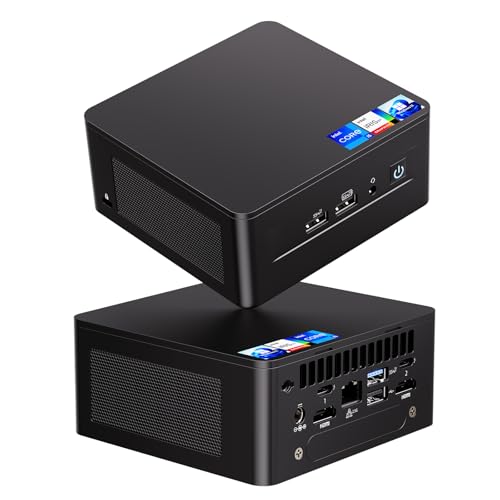
The Intel NUC 13 PRO Mini Desktop Computer stands out as an ideal choice for professionals seeking a compact yet powerful workstation for their home office. With its 13th Gen Intel Core i5 processor and hybrid architecture, you’ll enjoy seamless multitasking and efficient performance. It features 16GB of RAM and a 512GB SSD, perfect for handling demanding tasks. Plus, the Intel Iris Xe Graphics supports high-resolution displays, making it a great fit for creative projects. Connectivity options like WiFi 6E and multiple ports guarantee you’re well-equipped for any setup. With a 3-year warranty, it’s a reliable investment.
Best For: Professionals seeking a compact yet powerful workstation for their home office or creative projects.
Pros:
- Powerful 13th Gen Intel Core i5 processor with hybrid architecture for seamless multitasking.
- Supports high-resolution displays with Intel Iris Xe Graphics, ideal for graphic-intensive work.
- Advanced connectivity options including WiFi 6E and multiple ports for versatile setup.
Cons:
- Limited storage capacity with only a 512GB SSD; additional storage needs to be purchased separately.
- May require additional peripherals, as it includes only basic USB ports.
- Compact size may limit upgrade options compared to larger desktop setups.
Intel NUC 13 Pro Mini PC

For professionals seeking a powerful yet compact solution for their home office, the Intel NUC 13 Pro Mini PC stands out with its impressive 13th Gen Intel Core i5 processor and support for up to 64GB of memory. Weighing just 1.41 pounds, its small footprint doesn’t compromise on performance or features. With 512GB of M.2 PCIe SSD storage and Intel Iris Xe graphics, it supports stunning 8K and 4K displays. Connectivity options include Wi-Fi 6E and multiple Thunderbolt ports. Plus, its efficient cooling guarantees quiet operation, making it a reliable choice for your productivity needs.
Best For: Professionals seeking a compact and powerful mini PC for home office productivity and media consumption.
Pros:
- High performance with a 13th Gen Intel Core i5 processor and support for up to 64GB of RAM.
- Versatile connectivity options including Wi-Fi 6E and multiple Thunderbolt ports for fast data transfer and display support.
- Efficient cooling system ensures quiet operation, making it suitable for a distraction-free work environment.
Cons:
- Some users report fan noise during sleep mode, which may be disruptive.
- BIOS updates can potentially affect performance, requiring careful management.
- Limited storage capacity with the base model at 512GB, which may necessitate upgrades for heavy users.
GEEKOM Mini PC IT12 with 12th Gen Intel i5-12450H

Looking for a powerful mini PC that can handle your demanding home office tasks? The GEEKOM Mini PC IT12, equipped with a 12th Gen Intel i5-12450H processor, delivers exceptional performance with 8 cores, 16GB RAM, and a lightning-fast 512GB SSD. Its upgraded IceBlast Cooling System guarantees efficient heat management and quiet operation. You’ll benefit from 2.5Gbps Ethernet and Wi-Fi 6E for stable connectivity, plus dual USB4 ports for rapid data transfer. With support for four-screen output and a preinstalled Windows 11 Pro, this compact powerhouse is perfect for multitasking. Enjoy peace of mind with a 3-year warranty.
Best For: Professionals and home office users seeking a compact yet powerful mini PC that excels in multitasking and demanding applications.
Pros:
- High Performance: Equipped with a 12th Gen Intel i5 processor and 16GB RAM, it handles demanding tasks effortlessly.
- Efficient Cooling: The upgraded IceBlast Cooling System ensures quiet operation and effective heat dissipation.
- Versatile Connectivity: Features 2.5Gbps Ethernet, Wi-Fi 6E, and dual USB4 ports for fast data transfer and reliable internet access.
Cons:
- Limited Storage Upgrade: While expandable to 64GB RAM, the SSD is limited to a maximum of 2TB.
- Compact Size May Limit Upgradability: The mini form factor can restrict options for internal upgrades compared to larger PCs.
- Price Point: It may be more expensive than other entry-level mini PCs with less processing power.
ACEMAGIC Vista V1 N97 Mini PC

Designed for professionals who need reliable performance in a compact form, the ACEMAGIC Vista V1 N97 Mini PC stands out with its powerful 12th Gen Intel N97 processor. With up to 3.6GHz turbo boost, it delivers 30% faster performance while maintaining low power consumption. Equipped with 16GB DDR4 RAM and a 1TB M.2 SSD, multitasking feels effortless, and you can easily expand storage up to 2TB. Pre-installed with Windows 11 Pro, its upgraded cooling design guarantees quiet operation. Plus, it supports 4K UHD displays and offers a variety of connectivity options, making it perfect for your home office setup.
Best For: Professionals seeking a compact, high-performance PC for multitasking and office tasks.
Pros:
- Powerful Performance: 12th Gen Intel N97 processor offers 30% faster performance compared to previous generations.
- Ample Memory and Storage: Comes with 16GB RAM and 1TB SSD, expandable up to 2TB for enhanced multitasking capabilities.
- Quiet Operation: Upgraded cooling design ensures stable performance without noisy distractions.
Cons:
- Limited Graphics Capability: While it supports 4K UHD, it may not be suitable for high-end gaming or intensive graphic design.
- Storage Expansion Not Included: Additional storage options must be purchased separately.
- Compact Size May Limit Upgrade Options: The mini PC’s design may restrict future hardware upgrades compared to larger desktops.
Intel NUC 13 Pro Mini PC (NUC13ANHi7)

The Intel NUC 13 Pro Mini PC (NUC13ANHi7) stands out as an ideal choice for professionals seeking a compact yet powerful workstation. With its Intel Core i7-1360P processor, 32GB of upgradeable RAM, and 1TB M.2 PCIe SSD, it handles demanding tasks with ease. You’ll appreciate the stunning visuals from Intel Iris Xe Graphics, supporting resolutions up to 8K. Connectivity options abound, featuring Thunderbolt 4 ports, multiple HDMI outputs, and Wi-Fi 6E. Plus, its eco-friendly design guarantees you can upgrade and repair it easily. Backed by a 3-year warranty, this mini PC is perfect for your home office setup.
Best For: Professionals seeking a compact and powerful workstation for demanding tasks and high-resolution visuals.
Pros:
- High Performance: Equipped with an Intel Core i7-1360P processor and 32GB RAM, it excels in handling resource-intensive applications.
- Versatile Connectivity: Features multiple Thunderbolt 4 ports and HDMI outputs, ensuring compatibility with a variety of devices and displays.
- Eco-Friendly Design: Designed for easy upgradability and repairability, supporting sustainable business practices.
Cons:
- Limited Upgradability: Although RAM is upgradeable to 64GB, the compact size may limit options for additional expansion.
- Higher Price Point: Compared to traditional desktops, mini PCs can be more expensive for similar performance levels.
- Potential Overheating Issues: Compact design might lead to thermal management challenges during extensive use.
Beelink EQ14 Mini PC (Intel 13th Twin Lake-N150, 16GB RAM, 500GB SSD)

For professionals seeking a compact yet powerful solution for their home office, the Beelink EQ14 Mini PC stands out with its Intel 13th Twin Lake-N150 processor, delivering impressive performance with low power consumption. With 16GB of DDR4 RAM and a speedy 500GB NVMe SSD, you’ll enjoy quick loading times and smooth multitasking. Plus, its dual Gigabit Ethernet ports and WiFi 6 guarantee fast connectivity for all your online tasks. The ability to support dual 4K displays enhances your productivity, while the efficient cooling design keeps it quiet. With 24-hour tech support and a 1-year warranty, you’re well covered.
Best For: Professionals seeking a compact and efficient mini PC for home office use, combining power and low energy consumption.
Pros:
- Powerful Intel 13th Twin Lake-N150 processor with low power consumption.
- Supports dual 4K displays for enhanced productivity.
- Fast connectivity options with dual Gigabit Ethernet and WiFi 6.
Cons:
- Limited upgrade options for RAM (only one slot available).
- May not be suitable for high-end gaming due to integrated graphics.
- Relatively small storage capacity compared to larger desktop PCs (500GB SSD).
Intel NUC 13 PRO Mini Desktop Computer (NUC13ANKi7)
If you’re looking for a powerful and compact solution for your home office, the Intel NUC 13 PRO Mini Desktop Computer (NUC13ANKi7) stands out with its 13th Gen Intel Core i7 processor. This mini desktop packs a punch with twelve cores, reaching speeds up to 5.0GHz. With 16GB DDR4 RAM and a 512GB M.2 SSD, you’ll enjoy seamless multitasking and ample storage. Its compact design (4.6 x 4.4 x 1.3 inches) fits perfectly in tight spaces, and you can easily mount it behind your monitor. Plus, the Intel Iris Xe Graphics supports stunning 4K displays, perfect for all your professional needs.
Best For: Individuals seeking a compact and powerful desktop solution for home office tasks, professional applications, and entertainment.
Pros:
- High Performance: Equipped with a 13th Gen Intel Core i7 processor and 16GB DDR4 RAM for seamless multitasking.
- Compact Design: Its small dimensions allow it to fit in tight spaces and be mounted behind monitors.
- Versatile Graphics: Supports 4K displays and multi-screen setups, catering to various professional and entertainment needs.
Cons:
- Warranty Concerns: Some users have reported issues regarding warranty and product authenticity.
- Limited Storage Out-of-the-Box: While it has a 512GB SSD, users may need to invest in additional storage for extensive file needs.
- Weight: At 3.72 pounds, it may be heavier than some other mini PC options on the market.
Intel NUC 7 Mini PC with Windows 10 (BOXNUC7I5BNKP)

Compact yet powerful, the Intel NUC 7 Mini PC (BOXNUC7I5BNKP) is an ideal choice for home office professionals seeking versatility without sacrificing performance. With its 7th Generation Intel Core i5 processor and Intel Iris Plus graphics, you can easily handle multiple tasks and enjoy stunning 4K Ultra HD visuals across three displays. Weighing just 2.22 pounds and measuring 5.35 x 3.94 x 4.92 inches, it saves space while providing robust capabilities. Plus, with 8 GB of RAM and a 256GB SSD, it offers quick load times. Just keep in mind potential overheating and limited USB ports for peripherals.
Best For: Home office professionals seeking a compact and powerful PC for multitasking and 4K visuals.
Pros:
- Compact design saves space while providing full desktop performance.
- Supports stunning 4K Ultra HD visuals across up to three displays.
- Quick load times with 8 GB of RAM and a 256GB SSD.
Cons:
- Reports of overheating issues from some users.
- Limited USB ports may affect connectivity with peripherals.
- Driver problems can occur during Windows updates.
Intel NUC 14 Pro Slim Kit Mini PC (NUC14RVKI3)

The Intel NUC 14 Pro Slim Kit Mini PC (NUC14RVKI3) stands out as an ideal choice for professionals and students who demand powerful performance in a small form factor. With its Intel Core i3 100U processor, 16GB DDR5 RAM, and 512GB PCIe SSD, you can tackle demanding applications and multitask effortlessly. This compact powerhouse supports up to four 4K monitors, enhancing your productivity. Plus, rich connectivity options, including Thunderbolt 4 and Wi-Fi 6E, guarantee you’re always connected. Weighing just 1.11 pounds, it’s perfect for your home office setup, combining efficiency and versatility in a sleek black design.
Best For: Professionals and students seeking a powerful, compact mini PC for multitasking and demanding applications.
Pros:
- Compact and lightweight design, making it easy to fit into any workspace.
- Supports up to four 4K monitors, enhancing productivity for design and analysis work.
- Fast connectivity options with Thunderbolt 4 and Wi-Fi 6E for reliable performance.
Cons:
- Limited to Intel Core i3, which may not satisfy the performance needs of heavy gamers or intensive workloads.
- Lacks additional upgrade options for RAM and storage beyond the initial configuration.
- One-year warranty on remaining components may be shorter compared to competitors offering longer warranties.
Factors to Consider When Choosing Nuc Pcs for Home Office
When you’re choosing a NUC PC for your home office, consider key factors like performance and speed to handle your tasks efficiently. The size and form factor can impact your workspace, while connectivity options guarantee you can easily plug in all your devices. Don’t overlook cooling and noise levels, as well as upgradeability and support for future needs.
Performance and Speed
Choosing the right NUC PC for your home office hinges on understanding performance and speed factors. Start by considering the processor generation; newer Intel models, like the 12th and 13th Gen, typically deliver better performance thanks to advanced architecture. Opt for multi-core processors to enhance multitasking, allowing you to run several applications smoothly. Evaluate the RAM type and speed; DDR5 is faster than DDR4, considerably boosting overall performance. Don’t overlook storage; PCIe SSDs offer superior read/write speeds compared to traditional SATA SSDs, ensuring quicker boot times and file access. Finally, make sure your system supports high-resolution displays and multiple monitors, as this can greatly enhance your productivity in a home office setup.
Size and Form Factor
Understanding the size and form factor of NUC PCs is essential for optimizing your home office setup. These compact devices typically measure around 4.6 x 4.4 inches, making them perfect for limited desk space or crowded environments. Their low profile allows you to mount them behind monitors or tuck them on shelves without wasting valuable room. Weighing less than 5 pounds, NUC PCs are easily portable, letting you relocate them as needed. Importantly, their small size doesn’t compromise performance; they can house powerful processors and ample RAM for seamless multitasking. Plus, their design promotes efficient cooling and quiet operation, creating a distraction-free workspace conducive to productivity.
Connectivity Options Available
Connectivity options are vital for maximizing the functionality of your NUC PC in a home office. Look for models with multiple USB ports, including USB 3.0 and USB-C, to guarantee fast data transfer and the ability to connect various peripherals like keyboards and external drives. It’s also important that your NUC supports HDMI or DisplayPort outputs, allowing for dual or even triple monitor setups to boost your productivity. Don’t forget to check for high-speed Ethernet ports, ideally 2.5Gbps, to enhance your internet performance. Integrated Wi-Fi 6E is a must for stable connections in busy environments, and Bluetooth support, especially with the latest Bluetooth 5.3, will enable seamless pairing with wireless accessories like headsets and printers.
Cooling and Noise Levels
When you’re setting up a home office, efficient cooling and low noise levels are vital for maintaining focus and productivity. Look for NUC PCs with advanced cooling systems, like those featuring dual copper tubes, which can enhance heat dissipation by over 50%. This is important when multitasking or running demanding applications. Additionally, consider models that utilize silent fans, reducing operating noise by up to 40% for a quieter workspace. Compact designs often have strategically placed built-in fans to maintain airflow without excessive noise. However, be mindful that some models may produce noticeable fan noise during heavy processing or sleep mode. Choosing a NUC PC with quiet cooling solutions guarantees a more peaceful and efficient work environment.
Upgradeability and Support
A well-cooled and quiet workspace sets the stage for productivity, but the right NUC PC should also offer upgradeability and solid support. Look for models that allow you to upgrade RAM up to 64GB and add additional SSDs for more storage. Opt for those supporting the latest DDR5 RAM technology for enhanced performance and efficiency. A warranty that extends beyond one year indicates reliable manufacturer support. Also, evaluate the availability of technical support options, including responsive customer service and online resources for troubleshooting. Finally, ascertain the design allows easy access to RAM slots and storage bays, making it simple for you to perform upgrades without needing professional help. This way, your PC can grow with your needs.