As you prepare for the evolving demands of office computing in 2025, it’s crucial to evaluate the best mini PCs that combine power and compact design. These devices not only save space but also enhance productivity with advanced features. From the latest Apple Mac mini to various KAMRUI models, there’s a lot to explore. Let’s take a closer look at these compact powerhouses and what they can bring to your workspace.
Apple 2024 Mac mini Desktop Computer with M4 Chip (16GB, 256GB SSD)

If you’re a professional who needs a powerful yet compact desktop solution, the Apple 2024 Mac mini with the M4 chip is an excellent choice. Weighing just 1.5 pounds and measuring 5 x 5 x 2 inches, it fits perfectly in small spaces. The M4 chip delivers exceptional performance, opening apps instantly and ensuring smooth video editing. With 16GB of unified memory and a 256GB SSD, you can customize your storage to fit your needs. Plus, it connects seamlessly with your Apple devices, supports multiple high-resolution displays, and operates quietly, making it an ideal addition to any workspace.
Best For: Professionals seeking a compact, powerful desktop that integrates seamlessly into the Apple ecosystem for tasks like music production and video editing.
Pros:
- Compact design makes it ideal for small workspaces.
- Exceptional performance with the M4 chip for fast app launches and smooth multitasking.
- Quiet operation, running cooler than previous models even under heavy load.
Cons:
- Base model’s 256GB storage may be insufficient for users with large file needs.
- RAM and storage are non-upgradable, requiring careful selection at purchase.
- High-quality HDMI cables are necessary for optimal performance with external displays.
KAMRUI GK3Plus Mini PC (16GB RAM, 512GB SSD)

The KAMRUI GK3Plus Mini PC is an ideal choice for professionals needing a powerful yet compact workstation. With a 12th Alder Lake N95 processor, it delivers impressive CPU and GPU performance, making multitasking a breeze. The 16GB DDR4 RAM and 512GB SSD guarantee you can handle memory-intensive tasks effortlessly. Its compact size of just 5.1 x 5.1 x 1.96 inches fits perfectly in tight spaces, and it even supports a triple display setup with 4K resolution. Plus, with gigabit Ethernet, dual-band WiFi, and multiple USB ports, you’ve got all the connectivity options you need for a seamless work experience.
Best For: Professionals needing a compact and powerful workstation for multitasking and memory-intensive tasks.
Pros:
- Compact Design: Fits easily in small spaces and can be mounted behind monitors.
- High Performance: Delivers +35% CPU and +78% GPU performance compared to previous models.
- Multiple Connectivity Options: Offers gigabit Ethernet, dual-band WiFi, and various USB ports for versatile connectivity.
Cons:
- Limited Upgrade Options: Storage expansion requires an additional 2.5 SSD, which is not included.
- Potential Overheating: Compact size may lead to overheating under heavy workloads.
- No Dedicated GPU: Integrated graphics may not be sufficient for high-end gaming or graphic-intensive applications.
KAMRUI Essenx E1 Mini PC Computer
Compact and powerful, the KAMRUI Essenx E1 Mini PC is perfect for professionals seeking an efficient workspace in 2025. With its Intel N97 processor, it delivers 40% more responsiveness than previous models, ensuring smooth multitasking. The 16GB DDR4 RAM and 256GB SSD provide ample memory and storage for your projects. You’ll appreciate the dual monitor support and VESA mount for space-saving setups. Plus, its rich connectivity options make it easy to connect various devices. With 4K UHD support and efficient heat dissipation, the Essenx E1 is an ideal choice for both work and entertainment.
Best For: Professionals seeking an efficient and compact workspace that accommodates multitasking and entertainment needs.
Pros:
- Powerful performance with Intel N97 processor, offering 40% more responsiveness than previous models.
- Ample connectivity options including dual monitor support, multiple USB ports, and Gigabit Ethernet for versatile setups.
- 4K UHD support for high-quality video playback, making it suitable for home theater use.
Cons:
- Limited storage capacity of 256GB may require external storage solutions for extensive file needs.
- No dedicated graphics card, which may limit performance in graphics-intensive applications.
- Cooling fan noise could be noticeable in quiet environments during heavy usage.
GMKtec Mini PC N150 (G3 Plus Intel Twin Lake)

For professionals seeking an efficient workhorse, the GMKtec Mini PC N150 (G3 Plus Intel Twin Lake) stands out with its robust 2025 Intel Twin Lake N150 processor. With four cores and a burst speed of up to 3.6GHz, you’ll notice a 6%-10% performance boost over previous models. It comes prebuilt with 16GB DDR4 RAM and a 1TB PCIe NVMe SSD, ensuring quick boot times and smooth multitasking. Plus, its dual HDMI ports support 4K displays, while WiFi 6 and Bluetooth 5.2 keep you connected. The upgraded cooling system minimizes noise, making it a perfect fit for your office.
Best For: Professionals and home users seeking a compact, high-performance mini PC for routine tasks, office work, and multimedia entertainment.
Pros:
- High Performance: Features a powerful 2025 Intel Twin Lake N150 processor with a burst speed of up to 3.6GHz, offering improved performance for multitasking.
- Ample Storage: Comes with 16GB DDR4 RAM and a 1TB PCIe NVMe SSD, ensuring quick boot times and efficient file management.
- Excellent Connectivity: Equipped with WiFi 6, Bluetooth 5.2, and dual HDMI ports for seamless connections and 4K display support.
Cons:
- Limited Upgrade Options: Being a mini PC, it may have fewer upgrade options compared to larger desktops.
- Noise Levels under Load: Although designed for quiet operation, heavy usage may still generate noticeable noise.
- No Dedicated Graphics Card: Integrated graphics may not be sufficient for high-end gaming or professional graphic design work.
ACEMAGIC Mini PC Computers, Twin Lake N150

If you’re looking for a powerful yet compact solution for your workspace, the ACEMAGIC Mini PC with the Twin Lake N150 processor stands out as an excellent choice. With 4 cores and speeds up to 3.6GHz, it excels in performance, outperforming previous models considerably. Its sleek design integrates seamlessly into your setup, while versatile connectivity options, including Gigabit Ethernet and multiple USB ports, guarantee you’re well-equipped. The 16GB RAM and 256GB SSD provide ample multitasking power, and the whisper-quiet operation is perfect for any environment. Plus, with dual 4K display support, it’s ideal for both work and entertainment.
Best For: Individuals seeking a compact, high-performance PC for multitasking, office work, and entertainment in various environments.
Pros:
- Powerful Performance: Equipped with a Twin Lake N150 processor, providing enhanced speed and efficiency for daily tasks.
- Compact Design: Small footprint allows easy integration into any workspace without clutter.
- Versatile Connectivity: Multiple ports and wireless capabilities ensure seamless connection to various devices and networks.
Cons:
- Limited Storage Out of the Box: Comes with only 256GB SSD, which may require expansion for users with large file storage needs.
- Cooling System Noise Under Load: While generally quiet, heavy usage may still produce noticeable fan noise.
- No Dedicated Graphics Card: Integrated graphics may not meet the demands of high-end gaming or graphic-intensive applications.
GMKtec Mini PC Nucbox G3 Plus
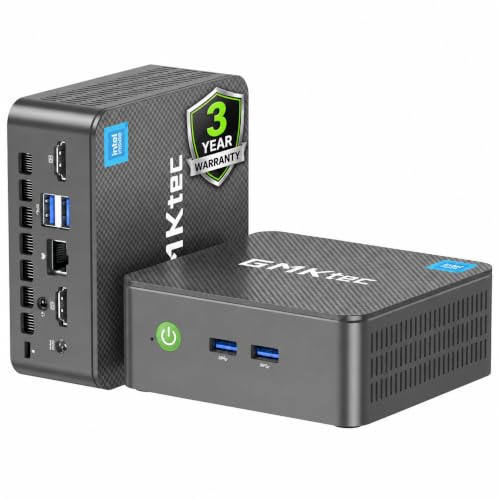
The GMKtec Mini PC Nucbox G3 Plus stands out as an excellent choice for professionals needing a portable yet powerful computing solution. With its Intel Twin Lake N150 processor, 16GB DDR4 RAM, and 1TB PCIe SSD, it handles routine tasks and multitasking effortlessly. The compact design (4.48 x 4.17 x 1.67 inches) makes it a perfect travel companion. You’ll appreciate the dual HDMI support for 4K displays and fast connectivity options, including WiFi 6 and Bluetooth 5.2. While it’s not geared for intensive gaming, it’s ideal for everyday use, offering great value for money and reliable customer support.
Best For: Professionals and casual users seeking a compact and efficient mini PC for everyday tasks and light entertainment.
Pros:
- Compact and portable design, making it easy to transport.
- Impressive performance with Intel Twin Lake N150 processor and 16GB RAM, suitable for multitasking.
- Excellent connectivity options, including dual HDMI for 4K displays and WiFi 6 for fast internet access.
Cons:
- Not designed for intensive gaming or heavy processing tasks, limiting its use for high-demand applications.
- Some users reported challenges with Linux installations, which may deter Linux enthusiasts.
- Limited to a 1-year warranty, which may not be sufficient for long-term users.
Beelink SER5 MAX Mini PC – AMD Ryzen 7 6800H, 32GB RAM, 1TB SSD
Packed with an AMD Ryzen 7 6800H processor, the Beelink SER5 MAX Mini PC is perfect for professionals who demand high performance in a compact form factor. With 32GB of dual-channel LPDDR5 RAM and a 1TB PCIe 4.0 SSD, it offers lightning-fast speeds for multitasking and storage. You can easily connect to three 4K displays for intricate design tasks or video editing. Plus, its quiet cooling system and portable design make it ideal for any workspace. With WiFi 6 and Bluetooth 5.2, you’ll enjoy stable connections. Backed by a 1-year warranty, it’s a smart investment for your office.
Best For: Professionals and creatives seeking a powerful, compact mini PC for multitasking, design work, and video editing.
Pros:
- High Performance: Equipped with an AMD Ryzen 7 6800H processor and 32GB of RAM for seamless multitasking and demanding applications.
- Versatile Display Support: Triple 4K display capability allows for intricate visual work and enhanced productivity.
- Compact Design: Portable and discreet, making it suitable for various work environments without sacrificing power.
Cons:
- Limited Gaming Capability: While it supports light gaming, it may not meet the needs of hardcore gamers looking for high-end graphics performance.
- Expandable Storage Not Included: The option to expand storage up to 8TB is available, but additional drives must be purchased separately.
- Noise from Cooling System: Although designed to be quiet, users may still hear the fan under heavy load, which could be distracting in a quiet environment.
KAMRUI AK1PLUS Mini PC with N95 Processor and 8GB RAM

For professionals and students seeking a reliable and powerful computing solution, the KAMRUI AK1PLUS Mini PC stands out with its robust 12th N95 Processor. It boasts 8GB of DDR4 RAM and a 256GB SSD, making multitasking effortless. You can upgrade storage up to 2TB, ensuring ample space for your projects. With UHD Graphics supporting resolutions up to 4096×2160@60Hz, it’s perfect for photo editing and streaming. Dual HDMI ports let you connect two monitors, enhancing productivity. Compact and lightweight, the KAMRUI AK1PLUS is a top choice, backed by positive reviews and solid connectivity options for all your office needs.
Best For: Professionals and students seeking a powerful and compact computing solution for multitasking and productivity.
Pros:
- High performance with a 12th N95 Processor, offering 30% better performance than previous models.
- Expandable storage options allow upgrading up to 2TB, accommodating growing file needs.
- Dual HDMI ports enable connection of two monitors for enhanced productivity and multitasking.
Cons:
- Limited to 8GB of RAM, which may not be sufficient for heavy multitasking or intensive applications.
- The compact size may limit upgrade options for certain internal components compared to larger PCs.
- Integrated graphics may not meet the needs of users requiring high-end gaming or graphic design capabilities.
GMKtec G3 Plus Mini PC
Ideal for professionals who need a reliable and efficient workstation, the GMKtec G3 Plus Mini PC showcases impressive performance with its Intel Twin Lake N150 processor. With 16GB DDR4 RAM and a 512GB PCIe SSD, you’ll enjoy fast boot times and smooth multitasking. Its dual HDMI ports support 4K video playback, perfect for connecting two displays. Plus, you’ll benefit from high-speed connectivity options like USB 3.2, WiFi 6, and 2.5GbE Ethernet. Backed by a 1-year warranty and responsive customer support, the GMKtec G3 Plus is an excellent choice for both office work and home entertainment.
Best For: Professionals seeking a reliable and efficient workstation for routine tasks, office work, and home entertainment.
Pros:
- Impressive performance with Intel Twin Lake N150 processor, enhancing productivity for multitasking.
- Fast storage with 512GB PCIe NVMe SSD, ensuring quick boot times and file transfers.
- Supports dual 4K displays through dual HDMI ports for efficient multitasking and high-quality entertainment.
Cons:
- Limited upgrade options due to the compact mini PC design, potentially restricting future enhancements.
- Integrated graphics performance may not meet the needs of gamers or graphic-intensive applications.
- Potential thermal management issues in compact form factors under heavy loads.
DreamQuest Mini PC with Windows 11 Pro and Intel 12th N95

The DreamQuest Mini PC stands out for professionals seeking a powerful yet compact workstation. With Windows 11 Pro and an Intel 12th Alder Lake N95 processor, it delivers impressive performance, reaching speeds of up to 3.4GHz. You’ll appreciate the 32GB DDR4 RAM and 1TB M.2 SSD storage, expandable for your growing needs. This mini PC supports 4K displays on three screens, ideal for multitasking. Weighing only 500g, it’s easily portable, and its VESA-mountable design saves space. While it’s perfect for office tasks and light gaming, heavy graphic users might want to contemplate alternatives. Enjoy seamless connectivity with multiple ports!
Best For: The DreamQuest Mini PC is best for professionals and casual users seeking a compact and efficient machine for everyday tasks, including light gaming and multimedia applications.
Pros:
- Compact and portable design, easy to VESA-mount for space-saving.
- Powerful performance with Intel 12th N95 processor and 32GB RAM, supporting multitasking and 4K display.
- Versatile connectivity options with multiple USB ports and HDMI outputs for various devices.
Cons:
- Not suitable for heavy gaming due to limitations in graphics performance.
- Reports of overheating and connectivity issues may concern some users.
- Customer support experiences vary, with some users facing delays in resolution.
Factors to Consider When Choosing Mini PCs for Work
When you’re selecting a mini PC for work, you need to reflect on several key factors. Performance and processing power, along with memory and storage options, will directly impact your efficiency. Don’t forget to take into account connectivity, design, and cooling features, as these can affect your overall experience.
Performance and Processing Power
As you consider mini PCs for work in 2025, understanding their performance and processing power is essential for ensuring they meet your needs. Focus on the CPU architecture; newer generations usually offer better performance and efficiency. Aim for mini PCs with at least 4 cores and 4 threads in their processors to manage routine tasks and multitasking effectively. Higher core counts enhance performance considerably. Additionally, check for integrated graphics capabilities, especially if you’ll handle multimedia tasks or multiple high-resolution displays. Performance benchmarks, showcasing CPU and GPU improvements, can also give you insights into the mini PC’s capabilities. These factors will help you choose a model that can handle your work demands smoothly and efficiently.
Memory and Storage Options
Selecting the right memory and storage options for your mini PC can greatly impact your work efficiency. Aim for at least 16GB of RAM for smooth multitasking and handling memory-intensive applications. Many mini PCs offer RAM options between 8GB and 32GB, but 16GB strikes the perfect balance for most tasks.
For storage, look for SSD capacities ranging from 256GB to 1TB, with models that allow for expansion via additional SSD slots. High-speed PCIe NVMe SSDs enhance performance, providing faster boot times and quicker file access than traditional SATA SSDs. Additionally, consider whether the mini PC supports unified memory systems like LPDDR5, which can optimize performance by allowing the CPU and GPU to share memory efficiently. Future storage upgrade capabilities are essential for evolving data needs.
Connectivity and Port Availability
Connectivity and port availability are fundamental factors that can greatly enhance your productivity when choosing a mini PC for work. Look for multiple USB ports, like USB 3.2 or USB-C, to connect various peripherals and guarantee fast data transfer. Dual HDMI or DisplayPort outputs are essential, as they let you connect multiple monitors, providing more screen space for multitasking. For reliable internet access, consider models with Gigabit Ethernet or 2.5GbE for faster wired connections. Don’t overlook wireless capabilities; choose mini PCs that support Wi-Fi 6 or Wi-Fi 6E for improved speed and reliability. Finally, evaluate the inclusion of audio jacks and headphone ports, which are crucial for effective communication and multimedia tasks.
Size and Design Factors
When choosing a mini PC for work, size and design play a significant role in functionality and comfort. Mini PCs usually measure between 3.9 to 5.5 inches, making them perfect for tight spaces or crowded desks. Look for models with VESA mount compatibility; this lets you easily attach the PC to your monitor’s back, freeing up valuable desk space. Weighing just 1.5 to 2.01 pounds, these devices are also portable, allowing you to shift them between work locations effortlessly. Opt for designs that include built-in wireless connectivity and multiple ports, ensuring seamless integration with your peripherals while keeping your workspace organized. A well-thought-out design enhances both your productivity and comfort in any professional environment.
Cooling and Noise Levels
Effective cooling and noise levels are vital factors to take into account in mini PCs, especially if you want a smooth work experience. Mini PCs can easily overheat during high-performance tasks, so look for models with efficient cooling systems like axial fans and heat sinks. These features help maintain ideal temperatures while keeping noise to a minimum. In office environments, quieter operation is essential to minimize distractions. Many compact designs incorporate innovative solutions to manage heat without expanding the device’s footprint. Regular maintenance, such as cleaning dust from vents, can also enhance cooling efficiency and reduce noise over time. Considering these factors will guarantee your mini PC runs smoothly and quietly, supporting your productivity.
Compatibility With Software
Choosing a mini PC for work means ensuring compatibility with the software you’ll rely on daily. Start by checking the processor; certain applications might need specific CPU architectures or performance levels. Next, evaluate the pre-installed operating system; software compatibility varies between Windows, macOS, and Linux. Don’t forget to take into account RAM—memory-intensive tasks like video editing often require more than the standard 8GB for smooth operation. Storage options are essential too; some software needs substantial disk space, so opt for SSDs for faster access and better performance. Finally, assess graphics capabilities, especially for design or gaming applications, as integrated graphics may fall short for demanding software that needs dedicated GPU support.