The best budget network attached storage systems make it easier to centralize files, back up phones and computers, and access your data without relying entirely on third-party cloud storage.
These 10 NAS options range from simple, preconfigured personal clouds to expandable multi-bay enclosures. The right choice depends on your storage capacity, backup strategy, software preferences, and media needs.
Best 10 Budget Network Attached Storage Systems Picks for 2026
Best Value Private Cloud

- Two-bay diskless private cloud enclosure
- Automated backups across computers and mobile devices
- Supports remote file access and IP cameras
Best For: Home users seeking simple private storage and backups
Best Beginner-Friendly Option

- Beginner-friendly two-bay personal storage
- 4GB RAM with automatic cross-platform backups
- AI photo tagging and duplicate detection
Best For: Personal users and creators organizing photos and device backups
Best for Media Streaming

- Private 4K media streaming and personal cloud features
- Up to 282 MB/s advertised transfer speeds
- RAID, snapshots, backups, and surveillance support
Best For: Creators and homes building a private media server
Best for Faster Home Networking

- 2.5GbE connectivity for faster home transfers
- Quad-core processor with 1GB DDR4 RAM
- Tool-free installation and private cloud support
Best For: Home users with a compatible 2.5GbE network
Best Budget 2-Bay Pick
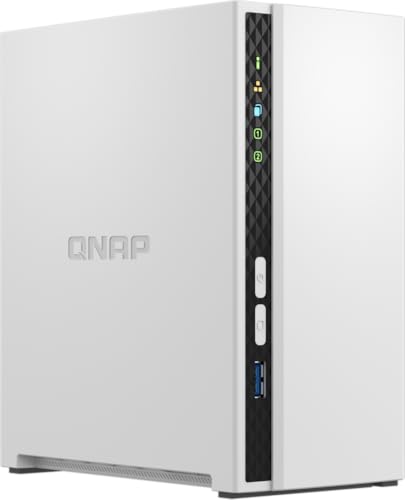
- Two-bay tabletop NAS with 2 GB RAM
- Supports Windows and Mac backups
- Includes snapshot protection features
Best For: Home file storage, media organization, and backups
Best All-Around Home Hub

- Two-bay diskless NAS for home or office
- Automates computer and mobile backups
- Supports collaboration and IP-camera monitoring
Best For: Centralized storage, backups, and small-team file sharing
Best Ready-to-Use Value

- Includes a preinstalled 2 TB hard drive
- Subscription-free personal cloud features
- Supports backups and folder access controls
Best For: Simple home storage with an included drive
Best Hybrid Value

- Two SATA bays plus two M.2 NVMe slots
- 2.5GbE and direct 4K HDMI output
- Private local storage with no stated subscription fees
Best For: Home users wanting flexible storage and media features
Best for Advanced Home Servers
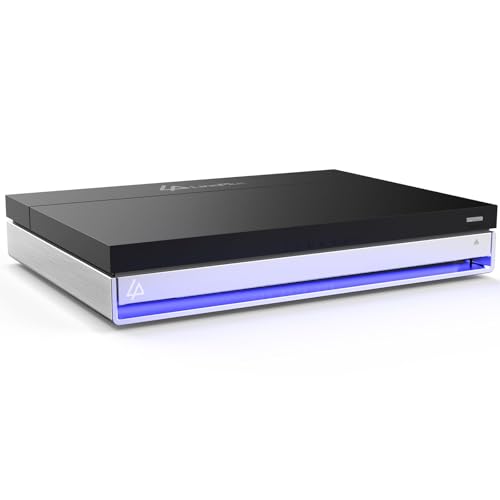
- 16GB RAM and Intel quad-core processing
- Two SATA bays plus four M.2 NVMe slots
- Unraid, Docker, 4K media, and 2.5GbE support
Best For: Enthusiasts running media servers and home-lab apps
Best Value Private Cloud – Synology DS223j
The Synology DS223j is a practical starting point for shoppers comparing budget network attached storage systems. This diskless two-bay enclosure supports private cloud access, file sharing, cross-device syncing, and automated backups for computers and mobile devices.
Best For: Home users who want straightforward private storage, backups, and remote file access.
Pros:
- Private cloud with multi-platform access from anywhere
- Automated backup support for Macs, PCs, mobile devices, cloud services, and external drives
- Two-bay design and support for multiple IP cameras
- Two-year warranty and ongoing Synology software support
Cons:
- Drives are not included
- Designed as an entry-level enclosure rather than a high-performance server
The DS223j emphasizes accessible storage management and dependable backup features over advanced hardware. It is a sensible budget pick when ease of use and the Synology software ecosystem matter more than maximum speed.
Best Beginner-Friendly Option – UGREEN NAS DH2300
The UGREEN NAS DH2300 is aimed at beginners moving away from scattered files, external drives, or recurring cloud fees. Among budget network attached storage systems, it stands out with 4GB of onboard RAM, a 1GbE connection, automatic cross-platform backups, and photo organization tools.
Best For: Personal users and content creators who want easy phone, computer, and photo backups.
Pros:
- Beginner-oriented two-bay design with support for up to 64TB
- Automatic backups for Windows, iOS, Android, and macOS devices
- AI-assisted photo tagging, duplicate detection, and search features
- Includes RAID modes, two-factor authentication, permissions, and encrypted transfers
Cons:
- Storage drives are not included
- Does not support Docker or virtual machines
- Wired Ethernet is recommended; Wi-Fi requires an external USB adapter
The DH2300 focuses on simple personal storage and media organization rather than server flexibility. Its 4GB of RAM and user-friendly backup features make it appealing for first-time NAS buyers, provided they do not need containers or virtual machines.
Best for Media Streaming – Synology DS225+
The Synology DS225+ is a more capable choice for shoppers evaluating budget network attached storage systems for media and creator workloads. This diskless two-bay NAS is designed for private cloud storage, 4K media streaming, automated backups, snapshots, and hardware-assisted transcoding.
Best For: Creators and households building a private media library with stronger backup and streaming needs.
Pros:
- Supports a personal streaming library for 4K movies, shows, and photos
- Advertised transfer speeds up to 282 MB/s
- Combines RAID, automated backups, and snapshot technology for layered protection
- Supports up to 30 IP cameras with AI detection and alerts
Cons:
- Drives are not included
- Its broader media and surveillance feature set may be more than basic file-storage users need
The DS225+ is suited to buyers who want one system for media streaming, photo storage, backups, and surveillance. Its three-year warranty and Intel processor with hardware transcoding further support users who expect more from a home NAS.
Best for Faster Home Networking – ASUSTOR Drivestor 2 Gen 2
The ASUSTOR Drivestor 2 Gen 2 is a compact two-bay option for buyers comparing budget network attached storage systems with faster-than-Gigabit networking. It combines a quad-core processor, 2.5GbE connectivity, 1GB of DDR4 memory, private cloud access, and tool-free drive installation.
Best For: Home users who have a 2.5GbE network and want quicker everyday file transfers.
Pros:
- 2.5GbE port for faster transfers than traditional Gigabit NAS hardware
- Quad-core 1.7GHz processor for storage, backups, and personal cloud tasks
- Tool-free drive installation is convenient for beginners
- Includes cross-platform multi-user access and comprehensive backup features
Cons:
- Only 1GB of installed and maximum supported RAM
- Storage drives are not included
- The faster network port benefits users whose network equipment also supports 2.5GbE
The AS1202T is a focused home NAS with useful networking headroom and an easy installation process. It makes the most sense when paired with compatible 2.5GbE equipment; otherwise, its main strengths remain private cloud storage and backups.
Best Budget 2-Bay Pick – QNAP TS-233-US
The QNAP TS-233-US is a practical choice among budget network attached storage systems for households that want centralized file storage and media streaming. Its two-bay tabletop design, quad-core processor, and 2 GB of DDR4 RAM provide a straightforward foundation for organizing family files.
Best For: Home users who need shared storage, photo and video organization, and computer backups.
Pros:
- Two-bay design supports a flexible home NAS setup.
- Quad-core ARM Cortex-A55 processor and 2 GB DDR4 RAM.
- Supports Windows backups with NetBak Replicator and Mac backups with Time Machine.
- Storage snapshot technology helps mitigate ransomware threats.
Cons:
- Disk drives are not included in the supplied product details.
- Designed for tabletop mounting rather than rack installation.
The TS-233-US balances essential backup and media features with a compact two-bay format. It is a sensible budget option when you want room for a pair of drives and QNAP’s snapshot and backup tools.
Best All-Around Home Hub – Synology DS223
The Synology DS223 is one of the more versatile budget network attached storage systems for consolidating files from computers, phones, and external drives. This diskless, two-bay NAS also adds collaboration, automated backup, and IP-camera monitoring features for home and small-office use.
Best For: Households and small teams that want centralized files, automated backups, collaboration tools, and optional surveillance support.
Pros:
- Centralizes files from computers, phones, and external drives.
- Supports automated backups for Macs, PCs, and mobile devices.
- Offers file sharing, synchronization, and version control.
- Can support IP-camera monitoring with motion alerts and remote viewing.
Cons:
- Diskless design requires separately purchased drives.
- Its broader feature set may be more than needed for basic storage.
The DS223 stands out when a basic file server is not enough. Its backup, collaboration, and surveillance capabilities make it a strong choice for buyers who want a broader home or office hub while staying with a two-bay enclosure.
Best Ready-to-Use Value – Buffalo LinkStation 210 2TB
The Buffalo LinkStation 210 is a convenient option among budget network attached storage systems because it includes a 2 TB hard drive. Connect it to a router to create shared storage, automated computer backups, and a subscription-free personal cloud for home files.
Best For: Home users who want an included-drive NAS for centralized storage, backups, and private file sharing.
Pros:
- Includes a 2 TB hard drive in its single-bay enclosure.
- Provides subscription-free access to stored photos, music, videos, and files.
- Supports automated backups for multiple computers.
- Includes SSL encryption, folder access controls, and 24/7 US-based support.
Cons:
- Single drive bay offers less expansion flexibility than two-bay models.
- Supplied compatibility notes limit macOS support to macOS 15 and earlier.
The LinkStation 210 is appealing if you prefer a simpler, drive-included setup rather than buying NAS disks separately. Its 2 TB capacity and backup software make it an accessible starting point for home network storage.
Best Hybrid Value – LincStation E1 4-Bay NAS
For shoppers comparing budget network attached storage systems, the LincStation E1 stands out with a flexible hybrid layout, efficient hardware, and no required monthly cloud subscription. It is a diskless NAS, so you supply the SATA drives or NVMe SSDs separately.
Best For: Home users who want private storage, fast local networking, and a built-in 4K media center.
Pros:
- Combines two SATA bays with two M.2 NVMe 2280 slots for capacity and caching flexibility.
- Quad-core 2.0GHz processor, 4GB DDR4 RAM, and 64GB eMMC support everyday multitasking.
- Includes 2.5GbE networking, HDMI 2.0 with native 4K decoding, and tool-free drive trays.
- Uses local accounts with no stated subscription fees for private cloud storage.
Cons:
- Diskless design means storage drives must be purchased separately.
- Only two SATA bays are available for traditional HDD or SSD storage.
The E1 is a practical budget NAS for households that want more than basic file storage. Its NVMe support and HDMI output add useful speed and media features, while the compact, low-power design helps keep ongoing ownership costs down.
Best Beginner Pick – Yxk Zero1 2-Bay NAS
The Yxk Zero1 is a straightforward option among budget network attached storage systems for personal files, phone backups, and shared home media. Its 2-bay design keeps the setup compact, while remote access and automated protection features add convenience for beginners.
Best For: Individuals and families seeking an approachable private cloud for photos, files, and device backups.
Pros:
- Supports remote access through phone apps, desktop clients, and web browsers.
- 2.5GbE connectivity is suited to faster file transfers and 4K streaming.
- Offers RAID modes, automated backups, snapshot recovery, encryption, and user permissions.
- Includes Docker support, 4GB RAM, and a compact, quiet tabletop enclosure.
Cons:
- It is a diskless NAS, so hard drives must be purchased separately.
- The two-bay design provides less expansion room than larger NAS models.
Zero1 focuses on accessible private storage rather than advanced server hardware. It makes sense for buyers who want a central home file hub with remote access and backup tools without committing to recurring cloud storage fees.
Best for Advanced Home Servers – LincStation N1 6-Bay NAS
For buyers who need more performance than typical budget network attached storage systems provide, the LincStation N1 offers a powerful hybrid platform in a compact enclosure. It combines Intel processing, 16GB of RAM, Unraid, two SATA bays, and four NVMe slots for demanding storage and server workloads.
Best For: Home-server enthusiasts and small offices running media servers, Docker applications, backups, or virtualized workloads.
Pros:
- Intel quad-core processor, 16GB RAM, and 128GB eMMC support demanding multitasking.
- Two 2.5-inch SATA bays and four M.2 NVMe slots provide a versatile six-drive layout.
- Included Unraid license supports mixed drive sizes, Docker apps, backups, and remote access.
- Offers 2.5GbE, USB-C, dual USB 3.2 Gen2 ports, HDMI 2.0, and adjustable fan control.
Cons:
- Diskless configuration requires separate SATA drives or NVMe SSDs.
- The 2.5-inch SATA bays limit compatibility with larger 3.5-inch hard drives.
- Unraid and the broad feature set may be more than casual storage users need.
The N1 is the strongest choice here for users who want a flexible home server rather than a basic backup box. Its included Unraid environment and generous memory make it well suited to media streaming, Docker, and mixed-drive storage, though its compact drive format should be checked before buying.
How We Picked the Best Budget Network Attached Storage Systems
We focused on affordable network attached storage designed for homes, personal offices, and small teams. Our selections cover diskless enclosures for buyers who want to choose their own drives, as well as ready-to-use models with storage included. We also considered drive-bay count, processor capability, memory, connectivity, backup features, media support, setup complexity, and upgrade potential.
A low purchase price is only part of the cost. Diskless NAS devices require compatible hard drives or SSDs, while models with included storage may offer less flexibility. We therefore compared each system by its intended use rather than treating specifications alone as a ranking.
Quick Comparison
| Best For | Recommended Type | What to Look For |
|---|---|---|
| Simple home backups | Two-bay NAS | Automatic backup apps and mirrored-drive support |
| Private cloud access | Synology, QNAP, or ASUSTOR model | Reliable mobile apps and remote-access tools |
| Streaming and media | NAS with stronger CPU | Hardware transcoding, HDMI, or media-server compatibility |
| Maximum capacity | Four- or six-bay NAS | More drive slots, expansion options, and adequate memory |
| Lowest upfront cost | Single-bay or included-drive NAS | Simple setup and realistic capacity expectations |
Key Buying Factors for Budget Network Attached Storage Systems
Drive Bays and Redundancy
Two bays are a practical starting point because they can support RAID 1, which mirrors data across two drives. RAID is not a substitute for a separate backup, but it can reduce downtime if one drive fails. Four- and six-bay systems provide more capacity, stronger redundancy options, and room to expand.
Diskless Versus Included Storage
Diskless NAS enclosures let you select NAS-rated hard drives or SSDs and replace them independently. They can be economical over time, but the total cost includes the drives. A system with an included disk is easier for beginners, though its capacity and upgrade path may be more limited.
Performance and Connectivity
For file sharing and backups, a modest processor and 1GbE networking are often sufficient. Media libraries, multiple users, encryption, containers, and video transcoding benefit from a faster CPU, more RAM, 2.5GbE networking, or HDMI output. Check your router and client devices before paying for faster networking.
Software and Backup Features
Look for automatic computer and phone backups, file versioning, user permissions, snapshots, remote access, and support for common cloud-sync services. A polished operating system can matter more than a small difference in processor speed, especially for first-time NAS owners.
Who Should Buy Which Budget Network Attached Storage Systems?
Choose a Basic Two-Bay NAS
Two-bay Synology, QNAP, ASUSTOR, UGREEN, or Yxk models suit households that primarily need centralized files, photo backups, and private cloud access. Add two matching drives and configure redundancy if protecting important data is a priority.
Choose a Ready-To-Use Single-Bay Model
A single-bay Buffalo system with included storage is best for buyers who want straightforward network storage and do not need drive redundancy. Keep a second copy of irreplaceable files elsewhere.
Choose a Four- or Six-Bay System
LincStation models make more sense for larger media collections, advanced users, or households expecting capacity growth. Their additional bays and modern storage interfaces offer flexibility, but setup and drive costs are higher.
Choose a Media-Focused NAS
For streaming, prioritize hardware transcoding support, processor performance, RAM, and compatibility with your preferred media applications. Direct playback is easier on the NAS, while transcoding can require substantially more processing power.