A compact NAS can turn scattered files, phone photos, and media libraries into one accessible private cloud. The right model can also simplify backups while reducing reliance on subscription storage.
We compared 10 compact network attached storage systems across drive capacity, expandability, performance, software features, and ease of setup to help you choose a practical fit for home or small-office use.
Best 10 Compact Network Attached Storage Systems Picks for 2026
Best Budget Private Cloud

- Compact two-bay diskless enclosure
- Backs up computers and mobile devices
- Remote sharing, syncing, and camera support
Best For: Home users building a simple private cloud
Best High-Speed Creator NAS

- 10GbE and Ryzen R2514 processor
- Expandable RAM and multiple SSD options
- Docker, virtual machines, and surveillance support
Best For: Creators and advanced home users with demanding workflows
Best Four-Bay Business NAS

- Four-bay diskless enclosure
- Team sharing with access controls and audit logs
- RAID, snapshots, backups, and surveillance support
Best For: Small offices and growing shared-storage environments
Best Beginner Phone-Backup NAS

- Simple two-bay personal storage
- Automatic backups across major platforms
- AI photo tagging and duplicate detection
Best For: Individuals and families backing up phones and photos locally
Best Hybrid NAS
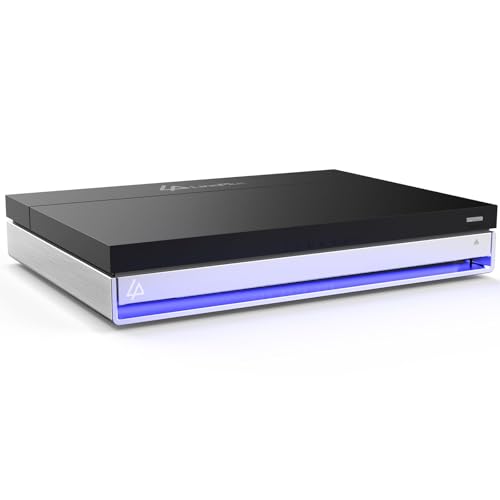
- Hybrid layout with 2 SATA and 4 NVMe bays
- 16GB RAM with Unraid included
- 2.5GbE, 4K HDMI, and Docker-ready flexibility
Best For: Home servers and flexible mixed-drive storage
Best for High-Speed Storage

- 10GbE networking for fast file transfers
- Four bays with up to 144TB advertised capacity
- Docker, VMs, RAID, encryption, and photo tools
Best For: Creators and small teams with demanding shared storage needs
Best Budget Pick

- 2TB included hard drive
- Automated backups and private folder sharing
- Two-year warranty with 24/7 US support
Best For: Affordable personal cloud storage for a small household
Best Mid-Range Capacity
- 4TB included hard drive
- Shared storage and automated computer backups
- Subscription-free personal cloud access
Best For: Households needing extra room for media and backups
Best High-Capacity Option
- 6TB included hard drive
- Centralized media storage and computer backups
- Secure sharing with folder access controls
Best For: Larger household media libraries and backup collections
Best Budget Private Cloud – Synology DS223j
The Synology DS223j is a straightforward, diskless choice for shoppers comparing compact network attached storage systems for home file access, backups, and private cloud storage. Its two-bay design supports access from computers and mobile devices, while Synology’s software ecosystem adds sharing, syncing, and remote access features.
Best For: Home users who want a compact private cloud and automated backups without needing a large multi-drive enclosure.
Pros:
- Two-bay tabletop design with a compact footprint
- Supports backups for Macs, PCs, and mobile devices
- Remote file access, sharing, and syncing across platforms
- Can support multiple IP cameras for home monitoring
Cons:
- Diskless, so compatible drives must be purchased separately
- Two bays provide less expansion room than four-bay models
- Designed more for everyday storage than demanding creator workloads
The DS223j is a sensible entry point for personal storage and backup tasks. Choose it when simplicity, Synology’s ongoing software support, and a small enclosure matter more than high-speed networking or extensive expansion.
Best High-Speed Creator NAS – UGREEN DXP2800 GT
The UGREEN DXP2800 GT stands out among compact network attached storage systems for creators, freelancers, and smart-home users who need faster transfers and broader application support. Its Ryzen processor, 8GB of RAM, 10GbE networking, and SSD expansion options are aimed at heavier file, media, backup, and self-hosting workloads.
Best For: Creators and advanced home users who want 10GbE performance, Docker and virtual machine support, media services, and local surveillance storage.
Pros:
- 10GbE networking for faster large-file transfers
- 8GB RAM is expandable up to 64GB
- Supports Docker, virtual machines, and services such as Plex through Docker
- Offers SATA, U.2 NVMe, and M.2 SSD expansion options
Cons:
- Diskless, with drives sold separately
- Plex requires manual Docker setup
- Pre-installed RAM is non-ECC; ECC requires a compatible upgrade
The DXP2800 GT is the most performance-oriented option in this group. Its flexible expansion and 10GbE port make it attractive for demanding workflows, but buyers should be comfortable configuring advanced software and separately sourcing storage.
Best Four-Bay Business NAS – Synology DS425+
Synology DS425+ Private Cloud Media Server - Stream, Back Up & Share Files (4-Bay Diskless NAS)
Check Price On AmazonThe Synology DS425+ is a four-bay, diskless option for compact network attached storage systems that need more capacity and organization than a basic home enclosure. It is positioned as a team file repository and media hub, with access controls, audit logs, backup features, snapshots, and support for professional surveillance deployments.
Best For: Small offices, teams, and serious home users who need four bays, centralized file management, redundancy, and surveillance support.
Pros:
- Four bays provide more capacity and flexibility than two-bay models
- Supports concurrent access for 10 or more users
- Includes granular access controls and audit logs
- Supports RAID, automated backups, snapshots, and up to 30 IP cameras
Cons:
- Diskless, so storage drives are an additional purchase
- Larger and heavier than compact two-bay alternatives
- May offer more capability than a single-user basic backup setup requires
The DS425+ is the strongest fit when storage growth, shared access, and data protection are priorities. Its four-bay enclosure and business-focused controls make it a better long-term platform than an entry-level NAS for teams or expanding media libraries.
Best Beginner Phone-Backup NAS – UGREEN DH2300
The UGREEN DH2300 is a beginner-friendly choice among compact network attached storage systems, especially for users replacing cloud storage or scattered external drives. Its two-bay enclosure supports automatic backups across Windows, iOS, Android, and macOS, while built-in photo organization tools help manage personal media.
Best For: Individuals and families who want simple phone, computer, and photo backups with local storage and a relatively easy setup.
Pros:
- Designed for beginners and personal storage
- Automatic cross-platform backups for phones and computers
- AI tools can tag and locate photos and identify duplicates
- Supports up to 64TB with separately purchased drives
Cons:
- Does not support Docker or virtual machines
- Drives are not included
- Wired Ethernet is recommended; Wi-Fi requires an external USB adapter
The DH2300 keeps the focus on accessible personal storage rather than advanced server workloads. It is a practical pick for photo backup and everyday files, but users wanting containers, virtual machines, or more sophisticated self-hosting should consider a higher-tier model.
Best Hybrid NAS – LincStation N1 6-Bay NAS
The LincStation N1 is one of the more flexible compact network attached storage systems for users who want both NVMe speed and expandable drive storage. Its hybrid six-bay layout, 16GB of RAM, 2.5GbE networking, and included Unraid license make it suited to home servers, backups, media libraries, and Docker applications.
Best For: Home users and small offices building a flexible media server, backup hub, or private cloud with mixed SATA and NVMe storage.
Pros:
- Combines two 2.5-inch SATA bays with four M.2 NVMe slots.
- 16GB RAM and Intel quad-core processing support demanding multitasking, Docker apps, and media transcoding.
- Includes Unraid, 2.5GbE, 4K HDMI, USB-C, and dual USB 3.2 Gen2 ports.
- Offers customizable fan control, a two-year warranty, and 24/7 support.
Cons:
- It is diskless, so compatible SATA and NVMe drives must be purchased separately.
- Its Unraid-focused setup may offer more flexibility than beginners need.
The N1 stands out when compact size and storage flexibility matter more than a conventional all-hard-drive NAS design. It is particularly compelling for users who plan to run apps or cache data on NVMe drives while keeping larger files on SATA storage.
Best for High-Speed Storage – UGREEN DXP4800 Plus 4-Bay NAS
The UGREEN DXP4800 Plus is a strong choice among compact network attached storage systems for families, creators, and small teams that need fast transfers and centralized file access. With four drive bays, 10GbE networking, 8GB DDR5 RAM, and support for Docker and virtual machines, it is built for demanding shared-storage workloads.
Best For: Families, content creators, and small offices that need fast backups, shared files, private-cloud access, and room to expand.
Pros:
- 10GbE and 10Gbps USB connectivity can enable very fast transfers with compatible hardware.
- Supports up to 144TB using compatible drives and offers multiple RAID options.
- 8GB DDR5 RAM, a five-core Intel processor, Docker, and virtual-machine support provide useful performance headroom.
- Includes photo organization features, encryption, permission controls, and cross-platform apps.
Cons:
- Hard drives or SSDs are not included.
- Actual transfer speeds depend on the network, drives, processor, and file sizes.
- Wired Ethernet is required; Wi-Fi is not supported for this model.
The DXP4800 Plus is the performance-oriented option here, especially for users with a 10GbE network or frequent large-file transfers. Its four-bay design and broad software support also make it a practical shared-storage platform that can grow with a household or small team.
Best Beginner NAS – Yxk Zero1 2-Bay NAS
The Yxk Zero1 is an approachable option among compact network attached storage systems for personal file storage, phone backups, and private cloud access. Its two-bay design, 2.5GbE connection, 4K HDMI, Docker support, and remote-access tools cover everyday home needs without requiring a large desktop enclosure.
Best For: Beginners and households that want centralized photo, video, and file storage with remote access and straightforward drive protection.
Pros:
- Compact two-bay format supports personal storage, entertainment, and backups.
- 2.5GbE networking is faster than standard 1GbE when the rest of the network supports it.
- Offers remote access, phone backup, RAID modes, snapshots, encryption, and user permissions.
- Includes Docker support, 4K HDMI, health monitoring, and intelligent thermal control.
Cons:
- Drives must be purchased separately.
- Two bays provide less expansion room than larger NAS systems.
- The plastic enclosure may feel less substantial than metal alternatives.
The Zero1 is a sensible entry point for users replacing scattered external drives or recurring cloud storage with a private home hub. Its two-bay capacity is limited compared with larger systems, but the compact design and beginner-friendly feature set keep the setup focused and practical.
Best Budget Pick – BUFFALO LinkStation 210 2TB
For shoppers comparing compact network attached storage systems, the 2TB BUFFALO LinkStation 210 is a straightforward home NAS with its hard drive included. Connect it to your router to centralize files, backups, photos, music, and videos without a monthly cloud subscription.
Best For: Individuals or small households that want an affordable, compact 2TB personal cloud and backup hub.
Pros:
- Includes a 2TB hard drive in a single-bay enclosure.
- Supports centralized storage, automated computer backups, and folder access restrictions.
- Closed-system design and SSL encryption help support secure file transfers.
- Includes 24/7 US-based support and a two-year warranty covering the device and hard drive.
Cons:
- Single-bay design limits expansion and does not provide drive redundancy.
- Mac compatibility is specified for macOS 15 and earlier; macOS 26 users are directed to the LS 700 series.
The 2TB LinkStation 210 is a practical entry point for basic shared storage and backups. Its included drive and subscription-free approach keep setup simple, though capacity and expansion are limited.
Best Mid-Range Capacity – BUFFALO LinkStation 210 4TB
The 4TB BUFFALO LinkStation 210 gives compact network attached storage systems shoppers more room for household files, media, and backups while retaining a simple one-drive setup. It connects through your router and works as shared network storage for compatible computers.
Best For: Home users who need more capacity than an entry-level NAS for centralized storage and routine backups.
Pros:
- Provides 4TB of included storage in a single-bay NAS.
- Supports automated backups for multiple computers using included management and backup software.
- Allows individual folder access restrictions for more controlled file sharing.
- Offers subscription-free personal cloud access and a two-year warranty.
Cons:
- Only one drive bay means limited expansion and no drive redundancy.
- Listed macOS support applies to macOS 15 and earlier; macOS 26 users are directed to LS 700 models.
With twice the capacity of the 2TB version, this model is a sensible middle ground for homes organizing larger photo, video, and backup libraries. Its one-bay architecture keeps it simple but limits future flexibility.
Best High-Capacity Option – BUFFALO LinkStation 210 6TB
If you need substantial room in a compact network attached storage system, the 6TB BUFFALO LinkStation 210 provides an included hard drive and a simple router-connected setup. It can centralize files, back up computers, and provide subscription-free access to personal media.
Best For: Families or users with larger photo, video, music, and backup collections who prefer a ready-to-use NAS.
Pros:
- Includes a 6TB hard drive for a larger starting storage pool.
- Supports centralized storage and automated backups for multiple computers.
- Provides folder-level access restrictions for sharing files with family and friends.
- Includes SSL encryption for file transfers, 24/7 US-based support, and a two-year warranty.
Cons:
- Single-bay configuration limits expansion and does not offer drive redundancy.
- Mac support is listed for macOS 15 and earlier; macOS 26 users are directed to the LS 700 series.
The 6TB version is the strongest fit in this group for users who want to avoid quickly outgrowing their NAS. It remains easy to deploy, but the single-bay design makes it best suited to straightforward storage and backup rather than an expandable multi-drive setup.
How We Picked the Best Compact Network Attached Storage Systems
We evaluated these Compact Network Attached Storage Systems by looking at the hardware layout, included or required storage, processor and memory configuration, network connectivity, expandability, and intended user. We also considered practical tasks such as automated computer and phone backups, file sharing, media streaming, remote access, and small-team collaboration.
Because NAS needs vary widely, the list includes beginner-friendly single- and two-bay options, more flexible four- and six-bay systems, and models with drives included. Diskless products generally provide greater control over drive selection and future upgrades, while preconfigured units can be faster to deploy.
Quick Comparison
| Best For | Recommended Type | What to Look For |
|---|---|---|
| Simple home cloud | One- or two-bay NAS | Easy setup, automatic backups, quiet operation |
| Photo and phone backups | Beginner two-bay NAS | Mobile apps, mirrored storage support |
| Media libraries | Two- or four-bay NAS | Strong CPU, media-server compatibility, fast networking |
| Creators and freelancers | Four-bay or NVMe-capable NAS | Higher throughput, expansion options, larger memory |
| Small teams | Four-bay NAS | User permissions, snapshots, collaboration tools |
Key Buying Factors for Compact Network Attached Storage Systems
Drive Bays and Redundancy
A one-bay NAS is usually the least expensive and simplest option, but it cannot protect data through drive mirroring. Two-bay systems can typically use RAID 1, which keeps a copy of data on each drive. Four or more bays provide more capacity, redundancy choices, and room to grow, though drives and power costs increase.
Diskless Versus Included Storage
Diskless models let you choose NAS-rated hard drives or SSDs and replace them independently. Models with included drives are convenient and easier to budget, but confirm the usable capacity after formatting and redundancy. Remember that RAID improves availability, not protection from accidental deletion, theft, or malware; maintain a separate backup.
Performance and Connectivity
For basic backups and file serving, modest hardware is often sufficient. Creators, households with several users, and media-heavy workloads benefit from more RAM, a stronger processor, faster Ethernet, and SSD or NVMe support. Check whether the advertised speed requires compatible networking equipment and storage.
Software and Remote Access
Review the operating system and mobile apps before buying. Useful features include scheduled backups, user permissions, snapshots, encryption, secure remote access, and media-server support. A polished software experience can matter more than peak specifications for everyday home use.
Who Should Buy Which Compact Network Attached Storage Systems?
Choose a one-bay Buffalo LinkStation when low cost, included capacity, and straightforward personal storage matter most. Pick a two-bay Synology, UGREEN, or similar model for phone backups, a private cloud, and basic redundancy. Families, creators, and small teams should consider four-bay systems for better capacity and expansion. Buyers who want maximum flexibility and fast local workloads should look closely at the six-bay LincStation N1, especially if NVMe storage and memory capacity match their needs.
Whichever model you choose, buy enough capacity for several years of growth, use RAID only as uptime protection, and keep an independent backup of irreplaceable files.