The best network attached storage systems for home offices make it easier to centralize files, automate backups, share documents, and access data across computers and mobile devices. The right choice depends on more than capacity: drive bays, included storage, performance, software, and expansion options all matter.
This roundup compares 10 NAS options for different home-office needs, including simple plug-and-play models, diskless systems, and higher-capacity units for creators or small teams.
Best 10 Network Attached Storage Systems for Home Offices Picks for 2026
Balanced Home Office Hub

- Two-bay diskless file and backup hub
- Automated backups across computers and mobile devices
- Supports collaboration and IP-camera monitoring
Best For: Home offices needing simple centralized storage and backups
High-Capacity Team Storage

- Four-bay design with up to 144TB advertised capacity
- 10GbE and 2.5GbE networking for fast transfers
- Supports Docker, virtual machines, backups, and RAID
Best For: Creators and small teams planning substantial storage and expansion
Simple Private Cloud

- Two-bay diskless private-cloud storage
- File sharing, synchronization, and automated backups
- Supports remote IP-camera recording and monitoring
Best For: Home users wanting essential shared storage and backup tools
Creator-Ready Performance

- Dual 10GbE and Ryzen-based multitasking performance
- Four bays plus SSD expansion for up to 144TB stated capacity
- Built-in surveillance, SD backup, Docker, and virtual-machine support
Best For: Creators and teams with demanding media, backup, or self-hosting workflows
Best Hybrid DIY NAS
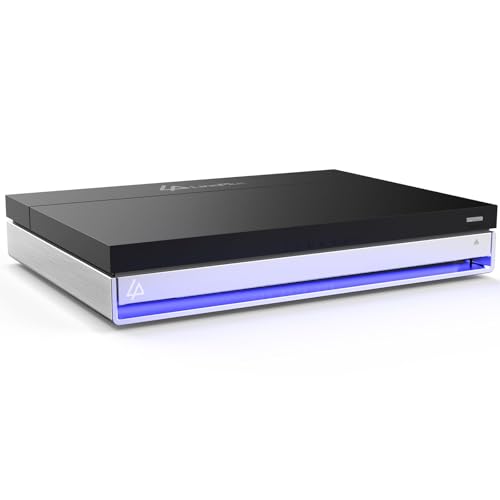
- Intel N5105 with 16GB RAM for multitasking
- Two SATA bays plus four M.2 NVMe slots
- Unraid included with 2.5GbE connectivity
Best For: Custom home servers, media libraries, and Docker apps
Best Ready-to-Use Office NAS
BUFFALO LinkStation SoHo 720 8TB

- Two installed 4TB drives provide 8TB total
- RAID 1 offers 4TB usable mirrored storage
- 2.5GbE, backups, and 3-year warranty included
Best For: Small-office file sharing and automated backups
Best Budget Home Cloud NAS

- Two included 2TB drives provide 4TB total
- RAID 1 delivers 2TB of mirrored usable space
- Automated backups and private folder sharing
Best For: Basic home file storage, backups, and personal cloud access
Best Value Home NAS

- 2TB drive included
- Automated computer backups
- Subscription-free personal cloud
Best For: Budget-conscious home offices needing centralized storage
Best Cloud-Ready Option

- 4TB drive included
- Compatible with macOS 26
- Syncs with major cloud services
Best For: Home offices wanting hybrid-cloud storage flexibility
Best High-Capacity Value
- 6TB hard drive included
- Automated device backups
- No monthly cloud-storage fee
Best For: Home offices storing large local file collections
Balanced Home Office Hub – Synology DS223
For buyers comparing network attached storage systems for home offices, the Synology DS223 is a practical two-bay hub for centralizing files, protecting backups, and sharing work across computers and mobile devices. It is diskless, so you choose and install the storage drives separately.
Best For: Home offices and small teams that want dependable file sharing, automated backups, and optional IP-camera monitoring without paying for a third-party cloud service.
Pros:
- Centralizes files from computers, phones, and external drives.
- Supports automated backups to multiple destinations, including cloud and external drives.
- Enables file collaboration, synchronization, version control, and IP-camera monitoring.
- Includes a two-year warranty and ongoing software updates.
Cons:
- Diskless design requires separately purchased drives.
- Two bays provide less expansion room than four-bay alternatives.
The DS223 is a well-rounded choice when straightforward backups and collaboration matter more than high-end processing or maximum capacity. Its two-bay format keeps the system relatively focused for a home office.
High-Capacity Team Storage – UGREEN DXP4800 Plus
The UGREEN DXP4800 Plus is a four-bay option for buyers evaluating network attached storage systems for home offices, creative work, and small teams. It combines substantial expansion potential with fast wired networking, automated backups, remote access, and support for advanced applications.
Best For: Small offices, creators, and families that need large storage capacity, multi-user collaboration, fast transfers, or Docker and virtual-machine support.
Pros:
- Four bays support up to 144TB with compatible drives, though drives are not included.
- Includes 10GbE, 2.5GbE, 10Gbps USB, 8GB DDR5 RAM, and a 128GB SSD.
- Supports RAID options, automatic backups, encryption, permissions, and remote access.
- Offers Docker, virtual machines, AI-powered photo organization, and 4K HDMI.
Cons:
- Storage drives must be purchased separately.
- It uses wired Ethernet rather than Wi-Fi.
- Actual transfer speeds depend on the network, drives, processor, and file sizes.
The DXP4800 Plus is a strong fit when a home office may grow into a small-team or creator workload. Its hardware and application support are more extensive than needed for basic backup duty, but useful for users planning ahead.
Simple Private Cloud – Synology DS223j
The Synology DS223j is a compact, diskless two-bay choice for shoppers seeking network attached storage systems for home offices without an especially complex setup. It provides private-cloud access, file sharing, device backups, and home-security recording through compatible IP cameras.
Best For: Home users and small offices that want accessible shared files, automatic backups, and a straightforward private-cloud or security-storage system.
Pros:
- Provides multi-platform access and private ownership of stored data.
- Supports file sharing, synchronization, and automated backups.
- Can record and monitor compatible IP cameras remotely.
- Includes a two-year warranty and Synology support resources.
Cons:
- Diskless design means storage drives are sold separately.
- Two bays limit expansion compared with four-bay systems.
- Its feature set is better suited to core storage needs than demanding advanced workloads.
The DS223j makes sense for buyers who prioritize accessible files and backup automation over maximum performance. It is a focused home-office NAS with useful security-system functionality.
Creator-Ready Performance – UGREEN DXP4800 GT
For demanding home offices and creative workspaces, the UGREEN DXP4800 GT brings high-performance hardware to the network attached storage systems category. Its four bays, dual 10GbE ports, expandable memory, media features, and built-in surveillance tools support intensive file, backup, and multi-user workflows.
Best For: Creators, tech enthusiasts, and office teams handling large media libraries, rapid backups, Docker or virtual-machine workloads, and local surveillance storage.
Pros:
- Ryzen Embedded processor, 8GB expandable DDR4 RAM, and dual 10GbE networking support demanding workloads.
- Four bays and SSD expansion provide up to 144TB of stated total capacity with compatible drives.
- Supports Docker, virtual machines, Plex-related workflows, and other self-hosted applications.
- Includes SD-card backup, multiple USB connections, 4K HDMI, and ONVIF/RTSP surveillance support.
Cons:
- Drives are not included and must be purchased separately.
- Advanced networking and application features may be more than a basic office needs.
- Maximum performance depends on compatible networking equipment and storage.
The DXP4800 GT is the most performance-oriented option here. It is best justified when fast media transfers, expandable storage, self-hosted services, or surveillance management are central requirements rather than occasional extras.
Best Hybrid DIY NAS – LincStation N1 6-Bay NAS
For network attached storage systems for home offices, the LincStation N1 is a flexible diskless option for buyers who want to choose their own drives and run more advanced services. Its Intel N5105 processor, 16GB of RAM, hybrid SATA/NVMe layout, and included Unraid license suit media, backup, Docker, and home-server workloads.
Best For: Home-office users who want customizable storage, app hosting, and media-server capability.
Pros:
- Combines two 2.5-inch SATA bays with four M.2 NVMe slots for flexible storage planning.
- 16GB RAM and an Intel quad-core processor support demanding multitasking, media transcoding, and Docker applications.
- Includes 2.5GbE, HDMI 2.0, USB-C, USB 3.2, and a 2-year warranty.
- Unraid supports mixed drive sizes, backups, remote access, and a 30-day trial.
Cons:
- Diskless design means the drives must be purchased and installed separately.
- The two SATA bays accept 2.5-inch drives only, up to 9.5mm thick.
- Unraid’s flexibility may require more setup than a ready-to-use NAS.
The N1 is a strong choice when expandability and server features matter more than plug-and-play simplicity. Its hybrid bays and fast networking give it room to grow, while user-controlled cooling helps balance noise and sustained performance.
Best Ready-to-Use Office NAS – BUFFALO LinkStation SoHo 720 8TB
BUFFALO LinkStation SoHo 720 2-Bay Professional Office NAS 8TB (2x4TB) with Hard Drives Included
Check Price On AmazonThe BUFFALO LinkStation SoHo 720 is a straightforward pick among network attached storage systems for home offices because it includes two installed 4TB drives and arrives configured in RAID 1. It emphasizes centralized file storage, automated computer backups, subscription-free remote access, and a closed system designed to reduce third-party app exposure.
Best For: Small offices and home offices that want an installed, low-maintenance backup NAS.
Pros:
- Includes 8TB of total storage with two 4TB hard drives installed.
- RAID 1 provides automatic duplication with 4TB usable capacity.
- 2.5GbE connectivity supports faster network transfers than standard gigabit Ethernet.
- Includes backup software, USB direct copy, 24/7 US-based support, and a 3-year warranty covering the drives.
Cons:
- RAID 1 leaves only 4TB usable from the included 8TB capacity.
- Two bays provide less expansion room than larger NAS enclosures.
- The included mechanical drives are less flexible and potentially slower for intensive server workloads than SSD-based storage.
Choose the LinkStation SoHo 720 if you prefer a conventional NAS that is ready to connect to your router and use. Its included drives, backup tools, and RAID 1 setup make data protection approachable without a monthly cloud subscription.
Best Budget Home Cloud NAS – BUFFALO LinkStation 220 4TB
For shoppers seeking affordable network attached storage systems for home offices, the BUFFALO LinkStation 220 provides a simple two-drive setup with 4TB installed and RAID 1 enabled by default. It centralizes files, photos, music, and videos while supporting automated backups and private folder sharing without recurring cloud storage fees.
Best For: Households and small home offices that need basic shared storage and backup.
Pros:
- Includes two 2TB hard drives for 4TB total capacity.
- Ships in RAID 1, providing 2TB of usable mirrored storage.
- Supports automated computer backups and individual folder access restrictions.
- Offers subscription-free personal-cloud access, SSL file transfers, and 24/7 US-based support.
Cons:
- RAID 1 reduces usable capacity from 4TB to 2TB.
- The two-bay design limits future expansion.
- Compatibility notes specify macOS 15 and earlier; macOS 26 users are directed to the LS 700 series.
The LinkStation 220 is a practical entry-level choice for centralized household files and routine backups. It is less suited to demanding media-server or advanced application workloads, but its included drives and simple RAID configuration keep setup approachable.
Best Value Home NAS – BUFFALO LinkStation 210 2TB
For home offices seeking network attached storage systems for home offices, the BUFFALO LinkStation 210 provides a straightforward way to centralize files, photos, videos, and computer backups. Its included 2TB hard drive connects to your router and supports Windows and macOS 15 and earlier, while the closed system and SSL encryption add a security-focused approach.
Best For: Home-office users who want an affordable, subscription-free personal cloud and centralized backup location.
Pros:
- Includes a 2TB hard drive and uses a single drive bay.
- Supports automated backups for multiple computers and devices.
- Offers folder-level access restrictions and SSL-encrypted file transfers.
- Includes 24/7 US-based support and a two-year warranty covering the hard drive.
Cons:
- Single-bay design limits storage expansion and redundancy options.
- macOS support is listed for macOS 15 (Sequoia) and earlier; macOS 26 users should consider the LS 700 series.
The LinkStation 210 is a practical entry-level choice when simple shared storage and automated backups matter more than advanced cloud integration or higher performance.
Best Cloud-Ready Option – BUFFALO LinkStation 710 4TB
The BUFFALO LinkStation 710 is a strong fit for home offices comparing network attached storage systems for home offices with cloud-sync needs. It includes a 4TB hard drive, connects to your router for shared storage, supports Windows and macOS 26, and can sync with Dropbox, Azure, and OneDrive for hybrid-cloud flexibility.
Best For: Home offices that want larger included capacity, newer macOS compatibility, and cloud integration.
Pros:
- Includes a 4TB hard drive in its single drive bay.
- Supports Windows and macOS 26.
- Syncs with Dropbox, Azure, and OneDrive for hybrid-cloud use.
- Includes automated backup software, SSL encryption, and 24/7 US-based support.
Cons:
- Single-bay design provides less flexibility for drive expansion or redundancy.
- Cloud integration may be unnecessary for users seeking only local network storage.
With its 4TB capacity and broader cloud-service compatibility, the LinkStation 710 is the more flexible pick for users who want local storage supplemented by online synchronization.
Best High-Capacity Value – BUFFALO LinkStation 210 6TB
For home offices with larger file libraries, the BUFFALO LinkStation 210 6TB offers generous built-in capacity without a monthly cloud-storage fee. It connects to your router, centralizes files and backups, and supports automated computer backups, folder access restrictions, and SSL-encrypted transfers.
Best For: Home offices that need substantial local capacity for documents, photos, videos, and device backups.
Pros:
- Provides 6TB of included storage in a single-bay enclosure.
- Centralizes files and backups for desktop and laptop devices.
- Offers subscription-free personal-cloud access.
- Includes two-year coverage, including the hard drive, plus 24/7 US-based support.
Cons:
- Single drive bay limits future expansion and redundancy options.
- macOS compatibility is listed for macOS 15 (Sequoia) and earlier; macOS 26 users should consider the LS 700 series.
The 6TB LinkStation 210 makes sense when capacity is the priority and your home office mainly needs dependable centralized storage rather than cloud-service integration or advanced NAS features.
How We Picked the Best Network Attached Storage Systems for Home Offices
We focused on the features that have the greatest impact in a home-office environment: storage capacity, drive-bay count, RAID or redundancy options, backup support, network performance, software usability, and room for future expansion. We also separated diskless NAS enclosures from models supplied with hard drives, since they suit different budgets and levels of technical experience.
Products were selected to cover a range of use cases, from basic file sharing and personal-cloud access to photo libraries, media storage, workstation backups, and small-team collaboration. A NAS is not a complete backup strategy by itself, so we also considered whether each type of device can support automated local and off-site backups.
Quick Comparison
| Best For | What to Look For | Typical Choice |
|---|---|---|
| Simple home backup | Included drives, straightforward setup, mobile apps | Preconfigured one- or two-bay NAS |
| Family file sharing | Two bays, user accounts, remote access | Two-bay home-office NAS |
| Creators and power users | Four or more bays, fast networking, SSD support | Multi-bay diskless NAS |
| Long-term flexibility | RAID support, replaceable drives, expansion options | Diskless enclosure with several bays |
Key Buying Factors for Network Attached Storage Systems for Home Offices
Capacity and Drive Bays
One-bay models are compact and often affordable, but they generally offer no drive redundancy. Two-bay systems can usually mirror drives with RAID 1, allowing work to continue if one drive fails. Four-bay and larger systems provide more usable capacity, better redundancy choices, and greater flexibility as your storage needs grow.
Included Drives or Diskless Design
Models with hard drives included are easier to deploy and make the total cost more predictable. Diskless NAS units let you choose NAS-rated hard drives or SSDs and upgrade them independently, but the drives must be purchased and installed separately.
Performance and Connectivity
Check the network ports, processor, memory, and storage interfaces. Gigabit Ethernet is sufficient for routine documents and backups, while faster networking is valuable for large photo libraries, video projects, and multiple users working at once. NVMe slots can also improve caching or provide fast working storage on compatible systems.
Software, Backup, and Security
Look for automatic computer and phone backups, file versioning, access controls, encryption, and reliable remote-access tools. Keep firmware updated, use strong passwords and two-factor authentication where available, and maintain a separate backup for irreplaceable data.
Who Should Buy Which Network Attached Storage Systems for Home Offices?
Choose a preconfigured one-bay NAS if you want a simple personal cloud for a modest amount of data and can accept limited redundancy. A preconfigured two-bay model is a better fit for families or home offices that want easier setup plus mirrored protection.
Choose a diskless two-bay NAS when you want control over drive selection and expect to manage backups, users, or shared folders more actively. Four-bay models are the stronger choice for photographers, video creators, large media libraries, and small teams that need capacity and room to expand. Enthusiasts with demanding workloads should consider systems offering faster networking, additional memory, SSD support, or multiple storage interfaces.