Choosing among commercial-grade network attached storage systems means balancing drive capacity, network speed, data protection, management features, and long-term expansion.
This roundup compares 10 rackmount and desktop NAS options for small businesses, IT teams, creators, developers, and demanding home labs.
Best 10 Commercial-Grade Network Attached Storage Systems Picks for 2026
Rackmount ZFS Powerhouse
TrueNAS Mini R 12-Bay Storage Server

- 12 hot-swap bays with diskless drive flexibility
- 32GB ECC RAM and dual 10GbE networking
- TrueNAS supports ZFS, VMs, plugins, and broad protocols
Best For: SMB and remote-office storage deployments
Virtualization-Ready Workhorse

- Core i3-1315U processor with expandable DDR5 memory
- 10GbE plus 2.5GbE networking for fast transfers
- Supports RAID, Docker, VMs, and dual M.2 SSDs
Best For: Developers, IT teams, and demanding power users
Preconfigured High-Capacity Hub

- Eight 10TB HDDs provide an 80TB configuration
- 32GB ECC memory and Ryzen processor support varied roles
- DSM, Btrfs, 10GbE, and management connectivity included
Best For: SMBs needing centralized high-capacity storage
Ten-Bay Business Expansion Platform
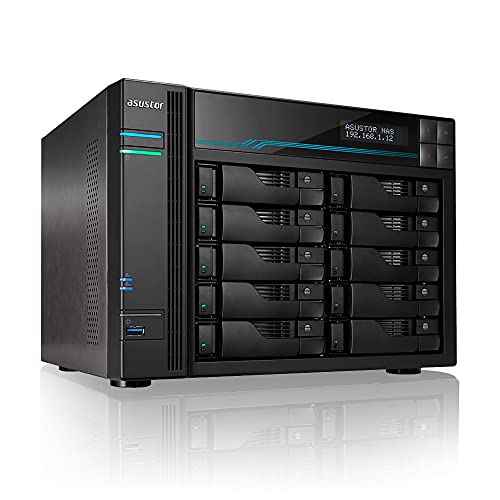
- Ten SATA bays support scalable RAID storage
- Dual 10GbE plus dual 2.5GbE networking
- Dual M.2 NVMe slots support SSD caching
Best For: SMBs and studios with high-capacity shared storage needs
Best Balanced Business NAS

- 32TB bundle with four 8TB IronWolf drives
- Ryzen processor and expandable ECC memory
- Dual 2.5GbE ports with expansion support
Best For: Small and medium-sized businesses needing ready-to-use storage and backup
Best Enterprise Rackmount NAS
Buffalo TeraStation 71210RH 96TB

- 12-bay rackmount design with 96TB raw capacity
- Four native 10GbE ports for fast transfers
- RAID 6, snapshots, encryption, and 2FA
Best For: Business IT environments requiring high-capacity rack storage
Best Flexible 10GbE NAS

- Up to 144TB with separately purchased drives
- 10GbE and 2.5GbE networking with 8GB DDR5 RAM
- Supports Docker, virtual machines, and 4K HDMI
Best For: Small teams and creators wanting customizable, high-speed storage
Best Ready-to-Deploy NAS

- Four 8TB NAS-grade drives included
- Snapshots, encryption, and two-factor authentication
- Native 10GbE with RAID support
Best For: Businesses wanting a preconfigured NAS with built-in storage and protection features
Best for Video Production
Synology DS1825+ Enterprise NAS

- Eight-bay, diskless design for scalable storage
- Supports optional 10GbE and 25GbE networking
- Built for shared 4K/8K production workflows
Best For: Creative teams managing large video projects and growing archives
Best High-Performance Six-Bay NAS

- Six bays plus two M.2 NVMe slots
- Dual 10GbE ports with link aggregation
- 12th Gen 10-core Intel Core i5 processor
Best For: Small businesses and teams handling large files and mixed workloads
Rackmount ZFS Powerhouse – TrueNAS Mini R 12-Bay Storage Server
For teams comparing commercial-grade network attached storage systems, the TrueNAS Mini R stands out as a diskless, rackmount platform built around ZFS, ECC memory, and substantial networking. Its 12 hot-swap bays and dual 10GbE ports give small businesses and remote offices room to build a capable, high-throughput storage system.
Best For: SMB file sharing, backup, surveillance, virtualization, multimedia workflows, and users who want to select their own drives and expand with SSD caching.
Pros:
- 12 hot-swap 3.5-inch SATA bays support significant storage expansion.
- 32GB ECC RAM, an eight-core Intel Atom CPU, and built-in IPMI support business-oriented operation.
- Dual 10GbE ports and support for SMB, NFS, iSCSI, S3, and other protocols suit varied workflows.
- TrueNAS supports plugins, VMs, cloud synchronization, and centralized TrueCommand management.
Cons:
- Diskless configuration requires separate drive purchases and installation.
- Rackmount hardware may be more than needed for basic home file storage.
- Its 41.7-pound listed weight and rack-oriented design reduce portability.
The Mini R is a strong foundation for buyers who prioritize drive flexibility, ZFS capabilities, and 10GbE connectivity. Plan for storage selection and TrueNAS configuration, but the platform offers considerable room for growth.
Virtualization-Ready Workhorse – UGREEN NAS DXP4800 Pro 4-Bay
The UGREEN NAS DXP4800 Pro is aimed at buyers seeking commercial-grade network attached storage systems in a compact four-bay format. Its Core i3 processor, expandable DDR5 memory, 10GbE connectivity, and support for Docker and virtual machines make it suitable for demanding office and development workloads.
Best For: IT professionals, developers, video editors, power users, virtualization, Docker containers, private cloud services, and high-speed file transfers.
Pros:
- Intel Core i3-1315U processor provides six cores, eight threads, and up to 4.5GHz turbo speed.
- 8GB DDR5 RAM can be expanded to 96GB for heavier multitasking.
- 10GbE plus 2.5GbE networking and dual M.2 PCIe 4.0 slots support fast transfers and caching.
- Tool-free trays, multi-zone cooling, RAID options, and a two-year warranty simplify ongoing use.
Cons:
- Four drive bays provide less raw expansion than larger NAS enclosures.
- Its advanced features may be excessive for basic backup and media serving.
- Maximum capacity and performance depend on separately selected drives and SSDs.
Choose the DXP4800 Pro when processing capability matters as much as storage capacity. It combines a desktop-friendly enclosure with hardware suited to containers, VMs, AI-assisted photo management, and growing team workflows.
Preconfigured High-Capacity Hub – Synology DS1823xs+ 80TB NAS
For buyers who want commercial-grade network attached storage systems with substantial included capacity, the Synology DS1823xs+ combines an eight-bay chassis with 80TB of SATA storage and a 1TB M.2 NVMe SSD. Its ECC memory, 10GbE port, and DSM operating system support file storage, backup, synchronization, surveillance, and multimedia roles.
Best For: Small and medium-sized businesses, high-capacity centralized storage, backup, file sharing, surveillance, and users seeking a Synology DSM-based platform.
Pros:
- Includes eight 10TB SATA hard drives for an 80TB storage configuration.
- 32GB DDR4 ECC memory and a Ryzen V1780B processor support varied server roles.
- 10GbE, dual 1GbE ports with link aggregation or failover, and out-of-band management offer flexible connectivity.
- DSM, Btrfs, iSCSI support, and an included 1TB NVMe SSD expand its business utility.
Cons:
- Drives and memory are supplied separately from the sealed chassis and require installation.
- The included storage configuration may be more capacity than smaller teams need.
- Only one 10GbE port is listed.
The DS1823xs+ is a practical choice for organizations that want a high-capacity Synology deployment rather than a bare enclosure. Its included hardware and broad connectivity make it well suited to centralized business storage, though installation is part of the setup.
Ten-Bay Business Expansion Platform – Asustor Lockerstor 10 AS6510T
The Asustor Lockerstor 10 AS6510T gives small businesses a large, diskless foundation for commercial-grade network attached storage systems. Ten SATA bays, dual 10GbE and dual 2.5GbE ports, and dual M.2 NVMe slots make it a strong fit for centralized storage, collaboration, backups, and media production.
Best For: Small businesses, creative studios, IT environments, 4K/8K video workflows, centralized file collaboration, and backup systems requiring scalable RAID storage.
Pros:
- Ten drive bays provide substantial capacity and room for storage expansion.
- Dual 10GbE and dual 2.5GbE ports support high bandwidth and link aggregation.
- Dual M.2 NVMe slots can accelerate performance through SSD caching.
- Intel Atom C3538 hardware is designed for multitasking and continuous 24/7 workloads.
Cons:
- Diskless design requires separate SATA drives and installation.
- The quad-core Atom processor is less performance-oriented than newer Core-based NAS platforms.
- No video output is provided, limiting its role as a direct workstation.
The Lockerstor 10 prioritizes bay count and network throughput over desktop-style computing features. It is a sensible expansion platform for businesses that need scalable RAID storage and fast shared access across multiple users.
Best Balanced Business NAS – Synology DS925+ 32TB Bundle
The Synology DS925+ is a practical choice for businesses seeking commercial-grade network attached storage systems in a compact four-bay enclosure. Its Ryzen processor, ECC memory, dual 2.5GbE ports, and included 32TB of IronWolf storage support centralized files, backups, surveillance, and other small-business workloads.
Best For: Small to medium-sized businesses that want a ready-to-use, expandable NAS for storage, backup, virtualization, or video surveillance.
Pros:
- Includes four 8TB Seagate IronWolf hard drives for 32TB of installed capacity.
- Uses an AMD Ryzen V1500B quad-core processor and 4GB of expandable DDR4 ECC memory.
- Offers dual 2.5GbE ports, two M.2 NVMe slots, and hot-swappable drive bays.
- Supports expansion to as many as nine drives with a DX525 unit.
Cons:
- The four-bay enclosure provides less expansion room than larger rackmount systems.
- Its 2.5GbE connectivity is slower than the 10GbE ports found on some enterprise NAS units.
For buyers who want included disks and a manageable tabletop design, the DS925+ bundle offers a strong balance of capacity, expandability, and business-focused hardware.
Best Enterprise Rackmount NAS – Buffalo TeraStation 71210RH 96TB
The Buffalo TeraStation 71210RH is built for organizations that need commercial-grade network attached storage systems with high capacity and rackmount deployment. Its 12 enterprise-grade drives, four native 10GbE ports, RAID 6 configuration, snapshots, and Xeon-based platform target demanding business file-server and backup environments.
Best For: Businesses and IT teams needing high-capacity rack storage, fast network transfers, and enterprise-oriented data protection.
Pros:
- Includes 12 pre-tested 8TB enterprise-grade hard drives for 96TB raw capacity.
- Ships in RAID 6 with 80TB usable capacity for added drive-failure protection.
- Provides four native 10GbE ports and two PCIe Gen 4×8 slots for expansion.
- Supports snapshots, Btrfs, 256-bit drive encryption, two-factor authentication, and backup features.
Cons:
- Its rackmount form factor and 54.2-pound weight require suitable equipment and installation space.
- The system is likely excessive for light home or small-office storage needs.
- RAID 6 reduces usable capacity from the advertised 96TB raw total to 80TB.
This TeraStation is the strongest fit for capacity-intensive business environments where rack integration, 10GbE performance, and recovery features matter more than compact size.
Best Flexible 10GbE NAS – UGREEN DXP4800 Plus 4-Bay NAS
The UGREEN DXP4800 Plus is a flexible option for buyers comparing commercial-grade network attached storage systems for small teams, creators, and advanced home offices. It combines a five-core Intel processor, 8GB of DDR5 RAM, 10GbE networking, Docker and virtual-machine support, and up to 144TB of advertised capacity, but requires separate drives.
Best For: Small teams and creators who want fast networking, app flexibility, and the freedom to select compatible HDDs or SSDs.
Pros:
- Supports up to 144TB with compatible drives and offers RAID options for data recovery.
- Includes 10GbE and 2.5GbE Ethernet, plus 10Gbps USB ports for fast transfers.
- Provides 8GB DDR5 RAM, a 128GB SSD, Docker, virtual machines, and 4K HDMI output.
- Works across Windows, macOS, Linux, iOS, Android, and web browsers.
Cons:
- Hard drives or SSDs are not included, so the total setup cost will be higher.
- Actual transfer speeds depend on the network, processor, drives, and file sizes.
- Wired Ethernet is required; the NAS does not support Wi-Fi.
Choose the DXP4800 Plus when customization and high-speed connectivity are priorities. Its diskless design is less convenient than a preconfigured bundle but gives buyers more control over the storage hardware.
Best Ready-to-Deploy NAS – TeraStation 5420DN 32TB
For businesses seeking commercial-grade network attached storage systems with capacity included, the BUFFALO TeraStation 5420DN is a practical, ready-to-use option. Its four included NAS-grade drives provide 32TB raw capacity, while RAID, snapshots, encryption, and cloud integration support everyday file storage, backup, and recovery needs.
Best For: Businesses that want a preconfigured desktop NAS with included drives, 10GbE connectivity, and built-in data-protection features.
Pros:
- Includes four 8TB NAS-grade hard drives.
- Supports RAID 5, RAID 6, and RAID 0 configurations.
- Offers snapshots, 256-bit drive encryption, and two-factor authentication.
- Includes a native 10GbE port, three-year warranty, and 24/7 US-based support.
Cons:
- RAID 5 configuration provides 24TB usable capacity rather than the full 32TB.
- Mechanical drives may not match SSD-based systems for access latency.
- Desktop enclosure is relatively large.
The TeraStation 5420DN stands out when predictable deployment and included storage matter more than maximum expansion. Its recovery and backup features make it a strong fit for small and midsize business environments.
Best for Video Production – Synology DS1825+ Enterprise NAS
The Synology DS1825+ is designed for demanding creative teams comparing commercial-grade network attached storage systems. This eight-bay, diskless NAS supports high-throughput video workflows, expansion to as much as 360TB, and optional 10GbE or 25GbE networking for large project files and shared production environments.
Best For: Video production, post-production, and broadcast teams that need scalable shared storage and high-speed networking.
Pros:
- Supports more than 50 concurrent users editing 4K/8K projects, according to the supplied specifications.
- Can scale from 160TB to 360TB with expansion units.
- Supports optional 10GbE or 25GbE network upgrade cards.
- Offers high-availability clustering, automated failover, and enterprise backup capabilities.
Cons:
- Diskless design requires separate compatible drives.
- Advanced networking requires optional upgrade cards.
- Its production-focused features may exceed the needs of basic file sharing.
With eight bays and expansion support, the DS1825+ is aimed at organizations whose storage requirements and user counts will grow. Budget for drives and networking upgrades when evaluating the complete system.
Best High-Performance Six-Bay NAS – UGREEN NASync DXP6800 Pro
For teams needing commercial-grade network attached storage systems with substantial performance headroom, the UGREEN NASync DXP6800 Pro combines six SATA bays, two M.2 NVMe slots, and a 12th Gen 10-core Intel Core i5 processor. Its dual 10GbE ports can be aggregated for up to 20G bandwidth, subject to the network and storage configuration.
Best For: Small businesses and collaborative teams transferring large files while running demanding storage, multimedia, Docker, or virtual-machine workloads.
Pros:
- Provides six drive bays plus two M.2 NVMe slots and supports up to 208TB.
- Dual 10GbE ports support link aggregation and up to 2500MB/s download speeds under stated conditions.
- Offers multiple RAID levels, including RAID 5, RAID 6, and RAID 10.
- Includes encryption and multi-factor authentication features.
Cons:
- Storage drives are not included.
- Actual transfer speeds depend on the router, processor, drives, and file sizes.
- Supports wired Ethernet only; Wi-Fi is not supported on this model.
The DXP6800 Pro is a flexible performance-oriented platform for businesses comfortable selecting and installing their own drives. Its processing power and connectivity are especially useful for large-file collaboration and mixed workloads.
How We Picked the Best Commercial-Grade Network Attached Storage Systems
We selected systems across several business use cases rather than treating every NAS as interchangeable. The lineup includes diskless models for custom drive and RAID planning, preconfigured units with included hard drives, compact desktop systems, and enterprise-style rackmount hardware.
Our comparison focuses on drive-bay count, storage scalability, CPU and memory, network interfaces, RAID and redundancy options, backup support, virtualization or iSCSI capabilities, and the software ecosystem. We also considered whether each system is better suited to a small office, production team, IT department, or technically experienced buyer.
Quick Comparison
| Best For | Recommended Type | What to Prioritize |
|---|---|---|
| Enterprise rack storage | 12-bay rackmount NAS | Redundant design, 10GbE, serviceability, expansion |
| Large media libraries | 8- to 12-bay NAS | Drive capacity, fast networking, video workflow support |
| Small business file sharing | 4- to 6-bay desktop NAS | Simple administration, snapshots, backup tools |
| Custom IT deployments | Diskless NAS | Drive selection, RAM, ZFS or advanced storage controls |
| Ready-to-use storage | NAS with included drives | Warranty, bundled capacity, RAID configuration |
Key Buying Factors for Commercial-Grade Network Attached Storage Systems
Capacity and Drive Layout
More bays provide greater usable capacity and flexibility, but they also increase cost, power consumption, and management requirements. Choose enough bays for current needs plus meaningful growth. Confirm whether the system supports SATA, SAS, SSD caching, or NVMe storage before purchasing drives.
Redundancy and Data Protection
RAID protects availability, not against every form of data loss. Consider RAID 5 or 6 for larger arrays, mirrored layouts for simpler deployments, and snapshots or replication for fast recovery. A separate backup remains essential for ransomware, accidental deletion, and hardware failure.
Networking and Performance
Gigabit Ethernet can limit multi-user workloads. For video editing, virtualization, large backups, and many concurrent users, look for 2.5GbE, 10GbE, or faster connectivity. Your switches, cabling, client adapters, and storage configuration must support the advertised speed.
Software, Memory, and Expansion
Compare the operating system and its support for user permissions, directory services, containers, virtual machines, iSCSI, cloud synchronization, surveillance, and backup targets. More RAM can help with caching and demanding services, while upgradeable memory and expansion ports extend useful life.
Who Should Buy Which Commercial-Grade Network Attached Storage Systems?
Choose a rackmount model if you have a server cabinet, centralized IT management, high drive-count requirements, or a need for serviceable enterprise-style hardware. Choose an 8- to 12-bay desktop NAS for large media libraries, production assets, and growing departmental storage without rack infrastructure.
Choose a four- or six-bay system for a small office, creative team, or advanced home lab that values easier installation and lower operating costs. Choose a diskless model if you already have a drive strategy or need specific enterprise, NAS, or SSD hardware. Bundled-drive systems are more convenient when you want a known starting capacity and a simpler deployment.