Finding the right rackmount NAS does not always mean buying the most expensive enterprise appliance. The best budget rackmount NAS systems balance drive capacity, network performance, expansion options, noise, and long-term operating costs.
This roundup includes complete diskless NAS units, direct-attached expansion hardware, and rackmount server chassis for buyers who want different levels of convenience and customization.
Best 10 Budget Rackmount NAS Systems Picks for 2026
Compact Performance Pick
Synology RS422+ 4-Bay Rackmount NAS

- 601/516 MB/s sequential read/write throughput
- Compact 327.5 mm rack depth
- Dual 1GbE with optional 10GbE upgrade
Best For: Small offices and home labs needing compact, expandable storage
DIY Storage Chassis Pick
RackChoice 2U 12-Bay Hot-Swap Chassis

- Twelve 6Gbps SATA/SAS hot-swap bays
- Supports Micro-ATX and Mini-ITX boards
- Includes sliding rails and Mini SAS cables
Best For: DIY builders needing high drive density in a 2U chassis
Ready-to-Use Home Storage Pick

- Includes a 2TB hard drive
- Automated backups and folder access controls
- 24/7 US-based support with two-year warranty
Best For: Homes needing simple, subscription-free network storage
Expandable ATX Build Pick
Rosewill RSV-R4100U 4U Chassis
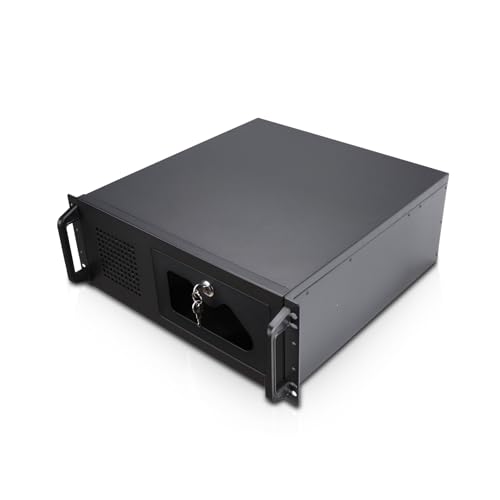
- Seven 3.5-inch HDD bays plus two 5.25-inch bays
- ATX and CEB motherboard compatibility
- Front USB 3.0 and locking front panel
Best For: Expandable ATX-based NAS and home-lab server builds
Best Expansion Value

- Four SATA drive bays with configurable RAID
- USB 3.0 Type-C direct-attached storage
- Lockable trays and QNAP disk-health management
Best For: QNAP users needing expandable rackmount storage
Best DIY Server Chassis
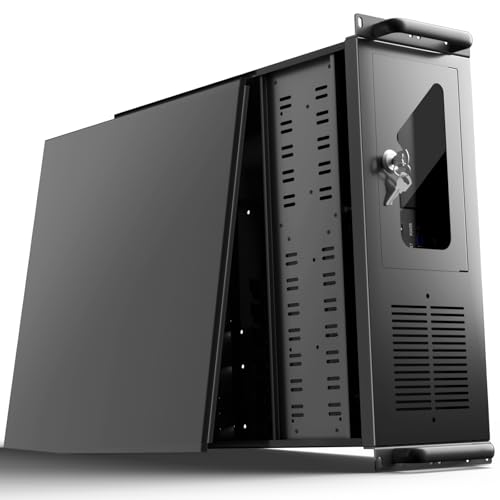
- 12 internal drive bays for custom storage builds
- Seven PCI slots and broad motherboard support
- Lockable front panel with USB 3.0 and dust filter
Best For: DIY builders creating a custom rackmount NAS
Best High-Performance Option

- Dual 10GbE ports and high sequential throughput
- Hot-swappable trays and fans for maintenance
- License-free backup and snapshot tools included
Best For: Demanding labs and small businesses needing fast storage
Compact DIY NAS Chassis

- Supports Micro ATX and mini-ITX boards
- Four internal 3.5-inch bays
- Standard ATX PS2 PSU support
Best For: DIY builders needing a compact 2U enclosure
Ready-Made 1U NAS

- Four-bay diskless 1U NAS
- Four built-in 1GbE ports
- Expandable to eight bays
Best For: Office file sharing, syncing, and backup
High-Capacity DIY NAS

- Eight hot-swappable SATA/SAS bays
- Supports EATX through mini-ITX
- Eight full-height expansion slots
Best For: High-capacity DIY NAS and small-business storage builds
Compact Performance Pick – Synology RS422+ 4-Bay Rackmount NAS
The Synology RS422+ is a strong choice for shoppers comparing budget rackmount NAS systems that need a compact, ready-to-expand network storage platform. It offers four bays, solid sequential throughput, dual network ports, and an upgrade path to 10GbE.
Best For: Small offices and home labs needing a compact four-bay NAS with network redundancy and future 10GbE support.
Pros:
- Over 601/516 MB/s sequential read/write throughput supports stable data transfers.
- Compact 327.5 mm depth helps it fit space-constrained racks.
- Dual 1GbE ports support failover and load balancing.
- Optional plug-and-play 10GbE RJ-45 upgrade modules add flexibility.
Cons:
- Diskless design requires separate drives.
- Four-bay capacity may be limiting for larger storage deployments.
- 10GbE connectivity requires an additional upgrade module.
With its compact metal enclosure, rack-mount design, and three-year warranty, the RS422+ is a practical option when you want more capability than a basic home NAS without moving to a larger chassis.
DIY Storage Chassis Pick – RackChoice 2U 12-Bay Hot-Swap Chassis
The RackChoice 2U chassis is aimed at builders who want budget rackmount NAS systems with extensive drive capacity and the freedom to choose their own motherboard, power supply, and storage components. Its twelve hot-swap bays make it suited to custom storage servers.
Best For: DIY NAS builders and small server deployments requiring twelve hot-swap SATA/SAS bays in a 2U chassis.
Pros:
- Supports twelve 3.5-inch or 2.5-inch 6Gbps SATA/SAS hot-swap drives.
- Compatible with Micro-ATX and Mini-ITX motherboards.
- Includes a 20-inch sliding rail set and Mini SAS-to-SATA cables.
- Four 80mm fans provide active airflow for a dense storage build.
Cons:
- It is a chassis rather than a complete NAS, so components must be supplied separately.
- Supports only low-profile expansion cards.
- Its 545mm depth is intended for racks or cabinets at least 600mm deep.
This chassis offers substantial drive density for the money, but it is best suited to users comfortable assembling and configuring their own NAS or storage server.
Ready-to-Use Home Storage Pick – Buffalo LinkStation 210 2TB
The Buffalo LinkStation 210 is a simple, affordable alternative for shoppers considering budget rackmount NAS systems but primarily need centralized home storage rather than rack installation. It includes a 2TB hard drive, automated backup software, and subscription-free personal cloud access.
Best For: Homes and small setups wanting an easy, preconfigured 2TB network storage and backup device.
Pros:
- Includes a 2TB hard drive, so no separate drive purchase is required.
- Supports centralized storage, automated computer backups, and folder access controls.
- Works with Windows and macOS 15 and earlier.
- Includes 24/7 US-based support and a two-year warranty covering the hard drive.
Cons:
- One drive bay limits storage expansion and redundancy options.
- It is a home network device, not a rackmount chassis.
- macOS 26 support is directed to Buffalo’s LS 700 series.
For users who do not need rack hardware, the LS210 keeps setup straightforward with included storage and no monthly cloud subscription, making it a practical entry-level network backup device.
Expandable ATX Build Pick – Rosewill RSV-R4100U 4U Chassis
The Rosewill RSV-R4100U is a spacious 4U enclosure for shoppers building budget rackmount NAS systems around standard ATX or CEB hardware. It provides room for multiple hard drives, full-height expansion capability, and front-panel access features for server or home-lab use.
Best For: ATX-based NAS and server builds that prioritize internal expansion, drive access, and rack compatibility.
Pros:
- Provides seven internal 3.5-inch HDD bays and two 5.25-inch device bays.
- Supports ATX and CEB motherboards with seven PCI expansion slots.
- Includes a front 120mm PWM fan and two rear 80mm PWM fans.
- Front USB 3.0 ports, HDD indicators, and a locking front panel add convenience and security.
Cons:
- It is an empty chassis, so motherboard, drives, and other components are required.
- It is a large 4U enclosure measuring 25 inches deep.
- Drive compatibility requires three screw holes on each side; two-hole drives are not supported.
The RSV-R4100U is a flexible foundation for a conventional ATX storage build, though its size and drive-mounting requirement make checking rack space and drive compatibility important before purchase.
Best Expansion Value – QNAP TR-004U 4-Bay Rackmount
QNAP TR-004U 4 Bay Rackmount NAS Expansion - Optional Use as a Direct-Attached Storage Device
Check Price On AmazonFor shoppers comparing budget rackmount NAS systems, the QNAP TR-004U is a flexible four-bay expansion enclosure that can also function as direct-attached storage. Its USB 3.0 Type-C connection, lockable trays, and support for up to four SATA drives make it a practical way to add capacity without building a complete server.
Best For: QNAP users and home-lab builders who need expandable four-drive storage, hardware-based RAID, or cross-platform file sharing.
Pros:
- Supports up to four SATA drives with configurable RAID modes.
- USB 3.0 Type-C supports faster data transfers.
- Lockable drive trays help prevent accidental drive removal.
- Storage & Snapshots Manager can configure RAID and monitor disk health when connected to a QNAP NAS.
Cons:
- It is primarily an expansion and DAS enclosure rather than a complete standalone NAS platform.
- Its strongest management features are tied to use with a QNAP NAS.
The TR-004U stands out when you already use QNAP equipment or want a rackmount storage enclosure with multiple operating modes. It offers useful flexibility at a lower-complexity level than a full NAS server.
Best DIY Server Chassis – UTLGAMENG 4U Rackmount Case
Among budget rackmount NAS systems, the UTLGAMENG 4U chassis is best viewed as a foundation for a custom build rather than a ready-to-run NAS. Its 12 internal drive bays, seven PCI slots, and broad motherboard compatibility leave room to choose your own storage hardware and operating system.
Best For: DIY home servers, data-center builds, and gaming or storage systems using ATX, Micro-ATX, or Mini-ITX components.
Pros:
- Provides 12 dedicated hard drive bays for substantial storage expansion.
- Seven PCI slots accommodate graphics, networking, or storage expansion cards.
- Supports standard ATX power supplies and three common motherboard sizes.
- Includes two front USB 3.0 ports, a lockable front panel, and a dust filter.
Cons:
- It is a server case, so motherboard, drives, power supply, and NAS software are required separately.
- Graphics-card and cooler clearance depends on the stated size limits and may require removing drive bays or brackets.
This chassis is a strong budget choice for technically confident buyers who want maximum component flexibility. It can support a large custom NAS, but the final system’s performance and reliability depend on the parts installed.
Best High-Performance Option – Synology RS1626xs+ 4-Bay NAS
The Synology RS1626xs+ is a premium-leaning four-bay choice for buyers who prioritize throughput, networking, and built-in data protection over the lowest purchase price. It combines dual 10GbE ports, ECC memory, hot-swappable components, and Synology’s license-free backup and snapshot tools in a 1U rackmount design.
Best For: Small businesses and demanding home labs that need fast network storage, dependable maintenance features, and room to expand to 16 bays.
Pros:
- Delivers over 2,100/1,500 MB/s sequential read/write performance according to the supplied specifications.
- Includes dual 10GbE RJ-45 ports for high-speed networking.
- Supports hot-swappable drive trays and fans to simplify maintenance.
- Includes Snapshot Replication, Hyper Backup, and Active Backup Suite without additional licenses.
Cons:
- Its advanced performance and features make it less focused on entry-level budgets.
- Expansion to 16 bays requires a separate Synology RX1225RP expansion unit.
With 16 GB of DDR4 ECC RDIMM memory, 10GbE connectivity, and a five-year limited warranty, the RS1626xs+ is the most capable option here. It is a better fit for intensive workloads than for simple file storage.
Compact DIY NAS Chassis – RackChoice 2U Micro ATX Case
For shoppers comparing budget rackmount NAS systems, this compact 2U RackChoice chassis is a flexible foundation for building a custom NAS. It supports Micro ATX or mini-ITX motherboards, standard ATX PS2 power supplies, and four internal 3.5-inch drives.
Best For: DIY NAS builders who want a compact, low-cost 2U enclosure with standard desktop components.
Pros:
- Supports Micro ATX and mini-ITX motherboards.
- Provides four internal 3.5-inch bays and includes a 3.5-to-2.5-inch adapter.
- Accepts standard ATX PS2 power supplies and offers four low-profile expansion slots.
- Includes USB 3.0 front ports compatible with USB 2.0.
Cons:
- Does not include a motherboard, drives, or power supply.
- Its 400mm chassis depth and low-profile slots limit component choices.
- Cooling is limited to the included 120mm top fan and two 80mm intake fans.
This is a practical enclosure rather than a complete NAS, so total cost depends on the components you add. Its compact dimensions and standard power-supply support make it appealing for a straightforward custom build, but verify motherboard, expansion-card, and rack compatibility first.
Ready-Made 1U NAS – Synology RackStation RS826+
The diskless Synology RackStation RS826+ is a more complete option among budget rackmount NAS systems for offices that want a purpose-built 1U platform. It has four drive bays, four built-in 1GbE ports, and expansion support for faster networking or NVMe adapter cards.
Best For: Offices and small businesses needing a rackmount NAS platform for file sharing, syncing, and backup.
Pros:
- Offers four drive bays in a 1U rackmount design.
- Claims sequential performance of over 2,000 MB/s read and 1,300 MB/s write.
- Includes four 1GbE ports and a PCIe 3.0 slot for optional 10GbE or 25GbE networking.
- Can expand to eight drive bays with one RX426 expansion unit.
Cons:
- It is diskless, so drives must be purchased separately.
- Optional higher-speed networking and expansion require additional hardware.
- The listed dimensions and 19-pound weight may require careful rack planning.
The RS826+ costs more than a bare chassis, but its integrated NAS platform and expansion path can simplify deployment. It is a strong fit when reliable office storage features matter more than building every component yourself.
High-Capacity DIY NAS – RackChoice 4U 8-Bay Chassis
For a budget rackmount NAS build that prioritizes drive capacity and maintenance access, this 4U RackChoice chassis provides eight hot-swappable 3.5-inch SATA/SAS bays plus one fixed bay. It supports EATX, ATX, Micro ATX, and mini-ITX boards, giving builders considerable component flexibility.
Best For: Small businesses and home labs building a high-capacity NAS with hot-swap storage and room for expansion cards.
Pros:
- Provides eight hot-swappable 3.5-inch SATA/SAS bays, with 2.5-inch compatibility.
- Supports EATX, ATX, Micro ATX, and mini-ITX motherboards.
- Includes three 120mm PWM ball-bearing fans and supports additional rear cooling.
- Offers eight full-height expansion slots and supports standard ATX or CRPS redundant PSUs.
Cons:
- It is a chassis only and requires a motherboard, drives, PSU, and other components.
- Its 26.77-inch depth and 4U height require substantial rack space.
- SATA/SAS cabling and backplane installation add complexity compared with a turnkey NAS.
This chassis is a compelling foundation when drive density and hot-swap maintenance are the priorities. Its broad motherboard support and expansion capacity improve upgrade flexibility, but the larger footprint and DIY setup make it less suitable for compact racks or plug-and-play buyers.
How We Picked the Best Budget Rackmount NAS Systems
We focused on the factors that matter most when building affordable rack storage: drive-bay count, rack height, hardware flexibility, diskless or preconfigured operation, expansion support, and suitability for home labs, small businesses, surveillance, and media storage. We also separated ready-to-run NAS appliances from chassis that require a motherboard, processor, memory, power supply, and operating system.
Because “budget” depends on the complete build cost, a low-priced chassis is not automatically cheaper than an integrated NAS. Buyers should consider included drives, software, rails, controllers, warranties, and the cost of future upgrades.
Quick Comparison
- Best for turnkey NAS software: Synology RackStation models offer polished management tools and broad storage features, but diskless systems still require compatible drives.
- Best for flexible DIY builds: RackChoice and Rosewill chassis provide room for standard components and multiple drive configurations.
- Best for simple network storage: The Buffalo LinkStation 210 includes a hard drive and is easier to deploy, though its single-bay design limits redundancy.
- Best for expansion: The QNAP TR-004U can add rackmount storage to an existing system and can also function as direct-attached storage.
Key Buying Factors for Budget Rackmount NAS Systems
Drive Bays and Redundancy
Four-bay systems are a practical starting point for RAID 5, RAID 10, or flexible expansion. One-bay models are simpler but provide no drive redundancy. Chassis with eight or more bays may cost more initially while offering better capacity growth.
NAS Appliance or DIY Chassis
A complete NAS appliance usually includes an operating system, remote administration, alerts, storage pooling, and backup tools. A bare chassis gives you more control over hardware and software, but you must verify motherboard compatibility, drive backplanes, cooling, power delivery, and rack-rail support.
Rack Height, Depth, and Noise
Measure the available rack depth before ordering. A short-depth chassis may fit network closets, while deeper cases need a full-size rack and suitable rails. Fans and enterprise drives can be loud, so noise matters in offices and home labs.
Connectivity and Expansion
Check Ethernet speed, USB or direct-attached connectivity, PCIe expansion, SATA or SAS support, and compatibility with your preferred backup or virtualization workflow. A faster network port is useful only when the switches, clients, and storage configuration can take advantage of it.
Total Cost of Ownership
Include drives, memory, rails, power consumption, replacement fans, software, and backup storage in the budget. RAID improves availability but is not a substitute for an independent backup.
Who Should Buy Which Budget Rackmount NAS Systems?
Choose a Synology rackmount appliance if you want a mature interface and straightforward administration with minimal setup. Consider Buffalo if you need basic, prepopulated network storage for a small household or office and can accept limited redundancy.
Choose the QNAP expansion unit when you already have a host system and want additional rack storage without building a complete NAS server. DIY builders should look at RackChoice or Rosewill cases when standard PC components, custom operating systems, and future hardware upgrades are priorities.
For growing businesses, media teams, and homelab users, a four- to eight-bay design is generally the safest balance between price and expansion. Whichever model you select, confirm drive compatibility, rack dimensions, cooling requirements, and your backup plan before purchasing.