The best budget portable OLED monitors give laptops, tablets, and handheld consoles a brighter, more colorful second screen without adding much bulk to your bag. OLED contrast makes dark scenes look deeper, while slim designs suit travel and flexible desk setups.
These 10 picks range from compact touchscreen models to high-resolution 4K displays and faster 120Hz options. Use the guide below to match screen size, connectivity, portability, and price to the way you work or play.
Best 10 Budget Portable OLED Monitors Picks for 2026
Best Lightweight OLED
AOC 16-inch OLED Portable Monitor

- 16-inch 1920×1200 OLED display
- 95% DCI-P3 color gamut
- USB-C, Mini HDMI, speakers, and kickstand
Best For: Mobile productivity and entertainment
Best 4K OLED Pick

- Sharp 4K UHD OLED image
- Lightweight 1.5-pound design
- USB-C power and video support
Best For: Traveling professionals and creative users who want maximum detail
Best Productivity Format

- Tall 16:10 WUXGA OLED display
- Power pass-through via USB-C
- Auto rotation and three-year coverage
Best For: Mobile productivity and multitasking
Best 4K Detail
UPERFECT 13.3-inch 4K OLED Monitor

- 4K OLED resolution with 109% DCI-P3 coverage
- 500-nit brightness and 1ms response time
- USB-C and HDMI connectivity in an aluminum body
Best For: Creative work and travel setups requiring maximum detail
Best Compact Touchscreen
10.5-inch 2.5K OLED Portable Monitor
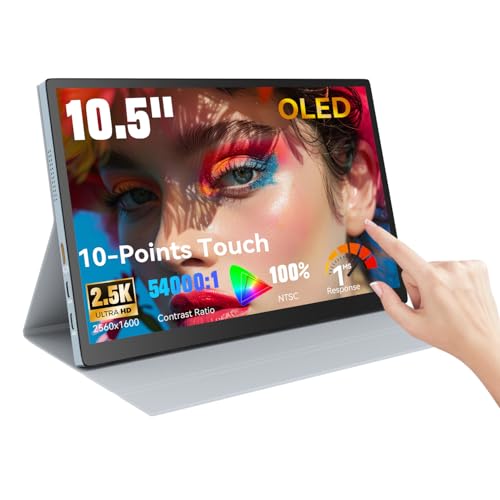
- 2.5K OLED display with 100% NTSC coverage
- 10-point touchscreen for intuitive gestures
- Protective case, built-in speakers, USB-C, and HDMI
Best For: Portable touch-based productivity and presentations
Best 4K Value – InnoView 15.6-inch 4K Portable Monitor
For shoppers comparing budget portable OLED monitors, this InnoView is a lower-cost alternative for those who prioritize 4K resolution over OLED technology. Its 15.6-inch 3840×2160 display, HDR support, and 100% sRGB coverage suit detailed work, gaming, and travel setups.
Best For: Buyers who want sharp 4K image quality, broad connectivity, and a lightweight travel monitor.
Pros:
- 4K UHD resolution with HDR, FreeSync, and a 1200:1 contrast ratio.
- 100% sRGB coverage and 1.07 billion colors support color-focused work.
- Two full-function USB-C ports, HDMI, and a headphone jack offer flexible connections.
- Lightweight 1.65-pound design includes a protective sleeve and adapter.
Cons:
- It uses an LCD panel rather than OLED.
- The 60Hz refresh rate is less suited to high-refresh gaming.
- USB-C operation may require the included adapter if the source device supplies insufficient power.
The InnoView stands out when resolution and connectivity matter most. It is a practical budget portable monitor for laptop work, console play, and creative tasks, provided OLED contrast is not a requirement.
Best Lightweight OLED – AOC 16-inch OLED Portable Monitor
Among budget portable OLED monitors, the AOC 16T40D offers a spacious 16-inch OLED panel in a lightweight travel-friendly design. Its WUXGA resolution, 16:10 aspect ratio, and 95% DCI-P3 gamut make it well suited to productivity, streaming, and creative content.
Best For: Users who want a light OLED second screen with a taller productivity-oriented aspect ratio.
Pros:
- OLED panel delivers vivid colors and strong contrast at 1920×1200 resolution.
- 16:10 format provides extra vertical workspace compared with 16:9 screens.
- Dual USB-C ports and Mini HDMI support laptops, Macs, tablets, and consoles.
- Built-in 0°–180° kickstand and dual speakers simplify mobile use.
Cons:
- The glossy finish can be less convenient in bright environments.
- WUXGA is less sharp than 4K for highly detailed work.
- The supplied notes do not specify a battery or wireless operation.
The AOC is a well-rounded OLED travel display for office work and entertainment. Its low 1.12-pound weight, flexible stand, and broad input selection make it especially easy to carry and set up.
Best for Creators – ViewSonic VP16-OLED Portable Monitor
The ViewSonic VP16-OLED is one of the more creator-focused budget portable OLED monitors, pairing a 15.6-inch Full HD OLED display with Pantone Validated color precision. Its adjustable stand, tripod mount, monitor hood, and screen cover are useful for photographers, editors, and mobile professionals.
Best For: Creative users who need portable color accuracy and more flexible positioning.
Pros:
- Pantone Validated OLED display offers strong color-focused credentials.
- 400-nit brightness, 20,000,000:1 contrast, and 178° viewing angles support detailed viewing.
- Height-adjustable stand, tripod mount, hood, and screen cover add practical flexibility.
- USB-C and Micro HDMI inputs work with laptops, PCs, and Macs, with a three-year warranty.
Cons:
- Its 1920×1080 resolution is lower than 4K alternatives.
- The glossy screen finish may reflect surrounding light.
- The detailed specifications list a weight of 5.9 pounds, which is less travel-friendly than the claimed roughly 2-pound design.
The VP16-OLED is a strong choice when color workflow and positioning matter more than maximum resolution. Its professional accessories and warranty help justify choosing it for serious mobile creative work.
Best Touchscreen Pick – Ricoh 15.6-inch OLED Portable Monitor
For shoppers seeking budget portable OLED monitors with direct control, the Ricoh Portable Monitor adds a 10-point touchscreen to its 15.6-inch Full HD OLED display. Its slim build, flexible kickstand, speakers, and included sleeve make it a convenient companion for presentations, design work, and mobile desktops.
Best For: Users who want touchscreen interaction and extremely slim portability in an OLED monitor.
Pros:
- 15.6-inch OLED screen provides deep contrast, 300-nit brightness, and a 1ms response time.
- 10-point touchscreen supports navigation, presentations, and optional stylus use.
- At 19.8 ounces and 0.19 inches thin, it is exceptionally easy to carry.
- Includes a kickstand, dual speakers, protective sleeve, USB-C cable, and cable clamps.
Cons:
- Full HD resolution is less detailed than 4K options.
- The glossy finish may produce reflections.
- Connectivity is centered on USB-C, so other source devices may need an adapter.
The Ricoh is the most compelling option here for touch-first workflows and ultra-light travel. It makes a sensible pick for presentations and interactive desktop use, as long as Full HD resolution meets your needs.
Best 4K OLED Pick – ViewSonic VX1655-4K-OLED
The ViewSonic VX1655-4K-OLED is a strong choice for shoppers seeking budget portable OLED monitors with unusually sharp 4K resolution. Its slim 1.5-pound design, USB-C connectivity, and built-in stand make it practical for mobile work, creative tasks, and entertainment.
Best For: Travelers, creative professionals, and laptop users who prioritize 4K image quality.
Pros:
- 4K UHD OLED resolution with individually lit pixels, deep contrast, and 400-nit brightness.
- Compact 0.6-inch-thick, 1.5-pound design with an integrated portrait-or-landscape kickstand.
- USB-C, mini-HDMI, and dual USB-C connectivity, with up to 60W two-way power.
- Includes a protective cover and a three-year limited warranty.
Cons:
- Its 60Hz refresh rate is not aimed at high-refresh gaming.
- 4K resolution may use more laptop power and bandwidth than a 1080p portable display.
This ViewSonic stands out when image detail matters most. It costs portability only in the sense that a 4K panel can demand more from your setup, but the light chassis and flexible connections keep it travel-friendly.
Best Compact Value – 13.3-Inch OLED Touchscreen Monitor
This 13.3-inch model is a compact option for shoppers comparing budget portable OLED monitors. It pairs a Full HD OLED panel with 500-nit brightness, HDR support, and a wide 100% DCI-P3 color gamut for work, gaming, and media.
Best For: Buyers who want a small OLED display with vivid color and a simple Full HD resolution.
Pros:
- OLED panel delivers a 100,000:1 contrast ratio and true-looking blacks.
- 500-nit brightness, HDR support, and 100% DCI-P3 color coverage support vivid visuals.
- Compact 13.3-inch Full HD format with a 2ms response time.
- Offers HDMI and USB-C connectivity, plus two USB ports.
Cons:
- Its 1920×1080 resolution provides less workspace and detail than 4K alternatives.
- The supplied notes list a one-year warranty, shorter than some competing options.
- The glossy finish may be less suitable for brightly lit environments.
This monitor makes sense when you value OLED contrast and color more than screen size or resolution. Its smaller footprint can be convenient in tight travel setups, while Full HD keeps compatibility straightforward.
Best Productivity Format – ASUS ZenScreen MQ16FC
The ASUS ZenScreen MQ16FC is a practical pick among budget portable OLED monitors for productivity-focused users. Its 16:10 WUXGA screen provides extra vertical space, while two full-function USB-C ports, auto rotation, and power pass-through support flexible laptop setups.
Best For: Mobile professionals who want a taller workspace and convenient USB-C connectivity.
Pros:
- 16:10 1920×1200 OLED display offers more vertical workspace than a standard 16:9 panel.
- 95% DCI-P3 coverage, 1ms response time, and a 100,000,000:1 contrast ratio support vivid, responsive images.
- Two full-function USB-C ports and mini-HDMI provide versatile connection options.
- Includes auto rotation support, a sleeve, tripod socket kit, cables, and three-year warranty coverage with burn-in protection.
Cons:
- Its 300-nit brightness is lower than the 500-nit compact alternative in this roundup.
- The glossy screen finish can reflect ambient light.
- Auto rotation depends on DisplayWidget Center software.
The MQ16FC is especially appealing for documents, coding, and general multitasking where vertical room matters. It is not the highest-resolution option here, but its aspect ratio, accessories, and power pass-through make it a well-rounded mobile workstation display.
Best 4K Detail – UPERFECT 13.3-inch 4K OLED Monitor
For shoppers comparing budget portable OLED monitors, this UPERFECT model stands out for its compact 13.3-inch 4K OLED panel. It combines high resolution, wide color coverage, 500-nit brightness, and USB-C or HDMI connectivity in a lightweight aluminum design.
Best For: Content creators, photo and video editors, and travelers who prioritize sharp 4K detail and vivid color.
Pros:
- 3840×2160 4K resolution with 109% DCI-P3 coverage and a 100000:1 contrast ratio
- 500-nit brightness, HDR support, and a 1ms response time
- USB-C and HDMI connections with plug-and-play setup
- Compact aluminum housing with built-in speakers and a two-year warranty
Cons:
- 60Hz refresh rate is less fluid than higher-refresh gaming-focused models
- Glossy glass finish may reflect surrounding light
- Its 13.3-inch screen provides less workspace than larger portable monitors
This is a strong choice when image sharpness and color performance matter more than screen size or refresh rate. Its 4K resolution makes it particularly appealing for creative work, while the portable build keeps it practical for travel and dual-screen setups.
Best Compact Touchscreen – 10.5-inch 2.5K OLED Portable Monitor
This 10.5-inch OLED is a compact option among budget portable OLED monitors, pairing a 2560×1600 resolution with touchscreen controls. Its small footprint, protective case, USB-C and HDMI inputs, and built-in speakers make it easy to add a portable second screen for work or entertainment.
Best For: Users who want a small touchscreen monitor for presentations, productivity, creative work, or travel gaming.
Pros:
- 2.5K resolution, 100% NTSC color coverage, and a 54000:1 contrast ratio
- 10-point multi-touch functionality for gestures, scrolling, and zooming
- USB-C and HDMI connectivity for laptops, smartphones, and consoles
- Lightweight 1.1-pound design with a protective case and built-in speakers
Cons:
- Touch functionality does not support Apple devices
- The 10.5-inch display offers limited workspace compared with larger options
- The supplied notes do not specify a refresh rate
The touchscreen is the main reason to choose this model. It is especially useful when direct interaction with on-screen controls matters, though Apple users should account for the stated touch limitation before buying.
Best High-Refresh Option – UPERFECT 14-inch 3K OLED Touchscreen
For buyers seeking smoother motion from budget portable OLED monitors, this 14-inch UPERFECT combines a 3K OLED display with a 120Hz refresh rate and touchscreen input. Its 16:10 format, 500-nit brightness, slim metal body, and adjustable stand suit both mobile work and gaming.
Best For: Gamers, creative users, and professionals who want smooth scrolling, responsive touch controls, and a larger portable screen.
Pros:
- 2880×1800 3K OLED resolution with 120Hz refresh via USB-C
- 0.1ms response time, 120% DCI-P3 coverage, and up to 500 nits brightness
- Pixel-accurate touchscreen with no stated offset
- Thin 1.29-pound metal design with adjustable stand and VESA support
Cons:
- 3K resolution runs at 100Hz through HDMI rather than 120Hz
- Glossy finish can be more reflective in bright surroundings
- The 25-watt power consumption may require attention when used with mobile devices
This is the most motion-focused choice in the group, especially when connected over USB-C for its full 120Hz capability. Check your device and cable setup if you specifically need the highest refresh rate or touchscreen functionality.
How We Picked the Best Budget Portable OLED Monitors
We compared these displays by panel quality, resolution, brightness, portability, connectivity, and practical versatility. Priority went to models with OLED contrast, useful USB-C support, a laptop-friendly size, and enough flexibility for travel, office work, creative tasks, gaming, or entertainment. Because “budget” means different things across 1080p, 2.5K, 3K, and 4K models, we considered value within each class rather than judging price alone.
Quick Comparison
For the sharpest image, look at the 4K models from InnoView, ViewSonic, and UPERFECT. A 1080p display is generally lighter on cost and power while remaining suitable for documents, coding, email, and streaming. Touchscreen models add convenient navigation for compatible laptops, tablets, and handheld devices. If smooth motion matters most, the 120Hz UPERFECT model is the standout option in this group.
Key Buying Factors
Screen Size and Resolution
Most portable OLED monitors sit between 13 and 16 inches. Smaller screens are easier to pack, while 15.6- and 16-inch models provide a more comfortable second workspace. Full HD is sufficient for everyday productivity; 2.5K, 3K, and 4K offer crisper text and images but may use more power and cost more.
Brightness, Color, and Contrast
OLED already delivers excellent contrast and rich blacks. Look for a stated brightness of around 400 to 500 nits if you frequently work near windows or in bright rooms. Wide-gamut specifications such as DCI-P3 or high sRGB coverage are useful for photo, video, and design work, but color accuracy still depends on calibration and the selected picture mode.
Ports and Device Compatibility
USB-C is the most convenient connection when it supports both video and power over the same cable. Check whether your laptop, phone, tablet, or console supports DisplayPort over USB-C. HDMI or Mini HDMI improves compatibility with older laptops, cameras, and game systems. Some setups require a second USB-C cable or an external power adapter.
Portability and Extras
Check weight, thickness, the included stand or cover, cable storage, and power requirements. Touch input is useful but may not work through every connection or operating system. A built-in stand, VESA support, speakers, or a headphone output can make a greater daily difference than a small resolution upgrade.
Who Should Buy Which Budget Portable OLED Monitors?
Choose a compact 13.3-inch or 10.5-inch model if bag space is your top concern. Pick a 15.6- or 16-inch 1080p OLED for affordable everyday multitasking. Choose a 4K model for detailed creative work, photography, or text-heavy productivity when you can accept higher power needs. Touchscreen models suit presenters, tablet users, and interactive workflows, while the 120Hz option is the better fit for gaming and noticeably smoother scrolling.
Before ordering, confirm the monitor’s maximum refresh rate, cable requirements, included accessories, and your device’s video-output support. Those checks help ensure your preferred budget portable OLED monitor works as expected on the first trip.