When it comes to finding the best USB flash drives for your iMac, speed and storage capacity play essential roles. You want options that not only enhance your workflow but also safeguard your data. From compact designs to high-capacity storage, there are plenty of choices available. But which drives truly stand out? Let’s explore the top contenders that can meet your needs effectively.
SanDisk 128GB Ultra Flair USB 3.0 Flash Drive – SDCZ73-128G-G46, black
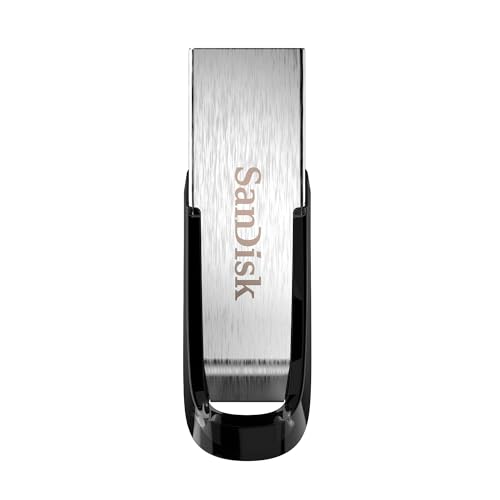
If you’re looking for a reliable and high-speed USB flash drive for your iMac, the SanDisk 128GB Ultra Flair USB 3.0 Flash Drive is an excellent choice. With USB 3.0 performance reaching up to 150MB/s, you’ll transfer large files quickly, like a full-length movie in under 30 seconds. Its sleek, durable metal casing not only looks good but also protects your data. Plus, the easy-to-use password protection features 128-bit AES encryption, ensuring your private files are safe. Just remember to download the necessary software for Mac. This drive combines speed, storage, and security, making it perfect for your needs.
Best For: Those who need a high-speed, reliable flash drive for transferring large files quickly and securely, particularly users of Windows and Mac OS systems.
Pros:
- High-speed USB 3.0 performance allows for rapid file transfers up to 150MB/s.
- Sleek and durable metal casing provides both aesthetic appeal and data protection.
- Easy-to-use password protection with 128-bit AES encryption ensures the safety of private files.
Cons:
- Requires software download for full functionality on Mac systems.
- Performance may vary based on host device and usage conditions.
- Limited to USB 3.0 ports for optimal performance; older USB 2.0 ports will be significantly slower.
Vansuny 128GB USB C Flash Drive 2 in 1 OTG

The Vansuny 128GB USB C Flash Drive 2 in 1 OTG is an excellent choice for iMac users seeking a versatile storage solution that effortlessly bridges the gap between devices. With its dual connectors, you can easily transfer files between your iMac and Android devices. The high-speed USB 3.0 guarantees quick data transfers, allowing you to move a 4GB movie in about 40 seconds. Its compact design and keychain loop make it portable and convenient. Plus, the exFAT format is compatible with various operating systems, guaranteeing smooth usability. Just plug it in, and you’re ready to go!
Best For: Those seeking a versatile and portable storage solution that easily connects Android devices and computers, particularly iMac users.
Pros:
- High-speed USB 3.0 allows for quick data transfers, making it efficient for moving large files.
- Dual connectors (USB Type C + USB 3.0) enhance compatibility across various devices.
- Compact and portable design with a keychain loop for easy carrying.
Cons:
- Some users reported compatibility issues with specific devices, requiring checks before use.
- Average read/write speeds noted may not meet the needs of heavy data users.
- Concerns about the durability of the keychain attachment, which could affect portability.
Lexar D40E 256GB Dual USB 3.2 Gen 1 Type-C Jump Drive

For those seeking versatility and compatibility, the Lexar D40E 256GB Dual USB 3.2 Gen 1 Type-C Jump Drive stands out with its dual connectors—USB Type-A and Type-C. With transfer speeds up to 100MB/s, it guarantees quick data access, though performance may vary based on your device. Its plug-and-play functionality makes it easy to use with a variety of devices, from smartphones to Macs. The 360° swivel design adds practicality, while the durable metal enclosure withstands temperatures from 0° to 50° C. Plus, advanced 256-bit AES encryption keeps your data secure, all backed by a 3-year warranty.
Best For: Users looking for a versatile and portable storage solution compatible with both USB Type-A and Type-C devices.
Pros:
- Fast transfer speeds of up to 100MB/s enhance data access efficiency.
- Plug-and-play functionality allows for easy use without software installation.
- Durable metal design and 360° swivel feature provide practicality and withstand varying temperatures.
Cons:
- Performance may vary depending on the host device and usage conditions.
- Limited to a 3-year warranty, which may be shorter than some competitors.
- The lightweight design might make it easier to misplace compared to bulkier drives.
Amazon Basics USB Flash Drive, 256GB with Dual USB C and USB A Ports

Ideal for users seeking versatility, the Amazon Basics USB Flash Drive features dual USB Type C and Type A ports, making it a perfect companion for iMac users. With 256GB of storage, you’ll have plenty of space for your files, while the champagne silver design and metal casing guarantee durability. You can easily transfer data between devices, enjoying read/write speeds of up to 300 MB/s for larger files. Customers love its performance and construction, rating it 4.7 out of 5 stars. Plus, with a solid return policy, you can shop with confidence and peace of mind.
Best For: Users needing a versatile storage solution for transferring data between various devices, especially those using both USB Type C and Type A connections.
Pros:
- Dual USB Type C and Type A ports for broad compatibility.
- High read/write speeds of up to 300 MB/s for efficient transfers.
- Durable metal casing and attractive champagne silver design.
Cons:
- Some users reported tight fits in certain devices.
- Actual read/write speeds may vary based on testing conditions.
- Limited to 256GB nominal storage, which may not suffice for all users.
SanDisk 1TB Extreme PRO Dual Drive

If you need a high-performance storage solution for your iMac, the SanDisk 1TB Extreme PRO Dual Drive is hard to beat. With impressive read speeds of up to 1,000MB/s and write speeds reaching 900MB/s, it’s perfect for quick file transfers. You’ll appreciate its versatility, as it connects seamlessly with both USB Type-C and USB Type-A devices. Plus, data protection features like recovery and encryption guarantee your files stay secure. The sleek metal design not only looks good but also boosts durability. Don’t forget to download the SanDisk app for easy auto backup and file management!
Best For: Professionals and creatives needing fast, secure, and versatile external storage for their devices.
Pros:
- High performance with read speeds up to 1,000MB/s and write speeds of 900MB/s for quick file transfers.
- Versatile connectivity compatible with both USB Type-C and USB Type-A devices.
- Enhanced data protection with recovery and encryption technology to keep files secure.
Cons:
- Requires software download for full features like auto backup and file management.
- Premium pricing compared to standard external drives with lower performance.
- Limited capacity options at 2TB, which may not meet the needs of users requiring larger storage.
2 Pack 64GB USB Flash Drive USB 2.0 Thumb Drives

The 2 Pack 64GB USB 2.0 Thumb Drives are perfect for anyone who needs reliable storage on their iMac. With a swivel design and a 360° metal cap, these drives not only look sleek but also protect the USB connector from damage. They’re compatible with various operating systems, including Mac OS, making them versatile for your data needs. You can easily store music, photos, and movies without hassle, thanks to the plug-and-play functionality. Plus, the matte surface helps prevent fingerprints. With a 12-month warranty and lifetime customer service, you can trust these drives for all your storage needs.
Best For: Individuals and professionals seeking dependable and versatile storage solutions for their digital data.
Pros:
- Plug and play functionality allows for easy use without additional software installation.
- Compatible with multiple operating systems including Windows, Mac OS, Unix, and Linux, making it versatile.
- Swivel design with a matte surface protects against fingerprints and enhances durability.
Cons:
- USB 2.0 speed may be slower compared to newer USB 3.0 drives.
- Limited storage capacity of 64GB may not suffice for users with large data needs.
- Plastic construction may not be as durable as metal alternatives.
SanDisk 256GB Ultra Dual Drive Go USB Type-C Flash Drive
For those seeking a versatile storage solution, the SanDisk 256GB Ultra Dual Drive Go USB Type-C Flash Drive stands out with its dual connectors, making it perfect for transferring files between your iMac and other devices. With a high-performance USB 3.1 Gen 1 interface, you’ll enjoy read speeds of up to 150MB/s. The reversible USB Type-C and traditional Type-A connectors guarantee compatibility with a range of devices. Plus, you can easily free up space on your smartphone or tablet. Just download the SanDisk Memory Zone app to back up your photos automatically. It’s an essential tool for seamless storage and transfer.
Best For: Users looking for a versatile storage solution to easily transfer files between USB Type-C and Type-A devices.
Pros:
- Dual connectors allow seamless compatibility with a variety of devices, including smartphones, tablets, and computers.
- High-performance read speeds of up to 150MB/s enhance file transfer efficiency.
- Automatic backup feature via the SanDisk Memory Zone app simplifies photo storage management.
Cons:
- Write speeds are lower and can vary depending on the capacity and other factors.
- Requires compatible devices with USB Type-C ports and On-The-Go (OTG) support for mobile use.
- Performance may be affected by host device specifications and usage conditions.
Samsung FIT Plus 128GB USB Flash Drive

Compact and unobtrusive, the Samsung FIT Plus 128GB USB Flash Drive is perfect for iMac users who need seamless storage expansion without sacrificing portability. With its plug-in and stay feature, you can keep it connected without worrying about accidental bumps or disconnections. You’ll enjoy quick read speeds up to 400 MB/s, letting you transfer a 3GB 4K UHD video in about 10 seconds. Plus, its durable design is waterproof, shock-proof, and temperature-proof, ensuring your files stay secure on the go. Trust Samsung, the world’s #1 flash memory brand, for reliable performance and quality in every byte.
Best For: Users seeking a compact and reliable USB flash drive for seamless storage expansion across various devices.
Pros:
- Quick transfer speeds of up to 400 MB/s, allowing for fast file transfers.
- Durable design that is waterproof, shock-proof, temperature-proof, and magnet-proof, ensuring file security during travel.
- Compact and unobtrusive plug-in and stay feature that reduces the risk of accidental disconnection.
Cons:
- Limited storage capacity of 128GB may not be sufficient for users with extensive data needs.
- USB 3.1 compatibility may not be fully utilized with older devices that only support USB 2.0.
- The compact design may be easy to misplace due to its small size.
SSK 256GB Dual USB C Flash Drive (2-in-1 Type C + USB A)

Offering impressive read speeds up to 550MB/s, the SSK 256GB Dual USB C Flash Drive (2-in-1 Type C + USB A) is perfect for users who need fast and efficient data transfer between their devices, like iMacs and smartphones. With both USB-C and USB-A ports, you can easily connect to a variety of devices, including your iPhone 15 and Android phones. Its durable zinc alloy design guarantees it withstands drops and abrasions, providing reliable performance. Plus, it’s plug-and-play ready—no software installation needed. Expand your storage effortlessly and enjoy the speed you deserve with this versatile flash drive.
Best For: Users seeking a high-speed, versatile storage solution for transferring data between various devices like smartphones, tablets, and computers.
Pros:
- Fast read speeds of up to 550MB/s and write speeds of up to 500MB/s, significantly improving data transfer efficiency.
- Dual connectivity with USB-C and USB-A ports, allowing compatibility with a wide range of devices.
- Durable zinc alloy construction provides resistance to drops and abrasions, enhancing longevity.
Cons:
- Incompatible with lightning ports, limiting use with certain Apple devices.
- Performance may vary based on host equipment and conditions, potentially affecting speed.
- Default format is EXFAT, which may require reformatting for some users on specific systems.
Samsung BAR Plus 3.1 USB Flash Drive (128GB)
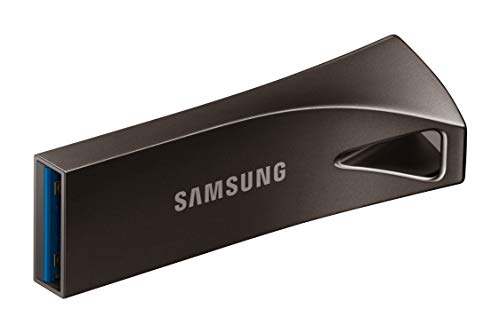
If you’re looking for a reliable and high-speed storage solution for your iMac, the Samsung BAR Plus 3.1 USB Flash Drive (128GB) is an excellent choice. With lightning-fast read speeds up to 300 MB/s, you can transfer a 3GB 4K UHD video file in just 10 seconds! Its sturdy metal body not only looks sleek but also guarantees your data stays safe. Plus, it’s waterproof, shock-proof, temperature-proof, magnet-proof, and X-ray-proof, safeguarding your valuable files. As the world’s #1 flash memory brand, Samsung backs it with a 5-year limited warranty, offering you peace of mind for long-term use.
Best For: Users who need a fast, durable, and reliable USB flash drive for storing and transferring large files, especially creatives and professionals working with 4K UHD content.
Pros:
- High-speed performance with read speeds up to 300 MB/s, allowing for quick file transfers.
- Durable design featuring a sturdy metal body that also includes an integrated keyring to prevent loss.
- Comprehensive protection features that safeguard data against water, shock, temperature, magnet, and X-ray exposure.
Cons:
- Price point may be higher compared to standard USB flash drives with lower speeds and less durability.
- Limited write speed compared to read speeds, which may affect transfer times for larger files.
- Metal body can get hot during prolonged use, potentially affecting performance.
Factors to Consider When Choosing an iMac USB Flash Drive
When you’re choosing a USB flash drive for your iMac, there are several key factors to keep in mind. You’ll want to contemplate storage capacity, transfer speed, and compatibility with your devices. Additionally, think about the design, durability, and any security features that might be important for your needs.
Storage Capacity Options
Choosing the right storage capacity for your iMac USB flash drive is essential for meeting your data needs. Flash drives come in various sizes, typically ranging from 16GB to 2TB. For everyday tasks like document storage and photo backups, a capacity of 64GB to 128GB usually suffices. However, if you’re dealing with high-definition videos, large software applications, or extensive photo libraries, consider drives of 256GB or more. Keep in mind that the actual usable space may be slightly lower than advertised due to formatting. It’s wise to think about your future storage needs, as opting for a higher capacity can offer more flexibility and longevity for your data storage requirements.
Transfer Speed Requirements
Understanding transfer speed is essential for getting the most out of your iMac USB flash drive. When selecting a drive, consider USB 3.0 options, which can offer read speeds up to 150MB/s, vastly outpacing the typical 4MB/s of USB 2.0 drives. If you frequently transfer larger files, like 4K videos, look for drives with read speeds exceeding 300MB/s for maximum efficiency. A high-speed USB flash drive can transfer a full-length movie (about 1.2GB) in under 30 seconds. Don’t forget to check write speeds, too, as some drives write data up to 15 times faster than standard USB 2.0 drives. Keep in mind that actual speeds may vary based on compatibility and environmental factors.
Compatibility With Devices
Selecting the right USB flash drive for your iMac goes beyond just transfer speeds; compatibility is key to ensuring a smooth experience. If you’re using a newer iMac, make sure the drive has a USB Type-C connector, as this enhances connectivity. It’s also essential to check for compatibility with the exFAT format, which allows seamless operation across macOS and Windows. If you plan to connect the drive to mobile devices, consider ones that support OTG (On-The-Go) functionality. Always verify that the flash drive works with the macOS version on your iMac, especially if it needs specific drivers. Finally, opt for drives that offer plug-and-play functionality to avoid any hassle with software installations.
Design and Durability
When you’re looking for a USB flash drive for your iMac, design and durability play essential roles in ensuring your data stays safe and accessible. Opt for drives with a sturdy metal body or durable casing, as these can withstand everyday wear and tear. Features like waterproof, shock-proof, temperature-proof, magnet-proof, and X-ray-proof capabilities provide extra protection against environmental hazards. A compact and sleek design enhances portability, reducing the risk of accidental bumps during use. Integrated keyring attachments are also useful, allowing you to easily attach the drive to your keychain or bag, minimizing the chance of loss. Choose materials like high-grade zinc alloy for added resistance to falls and abrasion, ensuring your drive lasts longer.
Security Features Offered
With a durable design in place, it’s time to focus on the security features that can keep your data safe on an iMac USB flash drive. Look for drives that offer password protection, ideally with 128-bit AES encryption, to safeguard your sensitive information from unauthorized access. Advanced security software for data recovery and encryption can further enhance your files’ protection. Verify the drive is compatible with your operating system’s security features, maximizing data protection capabilities. Additionally, consider drives with rugged metal casings for extra defense against environmental factors like water and shock. Finally, check the warranty and support options, as these may cover data recovery services if you accidentally lose your data.
Port Type Considerations
Port type is essential in choosing the right USB flash drive for your iMac. Newer iMac models mainly feature USB Type-C ports, while older ones may still use USB Type-A connections. To guarantee compatibility, consider dual-port flash drives that offer both USB Type-C and Type-A options, giving you more flexible connectivity. Aim for USB 3.0 drives or higher to achieve faster data transfer speeds, ideally with read speeds of at least 150MB/s. If you plan to use the drive across multiple devices, look for one with a reversible USB Type-C connector and backward compatibility with USB 3.0 or 2.0. Finally, prioritize drives with built-in encryption for secure data transfer, especially for sensitive information.