If you’re looking to enhance your typing experience with your iMac, a mechanical keyboard might be just what you need. These keyboards offer a range of features tailored for comfort and efficiency. From ergonomic designs to customizable options, there’s something for everyone. But which ones stand out in a crowded market? Let’s explore the top choices that could transform your workspace.
Keychron C2 Full Size Wired Mechanical Keyboard
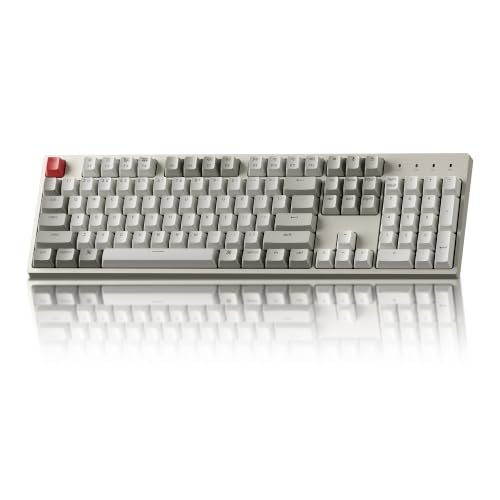
The Keychron C2 Full Size Wired Mechanical Keyboard is an excellent choice for Mac users seeking a blend of functionality and style. With its 104 keys, including a number pad, you’ll find it enhances your productivity effortlessly. Optimized for Mac, it includes multimedia and function keys, plus an extra Siri key. The USB Type-C wired connection guarantees a stable power supply, while the retro color keycap design adds a touch of charm to your workspace. You’ll appreciate the tactile responsiveness of the Keychron Brown switches, designed for durability, making it perfect for both office tasks and light gaming.
Best For: Mac users looking for a stylish and functional mechanical keyboard that enhances productivity and provides a tactile typing experience.
Pros:
- Optimized for Mac: Includes multimedia and function keys tailored for Mac users, along with an extra Siri key.
- Durable Design: Equipped with Keychron Brown switches offering a lifespan of up to 50 million keystrokes, suitable for both office work and light gaming.
- Ergonomic Comfort: Features an adjustable frame with two-level feet for comfortable typing angles.
Cons:
- Wired Connection Only: Lacks wireless capabilities, which may limit flexibility in setup.
- Num Lock Functionality: Num Lock is only available on Windows, making it less useful for Mac users who rely on this feature.
- No Backlight Option: The non-backlight version may not be ideal for users who prefer illuminated keys in low-light conditions.
Cherry KC 200 MX Mechanical Office Keyboard

Looking for a mechanical keyboard that perfectly complements your iMac setup? The Cherry KC 200 MX Mechanical Office Keyboard is an excellent choice. Featuring the new MX2A Silent Red switches, it offers a quiet operation, making it perfect for office environments. Its modern design, complete with a sturdy metal plate frame, enhances durability. With the ability to handle up to 50 million keystrokes, you can count on long-lasting performance. Plus, built-in white LED indicators for CAPS, SCROLL, and NUM lock make usability a breeze. Upgrade your typing experience with the Cherry KC 200 MX and enjoy smoother, more responsive keystrokes!
Best For: The Cherry KC 200 MX Mechanical Office Keyboard is best for professionals seeking a quiet, durable, and responsive typing experience in an office environment.
Pros:
- Quiet operation thanks to MX2A Silent Red switches, ideal for shared workspaces.
- Durable design with a metal plate frame that ensures longevity and stability.
- User-friendly features including built-in white LED indicators for CAPS, SCROLL, and NUM lock.
Cons:
- Limited switch options compared to other mechanical keyboards, which may not cater to all preferences.
- Not designed for heavy gaming, as the focus is on office use and quiet performance.
- Higher price point compared to non-mechanical keyboards, which may not be justified for some users.
RK ROYAL KLUDGE S98 Mechanical Keyboard (Wireless, 96%)

If you’re after a versatile mechanical keyboard that seamlessly integrates with your iMac, the RK Royal Kludge S98 is an excellent choice. This 96% layout keyboard features a small display for custom GIFs, date, connection mode, and battery status. Its knob lets you easily adjust volume, backlight brightness, and RGB settings. With stable Bluetooth 5.0, a 2.4GHz dongle, and USB-C wired options, connectivity is a breeze. The top-mount design guarantees a quieter typing experience, while hot-swappable switches and durable PBT keycaps offer customization and longevity. Elevate your typing experience with this stylish, functional keyboard!
Best For: The RK Royal Kludge S98 is best for users seeking a customizable and versatile mechanical keyboard that enhances their typing experience on various devices.
Pros:
- Custom Display: Features a small screen for GIFs, date, connection mode, and battery status.
- Versatile Connectivity: Offers Bluetooth 5.0, 2.4GHz dongle, and USB-C wired options.
- Quiet Operation: Top-mount design with sound-dampening features significantly reduces noise.
Cons:
- Size: The 96% layout may be less portable compared to compact keyboards.
- Learning Curve: Users may need time to adapt to the knob functionality for adjustments.
- Price Point: It may be more expensive than standard mechanical keyboards.
Keychron K10 Bluetooth Wireless Mechanical Gaming Keyboard

For users seeking a versatile mechanical keyboard that enhances their iMac experience, the Keychron K10 stands out with its seamless Bluetooth connectivity and Mac-friendly layout. You can easily connect up to three devices using Bluetooth 5.1 or opt for a wired connection via USB Type-C. With tactile Keychron Pro switches, you’ll enjoy responsive typing and a lifespan of up to 50 million keystrokes. The keyboard’s ergonomic design, featuring adjustable feet, guarantees comfort during long sessions. Plus, its impressive 4000 mAh battery offers up to 240 hours of use without backlighting, making it perfect for both work and play.
Best For: Users looking for a versatile mechanical keyboard that enhances productivity and comfort for both Mac and Windows devices.
Pros:
- Bluetooth 5.1 connectivity allows seamless multitasking with up to three devices.
- Tactile Keychron Pro switches provide a responsive typing experience with a long lifespan.
- Ergonomic design with adjustable feet ensures comfort during extended use.
Cons:
- The keyboard may be larger and heavier compared to compact options, making it less portable.
- Wireless performance is limited to 6-key rollover, which may affect gaming experience.
- Backlighting options are limited to white LED, lacking customizable RGB features.
RK ROYAL KLUDGE R75 Mechanical Keyboard

The RK Royal Kludge R75 Mechanical Keyboard stands out as an excellent choice for gamers and typists who crave a compact design without sacrificing functionality. Its 75% layout keeps essential keys while saving desk space. Thanks to the gasket mount and sound-absorbing layers, you’ll enjoy reduced key vibration and noise. The hot-swappable linear switches offer a quick, stable typing experience. With PBT keycaps and a durable aluminum volume knob, it balances comfort and functionality seamlessly. Plus, you can customize the RGB lighting to fit your style, making it a premium upgrade for your iMac setup.
Best For: Gamers and typists seeking a compact, high-performance keyboard with enhanced sound quality and customizable aesthetics.
Pros:
- Compact 75% layout retains essential keys while saving desk space, making it ideal for smaller setups.
- Gasket mount design with sound-absorbing layers reduces key vibration and noise for a quieter typing experience.
- Customizable RGB lighting with multiple modes and brightness levels allows for a personalized gaming atmosphere.
Cons:
- Limited key layout may not suit users who prefer full-sized keyboards with dedicated function keys.
- Hot-swappable switches may require additional investment in different switch types for optimal customization.
- RGB lighting customization might be overwhelming for users who prefer simpler keyboard aesthetics.
Macally Wireless Mechanical Keyboard for Mac

Engineered for Apple enthusiasts, the Macally Wireless Mechanical Keyboard for Mac boasts a compact 75% layout that maximizes functionality without compromising on style. This Bluetooth-compatible keyboard seamlessly connects to your MacBook, iPad, and iPhone, allowing you to switch between devices effortlessly. With precision blue switches, you’ll enjoy tactile feedback and an audible click on every keystroke, enhancing your typing experience. The adjustable white backlighting adds a touch of elegance, while the powerful 2000mAh battery lasts up to three months, ensuring you’re always ready to type. It’s perfect for professionals seeking a compact, stylish keyboard for their workspace.
Best For: Professionals seeking a compact, multi-device keyboard that integrates seamlessly into their Apple workspace.
Pros:
- Compact 75% layout maximizes desk space while maintaining essential functionality.
- Wireless connectivity allows easy switching between three devices, enhancing productivity.
- Durable blue switches provide tactile feedback and an audible click for an enjoyable typing experience.
Cons:
- The audible click of the blue switches may not be suitable for quiet environments.
- Adjustable backlighting may not offer RGB customization options.
- Battery life, while impressive, may vary with usage of backlighting settings.
Logitech MX Keys S Wireless Keyboard for Mac

Mastered for Mac, the Logitech MX Keys S Wireless Keyboard is a top choice for Apple enthusiasts who value seamless integration with their devices. Its Mac-specific layout and elegant finishes match your Apple gear perfectly. You’ll enjoy a fluid typing experience thanks to the laptop-like profile and spherically dished keys, which enhance comfort during long sessions. Plus, the smart illumination feature lights up as your hands approach, making it easy to type in low light. Connect effortlessly to up to three devices via Bluetooth, and embrace Logitech’s commitment to sustainability with its recycled materials. Upgrade your typing today!
Best For: Mac users who desire a seamless typing experience with a design tailored specifically for Apple devices.
Pros:
- Fluid typing experience with laptop-like profile and spherically dished keys for enhanced comfort.
- Smart illumination feature that lights up keys as hands approach, ideal for low-light environments.
- Sustainable construction using recycled materials, reflecting Logitech’s commitment to environmental responsibility.
Cons:
- Pricey compared to standard keyboards, which may deter budget-conscious buyers.
- Limited compatibility with non-Mac devices, reducing versatility for users with mixed systems.
- Requires Bluetooth connectivity, which may not be preferred by all users who favor a wired connection.
Keychron K10 Pro Wireless Custom Mechanical Keyboard
For Mac users seeking a versatile and high-performing keyboard, the Keychron K10 Pro Wireless Custom Mechanical Keyboard stands out with its full-size layout and seamless compatibility across multiple operating systems. Weighing 4.39 pounds, it offers excellent portability and a robust build. You can connect up to three devices wirelessly via Bluetooth 5.1 or use a wired USB Type-C connection. With customizable keys and hot-swappable switches, it caters to your unique typing style. Users love the enhanced typing experience, thanks to sound-absorbing foam and durable PBT keycaps. Overall, it’s a fantastic choice for efficiency and long-term usability.
Best For: Users looking for a versatile, high-performing keyboard that offers a customizable typing experience across multiple operating systems.
Pros:
- Supports both wireless and wired connectivity, allowing connection to up to three devices simultaneously.
- Features customizable keys and hot-swappable switches for personalized typing styles.
- Enhanced typing experience with sound-absorbing foam and durable PBT keycaps for comfort.
Cons:
- Some users report small print on manuals and switches, making it hard to read.
- Occasional connectivity glitches may disrupt the user experience.
- Backlighting may be considered less significant by some users, prioritizing functionality over aesthetics.
Keychron K8 Wireless Mechanical Keyboard for Mac and Windows
The Keychron K8 Wireless Mechanical Keyboard is an excellent choice for both Mac and Windows users seeking a versatile and reliable typing experience. With its 87-key TKL layout and tactile Brown Switches, you’ll enjoy satisfying feedback with every keystroke. It supports dual connection modes—Bluetooth 5.1, allowing you to connect up to three devices, and USB Type-C wired. Plus, its impressive 4000 mAh battery offers up to 200 hours of use without backlighting. Users praise its aesthetic design and seamless Bluetooth pairing, making typing efficient and enjoyable. Just be mindful of the power button’s location and potential charging issues.
Best For: Users looking for a reliable and versatile mechanical keyboard compatible with both Mac and Windows systems.
Pros:
- Tactile switches provide satisfying feedback.
- Good battery life (up to a week with regular use).
- Aesthetic design and backlighting options.
Cons:
- Non-reprogrammable lighting key can be accidentally triggered.
- Power button location may be inconvenient.
- Charging issues with USB hubs; requires specific power sources.
AJAZZ AK980 Mechanical Keyboard with Smart Display & Knob

If you’re a creative professional or gamer seeking an enhanced typing experience, the AJAZZ AK980 Mechanical Keyboard stands out with its innovative TFT Smart Display. You’ll love how it shows date, time, battery level, and customizable GIFs, while the knob provides precise volume and light control. With tri-mode connectivity, you can effortlessly switch between your devices. The hot-swappable switches allow for personalized key feel, and the ergonomic layout guarantees comfort during long sessions. Plus, its impressive battery life means you won’t be tethered to a charger. Elevate your workspace with the vibrant RGB backlighting and sleek design of the AK980.
Best For: Creative professionals and gamers seeking an enhanced and customizable typing experience.
Pros:
- TFT Smart Display provides real-time information and customizable GIFs, adding a unique touch to your workspace.
- Tri-mode connectivity allows seamless switching between multiple devices, enhancing productivity.
- Hot-swappable switches enable users to personalize their key feel easily, catering to individual preferences.
Cons:
- The gasket-mounted design may not appeal to users who prefer a firmer typing experience.
- Weight and size may be less portable for users who frequently travel with their keyboards.
- Some users may find the RGB customization options overwhelming or complex to set up.
Factors to Consider When Choosing an iMac Mechanical Keyboard
When choosing a mechanical keyboard for your iMac, you’ll want to think about compatibility with Mac systems and the types of key switches that suit your typing style. Consider whether you prefer a wireless or wired option, as well as any ergonomic design features that could enhance your comfort. Customization capabilities can also play a big role in tailoring your keyboard experience to your needs.
Compatibility With Mac Systems
Choosing the right mechanical keyboard for your iMac involves several key factors to guarantee seamless compatibility. First, opt for a layout optimized for macOS, which includes dedicated function keys and multimedia shortcuts tailored for Apple devices. Check if the keyboard comes with additional keycaps for Mac compatibility, as many are designed for both Mac and Windows users. Bluetooth connectivity is essential for easy pairing; some models can connect to multiple devices at once, simplifying your workflow. Make sure the keyboard supports USB Type-C connections for stable wired use with your modern Mac products. Finally, while we won’t explore switch types just yet, consider tactile and silent options for a quieter typing experience, especially in shared spaces.
Key Switch Types
Selecting the right key switch type is essential for a satisfying typing experience on your iMac mechanical keyboard. Mechanical keyboards typically offer three main switch types: tactile, linear, and clicky. Tactile switches, like the Brown switch, provide a noticeable bump when a key is pressed, enhancing accuracy without being too loud. If you’re a fast typist or gamer, linear switches are perfect since they allow smooth keystrokes without tactile feedback, enabling rapid key presses. On the other hand, clicky switches, such as the Blue switch, offer an audible click and tactile feedback, ideal for those who enjoy a more pronounced typing experience. Plus, with a lifespan of 50 million to over 100 million keystrokes, these switches are built to last.
Wireless vs. Wired Options
After deciding on the key switch type that suits your typing style, the next important evaluation is whether to go with a wired or wireless mechanical keyboard for your iMac. Wired keyboards offer a stable connection with zero latency, making them perfect for gaming or professional tasks where speed matters. In contrast, wireless keyboards provide flexibility, allowing seamless connections to multiple devices via Bluetooth or USB dongles. You can easily switch between your MacBook, iPad, or iPhone. However, you’ll need to assess battery life; some wireless models can last up to 240 hours without backlighting, while wired options eliminate battery management altogether. Ultimately, your choice will affect your workspace setup and usage experience.
Ergonomic Design Features
When you’re considering a mechanical keyboard for your iMac, ergonomic design features play an essential role in enhancing your comfort and productivity. Look for adjustable feet that let you set different typing angles, which can greatly improve wrist comfort during long sessions. An inclined bottom frame helps maintain a natural hand position, reducing strain on your wrists and forearms. Additionally, keyboards with sound-absorbing layers, like dampener pads, minimize noise and vibrations, creating a more pleasant typing experience. A compact or tenkeyless layout saves desk space and encourages better hand placement, reducing shoulder strain. Finally, PBT keycaps offer a comfortable feel and resist wear, contributing to an overall ergonomic experience that keeps you typing comfortably for hours.
Customization Capabilities
As you explore the world of mechanical keyboards for your iMac, customization capabilities can greatly enhance your typing experience. Look for keyboards with hot-swappable switches, allowing you to easily change key switches without soldering. This means you can personalize your setup to fit your typing style. Many models also offer programmable keys and macros, letting you remap functions and create shortcuts that streamline your workflow or gaming. RGB backlighting customization adds flair; you can choose color schemes and brightness levels, perfect for low-light environments. Some keyboards come with software for deeper customization, letting you set profiles based on your apps. Finally, opt for double-shot PBT keycaps to guarantee durability while showcasing unique legends that won’t fade.
Aesthetic Appeal and Durability
Choosing a mechanical keyboard for your iMac goes beyond just functionality; the aesthetic appeal and durability of the keyboard can greatly enhance your workspace. Opt for designs with retro-inspired color schemes or sleek finishes that match your Apple products. Durability matters too—look for keyboards made with PBT keycaps and metal frames, which can withstand wear and last for up to 100 million keystrokes. Customizable RGB backlighting adds flair and lets you create personalized effects. Ergonomic features, like adjustable feet, boost comfort during long typing sessions, helping maintain productivity. Additionally, consider the switch types; whether you prefer quiet keys for a subdued atmosphere or audible switches for tactile satisfaction, the right choice can elevate your typing experience.