Premium multi-gigabit network switches make it easier to connect fast desktops, Wi-Fi access points, servers, NAS devices, and internet gateways without creating bottlenecks. The right model depends on more than headline speed: port mix, management features, cooling, and expansion needs all matter.
This roundup compares 10 strong options, from compact unmanaged 10G switches to larger smart-managed models with 2.5G ports, SFP+ uplinks, and Power over Ethernet.
Best 10 Premium Multi-Gigabit Network Switches Picks for 2026
Best Rackmount Multi-Gig Upgrade
TRENDnet 20-Port 2.5G/Multi-Gig Switch

- 16 x 2.5G RJ-45 ports plus four 10G SFP+ ports
- 160Gbps switching capacity with VLAN passthrough
- Fanless 1U rackmount design and lifetime protection
Best For: Rack-based networks needing many 2.5G ports and 10G uplinks
Best Compact 10G Switch

- Four 10G Ethernet ports
- Compact metal design with versatile mounting
- Multiple powering options and silent operation
Best For: Small 10G setups with limited device counts
Best Managed 10G Switch
TRENDnet 12-Port 10G Web Smart Switch

- Eight 10G RJ-45 ports and four 10G SFP+ slots
- 240Gbps capacity with 1G/2.5G/10G support
- VLAN, QoS, monitoring, and link aggregation features
Best For: SMB networks needing managed 10G copper and fiber links
Best Plug-and-Play 2.5G Switch
Omada DS108G-M2 8-Port 2.5G Switch

- Eight 2.5Gbps RJ-45 ports with 40Gbps capacity
- Unmanaged plug-and-play setup
- Fanless metal housing with desktop or wall mounting
Best For: Quiet home offices, gaming setups, and small 2.5G networks
Best PoE Powerhouse
NETGEAR 10G Multi-Gig PoE Smart Switch
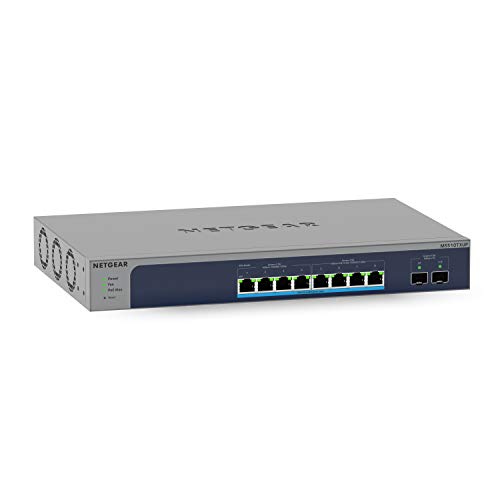
- Four 10G and four 2.5G multi-gig ports
- Eight PoE++ ports with a 295W budget
- Two 10G SFP+ ports and smart management
Best For: High-speed networks powering multiple demanding devices
Best Compact Managed Option

- Four 10G ports in a compact design
- Managed switching for network control
- Durable metal case
Best For: Small high-speed network segments needing managed 10G links
Best Plug-and-Play Value

- Five ports support speeds up to 10G
- Automatic 5-speed link negotiation
- Fanless metal design with flexible mounting
Best For: Quiet, uncomplicated 10G and multi-gig home or office networks
Best Enterprise-Ready Upgrade
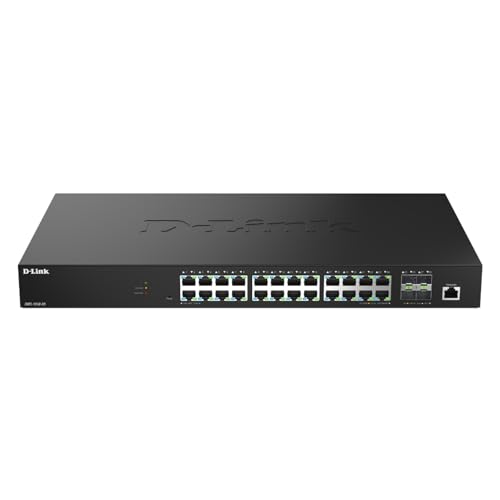
- 24 2.5GbE ports for dense multi-gig connectivity
- Four 10G SFP+ uplinks for servers and storage
- Centralized management with business security features
Best For: Growing business networks and high-density deployments
Best Heavy-Duty Pick

- Eight auto-negotiating 2.5GbE ports
- Easy smart management with VLAN and QoS support
- Fanless metal design for desktop or wall mounting
Best For: Small offices and quiet compact installations
Best Plug-and-Play 10G Switch

- Eight RJ45 ports support speeds up to 10Gbps
- Auto-negotiates from 100Mb through 10G
- Plug-and-play desktop or rackmount design
Best For: 10G home labs, NAS setups, and media or gaming networks
Best Rackmount Multi-Gig Upgrade – TRENDnet 20-Port 2.5G/Multi-Gig Switch
For buyers seeking premium multi-gigabit network switches with a mix of mainstream and uplink capacity, the TRENDnet TEG-S50204 combines 16 2.5G RJ-45 ports with four 10G SFP+ ports. It can use existing Cat5e-or-better cabling, while its fanless, 1U rackmount design suits quieter network closets.
Best For: Small businesses, home labs, and rack-based networks needing multiple 2.5G connections plus 10G fiber uplinks.
Pros:
- Offers 16 x 2.5G RJ-45 ports and four 10G SFP+ ports.
- Provides a 160Gbps switching capacity.
- Fanless operation, VLAN tag passthrough, and included rackmount hardware.
- Includes TRENDnet lifetime protection and NDAA/TAA compliance.
Cons:
- The four SFP+ uplink ports require compatible transceivers or cables.
- Its 1U rackmount form factor may be larger than needed for a simple desktop setup.
This is a strong fit when a network needs broad 2.5G device support today and fast 10G connections for storage or uplinks. Its managed-switch designation and VLAN passthrough add flexibility, while the silent design keeps operation unobtrusive.
Best Compact 10G Switch – MikroTik CRS304-4XG-IN
The MikroTik CRS304-4XG-IN is a compact option among premium multi-gigabit network switches, providing four 10G Ethernet ports in a metal enclosure. Its dual-core ARM CPU, multiple powering options, and silent operation make it suitable for focused high-speed links where space and noise matter.
Best For: Desktop users, compact labs, and small installations connecting a few 10G-capable devices.
Pros:
- Provides four 10G Ethernet ports with up to 40Gbps of listed data transfer capacity.
- Compact metal construction with versatile mounting options.
- Supports multiple powering options for added flexibility.
- Designed for silent operation and powered by a dual-core ARM CPU.
Cons:
- Only four network ports are provided.
- The listed one-year manufacturer warranty is shorter than some competing options in this roundup.
This switch makes the most sense for a targeted 10G setup rather than a large access network. Its small footprint and silent design are especially useful when a rack-sized or fan-cooled switch would be excessive.
Best Managed 10G Switch – TRENDnet 12-Port 10G Web Smart Switch
For businesses that need premium multi-gigabit network switches with deeper traffic controls, the TRENDnet TEG-7124WS combines eight 10G RJ-45 ports with four 10G SFP+ slots. Its web-smart management features include VLANs, link aggregation, QoS, monitoring, and access controls for more structured network integration.
Best For: SMB networks, NAS-heavy environments, and administrators who need managed 10G connectivity and monitoring.
Pros:
- Combines eight 10G RJ-45 ports with four 10G SFP+ slots.
- Offers a 240Gbps switching capacity and supports 1G, 2.5G, and 10G link speeds.
- Includes VLAN, QoS, link aggregation, ACL, SNMP, RMON, and port-mirroring features.
- Rackmount-ready metal housing with lifetime protection and NDAA/TAA compliance.
Cons:
- Its management features may be more than a basic plug-and-play network requires.
- The rackmount form factor is less convenient for minimalist desktop installations.
This is the strongest choice here for a managed 10G network that needs both copper and fiber connectivity. The broad monitoring and traffic-management feature set gives administrators more control as the network grows.
Best Plug-and-Play 2.5G Switch – Omada DS108G-M2 8-Port 2.5G Switch
The Omada DS108G-M2 offers a straightforward entry into premium multi-gigabit network switches with eight 2.5G RJ-45 ports and no configuration requirement. Its fanless metal design supports quiet operation, while compatibility with existing cabling can simplify an upgrade for homes, offices, workstations, and entertainment systems.
Best For: Home offices, gaming setups, LAN parties, and small networks needing several quiet 2.5G wired connections.
Pros:
- Provides eight 2.5Gbps ports and up to 40Gbps of switching capacity.
- Plug-and-play operation requires no configuration or central management.
- Fanless design supports quiet use in offices and home workspaces.
- Durable metal casing with desktop and wall-mount installation options.
Cons:
- It is unmanaged, so advanced VLAN, QoS, and monitoring controls are not listed.
- All eight ports are 2.5G RJ-45, with no listed 10G SFP+ uplink ports.
This model is a practical choice when simplicity matters more than advanced administration. It can connect multiple 2.5G devices quickly while keeping noise and installation effort low.
Best PoE Powerhouse – NETGEAR 10G Multi-Gig PoE Smart Switch
For demanding installations, the NETGEAR MS510TXUP is a premium multi-gigabit network switch that combines 10G connectivity with substantial PoE++ capacity. Its mix of multi-gig copper ports, SFP+ expansion, and smart management makes it a strong choice for networks supporting power-hungry devices.
Best For: Businesses, workspaces, and advanced home networks that need high-speed links plus centralized PoE power for compatible devices.
Pros:
- Four 10Gbps and four 2.5Gbps multi-gig Ethernet ports support high-speed connections.
- Eight Ultra60 PoE++ ports share a 295W power budget.
- Two 10G SFP+ ports support fiber connectivity and network expansion.
- Smart management, SNMP support, and one year of NETGEAR Insight provide administration options.
Cons:
- Its managed features may be more than a basic plug-and-play network requires.
- The 295W PoE budget and advanced hardware may be unnecessary for smaller setups.
The MS510TXUP stands out when both performance and device power are priorities. Desktop and rack-mount options add installation flexibility, while auto-negotiation helps it work with existing Cat5e or Cat6 cabling.
Best Compact Managed Option – Ubiquiti UniFi Switch Flex XG
The Ubiquiti UniFi Switch Flex XG is a compact premium multi-gigabit network switch for setups that need multiple 10G connections without a larger chassis. Its managed design and metal enclosure suit streamlined desktop network deployments.
Best For: UniFi-oriented users and compact workspaces that need four 10G network connections in a small managed switch.
Pros:
- Provides four 10G ports in a compact form factor.
- Managed switching supports more control than an unmanaged model.
- Metal construction offers a durable enclosure.
Cons:
- It has fewer ports than larger multi-gig switches.
- The supplied specifications do not list PoE support, so it is not suited to powering connected devices.
Choose the Flex XG when port count and physical size matter more than extensive expansion. With four 10G connections and a managed architecture, it is well suited to a focused high-speed network segment.
Best Plug-and-Play Value – TP-Link TL-SX105 10G Switch
The TP-Link TL-SX105 keeps premium multi-gigabit network switch performance straightforward with five auto-negotiating 10G ports and no software setup. Its fanless design, metal casing, and flexible desktop or wall-mount installation make it a practical choice for quiet high-speed networks.
Best For: Homes, offices, NAS setups, gaming systems, and Wi-Fi 6 access points that need simple multi-gig connectivity without management features.
Pros:
- Five ports support 100Mbps, 1G, 2.5G, 5G, and 10G link speeds.
- Plug-and-play operation requires no software installation or configuration.
- Fanless cooling provides quiet operation.
- Metal housing and desktop/wall-mount options support flexible placement.
Cons:
- As an unmanaged switch, it lacks advanced configuration and monitoring controls.
- It does not provide PoE or SFP connectivity according to the supplied specifications.
The TL-SX105 is a strong fit when reliable 10G and multi-gig expansion matters more than centralized management. Auto-negotiation helps it accommodate a range of devices, while its fanless construction works well in noise-sensitive areas.
Best Enterprise-Ready Upgrade – D-Link DMS-1250-28
D-Link 28-Port Multi-Gigabit Smart Managed Switch with 4 10G SFP+ & 24 2.5G Ports (DMS-1250-28)
Check Price On AmazonThe D-Link DMS-1250-28 is a strong choice for buyers comparing premium multi-gigabit network switches for a growing office, camera system, or high-speed wireless deployment. It combines 24 2.5GbE ports with four 10G SFP+ uplinks, providing plenty of connectivity for access points, NAS devices, servers, and workgroup PCs.
Best For: Small and midsize business networks that need extensive 2.5GbE access, 10G uplinks, and centralized management.
Pros:
- Offers 24 2.5GbE RJ45 ports for multi-gig devices.
- Includes four 10G SFP+ uplinks for servers, storage, or core switches.
- Provides web, CLI, SNMP, Nuclias Connect, and D-View 8 management options.
- Includes 6kV surge protection on all 2.5G ports and advanced security features.
Cons:
- Its 28-port, rack-sized design may be more than a small home network needs.
- It requires more planning and configuration than an unmanaged switch.
With its large port count, 10G backbone options, and business-focused controls, this D-Link is suited to deployments where capacity and ongoing administration matter more than minimal setup.
Best Heavy-Duty Pick – NETGEAR MS308E
The NETGEAR MS308E is a compact option for buyers seeking premium multi-gigabit network switches without moving to a larger rack-mounted platform. Its eight 2.5GbE ports automatically negotiate with connected devices and support VLANs, QoS, port monitoring, and network-security management through an intuitive interface.
Best For: Small offices and desktop or wall-mounted installations that need manageable 2.5GbE connectivity.
Pros:
- Provides eight auto-negotiating 2.5GbE ports.
- Supports VLAN configuration, QoS, port monitoring, and security management.
- Fanless design enables silent operation.
- Compact metal housing supports desktop or wall mounting.
Cons:
- It has no 10G uplink ports.
- Eight ports may limit expansion in larger networks.
- The listed model is intended for use in the U.S. and Canada.
This NETGEAR is a practical middle ground: it adds useful smart-management features and 2.5GbE speed while keeping installation quiet, compact, and relatively straightforward.
Best Plug-and-Play 10G Switch – TP-Link TL-SX1008
The TP-Link TL-SX1008 is a straightforward choice for buyers comparing premium multi-gigabit network switches for 10G-capable devices. All eight ports support 100Mb, 1G, 2.5G, 5G, and 10G connections through auto-negotiation, making it suitable for Wi-Fi access points, NAS hardware, servers, gaming PCs, and high-resolution video workflows.
Best For: Users who want eight flexible 10G/multi-gig ports with plug-and-play installation.
Pros:
- Eight ports support speeds up to 10Gbps and provide up to 160Gbps of switching capacity.
- Auto-negotiates among five Ethernet speeds for broad device compatibility.
- Requires no software installation or configuration.
- Metal casing and desktop/rackmount design support flexible placement.
Cons:
- It is unmanaged, so it lacks VLAN, QoS, and centralized management features.
- The smart fan may produce some noise under operation.
- It offers RJ45 connectivity rather than SFP+ uplink ports.
Choose this TP-Link when raw multi-gig throughput and simple deployment are the priorities. It is especially appealing for a fast local network built around several 10G devices rather than a managed business environment.
How We Picked the Best Premium Multi-Gigabit Network Switches
We focused on switches that offer a meaningful upgrade over standard gigabit networking and evaluated their port speeds, total capacity, management options, physical design, and intended use. The selection includes compact desktop switches, web-managed systems, PoE-capable models, and higher-port-count solutions for growing networks.
We also considered whether each switch makes sense for its target buyer. An unmanaged switch can be ideal for simple plug-and-play expansion, while a managed model is better for VLANs, traffic control, monitoring, link aggregation, and more deliberate network design.
Quick Comparison
| Best For | What to Prioritize | Recommended Type |
|---|---|---|
| Simple 10G expansion | Port speed and low setup effort | Unmanaged switch |
| Mixed-speed home networks | 2.5G compatibility and auto-negotiation | Multi-gig unmanaged or smart switch |
| Wi-Fi 6E or Wi-Fi 7 access points | PoE and multi-gig uplinks | PoE smart-managed switch |
| NAS, servers, and workstations | 10G ports, SFP+ options, and switching capacity | 10G managed or unmanaged switch |
| Large office or lab networks | Port density, VLANs, monitoring, and uplinks | Managed switch with SFP+ |
Key Buying Factors for Premium Multi-Gigabit Network Switches
Port Speeds and Mix
Check whether you need 2.5G, 5G, or 10G copper ports. A mixed-speed switch is often the most practical choice because it supports older gigabit devices while leaving faster ports for access points, NAS systems, and desktops. SFP+ ports can add flexible fiber or DAC connectivity, but they may require separate modules or cables.
Managed Versus Unmanaged Operation
Unmanaged switches require little configuration and are usually the easiest choice for a home office. Smart-managed and fully managed switches add VLANs, link aggregation, quality-of-service controls, diagnostics, and monitoring. Those features are valuable when you need segmentation, predictable performance, or remote administration.
PoE, Capacity, and Cooling
If the switch will power access points, cameras, phones, or other devices, verify both PoE support and the total power budget. Also consider switching capacity, packet-processing performance, fan noise, rack compatibility, and heat dissipation—especially for always-on 10G equipment.
Uplinks and Future Expansion
Choose a model with enough uplink bandwidth to prevent the switch itself from becoming a bottleneck. SFP+ uplinks, link aggregation, and extra 10G ports can make a major difference as your network grows.
Who Should Buy Which Premium Multi-Gigabit Network Switches?
Choose a compact unmanaged model if you want the simplest way to connect a few 10G devices. A 2.5G switch is a strong fit for homes with newer Wi-Fi access points, multi-gig internet, or a mix of modern and legacy hardware. Select a smart-managed option if you need VLANs, monitoring, or traffic controls. For offices, labs, and power users, prioritize higher port counts, SFP+ connectivity, and PoE when access points or cameras are part of the plan.