The right USB video adapter can help a small business add monitors, connect modern laptops to meeting-room displays, or capture legacy video without replacing otherwise useful equipment. The challenge is matching the adapter to your computer, display, operating system, and workload.
We selected 10 practical options spanning USB-A and USB-C display adapters, multiport hubs, dual-monitor solutions, video capture devices, and a DisplayPort cable for common office and remote-work setups.
Best 10 USB Video Adapters for Small Businesses Picks for 2026
Best Dual-Monitor Windows Adapter

- Adds two HDMI displays through USB-A 3.0
- Supports 4K 30Hz and 1080p 60Hz
- Includes business-friendly technical support
Best For: Windows dual-monitor workstations
Best for Legacy Video Digitization

- Captures VHS, VCR, Hi8, and DV sources
- Supports RCA and S-Video inputs
- Works with Windows and Mac OS
Best For: Digitizing analog business media
Best USB-C Office Hub

- Delivers 4K HDMI at 60Hz
- Adds 1Gbps Ethernet and USB-A ports
- Supports up to 100W pass-through charging
Best For: USB-C laptop desk setups
Best Compact Single-Display Adapter

- Adds one HDMI display over USB-A
- Supports up to 1080p at 60Hz
- Compact and bus-powered
Best For: Windows single-monitor expansion
Best Portable Pick

- 4K at 60Hz output
- Compact travel-friendly design
- 18-month warranty
Best For: Portable presentations and single-display USB-C setups
Best for Dual Monitors
UANTIN USB-A to Dual HDMI Adapter

- Dual extended displays on Windows
- 1080p at 60Hz per HDMI output
- Compact aluminum and braided design
Best For: Windows laptop users building a two-monitor workstation
Best Multifunction Hub

- Seven ports for office workflows
- HDMI up to 4K at 30Hz
- USB, SD, TF, and PD connectivity
Best For: USB-C workstations needing video and peripheral expansion
Best for USB-C to HDMI
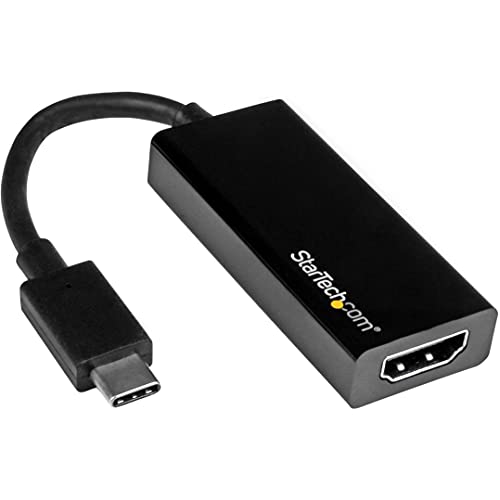
- 4K at 30Hz with 1080p support
- Driver-free plug-and-play setup
- Portable option for BYOD and presentations
Best For: USB-C laptops connecting to HDMI monitors or projectors
Best for HDMI Capture
Driver-Free 1080p Streaming Adapter
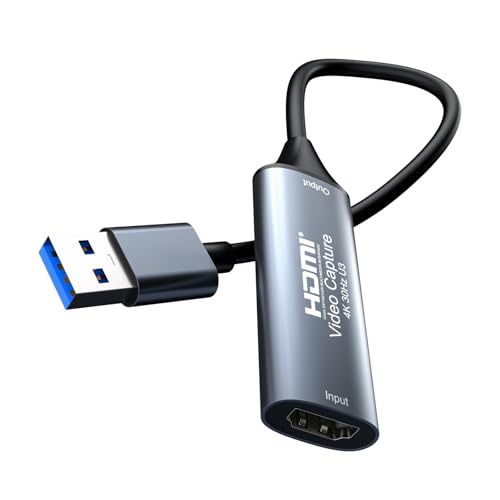
- Captures 4K input at up to 1080p/60Hz
- Low-latency video with synchronized audio
- Works with major streaming applications
Best For: Webinars, online meetings, teaching, and HDMI source recording
Best for DisplayPort Workstations

- Supports up to 8K at 60Hz
- Handles HDR, HBR3, and DSC
- Six-foot, driver-free connection
Best For: High-resolution USB-C or Thunderbolt 3 workstations
Best Dual-Monitor Windows Adapter – StarTech Dual HDMI 4K Adapter
For Windows offices that need more screen space, this USB video adapter for small businesses adds two HDMI displays through one USB-A 3.0 connection. It supports one 4K display at 30Hz and one 1080p display at 60Hz, making it practical for multitasking workstations.
Best For: Windows users building a dual-monitor office or work-from-home setup.
Pros:
- Supports two HDMI monitors from one USB-A connection.
- Handles up to 4K at 30Hz plus 1080p at 60Hz.
- Works with Windows Intel, AMD, and Snapdragon X platforms.
- Includes a three-year warranty and lifetime 24/5 multilingual technical assistance.
Cons:
- Does not support macOS, ChromeOS, or Linux.
- Administrator rights are required to install the drivers.
- The 4K output is limited to 30Hz.
This is a strong choice for Windows-based small-business workstations where two external screens are more useful than maximum refresh rate or broad operating-system compatibility.
Best for Legacy Video Digitization – USB RCA Capture Card
Small businesses with archived tapes can use this USB video adapter for small businesses to transfer footage from VHS, VCR, Hi8, DV, camcorders, and other RCA or S-Video sources to a computer. It captures up to 720p USB video and audio without requiring an external power supply.
Best For: Offices digitizing analog training videos, customer media, or business archives.
Pros:
- Converts RCA composite or S-Video sources to USB video.
- Supports VHS, VCR, Hi8, DV, camcorder, and DVD equipment.
- Works with Windows and Mac OS and supports NTSC and PAL.
- Automatically installs its driver and needs no external power.
Cons:
- Requires separate acquisition software such as OBS Studio, PotPlayer, or QuickTime Player.
- Capture output is limited to 720p.
- Designed for analog capture rather than connecting a modern HDMI monitor.
This capture device is better suited to preservation and conversion projects than everyday display expansion, especially when a business needs a simple way to move older media onto a computer.
Best USB-C Office Hub – Hiearcool 8-in-1 4K Hub
For modern laptops, this USB video adapter for small businesses combines 4K HDMI output with the connectivity many offices need. The USB-C hub also provides 1Gbps Ethernet, USB-A ports, card readers, and up to 100W pass-through charging in a compact aluminum enclosure.
Best For: USB-C laptop users who need display, wired networking, charging, and peripheral expansion from one hub.
Pros:
- Provides 4K HDMI output at 60Hz.
- Includes 1Gbps Ethernet for wired office networking.
- Offers three USB-A 3.0 ports, SD and microSD readers, and 100W PD pass-through charging.
- Supports MacBook and many Dell, HP, Lenovo, Windows, Chrome OS, Linux, and Android devices.
Cons:
- Requires a compatible USB-C host device.
- It is a multiport hub rather than a dedicated dual-monitor adapter.
- Actual charging and device compatibility depend on the connected laptop or device.
This is the most versatile option for a USB-C-centered desk, particularly where a single connection needs to handle an external display, Ethernet, accessories, storage cards, and laptop charging.
Best Compact Single-Display Adapter – StarTech USB-A HDMI Adapter
For a Windows computer that needs one additional screen, this compact USB video adapter for small businesses provides HDMI output up to 1920×1200 at 60Hz. Its bus-powered design requires no separate power supply, making it suitable for office desks and mobile setups.
Best For: Windows laptops or desktops adding one HDMI monitor for everyday productivity.
Pros:
- Supports 1080p-class output at 60Hz.
- Powered directly through USB with no extra adapter.
- Compact and lightweight for travel or shared workstations.
- Includes two-year limited warranty coverage.
Cons:
- Only supports Windows and does not support macOS, ChromeOS, or Linux.
- Requires driver installation and administrator rights.
- Adds one HDMI display rather than two.
This straightforward adapter is a sensible fit when a Windows user needs one reliable external monitor and values a small, bus-powered design over broader compatibility or multiple outputs.
Best Portable Pick – BENFEI USB-C to HDMI Adapter
For small businesses that need dependable USB video adapters for small businesses, this compact USB-C to HDMI model is a straightforward choice for connecting a compatible laptop, phone, or tablet to a monitor, projector, or TV. It supports up to 4K at 60Hz, making it suitable for presentations and extended desktop use.
Best For: Portable presentations and single-display setups using USB-C devices with DP Alt Mode.
Pros:
- Supports up to 4K at 60Hz, plus 2K at 144Hz and 1080p.
- Compact, lightweight design fits easily in a laptop bag or pocket.
- Broad compatibility with devices including MacBooks, iPhone 15 Pro/Max, iPad Pro, Galaxy devices, and Dell XPS systems.
- Includes an 18-month warranty and corrosion-resistant plated connector.
Cons:
- Requires the connected USB-C device to support DisplayPort Alt Mode.
- Provides one HDMI output rather than multiple display connections.
This is a focused adapter rather than a full hub, but its small size, 4K60 support, and broad device compatibility make it a practical everyday presentation accessory.
Best for Dual Monitors – UANTIN USB-A to Dual HDMI Adapter
Businesses using Windows laptops can expand their workspace with this USB-A dual HDMI adapter. Among USB video adapters for small businesses, it stands out for supporting two external monitors in Windows MST extended-display mode, with Full HD output at 60Hz.
Best For: Windows users who need two extended 1080p displays from a laptop or desktop with USB-A.
Pros:
- Supports two HDMI monitors simultaneously in Windows MST extended mode.
- Delivers up to 1080p at 60Hz with synchronized audio and video.
- Aluminum housing and braided cable are designed for regular, portable use.
- Supports Windows 11, 10, and 8.x, with a two-year warranty description.
Cons:
- Requires a one-time driver installation.
- macOS supports mirror mode only, not extended dual displays.
- It is limited to Full HD rather than 4K output.
This adapter is a useful productivity upgrade for Windows-based desks, especially where spreadsheets, communication tools, and reference material need to remain visible across two screens.
Best Multifunction Hub – BENFEI USB-C 7-in-1 Hub
For small offices that need more than video output, this 7-in-1 hub combines HDMI with USB ports, SD and TF card readers, and power delivery. It is one of the more versatile USB video adapters for small businesses, though the host device must support USB-C DP Alt Mode for video.
Best For: USB-C laptops and mobile workstations that need display output, peripherals, card readers, and charging through one hub.
Pros:
- Adds HDMI, three USB 3.0 ports, SD, TF, and PD connectivity.
- Supports HDMI output up to 4K at 30Hz or 1080p at 60Hz.
- USB 3.0 ports provide transfer speeds up to 5Gbps.
- Aluminum construction, compact design, and an 18-month warranty suit mobile work.
Cons:
- Video requires a compatible USB-C DP Alt Mode device.
- Smartphones and iPads may require power through the PD port for stable video output.
- 4K output is limited to 30Hz.
This hub is a strong choice when a business needs a single-cable accessory for presentations, file transfers, memory cards, and charging, rather than HDMI connectivity alone.
Best for USB-C to HDMI – Compact 4K Display Adapter
For small businesses using USB video adapters, this StarTech model is a straightforward way to connect a compatible USB-C or Thunderbolt 3 laptop to an HDMI monitor, projector, or TV. It supports 4K at 30Hz, requires no drivers, and is compact enough for BYOD setups and presentations.
Best For: Office users who need a portable USB-C-to-HDMI connection for presentations, expanded desktops, or high-resolution displays.
Pros:
- Supports 4K video at 30Hz and is backward compatible with 1080p.
- Plug-and-play operation requires no software or drivers.
- Compact design suits travel, BYOD, and dual-monitor workstations.
- Works with compatible Windows, Mac, Chromebook, and iPad Pro devices.
Cons:
- Requires a USB-C port with DisplayPort Alt Mode or Thunderbolt 3.
- Maximum 4K refresh rate is 30Hz.
- Provides HDMI output rather than DisplayPort output.
This is a practical choice when a team needs reliable HDMI connectivity without installing software. Confirm that the computer’s USB-C port supports video output before purchasing.
Best for HDMI Capture – Driver-Free 1080p Streaming Adapter
For small businesses that need to record or stream an HDMI source, this USB video adapter captures up to 4K input and outputs up to 1080p at 60Hz over USB 3.0. Its driver-free design, low-latency preview, and compatibility with common operating systems make it useful for webinars, online meetings, teaching, and presentations.
Best For: Teams capturing cameras, consoles, or other HDMI sources for streaming, conferencing, training, or recorded content.
Pros:
- Accepts up to 4K at 30Hz HDMI input and captures up to 1080p at 60Hz.
- Supports synchronized stereo audio and low-latency preview.
- Works with Windows, macOS, and Linux software such as OBS, Wirecast, Streamlabs, and VLC.
- Driver-free operation requires no external power, while the aluminum housing supports heat dissipation.
Cons:
- Captured output is limited to 1080p at 60Hz, even with a 4K input.
- Some consoles require HDCP to be disabled.
- Audio configuration may require restarting OBS Studio.
This adapter is better suited to HDMI capture than ordinary display expansion. It offers a flexible, portable setup for small teams, but buyers should account for the 1080p capture ceiling and source-device requirements.
Best for DisplayPort Workstations – 8K USB-C DisplayPort Cable
For small businesses building high-resolution workstations, this six-foot StarTech USB-C to DisplayPort 1.4 cable supports demanding monitor setups without drivers or a separate adapter box. It is designed for compatible USB-C and Thunderbolt 3 devices and supports resolutions up to 8K at 60Hz, along with HDR and other advanced display features.
Best For: Content creators, analysts, and office users connecting USB-C or Thunderbolt 3 computers to DisplayPort monitors.
Pros:
- Supports up to 8K at 60Hz, 5K at 60Hz, and 4K at 120Hz on compatible equipment.
- Includes DisplayPort 1.4 features such as HDR, HBR3, DSC, and HDCP support.
- Six-foot length provides flexibility for desk layouts.
- Requires no drivers and works across Windows, macOS, Linux, iPadOS, Chrome OS, and Android with compatible devices.
Cons:
- Requires USB-C DisplayPort Alt Mode or Thunderbolt 3 support.
- Uses DisplayPort output, so it is not suitable for HDMI-only displays without another adapter.
- Achieving 8K or other maximum modes depends on the computer and monitor.
This cable is a strong fit for businesses prioritizing DisplayPort performance and a clean workstation connection. Its advanced specifications provide room for high-resolution displays, but compatibility should be verified across both the source computer and monitor.
How We Picked These USB Video Adapters for Small Businesses
We focused on connection type, supported resolutions and refresh rates, display-expansion capability, operating-system requirements, and the practical needs of small offices. The selection includes single- and dual-monitor adapters, USB-C hubs with added ports, HDMI and DisplayPort connections, and capture devices for digitizing or recording video.
Compatibility was treated as a priority. USB-A adapters commonly require Windows drivers, while USB-C video output depends on DisplayPort Alt Mode or Thunderbolt support on the host device. We also considered useful business features such as Ethernet, USB expansion, power delivery, portability, and support for extended rather than mirrored displays.
Quick Comparison
| Best For | Look For | Typical Choice |
|---|---|---|
| Adding one office monitor | HDMI or DisplayPort output and the correct USB connector | Single-display USB-A or USB-C adapter |
| Dual-monitor workstations | Two independent outputs, driver support, and adequate USB bandwidth | Dual HDMI adapter |
| One-cable laptop docking | HDMI, Ethernet, USB ports, and USB-C power delivery | USB-C multiport hub |
| Video digitizing or streaming | HDMI/RCA input, audio handling, capture resolution, and latency | USB video capture device |
| High-resolution displays | USB-C Alt Mode or Thunderbolt compatibility and the required refresh rate | USB-C-to-HDMI or USB-C-to-DisplayPort solution |
Key Buying Factors for USB Video Adapters for Small Businesses
Host and Display Compatibility
Check whether the computer has USB-A, USB-C, Thunderbolt, or a USB-C port with video output. A standard USB-C data port may not drive a monitor. Confirm the display input as well: HDMI, DisplayPort, or another connector.
Resolution and Refresh Rate
For spreadsheets, email, and general productivity, 1080p at 60Hz is usually sufficient. Choose a 4K-capable adapter when text clarity matters or when connecting a large monitor. Note that some adapters support 4K only at 30Hz, which can feel less fluid than 60Hz.
Drivers and Operating Systems
USB-A display adapters often use DisplayLink or another driver-based technology. Verify Windows, macOS, or ChromeOS support before buying, and check whether company devices allow driver installation. Driver-free capture products have different compatibility and software requirements.
Bandwidth, Power, and Desk Setup
Hubs combine several functions over one port, so heavy file transfers, Ethernet, video output, and charging can share available bandwidth. For a permanent workstation, prioritize stable power delivery and the ports your team actually needs. For travel, a smaller single-output adapter may be more dependable.
Who Should Buy Which USB Video Adapters for Small Businesses?
Choose a single-output USB-C adapter for a modern laptop and one external display, especially when the computer supports USB-C video output. A USB-A-to-HDMI model is a practical choice for Windows desktops or laptops that lack a usable USB-C display connection, but plan for driver installation.
For employees who need two monitors, select a dual-HDMI adapter that explicitly supports extended displays and your operating system. A USB-C hub is better for laptop users who also need Ethernet, USB peripherals, memory-card readers, or charging through one compact accessory.
Choose a USB video capture card when the goal is recording HDMI sources, digitizing older RCA footage, or using a camera in conferencing software; it is not a substitute for a display adapter. Finally, select a USB-C-to-DisplayPort cable when the computer and monitor both support the required Alt Mode and DisplayPort version. Before ordering, confirm the host port, display input, maximum resolution, refresh rate, driver policy, and return terms.