Apple’s Magic Keyboard is convenient, but it isn’t the only way to add a trackpad and laptop-style typing to an iPad Pro. Some alternatives prioritize a lighter magnetic setup; others add a protective case, flexible stand, or rotating screen.
The catch is compatibility. This roundup covers both 11-inch and larger iPads, including older 12.9-inch Pro models, so check your exact model before choosing a keyboard.
Best 9 Ipad Pro Magic Keyboard Alternatives Picks for 2026
Best for Flexible Viewing
Landcase 360° Keyboard Case for iPad Pro 13

- Fits iPad Pro 13-inch M4 and M5
- Rotates 360° with adjustable viewing angles
- Trackpad, shortcut row, and seven-color backlight
Best For: Switching between typing, drawing, and video calls
Best for Older Pro Models
typecase Edge for iPad Pro 12.9

- Fits Pro 12.9-inch generations 3–6
- Also supports listed Air 13-inch models
- Floating stand, trackpad, and 11-color backlight
Best For: Compatible older iPad Pro 12.9-inch owners
Best Floating Design
typecase Edge for iPad Pro 13 M5/M4

- Fits iPad Pro 13-inch M4 and M5
- Adjustable floating cantilever stand
- Full-area trackpad and 11-color backlight
Best For: Newer Pro 13-inch owners wanting a floating setup
Best Detachable Pick
Logitech Combo Touch for iPad Pro 11-inch

- Detachable keyboard and flexible kickstand
- Backlit keys and large multi-touch trackpad
- Smart Connector needs no separate charging
Best For: 11-inch iPad Pro M4/M5 owners who want multiple use modes
Best Multi-View Stand
ESR Rebound Magnetic Keyboard Case 360

- Floating magnetic stand
- Detachable case with portrait and raised modes
- Multi-touch trackpad; rechargeable Bluetooth keyboard
Best For: 11-inch iPad Pro M4/M5 owners who want flexible screen positioning
Best for Older 12.9-Inch Pros
Magic-Style Magnetic Keyboard Case

- Fits listed 12.9-inch iPad Pro 3rd–6th generations
- Floating magnetic stand and multi-touch trackpad
- Backlit keys; battery recharges by USB-C
Best For: Compatible older 12.9-inch iPad Pro owners seeking a floating keyboard
Best Detachable Design
DANCESOUL Keyboard Case for 11-Inch iPad Pro
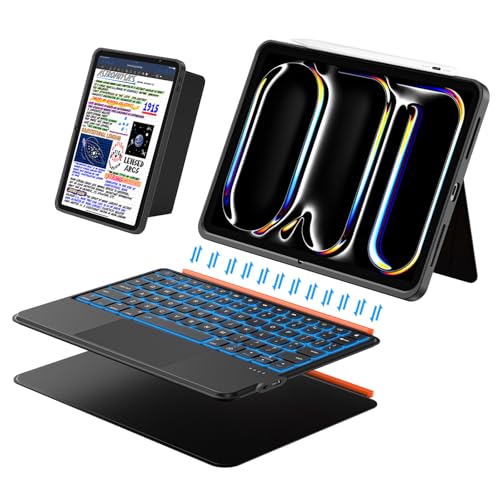
- Detachable magnetic keyboard
- Multi-touch trackpad and shortcuts
- Portrait mode; adjustable landscape stand
Best For: Switching between typing and tablet use on an 11-inch iPad Pro M4 or M5
Best Rotating 11-Inch Case

- 360° rotating hinge
- Trackpad and seven-color backlighting
- M5 fit needs verification
Best For: Confirmed 11-inch iPad Pro M4 owners seeking flexible viewing angles
Best Heavy-Duty Pick

- Fits listed 12.9-inch Pro and 13-inch Air models
- 360° stand with multi-touch trackpad
- Clear back and seven-color backlighting
Best For: Listed 12.9-inch iPad Pro or 13-inch iPad Air owners wanting a rotating case
Best for Flexible Viewing – Landcase 360° Keyboard Case for iPad Pro 13
Among iPad Pro Magic Keyboard alternatives, this Landcase case stands out for its rotating design. It fits the iPad Pro 13-inch M4 (2024) and M5 (2025), pairing a Bluetooth keyboard and multi-touch trackpad with a hinge that rotates 360° for typing, drawing, or video calls.
Best For: iPad Pro 13-inch owners who frequently switch between keyboard work and other screen orientations.
Pros:
- 360° rotation and adjustable viewing angles offer flexible positioning.
- Multi-touch trackpad and a dedicated row of iPadOS shortcut keys support everyday navigation.
- Seven backlight colors, three brightness levels, and a battery-level indicator add useful controls.
Cons:
- Fits only the listed iPad Pro 13-inch M4 and M5 models; check your model number before ordering.
- Bluetooth keyboard requires separate charging.
Choose this if orientation flexibility matters more to you than a simple floating-keyboard design. Its rechargeable battery and on-case power indicator are worth considering if you regularly work away from an outlet.
Best for Older Pro Models – typecase Edge for iPad Pro 12.9
If you are comparing iPad Pro Magic Keyboard alternatives for a 12.9-inch Pro, this typecase Edge is a model-specific option. It supports iPad Pro 12.9-inch generations 3 through 6 (2018–2022), as well as the listed iPad Air 13-inch M2, M3, and M4 models. The magnetic floating design, trackpad, and adjustable backlighting aim for a laptop-style setup.
Best For: Owners of a compatible iPad Pro 12.9-inch or iPad Air 13-inch who want a magnetic keyboard case.
Pros:
- Floating cantilever design lets you adjust the viewing angle.
- Full-area trackpad and 11 backlight colors with three brightness levels support varied work settings.
- Magnetic closure includes a spot for a Pencil, with front and back coverage when closed.
Cons:
- Does not fit the newer iPad Pro 13-inch M4 or M5; magnet layouts differ between models.
- Designed for use with a bare iPad, not an iPad inside another case.
The main buying decision is compatibility: verify the model number rather than relying on screen size alone. For a supported older Pro, this offers the floating form factor without requiring you to shop for a current 13-inch Pro case.
Best Floating Design – typecase Edge for iPad Pro 13 M5/M4
For owners of a newer 13-inch Pro seeking iPad Pro Magic Keyboard alternatives, this typecase Edge offers a magnetic floating cantilever design. It is made for the iPad Pro 13-inch M5 (2025) and M4 (2024), with a full-area trackpad, iPadOS shortcuts, and an adjustable 11-color backlight.
Best For: iPad Pro 13-inch M4 or M5 users who prefer a floating magnetic keyboard setup.
Pros:
- Floating cantilever stand adjusts to your preferred viewing angle.
- Full-area trackpad, iPadOS shortcuts, and three backlight brightness levels aid daily use.
- Magnetic closure provides a Pencil spot; the case covers the front and back.
Cons:
- Not compatible with iPad Air 13-inch M2 or M3.
- Bluetooth keyboard is battery-powered and needs recharging.
This is the straightforward pick here if the floating-keyboard layout is your priority and you have one of the specified Pro 13-inch models. Check the model number before purchase, since a similarly sized iPad Air is not supported.
Best Detachable Pick – Logitech Combo Touch for iPad Pro 11-inch
Among iPad Pro Magic Keyboard alternatives, the Logitech Combo Touch stands out if you want a keyboard you can remove without taking your iPad out of its protective case. This version fits the 11-inch iPad Pro M4 and M5 models from 2024 and 2025.
Best For: 11-inch iPad Pro owners who switch regularly between typing, sketching, reading, and watching video.
Pros:
- Detachable keyboard and flexible kickstand support several use modes.
- Large multi-touch trackpad and adjustable backlit keys.
- Smart Connector supplies power without separate keyboard charging.
Cons:
- Not designed for iPad Pro models with nano-texture glass.
- Only fits the specified 11-inch M4 and M5 iPad Pro models.
Choose this one for versatility and no-charge convenience, but check your iPad model and glass option before ordering.
Best Multi-View Stand – ESR Rebound Magnetic Keyboard Case 360
For shoppers comparing iPad Pro Magic Keyboard alternatives, the ESR Rebound Magnetic Keyboard Case 360 offers a floating magnetic stand plus additional ways to position an 11-inch iPad Pro M4 or M5. Its detachable back case lets you handle the tablet while keeping the case on.
Best For: 11-inch iPad Pro owners who want portrait and raised-screen viewing options alongside a keyboard.
Pros:
- Magnetic cantilever stand sets up for typing or browsing.
- Detachable protective back case supports raised-screen and portrait modes.
- Extended multi-touch trackpad supports tap, pinch, and swipe gestures.
Cons:
- Bluetooth keyboard requires battery charging.
- Specified for 11-inch iPad Pro M4/M5 models only.
This is the more adaptable viewing choice if portrait calls and a raised display matter to you; remember that its Bluetooth keyboard needs charging.
Best for Older 12.9-Inch Pros – Magic-Style Magnetic Keyboard Case
Many iPad Pro Magic Keyboard alternatives focus on newer models, but this magnetic keyboard case covers the 12.9-inch iPad Pro from the 3rd through 6th generations. It also supports the listed 13-inch iPad Air M2, M3, and M4 models, making model verification especially important.
Best For: Owners of a compatible 12.9-inch iPad Pro who want a floating keyboard setup with backlit keys and a trackpad.
Pros:
- Magnetic floating cantilever stand provides a laptop-style setup.
- Multi-touch trackpad and iPadOS shortcut row aid navigation.
- Three backlight brightness levels and USB-C charging.
Cons:
- Battery-powered keyboard requires recharging.
- Does not list compatibility with newer 13-inch iPad Pro models.
Its appeal is support for several older 12.9-inch Pro generations; match your iPad’s model number to the listing before buying.
Best Detachable Design – DANCESOUL Keyboard Case for 11-Inch iPad Pro
Among iPad Pro Magic Keyboard alternatives, this DANCESOUL case stands out for its detachable keyboard: you can leave the keys behind when reading or drawing. It fits only the 11-inch iPad Pro M4 (2024) and M5 (2025), so check your model number before ordering.
Best For: 11-inch iPad Pro owners who switch between typing and tablet use.
Pros:
- Detachable magnetic design supports keyboard-free use.
- Multi-touch trackpad and dedicated iPadOS shortcut keys aid navigation.
- Supports portrait placement and a landscape stand adjustable up to 160°.
Cons:
- Does not fit other iPad sizes or generations.
- Uses Bluetooth and a battery rather than a direct keyboard connection.
Choose this one if flexibility matters more than keeping the keyboard attached at all times. Confirm your iPad’s model number against the listed M4 and M5 models.
Best Rotating 11-Inch Case – lambasa Clear Keyboard Case
If you want iPad Pro Magic Keyboard alternatives with more viewing-angle flexibility, this lambasa case offers a 360° rotating hinge, a trackpad, and seven-color backlighting. Its compatibility information conflicts: the title and specifications mention M4 and M5, but the compatibility bullet limits it to the 2024 11-inch iPad Pro M4, models A2836 and A2837.
Best For: Owners of a confirmed 11-inch iPad Pro M4 who want a rotating keyboard case.
Pros:
- 360° hinge provides flexible screen positioning.
- Includes a multi-touch trackpad and adjustable, seven-color keyboard lighting.
- Protective case design includes cushioned edges.
Cons:
- M5 compatibility is inconsistent across the supplied product information.
- Bluetooth keyboard requires separate charging.
The rotating hinge is the reason to consider this case. If you own an M5 model, verify fit with the seller before buying rather than relying on the title alone.
Best Heavy-Duty Pick – Auupgo Clear Keyboard Case
For shoppers comparing iPad Pro Magic Keyboard alternatives for a 12.9-inch model, this Auupgo case pairs a transparent back with a Bluetooth keyboard, trackpad, and 360° rotating stand. It is listed for the 12.9-inch iPad Pro 3rd through 6th generations and the 13-inch iPad Air M2, M3, and M4—not newer 13-inch iPad Pro models.
Best For: Owners of a listed 12.9-inch iPad Pro or 13-inch iPad Air who want a rotating case with a clear back.
Pros:
- 360° hinge and multi-touch trackpad support varied working positions.
- Seven-color backlit keyboard helps with typing in dim settings.
- Transparent back, raised bezel, and stylus holder add everyday utility.
Cons:
- Does not list compatibility with 13-inch iPad Pro models.
- Bluetooth keyboard has its own rechargeable battery.
This is a practical pick when you want to keep an older 12.9-inch Pro in a protective keyboard case. Match your device’s model number to the seller’s compatibility list before purchasing.
How We Picked the Best Ipad Pro Magic Keyboard Alternatives
We focused on keyboard cases that offer a practical reason to look beyond Apple’s Magic Keyboard: a different stand design, more protective coverage, a detachable keyboard, a rotating screen, or compatibility with an older iPad Pro. The nine selections also cover multiple iPad sizes. We did not treat a shared screen size as proof that a case fits; camera openings, magnets, dimensions, and connector positions can differ between generations.
Quick Comparison: Which Style Fits Your Setup?
For a laptop-style feel: Start with the typecase Edge models or the other magic-style magnetic cases, then narrow the choice by your exact iPad model. For more protection and viewing flexibility: Compare the Logitech Combo Touch and ESR multi-mode stand options for the 11-inch iPad Pro. For portrait viewing or sharing the screen: Consider one of the 360-degree rotating cases. For an older 12.9-inch Pro: Look at the models that explicitly list its generation rather than assuming a 13-inch Pro case will fit.
Key Buying Factors for Ipad Pro Magic Keyboard Alternatives
Confirm the Exact IPad Model
Open Settings > General > About to identify your iPad before ordering. An 11-inch iPad Pro M4 or M5 needs a case that specifically supports that generation; likewise, a 13-inch iPad Pro M4 or M5 is not interchangeable with a 12.9-inch Pro or 13-inch iPad Air simply because their screens are similarly sized. Check the full compatibility list on the product page, especially for cases advertised for both Air and Pro.
Choose a Stand and Connection Style
A magnetic floating design suits shoppers who mainly type on a desk and want a familiar laptop-like arrangement. A kickstand can offer more positioning freedom, though it generally needs more surface area. Rotating cases make switching between landscape and portrait easier but can be bulkier. Also check whether the keyboard connects through Bluetooth or a physical connector: Bluetooth models typically need separate charging and pairing.
Check Trackpad, Protection, and Carry Weight
If you rely on gestures, look for a trackpad and confirm which gestures its listing supports. Backlighting is useful in dim rooms, but color options matter less than a comfortable layout and reliable connection. A shell or bumper may protect the iPad’s edges better than a minimal magnetic design; that added coverage can also increase thickness. Check for Apple Pencil access and whether the case remains useful when you detach the keyboard.
Who Should Buy Which Ipad Pro Magic Keyboard Alternatives?
Choose a slim magnetic case if you mostly work at a table and value a clean, laptop-style setup. Pick a kickstand case if you switch often between typing, drawing, and watching video. A rotating case makes sense for frequent portrait use, while a clear case may appeal if you want the iPad’s finish to show. For older 12.9-inch Pro owners, prioritize generation-specific fit over appearance. Whatever style you prefer, verify compatibility and the current listing’s connection and charging details before buying.