When it comes to enhancing your tablet’s functionality, a reliable docking station with Ethernet can make all the difference. These hubs not only streamline your workspace but also provide essential features like multiple USB ports and 4K HDMI output. Whether you’re a professional on the go or just need a more organized setup, the right docking station can elevate your experience. Let’s explore the top options available and see which one suits your needs best.
Anker Laptop Docking Station Dual Monitor (8-in-1 USB C Hub)

If you’re a professional or student who needs to connect multiple displays and devices seamlessly, the Anker Laptop Docking Station Dual Monitor (8-in-1 USB C Hub) is an excellent choice. This compact hub supports dual HDMI displays, allowing you to enjoy stunning 4K resolution, whether you’re working or streaming. With massive expansion capabilities, it includes USB-A ports, an Ethernet connection, and a card reader, making it versatile for any setup. Plus, it offers 85W power delivery, ensuring your devices stay charged. Compatible with various systems, this docking station enhances your productivity and connectivity without hassle.
Best For: Professionals and students who need to connect multiple devices and displays for enhanced productivity and seamless multitasking.
Pros:
- Massive Expansion: Offers multiple ports including USB-A, HDMI, Ethernet, and card reader for versatile connectivity.
- Dual HDMI Support: Enables 4K resolution on dual displays, enhancing visual experience for work and entertainment.
- 85W Power Delivery: Provides high-speed pass-through charging to keep devices powered during use.
Cons:
- Charger Not Included: Requires a separate 100W PD wall charger for optimal performance.
- Limited macOS Display Functionality: Displays identical content on dual monitors when used with macOS.
- Not Compatible with Linux: Users on Linux systems will not be able to utilize this docking station.
iPad USB C Hub Stand, 9-in-1 Multiport Adapter for iPad Pro
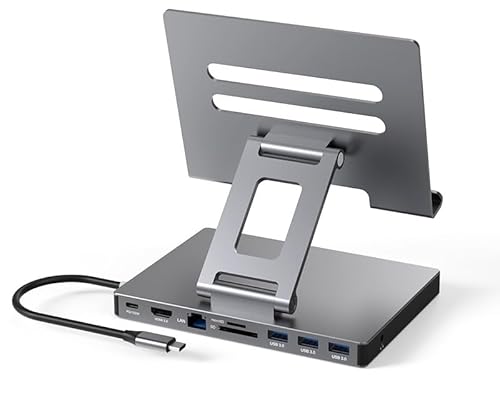
The iPad USB C Hub Stand, a versatile 9-in-1 multiport adapter, is the perfect choice for creative professionals and tech enthusiasts who rely on their iPad Pro for productivity. With features like a 4K HDMI port, Gigabit Ethernet, and three USB 3.0 ports, you can easily connect multiple devices. The SD/TF card reader and 3.5mm audio jack enhance functionality, while the PD port guarantees your iPad stays charged. Its compact, foldable design makes it easy to transport, allowing you to work seamlessly wherever you go. Enjoy plug-and-play convenience and fast file transfers—all in one handy device.
Best For: Creative professionals and tech enthusiasts who need versatile connectivity options for their iPad Pro.
Pros:
- Supports high-resolution 4K HDMI output for stunning visuals.
- Offers multiple connectivity options including USB 3.0 ports and card readers for enhanced productivity.
- Compact and foldable design makes it easy to carry for on-the-go use.
Cons:
- Limited compatibility with devices lacking USB3.1 Type-C interface.
- May require additional adapters for certain devices or setups.
- Performance may vary depending on the power source used for charging.
iPad Pro USB C Hub Stand, 9-in-1 Adapter for iPad Pro

For professionals and creatives using the iPad Pro, the 9-in-1 USB C Hub Stand is an essential tool that transforms your tablet into a powerful workstation. With its foldable design, you can easily carry it wherever you go. Enjoy high-resolution 4K@60Hz HDMI output and seamless Gigabit Ethernet connectivity. The hub features three USB 3.0 ports for quick data transfers up to 5Gbps, alongside SD/TF card readers and a 3.5 mm audio jack. Compatible with various devices and operating systems, this compact docking station is a must-have for enhancing productivity and connectivity on the go.
Best For: Professionals and creatives who need to enhance their iPad Pro’s functionality and connectivity on the go.
Pros:
- Compact and foldable design for easy portability and convenience.
- High-resolution 4K@60Hz HDMI output for stunning visuals during presentations or media playback.
- Multiple connectivity options including three USB 3.0 ports, SD/TF card readers, and Gigabit Ethernet for versatile usage.
Cons:
- Limited to USB-C compatible devices, which may exclude some users with older technology.
- Weight of 1.2 pounds may be slightly heavy for some users seeking ultra-light accessories.
- No built-in power delivery for charging devices while using all ports simultaneously.
USB C Laptop Docking Station Dual Monitor Hub (14 in 1)

Designed for professionals who need to maximize productivity, the USB C Laptop Docking Station Dual Monitor Hub (14 in 1) offers extensive connectivity options that streamline your workspace. With dual HDMI and DisplayPort support, you can easily expand your display to dual or triple monitors, achieving stunning resolutions up to 4K. You’ll enjoy rapid data transfer rates through multiple USB ports, while the 100W Power Delivery guarantees your devices stay charged. Additionally, the Gigabit Ethernet port provides stable internet connectivity. Plug and play functionality makes setup a breeze, making this hub an essential tool for any tech-savvy professional.
Best For: Professionals and tech-savvy individuals who require extensive connectivity options and the ability to expand their workspace with multiple monitors.
Pros:
- Supports dual and triple monitor setups with high resolution, enhancing productivity and multitasking.
- Fast data transfer rates through multiple USB ports, facilitating quick file transfers and device connections.
- 100W Power Delivery ensures that connected devices remain charged and operational without interruptions.
Cons:
- Incompatibility with certain devices may limit the use of HDMI and DisplayPort features for some users.
- Potentially bulky design may take up extra space on a desk or workstation.
- Limited support for resolutions (e.g., 4K@30Hz on dual monitors) may not meet the needs of all users for high-end graphics work.
Laptop Docking Station 11-in-1 USB C Hub

If you’re a laptop user needing versatility and connectivity, the Laptop Docking Station 11-in-1 USB C Hub is an excellent choice. This hub features 11 functional ports, including a 4K HDMI port for stunning visuals and a Gigabit Ethernet port for stable internet access. Compatible with various laptops, it offers fast data transfer speeds and supports multiple devices simultaneously. The adjustable height and 360° rotation make it user-friendly for screen sharing. Weighing just 2.09 pounds and with a foldable design, it’s perfect for portability, ensuring you stay connected and productive wherever you go.
Best For: Laptop users seeking a versatile and portable docking solution for enhanced connectivity and productivity.
Pros:
- 11 functional ports provide extensive connectivity options, including USB-C, HDMI, and Ethernet.
- 4K HDMI support enables stunning visual output for presentations and media.
- Adjustable design with 360° rotation offers convenient screen sharing and ergonomic use.
Cons:
- Charger not included for the 100W USB-C PD port may require additional purchase.
- Limited to laptops under 16 inches, potentially excluding larger models.
- Weight of 2.09 pounds may be heavier than some portable alternatives.
ABLEWE USB C Hub Ethernet, Multiport USB C to HDMI Hub (8 in 1)

The ABLEWE USB C Hub Ethernet stands out as an essential tool for professionals and tech enthusiasts who demand seamless connectivity and high-performance capabilities. This 8-in-1 hub effortlessly extends your USB-C port, offering a 4K@60Hz HDMI output, 1000M Ethernet for stable internet, and 100W Power Delivery charging. You can connect multiple devices simultaneously, thanks to its three USB 3.0 ports and built-in SD/TF card readers. With data transfer speeds up to 5Gbps, managing files becomes a breeze. Plus, it comes with a 24-month warranty, ensuring you’ve got reliable customer support when you need it.
Best For: Professionals and tech enthusiasts who require versatile connectivity and high-performance capabilities for their devices.
Pros:
- Versatile Connectivity: Offers multiple ports including HDMI, Ethernet, USB 3.0, and SD/TF card readers for diverse device connections.
- High-Speed Data Transfer: Supports data transfer speeds of up to 5Gbps, making file management quick and efficient.
- 4K Video Output: Enables stunning 4K@60Hz video output, perfect for presentations and media viewing.
Cons:
- Price Point: May be more expensive compared to simpler USB-C hubs with fewer functionalities.
- Limited HDMI Compatibility: Requires DP 1.4 version for optimal 4K@60Hz performance, which may not be available on all devices.
- Bulkiness: The hub’s multiport design may add bulk and weight, making it less portable than single-port adapters.
BENFEI Laptop Stand with USB C Docking Station

For professionals and creatives seeking a seamless work experience, the BENFEI Laptop Stand with USB C Docking Station stands out with its impressive 6-in-1 functionality. You’ll enjoy 4K@60Hz HDMI output and a reliable Gigabit Ethernet connection, ensuring fast internet access. With adjustable height and an ergonomic design, it promotes comfort during long hours. Plus, the aluminum alloy construction guarantees durability while anti-skid silicone keeps your laptop secure. It supports multiple devices, delivering data transfer speeds up to 10Gbps and 85W power delivery through the USB-C port. Elevate your workspace with this versatile and efficient docking station.
Best For: Professionals and creatives looking for an ergonomic and multifunctional laptop stand with advanced connectivity options.
Pros:
- Versatile connectivity with HDMI, Gigabit Ethernet, and multiple USB ports for enhanced productivity.
- Ergonomic design allows for adjustable height, promoting comfort during extended use.
- Durable aluminum alloy construction ensures stability and longevity, while anti-skid features keep your laptop secure.
Cons:
- Weight of 4.5 kg may make it less portable for users who frequently travel.
- Limited compatibility with devices outside the specified brands may restrict usability.
- Price point might be higher compared to basic laptop stands without docking capabilities.
USB C Hub Stand for MacBook Pro (10 in 1 Adapter)

Looking to enhance your MacBook Pro experience? The USB C Hub Stand is a powerful 10 in 1 adapter that elevates your connectivity options. With a 4K 60Hz HDMI port, Gigabit Ethernet, and four USB 3.0 ports, you can enjoy fast data transfers and seamless connections. It’s compatible with multiple devices, like iPads and Dell laptops, making it versatile for all your tech needs. Plus, its folding design guarantees portability, weighing just 2.53 pounds. With simultaneous usage of ports during charging, it’s perfect for productivity. Upgrade your setup and enjoy hassle-free connectivity with this essential hub stand.
Best For: Users seeking a versatile and powerful connectivity solution for their MacBook Pro or other compatible devices.
Pros:
- Supports high-resolution 4K@60Hz HDMI output for stunning visuals.
- Offers multiple connectivity options with four USB 3.0 ports, Gigabit Ethernet, and card reader.
- Portable folding design makes it easy to carry and use on the go.
Cons:
- Weighs 2.53 pounds, which may be heavier compared to other hubs.
- Limited to devices with USB3.1 Type-C interface, restricting compatibility for older devices.
- Customer rating of 4.1 may indicate some user dissatisfaction or concerns.
11-in-1 USB C Hub Multiport Adapter

Ideal for professionals on the go, the 11-in-1 USB C Hub Multiport Adapter transforms a single USB-C port into a powerhouse of connectivity options. With 11 ports, you can connect HDMI for 4K output, VGA for 1080P, and multiple USB ports for fast data transfer. The 100W Power Delivery keeps your devices charged while you work. Plus, stable Ethernet guarantees smooth online gaming and video calls. Its lightweight design and premium aluminum shell make it perfect for travel. Compatible with various devices, this hub is your ultimate solution for seamless connectivity at home, in the office, or wherever you are.
Best For: Professionals, travelers, and remote workers seeking versatile connectivity options in a compact design.
Pros:
- 11 ports provide extensive connectivity options, including HDMI, VGA, USB, and Ethernet.
- Fast charging with 100W Power Delivery keeps devices powered during use.
- Lightweight and portable design makes it ideal for on-the-go use.
Cons:
- Limited to USB-C compatible devices, which may exclude some older models.
- Performance may vary based on the quality of the connected charger.
- The hub may become warm during extended use, although it is designed for heat dissipation.
360° Rotating USB C Docking Station (11-in-1)
The 360° Rotating USB C Docking Station (11-in-1) stands out as the perfect solution for tech-savvy individuals who need versatility and connectivity on the go. This compact hub supports a wide range of devices, including iPads, laptops, and gaming consoles, making it incredibly versatile. With ports for HDMI, Gigabit Ethernet, multiple USB connections, and an SD/TF card reader, you can easily connect monitors, audio, and storage. Plus, its high-speed data transfer capability guarantees quick backups. The intelligent power management keeps your devices safe, while the foldable design makes it easy to carry wherever you need seamless connectivity.
Best For: Tech-savvy individuals who need versatile connectivity for multiple devices on the go.
Pros:
- Supports a wide range of devices including tablets, laptops, and gaming consoles.
- High-speed data transfer with SD/TF 4.0 interface for quick backups.
- Foldable and portable design for easy transport and use in various settings.
Cons:
- Full range of ports consumes about 8W of power, requiring careful evaluation of power usage.
- Limited to devices with Type-C ports, which may exclude some older models.
- The compact design may lead to cramped port spacing when multiple devices are connected.
Factors to Consider When Choosing a Tablet Docking Station With Ethernet
When you’re choosing a tablet docking station with Ethernet, consider the variety and functionality of ports it offers. You’ll also want to check its display resolution support and power delivery capabilities to guarantee it meets your needs. Don’t forget about build quality, design, and compatibility with your devices for a seamless experience.
Port Variety and Functionality
Choosing a tablet docking station with Ethernet requires careful consideration of port variety and functionality to enhance your setup. Look for models that offer 8 to 14 ports, giving you room to connect various peripherals. Multifunctional ports like HDMI, USB-A, and USB-C are essential, especially with USB 3.0 supporting data transfer rates up to 5Gbps. Power Delivery (PD) charging is another must-have, ideally between 85W to 100W, allowing your device to charge efficiently while using multiple accessories. Don’t forget to check for SD and TF card reader slots, which are invaluable for photographers and content creators. Finally, verify compatibility with Windows, macOS, and Linux for smooth integration across different systems.
Display Resolution Support
While evaluating a tablet docking station with Ethernet, considering display resolution support is vital for an ideal visual experience. You’ll want to check if the station supports 4K resolution, which delivers up to 3840×2160 pixels for sharper images and clearer text. If you multitask, look for dual monitor capabilities, as some stations allow for 4K@60Hz on one display or 4K@30Hz on two. Make sure it has HDMI or DisplayPort connections to handle high-definition video output. Compatibility with your tablet’s operating system is essential, so verify that the docking station works seamlessly. Finally, consider options for simultaneous use of multiple display outputs, enhancing your productivity for presentations or graphic-intensive tasks.
Power Delivery Capabilities
Power delivery capabilities are essential for maximizing the functionality of a tablet docking station with Ethernet. When choosing a docking station, look for models that support Power Delivery (PD) of up to 100W. This guarantees your devices charge efficiently while using multiple ports for data transfer, enhancing your productivity. If you’re using demanding applications on a tablet or laptop, opt for a docking station with higher wattage PD, typically between 60W and 100W. Verify the docking station is compatible with your devices’ power requirements; otherwise, you might experience slow charging or even shutdowns during heavy use. Many advanced stations feature smart chips that optimize power distribution, preventing overheating and guaranteeing a reliable power supply.
Build Quality and Design
When selecting a tablet docking station with Ethernet, build quality and design play an essential role in your overall experience. Look for durable materials like aluminum alloy to guarantee stability and longevity during regular use. A foldable or compact design enhances portability, making it easier to carry while traveling or commuting. Adjustable height and angle features can improve your ergonomics, allowing you to customize your viewing experience. Additionally, verify the docking station offers adequate heat dissipation to prevent overheating during prolonged use. Finally, check the layout of the ports; a thoughtful arrangement facilitates easy access and minimizes clutter, ultimately enhancing your user experience. Prioritizing these aspects will lead to a more satisfying and functional docking solution.
Compatibility With Devices
Choosing the right tablet docking station with Ethernet requires careful consideration of compatibility with your devices. First, verify the docking station matches your specific tablet model and operating system, as some hubs only support certain devices via USB3.1 Type-C interfaces. Check for support across multiple operating systems like Windows, macOS, and Linux, since compatibility can vary greatly. It’s important to confirm that the docking station connects seamlessly with various brands, such as iPad Pro, Dell, HP, and Lenovo, for a versatile setup. Additionally, look for features that allow simultaneous use of multiple ports; this guarantees you can use Ethernet alongside connections like HDMI and USB without issues. Compatibility is vital for maximizing your docking station’s potential.
Data Transfer Speeds
Understanding data transfer speeds is essential for maximizing the performance of your tablet docking station with Ethernet. Different docking stations offer varying speeds; for instance, USB 3.0 ports can achieve up to 5Gbps, while USB 3.1 can hit 10Gbps. If you’re using USB-C 3.0 ports, expect faster rates than the older USB-A 2.0, which maxes out at 480Mbps. Your choice of storage also matters—solid-state drives (SSDs) generally outperform traditional hard drives (HDDs) in speed. Additionally, Ethernet ports can provide stable internet connections up to 1Gbps, enhancing overall data transfer for online tasks. Remember, when using multiple ports, consider total bandwidth and power allocation to avoid bottlenecking and guarantee peak performance.