Choosing among laser projectors for professionals means balancing brightness, resolution, installation flexibility, connectivity, and operating costs. The right model should deliver dependable images in your specific room, whether you are presenting in a conference space, teaching in a classroom, installing a large-format display, or running a simulation setup.
This roundup compares 10 professional-capable laser projectors across portable, business, installation, short-throw, and home-theater categories. Use the guide below to narrow your options by room conditions, image size, throw distance, and workflow.
Best 10 Laser Projectors for Professionals Picks for 2026
Bright Business Choice
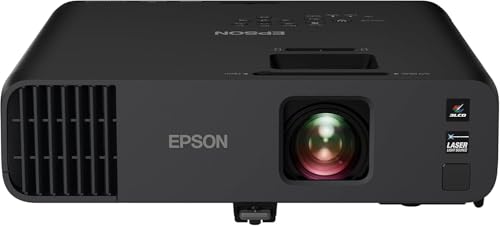
- 4,600-lumen color and white brightness
- 20,000-hour laser source
- Wireless-ready 1080p projection
Best For: Bright business presentations and video conferences
High-Output Installation Pick

- 7,000-lumen brightness
- WUXGA 1920 x 1200 resolution
- 1.6x zoom and six-point correction
Best For: Bright classrooms and conference-room installations
Efficient Connectivity Pick

- 4,000-lumen 1080p output
- USB-C and wireless-ready connectivity
- 20,000-hour laser source
Best For: Efficient office presentations with modern connectivity
Flexible WUXGA Workhorse

- 5,200-lumen WUXGA output
- 1.6x zoom and lens shift
- LAN and RS-232C control support
Best For: Detailed presentations with flexible installation needs
Bright Full HD Pick

- 4,600-lumen native Full HD laser projection
- 8.6ms input lag at 1080p/120Hz
- 360-degree and portrait projection support
Best For: Bright professional presentations, gaming, and multipurpose rooms
Installation-Focused Choice
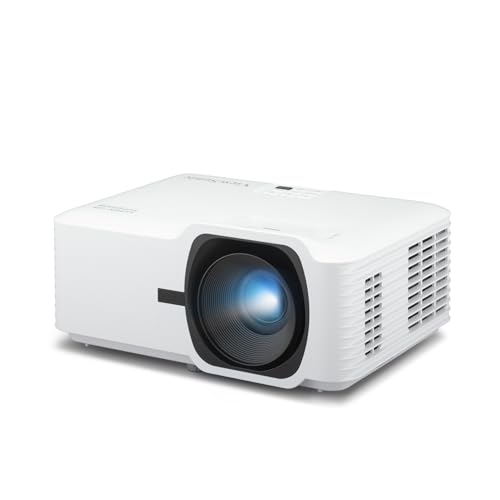
- 4,000 ANSI lumens for moderately lit rooms
- 360-degree and portrait projection modes
- Sealed IP6X engine with instant-on operation
Best For: Classrooms, conference rooms, and auditorium installations
Short-Throw Space Saver

- Ultra-compact Full HD laser projector
- Short-throw design for closer placement
- 3,500 lumens and up to 30,000-hour laser life
Best For: Space-constrained Full HD presentations, gaming, and media rooms
Best Bright-Room Pick

- 5,000 ANSI lumens with native 1080p
- 1.6x zoom and four-corner adjustment
- LAN control for managed installations
Best For: Bright meeting rooms, classrooms, and large venues
Best Short-Throw Option

- Short-throw projection from 2.6 to 3.7 feet
- 4,200 ISO lumens and native 1080p
- IP6X dust protection with a 30,000-hour laser
Best For: Space-limited rooms and golf simulation
Best High-Brightness Value

- 5,500 ANSI lumens for bright environments
- Native 1080p with 1.3x optical zoom
- 360-degree and portrait projection modes
Best For: Classrooms, auditoriums, and large-screen installations
Bright Business Choice – Epson Pro EX11000
For professionals comparing laser projectors for professionals, the Epson Pro EX11000 stands out for bright Full HD presentations in rooms with ambient light. Its 4,600-lumen output, 3LCD color performance, wireless features, and long-life laser source make it well suited to meetings, conferences, and large-group viewing.
Best For: Business presentations, video conferences, and large rooms needing bright 1080p images.
Pros:
- 4,600 lumens of both color and white brightness for well-lit rooms.
- 20,000-hour laser light source minimizes maintenance and bulb replacement.
- Supports images up to 300 inches with native 1920 x 1080 resolution.
- Includes Miracast, two HDMI ports, USB power, and a built-in 16W speaker.
Cons:
- Full HD resolution is lower than WUXGA alternatives for dense documents.
- At 9.5 pounds, it is portable but not especially lightweight for frequent travel.
The EX11000 is a practical professional projector when brightness, wireless presentation support, and accurate color matter more than higher-than-1080p resolution.
High-Output Installation Pick – Panasonic PT-VMZ71
The Panasonic PT-VMZ71 is a strong option for professionals evaluating laser projectors for professionals in classrooms, meeting spaces, and other bright environments. Its 7,000-lumen output, WUXGA resolution, and flexible image adjustment support clear content even with lights on or blinds open.
Best For: High-brightness classrooms, conference rooms, and installations requiring flexible positioning.
Pros:
- 7,000 lumens help maintain visibility in brightly lit spaces.
- WUXGA 1920 x 1200 resolution provides extra vertical detail for documents.
- 1.6x zoom, lens adjustment, and six-point screen correction support flexible setup.
- Wireless LAN, mobile-device software, USB playback, and QR-code projection simplify content delivery.
Cons:
- Its 15-pound weight is less convenient for mobile use.
- The supplied notes do not specify the laser source’s operating-life rating.
Choose the PT-VMZ71 when maximum brightness and installation flexibility are priorities, particularly for rooms where reducing ambient light is impractical.
Efficient Connectivity Pick – BenQ LH650 Business Projector
The BenQ LH650 combines professional-friendly connectivity with efficient laser operation, making it a compelling choice among laser projectors for professionals. It delivers 4,000-lumen 1080p images, 92% Rec.709 color coverage, USB-C connectivity, and wireless projection support through an optional Wi-Fi dongle.
Best For: Offices seeking an energy-conscious 1080p projector with modern device connectivity.
Pros:
- 20,000-hour laser source avoids routine lamp replacement.
- SmartEco technology can save up to 60% more energy than traditional Eco Mode.
- USB-C with alternate mode helps connect compatible devices without using additional ports.
- Includes 92% Rec.709 coverage, wireless projection readiness, and a three-year warranty.
Cons:
- Wireless projection requires an optional Wi-Fi dongle.
- Its 4,000-lumen output is lower than the Panasonic models in this selection.
- Maximum listed image size is 150 inches.
The LH650 is a sensible fit for offices that value operating efficiency, accurate standard-gamut color, and convenient USB-C connections in a compact desktop design.
Flexible WUXGA Workhorse – Panasonic PT-VMZ51S
Panasonic PT-VMZ51S WUXGA LCD Laser Projector, 5200 Lumens, No Digital Link, White
Check Price On AmazonThe Panasonic PT-VMZ51S offers a balanced professional setup for buyers researching laser projectors for professionals. Its 5,200-lumen WUXGA output, optical zoom, lens shift, and control connections make it suitable for detailed presentations where placement flexibility and integration support are important.
Best For: Business and education installations needing WUXGA detail, flexible placement, and wired control.
Pros:
- Native 1920 x 1200 resolution displays detailed charts, text, and video.
- 5,200-lumen output supports presentations in rooms with ambient light.
- 1.6x zoom plus vertical and horizontal lens shift simplify installation.
- Supports HDMI, LAN, and RS-232C connections, with images from 30 to 300 inches.
Cons:
- Wireless connectivity requires an optional module.
- The supplied specifications list conflicting lamp-life figures, so confirm the rating before purchase.
- It includes a 10W mono speaker rather than a higher-powered audio system.
The PT-VMZ51S is a versatile choice for fixed or semi-permanent professional installations, especially when WUXGA workspace and physical lens adjustment are more useful than built-in wireless access.
Bright Full HD Pick – Optoma HZ41
Optoma HZ41 Full HD 1080p Compact Laser Projector | 4,600 Lumens for Home Entertainment and Gaming
Check Price On AmazonFor professionals seeking laser projectors for professionals that remain visible in meeting rooms, classrooms, and multipurpose spaces, the Optoma HZ41 combines native 1080p resolution with 4,600 lumens of brightness. Its flexible installation features and long-life laser source make it practical for frequent use.
Best For: Bright business, education, signage, gaming, and home entertainment setups that need Full HD clarity.
Pros:
- High 4,600-lumen brightness with native Full HD resolution.
- Low 8.6ms input lag at 1080p/120Hz for responsive gaming.
- Up to 30,000 hours of maintenance-free DuraCore laser operation.
- 1.1x zoom, 360-degree projection, and portrait orientation support flexible placement.
Cons:
- Its maximum display resolution is 1080p, despite compatibility with 4K HDR input.
- At 9.2 pounds, it is less portable than smaller desktop projectors.
The HZ41 is a strong all-around choice when brightness, Full HD detail, and installation flexibility matter more than native 4K resolution.
Installation-Focused Choice – ViewSonic LSD400W
The ViewSonic LSD400W is a practical option for professionals comparing laser projectors for professionals for classrooms, conference rooms, and auditoriums. Its 4,000 ANSI lumens, sealed optical engine, and installation-oriented features are designed for dependable operation in moderately lit spaces.
Best For: Business and education installations needing WXGA projection, flexible mounting, and low maintenance.
Pros:
- 4,000 ANSI lumens help maintain image visibility under moderate ambient light.
- Compact design supports 360-degree projection and portrait mode.
- IP6X-rated sealed engine helps block dust without requiring filters.
- Instant-on operation and up to 30,000 hours of lamp-free use reduce downtime.
Cons:
- WXGA resolution is less detailed than Full HD models.
- The supplied details list a 20,000-hour light-source life, which is lower than the advertised 30,000-hour lamp-free-use figure.
- Its business-focused feature set may be more than needed for simple tabletop viewing.
Choose the LSD400W when installation flexibility, dust resistance, and operating efficiency are priorities; choose a Full HD model if fine image detail is more important.
Short-Throw Space Saver – Optoma GT2000HDR
For professionals working with limited placement distance, the Optoma GT2000HDR is one of the more practical laser projectors for professionals thanks to its short-throw design and ultra-compact form. It delivers native 1080p resolution, 3,500 lumens, and a laser light source rated for up to 30,000 hours.
Best For: Compact offices, training rooms, gaming spaces, and installations where the projector must sit relatively close to the screen.
Pros:
- Short-throw design supports large images from a closer position.
- Native Full HD resolution provides clear 1080p content.
- Compact 6.6-pound form factor is easier to place than larger installation projectors.
- Laser source offers up to 30,000 hours of operating life.
Cons:
- Its 3,500-lumen brightness is lower than the other projectors in this roundup.
- Tabletop mounting and limited listed keystone correction may provide less installation flexibility.
- An external power supply is part of the design.
The GT2000HDR makes the most sense when space is tight and Full HD detail matters, though brighter models may be preferable for rooms with stronger ambient light.
Best Bright-Room Pick – ViewSonic LS741HD
For professionals comparing laser projectors for professionals, the ViewSonic LS741HD stands out when you need bright, Full HD imagery and flexible installation. Its 5,000 ANSI lumens, optical zoom, alignment controls, and network management features suit meeting rooms, classrooms, and larger venues.
Best For: Bright presentation spaces, large meeting halls, and managed professional installations.
Pros:
- Native 1080p resolution with 5,000 ANSI lumens for detailed images in ambient light
- 1.6x optical zoom, H/V keystone, and four-corner adjustment simplify setup
- LAN control supports Crestron, AMX, Extron, and PJ Link management
- 360-degree and portrait projection modes add mounting flexibility
Cons:
- Its stationary design is less suited to frequent portable use
- It lacks the short-throw positioning of the Optoma alternative
The LS741HD is a strong all-purpose professional option, particularly where brightness, alignment flexibility, and remote administration matter more than compact mobility.
Best Short-Throw Option – Optoma GT2400HDR
The Optoma GT2400HDR is a practical choice for professionals comparing laser projectors for professionals in space-limited rooms. Its short-throw design can create a large image from a short distance, while 4,200 ISO lumens, Full HD resolution, and low input lag support presentations, golf simulation, and gaming-focused installations.
Best For: Short-throw setups, golf simulation rooms, and low-latency Full HD entertainment spaces.
Pros:
- Short-throw range of 2.6 to 3.7 feet helps reduce placement demands
- 4,200 ISO lumens and native 1080p deliver bright, detailed images
- 30,000-hour DuraCore laser light source supports long-term use
- IP6X-rated dust protection adds durability for demanding environments
Cons:
- It offers less brightness than both ViewSonic models
- Its listed connectivity is more limited, with HDMI and RCA noted
- Vertical keystone correction is more limited than the ViewSonic alignment systems
Choose the GT2400HDR when room depth is the main constraint. It is especially compelling for simulation or gaming applications where short-throw placement and low input lag are priorities.
Best High-Brightness Value – ViewSonic LS740HD
For professionals seeking laser projectors for professionals in bright, fixed-installation environments, the ViewSonic LS740HD offers particularly high rated brightness. Its 5,500 ANSI lumens, Full HD resolution, shorter 1.1–1.5 throw ratio, and installation adjustments make it well suited to classrooms, auditoriums, and large home cinema spaces.
Best For: Bright classrooms, auditoriums, professional presentations, and large-screen home cinema.
Pros:
- Highest rated brightness in this group at 5,500 ANSI lumens
- Native 1080p resolution supports clear presentation and video content
- 1.3x optical zoom, H/V keystone, and four-corner adjustment aid alignment
- 360-degree and portrait modes support varied mounting orientations
Cons:
- Its listed light-source life is 20,000 hours, shorter than the LS741HD and Optoma specifications
- It does not list LAN control features in the supplied specifications
- The stationary ceiling-mount design is not intended for portable use
The LS740HD is a strong fit when maximum brightness is the deciding factor. Its installation flexibility and 1.1–1.5 throw ratio make it adaptable, while the 1080p output keeps the overall package practical for professional viewing.
How We Picked the Best Laser Projectors for Professionals
We selected these Laser Projectors for Professionals by comparing their stated brightness, resolution, projection design, placement flexibility, connectivity, and intended use. We also considered features that affect daily operation, including wireless presentation support, lens shifting or geometric correction, optical zoom, short-throw capability, integrated speakers, and laser-light-source longevity.
Brightness ratings are not directly interchangeable across every manufacturer, so treat them as a starting point rather than a guarantee of real-world performance. Room lighting, screen size, wall color, and image mode all affect perceived output.
Quick Comparison
| Best For | Recommended Type | What to Prioritize |
|---|---|---|
| Conference rooms and classrooms | Business or installation laser projector | High brightness, WUXGA or Full HD resolution, easy connectivity |
| Portable presentations | Compact Full HD laser projector | Moderate weight, fast setup, wireless or USB connectivity |
| Large venues or fixed installations | High-lumen installation model | Lens flexibility, geometric correction, LAN control, long-term reliability |
| Small rooms | Short-throw laser projector | Short throw ratio, shadow reduction, placement flexibility |
| Gaming, golf, or home theater | Short-throw Full HD model | Low input lag, HDR support, contrast, and suitable screen size |
Key Buying Factors for Laser Projectors for Professionals
Brightness and Room Lighting
For bright conference rooms, classrooms, or multipurpose spaces, prioritize a projector with ample ANSI or manufacturer-rated lumens. More brightness helps overcome ambient light, but it does not replace curtains, a suitable screen, or controlled lighting. A very bright projector can also be excessive in a dark, small room.
Resolution and Image Format
Full HD 1080p is suitable for video, presentations, and most interactive content. WUXGA provides a taller 16:10 workspace, which can be helpful with business documents, spreadsheets, and laptop displays. WXGA models can work for basic signage or presentations when budget and brightness matter more than fine detail.
Throw Distance and Installation
Measure the distance from the planned projector mount to the screen before buying. Short-throw models are useful where space is limited or presenters need to stand close to the image. For permanent installations, horizontal and vertical keystone correction, four-corner adjustment, lens shift, optical zoom, 360-degree projection, and LAN control can simplify alignment and maintenance.
Connectivity and Operating Costs
Check for the ports your team actually uses, such as HDMI, USB-C, network control, and wireless presentation features. Laser light sources generally reduce lamp-replacement concerns and support fast start-up, but confirm warranty coverage, service availability, power consumption, and replacement-unit logistics for mission-critical installations.
Who Should Buy Which Laser Projectors for Professionals?
Choose a bright Panasonic or ViewSonic installation-oriented model for classrooms, boardrooms, venues, and fixed commercial deployments. Epson and BenQ options are strong candidates for business presentations when color quality, wireless convenience, and everyday usability matter. Optoma’s compact and short-throw models suit smaller rooms, flexible setups, gaming, and golf simulation, while a Full HD home-theater-oriented ViewSonic model fits buyers who want high brightness for entertainment as well as occasional professional use.
Before ordering, confirm the required image size, throw distance, ceiling or tabletop placement, screen aspect ratio, available power, and control-system compatibility. Those details usually matter more than a single headline specification.