Remote work presentations demand more than a bright image. The right setup should make slides easy to see, keep meetings moving, and give you dependable control whether you are presenting from a home office, conference room, or temporary workspace.
This roundup covers portable laser projectors alongside presentation remotes, including compact models for flexible workstations and high-output options for larger rooms. Use the guide below to match features such as brightness, resolution, battery life, connectivity, and pointer controls to the way you present.
Best 10 Laser Projectors for Remote Work Picks for 2026
Best Digital Pointer
Norwii N97s Presentation Remote
- Digital pointer works on TV and projection screens
- Bluetooth and USB-A/C connectivity
- Up to 164-foot stated range
Best For: Interactive remote presentations across different screen types
Best Portable Laser Projector
BenQ GV50 1080p Smart Projector

- Native 1080p laser projection at 500 ANSI lumens
- Automatic focus and image alignment features
- Google TV, Netflix, Wi-Fi, and Bluetooth built in
Best For: Flexible home offices that also support entertainment
Best Green-Laser Clicker
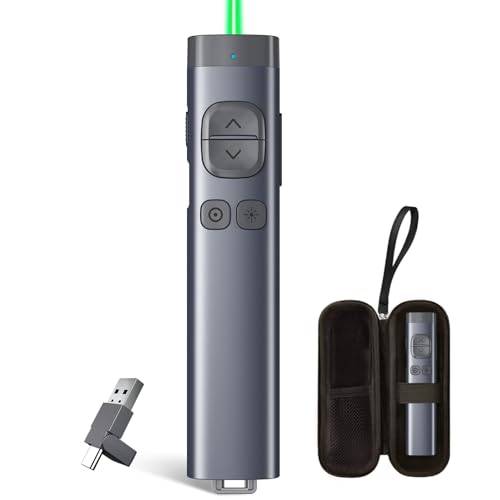
TITIANCOOL Green-Light Presentation Remote

- Visible 532nm green pointer
- USB plug-and-play operation
- USB-C rechargeable battery
Best For: Simple remote presentations needing a highly visible physical pointer
Best Battery-Powered Projector
XGIMI MoGo 4 Laser Portable Projector

- 550 ISO lumens with native 1080p output
- Built-in battery with up to 2.5 hours of playtime
- 360-degree stand and automatic image alignment
Best For: Portable remote-work and entertainment setups
Best Hybrid Presentation Remote

- Digital highlighting and magnification
- USB-A and Bluetooth connectivity
- 30-meter range with timing alerts
Best For: Hybrid presenters using a projector and online meeting tools
Best Bright-Office Laser Projector

- 7,000-lumen laser projection
- WUXGA 1920 x 1200 resolution
- Flexible wireless and screen correction options
Best For: Bright meeting rooms and professional presentations
Best Budget Presentation Clicker

- USB-A and USB-C receivers
- Slide, volume, and window controls
- Up to 165-foot wireless range
Best For: Portable laptop presentations and basic projector control
Long-Range Presenter

- 328-foot wireless range
- Works across major operating systems
- Plug-and-play USB receiver
Best For: Large-room remote presentations
Comfort Pick
VILNIU WP71-RC Presentation Clicker

- Ergonomic large-button design
- Plug-and-play setup
- Includes two AAA batteries
Best For: Comfortable laptop presentations
Compact Office Tool
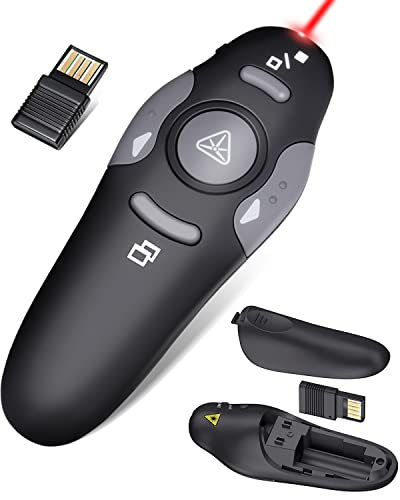
- 38-gram portable design
- Stores USB dongle internally
- Supports major presentation software
Best For: Traveling and mobile presenters
Best Digital Pointer – Norwii N97s Presentation Remote
For remote work presentations that use a TV, monitor, or projector, the Norwii N97s adds flexible digital and physical pointing tools. Its Bluetooth and USB connectivity, broad software compatibility, and up to 164-foot range make it a practical accessory for presenting from a distance.
Best For: Remote workers who present across different screen types and want spotlight, magnification, and cursor-style controls.
Pros:
- Digital pointer and spotlight work on TV and projection screens.
- Supports PowerPoint, Keynote, Google Slides, Zoom, and other major presentation software.
- Bluetooth and USB-A/C receiver connectivity with a stated range of up to 164 feet.
- Rechargeable battery, metal housing, and quieter buttons.
Cons:
- Advanced pointer, spotlight, and magnification functions require Norwii Presenter software.
- Only the left mouse-click function is supported for mouse-style interaction.
- Compatibility varies by operating system and feature.
The N97s is a strong choice when remote work involves varied display equipment or interactive presentations. Choose it over a basic clicker if digital highlighting and screen flexibility matter more than simple slide navigation.
Best Portable Laser Projector – BenQ GV50 1080p Smart Projector
The BenQ GV50 is a portable laser projector for remote work and home use, combining native 1080p resolution with Google TV and automatic image adjustments. Its flexible tilt design also supports wall, bedside, and ceiling projection when your workspace or viewing setup changes.
Best For: Remote workers who want one compact projector for presentations, streaming, gaming, and flexible ceiling or wall viewing.
Pros:
- Native 1080p resolution with a 500 ANSI-lumen laser light source.
- Auto focus, auto keystone, rotation, obstacle avoidance, and screen alignment simplify setup.
- Built-in Google TV, Netflix certification, Wi-Fi, AirPlay, and Chromecast support.
- Built-in 18W 2.1-channel Bluetooth speaker with a woofer for fuller sound.
Cons:
- Its 500-lumen brightness is better suited to controlled lighting than bright rooms.
- It weighs 2.5 kg, so it is portable but not especially lightweight.
- The listed maximum throw distance is 10.5 feet.
For a remote-work room that doubles as an entertainment space, the GV50 offers a well-rounded feature set and low-friction setup. Its automatic corrections are particularly useful when you move the projector between locations.
Best Green-Laser Clicker – TITIANCOOL Green-Light Presentation Remote
The TITIANCOOL green-light presenter is a straightforward option for remote work presentations where a visible physical pointer matters. Its 532nm green light is designed to stand out on projection screens and whiteboards, while the USB receiver provides plug-and-play control on compatible computers.
Best For: Remote workers, teachers, and meeting presenters who prioritize a bright physical pointer and simple USB operation.
Pros:
- Green 532nm light is designed to remain visible in ambient light.
- Plug-and-play USB receiver works with Mac, Windows, Linux, and compatible devices.
- USB-C rechargeable design avoids disposable AAA batteries.
- Includes presentation controls for slides, hyperlinks, volume, window switching, and screen modes.
Cons:
- USB connectivity is the listed connection method, with a stated range of 50 meters.
- It is intended primarily for physical pointer use rather than digital spotlight or magnification.
- Compatibility depends on the host device and presentation software.
This clicker is a practical pick when you need visible pointing and dependable slide control without installing software or pairing over Bluetooth. It is less feature-rich than a digital pointer, but its rechargeable, plug-and-play design keeps setup simple.
Best Battery-Powered Projector – XGIMI MoGo 4 Laser Portable Projector
The XGIMI MoGo 4 Laser is a portable laser projector for remote workspaces that need flexible placement and occasional off-grid use. It combines 1080p output, 550 ISO lumens, a built-in battery rated for up to 2.5 hours of wireless playtime, and automatic alignment for wall or ceiling projection.
Best For: Remote workers who want a portable projector that can move between rooms or travel without relying on immediate wall power.
Pros:
- Native 1080p resolution with 550 ISO lumens and triple-laser picture technology.
- Built-in battery provides up to 2.5 hours of stated movie playtime.
- 360-degree adjustable stand plus automatic focus, obstacle avoidance, and screen alignment.
- Google TV with licensed Netflix, built-in Wi-Fi, and 12W Harman Kardon speakers.
Cons:
- Its 1,000:1 contrast ratio is modest compared with some larger home-theater projectors.
- The recommended screen range for the triple-laser experience is 80 to 100 inches.
- Battery runtime may require recharging during longer work or viewing sessions.
The MoGo 4 Laser stands out for mobile setups where portability, battery operation, and automatic positioning are more important than maximum brightness. Its integrated streaming platform and speakers also reduce the number of accessories needed for flexible remote-work spaces.
Best Hybrid Presentation Remote – Logitech Spotlight
The Logitech Spotlight is a presentation remote rather than a projector, but it can be a useful companion for laser projectors for remote work. Its digital highlighting, magnification, cursor control, and 30-meter range support in-person, virtual, and hybrid presentations.
Best For: Remote workers and presenters who need polished control across online and in-room meetings.
Pros:
- Digital highlighting and magnification work for in-person, virtual, and hybrid presentations.
- Cursor control can play videos, open links, and interact with on-screen content.
- Supports USB-A receiver and Bluetooth connectivity with Windows and Mac.
- Built-in timing alerts and a rechargeable lithium-polymer battery add convenience.
Cons:
- It is a presentation controller, not a laser projector.
- Advanced customization requires the Logi Options+ app.
- The supplied notes specify compatibility with one device at a time.
Choose Spotlight if your remote-work setup already includes a projector and you want more engaging presentation controls than a basic clicker provides. Its virtual pointer and cursor features are particularly useful when presenting shared-screen content.
Best Bright-Office Laser Projector – Panasonic PT-VMZ71
The Panasonic PT-VMZ71 is a strong fit for laser projectors for remote work when presentations need to remain visible in meeting rooms with the lights on. Its 7,000-lumen output, WUXGA resolution, and flexible installation features are suited to offices, classrooms, and shared workspaces.
Best For: Bright meeting rooms, classrooms, and professional presentations where image visibility matters.
Pros:
- 7,000 lumens is designed for presentations with lights on and blinds open.
- WUXGA 1920 x 1200 resolution supports detailed presentation content.
- Wireless LAN, USB flash drive, mobile-device, and QR-code projection options add flexibility.
- 1.6x zoom, lens adjustment, and six-point screen correction help accommodate angled surfaces and corners.
Cons:
- Its 15-pound weight and 16 x 14 x 5-inch dimensions may limit portability.
- The supplied notes do not specify included accessories or audio features.
- Its professional brightness may be more than needed for a small home office.
The PT-VMZ71 is the most directly suitable option here for a dedicated remote-work projection setup. It prioritizes bright, high-resolution images and installation flexibility, making it better suited to conference rooms than casual home use.
Best Budget Presentation Clicker – DinoFire USB-C Presenter
The DinoFire presenter is a compact accessory for laser projectors for remote work, especially when you need straightforward slide control from a laptop. It combines USB-A and USB-C receivers with presentation shortcuts, volume control, and a red pointer.
Best For: Laptop-based presenters who want an affordable, portable clicker for PowerPoint and similar presentations.
Pros:
- USB-A and USB-C connectivity suits MacBooks, laptops, and PCs.
- Controls slides, volume, windows, screen modes, and hyperlinks without drivers.
- Offers a stated wireless range of up to 165 feet.
- Compact pen-clip design and built-in receiver storage make it easy to carry.
Cons:
- The red pointer is not recommended for LED or LCD screens.
- It uses a replaceable AAA battery rather than a rechargeable battery.
- Mac users may need to complete an initial setup.
Consider the DinoFire when portability and basic presentation control matter more than advanced digital annotation. Its dual connector design is especially practical for remote workers who switch between USB-A and USB-C computers.
Long-Range Presenter – Norwii N26 Laser Clicker
For remote work setups that use a projector or shared display, the Norwii N26 is a practical laser presenter with a claimed 328-foot wireless range. Its plug-and-play USB receiver and broad operating-system support make it straightforward for presentations from a laptop or compatible tablet.
Best For: Remote workers presenting in large rooms who want long-range slide control and compatibility across Windows, macOS, Linux, Android, or ChromeOS.
Pros:
- Wireless range of up to 328 feet for flexible movement.
- Red pointer complies with the IEC-60825-1 safety standard.
- Supports PowerPoint, Keynote, Prezi, Google Slides, and more.
- Plug-and-play USB-A receiver requires no software installation.
Cons:
- One AAA battery is required and is not included.
- The pointer is not recommended for TV screens.
- Some key customization requires Norwii Presenter software.
The N26 stands out among laser projectors for remote work when range and platform flexibility matter most. It is a simple, lightweight presentation tool, though buyers should plan for a battery and check feature compatibility for their specific device.
Comfort Pick – VILNIU WP71-RC Presentation Clicker
The VILNIU WP71-RC combines a red laser pointer with presentation controls for remote work and home-office meetings. Its ergonomic shape, plug-and-play setup, and included AAA batteries make it convenient for presenters who want a ready-to-use accessory for a laptop and projector.
Best For: Laptop-based presenters who prioritize a comfortable grip, simple controls, and compatibility with common presentation software.
Pros:
- Ergonomic design with large buttons to help reduce accidental presses.
- Offers up to 98 feet of clicker control and a claimed 328-foot laser range.
- Works with Windows, Mac OS, Linux, PowerPoint, Google Slides, Word, and Excel.
- Includes two AAA batteries and stores the USB receiver in the handle.
Cons:
- Listed compatibility is focused on desktop and laptop computers.
- Uses two AAA batteries, adding more battery weight and replacement needs.
- The supplied details contain differing weight figures.
For laser projectors for remote work, the WP71-RC is a sensible comfort-focused choice when you present from a computer. Its familiar controls and included batteries reduce setup friction, while the shorter control range may be better suited to typical offices than very large venues.
Compact Office Tool – CLIKBUTM WP08-R Laser Remote
The CLIKBUTM WP08-R is a compact red-laser presentation remote for remote work, office meetings, and projector-based slide decks. At 38 grams with the battery included, it is easy to carry, while its stored USB dongle and one-AAA design help keep the setup portable.
Best For: Mobile presenters who want a lightweight clicker for PowerPoint, Keynote, Google Slides, PDFs, and web-based presentations.
Pros:
- Compact 109 mm design weighs 38 grams with the battery included.
- USB dongle stores inside the battery compartment for easier carrying.
- Supports Windows, Mac OS, Linux, Keynote, Google Slides, PowerPoint, PDF, and websites.
- Uses one AAA battery, with the notes estimating about two months of use.
Cons:
- Wireless control distance is listed at 98 feet, shorter than the laser range.
- Requires pressing a connect button after plugging in the receiver.
- One AAA battery is required.
The WP08-R is a practical choice among laser projectors for remote work when portability matters more than advanced customization. Its broad software support and low weight suit frequent travel, while the connection step is a minor extra task before presenting.
How We Picked the Best Laser Projectors for Remote Work
We focused on products that can make remote presentations more practical: portable laser projectors with useful brightness, sharp resolution, smart or wireless connectivity, and flexible placement, plus presentation remotes that simplify slide control. We also considered charging options, operating range, compatibility with common presentation software, and whether each product suits a home office, shared workspace, or larger meeting room.
Because a projector and a presentation remote solve different problems, this list includes both categories. A projector handles the visual display, while a clicker can improve pacing and presenter freedom during online or in-person sessions.
Quick Comparison
| Best For | What to Prioritize | Typical Choice |
|---|---|---|
| Home-office presentations | Compact size, easy setup, quiet operation | Portable smart laser projector |
| Travel and hybrid work | Battery power, wireless connectivity, USB-C charging | Portable projector and rechargeable presenter |
| Large meeting rooms | High brightness, resolution, lens flexibility | High-lumen business projector |
| Frequent slide presenters | Long range, tactile controls, software compatibility | Wireless presentation remote |
Key Buying Factors for Laser Projectors for Remote Work
Brightness and Room Lighting
Brightness is critical when presentations take place during the day or in rooms without blackout shades. Portable models can work well in dimmer offices, but larger or brighter rooms generally call for a higher-lumen business projector. Remember that perceived brightness also depends on screen size, wall color, and ambient light.
Resolution and Image Size
Full HD is a sensible baseline for presentations containing small text, spreadsheets, and video. Higher resolution or strong image processing can improve legibility, but a large image is not automatically better if viewers sit close or the projector cannot focus evenly.
Connectivity and Setup
Look for HDMI, wireless casting, Bluetooth audio, or smart-platform support based on your devices. USB-C charging is convenient for travel, while automatic focus and keystone correction can reduce setup time. Check compatibility with your laptop, operating system, conferencing workflow, and preferred streaming or casting method.
Remote Controls and Battery Life
A good clicker should have clear buttons, reliable range, and dependable compatibility with PowerPoint, Keynote, or Google Slides. Rechargeable USB-C models reduce disposable-battery waste; replaceable batteries may be preferable if you need to resume presenting immediately.
Who Should Buy Which Laser Projectors for Remote Work?
Choose a compact smart laser projector if you move between rooms or need an all-in-one display for a home office. Choose a high-brightness business model if your presentations take place in larger, brighter rooms and image visibility matters more than portability. If your existing monitor or projector is adequate, a dedicated wireless presenter may deliver the biggest improvement for the lowest cost. For frequent travelers, pair a lightweight projector with a rechargeable USB-C clicker and verify that both fit your preferred laptop and conferencing setup.