If you’re looking to enhance your PC’s storage performance in 2025, investing in the right M.2 NVMe RAID enclosure is essential. These enclosures not only boost transfer speeds but also provide robust RAID configurations for data security and efficiency. With options that support impressive storage capacities, you’ll find something that fits your needs. Let’s explore the top enclosures that can transform your data management experience.
MAIWO Dual M.2 NVMe SSD Enclosure with 4 RAIDs
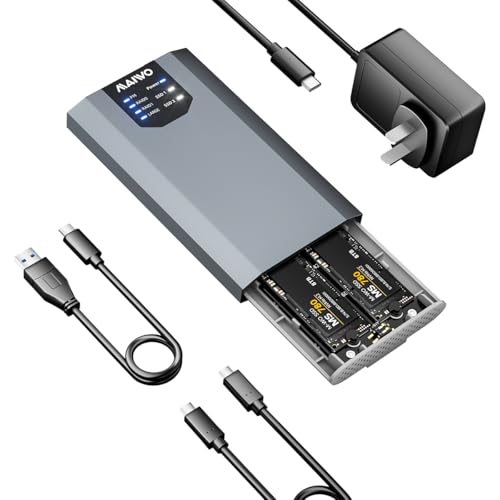
If you’re looking to maximize your storage capacity and performance, the MAIWO Dual M.2 NVMe SSD Enclosure with 4 RAIDs is an excellent choice for PC users. This enclosure connects two M.2 NVMe SSDs, allowing you to expand your storage up to 8TB. With support for various RAID configurations, you can choose RAID 0 for enhanced speed or RAID 1 for data redundancy, ensuring your data stays safe. Plus, the USB 3.2 Gen 2×2 Type-C interface delivers lightning-fast transfer speeds of up to 20Gbps. Its plug-and-play design means you’ll get instant access without any hassle.
Best For: PC users seeking to enhance their storage capacity and performance with a reliable NVMe SSD solution.
Pros:
- Supports multiple RAID configurations for tailored performance and data protection.
- High-speed data transfer capabilities of up to 20Gbps with USB 3.2 Gen 2×2 interface.
- Easy plug-and-play setup with no drivers required for instant access.
Cons:
- Requires two M.2 NVMe SSDs, which may increase overall cost.
- Limited to M.2 NVMe SSDs, not compatible with other storage types.
- Performance may vary depending on the SSDs used and RAID configuration selected.
OWC Express 4M2 Four-Slot USB4 External Storage Enclosure for NVMe SSDs

The OWC Express 4M2 Four-Slot USB4 External Storage Enclosure is an ideal choice for professionals and enthusiasts looking to maximize their NVMe SSD performance. This enclosure supports M.2 2230, 2242, and 2280 SSDs, delivering up to 3200MB/s real-world speeds. Weighing 3.9 pounds and measuring 7.01 x 5.47 x 2.36 inches, its rugged, aircraft-grade aluminum design guarantees durability and effective heat dissipation. You’ll appreciate its near-silent operation with smart fans. Plus, it supports multiple RAID configurations via OWC SoftRAID. With a 2-year warranty and solid customer ratings, the OWC Express 4M2 is a top-tier storage solution.
Best For: Professionals and enthusiasts seeking high-performance external storage solutions for NVMe SSDs.
Pros:
- High-speed performance with up to 3200MB/s real-world speeds.
- Durable construction from aircraft-grade aluminum, ensuring effective heat dissipation.
- Supports multiple RAID configurations for data redundancy and performance optimization.
Cons:
- The enclosure is sold separately from the SSDs, requiring additional investment.
- Weighing 3.9 pounds, it may be less portable compared to lighter alternatives.
- The product may be overkill for casual users who do not require high-speed storage solutions.
40Gbps Docking Station Dual Monitor with M.2 NVMe SSD Enclosure

For professionals and gamers seeking high-performance storage solutions, the 40Gbps Docking Station with Dual Monitor support and M.2 NVMe SSD enclosure stands out as an ideal choice. This versatile docking station features a dual-bay SSD enclosure with a cooling fan, ensuring peak performance. You can connect up to two 4K displays or one 8K display, provided your USB-C port supports DP Alt Mode. With support for RAID configurations, including RAID 0 and RAID 1, you can customize your storage to fit your needs. Plus, it’s compatible with Windows, macOS, and Linux for easy plug-and-play functionality.
Best For: Professionals and gamers looking for a high-performance docking station that supports dual monitors and customizable storage solutions.
Pros:
- High-speed connectivity with 40Gbps data transfer rates and support for dual 4K or single 8K displays.
- Versatile RAID support allows for customization of storage configurations to meet different needs.
- Effective cooling system with a built-in fan and aluminum alloy design for optimal heat dissipation.
Cons:
- Data deletion risk when configuring or changing RAID settings, requiring careful backup management.
- Limited to specific compatibility with USB-C ports that support DP Alt Mode for video output.
- Potentially high cost compared to standard docking stations without SSD enclosure features.
Hybrid SATA HDD/SSD Enclosure with Fan and USB A/C 3.2 Gen 2

Designed for those who need robust storage solutions, the Hybrid SATA HDD/SSD Enclosure with Fan and USB A/C 3.2 Gen 2 offers impressive versatility with its support for multiple RAID configurations. You can accommodate up to 68TB using 2 SATA HDDs and 3 M.2 NVMe SSDs in RAID 0, RAID 1, Normal, or JBOD modes. Its USB 3.2 Gen 2 guarantees read speeds of 200-300MB/s, while the aluminum-alloy design and silent 2.7-inch fans keep things cool. With plug-and-play compatibility across various systems, installation is tool-free, making it easy for you to access your drives whenever needed.
Best For: Those seeking a high-capacity and versatile storage solution with multiple RAID options for data redundancy or performance.
Pros:
- Supports multiple RAID configurations: Offers flexibility with RAID 0, RAID 1, Normal, and JBOD modes.
- High storage capacity: Accommodates up to 68TB with 2 SATA HDDs and 3 M.2 NVMe SSDs.
- Efficient cooling system: Features aluminum-alloy construction and silent fans for effective heat dissipation.
Cons:
- No RAID software for Mac OS: Limited functionality for Mac users when configuring RAID.
- Potential data loss during RAID setup: Users must be cautious when designing RAID arrays.
- Not suitable for noise-sensitive environments: The operation of fans may be audible to some users.
MAIWO 4 Bay M.2 NVMe SSD Enclosure with USB4 Port

If you’re a power user looking for high-speed data transfer and versatile storage solutions, the MAIWO 4 Bay M.2 NVMe SSD Enclosure with USB4 Port is an excellent choice. With a blazing 40Gbps speed, each bay supports up to 16Gbps transmission, ensuring quick access to your data. It’s compatible with various devices, including gaming consoles and laptops, and supports up to 32TB of storage. Plus, the tool-free installation and excellent heat dissipation features make setup a breeze. With RAID support for both macOS and Windows, you can customize your storage to fit your needs perfectly.
Best For: Power users seeking high-speed data transfer and versatile storage solutions for their gaming consoles and laptops.
Pros:
- High-speed performance with 40Gbps data transfer and 16Gbps per bay.
- Versatile compatibility with various devices including macOS, Windows, and Linux.
- Tool-free installation with excellent heat dissipation features for optimal performance.
Cons:
- Potential RAID risks that require caution when setting up.
- Limited to M.2 PCIe NVMe SSDs, which may not suit all storage needs.
- Lacks built-in storage, requiring users to purchase SSDs separately.
MAIWO M.2 NVMe PCIe RAID Enclosure (K2022R)

The MAIWO M.2 NVMe PCIe RAID Enclosure (K2022R) is an ideal choice for tech enthusiasts and professionals seeking a reliable solution for high-speed data storage. This dual-bay enclosure supports up to 16TB capacity with RAID 0, RAID 1, PM, and JBOD modes, making it highly versatile. You’ll enjoy lightning-fast transfer speeds of up to 2000MB/S thanks to its JMS586R chipset and USB 3.2 Gen2x2 interface. Plus, it’s compatible with various M.2 NVMe SSD sizes, ensuring you can easily manage your drives. With tool-free installation and excellent heat dissipation, it’s perfect for your data needs.
Best For: Tech enthusiasts and professionals seeking a reliable and high-speed data storage solution.
Pros:
- Supports up to 16TB capacity with versatile RAID modes (RAID 0, RAID 1, PM, JBOD).
- Achieves lightning-fast transfer speeds of up to 2000MB/S via USB 3.2 Gen2x2 interface.
- Tool-free installation and excellent heat dissipation with an aluminum alloy case.
Cons:
- Does not support M.2 SATA B+M Key SSDs, limiting compatibility.
- Requires data backup before changing RAID modes to prevent data loss.
- May be overkill for casual users with lower storage needs.
Hybrid SATA HDD/SSD Enclosure with Cooling Fan and USB A/C 3.2 Gen 2
For those who need a versatile and high-capacity storage solution, the CENMATE Hybrid SATA HDD/SSD Enclosure stands out with its ability to support both traditional SATA drives and multiple M.2 NVMe SSDs. You can combine one SATA drive with up to three M.2 NVMe SSDs, achieving a massive 46TB capacity. With USB A/C 3.2 Gen 2, you get lightning-fast data transfers at 10Gbps. Plus, its aluminum-alloy design includes silent cooling fans to keep your drives secure. Installation is a breeze with a tool-free setup, and it’s compatible with various operating systems, ensuring wide usability for your storage needs.
Best For: Users seeking a high-capacity, versatile storage solution that combines traditional SATA drives and M.2 NVMe SSDs for enhanced performance.
Pros:
- Supports up to 46TB of storage combining SATA and M.2 NVMe SSDs.
- Offers fast data transfer rates of up to 10Gbps with USB A/C 3.2 Gen 2.
- Tool-free installation makes it easy to set up and replace drives.
Cons:
- Noise level may not be suitable for users sensitive to sound due to the cooling fans.
- Limited to specific drive sizes and types (max 22TB for HDD and 8TB for M.2 SSDs).
- Heavier than some alternatives, weighing 1.02 kg.
Dual Bay RAID SSD Enclosure with Clone Mode & RAID 0/1

Professionals seeking efficient data management will find the Dual Bay RAID SSD Enclosure with Clone Mode & RAID 0/1 an essential tool for their workflow. This enclosure supports PCIe NVMe hard drives, offering versatile RAID modes for high-speed performance and data redundancy. With a 20Gbps transfer rate, you can quickly back up files or use JBOD for independent drive management. Its lightweight aluminum design guarantees portability and superior heat dissipation. Plus, the tool-free installation makes switching SSDs a breeze. Supporting up to 16TB, this enclosure is perfect for those needing reliable storage solutions on the go.
Best For: Professionals seeking efficient data management and reliable storage solutions on the go.
Pros:
- Supports high-speed performance with a data transfer rate of 20Gbps.
- Versatile RAID modes (RAID 0/1, JBOD, and Clone Mode) for flexible data management.
- Lightweight and portable design with tool-free installation for quick SSD switching.
Cons:
- Maximum supported capacity is limited to 16TB, which may not suffice for all users.
- Requires external power for larger drives (8TB or 16TB) if the USB port cannot supply enough power.
- Customer ratings of 4.2 out of 5 stars may indicate some user dissatisfaction.
UGREEN M.2 NVMe Enclosure with Aluminum Heat Dissipation
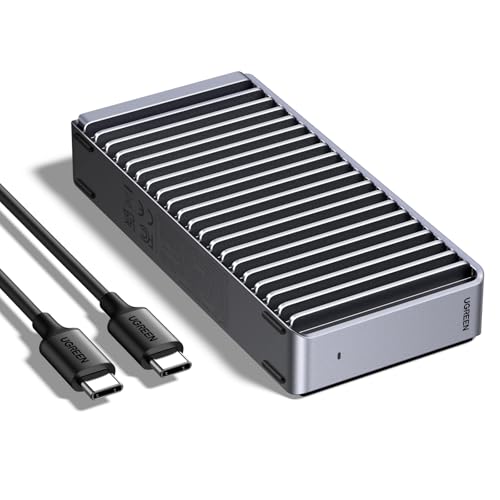
Need a high-performance solution for your M.2 NVMe SSD? The UGREEN M.2 NVMe Enclosure features a sleek aluminum design with double-sided fin heat dissipation, guaranteeing peak cooling. Compatible with Thunderbolt 4/3, USB4, and various USB standards, it supports speeds up to 3600MB/s when paired with the right cables. This enclosure accommodates M.2 SSDs up to 8TB in size, making it perfect for Windows, Mac OS, Linux, and Android systems. Its lightweight and durable structure guarantees easy portability, while the efficient cooling system operates silently, giving you the performance boost your storage needs without the noise.
Best For: Users seeking a high-performance and portable solution for their M.2 NVMe SSDs.
Pros:
- Supports high speeds of up to 3600MB/s when using Thunderbolt 4 cables.
- Efficient double-sided fin heat dissipation design ensures quiet operation.
- Compatible with a wide range of systems and SSD sizes up to 8TB.
Cons:
- Does not support SATA NGFF or mSATA SSDs.
- Optimal speeds require specific Thunderbolt 4 cables and devices.
- SSD not included, requiring separate purchase.
StarTech.com Dual-Slot Hard Drive Enclosure for M.2 SATA SSDs

The StarTech.com Dual-Slot Hard Drive Enclosure for M.2 SATA SSDs is an ideal choice for IT professionals seeking a reliable solution for data migration and backup. This USB 3.1 enclosure supports various M.2 SATA SSD sizes and features RAID modes like RAID 0, RAID 1, SPAN, and JBOD. With SSD TRIM support, it enhances drive performance and lifespan. The durable aluminum design protects your drives, while the independent activity LEDs keep you informed of their status. Plus, you’ll benefit from a 2-year warranty and free lifetime technical support, making it a smart investment for your storage needs.
Best For: IT professionals looking for a reliable dual-slot enclosure for M.2 SATA SSDs to facilitate data migration and backup.
Pros:
- Supports various M.2 SATA SSD sizes and multiple RAID configurations for flexible storage solutions.
- Durable aluminum construction offers protection for drives against damage.
- Includes a 2-year warranty and free lifetime technical support for peace of mind.
Cons:
- Not compatible with M.2 NVMe or AHCI PCI Express SSDs, limiting its versatility.
- Performance may be impacted if used with older USB standards (USB 2.0).
- Limited to SATA SSDs, which may not meet the needs of users requiring NVMe speed.
Factors to Consider When Choosing M 2 Nvme Raid Enclosures for PC
When you’re choosing an M.2 NVMe RAID enclosure for your PC, several key factors come into play. You’ll want to contemplate RAID configuration options, storage capacity, and compatibility with your system. Additionally, think about transfer speed performance, design, cooling features, and how easy it is to install.
RAID Configuration Options
Choosing the right RAID configuration for your M.2 NVMe RAID enclosure can greatly impact your system’s performance and data security. If you want speed, RAID 0 is your best bet; it stripes data across multiple drives, effectively doubling read and write speeds. However, it lacks redundancy. For improved data security, consider RAID 1, which mirrors data on two drives, ensuring you’ve always got a backup. RAID 5 offers a balance between performance and redundancy, combining data striping with parity to protect against a single drive failure. Alternatively, JBOD allows you to combine drives into one logical unit for maximum storage, but you won’t get the performance or protection benefits of RAID. Always back up data before changing RAID modes to avoid loss.
Storage Capacity and Compatibility
Selecting the right M.2 NVMe RAID enclosure hinges on understanding storage capacity and compatibility. First, check the maximum storage capacity supported by the enclosure; some can handle up to 32TB across multiple drives. Verify it’s compatible with various M.2 SSD sizes like 2230, 2242, 2260, and 2280, so you can fit different NVMe drives. Look for enclosures that offer multiple RAID configurations, like RAID 0 for performance or RAID 1 for redundancy, depending on your data management needs. Don’t forget to assess backward compatibility with older USB standards and Thunderbolt interfaces, verifying connection with various systems. Finally, confirm that the enclosure supports NVMe drives, as some may not be compatible with SATA SSDs.
Transfer Speed Performance
To maximize your data transfer performance with M.2 NVMe RAID enclosures, it’s essential to contemplate several key factors. First, look for enclosures that utilize USB 3.2 Gen 2×2 interfaces for speeds up to 20Gbps, or even USB4 for a remarkable 40Gbps. The RAID configuration you choose matters too; RAID 0 offers the highest speeds by striping data, while RAID 1 focuses on redundancy, which can slightly reduce performance. Opt for enclosures that support multiple RAID modes, allowing you to tailor speeds to your needs. Finally, verify your host system supports the same high-speed protocols as the enclosure to avoid bottlenecks that can throttle your transfer speeds.
Design and Cooling Features
When it comes to M.2 NVMe RAID enclosures, design and cooling features play a significant role in guaranteeing peak performance and longevity. Effective heat dissipation is vital, often achieved through aluminum alloy construction and built-in cooling fans. This helps maintain ideal operating temperatures during heavy usage. Look for designs that incorporate thermal pads and heat dissipation holes, enhancing airflow and preventing overheating. If you travel frequently, consider lightweight and compact enclosures for portability. A rugged exterior not only protects against physical damage but also adds aesthetic appeal, which is important in professional environments. By prioritizing these design and cooling features, you can guarantee reliable performance and safeguard your investment in high-speed storage solutions.
Ease of Installation
How easy is it to install your M.2 NVMe RAID enclosure? Look for enclosures with tool-free installation; they allow quick access to your M.2 NVMe SSDs without needing extra tools. Hot-swapping capability is also a big plus, letting you replace or add drives without shutting down your system. LED indicators can make a difference, providing real-time updates on power and drive activity, which helps during troubleshooting. Choose models that come with clear instructions or setup videos to simplify the process further. Finally, guarantee compatibility with various M.2 NVMe sizes—2230, 2242, 2260, and 2280—so you can easily select the right SSDs for your needs and streamline your installation experience.
Build Quality and Durability
While you might focus on speed and capacity when selecting an M.2 NVMe RAID enclosure, build quality and durability are equally important factors that can greatly impact your experience. Look for enclosures made from materials like aircraft-grade aluminum for rugged protection and effective heat dissipation. Consider options with built-in cooling features, such as fans or advanced designs, to prevent overheating and maintain performance. Tool-free installation is a plus, simplifying drive access and reducing wear. Confirm the enclosure has a robust design to withstand transport, especially for portable models. Finally, evaluate the warranty—longer warranties often indicate a manufacturer’s confidence in the product’s build quality and durability. Investing in a solid enclosure pays off in the long run.