As you gear up for 2025, the need for efficient storage solutions is more critical than ever. RAID NVMe desk arrays can greatly enhance your PC’s performance, offering impressive speeds and reliable data protection. With various options available, each suited for specific needs, you’ll want to know which models stand out. Let’s explore the top contenders that promise to elevate your storage experience.
ASUS Hyper M.2 x16 Gen5 Card (PCIe 5.0/4.0) for NVMe M.2 Devices

If you’re a power user looking to maximize your data transfer speeds and storage capabilities, the ASUS Hyper M.2 x16 Gen5 Card is an ideal choice for your RAID NVMe desk array. This card supports up to four NVMe M.2 devices, delivering a remarkable bandwidth of 512 Gbps on both AMD and Intel platforms. With its robust thermal management, featuring a large heatsink and active fan, it keeps your SSDs cool for unthrottled performance. Plus, the RAID functionality allows you to create bootable arrays, ensuring smooth data transfers and compatibility with various M.2 sizes. It’s an essential tool for serious data management.
Best For: Power users and enthusiasts looking to enhance their data transfer speeds and storage capabilities with a high-performance RAID NVMe setup.
Pros:
- Supports up to four NVMe M.2 devices with a bandwidth of 512 Gbps, ensuring rapid data transfers.
- Robust thermal management with a large heatsink and active fan, maintaining optimal performance without throttling.
- RAID functionality allows for bootable arrays and versatile configurations, enhancing data reliability and performance.
Cons:
- Requires a PCIe slot and a 6-pin power connector, which may limit compatibility with some systems.
- May be overkill for casual users who do not need such high data transfer speeds or RAID configurations.
- Potentially higher cost compared to simpler storage solutions, making it less accessible for budget-conscious buyers.
ASUS Hyper M.2 X16 PCIe Expansion Card V2

The ASUS Hyper M.2 X16 PCIe Expansion Card V2 stands out as an ideal choice for enthusiasts and professionals looking to maximize their system’s performance with NVMe RAID configurations. Supporting four NVMe M.2 drives, it delivers transfer speeds up to 128 Gbps. Its compatibility with Intel VROC and AMD Ryzen Threadripper enhances your RAID options. The two-phase power solution provides up to 14W output, boosting performance further. Plus, the stylish heatsink and integrated blower-style fan guarantee your drives stay cool, preventing throttling. By adding this card, you greatly improve your data transfer speeds and overall system efficiency.
Best For: Enthusiasts and professionals seeking to enhance system performance with NVMe RAID configurations.
Pros:
- Supports up to four NVMe M.2 drives, enabling significant data transfer speed improvements.
- Compatible with Intel VROC and AMD Ryzen Threadripper, providing flexible RAID options.
- Equipped with a stylish heatsink and blower-style fan, ensuring optimal temperature management and preventing throttling.
Cons:
- Requires a PCI Express 3.0 x16 slot, which may limit compatibility with some motherboards.
- Higher power consumption (up to 14W), potentially affecting overall system power efficiency.
- Installation may be complex for users unfamiliar with hardware upgrades, requiring technical knowledge.
Dual Bay Raid SSD Enclosure with Clone Mode & Raid 0/1

For professionals requiring speed and reliability, the Dual Bay RAID SSD Enclosure stands out as an excellent choice. Supporting PCIe NVMe hard drives, it offers versatile RAID modes including RAID 0 for high-speed performance and RAID 1 for automatic data backup. With a lightweight aluminum design, it’s easy to transport and features tool-free installation for quick SSD swaps. The enclosure supports high-capacity drives up to 16TB and boasts a data transfer rate of 20Gbps. Plus, the Clone Mode allows for direct disk duplication, making it perfect for your demanding storage needs.
Best For: Professionals needing a fast, reliable, and portable storage solution with data redundancy options.
Pros:
- Versatile RAID Modes: Offers RAID 0 for speed and RAID 1 for data protection.
- Lightweight Design: Easy to carry, making it perfect for on-the-go professionals.
- Tool-Free Installation: Quick and simple access for SSD replacements without the need for tools.
Cons:
- Power Supply Limitation: Larger drives (8TB or 16TB) may require external power if USB port power is insufficient.
- Limited to Two Drives: Supports only two SSDs, which may not be enough for extensive data users.
- Customer Ratings: Holds a moderate rating of 4.2 out of 5 stars, indicating room for improvement in user satisfaction.
MAIWO Dual M.2 NVMe SSD Enclosure with 4 RAIDs
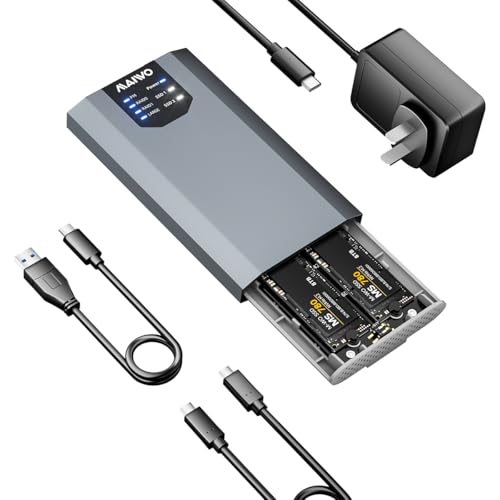
Designed for users who demand both speed and data protection, the MAIWO Dual M.2 NVMe SSD Enclosure stands out with its versatile RAID configurations. You can easily connect two M.2 NVMe SSDs, providing up to 8TB of storage. With support for RAID 0, RAID 1, PM, and Large setups, you can tailor your storage to fit your needs—whether you prioritize performance or redundancy. Plus, the USB 3.2 Gen 2×2 Type-C interface delivers blazing data transfer speeds of up to 20Gbps. Enjoy a hassle-free experience with its plug-and-play setup, requiring no additional drivers for instant access.
Best For: Users seeking high-speed storage solutions with flexibility in RAID configurations for performance or data redundancy.
Pros:
- Supports multiple RAID configurations for tailored storage options.
- Blazing fast data transfer speeds of up to 20Gbps with USB 3.2 Gen 2×2 interface.
- Easy plug-and-play setup with no additional drivers required for quick access.
Cons:
- Limited to M.2 NVMe SSDs, which may not be compatible with all SSD types.
- Requires knowledge of RAID setups for optimal configuration and usage.
- No built-in cooling system which may lead to overheating during prolonged use.
ASUS Hyper M.2 X16 PCIe Expansion Card for NVMe M.2

If you’re looking to maximize your NVMe storage capabilities, the ASUS Hyper M.2 X16 PCIe Expansion Card is an excellent choice, especially for gamers and content creators who demand high-speed performance. Supporting up to four NVMe M.2 drives, it utilizes PCIe 4.0, delivering speeds up to 256 Gbps. This card is compatible with various AMD and Intel setups, ensuring versatility. It features a stylish heatsink and integrated blower fan to prevent throttling, maintaining peak performance during intense tasks. Built with durable server-grade materials, it guarantees efficient data transfer and longevity, making it a reliable addition to your storage arsenal.
Best For: Gamers and content creators looking to enhance their NVMe storage performance with high-speed capabilities.
Pros:
- Supports up to four NVMe M.2 drives, maximizing storage potential.
- Utilizes PCIe 4.0 bandwidth for exceptional speeds of up to 256 Gbps.
- Equipped with a heatsink and blower fan to prevent throttling and ensure reliability during demanding tasks.
Cons:
- Requires a compatible motherboard with PCI Express x8 or x16 slots.
- May consume significant power (14W) from the system.
- Additional cooling solutions may be necessary if used in a high-heat environment.
HighPoint Technologies 2-Port M.2 NVMe Boot RAID Controller

The HighPoint Technologies 2-Port M.2 NVMe Boot RAID Controller stands out as an ideal solution for users seeking robust performance in virtualization environments, particularly with its seamless compatibility with VMware ESXi and various bootable operating systems. With a PCIe 3.0 x8 host interface and support for two M.2 SSDs (2242/2260/2280), you’ll enjoy impressive speed and efficiency. This driverless NVMe RAID solution features one-click RAID creation, plus RAID management through UEFI, CLI, and WebGUI. Integrated LED indicators help you monitor status, and the OOB management port allows for remote access, making it a versatile choice for any setup.
Best For: Users looking for a high-performance RAID solution for virtualization environments that require compatibility with multiple operating systems.
Pros:
- Driverless NVMe RAID solution simplifies setup and use without the need for additional drivers.
- One-click RAID creation feature allows for quick and easy RAID setup.
- Integrated LED indicators provide real-time status monitoring for ease of management.
Cons:
- Limited to only two M.2 ports, which may not be sufficient for users needing more storage.
- Compatibility may vary with some operating systems, potentially requiring additional configuration.
- The OOB management port may require additional network setup for remote access functionality.
ORICO MiniTower 2 Bay RAID Enclosure for NVMe SSD
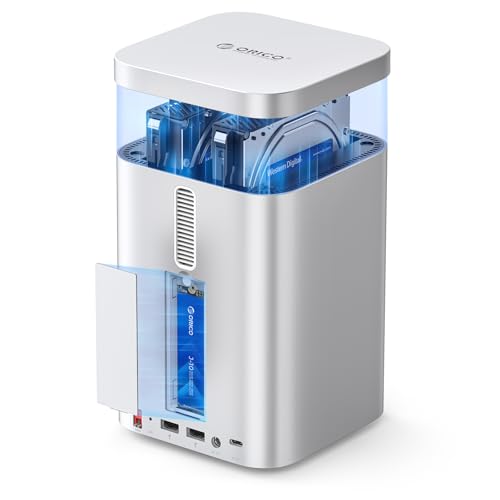
For Mac mini M4 Max users seeking to enhance their storage capabilities, the ORICO MiniTower 2 Bay RAID Enclosure stands out as an exceptional choice. It supports up to 56TB of storage, accommodating two SATA HDDs/SSDs and one M.2 NVMe SSD. With a blazing data transfer rate of up to 10Gbps via USB 3.2 Gen 2, you’ll experience fast, efficient data processing. Its versatile RAID configurations—RAID 0, RAID 1, single-disk, or JBOD—allow for tailored performance. The sleek aluminum design features a low-noise fan for ideal cooling, ensuring stability even under heavy loads.
Best For: The ORICO MiniTower 2 Bay RAID Enclosure is best for Mac mini M4 Max users looking to expand their storage and enhance data processing capabilities.
Pros:
- High Storage Capacity: Supports up to 56TB with options for SATA HDDs/SSDs and M.2 NVMe SSD.
- Fast Data Transfer: Offers data transfer rates of up to 10Gbps using USB 3.2 Gen 2, ensuring efficient performance.
- Versatile RAID Configurations: Allows users to configure storage in RAID 0, RAID 1, single-disk, or JBOD for tailored performance.
Cons:
- Complex RAID Management: RAID mode controls operate in reverse order, which may lead to confusion and require careful verification for data integrity.
- Limited to Specific Compatibility: Primarily designed for Mac mini M4 Max, limiting its use with other systems.
- Weight and Size: Weighing 4.24 pounds and measuring 5 x 5 x 7.48 inches may make it less portable compared to other storage solutions.
ASUS Hyper M.2 x16 Card v2 4 x M.2 Socket 3

ASUS Hyper M.2 x16 Card v2 stands out with its ability to support up to four PCIe 3.0 M.2 drives, making it an ideal choice for enthusiasts and professionals seeking high-performance storage solutions. With a remarkable transfer bandwidth of up to 128Gbps, you can expect lightning-fast data access and transfer speeds. The card also supports Intel VROC technology, enabling bootable RAID arrays using CPU PCIe lanes for enhanced performance. To guarantee peak operation, it features an integrated blower-style fan, effectively preventing throttling during intensive tasks. Upgrade your system with this powerful card and experience unmatched storage capabilities.
Best For: Enthusiasts and professionals seeking high-performance storage solutions with multiple M.2 drives.
Pros:
- Supports up to four PCIe 3.0 M.2 drives for extensive storage options.
- Transfer bandwidth of up to 128Gbps ensures lightning-fast data access and transfer speeds.
- Integrated blower-style fan prevents throttling during intensive tasks, maintaining optimal performance.
Cons:
- Requires a compatible motherboard with enough PCIe lanes for full utilization.
- Potentially higher power consumption due to multiple drives and active cooling.
- May be overkill for casual users who do not need such high-performance storage options.
MAIWO 4 Bay M.2 NVMe SSD Enclosure with USB4 Port

If you’re looking for a powerful storage solution, the MAIWO 4 Bay M.2 NVMe SSD Enclosure with USB4 Port is an excellent choice. With support for up to 32 TB of storage, it accommodates various M.2 PCIe NVMe SSD sizes. Enjoy lightning-fast speeds of up to 40Gbps and efficient heat dissipation thanks to its aluminum alloy body and built-in cooling fan. Plus, it offers RAID options for both macOS and Windows, ensuring your data is secure. The tool-free installation makes setup a breeze, so you can easily enhance your storage performance in 2025 and beyond.
Best For: Users who require high-capacity, high-speed storage solutions for gaming, professional applications, or data backup.
Pros:
- Supports up to 32 TB of storage across four SSD bays, accommodating various M.2 sizes.
- Delivers impressive speeds of up to 40Gbps with efficient heat dissipation features.
- Tool-free installation with a magnetic cover simplifies setup and enhances accessibility.
Cons:
- RAID setup may involve risks that require careful consideration and management.
- Performance may vary based on the specific SSDs used and their configurations.
- The device may be more expensive compared to simpler storage solutions.
MAIWO M.2 NVMe PCIe RAID Enclosure (K2022R)

The MAIWO M.2 NVMe PCIe RAID Enclosure (K2022R) stands out for its dual-bay design, making it an excellent choice for users who need to maximize storage capacity and speed. Supporting up to 16TB with two 8TB SSDs, it’s compatible with various M.2 NVMe sizes. With the JMS586R chipset and USB 3.2 Gen2x2 interface, you’ll enjoy transfer speeds up to 2000MB/S. Its tool-free installation and aluminum alloy case guarantee efficient heat dissipation. Plus, with RAID 0, RAID 1, PM, and JBOD options, you can easily manage your drives. Just remember to back up data when switching RAID modes!
Best For: Users seeking a high-capacity, high-speed storage solution for gaming, media editing, or data backup.
Pros:
- Supports up to 16TB with dual-bay for maximum storage capacity.
- High-speed transfer rates of up to 2000MB/S thanks to the USB 3.2 Gen2x2 interface.
- Versatile compatibility with various devices, including laptops, desktops, gaming consoles, and more.
Cons:
- Limited to M.2 NVMe SSDs; does not support M.2 SATA drives.
- Data loss risk when switching RAID modes without backing up data first.
- Requires external power adapter, which may add to clutter.
Factors to Consider When Choosing Raid NVMe Desk Arrays for PC
When choosing a RAID NVMe desk array for your PC, you’ll want to take into account several key factors. Make certain to check compatibility with your motherboard, explore various RAID configuration options, and assess cooling mechanisms. Additionally, keep an eye on data transfer speeds and storage capacity limitations to guarantee the best performance for your needs.
Compatibility With Motherboard
Before diving into the world of RAID NVMe desk arrays, verifying compatibility with your motherboard is essential. First, check the PCIe slot type, as different RAID arrays require specific versions like PCIe 3.0, 4.0, or 5.0 for peak performance. Next, confirm that your motherboard supports the M.2 SSD sizes you plan to use, such as 2242, 2260, 2280, or 22110. Don’t forget to verify that the BIOS can handle NVMe RAID configurations, especially if your motherboard is older. Additionally, confirm your motherboard can provide adequate power to the RAID NVMe desk array, as advanced setups often need extra power connectors. Finally, look for compatibility with RAID technologies like Intel VROC or AMD RAID, depending on your CPU and chipset.
RAID Configuration Options
Choosing the right RAID configuration for your NVMe desk array isn’t just about performance; it’s also about how well it meets your storage needs. If speed is your priority, consider RAID 0, which stripes data across multiple drives for improved read and write speeds, though it lacks redundancy. For data protection, RAID 1 mirrors data on two drives, ensuring safety in case of failure. RAID 5 offers a balance of performance and fault tolerance, requiring at least three drives. Meanwhile, RAID 10 combines the benefits of both RAID 0 and RAID 1, providing high performance and redundancy. Finally, JBOD lets you use multiple drives independently, maximizing storage capacity without RAID configuration. Choose wisely based on your requirements.
Cooling Mechanisms and Design
Selecting the right RAID configuration is only part of the equation; cooling mechanisms and design play an essential role in the performance and longevity of your NVMe desk array. Effective cooling solutions, like large heatsinks and integrated fans, are vital to prevent thermal throttling during demanding tasks. Look for designs featuring thermal pads on both sides to enhance heat dissipation, ensuring your M.2 SSDs run efficiently. Active cooling mechanisms, such as blower-style fans, can greatly lower temperatures, especially in multi-drive RAID setups. Additionally, materials like aluminum alloy casings improve heat dissipation, promoting stable operation under load. Finally, choose arrays that allow for tool-free access to drive bays, making it easier to manage cooling components and replace drives when necessary.
Data Transfer Speeds
Data transfer speeds are an important factor when evaluating RAID NVMe desk arrays for your PC. Depending on your configuration, RAID 0 can deliver impressive speeds up to 4000 MB/s, thanks to data striping. Conversely, RAID 1 may reduce speeds due to its mirroring process. The interface type you choose also matters greatly; PCIe 4.0 can reach transfer speeds up to 256 Gbps, while PCIe 3.0 maxes out around 128 Gbps. By utilizing multiple NVMe drives in a RAID setup, you can enhance overall data throughput, achieving bandwidth up to 512 Gbps when optimized. Remember, effective cooling mechanisms are vital to prevent thermal throttling, which can hinder your data transfer speeds during heavy tasks.
Storage Capacity Limitations
When it comes to RAID NVMe desk arrays, understanding storage capacity limitations is essential for optimizing your setup. First, check the maximum storage capacity supported by the enclosure, as many accommodate up to 16TB or more, depending on the number of M.2 SSDs used. Remember that RAID configurations like RAID 0 and RAID 1 affect usable space; for example, RAID 1 duplicates data, halving available capacity. The number of bays also matters—dual-bay systems can support up to 16TB with two 8TB SSDs. Additionally, verify compatibility with specific SSD sizes, as some arrays may not support certain RAID modes and larger SSDs might require external power. Stay informed to maximize your storage potential.