If you’re looking to boost your system’s storage capabilities, M.2 NVMe expansion cards (4x) are vital for achieving maximum speed and performance. These cards offer impressive data transfer rates and can greatly enhance your gaming or tech setup. However, with so many options available, it’s important to know which ones stand out. Let’s explore the top contenders that could redefine your storage experience.
ASUS Hyper M.2 X16 PCIe 3.0 Expansion Card V2

If you’re looking to supercharge your system with additional storage, the ASUS Hyper M.2 X16 PCIe 3.0 Expansion Card V2 is an excellent choice. This powerful card supports up to four NVMe M.2 drives, delivering blazing transfer speeds of up to 128 Gbps. It’s compatible with both Intel VROC and AMD Ryzen Threadripper, allowing you to set up NVMe RAID for enhanced performance. With a two-phase power solution providing up to 14W, you’ll maintain peak performance. Plus, the stylish heatsink and integrated blower-style fan keep temperatures in check, preventing throttling and ensuring your system runs smoothly.
Best For: Users looking to enhance their system’s storage capabilities and performance with high-speed NVMe M.2 drives.
Pros:
- Supports up to four NVMe M.2 drives for increased storage capacity and performance.
- Delivers transfer speeds of up to 128 Gbps, significantly boosting data transfer rates.
- Features a cooling mechanism with a heatsink and blower-style fan to prevent overheating and throttling.
Cons:
- Requires a PCI Express 3.0 x16 slot, limiting compatibility with some motherboards.
- May not be necessary for users with sufficient existing storage solutions.
- Additional NVMe drives can increase overall system complexity and power consumption.
ASUS Hyper M.2 X16 PCIe 4.0 Expansion Card

The ASUS Hyper M.2 X16 PCIe 4.0 Expansion Card is perfect for power users and gamers who demand lightning-fast data transfer speeds. Supporting four NVMe M.2 drives, it utilizes PCIe 4.0 bandwidth to achieve speeds up to 256 Gbps. Compatible with AMD’s Ryzen sTRX40, AM4, and Intel VROC NVMe RAID, it fits in PCIe x8 and x16 slots. Designed for next-gen SSDs with a 14W power consumption, this card guarantees peak performance. Plus, its stylish heatsink and integrated blower-style fan prevent throttling, enhancing reliability during high-performance tasks while the server-grade PCB material assures durability.
Best For: Power users and gamers seeking high-speed data transfer and optimal performance from multiple NVMe M.2 drives.
Pros:
- Supports up to four NVMe M.2 drives, maximizing storage capacity and performance.
- Utilizes PCIe 4.0 bandwidth, achieving speeds up to 256 Gbps for lightning-fast data transfer.
- Includes a stylish heatsink and integrated blower-style fan, preventing thermal throttling for reliable performance.
Cons:
- Requires a compatible motherboard with PCIe x8 or x16 slots, limiting compatibility for some users.
- Power consumption of 14W may be an issue for systems with limited power supply capacity.
- Higher cost compared to standard storage options, which may not be justifiable for casual users.
NGFF M.2 M-Key to PCIe X4 Expansion Card Adapter
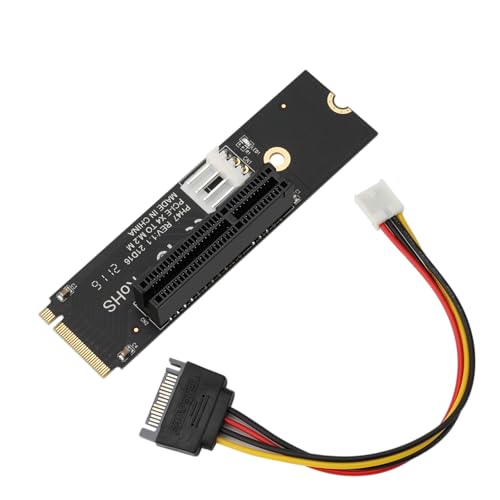
For tech enthusiasts and gamers looking to elevate their system’s performance, the NGFF M.2 M-Key to PCIe X4 Expansion Card Adapter is a game changer. This adapter seamlessly converts your M.2 interface to a PCIe X4 slot, supporting X1, X8, and X16 devices. Its clever power supply design minimizes interference, while the 4-layer PCB enhances stability and data integrity. With four high-capacity filter capacitors, you’ll enjoy improved signal transmission. Plus, the plug-and-play installation requires no drivers, making it hassle-free. Compatible with various devices, this adapter guarantees your system runs at peak performance without any headaches.
Best For: Tech enthusiasts and gamers seeking to enhance system performance with M.2 to PCIe connectivity.
Pros:
- Seamless compatibility with PCIe X1, X8, and X16 devices, ensuring flexibility for various setups.
- Stable operation due to the 4-layer PCB design and high-capacity filter capacitors for improved signal transmission.
- Easy installation with plug-and-play functionality that requires no driver installation.
Cons:
- Limited to M.2 M-Key interface, which may not suit users with different M.2 key types.
- Power supply reliance on external connectors may complicate cable management in compact builds.
- Potential bandwidth constraints based on the M.2 interface speed, which could limit performance for high-demand applications.
StarTech.com Dual M.2 PCIe SSD Adapter Card

Looking to boost your workstation or server’s storage capabilities? The StarTech.com Dual M.2 PCIe SSD Adapter Card lets you install two PCIe 3.0 M.2 SSDs, whether NVMe or AHCI. You’ll achieve impressive read/write speeds of up to 3GB/s with a single drive and 2.4GB/s with both. It supports various M.2 sizes, including the popular Samsung models, and works seamlessly with PCIe 1.0, 2.0, and x8/x16 slots. Plus, you can configure RAID setups for enhanced performance or redundancy. With its effective cooling design, this adapter card guarantees reliability while maximizing your storage potential.
Best For: Users looking to enhance their workstation or server storage with high-speed dual M.2 PCIe SSD capabilities.
Pros:
- Supports a wide range of M.2 SSD sizes and popular models, enhancing compatibility.
- Achieves impressive read/write speeds, improving overall system performance.
- Versatile RAID configurations allow for tailored storage solutions, including redundancy and performance boosts.
Cons:
- Requires PCIe x8/x16 slots, which may not be available on all motherboards.
- Additional cooling may be needed in high-performance scenarios to prevent throttling.
- Potentially higher cost compared to single SSD solutions, especially with dual-drive setups.
WD_BLACK 4TB SN850X NVMe Internal Gaming SSD

Designed specifically for gamers, the WD_BLACK 4TB SN850X NVMe Internal Gaming SSD delivers lightning-fast speeds of up to 7,300 MB/s, ensuring minimal load times and a seamless gaming experience. With a massive 4TB capacity, you can download more games without worrying about deleting your favorites. It features optional heatsinks and Adaptive Thermal Management to maintain peak performance during intense gaming sessions. You’ll appreciate the downloadable WD_BLACK Dashboard for monitoring drive health and customizing RGB lighting. Advanced features like Predictive Loading and Overhead Balancing enhance your overall performance, making this SSD a top choice for serious gamers.
Best For: The WD_BLACK 4TB SN850X NVMe Internal Gaming SSD is best for serious gamers looking for high-speed performance and ample storage for their gaming library.
Pros:
- Lightning-fast speeds of up to 7,300 MB/s for minimal load times.
- Large 4TB capacity allows for extensive game downloads without the need to delete favorites.
- Advanced features like Predictive Loading and Overhead Balancing enhance overall gaming performance.
Cons:
- Higher price point compared to traditional SSDs may not fit all budgets.
- Optional heatsink version may require additional investment for optimal thermal management.
- Software limitations as WD_BLACK Dashboard is only available for Windows users.
ICY DOCK 4 Bay Removable M.2 NVMe PCIe SSD Mobile Rack Enclosure (MB204MP-B)

The ICY DOCK 4 Bay Removable M.2 NVMe PCIe SSD Mobile Rack Enclosure (MB204MP-B) is an excellent choice for tech enthusiasts and professionals who need quick access to multiple M.2 NVMe SSDs. This adapter card fits four M.2 SSDs, supporting sizes from 2230 to 2280, and requires just one PCIe 5.0 x16 slot. Its tool-less installation allows for easy maintenance, while the quick release knob design makes swapping drives a breeze. Weighing only 13.1 ounces and compatible with Windows, macOS, and Linux, this enclosure balances performance and convenience, making it a solid addition to your setup.
Best For: Tech enthusiasts and professionals who require quick access to multiple M.2 NVMe SSDs for efficient data management.
Pros:
- Tool-less installation allows for easy maintenance and drive swapping.
- Supports a wide range of M.2 SSD sizes (2230 to 2280) for versatile compatibility.
- Compact design and lightweight build make it easy to integrate into various setups.
Cons:
- Requires a PCIe 5.0 x16 slot with bifurcation, which may not be available on all motherboards.
- Customer ratings are relatively low (2.1 out of 5 stars), indicating potential quality concerns.
- Limited warranty and return policy may pose risks for buyers regarding defective products.
Computer Motherboard PCI-E 1X to NVME M-Key M.2 SSD Adapter Converter

If you’re aiming to boost your desktop computer’s storage capacity without breaking the bank, the Repima PCI-E 1X to NVME M-Key M.2 SSD Adapter Converter is an excellent choice. This compact adapter, measuring just 3.94 x 0.94 x 0.12 inches, easily converts a PCI-E 1X interface to accommodate high-speed NVME M.2 SSDs. With a rugged 4-layer PCB design, it guarantees stable operation and peak performance. Installation is a breeze—simply insert the card into your motherboard’s PCI-E 1X slot and the system will automatically recognize the SSD. Experience faster load times and improved system stability with this affordable upgrade.
Best For: Budget-conscious users looking to upgrade their older desktop computers with enhanced storage performance.
Pros:
- Cost-effective solution for increasing storage capacity without needing to replace the entire motherboard.
- Easy installation process that requires no complicated settings or technical expertise.
- Supports high-speed data transfer, significantly improving load times for applications and games.
Cons:
- Limited to PCI-E 1X slots, which may restrict compatibility with some motherboards.
- Performance may be limited compared to newer motherboards with native NVME support.
- Requires a compatible NVME M.2 SSD, which may add additional costs if not already owned.
Kingston Fury Renegade 2TB NVMe M.2 Internal Gaming SSD

For gamers seeking lightning-fast load times and seamless performance, the Kingston Fury Renegade 2TB NVMe M.2 Internal Gaming SSD stands out as an exceptional choice. With read speeds up to 7300MB/s and write speeds reaching 7000MB/s, it delivers unrivaled speed for your gaming needs. Its slim M.2 2280 form factor guarantees compatibility with gaming laptops and desktops, and it’s PS5 ready. The optional heatsink effectively manages thermal levels, enhancing stability during intense gaming sessions. Rated 4.8 stars by over 5,200 users, this SSD is a reliable investment for any high-performance build. Enjoy the ultimate gaming experience with Kingston Fury Renegade.
Best For: Gamers looking for high-speed performance and reliability in their gaming laptops or desktops.
Pros:
- Incredible speed: Read speeds up to 7300MB/s and write speeds up to 7000MB/s enhance gaming performance.
- PS5 ready: Compatible with the latest gaming consoles, making it a versatile choice for console gamers.
- Efficient heat management: Includes an optional heatsink for improved thermal dispersion during intense gaming sessions.
Cons:
- Price point: Higher cost compared to standard SSDs may not fit all budgets.
- Heatsink installation: Some users may find the installation of the heatsink challenging.
- Limited warranty information: Clarification on warranty terms may be needed for peace of mind.
NVME to M.2 SATA3 Controller Multiplier Adapter

Expanding your storage capabilities is a breeze with the NVME to M.2 SATA3 Controller Multiplier Adapter, especially for tech-savvy users seeking high-speed data transmission. This card features an ASM1064 chip that guarantees stable performance and fast transmission through its four SATA3.0 ports. Designed for M.2 M standard compatibility, it harnesses PCIExpress 3.0’s 2-line bandwidth, giving you superior data transfer rates. Its plug-and-play functionality means you won’t need any software installation. You’ll appreciate the indicator lights that show active status or when data is being read or written, making it a practical choice for enhancing your PC’s performance.
Best For: Tech-savvy users looking to expand their PC storage capabilities with high-speed data transmission.
Pros:
- High-speed performance with PCIe 3.0 and ASM1064 chip for reliable data transfer.
- Easy installation with plug-and-play functionality, requiring no software setup.
- Multiple storage options with four SATA3.0 ports to enhance overall system performance.
Cons:
- Limited compatibility as it specifically supports M.2 M standard.
- Potential for overheating if not adequately cooled during heavy data transfers.
- Dependent on existing system specifications, which may limit usage in older PCs.
Lenovo Legion Go SSD Hard Drive Expansion Adapter Card

The Suckoo for Lenovo Legion Go Handheld Conversion SSD Hard Drive Expansion Adapter Card is the ideal choice for gamers and power users seeking to enhance their storage capabilities. This NVME M-Key M.2 PCIe 4.0 adapter upgrades your 2242 SSD to accommodate larger 2230, 2242, 2260, and 2280 drives, ensuring you have the speed and capacity you need. Weighing just 0.353 ounces, it’s lightweight yet durable, featuring a sleek black design that complements your Legion Go. Installation requires some technical know-how, but with included accessories, you’ll be set to boost your device’s performance effectively.
Best For: Gamers and power users looking to enhance their storage capabilities on Lenovo Legion Go devices.
Pros:
- Upgrades 2242 SSD to support larger 2230, 2242, 2260, and 2280 NVME drives for increased storage capacity.
- Lightweight and durable design ensures compatibility with Legion Go’s aesthetic.
- Includes necessary installation accessories, making it easier to set up.
Cons:
- Installation requires technical skills, which may not be suitable for all users.
- Thicker SSD drives may require modification, complicating the upgrade process.
- Customer ratings indicate mixed feedback, suggesting some users may experience issues.
Factors to Consider When Choosing M2 Nvme Expansion Cards 4x
When choosing M.2 NVMe expansion cards, you need to regard several key factors. Compatibility with your motherboard and supported NVMe drives is essential for ideal performance. Additionally, contemplate data transfer speeds, thermal management features, and power supply requirements to guarantee your setup runs smoothly.
Compatibility With Motherboards
Choosing the right M.2 NVMe expansion card for your motherboard requires careful consideration of several compatibility factors. First, check the PCIe slot configuration on your motherboard, as the card may need an x16, x8, or x4 slot for peak performance. Next, verify the supported M.2 drive lengths, such as 2242, 2260, 2280, or 22110, since different cards accommodate different sizes. Confirm your motherboard supports the PCIe version (3.0 or 4.0) of the card to maximize data transfer speeds. Additionally, consider chipset compatibility, as some expansion cards work best with specific brands or models. Finally, make sure your motherboard’s BIOS/UEFI is updated to support NVMe drives, as older versions might not recognize newer expansion cards.
Supported NVMe Drives
To guarantee ideal performance and compatibility, it’s essential to select an M.2 NVMe expansion card that supports the specific drive sizes you’ll be using, such as 2230, 2242, 2260, or 2280. Check whether the card works with both NVMe and AHCI drives, as some only support one protocol. If you need more storage, consider expansion cards that accommodate multiple drives simultaneously, enhancing both capacity and performance. Additionally, pay attention to power output requirements; some cards provide extra power for high-performance SSDs. Finally, verify the expansion card is compatible with your motherboard’s PCIe slots, matching the necessary PCIe generation (like PCIe 3.0 or 4.0) to achieve peak performance.
Data Transfer Speeds
Selecting the right M.2 NVMe expansion card goes beyond just guaranteeing compatibility with your drives; data transfer speeds are a key factor that can greatly impact your system’s performance. PCIe 3.0 cards typically offer speeds up to 128 Gbps, while PCIe 4.0 cards can reach an impressive 256 Gbps. Consider how many NVMe M.2 drives the card supports, as multiple drives can work together to enhance throughput. Additionally, the compatibility with different PCIe lanes—x4, x8, or x16—affects maximum speeds, with x16 providing the highest bandwidth. Finally, remember that the form factor of your M.2 drives can limit their speeds, so make sure your expansion card is designed to maximize their performance.
Thermal Management Features
Effective thermal management features are vital when evaluating M.2 NVMe expansion cards. Look for options that include integrated heatsinks and blower-style fans to prevent SSD throttling during high data transfer tasks. Advanced technologies like Adaptive Thermal Management can help maintain peak performance under load, ensuring your drives run efficiently. Pay attention to the design of the thermal solution, as high-quality materials and proper airflow considerably impact the reliability and longevity of your SSDs. Some expansion cards might come with thermal pads or heat spreaders that enhance heat dissipation, which is essential for high-capacity or high-speed drives. Additionally, monitoring systems for temperature and performance can help you track thermal conditions, allowing you to make necessary adjustments for ideal operation.
Power Supply Requirements
When you’re considering an M.2 NVMe expansion card, understanding the power supply requirements is essential for ideal performance. Many cards support SSDs with a power consumption of up to 14W, so you’ll need a compatible power supply unit (PSU) to avoid performance issues. Make sure the PSU design minimizes interference by opting for lateral 4-pin connectors or SATA 15-pin power supplies for stable operation. Some expansion cards may require additional power connectors, depending on the number of drives and system power demands. Look for cards that feature robust power management solutions to enhance performance and prevent throttling during high data transfers. Inadequate power delivery can greatly hinder the reliability and performance of your NVMe drives.
Installation and Setup
Installing an M.2 NVMe expansion card can greatly boost your system’s performance, but a few key factors need your attention. First, check that the expansion card is compatible with your motherboard’s PCIe slots—typically x4, x8, or x16—to guarantee maximum speed. Next, confirm that it supports the M.2 drive sizes you plan to use, like 2242, 2260, 2280, or 22110. Don’t overlook the power supply requirements; some cards may need extra connections for ideal operation. Additionally, evaluate the thermal management features, such as heatsinks or fans, to avoid overheating during heavy usage. Finally, review the installation process, as some setups might require specific tools or technical skills to get everything right.
Form Factor Options
Choosing the right form factor for your M.2 NVMe expansion card is essential for ensuring compatibility and performance. M.2 NVMe cards typically support various sizes, like 2230, 2242, 2260, and 2280, so you can match them with a range of SSDs. Make sure the dimensions of your M.2 drive align with the specifications of the expansion card to guarantee a proper fit. Some cards can handle thicker drives, while others might need modifications for larger SSDs. Additionally, consider the installation requirements—some expansions require technical skills for seamless integration. Finally, remember that your choice of form factor can affect thermal management, which plays a vital role in maintaining performance during demanding tasks.