Need to turn your Mac mini M4 Pro into a cleaner, more capable desktop setup? The right dock can add fast storage, extra display outputs, and the ports you actually use every day.
We focused on the best mac mini docking stations for m4 pro that balance speed, expansion, cooling, and value so you can choose the right fit without guesswork.
Best 10 Mac Mini Docking Stations for M4 Pro Picks for 2026
Best for Storage Expansion
Mac Mini M4 Dock with 8TB SSD Enclosure

- Integrated M.2 NVMe/SATA enclosure supports up to 8TB
- 4K@60Hz HDMI and 10Gbps USB ports add useful flexibility
- Stand-and-dock design helps keep the Mac mini setup tidy
Best For: Mac mini M4 Pro users who want a dock with built-in storage expansion and a compact desktop footprint.
Best for Pro Media Workflows
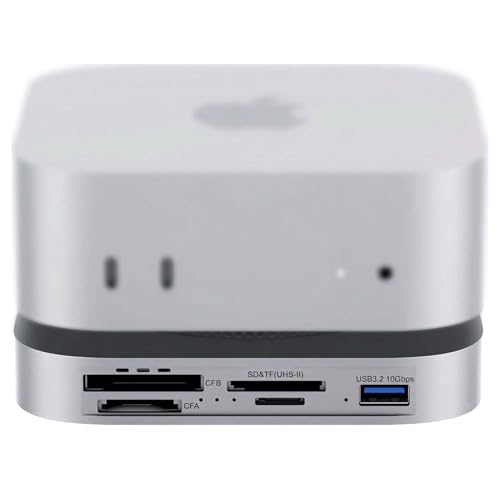
- 80Gbps USB4 2.0 with Thunderbolt 5/4 support
- Built-in PCIe 4.0 NVMe slot up to 7000MB/s
- CFexpress Type-A/Type-B and UHS-II SD/microSD readers
Best For: Photographers and videographers who need fast storage expansion and direct card offload.
Best Budget
BENFEI Mac mini M4 Dock with NVMe Enclosure

- Includes an NVMe SSD enclosure for up to 8TB expansion
- Offers 10Gbps USB-C/USB-A plus extra USB 3.0 ports
- Adds 4K DisplayPort and SD/microSD card readers
Best For: Mac mini M4 Pro users who want fast storage expansion and a compact hub in one dock.
Best for Rear USB Expansion
Mac mini M4 Docking Station with 4 USB-A Ports

- Adds four rear USB-A data ports for daily peripherals
- Built-in power button access avoids lifting the Mac mini
- Aluminum stand includes anti-slip pads and cooling-friendly support
Best For: People who want a stable Mac mini stand with simple USB-A expansion.
Best for Speed & Storage
UGREEN Mac mini M4 Dock with NVMe & 4K144Hz

- M.2 NVMe enclosure for expandable fast storage
- 4K 144Hz DisplayPort for high-refresh monitors
- 10G USB-A/C, SD/TF, and audio in one dock
Best For: Power users who want storage expansion and strong display support in a compact dock.
Best Protective Dock Combo
5-in-1 Dock for Mac mini M4 Pro

- Silicone protective case and stand built in
- Three USB-A 3.0 ports for daily peripherals
- SD/TF card slots for quick media transfers
Best For: Mac mini M4 Pro users who want protection plus basic port expansion in one compact accessory.
Best for Expansion
UGREEN Mac mini M4 Dock & Stand with NVMe SSD

- Up to 8TB NVMe storage expansion
- 11-in-1 hub with USB-A, USB-C, and SD/TF
- 10Gbps speeds for fast file transfers
Best For: Users who want storage expansion and extra ports in one compact Mac mini dock.
Best for Dual Displays
IVANKY 13-in-1 Mac mini M4 Dock

- Dual 4K@144Hz extended display support
- Built-in M.2 NVMe SSD enclosure
- 10Gbps USB, SD/TF, and audio ports
Best For: Mac mini owners who want dual 4K external displays, extra storage, and a cleaner all-in-one desktop setup.
Best for All-in-One Expansion

- Up to 8TB SSD enclosure for major storage expansion
- 10Gbps USB-C/USB-A plus SD/TF card readers
- HDMI 2.1 supports up to 4K@144Hz
Best For: Creators and Mac mini M4 Pro users who want storage, ports, and stand-style organization in one dock.
Best Simple Pick
iVANKY 13-in-1 Mac mini M4 Dock

- 10Gbps USB-A/USB-C and SD/TF 4.0 for faster transfers
- Built-in M.2 SSD enclosure supports up to 8TB
- 4K@144Hz HDMI plus 20W PD adapter for stable use
Best For: Mac mini M4 Pro owners who want a dock with built-in storage expansion and high-speed I/O.
Best for Storage Expansion – Mac Mini M4 Dock with 8TB SSD Enclosure
If you want one of the more versatile mac mini docking stations for m4 pro, this aluminum stand combines a hub, stand, and SSD enclosure in a single desktop footprint. It adds useful port expansion plus built-in storage support, making it a strong fit for users who want to clean up cables and add fast external storage at the same time.
Best For: Mac mini M4 Pro owners who want a dock with integrated M.2 storage expansion, 4K HDMI output, and extra USB ports.
Pros:
- Built-in M.2 NVMe/SATA enclosure supports up to 8TB for extra storage
- 4K@60Hz HDMI plus 10Gbps USB-A/USB-C ports for flexible connectivity
- Acts as both a stand and dock, helping keep the Mac mini setup compact
Cons:
- Only one HDMI output, so it supports a single external display
- May need the rear USB-C power connection when using SSDs to avoid disconnects
- More specialized than a basic hub if you do not need storage expansion
Among mac mini docking stations for m4 pro, this model stands out most for users who value built-in SSD expansion over minimalism. If storage growth and a tidy all-in-one desktop dock are priorities, it offers a practical balance of functionality and convenience.
Best for Pro Media Workflows – 80Gbps Mac mini M4 Pro Dock
If you want one of the most capability-packed mac mini docking stations for m4 pro, this 80Gbps dock is built for creators who move a lot of media. It combines USB4 2.0 speed, an internal NVMe slot, and multiple card readers in a compact aluminum design, making it a strong fit for heavy offloads, edits, and desk cleanup.
Best For: Photographers, videographers, and power users who need fast storage expansion plus built-in CFexpress and SD card access.
Pros:
- 80Gbps USB4 2.0 support with Thunderbolt 5/4 compatibility for high-speed transfers
- Built-in PCIe 4.0 NVMe slot rated up to 7000MB/s for fast local storage
- Dedicated CFexpress Type-A/Type-B and UHS-II SD/microSD readers for media workflows
- Dual PWM fans and auxiliary power help maintain performance during long transfers
Cons:
- More expensive and specialized than basic docking stations
- Full-speed performance depends on the host port, SSD, and inserted cards
- May be overkill if you only need a few USB ports and display connectivity
For buyers comparing mac mini docking stations for m4 pro, this model stands out for its media-centric port mix and serious storage expansion. It is less about general office convenience and more about turning the Mac mini into a compact offload and editing hub.
Best Budget – BENFEI Mac mini M4 Dock with NVMe Enclosure
If you want one of the more capable mac mini docking stations for m4 pro, this BENFEI dock adds useful desk-side expansion without taking up much space. It combines an NVMe SSD enclosure, DisplayPort output, fast USB ports, and card readers, making it a practical all-in-one add-on for storage, peripherals, and display hookup.
Best For: Mac mini M4 Pro users who want to add fast external storage and a compact hub in one accessory.
Pros:
- Built-in NVMe enclosure supports M.2 SSDs up to 8TB for major storage expansion
- 10Gbps USB-C and USB-A plus additional USB 3.0 ports handle everyday peripherals well
- 4K DisplayPort output and SD/microSD readers make it useful for mixed work setups
Cons:
- SSD is not included, so total cost rises if you need storage right away
- DisplayPort tops out at 4K/30Hz, which may be limiting for some monitor users
For buyers comparing mac mini docking stations for m4 pro, this one stands out most for storage-first setups rather than pure port count. It is a strong fit if you want to clean up your desk and add fast local storage in the same footprint.
Best for Rear USB Expansion – Mac mini M4 Docking Station with 4 USB-A Ports
If you want one of the more practical mac mini docking stations for m4 pro, this VOOPII KM28-Pro is built around everyday expansion rather than flashy extras. It acts as a sturdy aluminum stand while adding four rear USB-A data ports, making it a simple way to clean up your desk and keep frequently used peripherals within easy reach.
Best For: Users who want a stable Mac mini stand with extra USB-A ports for keyboards, mice, flash drives, and external storage.
Pros:
- Four rear USB-A data ports for fast, convenient peripheral expansion
- Integrated power button groove lets you start the Mac mini without lifting it
- Aluminum stand design supports airflow and adds a tidy desktop footprint
- Anti-slip silicone pads help keep the Mac mini secure and scratch-free
Cons:
- No USB-C, SD, or audio ports for broader connectivity needs
- Best suited to users who mainly need USB-A expansion rather than a full hub
- Designed for horizontal placement, so it may not fit every desk setup
For buyers comparing mac mini docking stations for m4 pro, this model stands out for its straightforward utility: solid support, easy access to the power button, and just enough extra ports to simplify a compact setup. It is a good fit if you want a cleaner workspace without adding unnecessary complexity.
Best for Speed & Storage – UGREEN Mac mini M4 Dock with NVMe & 4K144Hz
If you want one of the most feature-packed mac mini docking stations for m4 pro, this UGREEN dock-and-stand combo is built for users who need fast expansion, display support, and extra storage in a single footprint. It adds an M.2 NVMe SSD enclosure, 4K/144Hz DisplayPort output, 10G USB-A/C ports, SD/TF card slots, and audio access while keeping the Mac mini neatly elevated.
Best For: Power users who want a dock with high-speed ports, monitor output, and built-in SSD expansion for a cleaner M4 Pro desktop setup.
Pros:
- Built-in M.2 NVMe enclosure adds fast local storage expansion
- 4K 144Hz DisplayPort suits high-refresh external monitor setups
- 10G USB-A and USB-C ports cover fast peripherals and accessories
- SD/TF card readers and audio jack improve everyday convenience
Cons:
- NVMe SSD is not included, so total cost can rise quickly
- DisplayPort-focused output may not suit every monitor setup
- More features mean more complexity than a basic hub
As far as mac mini docking stations for m4 pro go, this is a strong pick if you care about performance, storage expansion, and desk organization in one accessory. It is especially appealing for creators and professionals who want a more capable workstation without adding a full-size dock.
Best Protective Dock Combo – 5-in-1 Dock for Mac mini M4 Pro
If you want one of the more practical mac mini docking stations for m4 pro, this 5-in-1 option stands out for combining basic expansion with a silicone protective case and stand. It adds three USB-A 3.0 ports plus SD/TF card slots, while keeping the Mac mini housed in a more desk-friendly setup.
Best For: Mac mini M4 Pro owners who want a simple dock, card reader, and protective stand in one compact accessory.
Pros:
- Built-in silicone case helps protect and stabilize the Mac mini
- Three USB-A 3.0 ports cover everyday peripherals and accessories
- SD and TF card slots are useful for quick media transfers
- 5Gbps transfer speeds are fine for routine file movement
Cons:
- No HDMI, Ethernet, or high-speed USB-C expansion
- Not ideal if you need a full-featured workstation dock
- Silicone-and-plastic design is more functional than premium-looking
For buyers comparing mac mini docking stations for m4 pro, this is a straightforward choice if you value protection and everyday port expansion over advanced connectivity. It makes the most sense for light desk setups, media workflows, and anyone who wants a tidy all-in-one mount.
Best for Expansion – UGREEN Mac mini M4 Dock & Stand with NVMe SSD
If you want one of the most versatile mac mini docking stations for m4 pro, this UGREEN dock adds both high-speed ports and internal NVMe storage without making your desk feel crowded. It’s a strong fit for users who need fast file access, extra USB connectivity, and a clean stand-style layout for the Mac mini M4 or M4 Pro.
Best For: Creators, power users, and home-office setups that need expandable storage plus extra USB ports in one compact dock.
Pros:
- Built-in NVMe enclosure supports up to 8TB of fast local storage.
- 11-in-1 layout adds multiple USB-A, USB-C, and SD/TF connections.
- 10Gbps transfer speeds are useful for large media files and backups.
- Short cable and stand design help keep the setup tidy.
Cons:
- SSD is not included, so total cost is higher if you need storage.
- Full multi-device use may require an external power adapter.
For buyers comparing mac mini docking stations for m4 pro, this model stands out because it combines storage expansion and everyday connectivity in a single, well-matched accessory. It’s especially appealing if you want a dock that does more than just add ports.
Best for Dual Displays – IVANKY 13-in-1 Mac mini M4 Dock
If you want one of the more feature-packed mac mini docking stations for m4 pro, this IVANKY dock is built around dual-display productivity and desktop expansion. It adds two HDMI outputs, a built-in M.2 NVMe SSD enclosure, multiple 10Gbps USB ports, SD/TF slots, and audio jacks, so it can turn a Mac mini into a more capable workstation without a pile of separate adapters.
Best For: Mac mini owners who want dual 4K external displays, extra storage, and a cleaner all-in-one desktop setup.
Pros:
- Supports dual 4K@144Hz extended displays for a high-refresh workstation setup
- Includes an M.2 NVMe SSD enclosure for fast local storage expansion
- Offers 10Gbps USB ports, SD/TF slots, and dual audio outputs
- Acts as a stand and dock in one, helping reduce cable clutter
Cons:
- Best value only if you’ll actually use the display and storage features
- May be more dock than casual users need for basic peripherals
For buyers comparing mac mini docking stations for m4 pro, this model stands out when your priority is replacing a full desktop hub with one compact unit. It’s a strong fit for users who want expandability now and room to grow later, especially in dual-monitor setups.
Best for All-in-One Expansion – Acer Gadget Mac mini M4 Dock
If you want one of the more fully loaded mac mini docking stations for m4 pro, this Acer Gadget dock packs storage expansion, fast I/O, and display support into a single aluminum stand. It’s built for users who want to add internal-style SSD capacity, keep cables tidy, and make everyday access to cards and ports much easier.
Best For: Creators, power users, and Mac mini M4 Pro owners who want a dock with built-in SSD enclosure and extra front-facing connectivity.
Pros:
- Supports up to 8TB M.2 NVMe or SATA SSDs for major storage expansion
- Includes 10Gbps USB-C and USB-A ports plus SD/TF card readers for quick transfers
- HDMI 2.1 output supports up to 4K@144Hz for high-refresh workflows
- Elevated aluminum design improves airflow and keeps the setup cleaner
Cons:
- SSD is not included, so total cost rises once storage is added
- Full 4K@144Hz performance depends on your monitor and cable
- Requires the included 5V/3A power adapter for stable operation
As a dock-first expansion station, this is a strong fit for mac mini docking stations for m4 pro buyers who want more than just extra USB ports. The added SSD bay makes it especially appealing for media work, backups, and desktop setups that need both speed and organization.
Best Simple Pick – iVANKY 13-in-1 Mac mini M4 Dock
If you want one of the most feature-packed mac mini docking stations for m4 pro, this iVANKY 13-in-1 stand is built around speed, storage, and a cleaner desk setup. It adds a 10Gbps M.2 SSD enclosure, faster USB and card-reader ports, and 4K display support, making it a practical hub for creators and power users.
Best For: Users who want to expand storage and add lots of high-speed ports to a Mac mini M4 Pro workstation.
Pros:
- 13-in-1 layout with 10Gbps USB-A/USB-C, SD/TF 4.0, audio, and HDMI
- Built-in M.2 NVMe/SATA SSD enclosure supports up to 8TB storage
- 4K@144Hz HDMI is a strong fit for high-refresh productivity or gaming
- Includes a 20W PD adapter for more stable performance with multiple devices
Cons:
- SSD is not included, so total cost can rise quickly
- Best suited to users who will actually use the extra ports and storage bay
- Bulkier than a simple hub-only dock
For buyers comparing mac mini docking stations for m4 pro, this model stands out when storage expansion matters as much as connectivity. It’s not the smallest option, but it delivers a lot of functionality in one dock.
How We Picked the Best Mac Mini Docking Stations for M4 Pro
We prioritized docks that match the Mac mini M4 Pro’s strengths: high-speed data, modern video outputs, practical front-access ports, and built-in NVMe expansion. We also looked for sturdy aluminum construction, sensible cooling, and clear support for the most useful workflows, from creative work to general productivity.
Quick Comparison
When comparing Mac Mini Docking Stations for M4 Pro, the biggest differences usually come down to storage type, port mix, and display capability. Some models emphasize NVMe SSD expansion for fast local storage, while others focus on more USB-A ports, card readers, or dual-display output. If you need one cable convenience, prioritize the ports you will use most often rather than the longest spec sheet.
Key Buying Factors for Mac Mini Docking Stations for M4 Pro
Storage Expansion
Choose a dock with an M.2 NVMe enclosure if you want fast external storage for apps, media libraries, and active project files. Check whether the enclosure supports NVMe only or also SATA, and confirm the maximum capacity if you plan to upgrade later.
Display Support
If you use more than one monitor, verify the dock’s display outputs and refresh-rate claims. Many buyers want 4K at higher refresh rates for smoother editing or everyday use, but the actual setup still depends on your Mac, monitor, cable quality, and the dock’s interface.
Port Mix and Speed
Look for enough USB-A and USB-C ports for peripherals, plus SD or microSD support if you transfer photos or video. For external drives and accessories, 10Gbps ports are usually the sweet spot for most users.
Build and Thermals
Because these docks often act as both a stand and a hub, solid aluminum construction helps with durability and heat management. A cooler-running dock is especially useful if you keep an SSD installed full-time.
Who Should Buy Which Mac Mini Docking Stations for M4 Pro?
If you mainly want simple extra ports, a compact stand dock with USB-A expansion may be enough. If you work with large files, choose one of the Mac Mini Docking Stations for M4 Pro with NVMe storage and faster data connections. Creative users and multitaskers should lean toward models with stronger display support, card readers, and more overall I/O. For the cleanest desk setup, pick a dock that combines stand, hub, and storage in one unit so you can reduce cable clutter and keep everything within reach.