A Mac mini dock with an NVMe enclosure can add SSD storage without leaving a separate drive on your desk. The right one can also put frequently used ports within easy reach.
These 10 options cover compact stands, dual-drive docks, display-focused hubs, and a 40Gbps model. The best fit depends on your Mac mini, your SSD, and the connections you actually use.
Best 10 Mac Mini Docking Stations with Nvme Enclosure Picks for 2026
Best for HDMI Displays
RayCue Dock with NVMe/SATA Storage

- 4K/60Hz HDMI for one display
- Up to 8TB NVMe or SATA SSD support
- 10Gbps USB-A and USB-C data ports
Best For: SSD expansion alongside one HDMI monitor
Best Compact Fit

- Up to 4TB M.2 NVMe storage
- Front USB-A ports and UHS-II SD reader
- Vented aluminum stand
Best For: Compact storage expansion with front-facing ports
Best for Audio and Cards
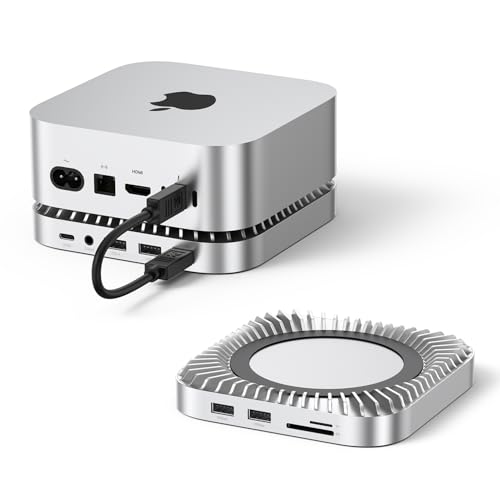
- Supports up to 8TB M.2 NVMe SSDs
- 10Gbps USB-A and USB-C data ports
- SD/TF readers and 3.5mm audio
Best For: Storage-heavy desks needing cards and audio
Best for USB Expansion

- Up to 8TB M.2 NVMe support
- Seven listed USB data ports
- Power-button lever and short cable
Best For: Multiple USB peripherals plus NVMe storage
Best for High-Refresh Display

- DisplayPort up to 4K/144Hz on M4 or 4K/240Hz on M4 Pro
- Single NVMe slot supports up to 8TB; SSD sold separately
- 10Gbps data ports plus SD/TF and audio
Best For: High-refresh DisplayPort setups with added NVMe storage
Best for Dual-Drive Storage
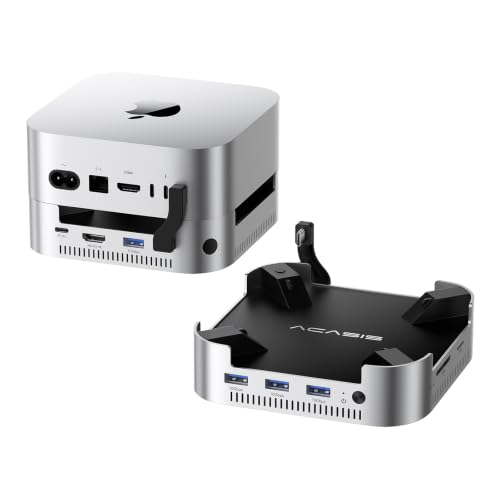
- Two NVMe bays; up to 16TB in RAID 0
- Includes 65W adapter and dual cooling fans
- 4K/60Hz HDMI, USB-A, and SD/TF slots
Best For: Two-drive Mac mini storage expansion
Best All-in-One Port Mix

- 8TB NVMe bay; SSD not included
- DisplayPort up to 4K/144Hz plus 4K/60Hz HDMI
- USB, SD/microSD, and audio in one dock
Best For: Combining NVMe storage with varied display and peripheral ports
Best Everyday Stand
Stouchi Mac mini Dock with SSD Enclosure

- NVMe or SATA M.2 bay, up to 8TB
- 10Gbps USB-A, HDMI, card readers, and audio
- Integrated power-button access
Best For: All-in-one desk setups with convenient power access
Best Dual-Drive Option

- Two NVMe/SATA M.2 bays, up to 8TB each
- RAID modes and offline cloning
- Gigabit Ethernet and broad port selection
Best For: Dual-drive storage and cloning workflows
Best High-Speed Display Dock

- 40Gbps NVMe bay; SATA unsupported
- Two 4K@60Hz HDMI outputs
- Fan and thermal pads for SSD cooling
Best For: Fast NVMe storage and dual-display setups
Best for HDMI Displays – RayCue Dock with NVMe/SATA Storage
Among mac mini docking stations with nvme enclosure, this RayCue stand is a practical pick if you also need an HDMI connection. Its built-in M.2 enclosure accepts NVMe or SATA SSDs up to 8TB, while the single HDMI port supports up to 4K at 60Hz.
Best For: Mac mini owners who want SSD expansion and one external HDMI display from the same dock.
Pros:
- Supports M.2 NVMe and SATA SSDs in 2230, 2242, 2260, and 2280 sizes.
- Provides 10Gbps USB-A and USB-C data ports, plus two 5Gbps USB-A ports.
- Includes SD/TF readers, audio, and 4K/60Hz HDMI output.
Cons:
- Its one HDMI port supports only one external monitor.
- The manufacturer advises connecting the dock’s additional USB-C power input when using drives to help prevent disconnects.
Choose this model when HDMI and NVMe/SATA flexibility matter more than a minimal port selection; plan for supplemental power if your storage setup needs it.
Best Compact Fit – Satechi Mac mini Hub & Stand
If you prefer mac mini docking stations with nvme enclosure that keep everyday connections at the front, the Satechi hub offers a streamlined option. It supports an M.2 NVMe SSD up to 4TB and adds USB-A ports and a UHS-II SD reader in a 5-inch-square aluminum stand.
Best For: Mac mini users prioritizing accessible USB-A ports, SD transfers, and a compact stand.
Pros:
- Two front USB-A ports support up to 10Gbps; the UHS-II SD reader supports up to 312MB/s.
- Recessed top and bottom vents are designed to preserve airflow around the Mac mini.
- Includes an SSD installation screw, screwdriver, and thermal pad, plus a two-year limited warranty.
Cons:
- SSD is not included; heatsink-equipped and double-sided SSDs are incompatible.
- Only one bus-powered device should be connected at a time, and the USB-A ports do not charge iPads.
This is a focused storage-and-peripherals stand rather than a broad display dock. Check SSD compatibility and peripheral power needs before buying.
Best for Audio and Cards – RayCue 8TB NVMe Dock
For shoppers comparing mac mini docking stations with nvme enclosure, this RayCue stand emphasizes storage and desktop peripherals. It supports up to 8TB of M.2 NVMe storage and combines USB data ports, SD/TF readers, and a 3.5mm audio jack.
Best For: Mac mini setups that need high-capacity NVMe storage, card access, and an audio connection.
Pros:
- Accepts 2230, 2242, 2260, and 2280 NVMe SSDs, with up to 10Gbps transfer speeds.
- Offers two 10Gbps USB-A ports, one 10Gbps USB-C data port, and two additional 5Gbps USB-A ports.
- Includes SD/TF readers, a 3.5mm audio jack, and bottom ventilation.
Cons:
- SSD is not included.
- No display output is listed in the supplied ports.
Its mix of storage, audio, and card access suits a peripheral-heavy desk. If the dock also needs to connect a monitor, look for a model with a specified video output.
Best for USB Expansion – UGREEN Mac mini Dock & Stand
Among mac mini docking stations with nvme enclosure, this UGREEN model stands out for its selection of USB data ports. It supports M.2 NVMe SSDs up to 8TB and provides three 10Gbps USB-A ports, two 5Gbps USB-A ports, two 10Gbps USB-C ports, and SD/TF card access.
Best For: Mac mini users connecting several USB peripherals while adding NVMe storage.
Pros:
- Supports 2230, 2242, 2260, and 2280 NVMe SSDs up to 8TB.
- Provides seven listed USB data ports and UHS-I SD/TF readers.
- Includes a power-button lever, anti-slip pads, and a short 4cm cable.
Cons:
- SSD is not included.
- An external power adapter is recommended for multi-device setups.
This is the port-rich choice for a busy desk. The supplied notes are inconsistent about HDMI, so verify display-output support with the seller if it is essential to your setup.
Best for High-Refresh Display – UGREEN Mac mini DP Dock
Among mac mini docking stations with nvme enclosure options, this UGREEN dock stands out for its DisplayPort output: the listing specifies up to 4K at 144Hz with an M4 Mac mini or 4K at 240Hz with an M4 Pro. It also adds a single M.2 NVMe slot without putting a separate enclosure on your desk.
Best For: Mac mini users who want a high-refresh DisplayPort connection alongside expandable local storage.
Pros:
- Supports 2230, 2242, 2260, and 2280 NVMe SSDs up to 8TB.
- Includes 10Gbps USB-A/USB-C data ports, SD/TF slots, and audio.
- Power-button lever lets you turn on the Mac mini without lifting it.
Cons:
- SSD is not included.
- For an additional screen, you must also use a port on the Mac mini.
Choose this one primarily for its stated DisplayPort refresh rates and convenient port layout. Check your Mac mini model before buying, since the advertised maximum refresh rate differs between M4 and M4 Pro.
Best for Dual-Drive Storage – ACASIS 2-Bay Mac mini Dock
If storage capacity is your priority among mac mini docking stations with nvme enclosure designs, the ACASIS dock accommodates two NVMe SSDs. Its listing specifies up to 16TB in RAID 0 mode, with an included 65W adapter to power the dock.
Best For: Mac mini owners who need two NVMe drive bays and a powered hub for their peripherals.
Pros:
- Two NVMe bays support up to 16TB in RAID 0, according to the listing.
- Offers 4K at 60Hz HDMI, 10Gbps USB-A ports, and SD/TF slots.
- Includes a power adapter, setup accessories, and dual cooling fans.
Cons:
- Do not insert or remove SSDs while the dock is powered on.
- The listed fans operate at approximately 52dB, which may be noticeable in a quiet room.
The second drive bay is the main reason to pick this dock over a single-slot model. Its published transfer figures depend on the selected drive mode, so choose the configuration that fits your storage needs rather than assuming the same speed in every mode.
Best All-in-One Port Mix – 4URPC 13-in-1 Mac mini Dock
The 4URPC dock is a broad-connectivity choice among mac mini docking stations with nvme enclosure options. Its 13-in-1 design combines an M.2 NVMe bay with DisplayPort, HDMI, USB ports, card slots, and audio in a stand-sized accessory.
Best For: Mac mini users who want storage expansion and both DisplayPort and HDMI connections in one dock.
Pros:
- Supports up to 8TB with 2230, 2242, 2260, or 2280 NVMe SSDs.
- Provides DisplayPort up to 4K at 144Hz and HDMI up to 4K at 60Hz, per the listing.
- Adds SD/microSD slots, USB-A and USB-C ports, and a 3.5mm audio jack.
Cons:
- SSD is not included, and SATA SSDs are not supported.
- The USB-C port and two of the USB-A ports are USB 2.0 rather than 10Gbps data ports.
This model makes sense when consolidating several accessories matters more than maximizing the speed of every port. Check which USB connection you plan to use for fast transfers, and use the Mac mini’s own video outputs if you need further display connections.
Best Everyday Stand – Stouchi Mac mini Dock with SSD Enclosure
Among mac mini docking stations with nvme enclosure, the Stouchi is a practical pick if you want storage and everyday ports in a stand that also makes the Mac mini’s underside power button easier to reach. Its M.2 bay supports NVMe or SATA SSDs up to 8TB; the SSD is sold separately.
Best For: Mac mini owners who want a compact, all-in-one stand with accessible power control.
Pros:
- Supports 2230, 2242, 2260, and 2280 NVMe or SATA SSDs at up to 10Gbps.
- Includes two 10Gbps USB-A ports, two USB 2.0 ports, SD/TF readers, 4K@60Hz HDMI, and audio.
- Integrated power button, vented elevation, and locking anchors add day-to-day convenience.
Cons:
- SSD is not included.
- Storage connection is limited to 10Gbps rather than 40Gbps.
Choose this over a more specialized dock when desk organization and easy access matter more than maximum SSD throughput.
Best Dual-Drive Option – ORICO Mac mini Dock with RAID
The ORICO stands out among mac mini docking stations with nvme enclosure for its two M.2 slots and hardware RAID 0, RAID 1, and OM modes. Each slot supports a compatible NVMe or SATA SSD up to 8TB, making this a versatile expansion hub if you also need Ethernet and card readers.
Best For: Users who want two SSD bays, RAID options, or drive-to-drive offline cloning.
Pros:
- Two M.2 bays support 2230, 2242, 2260, and 2280 drives.
- Offers RAID modes and offline SSD cloning without a computer.
- Adds Gigabit Ethernet, USB-A and USB-C ports, HDMI, audio, and SD/TF readers.
- Aluminum housing has side vents and a fan that activates at 50°C.
Cons:
- When NVMe and SATA drives are used together, the notes say only Slot 1 is recognized.
- Manufacturer warranty is one year.
The dual-bay features make this a stronger fit for storage-heavy workflows than a basic single-drive stand, but check the drive-protocol limitation before planning a mixed-SSD setup.
Best High-Speed Display Dock – ANYOYO 40Gbps Mac mini Dock
If SSD throughput and screen space top your list of mac mini docking stations with nvme enclosure, the ANYOYO pairs a 40Gbps NVMe bay with two HDMI outputs rated for 4K@60Hz. It is designed to sit beneath compatible Mac mini M4, M4 Pro, and M6 models.
Best For: Mac mini users prioritizing fast NVMe storage and two external displays from the dock.
Pros:
- 40Gbps NVMe enclosure supports 2230 through 2280 SSDs up to 8TB, with claimed speeds up to 2800MB/s.
- Two HDMI outputs support two 4K@60Hz displays.
- Built-in fan and thermal pads are intended to manage SSD heat during sustained work.
- Provides high-speed USB-A ports alongside USB 2.0 connections for peripherals.
Cons:
- The M.2 bay does not support SATA SSDs.
- Its supplied port details are inconsistent about the total USB-port count, so verify the exact layout before buying.
This is the speed-focused choice of the three, especially for a dual-monitor desk; just make sure your intended SSD is NVMe and confirm the ports you need.
How We Picked the Best Mac Mini Docking Stations with Nvme Enclosure
We focused on docks that combine Mac mini connectivity with an M.2 SSD enclosure. The selection spans straightforward stand-and-hub designs, dual-drive models, a display-focused option, and a 40Gbps dock. We also looked for meaningful differences in advertised port speeds, drive support, and fit across Mac mini generations. Treat manufacturer specifications as a starting point: confirm the exact model’s compatibility and included accessories before ordering.
Quick Comparison
For a tidy, single-drive setup, start with the Satechi, UGREEN stand-and-dock, Stouchi, or RayCue stand models. If you need two installed SSDs, compare the ACASIS and ORICO docks, paying particular attention to which drive types each slot accepts. The UGREEN DP hub is the display-focused choice on this list, while the ANYOYO 40Gbps dock is worth considering when a higher-bandwidth connection matters. The 4URPC and RayCue 8TB-listed options merit a closer look if advertised storage capacity is your priority; verify whether that figure describes supported capacity rather than an included SSD.
Key Buying Factors for Mac Mini Docking Stations with Nvme Enclosure
Mac and Physical Fit
Check your exact Mac mini model and year against the dock listing. A dock shaped to sit beneath one chassis may not fit another, even if its cable connects. Also check whether the stand obstructs the Mac mini’s vents, power button, or ports in your preferred orientation.
SSD Compatibility and Speed
M.2 describes the drive’s shape, not its protocol. Some enclosures take NVMe only; others also accept SATA M.2 drives. Confirm the supported drive lengths, maximum stated capacity, and whether an SSD is included. Advertised USB speeds such as 10Gbps or 40Gbps describe the connection’s ceiling, not guaranteed file-transfer rates. The host port, installed SSD, enclosure controller, and other devices sharing bandwidth all affect real-world performance.
Ports, Displays, and Power
Choose ports around your existing gear: USB-A for older accessories, USB-C for newer devices, and the appropriate display output if you need an external monitor. Verify claimed resolution and refresh rate against your Mac, display, and cable. A USB-C charging port on a dock does not necessarily power the Mac mini; check its stated purpose. Finally, see whether the dock requires a separate power adapter, particularly when running multiple drives or accessories.
Who Should Buy Which Mac Mini Docking Stations with Nvme Enclosure?
Choose a single-drive stand if you mainly want cleaner cabling and accessible ports. Pick a dual-bay dock if keeping two SSDs installed is more useful than a smaller footprint. Look at the UGREEN DP model for a setup centered on its advertised DisplayPort output, or compare the ANYOYO 40Gbps model if transfer bandwidth is your main concern. If you already own an M.2 SATA SSD, narrow the field to listings that explicitly support SATA; NVMe-only enclosures will not make use of that drive.