If you want more ports, faster storage, and better heat management, the right dock can turn your Mac mini into a more capable desktop hub.
These picks focus on practical performance: strong connectivity, SSD expansion, and cooling that helps keep things running smoothly during long work sessions.
Best 10 Mac Mini Docking Stations with Cooling Fan Picks for 2026
Best for Power Users
80Gbps Mac mini Dock with NVMe & Fans
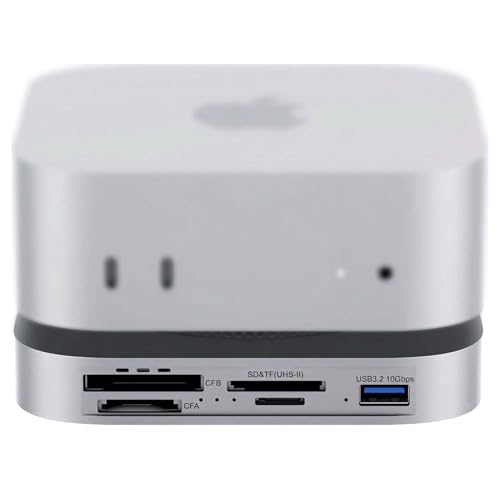
- 80Gbps USB4 2.0 with Thunderbolt 5/4 support
- PCIe 4.0 NVMe slot for fast internal storage expansion
- Dual CFexpress and UHS-II card readers for creators
Best For: Mac mini users who need maximum speed, storage expansion, and pro media card support.
Best Budget
13-in-1 USB4 Dock with NVMe & Expansion Bays

- Four modular expansion bays for custom workflows
- Built-in NVMe slot for fast local storage
- 2.5Gb Ethernet and DisplayPort 1.4 for pro setups
Best For: Mac mini users who want a highly configurable dock with storage expansion and multiple high-speed connections.
Best for Extreme Cooling
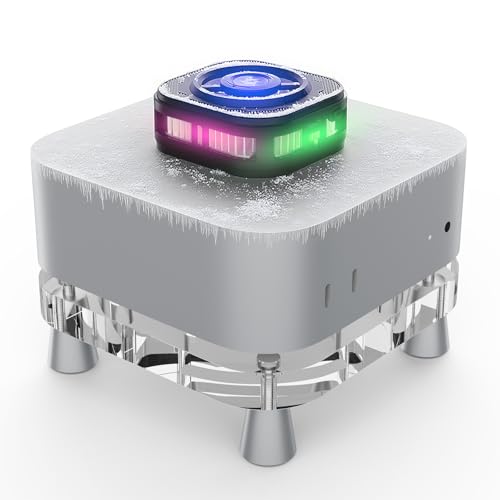
- TEC semiconductor cooling for strong heat reduction
- 7-blade fan and alloy fins for fast dissipation
- Quiet operation under 25dB with RGB display
Best For: Mac mini owners who need the most aggressive active cooling for long, demanding sessions.
Best for Heavy Storage Workflows
ANYOYO Mac mini M4 Dock with 8TB SSD

- 40Gbps NVMe enclosure with up to 8TB support
- Silent active cooling helps prevent SSD throttling
- Dual 4K HDMI and 6 USB ports for busy setups
Best For: Mac mini M4/M4 Pro users who need fast SSD expansion, cooling, and multi-display support.
Best Docking Hub for M1/M2
Satechi Mac mini Hub & Stand with SSD

- Adds NVMe/SATA M.2 storage in a compact stand
- Includes USB-C, USB-A, SD/microSD, and audio ports
- Vented aluminum design supports better airflow
Best For: M1/M2 Mac mini owners who want storage expansion and a cleaner desktop setup.
Best for High-Refresh Setups
IVANKY 13-in-1 Mac mini M4 Dock

- 4K@144Hz HDMI for smooth external display performance
- Built-in M.2 NVMe enclosure supports up to 8TB storage
- Top-vent design improves airflow around the Mac mini
Best For: Creators and power users who want fast displays, storage expansion, and a cooling-focused dock.
Best for All-in-One Displays

- 80Gbps M.2 NVMe enclosure with cooling fan
- Built-in 5-inch HD display for quick info
- 8K@60Hz DisplayPort plus USB, SD, and microSD
Best For: Mac mini users who want a single dock that combines storage, cooling, ports, and a display.
Best for Thunderbolt Expansion
Mini Dock Station 8-in-1 USB4 Hub

- Built-in NVMe M.2 enclosure for fast local storage
- Thunderbolt 3/4 and USB-C compatibility for Mac/Windows
- Dual-display and daisy-chain support for a fuller workstation
Best For: Users who want a dock with storage expansion, display output, and broad Thunderbolt compatibility.
Best for High-Speed Expansion
Mini Portable Thunderbolt 3 Dock 8-in-1 with NVMe
- NVMe slot supports fast external storage expansion
- DisplayPort 1.4 handles high-res and dual-display setups
- Three 10Gbps USB ports plus 1Gb Ethernet
Best For: Users who want a compact Thunderbolt dock with fast storage expansion and strong display support.
Best for Power Users – 80Gbps Mac mini Dock with NVMe & Fans
If you want one of the most feature-packed mac mini docking stations with cooling fan, this 80Gbps dock is built for heavy creative workflows, fast storage expansion, and constant media offloading. It pairs a Mac mini M4 or M4 Pro with an NVMe slot, pro card readers, and active cooling in a compact aluminum design.
Best For: Mac mini owners who need top-end bandwidth, internal SSD expansion, and built-in CFexpress/SD card support for photo or video work.
Pros:
- 80Gbps USB4 2.0 design with Thunderbolt 5/4 compatibility for high-speed transfers
- Built-in PCIe 4.0 NVMe slot supports fast storage expansion up to 7000MB/s
- Dual CFexpress Type-A/Type-B plus UHS-II SD and microSD readers suit pro workflows
- Dual PWM cooling fans help manage heat during sustained transfers and SSD use
Cons:
- Premium feature set makes it more expensive than basic docks
- Best performance depends on a compatible high-speed SSD and host port
- May be overkill if you only need a simple port expansion dock
For buyers comparing mac mini docking stations with cooling fan, this model stands out for combining serious expansion, active airflow, and creator-focused media slots in one dock. It is especially compelling if your Mac mini doubles as a desktop ingest station or external SSD hub.
Best for Triple-Display Power – Anker Prime Docking Station DL7400
If you want one of the most fully loaded mac mini docking stations with cooling fan, the Anker Prime Docking Station is built for desk-heavy workflows that need lots of ports, strong charging, and reliable multi-monitor support. It pairs DisplayLink triple-4K output with a smart display and active cooling, making it a strong fit for users who prioritize performance and stability over simplicity.
Best For: Power users who need triple-monitor support, high-watt charging, and a cooled dock for a busy desktop setup.
Pros:
- Triple 4K 60Hz DisplayLink support is ideal for expansive workstation setups
- Built-in cooling fan and smart display help monitor performance and temperature
- Generous port selection includes USB-C, USB-A, HDMI, DisplayPort, Ethernet, and card slots
- Up to 140W upstream charging can handle demanding laptops and setups
Cons:
- Requires the latest DisplayLink driver to enable full monitor support
- Not a native Mac-first dock; compatibility is centered on Windows 10/11
- DRM streaming services may have playback limitations through DisplayLink
For buyers comparing mac mini docking stations with cooling fan, this Anker model stands out for sheer connectivity and thermal management, but it makes the most sense for users who can take advantage of its triple-display setup and are comfortable with DisplayLink requirements.
Best Budget – 13-in-1 USB4 Dock with NVMe & Expansion Bays
If you want one of the most expandable mac mini docking stations with cooling fan in a desktop-style setup, this 13-in-1 USB4 dock stands out for its modular bays, NVMe storage support, and strong port mix. It is a practical pick for creators and multitaskers who need fast transfers, extra displays, and room to customize the dock around their workflow.
Best For: Mac mini users who want a highly configurable dock with storage expansion, Ethernet, and dual-display support.
Pros:
- Four expansion bays let you tailor the dock with card-reader modules for your workflow.
- Built-in NVMe slot supports very fast storage expansion for large media files.
- 2.5Gb Ethernet, DisplayPort 1.4, and dual USB-C ports cover demanding desk setups.
- Works with Thunderbolt 3/4 and USB4 systems, including Mac and Windows laptops.
Cons:
- Expansion modules are sold separately, so the full setup costs more.
- USB-A ports are limited to USB 2.0 speeds.
- It is not a simple plug-and-play dock if you do not need modular customization.
This is a strong fit if you value flexibility over simplicity, especially in mac mini docking stations with cooling fan setups where storage, ports, and expansion matter more than a basic hub.
Best for Extreme Cooling – Mac mini Stand with Cooler
If you want one of the more aggressively cooled mac mini docking stations with cooling fan support, this Mac mini stand is built around TEC semiconductor refrigeration and a turbine fan to push temperatures down fast. It’s a practical pick for users who keep their Mac mini under sustained workloads and want a desktop mount that prioritizes cooling over minimalism.
Best For: Mac mini users who run heavy multitasking, creative apps, or long work sessions and want maximum cooling headroom.
Pros:
- TEC semiconductor cooling aims for very strong temperature reduction.
- 7-blade fan and alloy fins are designed for rapid heat dissipation.
- Quiet operation under 25dB keeps noise low for desk use.
- RGB display adds a more premium, high-tech look.
Cons:
- More specialized than a simple docking stand, so it may be overkill for light users.
- Bulky cooling hardware may take up more desk space than basic mounts.
- Best results depend on whether you actually need active cooling.
For buyers comparing mac mini docking stations with cooling fan features, this model stands out because it leans hard into active refrigeration rather than just airflow. That makes it a strong fit if temperature control is your top priority and you’re willing to trade some simplicity for more cooling performance.
Best for Heavy Storage Workflows – ANYOYO Mac mini M4 Dock with 8TB SSD
If you want one of the more capable mac mini docking stations with cooling fan, this ANYOYO dock is built for users who need fast external storage, extra ports, and steady performance under load. It combines a 40Gbps NVMe enclosure, dual 4K display support, and a silent fan to help keep speeds consistent during long editing or transfer sessions.
Best For: Mac mini M4/M4 Pro owners who want a high-speed dock with built-in SSD expansion and active cooling for creative or multitasking setups.
Pros:
- 40Gbps NVMe enclosure supports up to 8TB and claims up to 2800MB/s speeds
- Built-in silent cooling fan and thermal pads help reduce throttling
- Dual HDMI 4K@60Hz plus support for a triple-monitor workflow
- Four 10Gbps USB-A ports and two USB 2.0 ports cover most peripherals
Cons:
- SATA M.2 drives are not supported, so NVMe only
- 30W PD is useful for the dock, but it is not a full laptop charging solution
For buyers comparing mac mini docking stations with cooling fan, this model stands out more for storage expansion and thermal stability than for simplicity. It is a strong fit if your Mac mini doubles as a workstation and you value fast transfers, quiet cooling, and a cleaner all-in-one desk setup.
Best Docking Hub for M1/M2 – Satechi Mac mini Hub & Stand with SSD
If you want one of the more polished mac mini docking stations with cooling fan-like airflow benefits, this Satechi hub stand is a strong fit for M1 and M2 Mac mini users who also want extra storage. It adds a front-facing port layout, an SSD enclosure, and vented aluminum construction that helps manage heat during heavier workloads.
Best For: M1/M2 Mac mini owners who want a tidy desk setup, expandable SSD storage, and easy-access ports in one compact stand.
Pros:
- Built-in SSD enclosure supports NVMe and SATA M.2 drives up to 10Gbps
- Front-facing USB-C, USB-A, SD/microSD, and audio ports improve daily convenience
- Vented aluminum design helps airflow while matching the Mac mini aesthetic
Cons:
- Not compatible with Mac mini M4 models
- SSD is not included
- Not ideal if you need a true active fan rather than passive cooling design
For buyers comparing mac mini docking stations with cooling fan, this is a practical choice if you value thermal-friendly airflow, storage expansion, and a clean all-in-one footprint more than raw port count.
Best for High-Refresh Setups – IVANKY 13-in-1 Mac mini M4 Dock
If you want one of the more feature-packed mac mini docking stations with cooling fan support, this iVANKY dock is built for power users who need fast displays, extra storage, and plenty of ports in one compact stand. It adds a top-vent design to help airflow while expanding the Mac mini M4/M4 Pro into a much more capable desk hub.
Best For: Creators, multitaskers, and Mac mini owners who want dual-monitor support, NVMe expansion, and a cleaner all-in-one desk setup.
Pros:
- 13-in-1 layout with HDMI, USB-A, USB-C, SD/TF, audio, and more
- Supports 4K at 144Hz for smooth high-refresh external displays
- Built-in M.2 NVMe enclosure adds up to 8TB of extra storage
- Top-vent cooling-focused stand design helps maintain airflow
Cons:
- SSD is not included, so storage expansion costs extra
- Best high-refresh results depend on monitor compatibility and settings
- May be more dock than casual users need for a simple setup
Overall, this is a strong pick if you want mac mini docking stations with cooling fan-style airflow benefits plus serious expansion. It is especially appealing for users who value speed, dual-display potential, and integrated storage in a single dock.
Best for All-in-One Displays – M5 Retro Dock for Mac mini
If you want one of the more feature-packed mac mini docking stations with cooling fan, this retro-style dock combines storage expansion, extra ports, and a built-in 5-inch display in a single desktop hub. It is especially appealing for users who want cleaner cable management and faster NVMe storage without adding multiple separate accessories.
Best For: Mac mini owners who want a multifunction dock with SSD expansion, extra display output, and a built-in screen for everyday productivity.
Pros:
- 80Gbps M.2 NVMe enclosure with a cooling fan for high-speed storage expansion
- Built-in 5-inch HD display adds handy at-a-glance monitoring or secondary info
- Includes 8K@60Hz DisplayPort, SD/microSD readers, and multiple USB ports
- Space-saving design helps reduce desktop clutter around the Mac mini
Cons:
- Thunderbolt 5 top speeds depend on the right cable, port, and SSD
- 36W PD power is recommended for stable operation, adding another adapter
- Feature-rich design may be more than some simple setups need
For buyers comparing mac mini docking stations with cooling fan, this model stands out for mixing storage, cooling, and a built-in display into one tidy hub. It makes the most sense if you want an all-in-one desktop upgrade rather than just a basic port expander.
Best for Thunderbolt Expansion – Mini Dock Station 8-in-1 USB4 Hub
If you want one of the more capable mac mini docking stations with cooling fan alternatives for desk setups that need extra ports, fast storage, and display expansion, this Mini Dock Station is built around Thunderbolt 3/4 and USB4-style flexibility. It adds Ethernet, DisplayPort, USB-A, USB-C, and an NVMe enclosure in one compact unit, making it a strong pick for users who want a dock-plus-storage workflow.
Best For: Mac and Windows users who want a dock with built-in NVMe expansion, dual-display support, and daisy-chain capability for a cleaner workstation.
Pros:
- 8-in-1 design combines display, networking, USB, and NVMe expansion
- Supports fast NVMe storage transfers up to 2800 MB/s depending on the drive
- Dual-display output and Thunderbolt daisy-chaining improve workstation flexibility
- Works with Thunderbolt 3/4 and compatible USB-C hosts on Mac or Windows
Cons:
- The NVMe slot does not work in USB 3.1 mode
- 2.4GHz wireless peripherals may be affected by USB interference
- No actual cooling fan is listed, so it may not suit buyers specifically seeking active cooling
For buyers comparing mac mini docking stations with cooling fan, this model stands out more for its integrated NVMe enclosure and Thunderbolt expansion than for thermal management. It is a practical choice if your priority is adding storage and connectivity in a single compact dock.
Best for High-Speed Expansion – Mini Portable Thunderbolt 3 Dock 8-in-1 with NVMe
If you want one of the more capable mac mini docking stations with cooling fan-style airflow benefits from its compact desktop design, this Thunderbolt 3 dock is built for speed-heavy workflows. It combines DisplayPort 1.4, 1Gb Ethernet, multiple 10Gbps USB ports, and an NVMe slot, making it a strong pick for users who need fast external storage and a clean single-cable setup.
Best For: Mac mini or MacBook users who want high-speed expansion, NVMe storage, and flexible dual-display support in one dock.
Pros:
- Built-in NVMe slot supports very fast transfers, up to 2800MB/s depending on the drive.
- DisplayPort 1.4 enables high-resolution output, including 8K/60Hz or dual-display setups.
- Three 10Gbps USB ports and 1Gb Ethernet cover common workstation needs.
- Thunderbolt 3 daisy-chaining adds room for future peripherals.
Cons:
- Not all users will need the added cost of the NVMe expansion bay.
- Wireless 2.4GHz peripherals may be less reliable near the dock.
- NVMe slot functionality is limited in USB 3.1 mode.
Overall, this is a practical choice if you care more about performance, storage expansion, and display flexibility than a simple plug-and-play hub. Among mac mini docking stations with cooling fan considerations, it stands out for feature depth rather than minimalism.
How We Picked the Best Mac Mini Docking Stations with Cooling Fan
We looked for docks that balance expansion, cooling, and real-world usability. Priority went to models with solid port selection, fast SSD support, reliable display output, and built-in thermal management. We also favored designs that fit the Mac mini cleanly as a stand or desktop companion.
Quick Comparison
Some Mac Mini Docking Stations with Cooling Fan are built for storage-first users, while others are better for multi-display workflows or high-speed USB4/Thunderbolt setups. If you mainly need extra ports and a cooler running base, a simpler hub may be enough. If you want external SSD speed, multi-monitor support, and better airflow, choose a higher-bandwidth dock.
Key Buying Factors for Mac Mini Docking Stations with Cooling Fan
Cooling Design
Look for an active fan or semiconductor cooling system if your Mac mini sits under sustained workloads, especially when using NVMe storage or driving multiple displays. Better airflow can help maintain more consistent performance.
Connection Speed
USB4, Thunderbolt 4, and Thunderbolt 5 options offer the best bandwidth for fast peripherals and NVMe enclosures. If you only need basic accessories, USB-C may be enough, but it will limit expansion potential.
Storage Support
Many of the best Mac Mini Docking Stations with Cooling Fan include an M.2 NVMe slot, while some also support SATA. Check whether the enclosure supports your preferred drive type and the speed ceiling you actually need.
Display Output
If you use more than one monitor, confirm whether the dock supports dual or triple display output and at what resolution or refresh rate. DisplayLink models can be especially useful for flexible multi-monitor setups.
Port Mix and Power Delivery
Think about your daily devices: USB-A for older peripherals, USB-C for newer gear, SD or CFexpress readers for creators, and Ethernet for stable networking. Power delivery matters too if the dock is expected to charge connected accessories or a laptop-style setup.
Who Should Buy Which Mac Mini Docking Stations with Cooling Fan?
Choose a storage-focused dock if your priority is fast local files, project drives, or media libraries. Pick a multi-display dock if your workflow depends on several monitors and many peripherals. Go with a compact hub if you want a cleaner desk and only need moderate expansion. For power users, the best option is usually the one that combines fast NVMe support, strong cooling, and the ports you’ll use every day.