Mac mini setups work best when the right dock turns a compact computer into a full desktop command center. If you want easier access to USB, card readers, audio, and SSD expansion, front-port designs make daily use much simpler.
This roundup focuses on Mac mini docking stations with front ports that improve convenience, expand storage, and help keep your desk cleaner in 2026.
Best 10 Mac Mini Docking Stations with Front Ports Picks for 2026
Best for Storage Expansion
Mac mini M4 Dock with SSD Enclosure

- Built-in M.2 NVMe/SATA enclosure supports up to 8TB
- Front-facing 10Gbps USB-A and USB-C ports
- Includes 4K60 HDMI, SD/TF, and audio
Best For: Mac mini M4 and M4 Pro users who want front ports and expandable SSD storage.
Best for Creators
80Gbps Mac mini Dock with NVMe & Card Readers
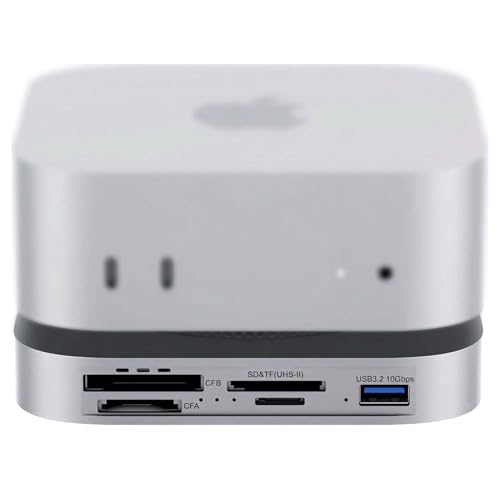
- 80Gbps USB4 2.0 with Thunderbolt 5/4 support
- Front NVMe slot and CFexpress/SD card readers
- Dual cooling fans and optional auxiliary power
Best For: Photographers and video editors who want fast front-facing storage and card access.
Best SSD-Expandability Pick
Satechi Mac mini Hub & Stand with SSD

- Adds front-facing USB, card readers, and audio
- Includes M.2 SSD enclosure for NVMe/SATA storage
- Matches Mac mini M1/M2 with a clean aluminum finish
Best For: Mac mini M1/M2 owners who want front ports and extra SSD storage in one hub.
Best for Small Spaces
Qwiizlab Mac mini Hub with Dual Drives

- Front-facing USB-C, USB-A, and card readers
- Adds M.2 and 2.5-inch drive support
- 10Gbps ports for fast daily transfers
Best For: Mac mini and Mac Studio users who want front ports and extra internal storage.
Best for Heavy-Duty Expansion
iVANKY 13-in-1 Mac mini M4 Dock

- 13-in-1 layout with front-facing ports
- Built-in M.2 SSD enclosure up to 8TB
- 4K@144Hz HDMI for smooth displays
Best For: Power users who want front access, storage expansion, and high-refresh monitor support.
Best for Rear-and-Front Expansion
Acer Mac mini M4 Dock with 8TB SSD Bay

- Front-access USB-C, USB-A, SD/TF, and audio ports
- Built-in M.2 NVMe/SATA enclosure with up to 8TB support
- 4K@144Hz HDMI 2.1 for high-refresh displays
Best For: Users who want front ports and built-in SSD expansion in one Mac mini dock.
Best for Thunderbolt Expansion
Mini Dock Station 8-in-1 USB4 Hub

- USB4 hub with DisplayPort, Ethernet, USB-A, and USB-C
- Built-in NVMe M.2 slot for fast storage expansion
- Thunderbolt 3 daisy-chain support for extra devices
Best For: Mac mini and Thunderbolt users who want front ports plus SSD expansion.
Best for Speed & Expansion
Mini Portable TB3 Dock 8-in-1 with NVMe
- Thunderbolt 3 dock with DisplayPort 1.4, Ethernet, USB-A, USB-C, and daisy-chain support.
- Integrated NVMe slot for fast storage expansion and large-file transfers.
- Supports up to dual-display setups and 60W host charging.
Best For: Power users who want a compact dock with fast connectivity, display support, and NVMe expansion.
Best for High-Speed Expansion
Acer Gadget Mac mini M4 Dock with 8TB SSD

- Up to 8TB SSD expansion
- 10Gbps USB-C, USB-A, and SD/TF front access
- HDMI 2.1 with 4K@144Hz support
Best For: Creators and Mac mini users who want front ports plus major storage expansion.
Best Modular Dock
TREBLEET 4-Bay Workflow Station

- Modular bays for CFexpress, XQD, CFast, SD/TF formats
- Fast 10Gbps USB 3.2 Gen 2 transfer support
- External power option for stable multi-card offloads
Best For: Creators who need a configurable, high-speed card reader dock for efficient media ingest.
Best for Storage Expansion – Mac mini M4 Dock with SSD Enclosure
If you want one of the more versatile mac mini docking stations with front ports, this aluminum stand adds easy-access USB, HDMI, SD/TF, and audio while also giving your Mac mini M4 a built-in M.2 SSD enclosure. It is a practical way to reduce cable clutter and add fast external storage without giving up a clean desktop setup.
Best For: Mac mini M4 and M4 Pro users who want front-facing ports plus expandable SSD storage in one compact dock.
Pros:
- Built-in M.2 NVMe/SATA enclosure supports up to 8TB for major storage expansion.
- Front-access 10Gbps USB-A and USB-C ports make quick device hookups easy.
- 4K@60Hz HDMI, SD/TF, and audio cover common display and media needs.
- Brushed aluminum stand blends in well with the Mac mini’s look.
Cons:
- Only one HDMI output, so it supports a single external monitor.
- May need the extra USB-C power connection for stable SSD use.
For buyers comparing mac mini docking stations with front ports, this model stands out most for combining convenient access ports with internal SSD expansion. It is especially appealing if you want a tidy hub that does more than just add USB connections.
Best for Creators – 80Gbps Mac mini Dock with NVMe & Card Readers
If you want one of the most fully loaded mac mini docking stations with front ports, this 80Gbps USB4 2.0 dock is built for fast media work and everyday expansion. It adds front-access storage, pro card readers, and extra USB connectivity while keeping the Mac mini M4/M4 Pro setup tidy.
Best For: Photographers, video editors, and Mac mini users who need fast front-facing access to NVMe storage and memory cards.
Pros:
- 80Gbps USB4 2.0 performance with Thunderbolt 5/4 compatibility
- Front-access NVMe slot plus CFexpress Type A/B and UHS-II SD/microSD readers
- Dual PWM cooling fans and optional auxiliary power for heavier workloads
- Good port mix for turning a Mac mini into a compact media hub
Cons:
- Higher-end feature set likely makes it more expensive than simpler docks
- NVMe speed depends on the SSD and host connection
- May be more dock than casual users need
This is a strong fit if your priority is front-access expansion rather than just adding a few USB ports. Among mac mini docking stations with front ports, it stands out for creator-focused storage and card-reader features that can streamline offloads and backups.
Best SSD-Expandability Pick – Satechi Mac mini Hub & Stand with SSD
If you want one of the most capable mac mini docking stations with front ports, this Satechi hub stands out by combining easy-access connectivity with built-in SSD expansion. It adds front-facing USB and card slots while also giving your Mac mini M1/M2 extra internal-style storage through an M.2 enclosure.
Best For: Mac mini M1/M2 users who want front ports plus add-on SSD storage in a clean, matching stand.
Pros:
- Built-in M.2 enclosure supports NVMe and SATA drives for fast, expandable storage
- Front ports include USB-C, multiple USB-A ports, memory card readers, and a 3.5mm audio jack
- Precision-fit aluminum design matches the Mac mini and helps with airflow
- Good choice if you want both a dock and a storage upgrade in one accessory
Cons:
- Not compatible with Mac mini M4
- SSD is not included
- USB-A ports have device and charging limitations
For buyers focused on expandability, this is a strong all-in-one option among mac mini docking stations with front ports. It is especially appealing if you value a tidy desktop setup and want storage plus everyday connectivity in one unit.
Best for Small Spaces – Qwiizlab Mac mini Hub with Dual Drives
If you want one of the more capable mac mini docking stations with front ports, this Qwiizlab hub adds both everyday I/O and real storage expansion in a compact aluminum enclosure. It gives your Mac mini or Mac Studio easy-access USB and card-reader ports up front, while also making room for internal SSD or HDD upgrades.
Best For: Mac users who want front-facing ports plus built-in storage expansion in a single dock.
Pros:
- Front-access USB-C, USB-A, and SD/microSD ports for quick peripheral swaps
- Supports M.2 NVMe/SATA SSDs and 2.5-inch SATA drives for extra internal storage
- Includes 10Gbps USB ports for fast everyday data transfers
- Compact aluminum design keeps the setup tidy under your Mac
Cons:
- Storage drives are not included
- Best suited to compatible Mac mini and Mac Studio models only
- More expensive than a simple port-only hub
For buyers comparing mac mini docking stations with front ports, this model stands out because it combines a clean front-facing I/O layout with true drive expansion. It is a strong pick if you want your dock to do more than just add extra USB connections.
Best for Heavy-Duty Expansion – iVANKY 13-in-1 Mac mini M4 Dock
If you want one of the most feature-rich mac mini docking stations with front ports, this iVANKY 13-in-1 dock is built for serious desk expansion. It adds front-access USB, SD/TF, audio, HDMI, and an M.2 SSD enclosure, making it a strong fit for users who want fewer cables and more speed in a single Mac mini stand.
Best For: Power users who want front-facing access, extra storage, and high-refresh display support in one Mac mini dock.
Pros:
- 13-in-1 design with front-access USB, SD/TF, and dual audio ports
- Built-in M.2 NVMe/SATA SSD enclosure supports up to 8TB
- 4K@144Hz HDMI output is useful for high-refresh monitors
- Includes a 20W PD adapter for more stable multi-device use
Cons:
- SSD is not included
- Best features depend on your monitor and connected devices
- Larger feature set may be more than casual users need
For buyers comparing mac mini docking stations with front ports, this model stands out when you need both convenience and expansion. It is especially appealing if you want front-facing access plus extra storage and display flexibility in a single dock.
Best for Rear-and-Front Expansion – Acer Mac mini M4 Dock with 8TB SSD Bay
If you want one of the more fully loaded mac mini docking stations with front ports, this Acer dock is built to turn a Mac mini M4 or M4 Pro into a compact workstation. It adds a 4K@144Hz HDMI 2.1 output, 10Gbps USB-C and USB-A connectivity, SD/TF card readers, a 3.5mm audio jack, and an internal M.2 NVMe/SATA SSD enclosure for serious storage expansion.
Best For: Buyers who want front-access ports plus a built-in SSD bay for a cleaner, all-in-one Mac mini desk setup.
Pros:
- Front-facing USB-C, USB-A, card reader, and audio ports keep everyday connections easy to reach
- Built-in M.2 SSD enclosure adds up to 8TB of expandable storage
- 4K@144Hz HDMI 2.1 is strong for high-refresh external displays
- Aluminum stand design helps keep the Mac mini setup tidy
Cons:
- Bulkier than a simple hub-only dock because of the SSD enclosure
- Storage speed and compatibility depend on the SSD you install
- May be more dock than some users need if they only want a few front ports
This is a good pick if you want mac mini docking stations with front ports and also need extra storage in the same footprint. It’s especially appealing for users who prefer a single dock to handle display output, peripherals, memory cards, and local files without cluttering the desk.
Best for Thunderbolt Expansion – Mini Dock Station 8-in-1 USB4 Hub
If you want one of the more versatile mac mini docking stations with front ports, this USB4 hub and SSD enclosure stands out for its mix of fast data access, Ethernet, DisplayPort, and expandability. It’s a practical pick for users who want a compact dock that can also serve as an NVMe enclosure and daisy-chain hub.
Best For: Mac mini or USB4/Thunderbolt users who want front-access connectivity plus built-in NVMe storage expansion.
Pros:
- Front-access mix of USB-A, USB-C, Ethernet, and DisplayPort keeps everyday connections easy.
- Built-in NVMe M.2 slot supports fast storage upgrades and file transfers.
- Thunderbolt 3 daisy-chain support adds flexibility for multi-device desk setups.
- 60W host charging and 120W power input make it more capable than a basic hub.
Cons:
- Not ideal for 2.4GHz wireless dongles due to potential interference.
- NVMe support depends on compatible drives and host mode.
- More specialized than a simple plug-and-play port extender.
This is a strong fit if you want mac mini docking stations with front ports that do more than just add USB connections. The built-in SSD bay and dual-display support make it especially appealing for power users who need a compact, all-in-one desktop upgrade.
Best for Speed & Expansion – Mini Portable TB3 Dock 8-in-1 with NVMe
If you want mac mini docking stations with front ports that also add serious expansion, this Thunderbolt 3 dock stands out with fast USB data, a DisplayPort 1.4 output, Ethernet, and an internal NVMe slot for quick storage upgrades. It’s a strong fit for users who need more than basic charging and port access.
Best For: Creators and power users who want a compact dock with fast front-access-style connectivity, external display support, and room for NVMe storage.
Pros:
- 8-in-1 design includes DisplayPort 1.4, Ethernet, USB-A, USB-C, and Thunderbolt 3 daisy-chaining.
- Built-in NVMe slot supports ultra-fast storage expansion for large file transfers and backups.
- Can drive dual displays, including up to 8K/60Hz on supported setups.
- 60W host charging and 120W power input help keep a laptop or Mac setup powered.
Cons:
- Not ideal if you specifically need lots of easily reachable front-facing ports for frequent plug-and-unplug use.
- NVMe slot won’t work in USB 3.1 mode.
- Wireless 2.4GHz peripherals may be impacted by USB interference.
This is a more expansion-focused dock than a simple port hub, but it still earns a place in mac mini docking stations with front ports searches thanks to its compact, desktop-friendly layout and useful front-access connections for everyday workflows.
Best for High-Speed Expansion – Acer Gadget Mac mini M4 Dock with 8TB SSD
If you want one of the more fully loaded mac mini docking stations with front ports, this Acer Gadget dock is built for storage-heavy setups and fast everyday access. It adds an internal SSD enclosure, front-facing USB and card slots, HDMI 2.1 output, and a cleaner desktop layout for Mac mini M4 and M4 Pro users who want fewer cables and less reaching behind the machine.
Best For: Creators, photographers, and Mac mini owners who want front-access ports plus serious SSD expansion in one dock.
Pros:
- Supports up to 8TB M.2 NVMe or SATA SSD expansion.
- Includes 10Gbps USB-C and USB-A ports, plus SD/TF card readers for quick front access.
- HDMI 2.1 supports up to 4K@144Hz for high-refresh displays.
- Aluminum stand design improves airflow and keeps the setup tidy.
Cons:
- SSD is not included, so you’ll need to buy storage separately.
- Best performance depends on using the included 5V/3A power adapter.
As far as mac mini docking stations with front ports go, this model stands out for users who care about both convenience and expansion. It is less about minimalism and more about turning the Mac mini into a compact workstation with accessible ports, extra storage, and a cleaner desktop footprint.
Best Modular Dock – TREBLEET 4-Bay Workflow Station
If you want a more specialized take on mac mini docking stations with front ports, the TREBLEET Workflow Station is built for card-heavy creative work rather than general peripheral expansion. Its front-facing modular bays let you build a setup around the exact media formats you use most, with fast 10Gbps transfer support for quick offloads.
Best For: Photographers, videographers, and editors who need a configurable multi-card reader dock for fast desktop ingest.
Pros:
- Modular 4-bay design lets you choose the card formats you need
- USB 3.2 Gen 2 10Gbps support helps speed up large media transfers
- Can handle multiple cards at once for a more efficient workflow
- Includes external power support for demanding, high-draw setups
Cons:
- Readers/modules are sold separately, so total cost can add up
- Focused on media ingest, not a full all-purpose Mac mini docking station
- May be overkill if you only need a simple USB hub
For creators who regularly move large files, this is a smart workflow tool, but it is less useful if you want a traditional all-in-one pick among mac mini docking stations with front ports. Its real strength is modular speed and flexibility, not broad expansion.
How We Picked These Mac Mini Docking Stations with Front Ports
We prioritized practical desktop upgrades: clearly accessible front-facing ports, solid compatibility with Mac mini models, useful storage expansion options, and connectivity that matches modern workflows. We also looked for a balance of speed, build quality, and real-world usefulness rather than specs alone.
Quick Comparison: Which Type Fits Your Setup?
If you mainly need simple USB expansion, choose a compact dock with front USB-A and USB-C. If you edit video or manage large projects, a model with an integrated NVMe SSD enclosure is more valuable. Creators and power users may want added card readers, dual display support, or higher-bandwidth USB4/Thunderbolt connectivity.
Key Buying Factors for Mac Mini Docking Stations with Front Ports
Port Layout and Accessibility
Front ports should be easy to reach without moving the Mac mini. Look for a layout that places your most-used connections up front, especially USB, SD/TF, and headphone jacks.
Storage Expansion
Many Mac Mini Docking Stations with Front Ports now include M.2 SSD support. Check whether the dock supports NVMe, SATA, or both, and confirm the maximum capacity if you plan to add serious local storage.
Video Output and Display Support
Match the dock to your monitor setup. Some docks are best for a single 4K display, while others support higher refresh rates or multiple external screens. Verify Mac compatibility carefully, since display behavior can vary by model.
Data Speed and Host Connection
USB4 and Thunderbolt-based docks generally offer the best headroom for fast drives and peripherals. If you only need basic accessories, a 10Gbps USB hub may be enough and often costs less.
Power, Cooling, and Build
For all-day use, aluminum stands can help with stability and heat management. If the dock powers peripherals or an SSD, check the power delivery spec so performance stays consistent under load.
Who Should Buy Which Mac Mini Docking Stations with Front Ports?
Choose a simple front-port dock if you want convenience and cleaner cable access. Choose an SSD dock if you need faster local storage for media libraries, backups, or projects. Choose a higher-end USB4 or Thunderbolt model if you want the most flexible expansion and performance from your Mac mini.
For most buyers, the best choice is the dock that matches your real workflow: everyday access, faster storage, better displays, or all three.