If you’re building a serious Mac Studio setup for music, podcasting, or post-production, the right dock can simplify everything. The best options add fast ports, reliable display support, and easy access to storage and peripherals.
This roundup focuses on mac studio docking stations for audio production that help reduce cable clutter while keeping your interface, drives, control surfaces, and monitors connected.
Best 10 Mac Studio Docking Stations for Audio Production Picks for 2026
Best for Dual Drive Expansion
Qwiizlab Mac mini Hub for Mac Studio

- Dual-drive enclosure for M.2 SSDs and 2.5-inch SATA drives
- 10Gbps USB-C and USB-A ports with extra 5Gbps connectivity
- SD/microSD card readers help speed up content transfers
Best For: Mac Studio and Mac mini users who want storage expansion and basic dock connectivity in one compact unit.
Best for Triple Displays
Baseus Spacemate 11-in-1 DisplayLink Dock
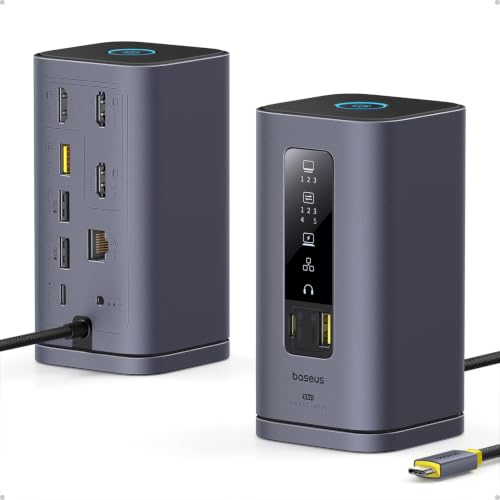
- Triple-display support for expanded screen real estate
- 10Gbps USB-C and USB-A ports for fast accessories
- 100W PD charging plus Ethernet and audio connectivity
Best For: Creators who want a multi-monitor dock with broad connectivity and charging in one unit.
Best Budget
WAVLINK 3-Monitor DisplayLink Dock

- Triple-monitor support with DisplayLink for Mac setups
- 15-in-1 port layout with USB, Ethernet, SD/TF, and audio
- Up to 100W laptop charging from a 130W power adapter
Best For: Creators who want a multi-monitor dock with broad port selection and solid power delivery.
Best for Multi-Display Routing
MOKiN Triple Display Docking Station

- Three HDMI + two DisplayPort outputs
- 10Gbps USB and 100W PD passthrough
- Includes Ethernet, SD/microSD, and audio jack
Best For: Creators who want a highly connected multi-monitor dock and can work within Mac compatibility limits.
Best for I/O-Heavy Setups

- 13-in-1 port layout with dual audio and SD/TF
- Built-in M.2 SSD enclosure up to 8TB
- 4K@144Hz HDMI plus 10Gbps USB ports
Best For: Creators who need lots of ports, fast external storage, and a compact desk footprint.
Best Dual-Display Dock
Plugable Dual DisplayPort & HDMI Dock

- Dual 4K monitor support via HDMI and DisplayPort
- Six USB 3.0 ports plus Gigabit Ethernet and audio
- Mac compatible with driver required; no host charging
Best For: Mac Studio owners who want a dependable, non-Thunderbolt dock for dual monitors and studio peripherals.
Best for Multi-Display Audio Workstations
TobenONE MacBook Docking Station

- Dual 4K display support on compatible Macs
- Five USB ports plus SD/microSD card slots
- 100W power adapter with Ethernet and audio
Best For: Producers who want a feature-packed dock for monitors, storage, and studio peripherals.
Best for Dual Drive Expansion – Qwiizlab Mac mini Hub for Mac Studio
If you want one compact add-on that expands storage and adds everyday ports, this Qwiizlab hub is a strong fit for mac studio docking stations for audio production. It combines a dual-drive enclosure with a practical USB and card-reader layout, making it easier to keep sample libraries, project files, and peripherals close at hand.
Best For: Producers who want a dock-and-storage combo for a Mac Studio or Mac mini without adding a separate external hub.
Pros:
- Supports both M.2 NVMe/SATA SSDs and 2.5-inch SATA drives for flexible storage expansion
- Includes 10Gbps USB-C and USB-A ports plus additional 5Gbps ports for fast accessories
- Built-in SD and microSD card readers are handy for quick media transfers
- Aluminum, space-saving design keeps a Mac setup neat and consolidated
Cons:
- Not a full Thunderbolt dock, so it is better for expansion than for maximum I/O speed
- Compatibility is focused on specific Mac mini and Mac Studio generations
For audio workflows that need more local storage and a few high-speed ports, this is a practical, desk-friendly option. It is especially appealing if you are comparing mac studio docking stations for audio production and want the extra benefit of built-in drive bays.
Best for Triple Displays – Baseus Spacemate 11-in-1 DisplayLink Dock
If you need mac studio docking stations for audio production that can also handle a complex visual workspace, the Baseus Spacemate is built around flexibility. Its DisplayLink support, triple-display capability, 10Gbps data ports, Ethernet, audio out, and 100W charging make it a strong fit for creators who want one dock to cover peripherals, networking, and monitor expansion.
Best For: Producers and Mac users who want a multi-monitor dock with fast peripherals and charging in a single desktop hub.
Pros:
- Supports triple-display setups for more screen space
- Includes 10Gbps USB-C and USB-A ports for fast drives and accessories
- 100W PD charging helps keep a laptop powered through the dock
- Ethernet and audio ports add useful studio-friendly connectivity
Cons:
- DisplayLink requires driver installation
- More focused on display expansion than pure audio-specific features
For mac studio docking stations for audio production, this Baseus dock is most compelling when your workflow includes multiple monitors and a mix of storage, network, and accessory connections. It is less about boutique studio I/O and more about building an efficient, tidy desktop hub.
Best Budget – WAVLINK 3-Monitor DisplayLink Dock
If you need one dock to handle a busy desktop setup, this WAVLINK model is a strong fit for mac studio docking stations for audio production. It adds triple-display support, lots of USB connectivity, wired Ethernet, and SD/TF card access, making it practical for editing timelines, moving media, and keeping peripherals connected.
Best For: Creators who want a multi-monitor dock with broad port selection, stable networking, and enough power for a USB-C laptop workflow.
Pros:
- Supports up to 3 external displays, with DisplayLink help for Mac multi-monitor setups.
- Includes 15 total ports, plus audio/mic, Ethernet, and SD/TF slots for a full workstation.
- Offers up to 100W charging from the host USB-C port with a 130W power adapter.
- Fast 10Gbps USB-C ports are useful for external drives and storage-heavy workflows.
Cons:
- Requires DisplayLink driver installation, so it is not a pure plug-and-play option.
- Only one of the HDMI/DP Alt Mode outputs can be selected on the relevant port group.
- Not compatible with iPadOS, iOS, Linux, or Unix systems.
For mac studio docking stations for audio production, this is a versatile pick if your priority is monitor expansion and lots of I/O rather than a minimalist desktop footprint. It is especially appealing when you want one dock to cover displays, storage, networking, and accessories in a single hub.
Best for Dual 4K Displays – PULWTOP Dual Monitor USB-C Dock
If you need mac studio docking stations for audio production that can also handle a dual-screen desk setup, this PULWTOP dock is a practical option. It combines dual 4K@60Hz HDMI outputs, 10Gbps USB-C/USB-A ports, Ethernet, SD/TF card slots, and audio in one compact stand-style dock, which is helpful when you want to keep peripherals and storage within easy reach.
Best For: Mac users who want a dock with dual 4K monitor support, plenty of fast data ports, and a built-in audio connection for a streamlined studio workspace.
Pros:
- Dual HDMI output supports two 4K displays at 60Hz
- 10Gbps USB-C and USB-A ports are useful for fast drives and interfaces
- Includes Ethernet, SD/TF, and audio for a more complete workstation setup
- Dock-stand design helps reduce desk clutter
Cons:
- Not a native Thunderbolt-class dock, so bandwidth may be limited for some pro workflows
- Best display results depend on the host Mac and macOS support
- Large monitor setups may still require careful cable management
This is a strong fit if you want mac studio docking stations for audio production with extra display flexibility and everyday connectivity in one unit. It is especially appealing for creators who value a tidy desk and quick access to storage, networking, and audio without adding multiple adapters.
Best for Dual Displays – WAVLINK 14-in-1 DisplayLink Dock
If you need one dock to streamline a Mac Studio workspace, this WAVLINK model is built around dual-display flexibility, wired networking, and plenty of everyday ports. It’s a practical option for mac studio docking stations for audio production when you want to connect monitors, storage, and accessories without living on adapters.
Best For: Mac users who need dual monitors, USB accessories, Ethernet, and card readers in one hub for a tidy production desk.
Pros:
- Dual DisplayLink video outputs with 2 DP and 2 HDMI options for flexible monitor setups
- 5 USB-A ports, SD/TF card readers, Ethernet, and separate headphone/mic jacks
- Up to 100W power delivery helps keep a compatible MacBook or laptop charged
Cons:
- Requires DisplayLink driver installation and is not plug-and-play
- Not a great fit for gaming or heavy graphics workloads
- Video output is limited to one port per display, so setup planning matters
For mac studio docking stations for audio production, the WAVLINK stands out more for connectivity than raw performance. It’s a solid desk hub if your workflow depends on dual monitors, fast file transfers, and easy access to audio I/O, but users who want a simpler native-display setup may prefer a more streamlined dock.
Best for Dual 4K Workflows – TobenONE 18-in-2 MacBook Docking Station
If you want one dock to handle a busy desk, this TobenONE model is a strong fit for mac studio docking stations for audio production-style workflows that need lots of ports, fast wired networking, and dual-display support. It combines HDMI, DisplayPort, USB, Ethernet, card readers, and audio jacks in a single base, which helps keep accessories organized when you’re juggling drives, interfaces, headphones, and peripherals.
Best For: MacBook users who need a high-port-count dock for dual monitors, fast wired networking, and mixed creative or office peripherals.
Pros:
- Supports dual 4K@60Hz output for expansive multitasking.
- Includes 2.5GbE, dual audio jacks, and lots of USB ports.
- Comes with a 150W adapter and up to 100W pass-through charging.
- Built-in dock stand helps reduce desktop clutter.
Cons:
- Not compatible with Mac Studio.
- M1/M2/M3 base-chip MacBooks are limited to a single external display.
- More desk-focused than truly portable.
For buyers comparing mac studio docking stations for audio production, this is more of a feature-rich MacBook hub than a direct Mac Studio solution. Still, if your setup centers on a MacBook and you want plenty of connectivity in one tidy unit, it covers the essentials well.
Best for Multi-Display Routing – MOKiN Triple Display Docking Station
If you need one dock to fan out a Mac Studio workstation into a highly connected desk setup, this MOKiN model is worth a look among mac studio docking stations for audio production. It combines multiple display outputs, fast USB ports, Ethernet, SD/microSD, and a 3.5mm audio jack, so you can keep monitors, drives, interfaces, and peripherals within easy reach.
Best For: Creators who want a single dock with lots of ports for a multi-monitor studio desk and general Mac/PC workflow flexibility.
Pros:
- Three HDMI plus two DisplayPort outputs for flexible multi-monitor setups
- 10Gbps USB-C/A ports help with fast drive and accessory transfers
- Includes Ethernet, SD/microSD, and a 3.5mm audio jack for a fuller studio hub
- 100W PD passthrough supports charging while the dock is in use
Cons:
- Full multi-display flexibility is Windows-only; Mac support is more limited
- Requires a separate power adapter for full-load use
- The weather/LCD extras are not essential for audio-focused buyers
For mac studio docking stations for audio production, this dock stands out more for its port density and display routing than for Mac-specific multitasking features. If your setup needs lots of connectivity and a tidy desk hub, it delivers strong value; if you need independent multi-screen expansion on macOS, check compatibility carefully first.
Best for I/O-Heavy Setups – iVANKY 13-in-1 Mac Mini Dock
If you want one of the more flexible mac studio docking stations for audio production-style workflows around a Mac mini setup, this iVANKY dock packs in storage, display, and device connections without taking up much desk space. It’s a strong fit for users who need fast external SSD access, multiple USB peripherals, and a tidy, all-in-one hub for a compact workstation.
Best For: Creators and power users who want a compact dock with built-in M.2 SSD expansion, dual display support, and plenty of ports for drives and accessories.
Pros:
- 13-in-1 layout with 10Gbps USB-A/USB-C, SD/TF, dual audio, and extra USB ports
- Built-in M.2 NVMe SSD enclosure supports up to 8TB for fast project storage
- 4K@144Hz HDMI output is useful for smooth editing and multitasking
- 20W PD adapter helps stabilize power when multiple devices are connected
Cons:
- Designed for Mac mini M4/M4 Pro users, so it is not a universal dock for every Mac Studio setup
- High refresh rate and dual-display behavior depends on monitor and host compatibility
- SSD is not included, adding to total cost if you need onboard storage
For buyers comparing mac studio docking stations for audio production, this model stands out more for connectivity density and built-in storage than for pure studio-specific features. If your priority is keeping drives, accessories, and displays organized in a compact footprint, it’s an efficient desk-saver with real workflow value.
Best Dual-Display Dock – Plugable Dual DisplayPort & HDMI Dock
If you need one of the more flexible mac studio docking stations for audio production, this Plugable dock is a practical way to add dual displays, wired networking, and plenty of USB ports to a Mac-based workstation. It is a strong fit for producers who want a cleaner desk setup and reliable peripheral expansion without paying for a Thunderbolt dock.
Best For: Mac Studio users who want dual-monitor support, Ethernet, and extra USB connectivity for a streamlined audio production setup.
Pros:
- Supports dual 4K displays over HDMI and DisplayPort for easy session management and plugin windows
- Includes Gigabit Ethernet, audio, and six USB 3.0 ports for interfaces, drives, and controllers
- Works with Mac, Windows, and ChromeOS, making it versatile across studio and office setups
- USB-C and USB 3.0 host options help it adapt to different computers and cabling needs
Cons:
- Requires driver installation on Mac
- Does not charge the host computer
- Not ideal for gaming or protected video playback
For buyers comparing mac studio docking stations for audio production, this model stands out for practical expansion rather than premium Thunderbolt performance. It is a solid choice if your priority is dual monitors, wired stability, and lots of accessible ports.
Best for Multi-Display Audio Workstations – TobenONE MacBook Docking Station
If you want one dock to handle screens, storage, and peripherals at a desk-based setup, this TobenONE unit is a practical option among mac studio docking stations for audio production. It supports dual 4K displays on compatible Macs, adds plenty of USB ports for controllers and drives, and includes audio plus Ethernet for a more complete workstation layout.
Best For: Producers who need a versatile, budget-friendly dock for dual monitors, wired networking, and multiple studio accessories on a Mac setup.
Pros:
- Dual HDMI output for a cleaner multi-monitor editing or mixing layout
- Five USB ports plus SD/microSD for interfaces, drives, and sample libraries
- 100W power adapter helps keep a laptop or compatible MacBook charged
- Built-in audio and RJ45 make it useful for hybrid studio desks
Cons:
- Designed primarily around MacBook support, so Mac Studio buyers should verify fit and workflow needs
- VGA is included, but most audio creators will rely on HDMI instead
For creators comparing mac studio docking stations for audio production, this model stands out more for its broad port selection than for studio-specific features. It is a strong all-rounder if you want a single hub for displays, storage, and connectivity, but it is worth confirming that its Mac compatibility matches your exact setup before buying.
How We Picked the Best Mac Studio Docking Stations for Audio Production
We prioritized docks that make real studio workflows easier: stable USB-C connectivity, enough high-speed ports for audio interfaces and storage, display support for dual or triple monitors, and power delivery that helps keep the desk clean. For Mac Studio Docking Stations for Audio Production, reliability matters more than flashy extras, so we favored models with practical port layouts and strong macOS compatibility.
Quick Comparison
Start by matching the dock to your setup. If you use one display and a few USB accessories, a simpler hub may be enough. If you run multiple monitors, sample libraries on external SSDs, and several audio devices, choose a higher-port-count dock with DisplayLink or native video support as needed. Also check whether you need SD card readers, Ethernet, or NVMe expansion for faster media workflows.
Key Buying Factors for Mac Studio Docking Stations for Audio Production
Port Types and Speed
Look for USB-C or USB-A ports that support 10Gbps when possible, plus enough downstream ports for controllers, interfaces, dongles, and external drives. Fast ports matter when moving large session files or running sample libraries from SSDs.
Display Support
Many audio users also manage timelines, mixer windows, and plugin racks across more than one screen. Confirm whether the dock supports dual or triple displays on macOS, and whether it relies on DisplayLink software or native video output.
Power Delivery and Stability
Even though the Mac Studio powers separately, a dock with solid power architecture and consistent data throughput can reduce glitches and keep your desk simpler. Stability is especially important during long recording or editing sessions.
Storage and Expansion
Some Mac Studio Docking Stations for Audio Production include NVMe enclosure support, card readers, or extra USB-C lanes that are useful for sample libraries, backups, and transfer workflows. If you work with large audio projects, these features can be more valuable than extra display outputs.
Who Should Buy Which Mac Studio Docking Stations for Audio Production?
If you mainly need a cleaner desk and a few essential ports, choose a compact hub-style dock. If you run dual or triple monitors and lots of peripherals, go for a full-featured DisplayLink model. If your workflow includes huge libraries, archival drives, or media ingest, prioritize docks with NVMe expansion, SD card access, and fast 10Gbps ports.
For most studio buyers, the best dock is the one that keeps recording sessions smooth, minimizes reconnecting devices, and supports the way you actually work every day.