If you edit in Adobe Lightroom, the right display can make a bigger difference than a faster CPU. You want strong contrast, dependable color, and enough resolution to judge fine detail without second-guessing your edits.
This roundup focuses on monitors that balance image quality, creator features, and practical connectivity, with an emphasis on mini LED options that can handle demanding photo workflows.
Best 10 Mini LED Monitors for Adobe Lightroom Picks for 2026
Best for Color-Managed Editing
BenQ PD3226G 32" 4K 144Hz Designer Monitor

- 4K IPS with 95% P3 and 100% sRGB coverage
- Factory-calibrated Delta E ≤ 2 with software calibration
- 90W Thunderbolt 4, KVM, and daisy chain support
Best For: Lightroom users and designers who want a large, accurate 4K monitor with strong workflow features.
Best HDR Color Upgrade
AOC Q27G3XMN 27" QHD Mini LED Monitor
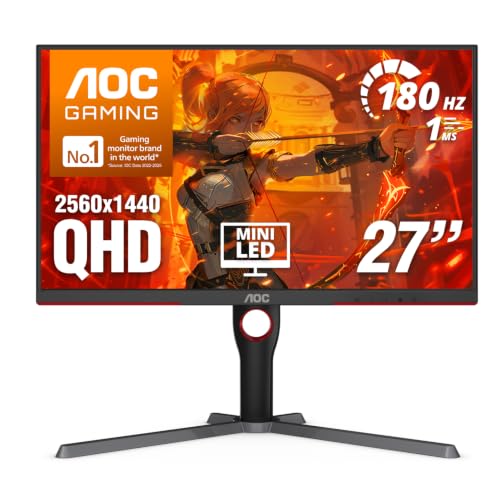
- Mini-LED with 336 dimming zones boosts contrast and highlight detail
- 27-inch QHD panel offers solid sharpness for Lightroom work
- Wide-gamut color and HDR 1000 add punch for photos and media
Best For: Lightroom users who want a high-contrast, wide-gamut display with some gaming appeal.
Best for Travel Editing
ASUS ZenScreen 15.6" Portable USB-C Monitor

- 15.6-inch FHD IPS panel with anti-glare coating
- USB-C and Mini HDMI for simple laptop connectivity
- Slim 0.9 kg build with kickstand and tripod mount
Best For: Traveling Lightroom users who want a portable, easy-to-set-up second screen.
Best HDR Pick
KTC 27-Inch Mini LED 1440P 180Hz Monitor

- 1152-zone Mini LED backlight boosts contrast and shadow detail
- 1440p resolution gives a sharp 27-inch editing workspace
- HDR1400 and 148% sRGB create a vivid, punchy image
Best For: Lightroom users who want strong contrast, HDR impact, and a fast monitor for mixed creative and gaming use.
Best for Mac Color Matching
BenQ PD3225U 32" 4K Thunderbolt Monitor

- Deep blacks from IPS Black technology
- Factory-calibrated color with 98% P3 coverage
- Thunderbolt 3, 85W charging, and daisy chaining
Best For: Mac-based Lightroom users who want a large, accurate editing monitor with easy single-cable setup.
Best for Bright Color Work
INNOCN 24.5" 1440p 240Hz Mini-LED Monitor

- Mini-LED local dimming with 1000-nit peak brightness
- 24.5-inch 1440p panel balances sharpness and desk space
- 100% sRGB plus HDMI 2.1 and DP 1.4 connectivity
Best For: Lightroom users who want a compact, bright monitor that can also game well.
Best for Wide-Gamut Editing

- 99% Adobe RGB for accurate Lightroom color work
- 4K 27-inch panel keeps images and UI sharp
- HDR1400 and mini-LED backlight boost contrast
Best For: Photographers who want wide-gamut color, strong contrast, and a versatile 27-inch editing display.
Best Simple Pick

- 1152-zone Mini LED backlight with HDR1400
- 99% Adobe RGB and factory calibration
- 90W USB-C plus HDMI 2.1 and DP 1.4
Best For: Photographers and hybrid creators who want a bright, color-accurate Mini LED display for Lightroom and occasional gaming.
Best for Color-Managed Editing – BenQ PD3226G 32" 4K 144Hz Designer Monitor
If you want a monitor that balances sharp detail, smooth motion, and dependable color, the BenQ PD3226G is a strong fit for mini led monitors for adobe lightroom comparisons. Its 4K IPS panel, factory calibration, and wide-gamut coverage make it better suited to editing accuracy than flashy gaming-first displays.
Best For: Lightroom users, photographers, and designers who want a large 32-inch 4K screen with reliable color and modern connectivity.
Pros:
- 4K IPS panel with 95% P3 and 100% sRGB for accurate editing workflows
- Factory-calibrated Delta E ≤ 2 plus software calibration support
- 90W Thunderbolt 4, KVM, and daisy chain support for streamlined setups
- Reflection-free Nano Matte panel helps reduce glare during long sessions
Cons:
- Not a mini-LED display, so HDR and contrast won’t match true mini-LED options
- Large 32-inch size may be more monitor than some desk setups need
- Premium feature set can push the price beyond basic photo-editing monitors
For editors comparing mini led monitors for adobe lightroom, the PD3226G stands out as a color-focused alternative with excellent workflow features, even if it doesn’t deliver the local dimming punch of a mini-LED panel. It is a practical choice when accuracy, connectivity, and a clean matte finish matter more than HDR intensity.
Best Portable OLED – ASUS ZenScreen OLED 16" USB-C Monitor
If you want a travel-friendly screen that still delivers strong color for editing, the ASUS ZenScreen OLED MQ16FC is a smart alternative to larger mini led monitors for adobe lightroom. Its 16-inch 16:10 OLED panel, 95% DCI-P3 coverage, and 1920 x 1200 resolution make it a practical companion for culling, proofing, and on-the-go retouching.
Best For: Lightroom users who need a lightweight second monitor with rich contrast, accurate-looking color, and easy USB-C portability.
Pros:
- OLED panel delivers deep blacks and strong perceived contrast for photo work
- 95% DCI-P3 coverage helps support color-focused editing tasks
- USB-C power pass-through keeps desk setup and travel use simple
- Auto-rotate and tripod support add flexibility in tight spaces
Cons:
- 1920 x 1200 resolution is useful, but not as detailed as higher-end desktop panels
- Portable size is great for mobility, though not ideal as a primary large editing display
- OLED may not be the best fit for users worried about static-interface burn-in
For photographers comparing mini led monitors for adobe lightroom, this ASUS stands out more for portability and contrast than raw screen size. It makes the most sense if you edit in multiple locations and want a compact display that still feels serious about image quality.
Best HDR Color Upgrade – AOC Q27G3XMN 27" QHD Mini LED Monitor
If you want mini led monitors for adobe lightroom that can handle both editing and occasional gaming, the AOC Q27G3XMN is a strong value pick. Its 27-inch 1440p panel, Mini-LED backlight, and HDR 1000 support give it impressive contrast and punchier highlights than a typical budget IPS display.
Best For: Lightroom users who want a bright, high-contrast screen with wide color coverage and don’t mind a gaming-first design.
Pros:
- Mini-LED backlight with 336 dimming zones for deeper blacks and brighter highlights
- QHD resolution on a 27-inch panel gives plenty of workspace for photo editing
- Strong wide-gamut color coverage makes images look vivid and detailed
- HDR 1000 can help reveal more tonal separation in supported content
Cons:
- VA panel behavior may not be as consistent as pro-grade IPS options for color-critical work
- High refresh rate features are more useful for gaming than Lightroom
- Color management may still require calibration for serious photo editing
For mini led monitors for adobe lightroom, this model stands out when you want richer contrast and brighter HDR performance without jumping to a much pricier pro display. It is not a pure creator monitor, but it offers a compelling blend of editing-friendly resolution and visual impact.
Best for Travel Editing – ASUS ZenScreen 15.6" Portable USB-C Monitor
If you want a lightweight second screen for photo work on the go, the ASUS ZenScreen MB16AHV is a practical fit. It’s not a mini LED panel, but for shoppers comparing mini led monitors for adobe lightroom, its FHD IPS screen, anti-glare finish, and USB-C simplicity make it easy to use for culling, editing, and reviewing images away from a desk.
Best For: Lightroom users who need a slim, portable external monitor for travel, cafes, or temporary editing setups.
Pros:
- 15.6-inch FHD IPS display with anti-glare coating for comfortable viewing
- USB-C and Mini HDMI support for fast, flexible laptop connections
- Ultra-slim 0.9 kg design with kickstand and tripod mount for easy setup
- TÜV-certified low blue light and flicker-free tech for longer sessions
Cons:
- Not a mini LED display, so it won’t deliver the same HDR contrast
- 1080p resolution is modest for detailed high-end photo retouching
- 15.6-inch size may feel small for heavy Lightroom multitasking
Overall, this ASUS is a strong portability-first pick for Lightroom work when convenience matters more than panel specs. If your shortlist for mini led monitors for adobe lightroom also includes travel-friendly IPS models, this one stands out for easy setup, low glare, and dependable day-to-day editing.
Best HDR Pick – KTC 27-Inch Mini LED 1440P 180Hz Monitor
If you want a brighter, more contrast-rich option among mini led monitors for adobe lightroom, this KTC 27-inch display stands out for its 1152-zone Mini LED backlight, HDR1400 support, and 1440p resolution. It is geared more toward vivid image quality and fluid performance than color-accurate proofing, but it can still be a compelling choice for editing, review work, and general creative use.
Best For: Lightroom users who want strong contrast, HDR punch, and a fast all-around 27-inch monitor for editing plus gaming.
Pros:
- 1152 local dimming zones help improve contrast and highlight detail
- QHD 2560 x 1440 resolution offers a sharp, practical editing workspace
- HDR1400 and 148% sRGB deliver a vivid, high-impact image
- Height, tilt, swivel, and pivot adjustments make it easy to position
Cons:
- Gaming-first tuning may not be ideal for color-critical Lightroom work
- Color coverage is strong, but calibration may still be needed for editing accuracy
- Mini LED brightness and HDR features can push the price above basic IPS monitors
For buyers comparing mini led monitors for adobe lightroom, the KTC is more of a high-contrast, high-refresh hybrid than a dedicated creator display, but its Mini LED backlight and 1440p sharpness make it an appealing value if you also want smooth everyday use.
Best for Mac Color Matching – BenQ PD3225U 32" 4K Thunderbolt Monitor
If you want a large, color-accurate display for photo work, the BenQ PD3225U is a strong alternative to many mini led monitors for adobe lightroom. Its 4K IPS Black panel, factory calibration, and wide P3 coverage make it well suited to editing images where shadow detail, consistency, and reliable color matter.
Best For: Lightroom users on Mac who want a calibrated 32-inch workspace with excellent color accuracy and simple single-cable connectivity.
Pros:
- IPS Black panel with a 2000:1 contrast ratio for deeper blacks
- 98% P3, 100% sRGB, Delta E ≤ 2, plus factory calibration
- Thunderbolt 3 USB-C with 85W charging, daisy chain, and KVM support
- Ergonomic stand and Display Pilot 2 tools make daily editing easier
Cons:
- Not a mini LED display, so HDR-style punch is more limited
- Large 32-inch size may be more monitor than some desks need
For photographers who care more about accurate tone and dependable calibration than headline-grabbing brightness, this BenQ fits the Lightroom workflow well. It is especially compelling if you are comparing mini led monitors for adobe lightroom and want a practical, Mac-friendly editing display instead of a true HDR panel.
Best for Bright Color Work – INNOCN 24.5" 1440p 240Hz Mini-LED Monitor
If you want a fast display that can still pull double duty for photo editing, this INNOCN is a strong fit for mini led monitors for adobe lightroom. Its 2K QHD resolution, Mini-LED backlight, and 1000-nit peak brightness give you more pop and contrast than a basic IPS monitor, while the 24.5-inch size keeps it compact on a desk.
Best For: Lightroom users who want a compact, high-brightness monitor that also handles gaming and general creative work.
Pros:
- Mini-LED local dimming and high peak brightness help images look punchy and detailed.
- 2560 x 1440 resolution on a 24.5-inch panel gives a crisp workspace for editing.
- 100% sRGB coverage is useful for color-aware photo and content work.
- HDMI 2.1, DP 1.4, and height/pivot stand add flexibility.
Cons:
- 240Hz gaming focus is more than most Lightroom-only users need.
- 100% sRGB is solid, but it is not a wide-gamut professional color reference display.
- Mini-LED can still require careful calibration for editing accuracy.
For editors comparing mini led monitors for adobe lightroom, this model stands out more for brightness, contrast, and versatility than for pure pro-grade color work. It makes sense if you want a vibrant, responsive screen that can handle both creative tasks and gaming.
Best for Wide-Gamut Editing – KOORUI 27" 4K QD-Mini LED
If you want one of the more capable mini led monitors for adobe lightroom without jumping to a true professional reference display, the KOORUI 27-inch 4K QD-Mini LED is a strong middle-ground pick. Its 99% Adobe RGB coverage, HDR1400 rating, and 4K detail make it well-suited to photo editing, while the dual-mode setup also gives you a fast gaming option when you’re not working in Lightroom.
Best For: Photographers who want wide-gamut color, strong HDR contrast, and a flexible 27-inch monitor for editing and everyday use.
Pros:
- 99% Adobe RGB coverage is a major plus for Lightroom color work
- Mini-LED backlight and HDR1400 can improve contrast and highlight detail
- 4K resolution on 27 inches delivers sharp UI text and image previews
- 90W USB-C, HDMI 2.1, and DP 1.4 add convenient connectivity
Cons:
- Dual-mode gaming features are more than many photo editors need
- 27 inches may feel small if you prefer a larger editing workspace
- Color-critical users may still want to calibrate for best results
For editors comparing mini led monitors for adobe lightroom, this KOORUI stands out for blending wide-gamut coverage, high brightness potential, and sharp 4K detail at a flexible all-around price point.
Best for Color-Accurate Editing – KTC 27-Inch Mini LED QHD Monitor
If you want mini led monitors for adobe lightroom that can handle both editing detail and everyday use, the KTC M27T6 stands out with its Mini-LED backlight, 1152-zone local dimming, and HDR1400 support. The 27-inch 1440p panel gives you plenty of workspace for photo panels and side-by-side image review, while the high brightness and strong contrast help images look punchy without losing shadow detail.
Best For: Lightroom users who want a brighter, high-contrast 27-inch monitor for photo editing, color-critical work, and some gaming on the side.
Pros:
- Mini-LED with 1152 local dimming zones for deeper blacks and stronger highlight control
- QHD 1440p resolution and DeltaE <2 tuning support more precise photo viewing
- Very bright HDR1400 panel can make editing details easier to see in well-lit rooms
- Ergonomic stand plus VESA support makes it easy to position for long editing sessions
Cons:
- 180Hz gaming focus is more than many Lightroom-only buyers need
- HDMI 2.0 limits refresh rate compared with DisplayPort
- White, gaming-styled design may not suit every studio setup
For creators comparing mini led monitors for adobe lightroom, this KTC is appealing if you value strong contrast, high brightness, and a roomy 27-inch 1440p workspace more than a pure office-style design.
Best Simple Pick – KOORUI 27" 4K QD-Mini LED
If you want mini led monitors for adobe lightroom that can also handle fast-paced gaming, the KOORUI 27-inch 4K QD-Mini LED is a strong all-rounder. Its 1152-zone backlight, HDR1400 support, and factory-calibrated color make it a compelling pick for editors who need deep contrast, bright highlights, and reliable Adobe RGB coverage.
Best For: Photographers and hybrid creators who want an affordable 4K Mini LED monitor with strong Adobe RGB coverage and a flexible USB-C setup.
Pros:
- 1152-zone Mini LED panel with HDR1400 for strong contrast and highlight control
- 99% Adobe RGB and factory calibration suit photo editing in Lightroom
- 90W USB-C, HDMI 2.1, and DP 1.4 make it easy to connect a laptop or desktop
- Height, swivel, tilt, and VESA support improve desk ergonomics
Cons:
- 27 inches may feel small for users who prefer a larger editing workspace
- Dual-mode speed features are useful, but Lightroom users may not need them
For mini led monitors for adobe lightroom, this KOORUI stands out because it combines wide-gamut color, high contrast, and modern connectivity in one display. It leans a bit gaming-first, but the panel specs and calibration features make it genuinely relevant for photo editing.
How We Picked the Best Mini LED Monitors for Adobe Lightroom
For Mini LED Monitors for Adobe Lightroom, we prioritized panels with accurate color coverage, consistent brightness, strong contrast, and useful calibration tools. We also looked for creator-friendly features like USB-C, Thunderbolt, KVM, uniformity compensation, and stand adjustability. Since Lightroom work often involves both culling and fine retouching, resolution and text clarity mattered too.
Quick Comparison
The best choices in this group fall into a few buckets: color-first 4K creator monitors, mini LED displays that add high contrast and HDR capability, and portable monitors for secondary editing or travel use. If your workflow is mostly studio-based, a 32-inch 4K creator model is usually the safest bet. If you want punchier contrast and occasional HDR review, mini LED becomes more attractive.
Key Buying Factors for Mini LED Monitors for Adobe Lightroom
Color Accuracy and Gamut
Look for wide coverage of Adobe RGB, DCI-P3, or at least excellent sRGB performance. Lightroom editing benefits from stable, predictable color more than exaggerated saturation.
Resolution and Screen Size
4K on a 27- to 32-inch panel is ideal for photo editing because it keeps detail sharp and gives you room for panels, tools, and side-by-side comparisons. Lower-resolution portable displays are better as secondary screens than as primary editing monitors.
Mini LED Local Dimming
Mini LED can improve contrast and HDR previewing, but it is not a substitute for accurate calibration. It is most useful if you also edit HDR content or prefer deeper blacks and stronger highlight control.
Calibration and Uniformity
Factory calibration, hardware calibration support, and uniformity compensation help keep color and brightness consistent across the panel. That consistency matters more than flashy refresh rates for Lightroom work.
Connectivity and Ergonomics
USB-C or Thunderbolt simplifies laptop setups, while height, tilt, swivel, and pivot adjustments make long editing sessions more comfortable. If you switch between devices, KVM and multiple inputs are useful extras.
Who Should Buy Which Mini LED Monitors for Adobe Lightroom?
Choose a creator-focused 4K monitor if your priority is reliable photo editing and print prep. Choose a mini LED model if you also want stronger contrast, HDR previewing, or a more premium visual experience. Choose a portable monitor only if you need a travel-friendly second screen or a lightweight backup setup. For most buyers searching for Mini LED Monitors for Adobe Lightroom, the best value comes from a display that blends accurate color, 4K sharpness, and easy calibration rather than one that simply advertises the highest brightness or refresh rate.