When it comes to optimizing your storage solutions for Docker containers, choosing the right NAS is essential. You want a system that delivers performance, expandability, and solid data protection. With so many options available, it can be overwhelming to find the perfect fit for your needs. In this guide, you’ll discover the top contenders that excel in these areas and how they can enhance your container management experience. Let’s explore what makes them stand out.
Synology 2-Bay DiskStation DS225+ (Diskless)

If you’re looking for a compact and efficient NAS solution for managing Docker containers, the Synology 2-Bay DiskStation DS225+ (Diskless) is an excellent choice. With its ability to store up to 40 TB of data, you’ll maintain complete ownership of your files. The sequential read/write throughput of up to 282/217 MB/s guarantees swift performance. Plus, its built-in tools assist in file management, data protection, and even surveillance solutions. You can easily access your data across multiple platforms, including Android and iOS devices. Backed by a 3-year warranty, this NAS is reliable and user-friendly for all your storage needs.
Best For: Users seeking a compact and efficient NAS solution for centralized data management and smart surveillance.
Pros:
- High storage capacity: Supports up to 40 TB, ensuring ample space for files and media.
- Fast performance: Achieves sequential read/write speeds of up to 282/217 MB/s for efficient data access.
- Multi-platform compatibility: Accessible on various devices including Android, iOS, desktops, and laptops.
Cons:
- Diskless design: Requires separate purchase of compatible drives to operate.
- Limited to Synology’s compatibility list: Users must ensure drives are on the official compatibility list for optimal performance.
- Potentially complicated setup: May require technical knowledge to configure and manage Docker containers effectively.
MINISFORUM N5 Air 5-Bay Desktop NAS with AMD Ryzen 7 CPU

The MINISFORUM N5 Air 5-Bay Desktop NAS is an exceptional choice for tech enthusiasts and professionals who require robust performance for Docker containers. With an AMD Ryzen 7 CPU and 8 cores, you’ll enjoy impressive speeds up to 4.9GHz. Its five SATA HDD slots support up to 174TB, while dual DDR5 RAM slots allow expansion up to 96GB. Connectivity is excellent, featuring 10GbE and 5GbE ports for fast data transfer. Plus, the user-friendly MinisCloud OS, with built-in Docker apps and ZFS snapshots, makes managing your storage seamless. Experience efficient cooling with dual axial fans, ensuring peak performance.
Best For: Tech enthusiasts and professionals seeking robust performance and high storage capacity for Docker containers and multi-user collaboration.
Pros:
- High performance with AMD Ryzen 7 CPU and up to 4.9GHz speeds for demanding applications.
- Large storage capacity of up to 174TB with five SATA HDD slots, allowing for extensive data management.
- User-friendly MinisCloud OS with built-in features like Docker apps and ZFS snapshots simplifies storage management.
Cons:
- Initial cost may be high for some users, particularly for those who do not require extensive features.
- Complexity in setup for users unfamiliar with NAS systems or advanced configurations.
- Limited pre-installed storage with only a 64GB SSD, which may require additional purchases for extensive data storage.
Synology 8 Bay RackStation RS1221+ (Diskless)

Designed for professionals and enthusiasts alike, the Synology 8 Bay RackStation RS1221+ (Diskless) excels in delivering robust performance for Docker container deployments. With impressive read speeds of up to 2,315 MB/s and write speeds reaching 1,147 MB/s, it easily handles demanding workloads. You can enhance your network performance fivefold by adding a compatible PCIe SFP+ or RJ-45 network card. Plus, by configuring two units, you can create a Synology High Availability cluster, ensuring maximum uptime and quick failover. Its compact 298 mm depth makes it a versatile choice for various setups, catering to all your storage needs seamlessly.
Best For: Professionals and enthusiasts seeking high-performance storage solutions for demanding workloads, including Docker container deployments.
Pros:
- Impressive performance: Achieves read speeds up to 2,315 MB/s and write speeds up to 1,147 MB/s, suitable for intensive tasks.
- Network enhancement capabilities: Allows for a fivefold improvement in network performance with compatible PCIe SFP+ or RJ-45 network cards.
- High availability configuration: Supports the creation of a Synology High Availability cluster with two units for maximum uptime and quick failover.
Cons:
- Diskless unit: Requires additional investment in hard drives to be fully operational.
- Limited physical depth: The compact 298 mm depth may not fit all rack setups comfortably.
- Potential complexity: Configuring high availability clusters may require advanced networking knowledge and setup time.
QNAP TS-673A-8G High-Performance NAS

For developers and IT professionals seeking a reliable platform for Docker containers, the QNAP TS-673A-8G stands out with its impressive networking capabilities. With dual 2.5GbE ports, it supports speeds up to 5 Gbps through port trunking, ensuring swift data transfer. The two PCIe Gen3 slots allow for extensive expansion options, such as adding 10GbE ports or SSD caching. Plus, its two M.2 PCIe NVMe SSD slots optimize storage using Qtier Technology. With 8GB of DDR4 RAM expandable to 64GB, this NAS provides a robust foundation for your Docker container needs, making it a top choice for performance-oriented setups.
Best For: Developers and IT professionals looking for a high-performance NAS solution that supports Docker containers and offers extensive networking and storage optimization capabilities.
Pros:
- High-speed networking: Dual 2.5GbE ports allow for fast data transfer rates up to 5 Gbps with port trunking.
- Expandable infrastructure: Two PCIe Gen3 slots offer flexibility for adding 10GbE ports, SSD caching, and more.
- Enhanced storage optimization: Two M.2 PCIe NVMe SSD slots support Qtier Technology for efficient storage management.
Cons:
- Initial cost: High-performance features may result in a more expensive upfront investment compared to entry-level NAS options.
- Complexity for beginners: The extensive features and options may be overwhelming for users who are not technically inclined.
- Limited native software: May require additional software solutions for specific use cases, such as advanced virtualization or specific Docker configurations.
Synology 2-Bay DiskStation DS723+ (Diskless)

Looking for a powerful yet flexible NAS solution for your Docker containers? The Synology 2-Bay DiskStation DS723+ is your answer. With a maximum of seven storage drives when paired with the DX517 expansion unit, you’ll enjoy ample space. It offers impressive sequential read/write speeds of up to 471/225 MB/s, ensuring smooth performance for your applications. You can easily integrate it into your existing setup, thanks to dual 1GbE ports and optional 10GbE for bandwidth-heavy tasks. Plus, take advantage of built-in file management and data protection solutions. Don’t forget to check the Synology knowledge center for setup assistance!
Best For: Users seeking a reliable and expandable NAS solution for Docker containers and data management.
Pros:
- High performance: Sequential read/write speeds of up to 471/225 MB/s for smooth application performance.
- Expandable storage: Supports a maximum of seven drives with the DX517 expansion unit for increased capacity.
- Versatile integration: Dual 1GbE ports and optional 10GbE for easy integration into existing setups.
Cons:
- Diskless unit: Requires separate purchase of hard drives, which can increase initial setup costs.
- Limited to 2 bays: Base configuration limits total storage capacity without expansion.
- Potentially complex setup: Users may need to navigate the Synology knowledge center for assistance, which can be daunting for novices.
QNAP 9 Bay Rackmount Hybrid NAS (TS-h987XU-RP-E2334-16G-US)

The QNAP 9 Bay Rackmount Hybrid NAS (TS-h987XU-RP-E2334-16G-US) stands out as the ideal choice for businesses that require efficient virtualization and robust performance for Docker containers. With its Intel Xeon E-2334 processor, you’ll experience impressive speeds, especially with bursts up to 4.8GHz. The 16GB ECC RAM, upgradable to 128GB, guarantees seamless multitasking. Dual 10GBASE-T and 2.5GbE RJ45 ports offer high-speed connectivity, perfect for intensive file access. Its sturdy metal enclosure and rackmount design fit well in any server room. Plus, with a 3-year warranty, you’ve got dependable support for your storage needs.
Best For: Businesses that require efficient virtualization and robust performance for Docker containers.
Pros:
- High-performance Intel Xeon E-2334 processor with burst speeds up to 4.8GHz.
- Ample 16GB ECC RAM, upgradeable to 128GB for seamless multitasking.
- Dual 10GBASE-T and 2.5GbE RJ45 ports for high-speed connectivity.
Cons:
- Limited to 9 drive bays which may not be sufficient for some large-scale enterprises.
- Rackmount design may not be suitable for environments without server racks.
- Initial cost may be high for smaller businesses or individual users.
QNAP TS-473A-8G SAN/NAS Storage System, Black

With its powerful AMD Ryzen processor and support for up to four HDDs, the QNAP TS-473A-8G SAN/NAS Storage System is an excellent choice for those who need a reliable platform for Docker containers. This tower NAS features 2.5 Gigabit Ethernet for enhanced data transfer, making it ideal for internal applications and sensitive data storage. You’ll appreciate the DDR4 SDRAM memory technology, which boosts performance. Plus, with a three-year manufacturer warranty, you can trust its durability. Customers rate it 4.3 out of 5 stars, ensuring you’re investing in a trusted solution for your Docker container needs.
Best For: Those seeking a robust NAS solution for Docker containers, internal applications, and secure data storage.
Pros:
- Powerful AMD Ryzen processor enhances performance for demanding applications.
- Supports up to four HDDs, providing ample storage capacity for various needs.
- Three-year manufacturer warranty offers peace of mind regarding durability and reliability.
Cons:
- Weight of 5000 grams may make it less portable compared to smaller NAS options.
- Limited to 4-bay configuration, which may not meet the needs of users requiring more extensive storage solutions.
- Restocking fees may apply for returns based on misrepresented conditions or customer misuse, potentially discouraging returns.
QNAP TS-873A-8G High-Performance NAS

For those seeking a robust solution for running Docker containers, the QNAP TS-873A-8G stands out with its powerful AMD Ryzen Embedded V1500B quad-core processor. With 8GB of DDR4 RAM, expandable up to 64GB, this NAS guarantees smooth performance. Its dual 2.5 Gigabit Ethernet ports support fast networking, while multiple USB 3.2 ports facilitate easy device connections. The 8 drive bays offer ample storage, optimized by Qtier Technology and SSD caching. Plus, you can switch between QTS and QuTS hero OS based on your needs. With a solid 3-year warranty, this NAS truly fulfills your Docker requirements.
Best For: Those looking for a high-performance NAS solution to efficiently run Docker containers and manage large data storage needs.
Pros:
- Powerful processor: Equipped with an AMD Ryzen Embedded V1500B quad-core 2.2 GHz for excellent performance.
- Expandable RAM: Comes with 8GB DDR4 RAM, expandable up to 64GB, allowing for enhanced multitasking and processing power.
- Flexible OS options: Supports both QTS and QuTS hero operating systems, enabling users to switch based on their specific needs.
Cons:
- Diskless: The unit does not come with pre-installed drives, requiring additional purchases for full functionality.
- Weight: At 8 kilograms, it may be cumbersome for some users to move or mount.
- Potential complexity: Users may face a learning curve when navigating different OS options and advanced features.
Synology 5 bay NAS DiskStation DS1019+ (Diskless), 5-bay; 8GB DDR3L

Offering robust performance and scalability, the Synology 5 bay NAS DiskStation DS1019+ is an ideal choice for developers and enthusiasts looking to deploy Docker containers efficiently. With its quad-core CPU and 8GB DDR3L memory, you can expect reading and writing speeds over 225 MB/s, even with encryption. The dual 1GbE ports enhance connectivity, supporting failover and Link Aggregation for peak performance. Plus, it features two M.2 NVMe SSD slots for caching, ensuring smooth operations. Expandable up to 10 drives with the DX517 unit, this NAS is perfect for scaling your Docker environments seamlessly.
Best For: Developers and enthusiasts looking for a powerful and scalable NAS solution for Docker container deployment.
Pros:
- High performance: Quad-core CPU with AES-NI encryption engine delivers reading and writing speeds over 225 MB/s, even with encrypted data.
- Expandable storage: Supports up to 10 drives with the addition of a DX517 expansion unit, allowing for easy scalability.
- Advanced connectivity: Dual 1GbE ports with failover and Link Aggregation support enhance network performance and reliability.
Cons:
- Diskless model: Requires separate purchase of hard drives, which may add to initial setup costs.
- Limited built-in connectivity: Only Bluetooth connectivity technology, which may not meet all networking needs.
- Power requirements: Requires a dedicated power supply unit, which may limit placement options based on outlet availability.
Synology 2 bay NAS DiskStation DS220+ (Diskless),Black
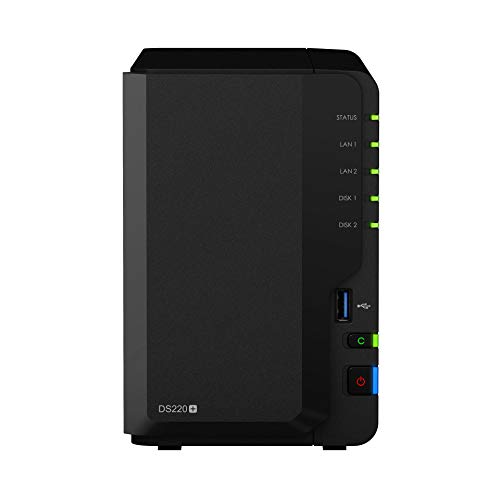
The Synology 2 bay NAS DiskStation DS220+ (Diskless) stands out as an excellent choice for anyone looking to run Docker containers thanks to its powerful Intel dual-core processor and expandable memory. With dual 1GbE LAN ports, you get network failover and Link Aggregation support, enhancing connectivity. Its impressive throughput of over 225 MB/s for reads and 192 MB/s for writes guarantees smooth operations. Plus, RAID 1 capabilities protect your data from sudden drive failures. You’ll appreciate the quiet operation at just 19.3 dB(A), making it perfect for any environment. Access and sync your data effortlessly across devices.
Best For: Those seeking a reliable and high-performance NAS solution for data storage, sharing, and running applications like Docker.
Pros:
- High throughput of over 225 MB/s read and 192 MB/s write speeds, ensuring fast data access and transfer.
- RAID 1 support for data protection, providing peace of mind against sudden drive failures.
- Quiet operation with a noise level of just 19.3 dB(A), making it suitable for home or office environments.
Cons:
- Diskless design requires purchasing separate hard drives, which can increase the initial setup cost.
- Limited memory capacity with only 2 GB DDR4 standard, necessitating an upgrade for more demanding applications.
- No built-in hard drives means users must handle the installation and configuration of storage, which may be challenging for beginners.
Factors to Consider When Choosing Nas for Docker Containers
When you’re choosing a NAS for Docker containers, there are several key factors to keep in mind. Performance specifications, storage capacity, and processor power can greatly affect how well your containers run. Don’t forget to take into account network connectivity and software compatibility to guarantee everything works seamlessly together.
Performance Specifications Importance
Choosing the right NAS for Docker containers hinges on understanding key performance specifications that can make or break your deployment. Read and write throughput are essential; higher speeds, measured in MB/s, enable faster execution of your containerized applications. If you’re dealing with memory-intensive containers, consider the amount of RAM supported by the NAS—more RAM means better handling of multiple containers without lag. Network connectivity options like 2.5GbE or 10GbE ports can greatly boost data transfer rates between your NAS and devices, enhancing responsiveness. Finally, don’t overlook RAID support for data protection; it guarantees your data’s integrity and availability, reducing the risk of loss due to hardware failures. Prioritize these factors to optimize your Docker experience.
Storage Capacity Requirements
Understanding storage capacity requirements is essential for a successful Docker deployment on your NAS. You’ll need enough space for both container images and any persistent data generated by your applications. Look for NAS systems that allow easy storage expansion, whether through additional drive bays or expansion units, so you can adapt to growing data needs. Evaluate the maximum supported storage capacity; some NAS models can handle 40 TB or more, ideal for larger deployments. Also, consider performance specifications like read and write speeds—higher throughput rates can enhance your efficiency when running multiple containers. Finally, think about RAID configurations for data redundancy and improved performance, utilizing multiple drives effectively to manage your storage capacity.
Processor and RAM Power
To guarantee your Docker containers run smoothly on a NAS, you must consider both the processor and RAM power. A high-performance CPU with multiple cores and a good clock speed is essential for managing several containers at once, helping you achieve efficient multitasking. For RAM, a minimum of 8GB is recommended for basic tasks, but if you’re running more demanding applications, aim for 16GB or more. Remember that each Docker container requires a certain amount of memory, so adequate RAM allocation is vital for peak performance. Also, look for processors with hardware acceleration for intensive tasks like video transcoding. Choosing a NAS with expandable RAM options allows you to adapt as your container workloads grow.
Network Connectivity Options
When it comes to selecting a NAS for Docker containers, network connectivity options play a crucial role in performance. You should consider the number and type of Ethernet ports available; dual ports can support link aggregation, boosting bandwidth and providing redundancy. Look for NAS devices with 2.5GbE or 10GbE networking options, especially if your applications require high data throughput. Verify the NAS supports VLAN tagging and advanced networking features to isolate Docker containers, enhancing security and performance. Check for compatibility with various networking protocols, including both IPv4 and IPv6, to improve connectivity across different environments. Finally, evaluate the availability of PCIe slots for potential network expansion cards tailored to your specific container workloads.
Software Compatibility Features
Choosing the right NAS for Docker containers goes beyond just network connectivity; software compatibility features are equally important. First, verify the NAS operating system supports Docker containers to run your applications effectively. Look for devices with expandable RAM, as this boosts performance when handling multiple containers. A robust CPU, preferably a multi-core processor, can greatly enhance Docker performance for resource-intensive applications. Additionally, check for compatibility with virtualization technologies, allowing you to run Docker alongside virtual machines for better resource management. Finally, review the availability of software tools and applications that simplify Docker management within the NAS environment. These features will make your experience smoother and more efficient, ultimately optimizing your storage solutions.
Expansion and Upgrade Potential
Considering the long-term usability of your NAS for Docker containers, expansion and upgrade potential should be a top priority. Look for models that allow RAM upgrades, as higher memory can greatly enhance container performance and support more simultaneous applications. Additionally, check for PCIe slots for expansion cards; these can provide extra network interfaces or SSD caching, boosting data access speeds for Docker workloads. Evaluate the number of drive bays and their compatibility with various RAID configurations, which directly impacts both data redundancy and performance. Confirm the NAS supports virtualization features to run multiple Docker containers efficiently. Finally, adequate cooling solutions, like dual fans, are essential for maintaining peak performance during heavy usage.
Data Protection Capabilities
As you assess the expansion and upgrade potential of your NAS for Docker containers, don’t overlook the significance of data protection capabilities. Effective NAS systems support various RAID configurations, like RAID 0, RAID 1, and RAID 5, to safeguard against data loss from drive failures. Look for built-in snapshot technology, allowing you to create point-in-time copies for quick restoration in case of accidental deletion or corruption. Advanced features, such as AES-NI hardware encryption, guarantee your sensitive container data is secure both at rest and in transit. Additionally, choose NAS solutions offering remote access and off-site backup capabilities to protect against local disasters. Regular software updates and security patches are crucial for maintaining data protection integrity against potential vulnerabilities.