When it comes to safeguarding your surveillance footage, choosing the right NAS device is essential. With a variety of options available, you need to evaluate factors like storage capacity, security features, and ease of access. The right choice can make all the difference in how effectively you monitor and protect your property. So, what are the top contenders in the market that can provide you with the confidence you need?
BUFFALO LinkStation 210 2TB NAS Network Attached Storage

If you’re looking for an affordable and user-friendly solution to store and manage your surveillance footage, the BUFFALO LinkStation 210 2TB NAS is an excellent choice. This 1-bay NAS offers 2TB of centralized storage, perfect for backing up videos, music, and photos from multiple devices. It features a subscription-free personal cloud, compatible with both Windows and macOS. With automated backups and secure file sharing, you can easily manage your data. Plus, its closed system reduces vulnerabilities, ensuring your footage remains safe. Enjoy 24/7 US-based support and a 2-year warranty for added peace of mind.
Best For: Those seeking an affordable and user-friendly NAS solution for centralized storage and management of surveillance footage, videos, music, and photos.
Pros:
- Subscription-free personal cloud service for easy access to your files.
- Automated backup features ensure data is regularly saved from multiple devices.
- Strong data security with SSL encryption and a closed system to reduce vulnerabilities.
Cons:
- Limited to a single drive bay, which may restrict future storage expansion.
- Compatibility only up to macOS 15; users with newer versions will need alternative solutions.
- Customer reviews indicate mixed satisfaction, with an average rating of 3.9 out of 5 stars.
BUFFALO LinkStation 210 4TB NAS Network Attached Storage
The BUFFALO LinkStation 210 4TB NAS Network Attached Storage is an ideal solution for users seeking a budget-friendly option for centralized storage and backup. With a generous 4TB capacity, this 1-bay NAS allows you to store and manage your videos, music, and photos without incurring monthly fees. Its closed system design enhances data security, and SSL encryption keeps your file transfers safe. You can easily share files with family and friends while configuring access restrictions. Plus, with 24/7 US-based support and a 2-year warranty, you can trust in its reliability and performance for all your surveillance storage needs.
Best For: Users seeking an affordable and reliable solution for centralized storage and backup without recurring fees.
Pros:
- Centralized Storage: Offers a 4TB capacity for easy access and management of files across multiple devices.
- Data Security: Features SSL encryption and a closed system design to enhance file transfer security.
- User-Friendly Setup: No assembly required, making installation quick and straightforward with NAS Navigator management utility.
Cons:
- Limited Compatibility: Works with Windows and macOS 15 and earlier, potentially limiting use for macOS 26 users.
- Single Bay Design: Only a 1-bay setup may not provide redundancy or increased storage options for users needing more capacity.
- No RAID Options: Lacks advanced RAID configurations, which may be a drawback for users requiring enhanced data protection.
Asustor Drivestor 2 Gen 2 AS1202T NAS (Diskless)

For those seeking a reliable and efficient solution for home surveillance storage, the Asustor Drivestor 2 Gen 2 AS1202T NAS stands out with its diskless design, allowing you to customize storage capacity based on your specific needs. Powered by a quad-core 1.7GHz CPU and equipped with a 2.5GbE port, it guarantees fast data access. With subscription-free private cloud storage, you can securely back up family memories and files from your devices. Plus, its smooth 4K video transcoding enhances your multimedia experience. Easy setup and a 3-year warranty complete this versatile NAS, making it perfect for your surveillance needs.
Best For: Home users seeking a customizable, efficient, and secure NAS solution for multimedia and surveillance storage.
Pros:
- Subscription-free private cloud storage allows for secure backup of files without ongoing fees.
- Smooth 4K video transcoding enhances the home entertainment experience by providing high-quality media playback.
- User-friendly setup with tool-free hard drive installation makes it accessible for beginners.
Cons:
- Diskless design means users need to purchase hard drives separately, which can add to initial costs.
- Only 1GB of memory may limit performance for users with heavy multitasking needs or extensive data processing.
- No built-in RAID support may pose a risk for data redundancy unless configured with additional drives.
BUFFALO LinkStation 710 4TB NAS Network Attached Storage

With its robust 4TB capacity, the BUFFALO LinkStation 710 is an excellent choice for home users seeking a reliable NAS solution for surveillance storage. This 1-bay NAS comes with a built-in HDD, offering enhanced cloud capabilities and up to 7x faster performance than its predecessor. You’ll appreciate its solid data security features, including SSL encryption and a closed system that minimizes vulnerabilities. The included NAS Navigator utility and automated backup options simplify file management across multiple devices. Plus, with subscription-free personal cloud storage and 24/7 US-based support, you can confidently secure and access your important footage anytime.
Best For: Home users seeking a reliable and secure NAS solution for surveillance storage and personal cloud management.
Pros:
- Up to 7x faster performance compared to previous models, enhancing efficiency for data access.
- Robust data security features including SSL encryption and a closed system to reduce vulnerabilities.
- Subscription-free personal cloud storage allows for easy access and management of files without ongoing costs.
Cons:
- Single bay design may limit storage expansion options compared to multi-bay NAS devices.
- Potentially complex setup for users unfamiliar with NAS systems and network configuration.
- Limited advanced features compared to higher-end NAS models that cater to professional users.
MaxDigitalData 6TB Internal Hard Drive for Surveillance (MD6000GSA12872DVR)
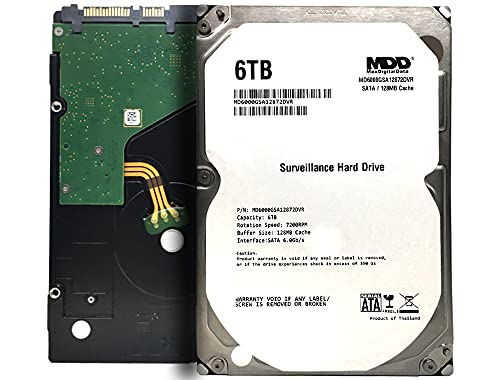
Ideal for those seeking reliable and expansive storage for their surveillance needs, the MaxDigitalData 6TB Internal Hard Drive (MD6000GSA12872DVR) stands out with its impressive capacity, allowing you to store up to 6,000 hours of HD video. With a speed of 7200 RPM and a 128MB cache, it guarantees smooth video recording and playback. Designed for 24/7 operation, this 3.5″ SATA drive handles heavy workloads effortlessly. Plus, its energy-efficient design keeps noise levels low. Compatible with various systems, including NAS and CCTV DVRs, it’s a solid choice for anyone looking to enhance their surveillance storage.
Best For: Those in need of reliable and high-capacity storage solutions for surveillance systems, CCTV DVRs, or heavy-duty computing.
Pros:
- High Capacity: Stores up to 6,000 hours of HD video, ideal for extensive surveillance needs.
- Reliable Performance: Designed for 24/7 operation with a low annualized failure rate of 0.44%.
- Versatile Compatibility: Works seamlessly with various systems including desktop PCs, Macs, NAS, and RAID setups.
Cons:
- Bare Drive Only: Does not include screws, cables, or accessories for installation.
- Formatting Required: Must be formatted on the system for detection, which may require additional setup time.
- Potential Restocking Fees: Returns may incur fees based on product condition, which could affect returnability.
MDD 14TB Internal Hard Drive for Surveillance Storage (Renewed)

The MDD 14TB Internal Hard Drive is specifically designed for those who need reliable and efficient storage solutions for surveillance systems. Operating at 7200 RPM with a 256MB cache, it guarantees smooth video recording and playback, even during heavy workloads. Built for 24×7 operation, it boasts an impressive MTBF of 2.0 million hours and an AFR of just 0.44%. This drive is compatible with various systems, including desktop PCs, NAS, and CCTV DVRs. Just remember to format the HDD upon installation for peak performance. With a 3-year warranty, you’re investing in lasting reliability for your surveillance needs.
Best For: Those seeking reliable and high-capacity storage solutions for continuous surveillance operations.
Pros:
- High capacity of 14TB, suitable for extensive video storage needs.
- 7200 RPM speed ensures smooth recording and playback during heavy workloads.
- 3-year warranty provides peace of mind and assurance of reliability.
Cons:
- Bare drive only, meaning no screws, cables, or accessories are included for installation.
- Requires formatting upon installation, which may be inconvenient for some users.
- Limited to surveillance use, may not be optimized for general storage tasks.
SSK 4TB Personal Cloud Network Attached Storage

For those seeking reliable storage for surveillance footage, the SSK 4TB Personal Cloud Network Attached Storage stands out with its robust 4TB capacity and efficient data management features. It connects via wired Ethernet, ensuring stable transfers at speeds up to 300 Mbps. With both NAS and DAS modes, you can easily manage files across devices, including smartphones and laptops. The one-click backup and real-time updates help centralize your data, while the smart app allows for secure sharing. Plus, its dual area setup enhances privacy. Backed by a one-year warranty, it’s a dependable choice for your surveillance needs.
Best For: Individuals or businesses looking for reliable and secure storage solutions for surveillance footage and data management across multiple devices.
Pros:
- High storage capacity of 4TB accommodates large amounts of data.
- Supports both NAS and DAS modes for versatile file management.
- One-click backup feature simplifies data protection and real-time updates.
Cons:
- Wired Ethernet connectivity may limit flexibility compared to WiFi options.
- Customer feedback rating of 3.0 out of 5 stars indicates mixed experiences.
- No built-in WiFi may restrict remote access in certain environments.
MDD MAXDIGITALDATA 2TB Internal Surveillance Hard Drive (Renewed)

Looking for a reliable storage solution for your surveillance system? The MDD MAXDIGITALDATA 2TB Internal Surveillance Hard Drive (Renewed) could be your answer. With a 7200 RPM speed and a 32MB cache, it’s built for 24/7 operation, ensuring your footage is always accessible. This 3.5-inch SATA drive offers a capacity of 2TB, providing an estimated 60 days of recording at 720P. Its quiet operation and low power consumption keep it cool, while the 0 bad sectors guarantee durability. Plus, it comes with a 2-year warranty, making it a smart choice for your security needs.
Best For: Those seeking a reliable and efficient storage solution for their surveillance systems and security devices.
Pros:
- Optimized for 24/7 operation, ensuring continuous recording and accessibility of footage.
- Quiet operation with low power consumption, promoting a cooler environment and energy efficiency.
- Comes with a 2-year warranty, providing peace of mind and assurance of quality.
Cons:
- As a renewed product, it may not have the same lifespan or reliability as a brand-new drive.
- Limited to a maximum capacity of 2TB, which may not suffice for larger surveillance setups.
- May require additional setup or compatibility checks with certain surveillance systems.
MDD 4TB Internal Surveillance Hard Drive (MD4000GSA6459DVR)

Designed specifically for surveillance systems, the MDD 4TB Internal Surveillance Hard Drive (MD4000GSA6459DVR) is a top choice for anyone needing reliable storage for continuous video recording. With a spacious 4TB capacity and a rotational speed of 5900 RPM, it guarantees smooth performance for 24/7 operations. Featuring SATA 6.0 Gb/s connectivity, you’ll experience fast data transfer rates and efficient power consumption. Plus, its quiet operation keeps your setup discreet. Customers have rated it 4.4 out of 5 stars, highlighting its reliability. If you’re looking to secure your footage, this hard drive’s optimized design makes it an excellent investment.
Best For: Those seeking reliable, high-capacity storage solutions for continuous video recording in surveillance systems.
Pros:
- Optimized for 24/7 operation, ensuring consistent performance for surveillance applications.
- Quiet operation and low power consumption, making it suitable for discreet setups.
- Generous 4TB storage capacity, allowing for extensive video recording time (up to 112 days at 30FPS, 720P resolution).
Cons:
- Rotational speed of 5900 RPM may be slower compared to higher RPM hard drives for other applications.
- Limited to internal installation, which may not be suitable for all users.
- As a renewed product, it may not come with the same assurances as a brand new hard drive.
MaxDigitalData 1TB Internal Surveillance Hard Drive (Renewed)

The MaxDigitalData 1TB Internal Surveillance Hard Drive (Renewed) is an excellent choice for anyone needing reliable storage for their surveillance systems. With a 5900 RPM rotation speed and 64MB cache, it efficiently handles 24/7 operation, making it perfect for CCTV and security applications. You’ll appreciate its low power consumption and quiet operation, ensuring it won’t disrupt your monitoring. This 3.5-inch internal hard drive offers a data transfer rate of 6 Gb/s, providing smooth footage recording for up to 30 days at 720P. Plus, it’s compatible with various devices, giving you flexibility in your storage solutions.
Best For: Those seeking reliable and efficient storage for 24/7 surveillance systems and CCTV applications.
Pros:
- Optimized for continuous operation, ensuring reliable performance for security needs.
- Low power consumption helps save energy while maintaining functionality.
- Quiet operation minimizes disruption in monitoring environments.
Cons:
- Limited capacity of 1TB may not be sufficient for extensive surveillance footage.
- 5900 RPM rotation speed might be slower compared to higher RPM drives for other applications.
- Renewed condition may raise concerns regarding longevity and reliability compared to new drives.
Factors to Consider When Choosing Nas for Surveillance Storage
When you’re selecting a NAS for surveillance storage, there are key factors to keep in mind. You’ll want to take into account storage capacity, data transfer speeds, and how well it works with your existing devices. Don’t forget to check the RAID options and security features to guarantee your system meets your needs.
Storage Capacity Requirements
Selecting the right NAS for surveillance storage involves careful consideration of several key factors, especially storage capacity. First, think about how many cameras you’ll use and their resolutions. Higher resolutions like 1080p or 4K generate much more data, so they’ll need more space. As a rule of thumb, plan for about 1TB of storage for every 10 days of recording per camera at 720p resolution. If you’re setting up multiple cameras, consider a NAS with a capacity of at least 8TB to 14TB. Don’t forget about future needs; choose a NAS that allows for additional drives or higher capacity options to accommodate your growing surveillance demands.
Data Transfer Speed
Data transfer speed plays an essential role in the effectiveness of your surveillance storage solution. You need a NAS device that can keep up with the demands of high-resolution video feeds. A higher data transfer rate, measured in Mbps or Gbps, guarantees smooth recording and playback, especially during peak usage times. If you’re recording in 4K or at high frame rates, robust data transfer capabilities are vital to avoid dropped frames or lag. The interface type, like SATA 6.0 Gb/s, greatly impacts your maximum achievable speed, with newer options offering better performance. For best results, choose a NAS with multiple drive bays to support RAID configurations, enhancing both data redundancy and transfer speeds.
Compatibility With Devices
Finding a NAS that’s compatible with your devices is crucial for a smooth surveillance storage experience. Make certain it works seamlessly with your desktop PCs, Macs, and surveillance systems. Look for NAS systems that support various operating systems, like Windows and macOS, so you can access your footage without hassle. Check if the NAS supports the specific file formats and storage protocols used by your surveillance cameras to prevent compatibility issues. Connectivity options matter too; confirm the NAS has USB ports and Ethernet connections to easily link with your setup. Finally, verify that the NAS can handle multiple cameras simultaneously, as some may limit concurrent connections or need specific configurations for peak performance.
RAID Configuration Options
When choosing a NAS for surveillance storage, understanding the RAID configuration options is essential to make certain your footage is secure and accessible. RAID (Redundant Array of Independent Disks) enhances data redundancy and performance by combining multiple hard drives. For surveillance, consider RAID 0 for speed, RAID 1 for data mirroring, or RAID 5 for a blend of performance and redundancy, requiring at least three drives. RAID 1 and 5 are particularly effective for maintaining data integrity and uptime, protecting against drive failures with duplication or parity. When selecting your NAS, verify it has enough drive bays to support your chosen RAID setup, guaranteeing peak performance and reducing the risk of data loss due to hardware issues.
Security Features Offered
Selecting the right NAS for surveillance storage goes beyond just RAID configurations; security features play an essential role in protecting your footage. Look for NAS systems that offer SSL encryption to guarantee secure file transfers, keeping your sensitive data safe during transmission. A closed system design minimizes vulnerabilities from third-party applications, boosting overall data security. Configurable access restrictions allow you to manage who can view or edit specific files, adding another layer of protection. Additionally, built-in firewalls and antivirus software, like ClamAV, help guard against malware and unauthorized access. Finally, consider subscription-free personal cloud options for secure storage and management of your surveillance footage, eliminating ongoing costs and risks tied to third-party cloud services.
Backup and Recovery Tools
While choosing a NAS for surveillance storage, effective backup and recovery tools are essential to guarantee your footage remains secure and accessible. Look for automated backup features that allow you to schedule regular backups, ensuring you won’t lose important data. Snapshot capabilities are also significant, as they let you create point-in-time copies of your footage, facilitating recovery from accidental deletions or ransomware attacks. Some NAS systems support backing up to multiple locations, including local drives and cloud services, enhancing redundancy and disaster recovery options. Additionally, data management software can help you organize footage, set retention policies, and streamline recovery processes, making it easier to access crucial surveillance data when you need it most.
Installation and Setup Ease
Choosing a NAS for surveillance storage becomes much easier if you prioritize installation and setup ease. Look for NAS devices with tool-free installation features, allowing you to install hard drives without needing extra tools. Quick installation guides or tutorials can greatly cut down setup time, especially if you’re a beginner. Models with sliding covers and thumb screws make accessing drive bays hassle-free during installation or upgrades. Make sure the NAS connects via Ethernet to fit seamlessly into your existing network infrastructure. Finally, opt for systems requiring minimal assembly or configuration; this way, you can enjoy a straightforward plug-and-play experience. With these features, you’ll get up and running in no time.
Warranty and Support Services
When considering a NAS for surveillance storage, warranty and support services can greatly impact your overall experience. A longer warranty, ideally three years, offers peace of mind, especially for devices operating 24/7. You’ll want access to 24/7 customer support for immediate help with installation, troubleshooting, and maintenance—crucial for your surveillance system’s reliability. Check if the manufacturer provides a return policy, usually within 30 days, allowing you to return defective products for a full refund. Make certain that warranty coverage extends to the hard drives, as they endure wear and tear. Finally, look for online resources like tutorials and FAQs to simplify setup and management, enhancing your user experience.