Choosing the right NAS for home lab PC setup is about more than raw storage capacity. You want enough performance for backups, media, Docker, and remote access without overpaying for features you will never use.
Below, we focus on practical options for beginners, power users, and growing labs, with a mix of bundled drives, diskless models, and faster networking choices.
Best 10 Nas for Home Lab PC Setup Picks for 2026
Best for Pro-Level Home Lab Performance

- 6-core Intel i3 and DDR5 RAM for VMs, Docker, and multitasking
- 10GbE + 2.5GbE networking for fast home lab transfers
- 2x M.2 NVMe slots and 4-bay expansion for flexible storage
Best For: Home lab builders who want desktop-class speed and expansion in a NAS.
Best CMR Pick

- CMR recording for steadier NAS performance
- 4TB capacity suits backups and starter arrays
- Designed for 24/7 home NAS use
Best For: Home lab builders who want dependable, low-noise NAS storage for everyday shared data.
Best for Easy Setup

- Intel N100 CPU with 8GB DDR5 for smooth everyday NAS tasks
- 2.5GbE networking and dual M.2 NVMe slots for better responsiveness
- User-friendly app experience for backup, sharing, and media access
Best For: Home lab users and creators who want a straightforward, locally controlled NAS with modern connectivity.
Best for Virtualization
AOOSTAR WTR PRO 5825U 4+2 Bay NAS
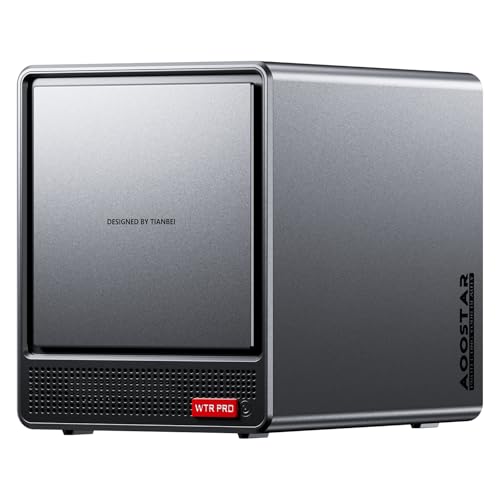
- 8-core Ryzen 7 5825U handles VMs and Docker well
- 4+2 bays with RAID and up to 96TB expansion
- Dual 2.5GbE plus Wi-Fi 6 for flexible home lab networking
Best For: Home lab builders who want a NAS that can double as a small virtualization and routing server.
Best for Simple Secure Backups
BUFFALO LinkStation 710 4TB NAS

- Drive included for quick setup
- Subscription-free personal cloud access
- Security-focused closed system with SSL
Best For: Home users who want simple, secure network storage with included storage and easy backup features.
Best for DIY Homelab Builders
ZimaBlade 7700 x86 Home Server Kit
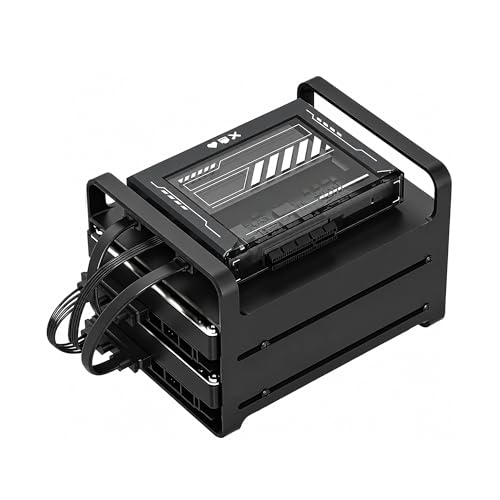
- x86 Intel quad-core for broad software compatibility
- 16GB RAM with dual SATA for light always-on workloads
- Includes PSU, drive cage, and cables for a ready-to-build kit
Best For: DIY users who want a compact x86 NAS kit for Docker, Plex, and self-hosting.
Best Entry-Level NAS
BUFFALO LinkStation 210 2TB NAS

- Includes a 2TB drive for immediate setup
- Simple shared storage and backup for home devices
- Subscription-free personal cloud with basic security
Best For: Home users who want an affordable, ready-to-use NAS for basic storage and backups.
Best for 10GbE Lab Builds

- Dual 10GbE for fast home lab networking
- Ryzen CPU with expandable RAM for Docker and VMs
- NVMe, HDMI, and SD support for creator-friendly workflows
Best For: Home lab builders and creators who want a fast, expandable NAS for self-hosted apps and media.
Best for DIY Home Lab

- Intel N100 with 8GB RAM for light server tasks
- 4 bays plus 2 M.2 slots for flexible storage growth
- Dual 2.5GbE and HDMI suit media and lab use
Best For: Home lab users who want a customizable NAS for storage, Docker, and media streaming.
Best for Pro-Level Home Lab Performance – UGREEN DXP4800 Pro 4-Bay NAS
If you want a serious nas for home lab pc setup, the UGREEN DXP4800 Pro stands out for its Intel Core i3-1315U processor, fast DDR5 memory, and dual high-speed networking. It is a strong fit when you need a NAS that can handle Docker, virtual machines, media duties, and fast file transfers without feeling underpowered.
Best For: Power users building a home lab who want desktop-class performance, 10GbE speed, and room to grow.
Pros:
- Intel Core i3-1315U and DDR5 RAM make it well suited for VMs and containers
- 10GbE plus 2.5GbE networking supports fast transfers for demanding lab workloads
- Two M.2 NVMe slots add cache or storage flexibility
- UGOS Pro includes useful built-in tools for backups, media, and photo management
Cons:
- Diskless model means you must buy your own drives separately
- Higher-end hardware makes it more expensive than basic home NAS options
- Overkill if you only need simple network backup and file sharing
This is a compelling choice if your nas for home lab pc setup needs real compute headroom rather than just storage. It is especially appealing for anyone planning to run multiple services, move large files over 10GbE, or expand into heavier workloads over time.
Best CMR Pick – WD Red Plus 4TB NAS HDD
If you’re building a reliable nas for home lab pc setup, this WD Red Plus 4TB drive is a practical choice for shared storage, backups, and light virtualization. Its CMR recording helps keep performance more consistent than SMR drives, which matters when multiple services or users are writing data at once.
Best For: Home lab users who want a dependable 3.5-inch NAS hard drive for always-on storage, media, and backups.
Pros:
- CMR design is better suited to NAS workloads than SMR alternatives
- 4TB capacity works well for starter arrays, backups, and media libraries
- WD Red Plus line is built for 24/7 NAS use
- 5400 RPM operation can help reduce noise and heat
Cons:
- Not the fastest option for heavy write-intensive lab tasks
- 4TB may feel limited for larger VM or surveillance storage needs
- Single-drive buyers won’t get the full benefit of a RAID setup
For a nas for home lab pc setup, this drive is a sensible balance of compatibility, endurance, and predictable performance. It’s not the flashiest pick, but it’s the kind of storage that fits well when reliability matters more than raw speed.
Best for Easy Setup – UGREEN DXP2800 2-Bay NAS
If you want a practical nas for home lab pc setup without jumping straight to an expensive enterprise box, the UGREEN DXP2800 hits a strong middle ground. It pairs an Intel N100 CPU with 8GB of DDR5 RAM, 2.5GbE networking, and dual M.2 NVMe slots, so it’s a capable platform for backups, media, and everyday file access.
Best For: Home lab users, creators, and first-time NAS buyers who want an easy-to-manage, locally controlled storage box with room to grow.
Pros:
- Intel N100 and 8GB DDR5 deliver solid entry-level NAS performance
- 2.5GbE plus dual M.2 NVMe slots add useful speed and caching options
- Simple cross-platform access makes setup easier on Windows, macOS, mobile, and web
- Up to 80TB capacity is plenty for backups, photos, and media libraries
Cons:
- Diskless model means you still need to buy drives separately
- 2-bay design limits RAID flexibility compared with larger NAS units
For a nas for home lab pc setup, this UGREEN model stands out because it balances approachable software, modern connectivity, and useful expansion without overcomplicating the build. It’s a sensible pick if you want local storage control and creator-friendly features in one compact box.
Best for Virtualization – AOOSTAR WTR PRO 5825U 4+2 Bay NAS
If you want a nas for home lab pc setup that can do more than basic file sharing, the AOOSTAR WTR PRO is built for multi-service workloads. Its Ryzen 7 5825U CPU, dual 2.5GbE ports, RAID support, and virtualization-friendly hardware make it a strong fit for Docker, VMs, and always-on home server duties.
Best For: Home lab users who want a compact NAS that can also run virtualization, container workloads, and routing software.
Pros:
- Ryzen 7 5825U offers 8 cores and 16 threads for heavier multitasking
- 4+2 bay design with RAID support and up to 96TB expansion potential
- Dual 2.5GbE, multiple USB ports, and Wi-Fi 6/Bluetooth 5.2
- Supports Windows, Ubuntu, OPNsense, OpenWrt, ESXi, and PVE use cases
Cons:
- Sold without RAM, SSD, or OS, so total setup cost is higher
- May be more power than casual file-storage users need
- Four-screen 4K support is useful, but not essential for every buyer
For a nas for home lab pc setup, this model stands out because it combines storage expandability with real compute headroom. If you plan to run several services at once, the AOOSTAR WTR PRO is more capable than a typical entry-level NAS and still stays compact enough for a desk or small rack.
Best for Simple Secure Backups – BUFFALO LinkStation 710 4TB NAS
If you want a straightforward nas for home lab pc setup that doubles as shared storage, the BUFFALO LinkStation 710 is a practical pick. It includes a hard drive, works with Windows and macOS, and focuses on easy backup, file sharing, and basic home-cloud access without a monthly fee.
Best For: Home users who want simple, secure network storage with included storage and easy backup features.
Pros:
- 4TB capacity with the drive included, so it’s ready to use out of the box
- Subscription-free personal cloud access for photos, videos, and files
- Closed system design and SSL encryption add a security-focused layer
- Includes backup software and support for multiple computers and devices
Cons:
- Single-bay design offers no built-in drive redundancy
- Not as flexible as more advanced NAS systems for apps and expansion
- Storage capacity is limited compared with multi-bay options
For a nas for home lab pc setup where reliability, simple backups, and low-maintenance file sharing matter more than expandability, the LinkStation 710 makes sense. It’s a good fit if you want an easy NAS that handles everyday storage without extra subscriptions or a complicated setup.
Best for DIY Homelab Builders – ZimaBlade 7700 x86 Home Server Kit
If you want a flexible nas for home lab pc setup rather than a locked-down appliance, the ZimaBlade 7700 is a smart starting point. It gives you an x86 platform, dual-bay storage support, and enough RAM to run file sharing, containers, Plex, and other self-hosted tools in one compact system.
Best For: DIY users who want a compact x86 NAS kit for Docker, media streaming, and self-hosting projects.
Pros:
- x86 Intel quad-core platform offers broad Linux, Docker, and CasaOS compatibility.
- 16GB RAM and dual SATA support make it practical for always-on homelab workloads.
- Includes the key hardware to get started: PSU, drive cage, and SATA cables.
- PCIe expansion leaves room for future networking or storage upgrades.
Cons:
- Not as turnkey as a mainstream NAS appliance, so setup takes more hands-on effort.
- Two-bay capacity may be limiting if you plan to grow a large storage array.
- Best suited to light-to-moderate workloads rather than heavy transcoding or enterprise use.
This is a strong fit if you want a flexible, low-power nas for home lab pc setup that prioritizes experimentation and customization over plug-and-play simplicity.
Best Entry-Level NAS – BUFFALO LinkStation 210 2TB NAS
If you want a straightforward nas for home lab pc setup without paying for extra cloud services or advanced app ecosystems, the Buffalo LinkStation 210 is built around simple shared storage, backups, and private file access. It’s a practical 1-bay option for users who mainly need centralized storage for a few computers and household devices.
Best For: Budget-minded users who want basic network storage, easy backups, and a subscription-free personal cloud.
Pros:
- Includes a 2TB hard drive, so it’s ready to use out of the box.
- Simple network sharing and automated backup tools for Windows and older macOS versions.
- Closed-system design and SSL encryption add a layer of data protection.
- Subscription-free access for photos, music, videos, and home files.
Cons:
- 1-bay design means no RAID redundancy if the drive fails.
- Not ideal for power users who need faster performance or app-heavy features.
- macOS support is limited to older versions; newer Mac users should look elsewhere.
For a basic nas for home lab pc setup, this model makes sense when ease of setup and low ongoing cost matter more than expandability or speed. It’s better suited to simple file storage and backup than to demanding virtualization or media-server workloads.
Best for 10GbE Lab Builds – UGREEN DXP4800 GT 4-Bay NAS
If you want a nas for home lab pc setup that can handle Docker, backups, media streaming, and fast local transfers without feeling underpowered, the UGREEN DXP4800 GT is built for that kind of workload. Its Ryzen Embedded CPU, dual 10GbE, and NVMe expansion make it a strong fit for power users who need speed and flexibility in one desktop box.
Best For: Home lab builders, creators, and small teams who need a fast, expandable NAS for self-hosted apps, media, and backup storage.
Pros:
- Dual 10GbE and NVMe support make it a strong choice for high-speed lab networking and storage tiers.
- Expandable RAM and Ryzen-powered performance handle Docker, VMs, and multitasking smoothly.
- UGOS Pro adds guided setup plus app support for Plex, Home Assistant, surveillance, and more.
- Built-in HDMI, SD, and USB ports simplify local media and creator workflows.
Cons:
- Drives are not included, so total cost rises once you add HDDs or SSDs.
- Advanced features and expansion will be overkill for basic file sharing needs.
- Setup is easier than many NAS boxes, but still more involved than a plug-and-play external drive.
For a nas for home lab pc setup, this model stands out because it blends real networking headroom with enough CPU and app support to grow into serious self-hosted projects. It is a practical pick if you want one device that can do storage, services, and media without immediately hitting performance limits.
Best for Easy Home Lab Start – Yxk Zero1 2-Bay Desktop NAS
If you want a practical nas for home lab pc setup without diving into a complicated enterprise ecosystem, the Yxk Zero1 is built for straightforward private storage, remote access, and room to grow. It gives beginners a simple 2-bay starting point with 2.5GbE, Docker support, and enough flexibility to handle backups, media, and shared files at home.
Best For: First-time NAS buyers who want a quiet, beginner-friendly home lab storage box with fast networking and basic app expansion.
Pros:
- Beginner-friendly setup with remote access across phone, desktop, and browser
- 2.5GbE networking helps speed up backups and file transfers for a home lab PC
- 2-bay design supports RAID, snapshots, and up to 60TB of storage capacity
- Quiet, compact build fits easily into a home office or bedroom
Cons:
- Drives are sold separately, so the total cost depends on the disks you choose
- 4GB RAM may feel limited if you plan to run heavier Docker workloads
- Not ideal for users who want advanced enterprise-grade NAS features
Overall, the Yxk Zero1 makes sense if you need a low-friction nas for home lab pc setup and care more about easy storage, quiet operation, and fast networking than deep customization. It’s a solid entry point for building a private cloud at home.
Best for DIY Home Lab – Yxk Zero1 Pro 4-Bay NAS
If you want a flexible nas for home lab pc setup, the Yxk Zero1 Pro stands out with an Intel N100 CPU, 8GB of RAM, dual 2.5GbE, and support for third-party operating systems. It gives tinkerers enough hardware headroom for file storage, Docker apps, and media duties without jumping into a full server build.
Best For: Home lab users who want a diskless, customizable NAS for backups, Docker, media streaming, and alternative OS installs.
Pros:
- Intel N100 and 8GB RAM provide solid entry-level performance for NAS and light app hosting
- 4 SATA bays plus 2 M.2 NVMe slots offer strong expansion for a compact desktop unit
- Dual 2.5GbE and 4K HDMI make it useful for fast networking and direct media playback
- Supports Docker and third-party OS options like TrueNAS, Unraid, and OMV
Cons:
- Drives are not included, so total cost rises quickly once storage is added
- Manual setup may be too involved for buyers who want a plug-and-play appliance
- Performance is good for a home lab NAS, but not a replacement for a true server
Overall, the Zero1 Pro is a strong fit if your nas for home lab pc setup needs customization, expandability, and better networking than a basic consumer NAS. It is especially appealing for users who want to run services, stream media, and experiment with different OS choices in one box.
How We Picked These Nas for Home Lab PC Setup Options
We prioritized hardware that makes sense for a Nas for Home Lab PC Setup: reliable drive support, manageable noise and power use, useful networking such as 2.5GbE or 10GbE, and expansion features like M.2 NVMe, multiple bays, or container-friendly operating systems. We also favored systems that fit different budgets and skill levels, from simple turnkey units to more flexible builder-style models.
Quick Comparison
Think in tiers. One-bay units are the easiest way to get started, but they offer limited redundancy and room to grow. Two-bay systems are the sweet spot for most home users because they balance cost, capacity, and basic protection options. Four-bay and hybrid NAS models make more sense if you expect to run VMs, Plex, multiple Docker containers, or large backup jobs. If speed matters, prioritize 2.5GbE or 10GbE and pair it with SSD cache or NVMe where supported.
Key Buying Factors for Nas for Home Lab PC Setup
Bays and Expandability
More bays usually mean more flexible RAID choices and easier future upgrades. If you plan to keep data long term, two bays is often the minimum practical starting point, while four bays gives you more breathing room.
CPU, RAM, and Workload Fit
Light file sharing and backups do not need much power. Docker, transcoding, media indexing, and virtual machines benefit from stronger CPUs and more memory. For a Nas for Home Lab PC Setup, RAM matters as much as storage once you start multitasking.
Networking Speed
Standard gigabit is fine for basic use, but 2.5GbE or 10GbE can make large backups and multi-device access feel much faster. Match the NAS to the rest of your network so you can actually use the extra bandwidth.
Drive Type and Noise
NAS-rated HDDs are the safest choice for 24/7 operation. If the system is going in a bedroom or office, consider noise, vibration, and fan behavior as part of the decision.
Who Should Buy Which Nas for Home Lab PC Setup?
Buy a simple one-bay or bundled-drive NAS if you want easy home cloud storage with minimal setup. Choose a two-bay model if you want the best balance of price, redundancy, and everyday usefulness. Go with a four-bay or hybrid unit if you are building a serious lab, need more storage growth, or plan to run services beyond basic file sharing. If you already know you want fast transfers and container workloads, pick the stronger CPU and higher-speed networking first, then add drives and SSDs to match.