If your PC workflow depends on large files, frequent backups, or shared project folders, a NAS with SSD cache can make everyday storage feel much faster and more responsive.
Below, we focus on options that balance speed, reliability, and expansion so PC users can choose the right setup for editing, gaming libraries, home offices, and team storage.
Best 10 Nas with SSD Cache for PC Users Picks for 2026
Best for Power Users

- Dual M.2 NVMe slots for SSD cache or storage pools
- 10GbE + 2.5GbE for fast PC transfers
- Core i3 and DDR5 handle Docker and VMs well
Best For: PC users who want fast shared storage with SSD caching and advanced multitasking.
Best High-Capacity NAS Drive

- 10TB CMR drive suited to RAID and NAS use
- NASware firmware for compatibility in multi-bay systems
- Rated up to 180 TB/yr workload with 3-year warranty
Best For: PC users who need dependable, high-capacity NAS storage for a 24/7 setup.
Best Speed Boost

- Up to 7,250 MB/s read and 6,900 MB/s write
- Efficient Gen4 design for laptops and handhelds
- Good capacity for games, apps, and cache-like workloads
Best For: PC users who want a fast, efficient PCIe Gen4 SSD for gaming and storage-heavy setups.
Best for DIY Expansion

- 3x M.2 SSD slots plus 2 HDD bays
- 5GbE + 2.5GbE dual LAN for fast transfers
- Intel N150 with 16GB LPDDR5 and 1TB SSD
Best For: PC users who want a highly expandable mini PC NAS with SSD cache potential and fast networking.
Best Endurance Pick
Gigastone 4TB NAS Certified SSD

- 24/7 high-endurance build for NAS cache
- Up to 530 MB/s with SLC caching
- NAS-certified for Synology, QNAP, and Asustor
Best For: PC users and NAS owners who want reliable SATA SSD caching for heavy workloads.
Best All-Flash Performance

- All-flash 4-bay design for very fast storage access
- 10GbE and Wi‑Fi 6 for high-speed connectivity
- Intel Core i5 plus DDR5 RAM for creator workloads
Best For: PC users who want a fast all-flash NAS for shared storage and editing.
Best SATA SSD for Everyday PC Upgrades
TEAMGROUP T-Force Vulcan Z 1TB SSD

- Up to 550/500 MB/s with SLC cache
- 2.5-inch SATA III fits most PCs and laptops
- Silent, shock-resistant, and power-efficient
Best For: PC users who want an easy SATA SSD upgrade for faster boots and smoother day-to-day performance.
Best with Extra Features
MINISFORUM N5 Air 5-Bay Desktop NAS
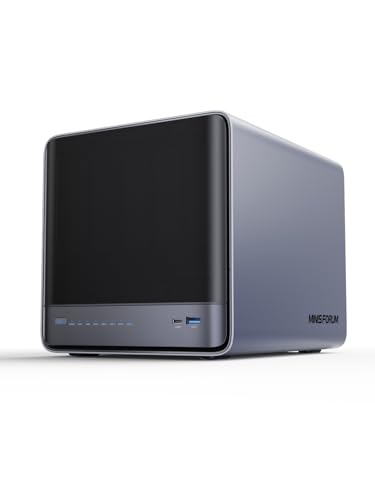
- Ryzen 7 255 delivers strong desktop-class performance
- 3x M.2 slots and PCIe x16 support SSD cache expansion
- 10GbE + 5GbE networking suits fast PC file transfers
Best For: PC users who want a fast, expandable NAS with SSD cache and room to grow.
Best High-Endurance Cache SSD
Gigastone 1TB NAS Certified SSD

- TLC flash with SLC caching for steadier write performance
- NAS certified and built for 24/7 reliability
- Up to 550MB/s SATA speeds with a 5-year warranty
Best For: PC users and NAS owners who need a durable SATA SSD for cache and always-on workloads.
Best SATA Cache Upgrade

- Fast 560/530 MB/s SATA performance
- Compatible with many NAS and PC systems
- 600 TBW endurance with 5-year warranty
Best For: PC users and NAS owners who want a dependable SATA SSD for cache or storage.
Best for Power Users – UGREEN DXP4800 Pro 4-Bay NAS
If you want a nas with ssd cache for pc users that can also handle heavier multitasking, the UGREEN DXP4800 Pro is built like a mini workstation. Its Intel Core i3-1315U, 10GbE networking, and dual M.2 NVMe slots make it a strong fit for fast file transfers, cached HDD arrays, and advanced home or office workloads.
Best For: PC users who need fast shared storage, SSD caching, and room for Docker, VMs, and large media libraries.
Pros:
- Dual M.2 NVMe slots can be used for SSD cache or storage pools to reduce HDD bottlenecks
- 10GbE + 2.5GbE networking is excellent for fast PC transfers and multi-user access
- Intel Core i3-1315U and DDR5 RAM provide strong headroom for Docker and virtual machines
- 4-bay design offers solid expansion for media, backups, and mixed workloads
Cons:
- Diskless model means you still need to buy drives separately
- Overkill for simple backup-only use cases
- Higher-end hardware makes it pricier than basic NAS options
For buyers comparing a nas with ssd cache for pc users, this model stands out when speed and flexibility matter more than keeping costs low. It is especially compelling if you want one box to cover fast file access, caching, and more demanding desktop-style workflows.
Best High-Capacity NAS Drive – WD Red Plus 10TB NAS HDD
If you want a dependable NAS drive for a home office or small business setup, this WD Red Plus is a strong fit. It’s a good match for a nas with ssd cache for pc users who want bulk storage on the HDD side while keeping frequently used data responsive through caching.
Best For: PC users building a 24/7 NAS that needs large-capacity, CMR-based storage with broad compatibility.
Pros:
- CMR recording is better suited to RAID and NAS workloads than many SMR desktop drives.
- 10TB capacity gives plenty of room for backups, shared files, and media libraries.
- NASware firmware and NAS-focused testing help improve compatibility in multi-bay systems.
- Rated for up to 180 TB/yr workload and backed by a 3-year limited warranty.
Cons:
- Not an SSD, so it won’t deliver cache-level speed on its own.
- 7200 RPM drives can be noisier and warmer than lower-speed alternatives.
- Overkill if you only need a simple single-drive desktop storage upgrade.
For buyers comparing a nas with ssd cache for pc users, this drive makes sense as the high-capacity storage layer underneath fast caching. It’s a practical pick when reliability, capacity, and NAS compatibility matter more than raw SSD-like performance.
Best Speed Boost – WD_BLACK SN7100 2TB NVMe SSD
If you’re building a nas with ssd cache for pc users who want faster game loads, smoother app launches, and better write performance, the WD_BLACK SN7100 is a strong Gen4 option. It’s tuned for high sequential speeds and better power efficiency, which makes it a practical upgrade for laptops, handhelds, and compact systems that need quick storage without excess heat or battery drain.
Best For: PC users who want a fast, efficient PCIe Gen4 SSD for gaming laptops, handhelds, or cache-style acceleration in a storage-heavy setup.
Pros:
- Very fast Gen4 speeds up to 7,250 MB/s read and 6,900 MB/s write
- Improved power efficiency helps in laptops and portable systems
- Available up to 2TB in this model for plenty of game and app storage
- WD_BLACK Dashboard support helps with drive tuning on Windows
Cons:
- Not a dedicated NAS SSD, so it’s not built for always-on server duty
- Cooling may still matter in tight enclosures during sustained workloads
- Windows-only dashboard limits some management features
For nas with ssd cache for pc users, this is better thought of as a high-performance client drive than a true NAS workload specialist. Still, if your priority is fast access, strong efficiency, and a well-priced Gen4 upgrade for a PC-based storage setup, it’s an easy one to recommend.
Best for DIY Expansion – Beelink Me Pro Mini PC NAS
If you want a nas with ssd cache for pc users that also doubles as a compact home server, the Beelink Me Pro stands out with three M.2 PCIe SSD slots, two drive bays, and built-in 5GbE/2.5GbE networking. It’s a practical pick for fast file access, media storage, backups, and light virtualization in a small desktop footprint.
Best For: PC users who want a flexible mini PC NAS with room to grow, fast SSD-based caching, and high-speed networking for shared storage.
Pros:
- Three M.2 SSD slots plus two HDD bays for a very expandable hybrid setup
- 5GbE and 2.5GbE ports are ideal for fast transfers and network aggregation
- Intel N150, 16GB LPDDR5, and a preinstalled 1TB SSD make setup straightforward
- Quiet cooling and compact design suit 24/7 desktop or media-server use
Cons:
- Overkill if you only need basic file sharing or a simple backup box
- Hybrid storage flexibility may take more setup time than a traditional NAS
For buyers searching for a nas with ssd cache for pc users, this model is compelling because it combines cache-friendly SSD expansion, multi-drive capacity, and strong wired networking in one small system. It’s especially attractive if you want one device for shared storage, media, and light server tasks.
Best Endurance Pick – Gigastone 4TB NAS Certified SSD
If you need a nas with ssd cache for pc users that leans more toward reliability than flashy specs, this Gigastone 4TB drive is built for sustained 24/7 workloads. It’s a practical fit for NAS cache, RAID arrays, and mixed home-office use where consistent responsiveness matters more than peak benchmark numbers.
Best For: PC users and NAS owners who want a high-endurance SATA SSD for cache, storage acceleration, and long-running workloads.
Pros:
- High-endurance design aimed at 24/7 NAS caching and heavy workloads
- Up to 530 MB/s sequential speed with SLC caching for snappier transfers
- NAS-certified compatibility with Synology, QNAP, and Asustor models
- 5-year warranty plus lifetime technical support
Cons:
- 2.5-inch SATA performance is slower than NVMe SSD options
- Not recommended for server models or SAN environments
For buyers comparing a nas with ssd cache for pc users, this drive stands out for endurance, easy NAS integration, and quiet operation. It’s a sensible choice if your priority is stable caching and dependable storage rather than top-tier speed.
Best All-Flash Performance – UGREEN DXP480T Plus 4-Bay NAS
If you want a fast nas with ssd cache for pc users that feels closer to a local SSD than a traditional file server, the UGREEN DXP480T Plus is built for that job. Its all-flash design, 10GbE networking, and 12th Gen Core i5 make it a strong fit for heavy file transfers, photo libraries, and editing workflows.
Best For: PC users who want an all-flash NAS for fast transfers, shared storage, and creator workflows.
Pros:
- All-SSD 4-bay design delivers very fast reads and writes
- 10GbE port and Wi‑Fi 6 support speed up wired and wireless access
- Intel Core i5 and DDR5 RAM help with multitasking and app performance
- Four M.2 NVMe slots provide flexible high-speed storage configurations
Cons:
- Drives are not included, so total cost rises quickly
- Overkill if you only need simple backup and light file sharing
- Performance depends on your network and SSD choice
This is a compelling pick if you want a compact, all-flash box that can serve as a fast shared library for a workstation setup. For nas with ssd cache for pc users who care more about speed and responsiveness than raw capacity, it’s one of the most capable options here.
Best SATA SSD for Everyday PC Upgrades – TEAMGROUP T-Force Vulcan Z 1TB SSD
If you want a straightforward storage upgrade for a nas with ssd cache for pc users-style performance boost, the TEAMGROUP T-Force Vulcan Z 1TB is a practical SATA SSD that cuts load times and reduces system lag without the complexity of NVMe tuning. Its built-in SLC cache, 3D NAND TLC design, and 2.5-inch SATA III form factor make it an easy replacement for older hard drives in desktops and laptops.
Best For: PC users who want a simple, reliable SATA SSD for faster boot times, smoother multitasking, and everyday game storage.
Pros:
- Up to 550/500 MB/s speeds with SLC cache for responsive everyday performance
- 2.5-inch, 7mm SATA III design fits most laptops and desktops
- Silent, shock-resistant, and lower power than a mechanical HDD
- 3-year limited warranty adds some extra peace of mind
Cons:
- Not an NVMe drive, so it will not match PCIe SSD speeds
- 1TB capacity may be limiting for large game libraries or media projects
- Best gains come from replacing an HDD, not from upgrading an already-fast SSD
For buyers comparing options for nas with ssd cache for pc users, this drive makes sense as a dependable SATA storage pick rather than a cutting-edge speed monster. It is a strong value choice when you want fast, stable performance and easy compatibility more than maximum benchmark numbers.
Best with Extra Features – MINISFORUM N5 Air 5-Bay Desktop NAS
MINISFORUM’s N5 Air is a strong pick if you want a nas with ssd cache for pc users and need far more than basic file storage. The Ryzen 7 255, dual high-speed LAN, and expansion-friendly design make it a compelling desktop NAS for fast transfers, caching, VMs, and heavy multitasking.
Best For: PC users who want a fast, expandable NAS with room for SSD caching, 10GbE networking, and future upgrades.
Pros:
- Ryzen 7 255 and Radeon 780M provide strong performance for multitasking and media workloads
- 3x M.2 slots plus PCIe x16 expansion give it real SSD cache and upgrade flexibility
- 10GbE + 5GbE networking is well-suited to fast PC transfers and shared storage
- 5-bay design supports large-capacity RAID setups for mixed hot and cold storage
Cons:
- Diskless barebone pricing means you still need to buy your own drives and SSDs
- Advanced hardware can be overkill for simple backup-only use
- Best value depends on whether you’ll actually use the PCIe and cache expandability
This is a strong fit if you want a nas with ssd cache for pc users and plan to take advantage of fast networking, multiple NVMe slots, and a more capable desktop-class platform. It’s less about basic storage and more about building a serious, upgradeable home or small-office data hub.
Best High-Endurance Cache SSD – Gigastone 1TB NAS Certified SSD
If you want a drive that can handle constant reads and writes without feeling fragile, the Gigastone 1TB High Endurance SSD is a practical pick for a nas with ssd cache for pc users. Its TLC NAND, SLC caching, and 24/7 reliability focus make it a sensible option for cache duties, game libraries, and everyday PC storage.
Best For: PC users and NAS owners who want a durable SATA SSD for caching, light RAID use, and always-on storage workloads.
Pros:
- High-endurance design suits frequent cache and write-heavy tasks
- Up to 550MB/s SATA speeds for a straightforward performance boost
- 24/7 reliability and NAS certification add confidence for always-on systems
- 5-year warranty helps back long-term use
Cons:
- SATA speeds are slower than newer NVMe SSDs
- 2.5-inch form factor requires a compatible SATA bay or adapter
- Not the best choice if you need maximum peak throughput
For a nas with ssd cache for pc users who care more about endurance and stability than raw benchmark numbers, this Gigastone drive is a well-balanced middle ground. It is especially appealing if you want a dependable SSD that can stay in service around the clock.
Best SATA Cache Upgrade – Samsung 870 EVO 1TB SATA SSD
If you need a reliable drive for a NAS with SSD cache for pc users, the Samsung 870 EVO is a smart SATA option thanks to its strong compatibility, steady speeds, and proven endurance. It’s also an easy pick for desktop and laptop upgrades when you want responsive everyday storage without moving to NVMe.
Best For: PC users and NAS owners who want a dependable 2.5-inch SATA SSD for caching, upgrades, or general storage.
Pros:
- Up to 560/530 MB/s speeds for fast SATA performance
- Compatibility-tested with major systems, including many NAS setups
- Up to 600 TBW with a 5-year limited warranty for long-term use
- Samsung Magician software helps with health monitoring and updates
Cons:
- SATA performance is slower than NVMe alternatives
- 1TB may be limiting for large media or multi-cache workloads
- 2.5-inch form factor requires available SATA bays or drive mounts
For a NAS with SSD cache for pc users, the 870 EVO stands out because it balances trusted brand reliability with broad device compatibility and low-friction setup. It’s not the fastest option on the market, but it’s one of the safer choices when consistency matters more than peak benchmark numbers.
How We Picked the Best Nas with SSD Cache for PC Users
For Nas with SSD Cache for PC Users, we prioritized systems and drives that make a real difference in day-to-day use: fast network support, solid SSD options, dependable HDD compatibility, and enough CPU and memory headroom for file sharing, backups, and light virtualization. We also looked at whether the hardware is practical for long-term use, not just peak benchmark numbers.
Quick Comparison
In simple terms, all-flash NAS models are best when you want the lowest latency and the quickest response for active files. Hybrid NAS units with HDDs plus SSD cache are usually the better value if you need more capacity for backups, media, or shared archives. Dedicated SSDs and NAS-rated drives matter too, because cache performance depends heavily on sustained reliability.
Key Buying Factors for Nas with SSD Cache for PC Users
Performance and Network Speed
A 10GbE port can make a major difference for large transfers, especially when several PCs access the NAS at once. If you regularly move video, design files, or game libraries, faster networking can matter as much as SSD speed.
SSD Cache Versus Full SSD Storage
SSD cache helps accelerate frequently accessed files while keeping bulk data on cheaper HDDs. Full SSD NAS systems are better if your priority is consistently low latency across everything you do. Choose cache if you want value; choose all-flash if you want speed first.
Drive Type and Endurance
For cache and always-on use, look for SSDs with strong endurance ratings and NAS-friendly firmware. For HDD-based storage pools, CMR drives are the safer choice because they handle sustained writes more predictably than SMR models.
Capacity, Expansion, and Noise
PC users should think about current capacity plus future growth. A 4-bay or 5-bay enclosure gives more flexibility for RAID and expansion, while smaller SSD-based systems often trade raw capacity for speed, silence, and compact size.
Who Should Buy Which Nas with SSD Cache for PC Users?
If you want the best balance for a desktop setup, choose a hybrid NAS with SSD cache and 10GbE support. If your work is latency-sensitive, go with an all-flash model. If you mainly want affordable bulk storage with better responsiveness for active folders, pair NAS-rated HDDs with a high-endurance SSD cache drive.
For most PC users, the right choice comes down to whether speed or capacity matters more. A well-matched NAS with SSD cache can deliver both—fast access for current projects and plenty of room for everything else.