If you’re serious about video editing, you know how essential a reliable storage solution is. NVMe RAID arrays can greatly enhance your workflow and performance, offering speed and capacity that traditional drives simply can’t match. From dual-bay enclosures to advanced multi-bay systems, there’s a variety of options tailored for your needs. Let’s explore the top selections that can elevate your editing experience and keep your projects running smoothly.
ACASIS Dual-Bay M.2 NVMe SSD Enclosure with Cooling Fan
If you’re a video editor looking for a powerful and efficient storage solution, the ACASIS Dual-Bay M.2 NVMe SSD Enclosure with Cooling Fan is a standout choice. This enclosure supports USB4/40Gbps connectivity, enabling lightning-fast data transfer rates. You can expand your workspace with dual monitor support, achieving stunning resolutions of 8K at 60Hz or 4K at 60Hz. The software RAID options allow you to tailor performance to your needs, whether you prefer speed with RAID 0 or data protection with RAID 1. Plus, its thermal management features guarantee peak operation, keeping your drives cool even during intense editing sessions.
Best For: Video editors and professionals seeking high-speed, efficient storage solutions with advanced RAID configurations and dual monitor support.
Pros:
- Supports high-speed data transfer with USB4/40Gbps connectivity, ensuring efficient workflows.
- Flexible RAID configurations provide options for performance enhancement or data protection based on user needs.
- Effective thermal management with built-in fans and aluminum construction keeps the drives cool during intensive usage.
Cons:
- Limited compatibility with JBOD mode only available on macOS, potentially restricting use for Windows users.
- Requires identical drives for optimal RAID 0 performance, which may necessitate additional purchases.
- Physical size may be an issue for users with limited space or those seeking a more portable solution.
Dual Bay M.2 SSD Enclosure with RAID and Cloner Functions

For video editors seeking efficient data management and enhanced storage capabilities, the Dual Bay M.2 SSD Enclosure with RAID and Cloner Functions stands out as an ideal choice. With support for RAID 0, RAID 1, and JBOD, you can easily enhance speed and guarantee data security. Its tool-free installation makes setup a breeze, while high-speed data transfer rates of up to 20Gbps cater to your demanding projects. Compact and portable, it’s compatible with various SSD sizes and protocols, and it even allows offline cloning without a computer. With robust cooling features, it assures stable performance during intense editing sessions.
Best For: Video editors and professionals seeking efficient data management and enhanced storage capabilities.
Pros:
- Supports multiple RAID configurations, providing options for speed enhancement and data security.
- High-speed data transfer rates up to 20Gbps, ideal for demanding projects.
- Tool-free installation and offline cloning feature for convenient setup and data management.
Cons:
- Limited to M.2 SSD sizes and protocols, which may not suit all users.
- Requires a DC power adapter for high-performance drives, adding to the complexity of setup.
- Potential heat generation during intense use, despite cooling features.
JEYI 4-Bay NVMe RAID Enclosure (Compatible with Thunderbolt 4/3)

The JEYI 4-Bay NVMe RAID Enclosure stands out as an ideal choice for video editors who demand high-speed data transfer and robust storage solutions. With support for up to 32TB using four 8TB NVMe M.2 SSDs, you’ll never run out of space. Its Thunderbolt 4/3 compatibility guarantees lightning-fast transmission speeds of up to 40Gbps. The advanced ASM2464PDX controller and efficient cooling system with a turbo fan keep your drives running smoothly. You can easily configure RAID options on both Mac and Windows, making it versatile for your editing needs. Plus, it comes with everything you need to get started right away.
Best For: Video editors and content creators who require high-speed data transfer and extensive storage capacity.
Pros:
- Supports up to 32TB of storage using four 8TB NVMe M.2 SSDs, ensuring ample space for large projects.
- Thunderbolt 4/3 compatibility allows for transmission speeds of up to 40Gbps, enhancing workflow efficiency.
- Versatile RAID configurations available for both Mac and Windows systems, catering to different user needs.
Cons:
- Potential compatibility issues with AMD systems when using USB4/Thunderbolt interfaces.
- Standard USB 3.2 port does not support RAID configurations, limiting functionality in certain setups.
- Requires additional setup for RAID configurations, which may be complex for some users.
Dual Bay Raid SSD Enclosure with Clone Mode & Raid 0/1

Designed for video editors and content creators, the Dual Bay RAID SSD Enclosure offers versatile functionalities like Clone Mode and RAID 0/1. You can enjoy high-speed performance with RAID 0, or opt for RAID 1 for automatic data redundancy. Its tool-free installation makes switching SSDs a breeze, while the durable aluminum casing guarantees effective heat dissipation. With a compact design, it’s portable enough for on-the-go editing. Experience lightning-fast data transfer rates of up to 20 Gbps, perfect for handling large files. Plus, the enclosure supports drives up to 16 TB, making it an excellent choice for your storage needs.
Best For: Video editors and content creators who require fast data transfer and reliable storage solutions.
Pros:
- High-speed performance with data transfer rates of up to 20 Gbps, ideal for large file handling.
- Versatile RAID modes (0, 1, and JBOD) that cater to different storage needs, including data redundancy and speed.
- Tool-free installation allows for easy SSD switching and replacement, enhancing portability and convenience.
Cons:
- Limited to M.2 2280 SSDs, which may not accommodate all types of drives.
- Extra power supply required for high-capacity SSDs (8TB or 16TB), adding to setup complexity.
- Weight of 0.46 kg may be considered heavy for those seeking ultra-light portable solutions.
cablecc Dual NGFF M.2 SSD to 2.5inch SATA Enclosure

Offering a versatile solution for video editors, the cablecc Dual NGFF M.2 SSD to 2.5inch SATA Enclosure supports dual M.2 SSDs in JBOD configuration, allowing you to maximize your storage potential. This enclosure accommodates various M.2 sizes, including 22*30 mm, 22*42 mm, 22*60 mm, and 22*80 mm, ensuring compatibility with B or B/M key socket SSDs. Each drive operates independently, providing flexible storage solutions without the need for RAID configuration. By leveraging this enclosure, you can easily enhance your workflow, streamline file access, and expand your editing capabilities efficiently, making it a perfect addition to your video editing setup.
Best For: Video editors and content creators looking for an expandable storage solution to enhance workflow efficiency.
Pros:
- Supports multiple M.2 sizes: Compatible with a range of SSD sizes (22*30 mm, 22*42 mm, 22*60 mm, and 22*80 mm).
- Independent drive operation: Each drive can function separately, providing flexible storage options without RAID requirements.
- JBOD configuration: Allows for easy management of multiple drives, maximizing storage potential without complex setups.
Cons:
- Limited to SATA SSDs: Only compatible with M.2 NGFF SSDs using SATA transmission protocol, excluding NVMe drives.
- No RAID support: While JBOD offers flexibility, it lacks the redundancy and performance benefits of a RAID configuration.
- Potential heat issues: Dual SSDs in a compact enclosure may lead to overheating without adequate cooling solutions.
ASUS Hyper M.2 X16 PCIe Expansion Card V2

For video editors seeking to maximize their data transfer speeds, the ASUS Hyper M.2 X16 PCIe Expansion Card V2 stands out as an exceptional choice. This card supports four NVMe M.2 drives, delivering impressive transfer speeds of up to 128 Gbps. Compatible with Intel VROC and AMD Ryzen Threadripper, it enables robust NVMe RAID configurations. The new two-phase power solution provides stable performance with up to 14W output, while the stylish heatsink and integrated blower-style fan prevent M.2 throttling during intense tasks. By adding this expansion card, you’ll greatly enhance your system’s performance and elevate your video editing workflow.
Best For: Video editors and professionals seeking to maximize data transfer speeds and overall system performance.
Pros:
- Supports up to four NVMe M.2 drives for enhanced storage capacity and speed.
- Compatible with Intel VROC and AMD Ryzen Threadripper for NVMe RAID support.
- Features a cooling system with a heatsink and blower-style fan to prevent throttling during intensive tasks.
Cons:
- Requires a PCI Express x8 or x16 slot, which may limit compatibility with some systems.
- The price point may be higher compared to simpler M.2 expansion options.
- Installation may be complex for users unfamiliar with hardware upgrades.
MAIWO Dual M.2 NVMe RAID Enclosure K2023R
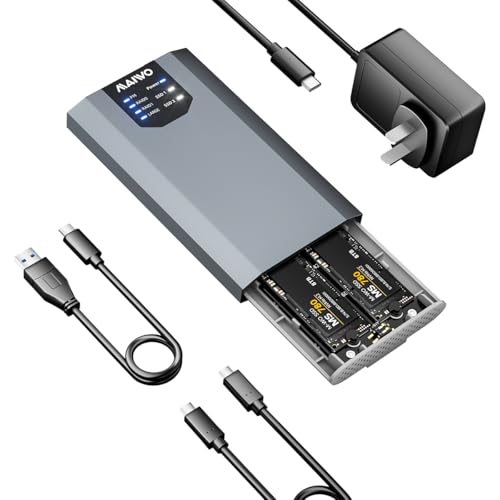
The MAIWO Dual M.2 NVMe RAID Enclosure K2023R stands out for video editors seeking a high-speed, flexible storage solution. With support for up to 8TB across two M.2 NVMe SSDs, it offers RAID configurations like RAID 0 and 1 to optimize performance and redundancy. You’ll appreciate the USB 3.2 Gen 2×2 Type-C interface, delivering impressive data transfer rates of up to 20Gbps. Its plug-and-play design makes setup a breeze, while the durable ABS and aluminum construction guarantees longevity. Plus, with a 12-month warranty and a 30-day return policy, you can buy with confidence.
Best For: Video editors and professionals seeking a high-speed, flexible storage solution with RAID support.
Pros:
- Supports up to 8TB storage across two M.2 NVMe SSDs for extensive data needs.
- Impressive data transfer rates of up to 20Gbps via USB 3.2 Gen 2×2 Type-C for fast file access and transfers.
- Durable construction using ABS and aluminum ensures longevity and reliability.
Cons:
- Customer rating of 3.9 out of 5 stars, indicating mixed feedback from users.
- Limited to two M.2 NVMe SSDs, which may not meet the needs of users requiring more extensive storage options.
- May require additional power supply, adding complexity to setup despite the plug-and-play design.
MAIWO M.2 NVMe PCIe RAID Enclosure (K2022R)

If you’re a video editor looking for a reliable storage solution, the MAIWO M.2 NVMe PCIe RAID Enclosure (K2022R) stands out with its dual bay design and impressive 20Gbps transfer speed. This enclosure supports various M.2 NVMe SSD sizes, ensuring compatibility with your drives. With a total capacity of 16TB, you can easily manage large video files. The tool-free installation and plug-and-play feature make setup a breeze. You’ll appreciate the RAID options, allowing for tailored performance. Plus, it’s compatible with multiple devices and operating systems, ensuring versatility in your editing workflow. Don’t miss out on this efficient solution!
Best For: Video editors and content creators seeking a high-capacity, fast, and flexible storage solution for managing large files.
Pros:
- Supports dual bay configuration with a total capacity of 16TB, ideal for extensive video projects.
- High-speed USB 3.2 Gen2x2 connection allows for data transfer rates up to 2000MB/s.
- Easy tool-free installation and plug-and-play functionality streamline the setup process.
Cons:
- Does not support M.2 SATA B+M Key SSDs, limiting compatibility to specific SSD types.
- Users must back up data before changing RAID modes to avoid potential data loss.
- Requires an independent power adapter, which may be less convenient for mobile setups.
ASUS ROG STRIX Arion M.2 NVMe SSD External Portable Enclosure Case

Designed to accommodate various M.2 PCIe NVMe SSDs, the ASUS ROG STRIX Arion is an excellent choice for video editors seeking portability and high-speed performance. With USB Type-C 3.2 Gen 2 connectivity, you’ll enjoy transfer speeds up to 10 Gbps, making file transfers a breeze. The enclosure supports multiple M.2 sizes, ensuring compatibility with your drives. Its aluminum alloy design not only looks sleek but also includes thermal pads to manage heat effectively. Plus, the customizable ASUS Aura Sync RGB lighting adds a personal touch to your setup, syncing beautifully with other Aura-enabled devices.
Best For: Video editors and content creators seeking a portable, high-speed external storage solution for M.2 NVMe SSDs.
Pros:
- High transfer speeds: USB Type-C 3.2 Gen 2 connectivity allows for data transfer rates up to 10 Gbps.
- Effective thermal management: Aluminum alloy design and thermal pads help dissipate heat, ensuring optimal drive performance.
- Customizable lighting: ASUS Aura Sync RGB lighting offers a wide range of colors and synchronization with other Aura-enabled devices.
Cons:
- M.2 NVMe SSD not included: Users need to purchase the SSD separately, which may incur additional costs.
- Limited to NVMe SSDs: Compatibility is restricted to M.2 PCIe NVMe drives, excluding SATA SSDs.
- May require adapters: Depending on the device, additional adapters may be necessary for certain connections, particularly with USB Type-A.
G-Technology G-SPEED eS PRO 8 TB Mini-SAS RAID Array
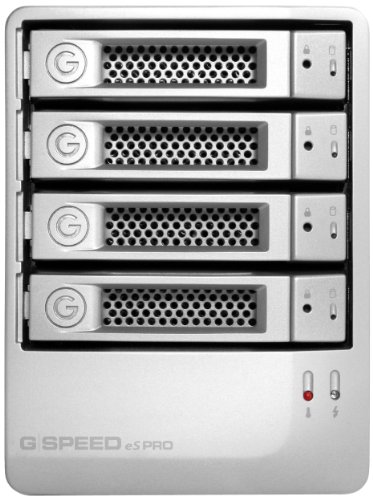
For professional content creators seeking a reliable and efficient storage solution, the G-Technology G-SPEED eS PRO 8 TB Mini-SAS RAID Array stands out with its impressive 12Gbit mini-SAS connectivity and support for demanding workflows. This compact system features four hot-swappable drives, allowing for easy management of your data. With RAID levels 0, 1, 3, 5, and 6, you can tailor performance to fit your needs. It also supports multi-stream ProRes 422 HQ playback, ensuring smooth editing of high-quality footage. Plus, the built-in Web GUI simplifies monitoring and configuration, keeping your projects running smoothly without interruption.
Best For: Professional content creators looking for a high-speed, reliable storage solution for demanding video editing workflows.
Pros:
- Supports multiple RAID configurations (0, 1, 3, 5, 6) for tailored performance.
- Compact design with hot-swappable drives for easy data management.
- Built-in Web GUI for straightforward monitoring and configuration.
Cons:
- Limited to 8 TB storage capacity, which may not be sufficient for larger projects.
- Customer reviews indicate potential reliability issues, with a low rating.
- Heavier weight (15.6 pounds) compared to some portable storage solutions.
Factors to Consider When Choosing NVMe RAID Arrays for Video Editing
When you’re selecting an NVMe RAID array for video editing, you’ll want to think about several key factors. Consider your storage capacity needs, the speed and performance you require, and the RAID configuration that best fits your workflow. Additionally, don’t overlook thermal management and connectivity features, as these can greatly impact your editing experience.
Storage Capacity Requirements
How much storage do you really need for video editing? Aim for a minimum of 8TB to handle high-resolution files and complex projects effectively. If you choose RAID 0, you can combine two 8TB drives for a total of 16TB, maximizing both speed and storage. Keep in mind the individual drive sizes your array supports, like the common M.2 NVMe SSD sizes of 2230, 2242, 2260, and 2280, as this will influence your drive selection.
Additionally, consider RAID configurations like RAID 1 or JBOD for data protection, especially for critical projects. Finally, think about future growth; select RAID arrays that can expand beyond initial limits, ideally supporting up to 32TB to accommodate your evolving needs.
Speed and Performance
Choosing the right NVMe RAID array can drastically elevate your video editing experience, especially since speed and performance are critical for handling large files and complex projects. NVMe RAID arrays can achieve data transfer speeds between 20Gbps to 40Gbps, which is essential for fast read and write capabilities. If you’re looking to maximize performance, consider RAID 0 configurations that combine multiple drives to boost throughput, reaching speeds of 1800-2800 MB/s. While RAID 0 excels in speed, remember that RAID 1 offers data redundancy, safeguarding your important video files. Additionally, opt for enclosures that support high-capacity configurations, accommodating up to 16TB or more. Don’t forget efficient thermal management features to prevent overheating during intense editing sessions.
RAID Configuration Options
Selecting the right RAID configuration can greatly impact your video editing workflow, as each option offers distinct advantages tailored to specific needs. RAID 0 is perfect if you prioritize speed, as it stripes data across drives, effectively doubling read and write speeds for quick access to large files. If data redundancy is your main concern, RAID 1 mirrors your data on two drives, ensuring accessibility even if one fails. For a balanced approach, RAID 5 combines striping and parity, allowing for improved performance while protecting against a single drive failure. Alternatively, JBOD offers flexibility with independent drive operation, though it lacks the benefits of redundancy and speed. Consider your specific requirements to choose the best configuration for your editing tasks.
Thermal Management Solutions
As you plunge into video editing with NVMe RAID arrays, effective thermal management becomes a key factor in maintaining performance and reliability. High-performance SSDs generate considerable heat during intensive tasks, risking throttling and reduced efficiency. Look for enclosures made from aluminum alloy with built-in fans or thermal pads to enhance heat dissipation. A well-designed cooling system can boost cooling efficiency by up to 40%, keeping your drives safe even under heavy workloads. Additionally, monitoring temperature levels is vital; some RAID arrays offer built-in indicators or management software to alert you when temperatures exceed safe thresholds. By implementing solid thermal management solutions, you’ll greatly extend your NVMe SSDs’ lifespan, minimizing the risk of data loss or drive failure during critical editing sessions.
Connectivity Features
When it comes to NVMe RAID arrays for video editing, connectivity features play an essential role in maximizing your workflow efficiency. Look for options like USB4 and Thunderbolt 3/4, which boast peak transfer rates of up to 40Gbps, enabling speedy data access and editing. Multiple ports, including USB-C and HDMI, are vital for seamless connections to various devices and dual monitor setups. Make sure the array accommodates different M.2 SSD sizes, like 2230 to 2280, so you can easily adapt to your storage needs and future upgrades. Features such as plug-and-play design and tool-free installation will streamline your setup, while effective cooling systems, like built-in fans and aluminum casings, help maintain peak performance during demanding editing tasks.
Compatibility With Systems
Understanding compatibility with your system is essential for choosing the right NVMe RAID array for video editing. Start by verifying the array supports your operating system, whether it’s Windows, macOS, or Linux, for seamless integration. Next, check the specific NVMe SSD sizes your system accommodates, like 2230 or 2280, to prevent fit issues. Verify that your hardware and software can handle the desired RAID configurations, such as RAID 0 or JBOD, for effective data management. Additionally, consider the connectivity interfaces available—USB4, Thunderbolt 3/4, or PCIe—to confirm they match your system’s ports for ideal transfer speeds. Finally, confirm the RAID array’s power requirements align with your system’s capabilities, especially if you’re using high-performance SSDs.
Portability and Design
Portability and design play an essential role in your choice of NVMe RAID arrays for video editing, especially if you often work on the go. Look for compact and lightweight enclosures that make transportation hassle-free. Tool-free installation features can simplify setup, allowing you quick access to drives for maintenance or upgrades. Choose materials like aluminum for effective thermal management, preventing overheating during intense data transfers. Multiple connectivity options, such as USB Type-C or Thunderbolt, enhance compatibility with various devices and boost data transfer speeds. Finally, consider RAID arrays with built-in fans for cooling, which can improve performance reliability during those long editing sessions. Prioritizing these factors guarantees a smooth workflow wherever you are.