When it comes to overclocking, effective cooling isn’t just a luxury—it’s a necessity. With the right upgrades, you can push your system to its limits without worrying about overheating. From high-performance air coolers to advanced AIO solutions, there are plenty of options to evaluate. But how do you choose the best cooling solutions for your setup? Let’s explore some of the top contenders that can elevate your gaming or productivity experience.
Thermalright Assassin X 120R Digital ARGB CPU Air Cooler

If you’re looking to push your CPU’s limits through overclocking, the Thermalright Assassin X 120R Digital ARGB CPU Air Cooler is an excellent choice. This cooler features a 2000RPM PWM fan that adjusts its speed based on the motherboard’s temperature, ensuring peak cooling. With four upgraded 6mm heat pipes and a fine bottom surface treatment, heat dissipation is efficient. Standing at 151mm, it fits most cases without sacrificing performance. Plus, the ARGB lighting syncs with your motherboard, adding a visual flair. Its digital screen and TRCC software allow you to monitor and manage performance seamlessly, making it a top-tier option for enthusiasts.
Best For: Enthusiasts looking to optimize CPU cooling performance while enjoying customizable ARGB lighting effects.
Pros:
- Efficient cooling performance with a 2000RPM PWM fan and advanced heat pipe technology.
- Aesthetic appeal with ARGB lighting that syncs with the motherboard for a personalized look.
- User-friendly digital screen and TRCC software for easy performance monitoring and management.
Cons:
- Height limitations may restrict compatibility with some smaller cases.
- Setup complexity may be challenging for beginners unfamiliar with cooler installation.
- Noise levels may increase under peak performance conditions despite noise reduction features.
Cooler Master Hyper 212 Black CPU Cooler

For gamers and enthusiasts looking to push their AMD Ryzen R7 or Intel i7 processors to the limit, the Cooler Master Hyper 212 Black CPU Cooler stands out as an exceptional choice. With its four copper heat pipes and aluminum top cover, it enhances heat dissipation effectively. The SickleFlow 120 Edge PWM fan provides premium airflow, adjustable from 690 to 2,500 RPM, balancing noise and efficiency. Installation is a breeze thanks to redesigned brackets, making it compatible with AM5 and LGA 1851|1700 platforms. Its 152mm height guarantees it fits in various chassis, making it a versatile cooling upgrade.
Best For: Gamers and enthusiasts seeking an effective cooling solution for high-performance AMD Ryzen R7 and Intel i7 processors.
Pros:
- Excellent heat dissipation with four copper heat pipes and aluminum top cover.
- Adjustable fan speeds (690 to 2,500 RPM) for optimal airflow and noise balance.
- Easy installation with redesigned brackets and broad compatibility with various platforms.
Cons:
- Height of 152mm may limit compatibility in smaller chassis.
- Performance may not match higher-end cooling solutions for extreme overclocking.
- PWM fan may introduce slight noise at higher RPMs during intense usage.
Minorsonic AIO CPU Cooler (360mm)

The Minorsonic AIO CPU Cooler (360mm) stands out with its high-speed ceramic bearing pump, making it a top choice for gamers and power users enthusiastic to push their systems to the limit. With a robust 3000 RPM pump and an industrial-grade 3-phase motor, it minimizes noise and vibration while enhancing heat transfer. Smart PWM fan control guarantees peak airflow, and the daisy-chained 120mm fans keep your setup tidy. Its exclusive 12-channel radiator design promotes efficient heat dissipation, making this cooler ideal for maintaining stability and performance under heavy workloads. Trust the Minorsonic to keep your system cool and quiet!
Best For: Gamers, creators, and power users seeking reliable performance and low noise levels during heavy workloads.
Pros:
- High-speed ceramic bearing pump operates at 3000 RPM for enhanced flow and longevity.
- Smart PWM fan control adjusts speeds based on system temperature, optimizing airflow and minimizing noise.
- Exclusive 12-channel radiator design improves heat dissipation for superior cooling performance.
Cons:
- Larger size may not fit in compact cases or setups with limited space.
- Installation may require more effort due to the 360mm radiator size and fan configuration.
- Higher price point compared to simpler cooling solutions.
Thermalright Assassin X120 Refined SE CPU Air Cooler

Designed to meet the cooling demands of overclocking enthusiasts, the Thermalright Assassin X120 Refined SE CPU Air Cooler excels with its innovative AGHP technology. Weighing just 0.645kg and standing 148mm tall, it fits perfectly in medium-sized cases. Its 120mm fan operates at 1550rpm, delivering a maximum airflow of 66.17 CFM while maintaining a whisper-quiet noise level of ≤25.6dB(A). With compatibility for various Intel and AMD sockets, this cooler includes all the necessary mounting hardware. The durable design and long service life of up to 20,000 hours make it a reliable choice for maximizing your system’s performance.
Best For: Overclocking enthusiasts and gamers looking for efficient and quiet cooling solutions for their CPUs.
Pros:
- Innovative AGHP technology enhances cooling performance, making it ideal for high-demand applications.
- Low noise level of ≤25.6dB(A) ensures a quiet computing experience even under load.
- Wide compatibility with multiple Intel and AMD CPU sockets, making it versatile for various builds.
Cons:
- Height may limit compatibility with some smaller computer cases, requiring careful consideration during installation.
- Weight of 0.645kg could pose a challenge for portability or installations in lightweight cases.
- Fan speed of 1550rpm may not be sufficient for extreme overclocking scenarios compared to higher RPM models.
Wathai Cooling Case Fan for Receiver and DVR

If you’re looking to enhance the cooling of your electronics, the Wathai Cooling Case Fan is an excellent choice for devices like DVRs and AV receivers. With its compact 120mm size and 1500 RPM speed, it moves an impressive 56.7 CFM of air while operating at a whisper-quiet 23 dBA. This USB-powered fan fits easily in tight spaces, making installation a breeze, and it comes with all necessary accessories, including mounting screws and a protective net. Designed for a lifespan of 35,000 hours, it efficiently cools everything from routers to gaming consoles, ensuring your devices remain functional and cool.
Best For: The Wathai Cooling Case Fan is best for users seeking efficient cooling solutions for their electronics, particularly DVRs, AV receivers, and gaming consoles.
Pros:
- Compact design allows for easy installation in tight spaces.
- Operates quietly at 23 dBA, making it suitable for home entertainment setups.
- Long lifespan of 35,000 hours ensures durability and long-term use.
Cons:
- Limited to USB power source, which may restrict placement options.
- May not be sufficient for larger or more powerful electronics that generate significant heat.
- The 55 cm cable length may be short for some setups, requiring additional extensions.
ID-COOLING SE-903-XT V2 Black CPU Air Cooler

For gamers and overclocking enthusiasts seeking reliable cooling solutions, the ID-COOLING SE-903-XT V2 Black CPU Air Cooler stands out with its upgraded 100mm PWM fan. This cooler features an improved tower heatsink design with direct touch heat pipes, ensuring efficient heat dissipation. The larger fan enhances airflow while keeping noise levels low, perfect for gaming sessions. Its compact size fits snugly in small and mid-size cases without interfering with components. Plus, the universal mounting bracket simplifies installation for both Intel and AMD platforms. With reinforced fan clips, you can trust its durability for long-term use.
Best For: Gamers and overclocking enthusiasts seeking reliable and efficient cooling solutions for their PC builds.
Pros:
- Enhanced cooling performance with improved tower heatsink design and larger 100mm PWM fan for better airflow.
- Compact and low-profile design that fits well in small and mid-size cases without interfering with components.
- User-friendly installation process with a universal mounting bracket compatible with both Intel and AMD platforms.
Cons:
- Limited RGB options for users looking for customizable lighting effects in their builds.
- Not suitable for high-end overclocking compared to larger, more powerful coolers.
- May require additional case fans to optimize overall airflow in larger builds.
Thermal Grizzly Kryonaut High Performance Thermal Paste (1 Gram)

Thermal Grizzly Kryonaut High Performance Thermal Paste is perfect for those who demand top-tier cooling solutions, especially if you’re overclocking your CPU or GPU. With exceptional thermal conductivity, this paste guarantees your components stay cool under pressure, even in demanding configurations. The included syringe and spatula allow for easy, precise application, facilitating uniform distribution across your processors and graphics cards. Plus, its unique structure assures long-lasting performance, resisting drying out at temperatures up to 80°C. Users often notice a significant temperature drop right after application, enhancing heat management and overall operational comfort, making it a must-have for any overclocking enthusiast.
Best For: Thermal Grizzly Kryonaut High Performance Thermal Paste is best for overclocking enthusiasts and users seeking top-tier cooling solutions for their CPUs and GPUs.
Pros:
- Exceptional thermal conductivity ensures optimal cooling for demanding applications.
- Easy and precise application with included syringe and spatula.
- Long-lasting performance that resists drying out at high temperatures.
Cons:
- Limited quantity (1 gram) may not be sufficient for multiple applications.
- Higher price point compared to standard thermal pastes.
- Requires careful application to avoid overuse or messiness.
Cooler Master Hyper 212 Spectrum V3 ARGB CPU Air Cooler

The Cooler Master Hyper 212 Spectrum V3 ARGB CPU Air Cooler stands out as an excellent choice for gamers and overclocking enthusiasts seeking a balance of performance and aesthetics. With its 120mm PWM fan and 152mm height, it fits a wide range of chassis while remaining compatible with AMD Ryzen and Intel LGA platforms. The four copper heat pipes and silver nickel-plated base provide superior cooling for high-performance CPUs. Plus, the dynamic fan adjusts speeds from 650 to 1,750 RPM, ensuring a perfect mix of airflow and noise control. The aRGB lighting adds a vibrant touch, making it a visually striking upgrade.
Best For: Gamers and overclocking enthusiasts seeking an effective cooling solution with customizable aesthetics.
Pros:
- Superior cooling performance with four copper heat pipes and a silver nickel-plated base, ideal for high-performance CPUs.
- Dynamic PWM fan offers adjustable speeds from 650 to 1,750 RPM, balancing noise levels and airflow effectively.
- Customizable aRGB lighting enhances the visual appeal, allowing users to personalize their setup.
Cons:
- Height may limit compatibility with some smaller chassis or cases.
- Installation can be complex for beginners, despite redesigned brackets.
- May not be the quietest option at maximum fan speeds, which could be a concern for noise-sensitive users.
AsiaHorse Nyota Ultra 120mm PC Case Fan
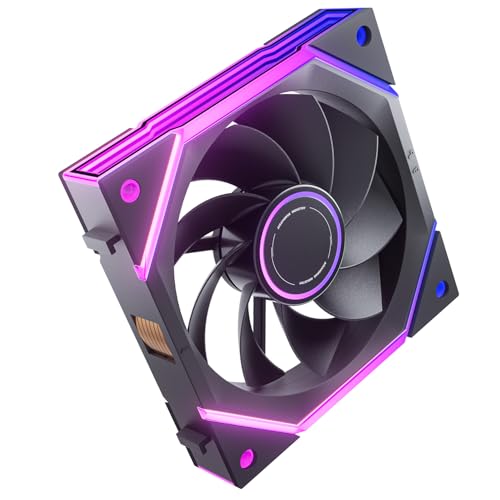
If you’re looking to enhance your PC’s cooling performance while overclocking, the AsiaHorse Nyota Ultra 120mm PC Case Fan stands out with its powerful airflow and innovative design. With 9 blades generating an impressive 58.5 CFM, it effectively dissipates heat, even under heavy loads. Enjoy silent operation at just 6 dB(A), thanks to premium silicone pads and hydro bearings. The fan’s modular design allows for customizable aesthetics, and it includes dedicated screws for easy installation. Plus, the vibrant RGB lighting, adjustable via motherboard software, adds a stunning visual effect to your setup. Elevate your cooling game with this fan!
Best For: PC enthusiasts and gamers seeking efficient cooling performance and customizable RGB lighting for their systems.
Pros:
- Powerful airflow of 58.5 CFM with 9 blades, ensuring effective heat dissipation under heavy loads.
- Silent operation at just 6 dB(A), thanks to premium silicone pads and hydro bearings.
- Modular design allows for personalized aesthetics and easy installation with dedicated screws.
Cons:
- May require motherboard software for full RGB lighting control.
- Compatibility may vary with certain PC cases, despite being designed for most.
- Limited to 120mm size, which may not suit all system configurations.
ID-COOLING SE-214-XT Black CPU Cooler

For overclocking enthusiasts seeking reliable and efficient cooling, the ID-COOLING SE-214-XT Black CPU Cooler stands out with its impressive TDP of 180W. Its all-black design integrates seamlessly into your setup, while the four direct-contact heat pipes guarantee effective heat dissipation. The 120mm PWM fan operates quietly, with a maximum airflow of 76.16 CFM, keeping noise levels manageable between 15.2 to 35.2 dB(A). Installation is hassle-free across Intel and AMD sockets, and it won’t interfere with RAM or PCIe slots. With a customer rating of 4.6 stars, this cooler is a solid choice for any overclocking rig.
Best For: Overclocking enthusiasts looking for efficient and reliable cooling solutions for their CPU.
Pros:
- Effective cooling with a TDP of 180W and four direct-contact heat pipes.
- Quiet operation due to the 120mm PWM fan, maintaining noise levels between 15.2 to 35.2 dB(A).
- Hassle-free installation compatible with a wide range of Intel and AMD sockets without interfering with RAM or PCIe slots.
Cons:
- Bulkier design may limit compatibility with smaller cases due to its 150mm height.
- Performance may vary depending on case airflow and specific CPU configurations.
- Limited aesthetic options as it only comes in an all-black design, which may not appeal to all users.
Factors to Consider When Choosing a PC Cooling Upgrade for Overclocking
When choosing a cooling upgrade for overclocking, you need to take into account several key factors. Cooling performance metrics, noise levels, and compatibility with your components are essential for ideal results. Don’t forget to reflect on installation ease and the aesthetic appeal of your new cooler as well.
Cooling Performance Metrics
Choosing the right cooling solution for overclocking hinges on understanding several key performance metrics. First, consider thermal resistance, measured in °C/W; lower values mean better heat dissipation from your CPU. Next, look at airflow, indicated in cubic feet per minute (CFM), as it determines how effectively air circulates through the heatsink. Additionally, the maximum fan speed, measured in RPM, directly impacts cooling efficiency—higher speeds increase airflow but may also raise noise levels. Finally, check the cooling capacity, expressed as thermal design power (TDP). Make sure your cooler can handle the heat output from your CPU during overclocking. By focusing on these metrics, you can make an informed decision for peak performance and stability.
Noise Levels Consideration
While achieving ideal cooling performance is essential for overclocking, you shouldn’t overlook the importance of noise levels in your PC setup. Noise levels, measured in decibels (dB), matter; fans operating below 25 dB(A) are often preferred for a quieter experience. Consider using PWM (Pulse Width Modulation) fans, which adjust speed based on temperature, allowing for quieter operation during lighter loads. Look for effective noise reduction features like silicone corner pads and S-FDB technology to minimize vibrations. Remember that airflow rate, measured in CFM, can impact noise; higher airflow often means more noise. Aim for cooling solutions with noise levels below 30 dB(A) to guarantee a pleasant environment, especially during long gaming or workstation sessions.
Compatibility With Components
Before you upgrade your PC cooling for overclocking, it’s crucial to verify compatibility with your existing components. Start by checking the cooler’s dimensions to confirm it fits your case; many coolers have height restrictions that can interfere with RAM and motherboard components. Verify the socket compatibility, as different coolers support specific Intel and AMD sockets, which vary across generations. Consider your CPU’s thermal design power (TDP) rating; the cooler must effectively dissipate heat generated during overclocking. Also, examine the clearance around the CPU socket to avoid conflicts with RAM or graphics cards when installing larger coolers. Finally, confirm the cooler’s mounting mechanism aligns with your motherboard’s layout for a hassle-free installation.
Installation Ease and Features
When upgrading your PC cooling for overclocking, installation ease and features play an essential role in guaranteeing a smooth setup. Look for coolers with redesigned brackets or universal mounting systems, as they simplify installation across various CPU socket types. Compact designs can also prevent interference with RAM and other motherboard components, making it easier to install in tight spaces. Check for included installation accessories like screws and mounting plates to facilitate a hassle-free setup. Choose coolers that come with clear installation instructions or online resources to help streamline the process, whether you’re a novice or an experienced builder. Finally, verify the cooler’s height and dimensions are compatible with your case to avoid compromising other components during installation.
Aesthetic Appeal and Design
Upgrading your PC cooling isn’t just about performance; it’s also an opportunity to enhance your build’s aesthetic appeal. Many coolers come with customizable RGB lighting, allowing you to create vibrant effects that sync with your setup. When choosing a cooling solution, consider how its design complements your case’s theme—options range from sleek black finishes to eye-catching transparent elements. Pay attention to the size and layout, ensuring compatibility with your RAM and motherboard while maintaining a polished look. Innovative designs, like infinity mirrors or modular fans, not only improve airflow but also add unique visual flair. Finally, opt for quality materials like aluminum or premium plastics that enhance both durability and the overall aesthetic of your cooling upgrade.
Price and Value Assessment
Choosing the right PC cooling upgrade for overclocking involves weighing several factors to guarantee you get the best bang for your buck. Start by evaluating the cost-performance ratio; compare cooling efficiency and noise levels against their price points. Longevity and warranty are vital, too—higher upfront costs can lead to better long-term value through durability. Don’t overlook additional features like RGB lighting or software control, which can enhance your experience and justify a higher price. Analyze user reviews and performance benchmarks to see if a cooling solution greatly improves thermal management for your system. Finally, keep an eye out for hidden costs, such as compatibility issues or necessary installation accessories that could inflate your overall expenditure.