If you’re serious about gaming, you know that every component matters, especially when it comes to your M.2 SSD. Upgrading its cooling can make a significant difference in performance, helping to prevent thermal throttling and ensuring smooth gameplay. With a range of active cooling solutions available, each offers unique features and designs. Let’s explore the top options that can help you maximize your gaming experience.
Thermalright HR10 2280 PRO Black SSD Heatsink Cooling

If you’re looking to keep your high-performance PCI-E 5.0 SSD cool under pressure, the Thermalright HR10 2280 PRO Black SSD Heatsink Cooling is your go-to solution. With advanced AGHP technology featuring four 5mm heat pipes, it enhances heat conduction efficiency. The compact PWM fan operates between 3500-6000 RPM, rapidly reducing temperatures. Its double-sided cooling design, equipped with high thermal conductivity pads, can lower temperatures by 10°C-30°C, preventing overheating. Plus, it’s compatible with both single-sided and double-sided M.2 SSDs. This unique design not only boosts cooling but also elevates overall product value, making it an essential upgrade for gamers.
Best For: Gamers and PC enthusiasts looking to maintain optimal performance and prevent overheating of their high-performance PCI-E 5.0 SSDs.
Pros:
- Advanced Cooling Technology: Features AGHP technology and effective heat dissipation, enhancing performance during intense usage.
- Rapid Temperature Reduction: The compact PWM fan operates at high speeds, quickly cooling the SSD to prevent throttling.
- Double-Sided Cooling: Equipped with high thermal conductivity pads on both sides, allowing for efficient heat management.
Cons:
- Compatibility Limitations: Not compatible with ITX motherboard back-mounted M.2 interfaces, which may limit usage for some builds.
- Installation Space: May require sufficient space within the case for the heatsink and fan assembly.
- Price Point: Higher cost compared to basic heatsinks may be a consideration for budget-conscious users.
EZDIY-FAB Shield ARGB M.2 SSD Heatsink with PWM Fan

For gamers and heavy workload users, the EZDIY-FAB Shield ARGB M.2 SSD Heatsink with PWM Fan stands out as an essential upgrade. This heatsink delivers high-performance cooling, reducing SSD temperatures by 5°C to 30°C, which helps prevent thermal throttling. Its integrated PWM fan spins up to 13,000 RPM, adjusting based on your cooling needs. With a sleek aluminum design and vibrant ARGB effects, it enhances both aesthetics and functionality. Built to last with a lifespan of up to 60,000 hours, it’s compatible with various M.2 SSD sizes, making it a versatile choice for your gaming rig.
Best For: Gamers and heavy workload users seeking to enhance SSD cooling performance and prevent thermal throttling.
Pros:
- High-performance cooling that reduces SSD temperatures by 5°C to 30°C.
- Integrated PWM fan that adjusts speed based on thermal demand, ensuring efficient cooling.
- Sleek aluminum design with vibrant ARGB effects, enhancing both aesthetics and functionality.
Cons:
- May not be compatible with SSDs larger than M.2 2280 or those with unique designs.
- Requires adequate space in the case for installation due to its compact form factor.
- The PWM fan, while effective, may introduce some noise at higher RPMs.
be quiet! MC1 Pro M.2 SSD Cooler (BZ003)

MC1 Pro M.2 SSD Cooler (BZ003) is your go-to solution for keeping your NVMe SSDs cool. Its advanced aluminum heatsink, coupled with a built-in heatpipe, efficiently dissipates heat, ensuring your read and write speeds stay at their peak. Compatible with both single-sided and double-sided M.2 2280 drives, it offers flexibility for various SSDs. The sleek matte black finish adds a touch of elegance to your setup. Plus, the simple mounting system makes installation a breeze, providing reliable cooling and durability for your gaming needs. Upgrade your cooling game with this high-quality cooler!
Best For: Users looking to enhance the cooling performance of their NVMe SSDs for optimal gaming and computing experiences.
Pros:
- Efficient heat dissipation with advanced aluminum heatsink and built-in heatpipe.
- Wide compatibility with both single-sided and double-sided M.2 2280 drives.
- Stylish design featuring a sleek matte black finish that complements any setup.
Cons:
- Limited to M.2 2280 drives, which may not suit all SSD types.
- Installation may require extra care for those unfamiliar with hardware setups.
- Additional cost compared to standard SSDs without cooling solutions.
be quiet! MC1 M.2 SSD Cooler Heatsink (BZ002)
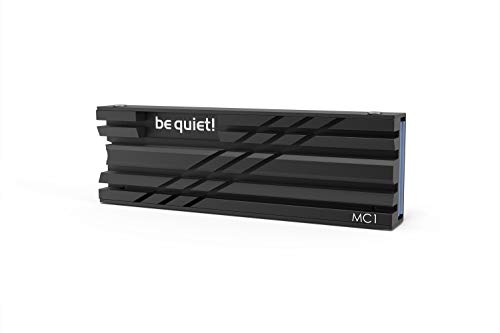
Designed specifically for both single and double sided 2280 modules, the be quiet! MC1 M.2 SSD Cooler Heatsink (BZ002) offers exceptional cooling efficiency. It helps maintain maximum read and write speeds, ensuring your M.2 SSD runs at full performance for longer periods. You’ll appreciate its versatility, as it fits seamlessly into various setups, including those extending your PlayStation 5 memory. By lowering temperatures, this heatsink not only enhances performance but also reduces lag, leading to shorter loading times and increased free space. Upgrade your gaming experience with this reliable cooling solution for your M.2 SSD.
Best For: Gamers and PC builders looking to enhance M.2 SSD performance and reduce loading times seamlessly.
Pros:
- Efficient cooling that maintains maximum read/write speeds for prolonged use.
- Versatile compatibility with both single and double sided M.2 2280 modules, making it suitable for various setups.
- Ideal for PlayStation 5, providing extended memory and improved gaming performance.
Cons:
- May require additional installation effort for users unfamiliar with PC hardware.
- Limited to M.2 2280 module sizes, which may not fit all SSDs.
- Aesthetic design may not appeal to all users, especially those seeking a specific look for their builds.
EZDIY-FAB M.2 SSD Heatsink with PWM Fan (1 Pack)

If you’re looking to enhance your gaming rig or workstation with reliable cooling, the EZDIY-FAB M.2 SSD Heatsink with PWM Fan is an excellent choice. This heatsink features a built-in 20mm PWM fan that automatically adjusts its speed, ensuring peak cooling when you need it most. With dual-sided thermal pads and a sturdy aluminum base, it effectively reduces SSD temperatures by 5°C to 30°C, preventing overheating. Designed for M.2 2280 SSDs, it’s also compatible with various sizes. Plus, its sleek design fits snugly in tight spaces, making it a stylish and practical upgrade for your setup.
Best For: Gamers and PC enthusiasts looking for effective cooling solutions for their M.2 SSDs.
Pros:
- Efficient Cooling: Lowers SSD temperatures by 5°C to 30°C, preventing overheating during intense usage.
- Automatic Fan Adjustment: The PWM fan automatically adjusts speed based on cooling needs, ensuring optimal performance.
- Compact Design: Fits well in tight spaces without compromising on aesthetics or functionality.
Cons:
- Limited to M.2 SSDs: Specifically designed for M.2 2280 SSDs, which may not suit all users.
- Installation Complexity: Installation may require additional effort or technical knowledge for some users.
- Noise Levels at High RPM: The fan can produce noticeable noise at higher RPMs, potentially distracting in quiet environments.
12V M.2 2280 SSD Heatsink with Cooling Fan

For enthusiasts looking to maximize their M.2 NVMe SSD performance, the 12V M.2 2280 SSD Heatsink with Cooling Fan stands out as an essential upgrade. This heatsink is designed for desktop PCs and works with single or double-sided M.2 NVMe 2280 SSDs. It combines active and passive cooling, featuring three 4.5mm copper heat pipes that efficiently absorb and dissipate heat. The 40mm quiet PWM cooling fan operates at a maximum speed of 8500 RPM, ensuring rapid cooling with minimal noise. Plus, installation is a breeze with included thermal tape, screws, and a screwdriver, guaranteeing your SSD’s long-lasting performance.
Best For: Enthusiasts and gamers seeking to enhance the cooling performance of their M.2 NVMe SSDs in desktop PCs.
Pros:
- Efficient Cooling: Combines active and passive cooling for optimal heat dissipation.
- Quiet Operation: 40mm PWM fan operates quietly at a maximum speed of 8500 RPM.
- Easy Installation: Comes with all necessary components including thermal tape and screwdriver for hassle-free setup.
Cons:
- Limited Compatibility: Only compatible with single/double-sided M.2 NVMe 2280 SSDs, excluding other form factors.
- Requires 12V Power: Needs a 12V power source, which may not be available in all setups.
- Potential Size Constraints: The heatsink may take up additional space, which could be a concern in compact builds.
ARCTIC M2 Pro Heatsink Cooler for M.2 2280 SSD

Looking to enhance your gaming rig or PC performance? The ARCTIC M2 Pro Heatsink Cooler for M.2 2280 SSD is a fantastic choice. It efficiently dissipates heat, allowing your SSD to maintain peak performance even during intense gaming sessions. With its easy installation—no screws or rubber bands needed—you’ll secure your NVMe SSD effortlessly using a click mechanism. Plus, the included ARCTIC TP-3 thermal pads adapt to various heights, ensuring ideal thermal contact. This means reduced thermal throttling and reliable performance, so you can focus on gaming without worrying about overheating. Upgrade your cooling and boost your gameplay today!
Best For: Gamers and PC enthusiasts looking to enhance their SSD performance and cooling efficiency.
Pros:
- Efficient heat dissipation reduces the risk of thermal throttling during intensive tasks.
- Easy installation with a click mechanism, eliminating the need for screws or rubber bands.
- Includes adaptable thermal pads for optimal thermal contact across various SSD components.
Cons:
- Compatibility limited to M.2 2280 SSDs, which may not suit all users.
- Additional mass may increase the overall weight of the SSD setup.
- Some users may prefer a more intricate installation method for added security.
Thermalright HR09 2280 SSD Heatsink Cooler for M.2 SSD

The Thermalright HR09 2280 SSD Heatsink Cooler stands out as an ideal choice for gamers and content creators who demand superior performance from their M.2 2280 SSDs. Its double-sided design and robust aluminum alloy construction guarantee efficient heat dissipation, maintaining temperatures 10°C to 30°C lower than uncooled units. With 32 aluminum fins and a unique Nano Thermal Pad, it adapts to uneven surfaces without damaging your warranty labels. Weighing only 0.8 kg, it’s easy to install with adjustable height screws, making it compatible with various SSD heights. Elevate your gaming performance with this high-quality cooling solution.
Best For: Gamers and content creators seeking superior thermal performance for their M.2 2280 SSDs.
Pros:
- Efficient heat dissipation, lowering temperatures by 10°C to 30°C compared to uncooled SSDs.
- Unique Nano Thermal Pad adapts to uneven surfaces without damaging warranty labels.
- Easy installation with adjustable height screws, compatible with various SSD heights.
Cons:
- Weighs 0.8 kg, which may add additional weight to compact builds.
- May require additional space in the case due to its dimensions.
- Performance can vary based on environmental conditions.
WAVLINK Heatsink 880F for M.2 NVMe PCIe and SATA SSD

When seeking peak performance for your M.2 NVMe or SATA SSD, the WAVLINK Heatsink 880F stands out as an essential upgrade. This heatsink supports both single-sided and double-sided 2280 SSDs, enhancing cooling efficiency by up to 35%. With its anodized aluminum casing and groove shell design, it effectively reduces temperatures by approximately 18°C, extending your SSD’s lifespan and preventing throttling. The integrated 1 cm fan spins at 7,000 RPM while maintaining ultra-quiet operation, thanks to its low-noise adapter. Plus, thermal conductive pads guarantee superior heat transfer, safeguarding your SSD while boosting overall performance.
Best For: The WAVLINK Heatsink 880F is best for PC enthusiasts and gamers looking to enhance the cooling and performance of their M.2 NVMe or SATA SSDs.
Pros:
- Enhances cooling efficiency by up to 35%, preventing overheating and throttling.
- Durable anodized aluminum casing provides resistance against physical damage.
- Ultra-quiet 1 cm fan operates at 7,000 RPM without significant noise, ensuring a peaceful computing environment.
Cons:
- Not compatible with laptops or PS5, limiting its use to desktop systems only.
- Requires installation, which may be challenging for users unfamiliar with PC hardware.
- Slightly bulky design may not fit in all cases, especially compact builds.
M.2 Heatsink SSD Cooler for PS5 and PCIE NVME or SATA 2280 SSD (Black, 2 Pieces)

For gamers and PC enthusiasts seeking peak performance, the M.2 Heatsink SSD Cooler is an essential upgrade. Designed for PS5 and PCIE NVME or SATA 2280 SSDs, this two-piece cooler effectively enhances heat dissipation with its double-sided aluminum alloy design. It can lower temperatures by 10°C to 30°C, ensuring your SSD runs efficiently. Weighing only 1 ounce, it’s easy to install with fixed screws, accommodating various M.2 SSDs, including popular models like the Samsung 970 EVO. With a solid 4.7 out of 5 stars from nearly 1,800 reviews, it’s a smart choice for anyone serious about gaming performance.
Best For: Gamers and PC enthusiasts looking to enhance their SSD performance through effective cooling solutions.
Pros:
- Double-sided cooling design significantly increases heat dissipation, lowering temperatures by 10°C to 30°C.
- Easy installation with fixed screws accommodates various M.2 SSDs, making it user-friendly.
- High customer satisfaction with a rating of 4.7 out of 5 stars from nearly 1,800 reviews, indicating reliability and effectiveness.
Cons:
- Limited compatibility may not suit SSDs outside the M.2 2280 form factor, restricting use for some users.
- Material weight at 1 ounce may still be considered heavy for ultra-light builds.
- Potential warranty concerns with the use of thermal pads, although designed to preserve SSD labels.
Factors to Consider When Choosing a PC M2 Active Cooling Upgrade
When you’re choosing an M.2 active cooling upgrade, several factors come into play. You need to think about cooling efficiency, compatibility with your SSD, and how easy it is to install. Also, consider the materials used and the design aesthetics that match your setup.
Cooling Efficiency Levels
Choosing the right M.2 active cooling upgrade hinges on understanding cooling efficiency levels, as they can vary greatly among different models. Some coolers can lower temperatures by 5°C to 30°C, depending on their design and fan specifications. Look for active cooling solutions with PWM fans, which adjust speeds based on thermal needs and can reach up to 13,000 RPM. Heatsinks with integrated heat pipes enhance heat dissipation, helping maintain maximum read and write speeds while preventing thermal throttling. Pay attention to materials like aluminum and advanced thermal pads, which can notably improve heat transfer. Additionally, consider designs featuring double-sided cooling and increased surface area for ideal performance and SSD longevity.
Compatibility With SSDS
Verifying compatibility with your M.2 SSD is critical for selecting an effective active cooling upgrade. First, check that the cooler supports your specific M.2 SSD form factor, like 2280, since sizes such as 2230, 2242, and 2260 differ. Next, determine if the cooler is designed for single-sided or double-sided SSD configurations to guarantee a proper fit and ideal thermal contact. You’ll also want to verify compatibility with the SSD interface type, whether NVMe or SATA, to avoid installation issues. Additionally, consider any mounting requirements the cooling solution may have, as some might need specific components. Ultimately, review the thermal conductivity specifications, confirming the cooler uses suitable thermal pads that meet your SSD’s heat dissipation needs.
Installation Complexity
Installation complexity can vary widely among M.2 active cooling upgrades, so it’s essential to understand the differences before you commit. Some coolers feature simple mounting systems that require no tools, while others involve screws and thermal pads, making installation more involved. Certain heatsinks utilize a click mechanism, allowing for straightforward installation without screws, which saves you time and effort. Additionally, active cooling solutions often come with integrated fans that may need extra power connections, increasing complexity. Compatibility with SSD sizes can also impact ease of installation, as some coolers are designed for specific configurations. Finally, proper alignment of thermal pads is critical for effective cooling, so pay attention during installation to avoid performance issues.
Material and Durability
When upgrading your PC’s M.2 cooling system, the materials used in the cooler can greatly affect its durability and performance. Aluminum alloys are popular for their excellent thermal conductivity and resistance to physical damage. Look for anodized finishes or powder-coated surfaces that enhance corrosion resistance, prolonging the cooler’s lifespan. Integrated ball-bearing designs in fans typically offer operational lifespans of up to 60,000 hours, which is a significant advantage. High-quality thermal pads with thermal conductivity ratings around 14.8 W/mK guarantee effective heat transfer while maintaining durability. Additionally, a cooler’s construction quality—like stainless steel components and solid metal bases—plays an essential role in overall performance, making certain that your upgrade stands the test of time.
Design Aesthetics
While performance is essential, the design aesthetics of your M.2 active cooling upgrade can truly elevate your PC build. You’ll find options in sleek aluminum finishes or vibrant RGB lighting effects that enhance visual appeal. Compact form factors are vital, too; they keep your setup organized without obstructing other components. Opting for premium materials like anodized aluminum or powder-coated finishes not only looks great but also stands up to wear and tear. Think about color schemes that complement your motherboard and other components for a cohesive look that reflects your personal style. Additionally, innovative designs, including unique shapes and advanced heat dissipation technologies, can boost both performance and visual interest in your gaming rig.
Fan Specifications
Choosing the right fan specifications is key to maximizing the effectiveness of your M.2 active cooling upgrade. Start by considering the size of the fan; common dimensions like 20mm or 30mm fit well in tight spaces. Look at the RPM rating, as some fans can reach speeds up to 13,000 RPM, ensuring effective cooling under heavy workloads. PWM functionality is another feature to seek, allowing the fan to adjust its speed based on temperature, optimizing performance while keeping noise low. Don’t overlook lifespan; some fans can last up to 60,000 hours. Finally, aim for fans that operate quietly, usually around 20 to 30 dBA, to maintain a peaceful computing environment while enhancing cooling efficiency.
Thermal Management Techniques
To guarantee your M.2 active cooling upgrade performs at its best, it’s crucial to take into account various thermal management techniques. Start by considering active cooling solutions like fans, which can lower temperatures by 5°C to 30°C, preventing thermal throttling during intense workloads. Incorporating materials with high thermal conductivity, such as aluminum and specialized thermal pads, enhances heat dissipation efficiency. Additionally, implementing heat pipes in your cooling design can greatly improve heat transfer, maintaining maximum read and write speeds. A well-designed heatsink with a larger surface area optimizes passive cooling, while utilizing dual-sided thermal pads ensures both sides of the SSD are cooled effectively, reducing the risk of overheating and prolonging its lifespan.
Performance Impact
When evaluating the performance impact of a PC M.2 active cooling upgrade, it’s essential to contemplate how temperature affects your SSD’s efficiency. Active cooling solutions can lower SSD temperatures by up to 30°C, drastically reducing the risk of thermal throttling during demanding tasks. High-performance PWM fans adjust speeds according to thermal needs, ensuring your read and write speeds stay ideal. Many active coolers use advanced thermal pads with impressive conductivity ratings, enhancing heat transfer from the SSD to the heatsink. By incorporating effective cooling, you can also extend your M.2 SSD’s lifespan, preventing overheating and subsequent performance degradation. Plus, most active cooling systems are designed to fit both single-sided and double-sided M.2 SSDs, guaranteeing compatibility across various devices.