When it comes to gaming, you know that maintaining ideal temperatures can make all the difference in performance. Upgrading your PC cooling system isn’t just about aesthetics; it’s about ensuring your components run smoothly and last longer. With a variety of options available, from high-performance liquid coolers to effective case fans, you might wonder which products are worth your investment. Let’s explore the top contenders that could elevate your gaming experience.
CORSAIR Nautilus 360 RS ARGB Liquid CPU Cooler

If you’re a gamer or content creator seeking top-tier cooling performance, the CORSAIR Nautilus 360 RS ARGB Liquid CPU Cooler is an ideal choice. This 360mm all-in-one cooler features a whisper-quiet pump operating at just 20 dBA, ensuring your system stays cool without the noise. With a convex cold plate and pre-applied thermal paste, it guarantees peak contact with your CPU. The RS120 ARGB fans deliver strong airflow and high static pressure at 2100 RPM. Plus, the customizable RGB lighting and easy setup with daisy-chain fan connections make it both functional and visually appealing. Elevate your cooling game today!
Best For: Gamers and content creators seeking efficient and quiet cooling for high-performance CPUs.
Pros:
- High-performance cooling with low noise levels (20 dBA) ensures optimal performance without distraction.
- Customizable RGB lighting enhances the aesthetic appeal of your build, allowing for personalized setups.
- Easy installation with daisy-chain fan connections simplifies wiring and setup.
Cons:
- Larger size (360mm) may not fit in all cases, limiting compatibility with some builds.
- Higher price point compared to standard air coolers might be a concern for budget-conscious users.
- Potential for complex installation for users unfamiliar with liquid cooling systems.
Cooler Master MasterLiquid 360L AIO Liquid Cooler

The Cooler Master MasterLiquid 360L AIO Liquid Cooler is an excellent choice for gamers and PC enthusiasts seeking top-tier thermal performance. With its 360mm close-loop design, it’s compatible with both AMD Ryzen and Intel processors. The sleek black aesthetic and customizable ARGB lighting elevate your setup’s look. Its Gen S Dual Chamber Pump targets heat spots precisely, while the improved copper base enhances water flow for better cooling. Featuring premium CryoFuze thermal paste, it guarantees exceptional thermal conductivity. Plus, optimized PWM fans deliver efficient airflow with minimal noise, making it a standout option for anyone serious about cooling performance.
Best For: Gamers and PC enthusiasts seeking high-performance cooling solutions for their systems.
Pros:
- Exceptional thermal performance with Gen S Dual Chamber Pump and premium CryoFuze thermal paste.
- Customizable ARGB lighting enhances the aesthetic appeal of any gaming setup.
- Quieter operation with optimized PWM fan design, ensuring efficient cooling without excessive noise.
Cons:
- Requires more space due to its 360mm size, which may not fit in all cases.
- Installation can be complex for beginners, particularly with the mounting process.
- Higher price point compared to standard air coolers, which may not appeal to budget-conscious users.
Cooler Master Hyper 212 Black CPU Cooler

For gamers and content creators seeking reliable cooling solutions, the Cooler Master Hyper 212 Black CPU Cooler stands out with its impressive design and performance. Its SickleFlow 120 Edge PWM fan delivers premium airflow, while four copper heat pipes enhance heat dissipation, making it ideal for AMD Ryzen R7 and Intel i7 processors. The fan operates at adjustable speeds from 690 to 2,500 RPM, balancing noise levels and airflow efficiency. Installation is a breeze with redesigned brackets, and its 152mm height guarantees compatibility with various chassis, making it a versatile choice for your cooling upgrade.
Best For: Gamers and content creators seeking reliable and efficient cooling solutions for high-performance processors.
Pros:
- Premium airflow: The SickleFlow 120 Edge PWM fan provides excellent airflow performance.
- Efficient heat dissipation: Four copper heat pipes enhance heat transfer, ensuring optimal cooling for CPUs.
- Easy installation: Redesigned brackets simplify the installation process across various platforms.
Cons:
- Height limitations: At 152mm tall, it may not fit in smaller chassis.
- Noise levels at max RPM: While adjustable, the fan can be quite noisy at maximum speeds.
- Limited RGB options: Lacks RGB lighting for those who prefer customizable aesthetics in their builds.
PCCOOLER 360mm AIO Liquid CPU Cooler
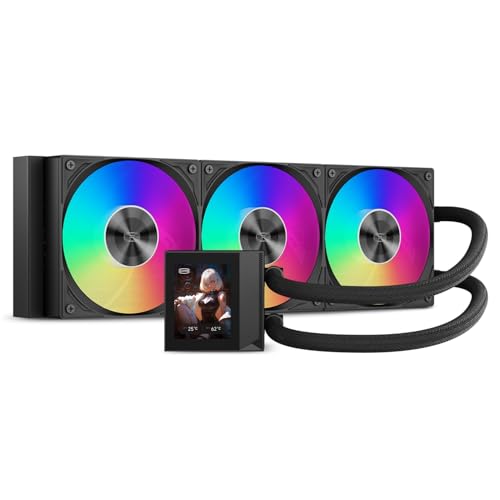
Looking to enhance your PC’s cooling capabilities? The PCCOOLER 360mm AIO Liquid CPU Cooler is an excellent choice for high-performance cooling. Its next-gen pump operates silently at just 15 dBA, while the premium F5 ARGB fans deliver impressive airflow and static pressure. With a customizable 2.4-inch IPS display, you can showcase CPU temperatures or animations, adding flair to your build. Installation is straightforward, supporting various Intel and AMD sockets. Plus, ARGB synchronization lets you unify your lighting effects. Crafted from durable CNC aluminum, this cooler balances aesthetics and performance, making it a top pick for gamers and enthusiasts alike.
Best For: Gamers and PC enthusiasts seeking high-performance cooling solutions with customizable aesthetics.
Pros:
- Silent operation at just 15 dBA, ensuring minimal noise during intense gaming sessions.
- High airflow and static pressure from the F5 ARGB fans, making it suitable for high-end CPUs.
- Customizable 2.4-inch IPS display allows for real-time monitoring and personalization of your build.
Cons:
- Requires sufficient case space for the 360mm radiator, which may not fit in all cases.
- Potentially higher price point compared to standard air coolers, which may not be suitable for budget builds.
- ARGB synchronization may require compatible motherboard software, limiting options for some users.
CORSAIR XH505i RX 360 RGB Custom Cooling Kit

If you’re aiming to elevate your PC’s cooling performance while adding an eye-catching aesthetic, the CORSAIR XH505i RX 360 RGB Custom Cooling Kit is the perfect choice. This kit combines an iCUE LINK XC7 RGB ELITE CPU Block, XD6 RGB Pump Reservoir, and a 360mm radiator for ideal thermal management. With three iCUE LINK RX120 RGB fans and vibrant RGB lighting, your setup will look stunning. Plus, the iCUE software lets you customize fan speeds, monitor temperatures, and synchronize lighting with ease. Thanks to iCUE LINK technology, installing this hardline cooling system is simpler than ever, even for beginners.
Best For: PC enthusiasts and gamers looking for a high-performance cooling solution with customizable RGB aesthetics.
Pros:
- Efficient cooling performance with a hardline loop design for optimal thermal management.
- Dynamic RGB lighting enhances visual appeal and can be customized through iCUE software.
- Simplified installation process with iCUE LINK technology, making it accessible for users of all skill levels.
Cons:
- Hardline tubing may require more effort and care during installation compared to flexible tubing.
- The aesthetic features may not appeal to users who prefer a more minimalistic look.
- Higher cost compared to standard air cooling solutions.
Minorsonic AIO CPU Cooler, 360mm with ARGB Fans

The Minorsonic AIO CPU Cooler, featuring a robust 360mm design with ARGB fans, stands out as an excellent choice for gamers and creators who demand high performance from their systems. Its high-speed ceramic bearing pump runs at 3000 RPM, ensuring stable operation and efficient cooling. The smart PWM fan control adjusts speeds based on temperature, keeping noise levels low while maximizing airflow. With an exclusive 12-channel radiator, heat dissipation is optimized for peak performance. Compatible with Intel and AMD sockets, this cooler is perfect for power users looking to enhance system stability during heavy workloads while enjoying stunning RGB aesthetics.
Best For: Gamers, creators, and power users seeking reliable performance and efficient cooling for heavy workloads.
Pros:
- High-speed ceramic bearing pump for efficient cooling and long lifespan.
- Smart PWM fan control minimizes noise while maximizing airflow.
- Exclusive 12-channel radiator design optimizes heat dissipation for superior cooling performance.
Cons:
- Requires adequate space in the case for the 360mm radiator.
- May be overkill for casual users with less demanding systems.
- Installation can be complex for those unfamiliar with AIO coolers.
X3 USB Cooling Fan, Ultra Quiet 140mm PC Fan
For those seeking a quiet yet powerful cooling solution, the X3 USB Cooling Fan stands out as an ideal choice. This 140mm fan operates at an ultra-quiet 18dB, making it perfect for gaming or working without distractions. With 11 high-pressure blades, it delivers impressive airflow at 65.8 CFM, cooling your devices by 20% in seconds. The built-in USB cable and one-touch switch simplify operation, while the 31.5-inch cable allows flexible placement. Made from durable ABS material, it promises over 40,000 hours of reliable performance. Keep your PC and gaming setup cool and efficient with the X3 USB Cooling Fan.
Best For: Those looking for an efficient and quiet cooling solution for their gaming setup, office, or home devices.
Pros:
- Ultra-quiet operation at only 18dB, perfect for immersive experiences.
- High airflow of 65.8 CFM, cooling devices quickly and effectively.
- Durable construction with a lifespan of over 40,000 hours, ensuring long-term reliability.
Cons:
- Limited to USB power, which may restrict placement options.
- May not be suitable for larger devices or setups requiring more powerful cooling.
- Compact size might not effectively cover larger areas in need of cooling.
llano V12 RGB Laptop Cooling Pad

Looking for a cooling solution that perfectly fits your 15.6 to 19-inch laptop? The llano V12 RGB Laptop Cooling Pad is your answer. With a powerful 5.5-inch turbofan and adjustable speed, it cools your laptop in seconds, even during intense gaming. Its whisper-quiet operation guarantees you stay focused without distractions. Plus, the soothing RGB light bar offers 10 modes and multiple colors, enhancing your gaming setup. With a handy HD LED display and touch controls, adjusting fan speed and lighting is a breeze. The adjustable height and non-slip design provide comfort and stability, making this cooling pad a must-have for gamers.
Best For: Gamers and professionals looking for an efficient cooling solution for their 15.6 to 19-inch laptops.
Pros:
- Powerful 5.5-inch turbofan with adjustable speed ensures rapid cooling during high-intensity tasks.
- Soothing RGB light bar with multiple modes enhances the aesthetic appeal of your gaming setup.
- Adjustable height and non-slip design provide comfort and stability during prolonged laptop use.
Cons:
- Operating noise can reach up to 70dB, which may be distracting for some users.
- Limited to laptops sized between 15.6 to 19 inches, restricting compatibility with smaller devices.
- The touch control system may be sensitive, leading to accidental adjustments during use.
ARGB 120mm PWM Fan for Gaming PC Case & CPU Cooling

If you’re a gamer seeking to enhance your system’s cooling while adding a touch of flair, the ARGB 120mm PWM Fan is an ideal upgrade. This fan features a 4-pin connector for PWM speed adjustment, allowing you to fine-tune the speed between 800 and 1800 RPM. With advanced hydraulic bearings and optimized blades, it operates as quietly as 20 dBA. You’ll love the vibrant ARGB lighting, offering 16.8 million colors and multiple modes compatible with most RGB software. Easy to install with rubber pads and screws, it fits standard 120mm mounts, making it perfect for your gaming rig or CPU cooler.
Best For: Gamers looking to improve their PC cooling performance while adding customizable RGB lighting effects.
Pros:
- High-performance cooling with adjustable speed between 800 and 1800 RPM for optimal airflow.
- Silent operation with noise levels as low as 20 dBA, enhancing the gaming experience.
- Vibrant ARGB lighting with 16.8 million colors and multiple modes for personalized aesthetics.
Cons:
- Requires compatible motherboard for full RGB functionality, which may limit some users.
- Standard 120mm size may not fit in non-standard cases or setups.
- PWM control may not be usable with older fan headers, limiting speed adjustment options.
Wathai Cooling Case Fan for Receiver and DVR

The Wathai Cooling Case Fan is an excellent choice for anyone seeking to enhance the longevity and performance of their electronic devices. With a compact design measuring 120mm, it fits snugly in tight spaces, making it perfect for receivers, DVRs, and gaming consoles like Xbox Series X and PlayStation. Operating at a quiet 23 dBA, it provides an impressive airflow of 56.7 CFM, ensuring your devices stay cool. Installation is a breeze with its USB connection, and it includes accessories like a protective net and mounting screws. With a lifespan of 35,000 hours, this fan is a reliable cooling solution.
Best For: The Wathai Cooling Case Fan is best for users looking to prevent overheating in their electronic devices like DVRs, receivers, and gaming consoles.
Pros:
- Compact design allows for easy placement in tight spaces.
- Operates quietly at 23 dBA, ensuring minimal noise disruption.
- Easy installation with USB connectivity and included mounting accessories.
Cons:
- Limited to USB power, which may not be suitable for all setups.
- Lifespan of 35,000 hours may require replacement after several years of use.
- May not provide sufficient cooling for high-performance gaming or heavy-duty electronics in extreme environments.
Factors to Consider When Choosing PC Cooling Upgrade Products
When choosing PC cooling upgrade products, you’ll need to take into account several key factors. Cooling performance efficiency and noise levels can greatly impact your overall experience, while compatibility with your components is vital for seamless integration. Don’t forget to reflect on aesthetic design and installation complexity to guarantee your upgrade fits both your style and skill level.
Cooling Performance Efficiency
Choosing the right cooling upgrade for your PC hinges on understanding several key factors that influence cooling performance efficiency. First, look at airflow (measured in CFM) and static pressure (mmH2O) since these metrics determine how effectively heat is dissipated. For liquid coolers, pump speed (RPM) is essential; higher speeds improve coolant flow and heat transfer. Additionally, consider the thermal conductivity of materials like copper and aluminum—better conductivity means more efficient heat dissipation. Finally, examine fan blade design; optimized blades minimize turbulence and enhance airflow. By focusing on these factors, you’ll choose a cooling solution that maximizes your PC’s performance and keeps your components running cool.
Noise Level Considerations
Upgrading your PC’s cooling system isn’t just about maximizing efficiency; noise levels play a significant role in your overall experience. When selecting cooling products, pay attention to the noise level measured in decibels (dBA). Quieter options typically range from 15 dBA to 36 dBA, making a noticeable difference in quiet environments. High-performance cooling solutions often include advanced fan and pump designs that maintain low noise levels, with some models reaching as low as 15 dBA during peak operation. Consider PWM fans that adjust speeds based on temperature, allowing for quieter performance at lower RPMs. Additionally, opt for high-quality bearings and optimized blade designs to further reduce noise while ensuring effective airflow.
Compatibility With Components
Guaranteeing compatibility with your components is essential for a successful cooling upgrade, as mismatched parts can lead to installation headaches or less-than-ideal performance. Start by checking your CPU socket type, like AMD AM4/AM5 or Intel LGA 1700/1851, to assure a proper fit. Next, consider your case dimensions, confirming the cooling solution, especially radiator size (e.g., 360mm), fits without obstruction from tall components. Don’t forget to verify power connector types, such as 4-pin PWM, to match your motherboard’s fan headers for maximum control. If you want RGB lighting, make sure it’s compatible with your motherboard’s RGB software for seamless integration. Finally, pay attention to the thermal paste type for effective heat transfer and reduced thermal resistance.
Aesthetic Design Preferences
Aesthetic design plays an essential role in your PC cooling upgrade, as it not only enhances the visual appeal of your setup but also reflects your personal style. You might want to reflect on customizable RGB lighting options, allowing you to personalize your rig with vibrant colors and dynamic effects. Many cooling products come with sleek and minimalist designs that can elevate the overall look of your gaming or workstation build. The choice of materials, like aluminum and copper, impacts both cooling efficiency and aesthetic quality. Additionally, compatibility with ARGB synchronization technology lets you unify lighting effects across components for a cohesive experience. Ultimately, unique fan designs can improve airflow while creating a distinct look that complements your setup.
Installation Complexity
When choosing PC cooling upgrade products, the complexity of installation can greatly influence your decision-making process. AIO liquid coolers typically require more precise mounting and tubing management compared to traditional air coolers. However, many AIOs come with universal mounting brackets and pre-applied thermal paste, making installation easier. On the other hand, custom cooling solutions like hardline setups demand specialized tools and a deeper understanding of water cooling systems, presenting a steeper learning curve. Additionally, consider factors like case compatibility, cable management needs, and potential clearance issues, which can complicate installation. Finally, check for availability of installation guides and support resources from manufacturers to help you navigate any complexities.
Price vs. Performance
While it might be tempting to opt for the cheapest cooling solution available, understanding the balance between price and performance is essential for making an informed decision. Higher-priced products often come with advanced features like customizable RGB lighting and quieter operations, enhancing your overall experience. When evaluating options, look at thermal efficiency and noise levels—premium products usually excel in both areas. For instance, AIO liquid coolers may have higher fan RPMs and better static pressure, but budget models can still perform well for mid-range systems. If you’re a gamer or content creator, investing in high-performance cooling can improve system stability under heavy workloads. Ultimately, casual users might find budget products sufficient, while enthusiasts should prioritize performance.
Long-term Reliability Factors
Choosing the right cooling upgrade for your PC involves considering long-term reliability factors that can affect your system’s performance over time. The lifespan of cooling components is vital; opt for fans rated for over 40,000 hours under ideal conditions. Noise levels also matter—quieter solutions at 20 dBA or lower often indicate superior design and materials that enhance durability. Look for high-quality bearings, like hydraulic or ceramic, which reduce wear and tear. Additionally, prioritize thermal management efficiency; materials with high thermal conductivity, such as thermal paste rated at 14W/mK, help prevent overheating. Finally, confirm compatibility with various sockets and systems to adapt to future hardware changes, prolonging usability and effectiveness.