A capable 4K editing PC needs more than a fast processor. Your footage, effects, and delivery format determine how much memory, graphics power, and fast storage will actually help.
These 10 picks range from compact mini PCs to full-size workstations. The right choice depends on whether you prioritize a small desk footprint, smoother effects and exports, or room to expand.
Best 10 PC for 4K Video Editing Picks for 2026
Compact Budget Pick

- Eight-core Ryzen 7 and 16GB LPDDR5
- Three 4K-capable display outputs
- Integrated graphics; 16GB RAM maximum
Best For: Compact setups and lighter editing projects
Dedicated Editing Workstation
CPU Solutions VidCore Ultra 9 Tower
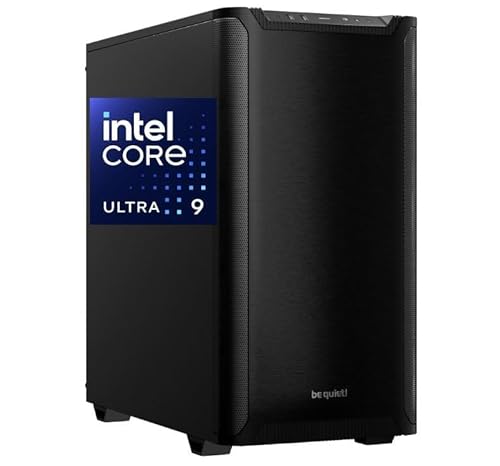
- 24-core CPU and 64GB RAM
- Quadro RTX 2000 Ada with 16GB VRAM
- 2TB NVMe SSD; 45-pound tower
Best For: Demanding editing projects in a fixed workspace
Compact GPU Powerhouse

- 16-core Ryzen 9 and RTX 5060 8GB
- 32GB RAM and 1TB SSD included
- 3.8L chassis with RAM and SSD expansion
Best For: GPU-assisted editing in a compact workspace
Upgradeable Everyday Tower

- Core Ultra 7-265 and 32GB RAM
- Two 4K-capable display connections
- Integrated graphics; verify SSD capacity
Best For: General desktop use and lighter editing
Compact Triple-Display Pick

- Ryzen 7 H 255 with 24GB LPDDR5X
- 1TB SSD with storage expansion
- HDMI, DisplayPort, and USB4 outputs
Best For: Compact, multi-monitor editing desks
Multitasking Mini Workstation

- Core Ultra 9 285H and 32GB DDR5
- Dual USB4 plus dual HDMI
- 1TB NVMe SSD; expandable memory and storage
Best For: Multi-display editing and multitasking in a mini PC
Dedicated-GPU Tower Pick

- Ryzen 5 5500 and RTX 3050 6GB
- 16GB DDR4 and 1TB NVMe SSD
- Verify 4K output; listed maximum is 1080p
Best For: Windows tower buyers who want dedicated graphics
High-Memory Workstation

- Dual Xeons with 32 cores total
- 192GB DDR4 RAM
- 2TB SSD plus 8TB HDD storage
Best For: Large projects needing ample RAM and storage
Compact Multi-Monitor Pick

- 12-core Core i7-12700T
- Three 4K outputs at 60Hz
- 16GB RAM and 512GB NVMe SSD
Best For: Small desks and lighter multi-monitor editing
Storage-Focused Desktop

- Six-core 8th-gen Core i5
- 32GB RAM and Quadro K1200 4GB
- 1TB SSD plus 4TB HDD
Best For: Modest projects needing built-in file storage
Compact Budget Pick – Glorlin Ryzen 7 6800H Mini PC
If you need a space-saving pc for 4k video editing, the Glorlin combines an eight-core Ryzen 7 6800H, 16GB LPDDR5 memory, and a 512GB NVMe SSD. Its three 4K-capable display outputs are useful for keeping an editor, preview, and other windows visible.
Best For: Editors who prioritize a compact multi-monitor setup for lighter projects.
Pros:
- Ryzen 7 6800H has eight cores and 16 threads for multitasking.
- HDMI, DisplayPort, and Type-C support up to three 4K displays.
- Dual M.2 storage support provides room to add project storage.
Cons:
- Integrated Radeon 680M graphics are less suited to demanding GPU-heavy work than a dedicated card.
- Installed 16GB LPDDR5 memory is also the listed maximum.
This is a sensible small-footprint option if display flexibility matters more than high-end rendering power; budget for extra storage if your media library grows.
Dedicated Editing Workstation – CPU Solutions VidCore Ultra 9 Tower
The VidCore is a purpose-built pc for 4k video editing with a 24-core Intel Core Ultra 9 285K, 64GB DDR5 RAM, a 2TB NVMe SSD, and a Quadro RTX 2000 Ada with 16GB of dedicated graphics memory. That combination makes it the most workstation-focused configuration in this group.
Best For: Editors handling demanding projects who want substantial memory, dedicated graphics, and generous built-in storage.
Pros:
- 64GB installed RAM, with a listed maximum of 192GB.
- Quadro RTX 2000 Ada provides 16GB of dedicated graphics memory and professional-application drivers.
- 2TB NVMe SSD offers more included project space than the other listed configurations.
- Liquid cooling is designed for extended editing sessions.
Cons:
- At 45 pounds, the tower is not a portable choice.
- Its four video outputs are Mini DisplayPort, so check your monitor cables and adapters.
Choose this tower when editing capacity matters more than desk space. Windows 11 Pro and a one-year parts-and-labor warranty round out its workstation-oriented package.
Compact GPU Powerhouse – MINISFORUM G1 Pro
For a compact pc for 4k video editing that still has dedicated graphics, the MINISFORUM G1 Pro pairs a 16-core Ryzen 9 8945HX with a desktop GeForce RTX 5060 8GB, 32GB DDR5 RAM, and a 1TB SSD. Its 3.8L chassis offers an alternative to a full-size editing tower.
Best For: Creators who want strong CPU and GPU specifications without a large desktop footprint.
Pros:
- 16-core, 32-thread Ryzen 9 supports heavy multitasking.
- Dedicated RTX 5060 graphics provide 8GB GDDR7 memory and NVIDIA Studio support.
- Supports up to 96GB DDR5 RAM and dual M.2 SSD expansion.
- Offers 5Gb Ethernet, Wi-Fi 7, and support for four 4K displays.
Cons:
- The included 1TB SSD may fill quickly with large video projects.
- 8GB of graphics memory is less than the VidCore’s listed 16GB.
The G1 Pro makes sense when you want dedicated GPU capability and meaningful upgrade room in a small chassis. Check your software and storage needs before relying on its stock 32GB/1TB configuration.
Upgradeable Everyday Tower – Dell ECT1250 Desktop
The Dell ECT1250 is an approachable tower to consider as a pc for 4k video editing when your workload is less GPU-intensive. It combines an Intel Core Ultra 7-265 and 32GB RAM with two 4K-capable monitor connections, but its Intel UHD graphics are integrated rather than dedicated.
Best For: Home or office users who want a general-purpose desktop that can also handle lighter editing work.
Pros:
- 32GB of installed RAM gives you room for multitasking.
- HDMI 2.1 and DisplayPort support two 4K displays.
- Tool-less entry and a removable side panel make internal access easier.
- Includes one year of onsite service after remote diagnosis for covered hardware issues.
Cons:
- Integrated Intel UHD graphics are a limitation for GPU-heavy editing workflows.
- The supplied specifications do not clearly state the included SSD capacity.
This Dell is the practical all-rounder here, not the dedicated editing workstation. Confirm its storage configuration and your editor’s graphics requirements before buying it for regular 4K projects.
Compact Triple-Display Pick – Beelink SER9 PRO
If you want a space-saving pc for 4k video editing, the Beelink SER9 PRO pairs an eight-core Ryzen 7 H 255 with Radeon 780M integrated graphics, 24GB LPDDR5X memory, and a 1TB PCIe 4.0 SSD. Its HDMI, DisplayPort, and USB4 outputs can support a three-screen editing workspace.
Best For: Editors who value a small desk footprint and multiple displays over a dedicated graphics card.
Pros:
- Eight-core, 16-thread processor and 24GB memory for multitasking.
- 1TB SSD, with a second M.2 slot for storage expansion.
- USB4 and three display outputs provide flexible workspace connections.
Cons:
- Radeon 780M is integrated graphics, not a dedicated GPU.
- Built-in LPDDR5X memory is not presented as upgradeable.
This is the tidy-workstation choice for editing alongside other apps; consider the graphics limitation if your projects rely heavily on GPU-accelerated effects.
Multitasking Mini Workstation – GEEKOM IT15 AI
The GEEKOM IT15 is a compact pc for 4k video editing when you also keep design tools and other work apps open. It combines an Intel Core Ultra 9 285H, Intel Arc 140T integrated graphics, 32GB DDR5 memory, and a 1TB PCIe 4.0 NVMe SSD.
Best For: Editors who want generous starting memory, multiple displays, and fast external-storage connections in a mini PC.
Pros:
- 32GB DDR5 memory and a 1TB NVMe SSD, with stated expansion options.
- Dual USB4 and dual HDMI connections support up to four displays.
- Wi-Fi 7 and 2.5GbE provide wired and wireless networking choices.
Cons:
- Arc 140T is integrated graphics; demanding GPU effects may call for a different setup.
- The supplied specifications list flexible OS support rather than clearly identifying a preinstalled OS.
Its memory and connectivity make it the stronger mini-PC fit for a busy editing desk, but check the operating-system configuration before buying.
Dedicated-GPU Tower Pick – ZYNEEX S5
The ZYNEEX S5 takes a tower approach to a pc for 4k video editing, pairing a six-core Ryzen 5 5500 with a dedicated GeForce RTX 3050 6GB graphics card. It also includes 16GB DDR4 memory, a 1TB NVMe SSD, and Windows 11 Home.
Best For: Buyers who prefer a dedicated GPU and a ready-to-use Windows tower over a compact mini PC.
Pros:
- RTX 3050 provides dedicated graphics with 6GB of video memory.
- 1TB NVMe SSD offers room for software and active files.
- Windows 11 Home, Wi-Fi, HDMI, and DisplayPort are listed.
Cons:
- 16GB starting RAM may be restrictive for larger editing projects.
- Listed maximum display resolution is 1920 × 1080, so confirm 4K monitor-output requirements before purchase.
The dedicated GPU distinguishes this tower from the mini PCs, but its listed display specification makes verification especially important for a 4K-monitor setup.
High-Memory Workstation – Dell Precision 7920 Tower
If your search for a pc for 4k video editing centers on memory and storage capacity, this renewed Dell Precision 7920 is worth considering. Its two Xeon Gold 6130 processors provide 32 cores total, paired with 192GB of DDR4 RAM.
Best For: Editors handling large projects who want substantial RAM and separate SSD and HDD storage in a tower.
Pros:
- 192GB of installed DDR4 RAM.
- Two 1TB SSDs and two 4TB HDDs provide room for active files and archives.
- Removable hot-swap drive bays and eight listed expansion slots add flexibility.
Cons:
- The Quadro P1000 has 4GB of graphics memory, so GPU-heavy effects warrant a closer look.
- Its 22.29-inch-deep tower needs substantial desk or floor space.
- It is sold as a renewed system.
This is the capacity-first choice of the three, but check whether the P1000 fits the GPU demands of your editing software before buying.
For a pc for 4k video editing in a small workspace, the HP Pro Mini 400 G9 offers a 12-core Core i7-12700T and support for three 4K displays at 60Hz. Its 16GB of RAM and 512GB NVMe SSD make it a compact starting point rather than a high-capacity editing setup.
Best For: Editors who prioritize a small footprint and multiple 4K screens for lighter workflows.
Pros:
- Two DisplayPort 1.4 outputs and one HDMI 2.1 output support three 4K monitors at 60Hz.
- Compact design includes a stand, wired keyboard, and wired mouse.
- Seven USB ports include two USB-C ports rated at 20Gbps.
Cons:
- Integrated Intel UHD 770 graphics share system memory rather than offering a dedicated GPU.
- 16GB RAM and a 512GB SSD may feel restrictive as projects grow.
Choose this mini PC for workspace efficiency and display connectivity; plan for external storage if you keep substantial footage on hand.
This renewed HP desktop is an option for buyers seeking a pc for 4k video editing with a 1TB SSD for active work and a 4TB HDD for stored footage. It pairs an 8th-generation six-core Core i5 with 32GB of DDR4 RAM and a Quadro K1200 4GB graphics card.
Best For: Editors who value built-in storage capacity and a dedicated graphics card for modest projects.
Pros:
- 32GB of RAM offers more working memory than a basic 16GB configuration.
- 1TB SSD and 4TB HDD separate faster primary storage from larger-capacity storage.
- Includes USB-C, two DisplayPort connections, Wi-Fi, and Bluetooth.
Cons:
- The 8th-generation Core i5 and Quadro K1200 are older components to weigh against demanding effects work.
- The listing describes a renewed system with a 90-day extended warranty.
Its RAM and drive mix are practical strengths, but confirm that this older CPU-and-GPU combination meets your editing software’s requirements.
How We Picked the Best PC for 4K Video Editing
We compared the listed CPU, GPU, memory, storage, and form factor of each selected system against common editing needs. We favored balanced configurations: a strong processor for decoding and exports, enough RAM for an active project, fast SSD storage, and a GPU suited to the effects you use. Published specifications do not establish real-world timeline performance, so check independent benchmarks for your editor and footage format before buying.
Quick Comparison: Which Type Fits Your Workflow?
Mini PCs such as the Glorlin, Beelink SER9 PRO, GEEKOM IT15, and HP i7-12700T model save desk space but offer varying graphics capability and limited expansion. The MINISFORUM G1 Pro pairs its compact design with a listed RTX 5060, making it the stronger GPU-focused mini-PC option on paper. Full-size desktops such as the CPU Solutions VidCore and Dell Core Ultra 7 tower give buyers more room to consider cooling and future upgrades, though exact expansion options should be verified. The Dell Precision 7920 offers 192GB of listed RAM for unusually large projects; its older dual-Xeon platform should not be assumed faster than a newer CPU in every editor.
Key Buying Factors for a PC for 4K Video Editing
CPU, GPU, and Footage Format
Start with the footage you actually edit. Smooth playback depends partly on whether your software and hardware can decode its codec, bit depth, and chroma format. A dedicated GPU is especially useful for supported color grading, noise reduction, and GPU-accelerated effects; its presence alone does not guarantee faster exports. Check your editor’s requirements for the exact graphics card and media format.
Memory and Storage
For regular 4K projects, 32GB of RAM is a sensible target, particularly when you keep other creative apps open. A 16GB system can suit lighter edits or proxy workflows, while 64GB or more is worth considering for demanding timelines and heavy multitasking. A 512GB SSD can fill quickly with source footage, cache files, and exports. Plan separate capacity for active projects and backups, and confirm whether RAM or storage can be upgraded before choosing a mini PC.
Ports and Practical Fit
Match display outputs to your monitor setup, but remember that support for multiple 4K displays is not a measure of editing speed. Check for ports that suit your external drives, networking needs, and capture hardware. Also consider noise, desk space, and the seller’s warranty and return terms.
Who Should Buy Which PC for 4K Video Editing?
Choose a compact integrated-graphics model for lighter edits, proxies, and space-constrained desks. Look first at the MINISFORUM G1 Pro or another suitable dedicated-GPU desktop if GPU-accelerated effects are central to your work. Consider the CPU Solutions VidCore or Dell Core Ultra 7 tower if you prefer a full-size system; verify the exact GPU and upgrade options before ordering. The older Dell Precision and HP workstation are more specialized choices: compare their platform age and graphics hardware with your software’s current requirements rather than buying on RAM capacity or the workstation label alone. The Ryzen 5 5500 and RTX 3050 gaming desktop is a budget-minded dedicated-GPU option, but its listed 16GB of RAM may warrant an upgrade for regular 4K work.